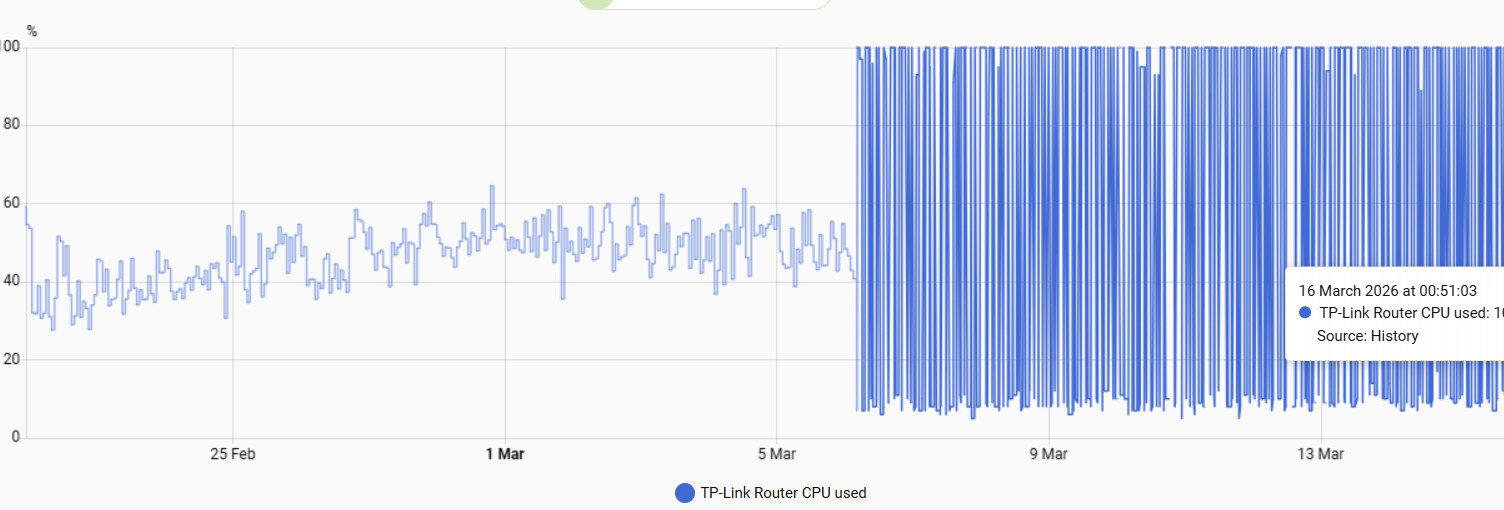
Hi, I have 1 x Deco X73 and 4 x Deco X50s. Because of my broadband provider, I don’t use them as routers but as access points instead. I have tried to connect these but are not able to - I guess because of this reason?
Hello Aleksandr,
First of all, I apologize for any errors as I’m using a translator.
I have a TP-Link Archer AX55 router and I can’t connect to your integration. I get this error.
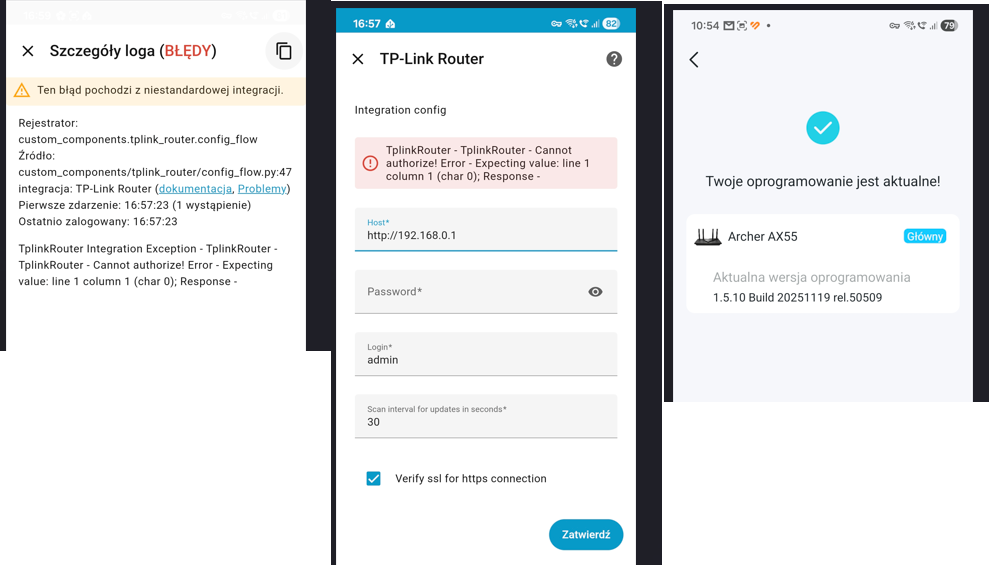
You may have updated the router firmware - the new deco firmware may not be supported
Have you tried - Cannot authorize! Error after Firmware update · Issue #220 · AlexandrErohin/home-assistant-tplink-router · GitHub ?
I have the latest version. Will you be updating it, or is there no hope?
Have you tried this fix from comment Cannot authorize! Error after Firmware update · Issue #220 · AlexandrErohin/home-assistant-tplink-router · GitHub?
As there are more than a hundred router models - I cannot support all of them by my own. If your router doesnt work with this integration it would be great if you could add the support - here are the examples TP-Link-Archer-C6U/CONTRIBUTING.md at bd42beebcbe39abc823f00a83ec6540f305e10cb · AlexandrErohin/TP-Link-Archer-C6U · GitHub
v2.18.0 Released
Changelog
- Improve request logout safety to prevent update failures Improve request logout safety to prevent update failures by hepter · Pull Request #308 · AlexandrErohin/home-assistant-tplink-router · GitHub
- Add client metric attributes to device_tracker (tx_rate, rx_rate, online_time, traffic_usage, signal) Add client metric attributes to device_tracker by hepter · Pull Request #307 · AlexandrErohin/home-assistant-tplink-router · GitHub
- Added support for new firmware for BE routers (tested with Archer BE3600 v1.0 and Archer BE230 v1.0) feat: add support for SG_L1_S2 / CE_RED certified routers (SHA256 + OAEP) by mattmanning · Pull Request #136 · AlexandrErohin/TP-Link-Archer-C6U · GitHub
- Added LTE information for TP-LINK M8550 v1, NE200-Outdoor v1.0, NE211-Outdoor v1.0, NX510V
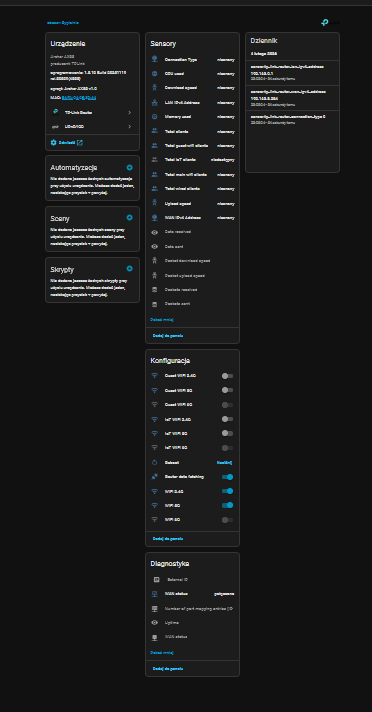
Hey everyone! I was looking for a more detailed client list for home-assistant-tplink-router in Lovelace, so I ended up building a small card for my own setup, and I’ve now made it public. It includes a client list with filtering and multi-sort, plus a few handy router actions.
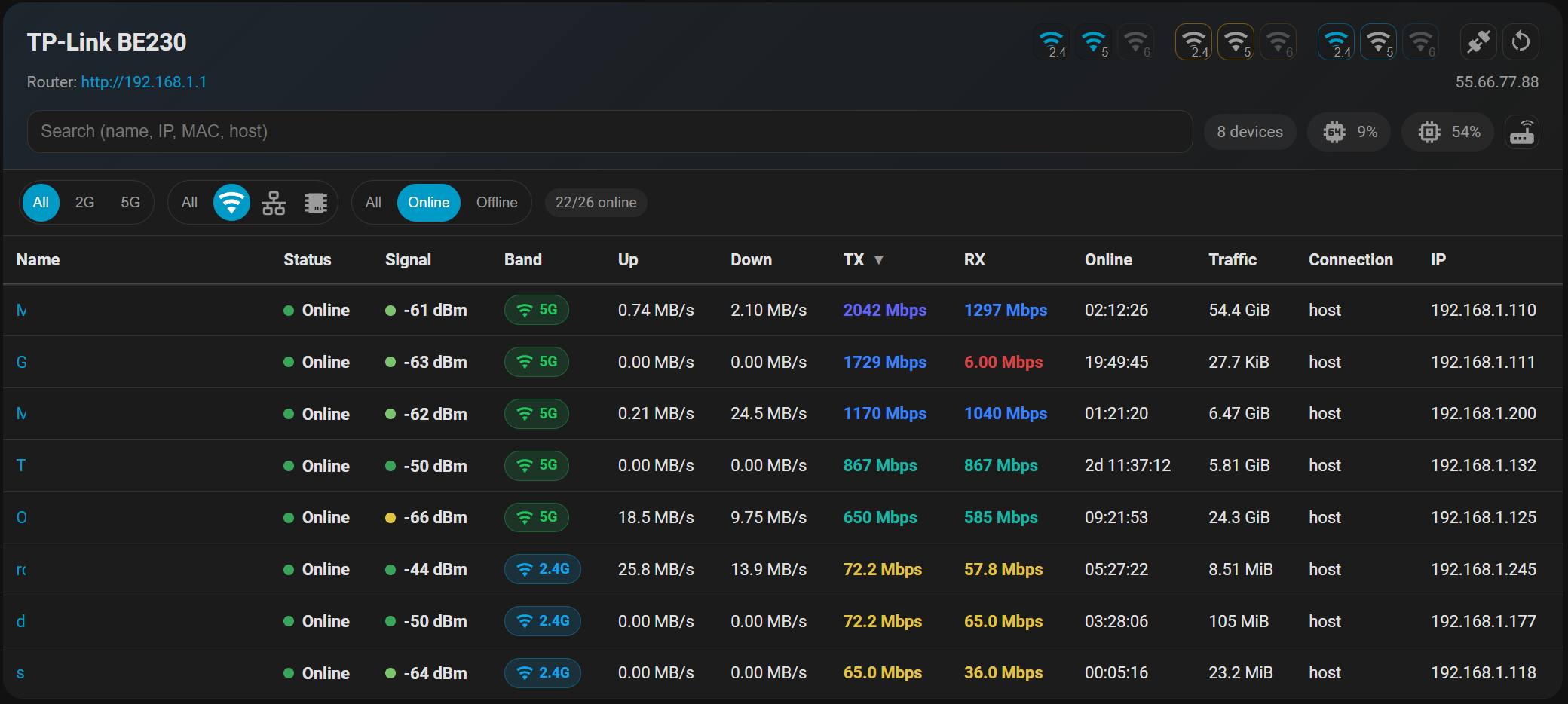
It is waiting for HACS approval. You can already use the custom repo

If that sounds useful, feel free to check it out: GitHub - hepter/ha-tplink-router-card: Home Assistant Lovelace card for TP-Link Router (tplink_router) that shows live client list, filters, sorting, and router actions.
3 Likes
Hepter this is really good just installed it on my HA gives me loads of info of what is connected to my TP-link Router thank you
1 Like
Hello,
I’m trying to add my Archer VR1210v to HA, but I get the error:
TplinkRouter Integration Exception - ('Connection aborted.', BadStatusLine('18\r\n'))
I’m connecting through http (https local management not enabled on the router) and I have a custom local user and a different subnet from standard 192.168.0.1/24 or 192.168.1.1/24, so I specified both IP/username/password, but it doesn’t work.
Firmware Version is 2.0.0 0.9 v6041.0 Build 221027 Rel.12900n
Hardware Version is Archer VR1210v v1 00000001
Login screen on the router is the following:

Can you please help?
I have the TP-Link Router integration installed for over a year, but I am not acutally using a lot of it’s potential. (for my AX90 v1 router)
I could probably use it to reboot it on a schedule,
or check the WAN IP address
or switch on the guest network when I have guests (which TP-Link handles in a horrible way, because it must reboot the entire router. So if I want to use the guest network, all currently connected clients will temporarilly be disconnected)
Another thing my TP-Link router handles very poorly is the whitelist vs the blacklist. (I have discussed this with the sofware engineers at TP-Link many times)
- The blacklist specifies any MAC-address you forbid to connect to the router (which is easily bypassed. Most new phones attempt to connect with a random MAC-address anyway)
- The whitelist specifies all MAC-addresses you allow to connect to the router.
The TP-Link router uses either the blacklist OR the whitelist (or no list at all in which case every mac address will connect)
For the whitelist to work, you need to tell your apple or android device to connect to your wifi router with its “device MAC” (not a randomised MAC, which is the default in most new phones)
If you want to connect a new device to the WiFi router, you have to
- know or find it’s mac address
- add it to the whitelist
- put wifi password into device and connect
If you add password into your phone without first adding MAC to the whitelist, the connection will fail (as it should) but there is no event logged in the router’s userinterface indicating a connection event faild AND CRITICALLY which mac-address attempted to connect (so that you can then simply add the device to the whitelist)
(The router I used 15 years ago had that feature, which makes connecting a new devide much easier)
My question:
- How do I access the tplink_router_new_device event that the HA integration supposedly offers? (or either of the _device_offline and _device_online events)
- Does this event show an attempted but failed connection? (and with what level of detail) ?
I have found the lines in your explanation. But my question is if this is only possible through the yaml.
The documentation has the syntax for the tplink_router_new_device event
, but not for the tplink_router_device_online event.
If I want to get a notification when my phone’s mac address connects to my router, how do I specify its mac address of in the yaml file.
Events tplink_router_new_device, tplink_router_device_offline, tplink_router_device_online have same fields in trigger.event.data
I have been experimenting a little (struggeling with syntax and the new type and old type of syntax)
When I add your example to the automation.yaml , nothing happens
I then tried to add the trigger and action to the HA frontend
alias: TPLink 1
description: New Device comes online
triggers:
  - event_type: tplink_router_device_online
    trigger: event
conditions: []
actions:
  - action: notify.mobile_app_nokia_g60_5g
    metadata: {}
    data:
      message: Device online
mode: single
- Connecting any device to the wifi network does not trigger the automation
- When I “Run action” , my phone gets the message “Device Online”
- When I replace “message” with “content” , then “Run action” I get a popup
extra keys not allowed @data[‘content’]. Got None required key not provided @data[‘message’]. Got None.
As indeed in the documentation of notifications, I don’t find the option “content” - When i include the template {{trigger.event.data.hostname }} , I get the message
Error rendering data template: UndefinedError: ‘trigger’ is undefined
I am very sure it is my not understanding of the syntax or worse
OK, I have been able to trigger the automation
But I still can’t find a way to access the trigger.event.data
OK, the problem there was that I triggered the automation from the developer tools. It then doesnt have trigger.data.
For completeness (and perhaps this helps other beginners like myself)
My full automation, entered through the HA frontend (and then viewed in yaml)
alias: TPLink
description: New Device comes online
triggers:
  - event_type: tplink_router_device_online
    trigger: event
conditions: []
actions:
  - action: notify.mobile_app_nokia_g60_5g
    metadata: {}
    data:
      message: Device {{ trigger.event.data.band }}
mode: single
gives me the message
Device 5G
On my nokia phone, when I connect my tablet to the WiFi Network.
I do not know if the example yaml from the github of this integration can (still) work.
Hi Alexandr and thanks for this integration. I’ve just bought an Archer C6 Router and am trying to get your integration to work but when I try to add the integration (installed via HACS) I get the following error:
Config flow could not be loaded: 500 Internal Server Error Server got itself in trouble
If I look in the HA error log I see the following entry (just showing the pertinent lines rather than the full trace):
  File "/usr/src/homeassistant/homeassistant/requirements.py", line 331, in _raise_for_failed_requirements
    raise RequirementsNotFound(integration, [req])
homeassistant.requirements.RequirementsNotFound: Requirements for tplink_router not found: ['tplinkrouterc6u==5.16.0'].
I have tried undownloading/redownloading the integration from HACS and get the same error.
Please can you suggest next steps for troubleshooting? I will try accessing my router from Python in the meantime. Thanks!
System config:
- Installation method Home Assistant OS
- Core 2026.3.0
- Supervisor 2026.02.3
- Operating System 17.1
- Frontend 20260304.0
- Raspberry Pi 4
I mostly just wanted to chime in here to thanks Alexandr for his great work. I had been thinking about reverse engineering the TP-Link REST API for my AX55 router + access points, but it was getting to be too complicated to be worth it. Then I came across Alexandr’s library which not only handles the AX55 but a huge list of other TP-Link routers. Many thanks, Alexandr!
I do have one question about the library: Does it expose a way to see the device type/category (smartphone, laptop, etc.)? This would be nice to have in my application though is not super critical.