do you see the update button for the device in the builder app?
Hi,
if you mean ESPHome Builder → device? No There is no update hint. And HomeAsisstant is also not giving an update hint. I also assumed, that there was already an ESPHome Update for this ESP.
Juergen
can you check the firmware entity of the device in the esphome integration?
what version does it say?
maybe there is a mismatch or leftover from a previous install of the device.
you can always remove the device from the esphome integration, restart HA and add it again, see if this helps.
HI,
the firmware version ist the one that ESPHome Updates is showing as well. The “update” is “done” (I have a beep when the ESP goes online, and if the update pops in while the beep, the beep continues.) I heared the beep at least once, but still after the “update”, the ESPHome Update assumes that there is the same update to do.
I hat this when I manually updated the firmware the last time, when a new ESPHome kame up. This also was “pretending” the Update, compiling before (I assume, because it took a long time, cannot check), and than pretended to do the update.
But after reboot of HomeAssistant with the ESPHome APP running, it said the Update has to be done.
It went away, when I did my own personal OTA Update with the ESPs. (I cannot test it right now, as I let one ESP rund with a new firmware, to see, if the battery power lasts longer with my new version.
If you are interested, I can keep you posted. But it does not seem to be an issue with ESPHome Update.
many thanks
Juergen
thx for the info, but I’m not sure I fully understand, maybe you can clarify some more?
what does the esphome update manager show?
what does the esphome builder show?
what does the firmware entity in esphome integration show?
and does esphome update manager correspond with the builder and esphome integration?
if you’re saying the update was not successful and ESPHome update Manager and firmware entity and ESPHome builder are consistent, then what probably happend is that you have an issue in your yaml where the device does not boot properly and falls back to the previous firmware. This feature was introduced since 2026 versions.
Hi,
sorry for coming back not immediately, but I wanted to try a couple of things, before I make more wild guesses.
So where I am “now”. As my device mostly sleeps, it is hard to update. I now did the following: Have a Helper in HomeAssistant that basically sets a time, the ESP device should be “alive” the next time is goes online. The time is used in the ESP to set a delay, and it works very well. I now can say, the ESP should be online 10 minutes, I get a message from HomeAssistant, I manually start the Update and it works.
There is one word which I don’t like in this process is  “manually” . I could not find a reliable way that does not feel “wrong” to do. (I saw tips for opening doccker, where I get severe warning, CLI commands that do not work, etc. etc. So now my idea:
Can I ask you for the following feature in ESPHome Update Manager:
a “force Update” feature, where I can mark a specific ESPHome in your Update Manager, that the next time it comes up, it should make an update, regardless, if ESPHome itself is new or not. Reason: I could absolutely find no way to tell ESPHome Update Manager, that there is a new version ready for a specific ESPHome device. I have this code in my ESP.yaml
esphome:
  name: ${rmgr_device_name}
  friendly_name: ${rmgr_device_name}
  project:
    name: punktde.rmgr
    version: "1.8.3"
but I can not find a way, so that a version change triggers an automated update.
many thanks for any help.
juergen
Hi,
edit: wrong conclusion:
If updates are not “noticed” by ESP devices, than the safe_more: might be an issue. In my case, I added
safe_mode:
  boot_is_good_after: 15s

esphome:
  name: ${rmgr_device_name}
right before the esphome: definition and than it worked and the new firmware “stayed” on the system.
The other problem that I do not find a way that ESPHome uses my version changes for triggering an update, that still stays.
thank you
Juergen
I’m working on a possible solution for your case, please bear with me.
Hi,
no problem at all. many thanks for considering this idea.
It might be an idea, that in your ESPHome Update Manager the user can define an “awake” time for each ESP device.
If this is set > 0, the ESP Device reads it on the next wakeup, stays awake for the time, gets the update, and if the update is successful your ESPHome Update manager sets the time to “0” so no second update happens. If not successful it lets the ESP retry as you define it here already, and than sets it to “0” with an error.
That way a ESP developer can just use your ESPHome Update manager, and forget about doing his own automations, resets the wakeup time after the update…
I did two automations for the update:
a.) inform the user via message, that the update can be done manually “now” with the hint, how long the ESP will be awake.
b.) after next reboot of the ESP, I reset the awake time to “0” and send a message.
In your structure it would make much more sense.
I do not want to overload you with work, I just think, it would be a solution, that people could need. All I can help is with debugging, and later on documentation if this sounds like a “deal”
Juergen
what I’m working on at the moment:
when yaml and device contains the project component, the integration will compare both and if yaml is newer than the device and the device status changes to on (online) and auto update is set to on, then the yaml will be uploaded.
first tests are promising.
Hi everyone, it is a great integration. Thanks. Although working for me properly, I see for a number of devices that there seems to be a copy that is detected some where, differing sometimes in having a capital in the name.

What you’re seeing are “ghost” or “orphan” devices in Home Assistant. This can have several causes:
Possible causes:
- Old ESPHome entries - If you ever reflashed a device or renamed the configuration, the old integration entry may still exist in HA.
- Deleted YAML configurations - If you deleted an ESPHome YAML file but didn’t clean up the HA integration.
- MAC address change - Sometimes an ESP gets a new MAC address (e.g., after a factory reset), causing HA to see it as a new device.
Solution:
- Go to Settings → Devices & Services → ESPHome
- Find the “Unavailable” devices with the old firmware (2024.7.3)
- Click on the device → Delete
If there are no visible old/duplicate entries in the ESPHome integration, you can simply delete the current entry. The device will automatically be discovered again and you’ll get a notification to re-add it. This effectively gives you a clean setup.
Yesterday I migrated to a new ESPhome device builder environment. I was running ESPHome as an addon (or app nowdays) but now have it installed on my Proxmox host, which speeds up the building process massively.
Unfortunately I can’t get the update manager working anymore. I have entered the external host, which is http://192.168.1.100:6052, which just works. It shows all my devices. When I upgrade a device from this, it works too.
But updating from the update manager results in the device not being found.

I don’t understand this. Because they are reachable. And used to work fine while using the app installed on my HA host.
I also removed an ESPHome device from my HA instance, and readded it. This results in an different error:

I must be doing something wrong. But I can’t explain either error.
Btw, running 1.4.7 of update manager.
did you try the steps suggested in the readme?
1 Like
My bad… didn’t reboot in between. So this step is absolutely needed. Thanks for the pointer!
I have got 4 bluetooth proxies. All give the same error:

Building from the esphome page works just fine.

Don’t exactly know why they are red, while others are white, but haven’t searched the github yet for that 
they are red because update failed, this is documented in the readme.
I’ve sent you updated code for testing, please try this newer version first.
if it doesn’t fix the issue, please let me know or make an issue report on github.
Can you tell me how you updated these devices? auto update, selected update or one at the time? How long does it take to update such a device?
EDIT: I may have found the issue, I’m working on a solution.
1 Like
Fixed in release v1.4.8 (along with other fixes)
1 Like
Release v1.5.0
New features
- Force Install — Recompile and upload firmware via the ESPHome dashboard, even when no update is available. Useful for pushing configuration changes without a firmware version bump
- Force Install via service — Trigger Force Install from automations using esphome_update_manager.force_install
- Project version auto-check — Automatically detects and installs project version updates when a device comes online, HA restarts, or the external dashboard comes online
1 Like
I still have an issue with my UltimateSensor device while being managed by external ESPhome. I thought it was solved, but unfortunately it isn’t. I did remove, restart and readd (just did it again to make sure I did this step).
It is also the only device not showing [ext] next to it:
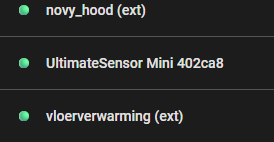
I left it on purpose on 2026.3.2. While 2026.4.0 is available now.
Do you want me to open an issue on Github?