Adding to the answer before: It could happen, that the OTA Update does not work, if the ESP does not run for 1 minute (or longer, if bad luck it depends on the ESP) after the update. Deep in my brain, I assume, that this was the reason, why I am fiddling with the awake time before I run an OTA update. But this is, what you should test, or keep in mind.
Juergen
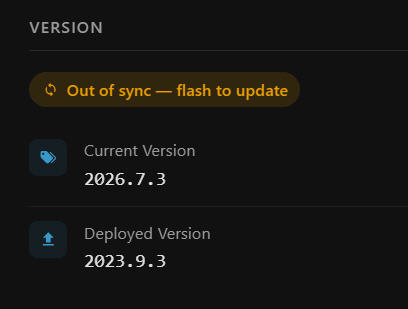
The keyword here is “firmware”. The ESPHome dashboard is accurately reporting that the firmware is up-to-date, not the device. In the dashboard, click on the device and scroll down to “Version”. This is where you will see if the installed version is different from the compiled version.
I don’t use “awake time” at all. I don’t see the need for it. When I am finished with whatever the device needs, I put it back to sleep. If you use Awake Time, you risk going back to sleep before finishing whatever you are doing.
Perhaps my problem got a bit lost in the length of my description. Yes I did follow the instructions.
Basically the device does not go back to sleep when there is NO update.
Therefore your comment about the automation to trigger deep sleep after an update does not seem relevant (correct me if I have misunderstood). The description of that automation states that it is NOT called if there are no updates.
I would have though that my situation would be the most common one - wake up > send the sensor data > see there is no update > go back to sleep.
The integration can detect when a device comes on line which is necessary. It would appear that it then checks if an update is available and proceeds to do the update if there is, after which it calls the automation to return to deep sleep.
But that does not seem to support the workflow that I understand is needed for when there i no update.
So, if the integration does not support the ‘no update’ situation, is there a state (or whatever) I can check to see if the integration does NOT have an update available so that I can write my own automation that wakes on the device connection, check that no update is available and then trigger the ‘deep sleep’?
Susan
I see what you mean now, and you have a point, this is indeed a problem.
I’m working on a solution and will keep you updated.
UPDATE:
There is a new release (v1.11.1) and a new automation that addresses this issue.
You’ll need to configure the awake window in the automation (in your case 10 sec).
When the device comes online and there is no update pending, the automation will trigger deep sleep after 10 sec. In case of a pending update, the update will start, the device will reboot after the update and when back online it will go to deep sleep after 10 sec.
Thank you very much for the quick response.
Susan
Basically this is what I am doing as well: I generate my own “awake” time, I put the ESP to sleep if the program is done. This is what I call “awake” time.
I’ve noticed that one of my devices (that sleeps for 30 minutes before taking samples for 10 seconds) does not receive updates.

Looking at the automation trace, I see that it is triggered when the device comes on line, but from my limited knowledge of how to read the trace information, it does not seem to ever look to see if the device has a pending update.
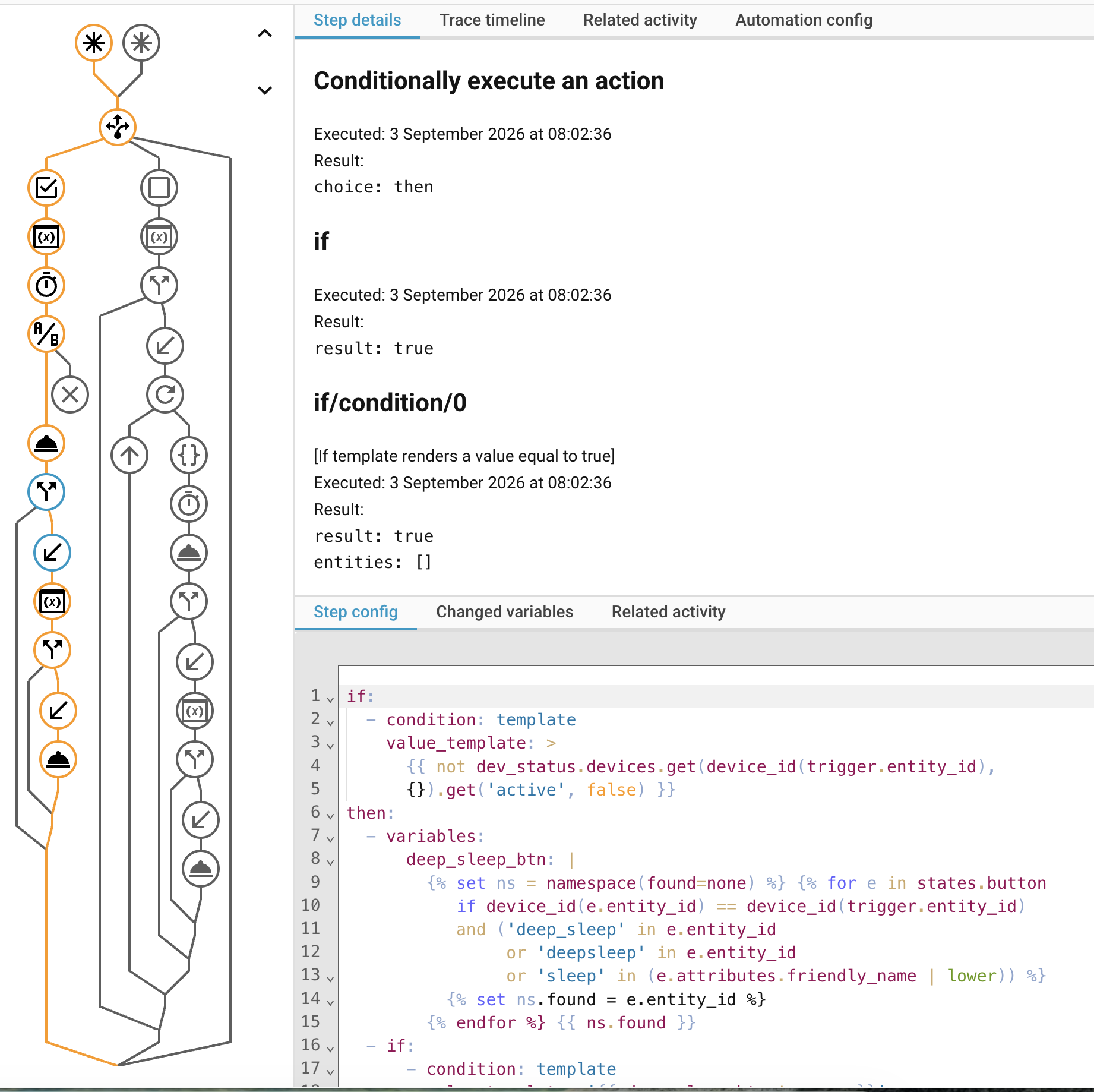
What do I need to do to make sure that, where there is an update available, that this is applied when the device wakes up?
(I can provide any other information to help look at this.)
Susan
Hi Susan,
A few things to check:
- Check your
deep_sleep:block in the YAML, does it haverun_durationset (e.g. 10s)? If so, that needs to be removed. Per the README, the deep sleep block must not definerun_duration, the device needs to stay awake until the automation presses the deep sleep button, otherwise it goes to sleep on its own after that fixed time, regardless of whether an update is running. - Is auto-install enabled, and is the scope set to something that includes firmware updates (
Firmware onlyorFirmware + Project)? - Do you have a
statusbinary_sensor configured on the device? Without it, both online detection and the automation’s timing become unreliable/slow. - With
run_durationremoved,awake_window_secondsin the automation effectively takes over that role, it’s the time the device stays awake for its normal task (taking samples, etc.) before the automation puts it back to sleep. If an update is already running by the time that window elapses, the automation correctly keeps the device awake until it finishes, so the update itself isn’t limited to 10 seconds. The risk is in the timing of the start: if auto-install hasn’t kicked off yet by the time the automation checks (e.g. the update queue is busy with another device), the automation will see nothing active and put the device back to sleep before an update ever started. Try settingawake_window_secondsa bit above your normal 10s task time (e.g. 15-20s) to give auto-install a bit more margin to kick in. - Alternatively, you can select the device for Force Install in the panel while it’s offline, this queues it on the persistent pending list and works independently of auto-install. When it wakes up, the install will start automatically, but only after a ~15 second debounce window (so multiple devices waking up at once can be batched). Since the debounce and your
awake_window_secondsboth start counting from the same wake moment, settingawake_window_secondsto exactly 15s risks a race condition, the automation might check just before the install is registered as active. Give it a bit of margin above the debounce (e.g. 20s) so the check happens after the install is reliably active, you don’t need to add the install duration on top of that, since the automation keeps the device awake until it finishes once it detects it running.
@Krivatri - thanks for the reply.
- No run_duration (or at least is should be commented out:
deep_sleep:
  id: sleepy_bye
#  run_duration: 10s
  sleep_duration: 30min
-
Auto install is enabled:
-
binary_sensor is configured:

binary_sensor:
    - platform: status
      name: "Connection Status"
-
I’ll try that an report back
-
Something to try if 4) doesn’t do the trick.
Susan
- I adjusted the delay to 20 seconds. This is the trace after the automation ran - basically the same as before:
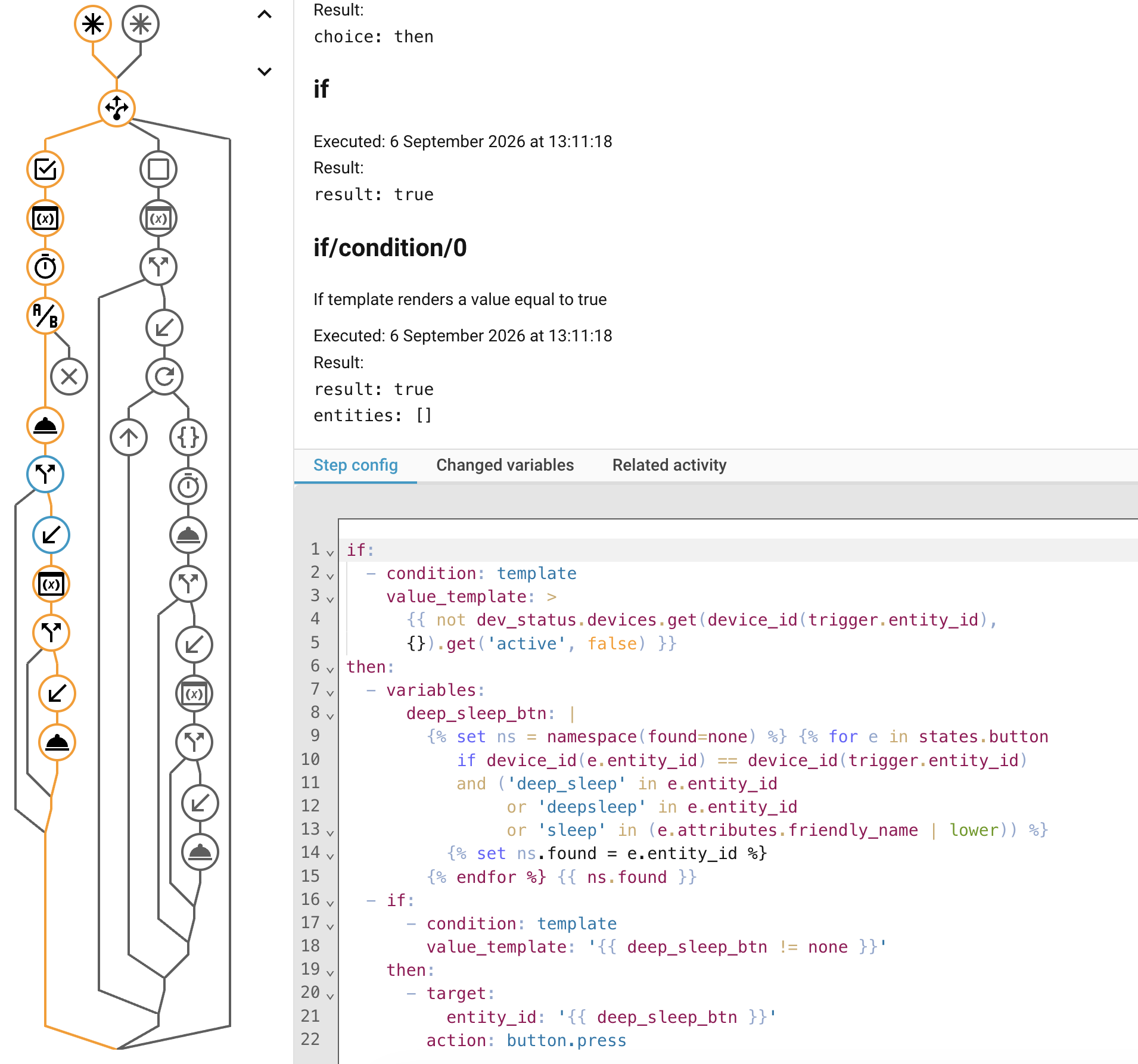
My understanding is that the orange line is the flow through the automation. Therefore it was triggered when the device came on line. The automation delay of 20 seconds occurred.
It then (I think) checks to see if the device is still active, then looks for the ‘deep sleep’ button (which it finds) and then ‘clicks’ that.
From my understanding of the automation code is that there is nothing in that whole ‘trigger’ path that checks for a firmware update.
Susan
Could you share your device’s YAML and your deep sleep automation?
That’ll make it much easier to pinpoint what’s going on.
Thx!
esphome:
  name: filament-dryer
  friendly_name: Filament Dryer
  on_boot:
    then:
      - lambda:
          if (id(wakeup_cause).state == 0)
          {
            id(reboot_counter) = 0;
          }
          else
          {
            id(reboot_counter) += 1;
          }

esp32:
  board: seeed_xiao_esp32s3
  framework:
    type: esp-idf

# Enable logging
logger:

# Enable Home Assistant API
api:
  encryption:
    key: "xxxxxxxxxxx"

ota:
  - platform: esphome
    password: "xxxxxxxx"

wifi:
  ssid: !secret wifi_ssid
  password: !secret wifi_password

  # Enable fallback hotspot (captive portal) in case wifi connection fails
  ap:
    ssid: "Filament-Dryer Fallback Hotspot"
    password: "xxxxxxxx"

captive_portal:

deep_sleep:
  id: sleepy_bye
#  run_duration: 10s
  sleep_duration: 30min

globals:
  - id: reboot_counter
    type: int
    restore_value: True
    initial_value: "0"

i2c:
  - id: bus_a
    sda: GPIO5
    scl: GPIO6

bme68x_bsec2_i2c:
  i2c_id: bus_a
  model: bme680
  id: bme680_bathroom
  address: 0x76
  operating_age: 4d
  # temperature_offset: 2.6

sensor:
  - platform: bme68x_bsec2
    temperature:
      name: "Temperature"
      filters:
        - debounce: 2s
    pressure:
      name: "Pressure"
      filters:
        - offset: -2
    humidity:
      name: "Humidity"
      filters:
        - offset: -3
    gas_resistance:
      name: "Gas Resistance"
    iaq:
      name: "IAQ"
      id: iaq
      on_value:
        then:
          - component.update: iaq_classification
    co2_equivalent:
      name: "CO2 Equivalent"

  - platform: adc
    pin: GPIO1
    id: battery_voltage
    name: "Battery Voltage"
    attenuation: 12db
    filters:
      - multiply: 2.0

  - platform: template
    name: "Wakeup Cause"
    id: wakeup_cause
    accuracy_decimals: 0
    lambda: return esp_sleep_get_wakeup_cause();

  - platform: template
    name: "Restart Count"
    id: restart_count
    unit_of_measurement: "units"
    accuracy_decimals: 0
    lambda: return id(reboot_counter);

text_sensor:
  - platform: template
    name: "BME68x IAQ Classification"
    id: iaq_classification
    lambda: |-
      if ( int(id(iaq).state) <= 50) {
        return {"Excellent"};
      }
      else if (int(id(iaq).state) <= 100) {
        return {"Good"};
      }
      else if (int(id(iaq).state) <= 150) {
        return {"Lightly polluted"};
      }
      else if (int(id(iaq).state) <= 200) {
        return {"Moderately polluted"};
      }
      else if (int(id(iaq).state) <= 250) {
        return {"Heavily polluted"};
      }
      else if (int(id(iaq).state) <= 350) {
        return {"Severely polluted"};
      }
      else if (int(id(iaq).state) >= 351) {
        return {"Extremely polluted"};
      }
      else {
        return {"error"};
      }
  - platform: bme68x_bsec2
    iaq_accuracy:
      name: "IAQ Accuracy"
      id: iaq_accuracy

button:
  - platform: template
    name: "Enter Deep Sleep"
    icon: mdi:sleep
    on_press:
      - deep_sleep.enter:
          id: sleepy_bye

binary_sensor:
    - platform: status
      name: "Connection Status"
I’m not sue what you mean by the ‘deep sleep automation’ as the only automation used is your one (suitably edited for the trigger and the awake window (20 seconds)).
If you only changed the awake window but not the trigger entity_id, this could be the issue.
the triggers part in your automation should look like this:
triggers:
  - id: wake
    trigger: state
    entity_id:
      - binary_sensor.filament_dryer_connection_status
    to: "on"
  - id: finished
    trigger: event
    event_type: esphome_update_manager_finished
can you confirm if this is what you have in your automation?
alias: Deep sleep after wake-up or update
description: >
  Handles ALL deep sleep devices. On every wake-up (normal wake AND the reboot
  after an install), the device gets its full awake_window_seconds before being
  put back to sleep — unless an update is pending/running, in which case it
  stays awake until that update finishes (then still gets its
  awake_window_seconds before sleeping).
triggers:
  - id: wake
    trigger: state
    entity_id:
      - binary_sensor.filament_dryer_connection_status
    to: 'on'
  - id: finished
    trigger: event
    event_type: esphome_update_manager_finished
actions:
  - choose:
Confirmed
Thanks for confirming that.
I’ll also run a test using a test ESP device and an automation identical to your setup, to see what might be going wrong.
This probably won’t be today due to a family visit, but I’ll keep you posted.
Hi Susan,
Good news, I managed to reproduce the issue, and I think I’ve found what’s happening. This turns out to not be about the automation or your YAML at all, it’s in how the integration tracks devices internally.
Here’s the short version: the integration takes a snapshot of all your devices’ status sensors shortly after Home Assistant starts (or after the integration is reloaded), and then listens for those specific sensors to detect when a device comes online. If a device gets removed and re-added to Home Assistant (or newly added) after that snapshot was taken, it’s not part of that “listening list” anymore, so the integration never notices it coming online, and auto-install for that device silently never triggers, even though everything looks correctly configured.
Have you at any point removed and re-added the filament-dryer device in Home Assistant, without restarting Home Assistant or reloading the integration afterward? If so, that’s very likely the cause.
Immediate fix: go to Settings → Devices & Services → ESPHome Update Manager → ⋮ → Reload (a full Home Assistant restart also works, but reload should be enough). Do this once, without touching the device itself afterward, then let it wake up naturally and see if the update triggers.
I’m working on a proper fix for this on my end so it won’t require a manual reload in the future. I’ll let you know once that’s released. Thanks again for your patience and for the detailed information, it really helped track this down.
EDIT:
fixed in version 1.11.3
@Krivatri - the filament-dryer device has been in HA for some weeks and HA has been restarted several times since then due to HA updates and other reasons.
I’m intrigued by your comment about how the determines that the device comes back on line. Looking at the ‘triggers’ section of your automation:
triggers:
  - id: wake
    trigger: state
    entity_id:
      - binary_sensor.filament_dryer_connection_status
    to: 'on'
  - id: finished
    trigger: event
    event_type: esphome_update_manager_finished
the ‘wake’ ID uses the devices connection status (as defined in the devices yaml) to trigger the automation. This is occurring even 30 minutes correctly. The automation then correctly choses the condition sequence:
actions:
  - choose:
      - conditions:
          - condition: trigger
            id: wake
After recording something, the automation then waits for the 20 seconds and again this seems to e occurring.
However in that whole ‘condition’ path, I can’t see where it looks for a firmware update.
The other condition sequence (from the update manager completing) there is a list of devices created that is iterated to perform the update:
        sequence:
          - variables:
              finished_devices: |
                {{ trigger.event.data.results
                   | selectattr('device_id', 'defined')
                   | list }}
          - if:
              - condition: template
                value_template: '{{ finished_devices | length > 0 }}'
            then:
              - repeat:
                  for_each: '{{ finished_devices }}'
This path checks if a device is ‘active’ (at least I think that is what it does’) and skips it if it is not - and my filament-dryer device is almost certainly not active when it is checked.
Is it possible to do two things here:
- if the device is not active, then put it in a list (???the ‘forced update’ list???) to be looked at the next time the device does connect, and
- in the ‘wake’ path, see if the device is on that list and update it if it is before sending it back to deep sleep
Thank you for looking into this for me - much appreciated.
Susan
Also just did the reload as requested. The device came online a bit after that:
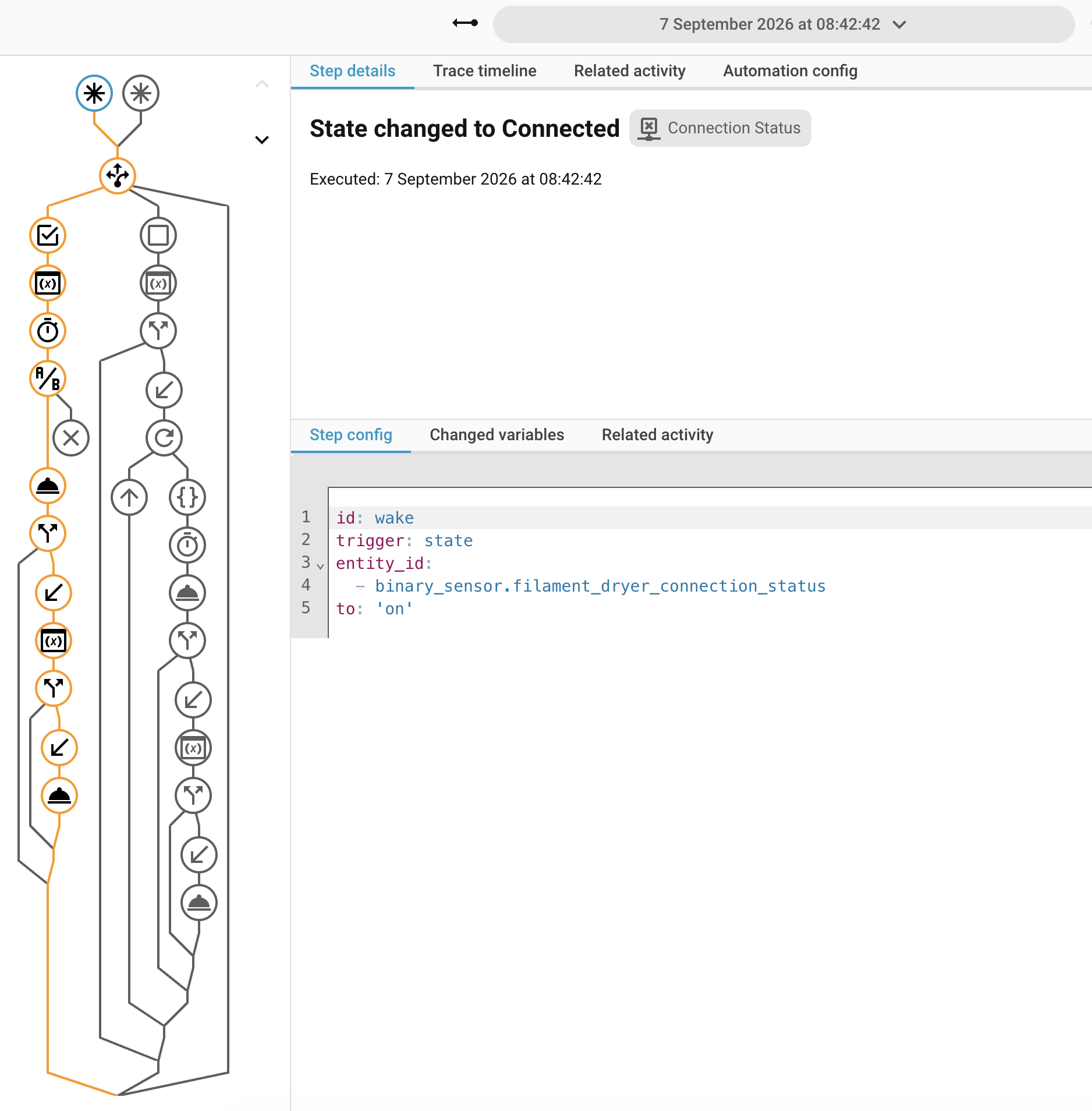
The automation was triggered but it didn’t perform any firmware update and the path followed (in orange in the image above) was the same as before.
Susan
Hi Susan,
The (extensive) testing I did with a deep sleep device and the automation worked fine on my end, so something else must be going on with your specific device/setup?
A few things to try, in order:
- First, a quick visual check, is
filament-dryer’s name shown in red in the panel? (according to your screenshot, it’s not). It’s possible a previous update attempt failed and the device is now flagged internally, which permanently skips it from auto-update until a manual update succeeds. This would show as a red device name in the panel. Another way to check this (if you have access to the .storage folder in HA) is to open the file esphome_update_manager.settings and see if “failed_devices”: {} is empty or not. - Test with a longer awake window, temporarily set
awake_window_secondsto120in your automation, to rule out a slow response (e.g. the update not being registered as “active” quickly enough after waking up). - As an additional test: while the device is asleep, select it for Force Install in the panel (this queues it on the persistent pending list, independent of the auto-update logic entirely, it doesn’t check failed/excluded status at all). If the install succeeds this way when the device wakes up, that confirms the queue/update mechanism itself works fine, and narrows the issue down to the normal auto-update detection path specifically (timing, or a failed/excluded flag we haven’t spotted yet). If it fails even via Force Install, the issue likely sits elsewhere. If it succeeds, the failed flag should be gone and the next time an update is available, it should work as expected.
One more relevant detail: the deep sleep automation doesn’t check “is there a firmware update available” directly, it checks whether the device is currently in the integration’s internal work queue. So even with a pending update showing in the panel, the automation only sees it as “active” once that update has actually started being processed.
Let me know what you find with the above, that’ll help narrow this down further.