I tried to combine best practices from the original roomba integration (still with limited features), other developments (complex rest980 docker by more features) and systematically analysing roombapy and roomba980 python.
And the outcome looked pretty good for me. Though I am still in testing also some more advanced features aroung map rendering and room / door detection, I believe it might be of interest for the community.
2 Likes
 Roomba+ status update — v3.4.1
It’s been a while since the original post, so here’s where things actually stand — both the version and, more importantly, what’s confirmed working on real hardware. A good chunk of this is thanks to people testing on their own robots and reporting back, not just my own guesswork.
 Confirmed hardware
| Series | Examples | Status |
|---|---|---|
| 600 (bump & run) | Roomba 694, 692 |  untested — nobody’s tried yet untested — nobody’s tried yet |
| 900 (VSLAM) | Roomba 980, 985 |  confirmed (980) confirmed (980) |
| i-series | i3, i7, i7+ | confirmed (i3+, i7+) |
| s-series | s9+ | confirmed (S9+) |
| j-series | j7, j7+ | confirmed |
| Braava | m6 | confirmed (jet m6) |
 What you actually get, by tier
Not every robot gets the same feature set — here’s the honest breakdown:
| 600 | 900 (VSLAM) | i / s / j (Smart Map) | Braava m6 | |
|---|---|---|---|---|
| Local control, no cloud needed | |
|
|
|
| Live map & path |  |
|
|
|
| Auto-detected zones | |
|
|
|
| Maintenance tracking | |
|
|
|
| Calendar / to-do integration | |
|
|
|
| Named rooms & favourites | |
(no persistent map) |
|
|
| Mission history & dirt-sensor correlation | |
|
(cloud) |
(cloud) |
600-series is a real hardware ceiling, not a missing feature — it’s the bump-and-run generation, there’s nothing to map. Everything cloud-based is opt-in everywhere else: just your iRobot app email/password, and local MQTT control works fully without it regardless of tier.
 Looking for testers
If you’re running 600-series and are up for trying it — that’s the one gap left in the compatibility picture. Good or bad, I’d like to hear how it goes.
As always: real-device reports are what’s actually driving progress here, more than anything I could guess at from the couch.
so these 2 are yet to come?
Furniture-change detection
Room shape / door-position export
i have almost since i got the damm thing been pissed of that it can never get the room shape right… and of course they never made it possible to edit the map in the app…
would that be possible with this integration ?
anyways i tried to install and it could not get the password automatic, now i have to remember how i was able to get it for the core integration (shold have noted it down)
EDIT: got it installed… much better than the core integration…
the only thing i’m missing is some way to export the map and then trick the bot to reimport it… in that way to edit the maps
Glad it’s working better for you — and the two things you’re asking about are the two I’d most like to be able to promise. I can’t, and the reasons differ.
Room shape
This depends on which robot you have, and the answer is worse for the older ones.
A 900-series robot keeps no map at all. It forgets everything when a mission ends, so anything spatial the integration shows is reconstructed from the position stream: where the robot drove, accumulated across missions. That means furniture leaves holes, room edges stop about one robot radius short of the wall, and boundaries land at narrow points in the coverage rather than at doorways. More missions settle the room count; they don’t change the shape, because the sofa is in the same place every time.
That isn’t a bug I’m working around — it’s the ceiling of what coverage data can give you. Wall-accurate rooms would need obstacle data (where the robot bumped into things), and these robots don’t report it.
An i/s/j-series robot does keep a real map, and the shapes come from the robot rather than from us. If yours is one of those and the shapes are wrong, that’s the robot’s own map being wrong, and we’d be showing it faithfully.
So: which model?
Editing the map
On Prime robots (the 400-series Combos and the Max 705) renaming, splitting and merging rooms works from Home Assistant — confirmed on real hardware. If yours is one of those, you have more than you think.
On everything else, no, and export-edit-reimport specifically is the hardest version of it. The upload path exists in the protocol and is deliberately not built: writing a map back to a robot is the one operation where getting it wrong leaves you worse off than before, and nothing has been tested against real hardware. I’d rather it stay missing than ship it as a guess.
The nearer thing
There’s a geometry store that holds user-drawn walls, doors and obstacles, kept separate from the robot’s own map — the robot’s version stays untouched and yours draws on top. The plumbing is there; there is no editor in front of it yet.
That wouldn’t change how your robot cleans. It would change what the map in Home Assistant looks like, which sounds like part of what’s been annoying you.
The password
For future reference: the integration can usually fetch it if the robot is on the same network and reachable, and it falls back to asking for your iRobot account instead. If neither worked, that’s worth its own thread — the automatic path has a few failure modes and each has a different cause.
The model
oh the model, one is an i7 and the other has the selfempty basse station so an i7+
The map
this is the map as the robot see it

but it should be more like this (after some “fun” work in paint):
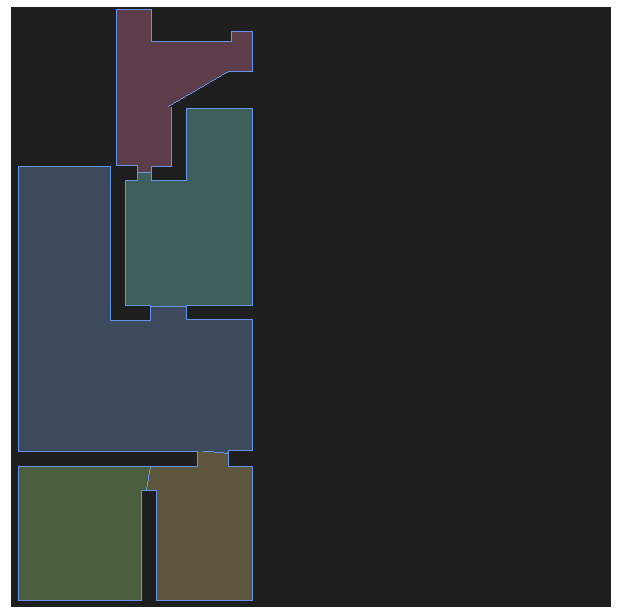
not sure if it changes anything for the robot if the map is more correct or not
last “redish” room is one that is not complete yet as there is a huge step down where i tricked the robot by grapping it by the wheels (so they where pressed up) and quickly lifting it down and the same after the room was done
zones… would they be added?
not sure if it now makes more sense with a precise map so we could draw arround a carpet to include/exclude that? just another random thought
The password
hmm they are on the same network, but it never asked me for my irobot account. which would the a logical step. i ended up using this python script: irobot_get_cloudpassword/get_cloud_password.py at c98ff95ff8f08b70505f7464f4b26a68ae629433 · HotNoob/irobot_get_cloudpassword · GitHub
Two i7s changes my earlier answer in one place and not the other.
The map
Your paint version is what the room is; the robot’s version is where it has driven. That gap does not close with more missions — furniture stays where it is, and a step the robot cannot cross is a wall as far as it knows.
But on an i7 the shapes come from the robot’s own saved map, not from anything we reconstruct. So what you are looking at is iRobot’s map of your home, drawn faithfully. If it is wrong there, it is wrong at the source, and nothing on our side can correct it.
Map editing exists for Prime robots — renaming, splitting, merging — but the i-series uses a different protocol for it, and it is not built. Redrawing an outline the way you did in paint is not something either protocol offers: the app cannot do it, so there is no command to imitate.
Zones
Better news. Zones on i-series robots are readable, and the next release draws saved clean zones on the rooms map — outlined, so they read as a marked-out part of a room rather than a separate one.
Creating and editing them from Home Assistant is being worked on by another tester and is not merged yet.
What you describe — drawing round a carpet to include or exclude it — is exactly what keep-out and no-mop zones do, and those are the ones in flight. So: not now, plausibly soon, and by a route that does not need map editing at all.
The password
That is on us. There is an “Set up with my iRobot account” option in the setup flow, and its description says “for newer models with no local setup, e.g. Combo” — which reads as not for you, when in fact it is the fallback for exactly your case: robot on the network, password not retrievable automatically.
So you did the right thing and the interface told you not to. The wording is wrong and I will fix it.
If it happens again on the second robot: pick that option rather than the external script. It signs in, fetches the password, and stores it the same way — the script you found does the same thing by hand.
 Roomba+ 4.0.0 — stable, and V4/Prime robots are supported
Since the v3.4.1 update in July: 51 prereleases, 47 alphas and 4 betas, and it is stable. Two things changed that are worth more than the version number.
Roomba+ is in the HACS default store
No custom repository any more. Open HACS, search for Roomba+, download. If you followed an older guide and added it by URL, that still works and is simply no longer needed.
And 4.0.0 is a normal release rather than a prerelease, so Show beta versions is no longer required either.
V4/Prime robots — the cloud-only generation
The Roomba Combo and Plus 400-series, Roomba Max. These have no local interface at all, which is why no integration covered them: everything runs through iRobot’s cloud. That path is now built, on a separate library (roombapy-prime), and it is a genuinely separate code path rather than an extension of the local one.
What works on them: setup, start/stop/pause/dock/locate, room and zone cleaning including vacuum · mop · both per run, iRobot’s own rendered map plus a rooms map with floor plan and live trail, schedules as a Home Assistant calendar with recurrence, favourites as buttons, map editing — rename, split and merge rooms — maintenance with the dock’s real part names, and room-level history.
Updated hardware table:
| Series | Examples | Status |
|---|---|---|
| 600 (bump & run) | 694, 692 | still untested — nobody has tried |
| 900 (VSLAM) | 980, 985 | confirmed (980) |
| i-series | i3, i7, i7+ | confirmed (i3+, i7+) |
| s-series | s9+ | confirmed (S9+) |
| j-series | j7, j7+ | confirmed |
| Braava | m6 | confirmed (jet m6) |
| V4/Prime (cloud only) | Combo/Plus 400-series, Max 705 | confirmed across multiple accounts |
A classic and a V4 robot on one account works too — the same login finds both.
@boelle — your map question, answered properly
You asked in August about exporting the map and getting the robot to re-import it, so you could fix room shapes the app will not let you edit. Two halves, and they have different answers.
Reading and editing the map: yes, on Prime robots. Rename rooms, split them, merge them — confirmed on real hardware. On the local-protocol robots the 900-series map pipeline was rebuilt in this release and now shares one coordinate frame between the floor plan and the cleaning trail, so they overlay properly instead of sitting side by side at different scales.
Pushing a modified map back to the robot: no, and it is not on a list somewhere. The request format has never been captured — what is modelled is the robot uploading its map, which is the opposite direction. Restoring a map onto a robot is rare and destructive enough that guessing the payload shape is the wrong trade: get it wrong and you have damaged a map the app cannot repair either.
So it is deliberately absent rather than pending. If a capture of that request ever turns up, it goes in — but I am not going to guess at it.
On the room-shape frustration specifically: for the 900-series the integration derives rooms from accumulated coverage data across missions rather than from the robot’s own idea of them, and lets you name them. That is not editing the robot’s map, but it may get you closer to what you actually wanted.
Also new since 3.4.1
Mopping from Home Assistant with a cleaning-mode selector · writable schedules · clean_area on Combo robots · per-room “last cleaned” · a blueprint for a robot that has gone silent · error messages taken from iRobot’s own catalogue in eight languages, replacing home-grown labels of which exactly two of 126 turned out to match the vendor’s wording.
One thing to check before updating
Automations matching the status sensor’s old value will stop matching. The sensor is translated now and its state values changed with it.
Still looking for
600-series. Unchanged from July and still the one gap in the picture. It is the bump-and-run generation, so there is no map to expect — but nobody has confirmed the basics work.
The honest note stays the same as last time: real-device reports drove this, not guesswork from the couch. Two dozen people ran 51 prereleases on their own robots. Several read the source and diagnosed their own bug reports; one logged 24,900 messages over three weeks and then retracted two of his own conclusions after re-reading the whole file. Three contributed code.
Thank you — including for the runs that found nothing. A carefully reported negative result has closed more questions here than any single fix.
I was never able to retrieve the password before this integration; this made it so easy. Thank you for developing this.
Regarding the ha_roomba_plus_card, my map has a lot of rooms and having the room areas shown along with the room names makes the map a little cluttered. Is there a way to turn off the room areas from being shown? I couldn’t find that option in the card configuration.