No only one
Then thy should appear after reload or restart assuming you spelled the filename correctly in comparison to your include.
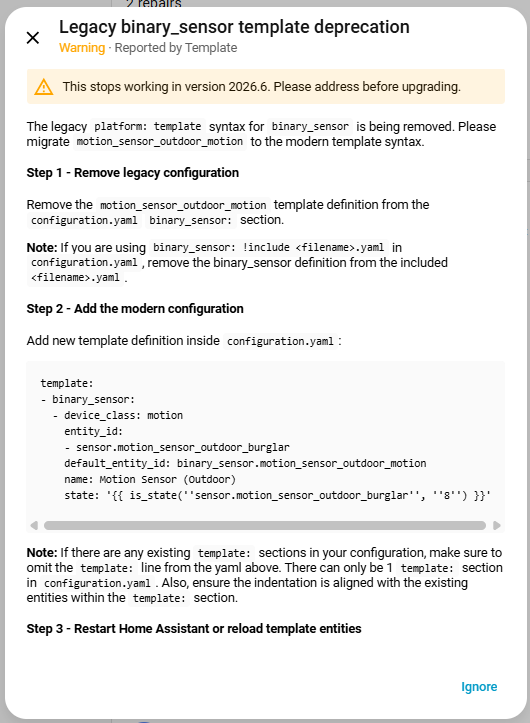
I’ve attempted to read everything here. I’ve gone through the migration using the integration, it makes sense. All except for the platform template sensors that HA identified, and the new migrated sensors that were created:
Repair notice:
Newly-created sensors in config\migrated_templates:
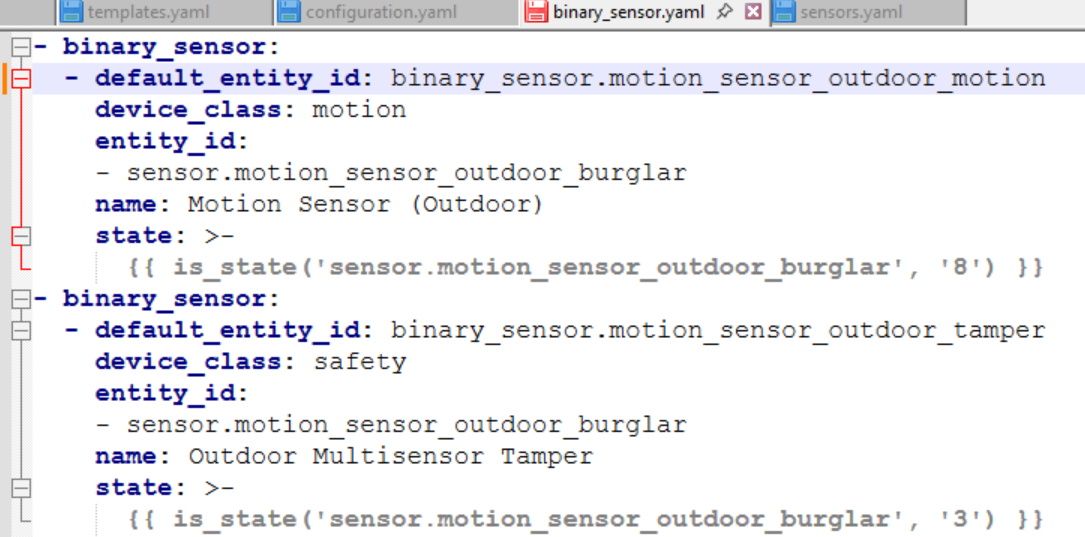
Is this just advisory? Because these sensors don’t exist anywhere in my original configuration. I don’t have a sensor.motion_sensor_outdoor_burglar anywhere. Here’s the relevant section of my configuration.yaml:
group: !include groups.yaml
automation: !include_dir_merge_list automations
scene: !include scenes.yaml
script: !include scripts.yaml
sensor: !include sensors.yaml
#binary_sensor: !include binary_sensors.yaml
template: !include_dir_merge_list templates
#template migrated: !include_dir_merge_list migrated_templates
I’ve just commented out the migrated sensor line because the new sensors don’t make any sense. The repair notifications remain, though. That’s the weird part… because they point to sensors that don’t exist.
You are running into 2 issues.
- You’re using a legacy key that was deprecated in 2020 and you never did anything about it.
entity_id. - There is a bug when using
template <some name>: !include...and it’s not honored.
Both should be addressed in 2025.12.2
you can get around both now if you don’t want to wait.
-
Remove
entity_idand it’s value from all your legacy template entities. (or remove it after it’s converted). -
Rename the migrated files to something unique and move them into your
templatesfolder. Just make sure the filenames don’t clash with the existing files in that directory.
But… where? I don’t use the entity_id key anywhere in sensors.yaml except in platform history_stats, filter, statistics, and that’s how it’s defined as required on the various Integration info pages. If those are wrong, I need to address them. But I don’t think that’s it.
I don’t define sensors in configuration.yaml. And binary_sensors.yaml has none, and it’s commented out anyway.
I removed all entity_id keys quite a long time ago. The sensors on the screen shots above don’t exist. I’ve searched my config with Studio Code Server to find any instance of “burglar” (which I’ve never used before), and it’s not there.
This, I’ll need to check out. Any references would be helpful, but I’ll see what I can find.
The only way this configuration:
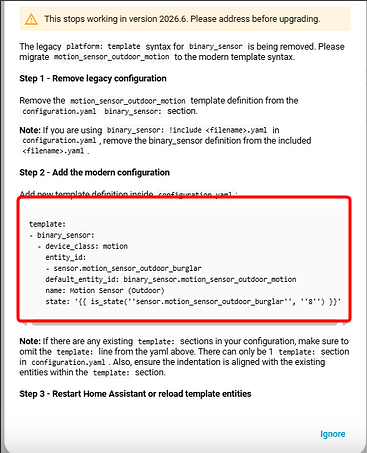
was generated, was if your legacy sensor had entity_id in it.
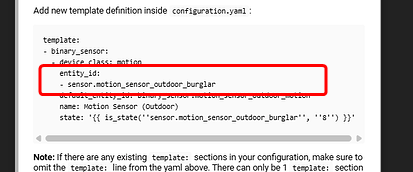
That field in legacy sensors was deprecated in mid 2020 and it was never introduced in the modern template style.
They are coming from somewhere. The template integration is receiving them from something, possibly a package you don’t remember using?
Nothing you need to check out here, this was a bug that was discovered this morning and a fix is in the works.
I believe that. I’ve just exhausted all means of finding them. And I’ve never defined those sensors manually. I’ve looked in Dev Tools - > States and searched for entities with all filters removed. Studio Code Server came up empty. The only evidence of their existence is in the repair notification and now the migrated_sensors folder.
You’d think Spook would find them. They’re not in use anywhere… I run a pretty tidy HA installation and it’s aggravating that there’s something like this hanging out somewhere.
search your config for platform: template, nothing more.
The other possibility is that you are one of the very few people who accidentally stumbled on undocumented yaml… do you have an existing template entity section?
I’ve just found this file in config\packages:
outdoor_motion_sensor.yaml
Here are its contents:
#sensor:
#  - platform: template
#    sensors:
#      motion_sensor_outdoor_battery:
#        friendly_name: "Outdoor Multisensor Battery"
#        value_template: "{% if states.zwave.motion_sensor_outdoor %}
#            {{ states.zwave.motion_sensor_outdoor.attributes.battery_level }}
#          {% else %}
#            unknown
#          {% endif %}"
#        unit_of_measurement: '%'
#        # entity_id: zwave.motion_sensor_outdoor
#        icon_template: >-
#          {% set battery_level = states('sensor.motion_sensor_outdoor_battery')|int('unknown') %}
#          {% set battery_round = (battery_level|int / 10)|int * 10 %}
#          {% if battery_level == 'unknown' %}
#            mdi:battery-unknown
#          {% else %}
#            {% if battery_round >= 100 %}
#              mdi:battery
#            {% elif battery_round > 0 %}
#              mdi:battery-{{ battery_round }}
#            {% else %}
#              mdi:battery-alert
#            {% endif %}
#          {% endif %}
#        entity_id: sensor.time

binary_sensor:
  - platform: template
    sensors:
      motion_sensor_outdoor_motion:
        value_template: "{{ is_state('sensor.motion_sensor_outdoor_burglar', '8') }}"
        friendly_name: "Motion Sensor (Outdoor)"
        device_class: motion
        entity_id:  sensor.motion_sensor_outdoor_burglar

      motion_sensor_outdoor_tamper:
        value_template: "{{ is_state('sensor.motion_sensor_outdoor_burglar', '3') }}"
        friendly_name: "Outdoor Multisensor Tamper"
        device_class: safety
        entity_id:  sensor.motion_sensor_outdoor_burglar
Clearly, this is where it’s coming from. I have no idea what package this could have been associated with. I have only two files in the packages folder, and neither of them are valid. These files are included in configuration.yaml here:
homeassistant:
  packages: !include_dir_named packages
  customize: !include customize.yaml
  allowlist_external_dirs:
    - /config/www/snapshots
    - /config
There it is. Thanks for sticking with this.
1 Like
I just finished migrating ~110 items to the new format. I took a few hours to carefully test and clean up my complex config along the way.
My takeaways:
- Documentation on this is excellent. Even though it takes work to update old configs, the way the repairs show up with “copy/paste” fixes was a fantastic starting point to quickly understand the issues and resolutions.
- Power user tip: If you use VSCode, regex “Find and Replace” is a lifesaver for big updates on complex configurations if you have a lot of repeat templates. Just be careful, use AI to help write the patterns, and test often.
- Better structure: The modern templates have feature parity to the old ones in terms of capabilities, but so much easier to understand, use, and keep organized since they have the common attributes and structure.
Big thanks to the contributors! This is really well done, and avoids a lot of future confusion with the legacy templates. In the end, it also helped me simplify several areas of my setup!
1 Like
Thank you. Learned something new.
I have managed to gt all of my templates changed to the new format except for one. And no matter where or how I write it, whether in my congig. yaml file or not, it still will not work Any ideas/help would be appreciated.
template:
- switch:
  - turn_on:
    - action: cloud.remote_connect
    turn_off:
    - action: cloud.remote_disconnect
    default_entity_id: switch.cloud_connected
    state: '{{ is_state(''binary_sensor.remote_ui'', ''on'') }}'
    name: cloud_connected
58 repairs here 
Have your rebooted HA (not just reloaded)? My last one did not show as fixed until I rebooted…
What did the old template look like?
I’ve rebooted it several times with still the same results.
This is the current template I am using that that works:
- platform: template
  switches:
    cloud_connected:
      value_template: "{{ is_state('binary_sensor.remote_ui', 'on') }}"
      turn_on:
        service: cloud.remote_connect
      turn_off:
        service: cloud.remote_disconnect
Dunno where the extra - came from but it should be:
template:
  - switch:
    - default_entity_id: switch.cloud_connected
      name: cloud_connected
      state: "{{ is_state('binary_sensor.remote_ui', 'on') }}"
      turn_on:
        action: cloud.remote_connect
      turn_off:
        action: cloud.remote_disconnect
I might have made typos but cannot test as i dont have this integration.
That should make no difference.
Actions are a list. A list with one item does not need the dash but it is good practice to include the dash anyway to make it clear it is a list.
1 Like
The config looks correct. So it is the way you are including it that is incorrect.
Where are you putting the switch config?
How many times do you have template: in that config?