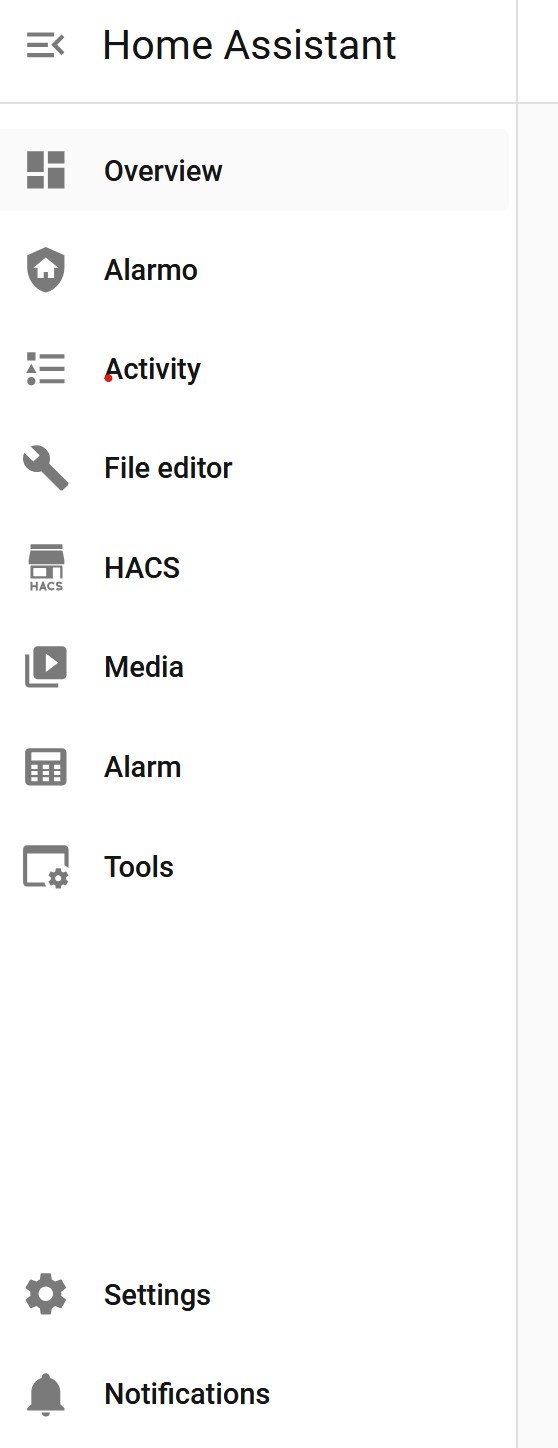
Hi all, just wondering if anyone can help with this annoying thing that has just happened. Developer Tools went missing from the sidebar and I cant get it back!
I have done a Hard Refresh & Cache Clear,
Made sure Advanced Mode is still enabled.
Logged out and Logged back in.
I have verified that it IS still present in the Quick Bar (i.e. in the UI, press c on my keyboard and typed “Developer Tools”). Its still there!
Forced a reset of the Sidebar.
Checked for `default_config’ in my Configuration.yaml file.
Verified my Administrator Status.
Logged in in an Incognito window.
Yet, its still wont come back.
Getting frustrated by having to press ‘c’ and go through the Quickbar every time I want to go to Developer Tools.
Recent HA Core updates have been reorganizing Settings for consistency.
In the 2026.2.x series, some installations (especially Core and Container) moved tools that used to be in the sidebar into Settings to reduce sidebar clutter.
That’s why:
You still can access Developer Tools
It still works normally
But the sidebar item is no longer shown by default
This particularly affects:
Home Assistant Core installs (not OS)
Users without custom dashboards controlling the sidebar
I write my own yaml code, and I sure do miss the quick shortcut of having Developer Tools on the sidebar in OS 26.2.
So:
Here is a way to put Developer Tools, which will then (after this edit) be called “Tools” back on the sidebar in 26.2. Keep in mind that this can break if further changes are made by the Home Assistant programmers. I make no guarantee that this will work for everyone - or anyone - but it worked for me.
Edit your configuration.yaml file and add the section to it that I’ve listed at the end of this message.
Double check to make sure you did only this exact addition, then save the file and completely restart Home Assistant. If “Tools” doesn’t show up, refresh your browser.
Afterwards, your sidebar should have a “Tools” entry that loads Developer Tools.
Thanks for this, works better than creating a new dashboard which seems to nest sidebars - I have posted the code as text rather than picture, so it can be copied straight in…
panel_custom:
    # fix for ha decision to remove dev tools
  - name: developer-tools
    sidebar_title : Dev tools
    sidebar_icon: mdi:tools
    js_url: /api/hassio/app/entrypoint
    embed_iframe: true
I tried that and have a weird side-effect. When I click on the newly created dev tool sidebar, I not only get the Dev tool page but I get a copy of the entire side-bars to go with it. In other words, where the Dev Tools frame should be, I get both the entire side-bar and the Dev Tools.
Any ideas?
This is by far one of the most absurd changes - basically the only time I’m opening the app or browser is if something is broken…which means I basically always will need to jump around between settings and dev tools. This adds a stupid amount of extra clicks to jump thru since its like 2 extra clicks EVERY time you want to switch tabs.
Developer tools is also not a “setting” so that’s an intuitive location just like notifications are not a setting.
If anything deserves to be moved deeper its some of the pages like “Map” that serves no useful purpose.
I agree and unfortunately the only workaround for the time being (if it ever really will be fixed) is to add your own link to dev tools back to the sidebar.
Hey, so i have done it like that as well, saved my configuration and did a full restard on Homeassistant (2. Option in the dev Options). After the restart i cleared the Websites Cache by entering the F12/Dev Menu of my Browser and by right clicking on the restart sign.
So and as you’ve experienced, now its probably not at the Bottom of the Sidebar; this is easy solvable by holding the Homeassistant sign on top of it and rearrange it. Hope that helps