Here’s my latest config if you want to give it a whirl:
          - type: custom:week-planner-card
            calendars:
              - entity: calendar.abc
                name: abc
                color: '#7afcfd'
              - entity: calendar.def
                name: def
                color: '#BBF1F1'
              - entity: calendar.ghi
                name: ghi
                color: '#FFB6C1'
              - entity: calendar.jkl
                name: jkl
                color: '#90EE90'
              - entity: calendar.mno
                name: Family
                color: '#b5e1ff'
              - entity: calendar.holidays_in_united_states
                name: Holidays
                color: '#CBC3E3'
            days: 35
            columns: large
            startingDayOffset: 0
            startingDay: sunday
            dayFormat: >-
              '<span class="text">'ccc'</span><span data-date="'d'"><span
              class="number">'d'</span><span class="month">'MMM'</span></span>'
            timeFormat: h:mm a
            hideWeekend: false
            noCardBackground: false
            compact: true
            weather:
              showCondition: true
              showTemperature: true
              showLowTemperature: true
              useTwiceDaily: false
              entity: weather.forecast_home
            locale: en-US
            showLocation: false
            showDescription: false
            hidePastEvents: false
            hideDaysWithoutEvents: false
            hideTodayWithoutEvents: false
            combineSimilarEvents: true
            showLegend: true
            legendToggle: true
            showNavigation: true
            texts:
              yesterday: ''
              today: ''
              tomorrow: ''
              noEvents: ''
              fullDay: ''
            card_mod:
              style:
                .: >
                  ha-card {
                    background: transparent !important;
                    box-shadow: none !important;
                    border: none !important;
                  }  .card-content {
                    padding-top: 0px !important;
                  }  .container .legend {
                    padding: 0px 0px 5px 20px !important;
                  }  .container .day .date span .month {
                    display: none;
                    font-size: var(--day-date-number-font-size);
                    line-height: var(--day-date-number-line-height);
                  }

                  .container .day .date span[data-date="1"] .number {
                    display: none;
                  }

                  .container .day .date span[data-date="1"] .month {
                    display: inline;
                    background-color: #808080 !important;
                    border-radius: 50%;
                    order: 2;
                    height: 40px;
                    width: 40px;
                    padding: 5px;
                    padding-top: 15px;
                    margin-top: 5px;
                    display: table-cell;
                    vertical-align: middle;
                    text-align: center;
                    font-weight: 100;
                    font-family: "Roboto", sans-serif;
                  }

                  .container .day .events .event .time {
                    font-weight: 700;
                    font-size: 15px !important;
                    margin: 0px !important;
                  }

                  .container {
                    row-gap: 0px !important;
                    column-gap: 5px !important;
                  }

                  .container .navigation {
                    position: absolute;
                    right: 50px;
                  }

                  ha-card {
                    border-radius: 0px;
                    margin-top: 0px;
                    font-size: 20px !important;
                    overflow: hidden;
                    --days-spacing: 10px;
                    --event-padding: 2px !important;
                    --events-margin-top: 1px !important;
                    --event-border-width: 2px;
                    --navigation-month-font-size: 20px !important;
                    #background-color: black;
                  }

                  .event.past {
                    opacity: 0.3;
                  }

                  .none {
                    background-color: transparent !important;
                  }

                  .container .day {
                    width: calc((100% - 6 * var(--days-spacing)) / 7) !important;
                    margin: 0px !important
                  }

                  .container .day .date {
                    display: flex;
                    flex-direction: column;
                    align-items: center;
                    justify-content: center;
                  }

                  .container .day .date .number {
                    order: 2;
                    height: 40px;
                    width: 40px;
                    padding: 5px;
                    padding-top: 15px;
                    margin-top: 5px;
                    display: table-cell;
                    vertical-align: middle;
                    text-align: center;
                    font-weight: 100;
                    font-family: "Roboto", sans-serif;
                  }

                  .container .day .date .text {
                    order: 1;
                    font-weight: 300;
                    font-family: "Roboto", sans-serif;
                    font-size: 20px !important;
                    margin-bottom: 8px;
                    transform: scale(1, 1.2);
                  }

                  .today .date .number {
                    background-color: #ff0000 !important;
                    border-radius: 50%;
                  }

                  .container .day:nth-child(n+9) .date .text {
                    display: none;
                  }

                  .event {
                    color: #333333 !important;
                    #line-height: 16px !important;
                    background-color: var(--border-color) !important;
                    border-radius: 10px !important;
                    max-height: 200px !important;
                    overflow: hidden !important;
                    font-size: 1.2em !important;
                  }

                  .container .day .events .event[data-entity="calendar.name"] {
                    color: black;
                    --secondary-text-color: black;
                    background-color: hsla(174,53%,68%,0.75) !important;
                  }

                  .container .day .events .event[data-entity="calendar.garbage"]
                  {
                    color: black;
                    --secondary-text-color: black;
                    background-color: hsl(80,60%,35%,0.65) !important;
                  }
.container .day:nth-child(n+9) .date .text {
                    display: none;
                  }
I changed the code to this and my last day displays now.
Hi,
Firstly thanks for the amazing write up, loads of detail.
Im fairly new to HA, and I know enough to be dangerous, but happy to have fun in the process.
One thing I seem to be stuck on is Step 5 - Dashboard.
I’ve copied the YAML for the Top Section and it wasnt working, it didnt display anything at all. So I had to add a bit more too it at the top. So its now taken it and saves.
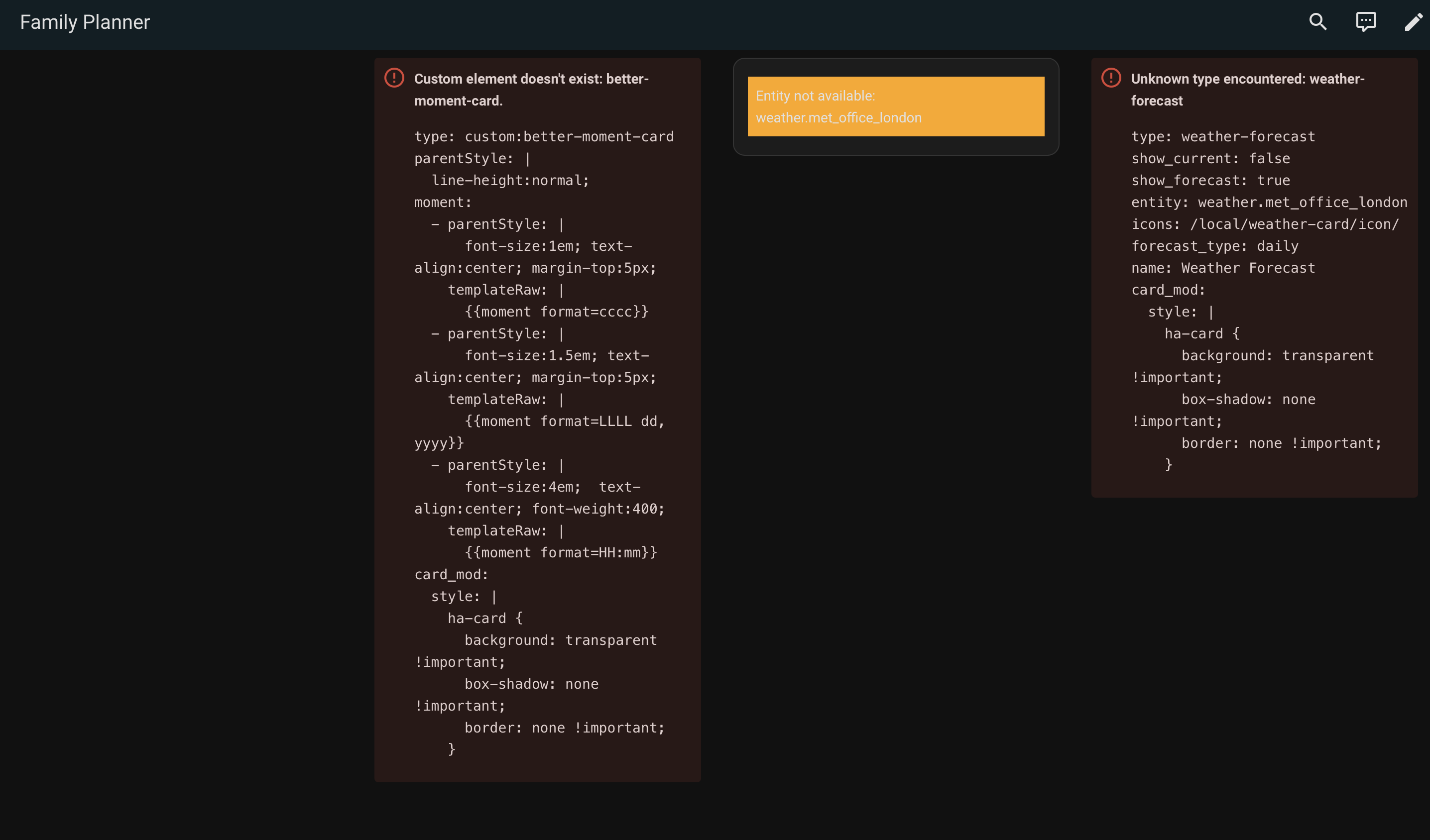
However when I then view the dashboard it displays errors and none of the time or weather is presented - see attached
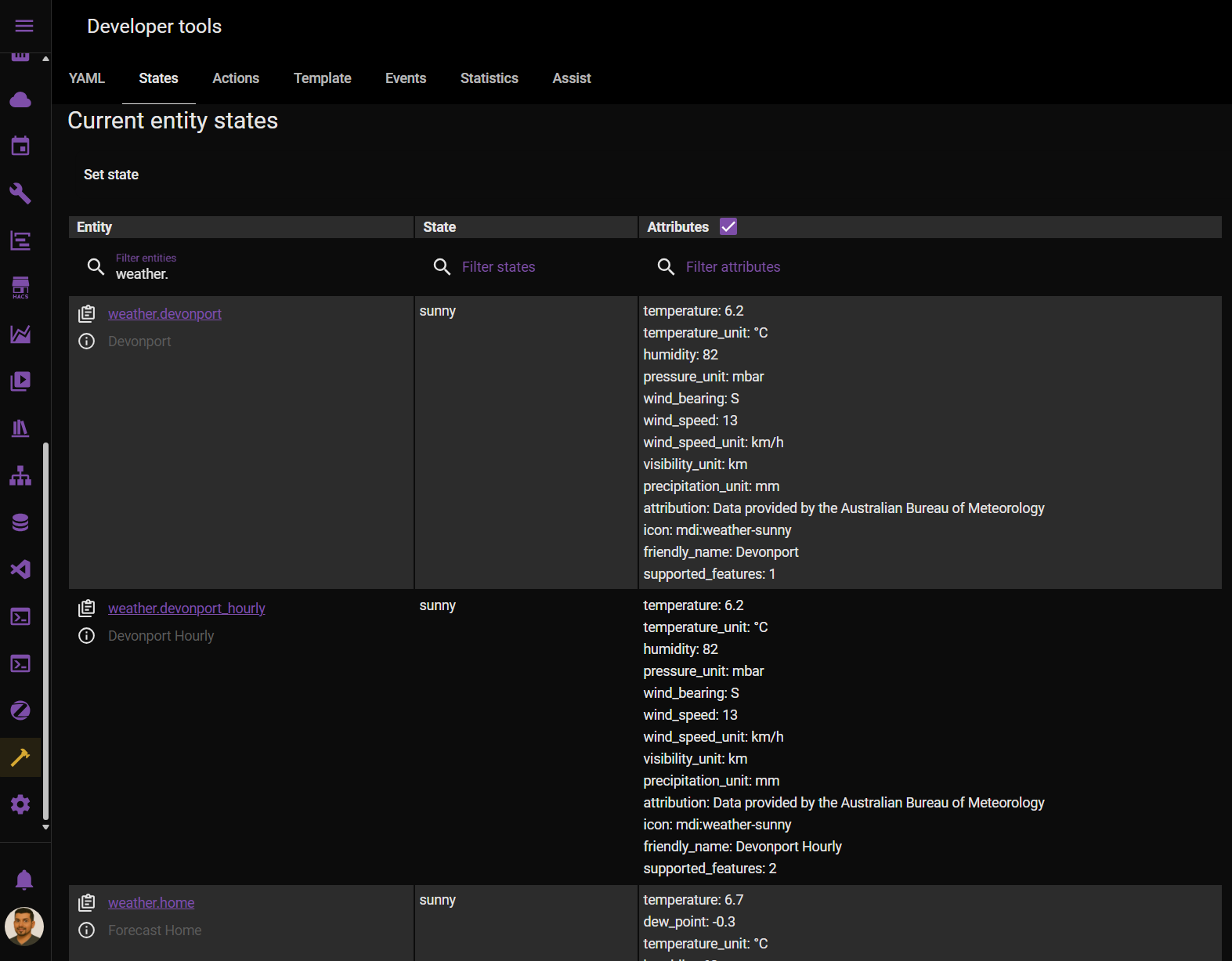
Also for the weather I’ve set the entity to “weather.met_office_london” which seemed to be a thing when I googled it, but that doesnt work. I’ve also added in the icon path.
Full code below:
views:
  - type: sections
    max_columns: 10
    title: Family Planner
    path: family-planner
    sections:
      - type: grid
        cards: null
      - type: custom:better-moment-card
        parentStyle: |
          line-height:normal;
        moment:
          - parentStyle: |
              font-size:1em; text-align:center; margin-top:5px;
            templateRaw: |
              {{moment format=cccc}}
          - parentStyle: |
              font-size:1.5em; text-align:center; margin-top:5px;
            templateRaw: |
              {{moment format=LLLL dd, yyyy}}
          - parentStyle: |
              font-size:4em;  text-align:center; font-weight:400;
            templateRaw: |
              {{moment format=HH:mm}}
        card_mod:
          style: |
            ha-card {
              background: transparent !important;
              box-shadow: none !important;
              border: none !important;
            }
      - type: custom:weather-card
        entity: weather.met_office_london
        icons: /local/weather-card/icon/
        current: true
        details: true
        forecast: false
      - type: weather-forecast
        show_current: false
        show_forecast: true
        entity: weather.met_office_london
        icons: /local/weather-card/icon/
        forecast_type: daily
        name: Weather Forecast
        card_mod:
          style: |
            ha-card {
              background: transparent !important;
              box-shadow: none !important;
              border: none !important;
            }
What have I missed as I cant tell!
Chykan
May 28, 2025, 11:09pm
86
Open Developer Tools and type weather. into the search. this will give you a list of weather providers on your instance. Most likely weather.home
Thank you. Thats pulled through the current weather, but it doesnt pull through the forecast. It looks like HA changed something in 2023 where forecasts now need to be a service/template???
However I still get the other errors related to custom elements not existing. Any ideas here please?
Thank you
1 Like
Chykan
May 30, 2025, 2:12am
88
Have you installed those cards from HACS?
type: weather-forecast
I’ve got the better-moment-card as a resource but realised I’ve only got weather-card not weather-forecast.
That said weather-forecast doesnt appear to exist as its now been replaced by services.
So I am now trying to learn about sensors and templates - interesting stuff just another layer of complexity. If anybody has any guidance or great tutorials on this it would be appreciated.
I’ve got the better-moment-card working now.
However the outstanding issues are:
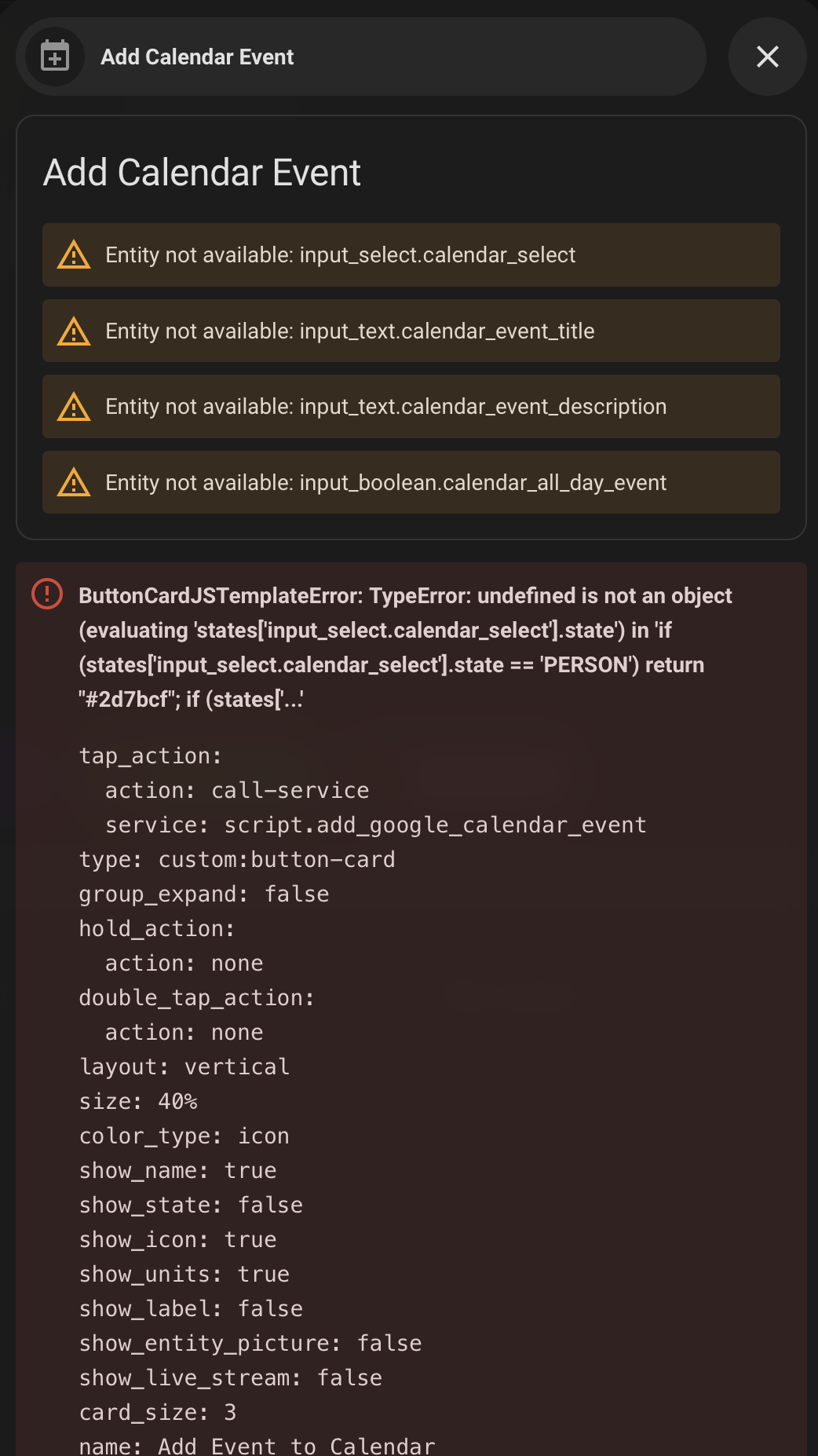
If I click “add event” I get the attached error pop up
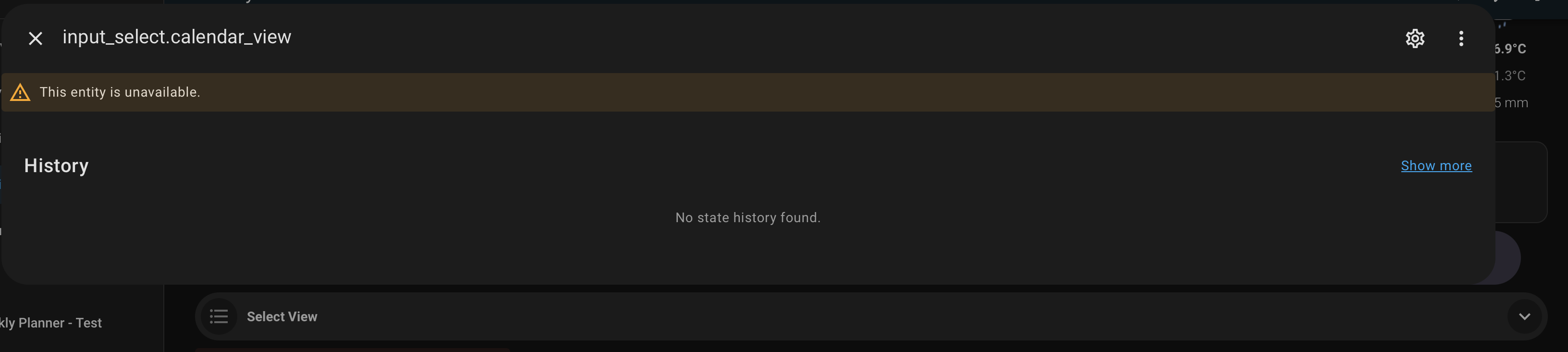
Clicking “Select View” doesnt appear to do anything
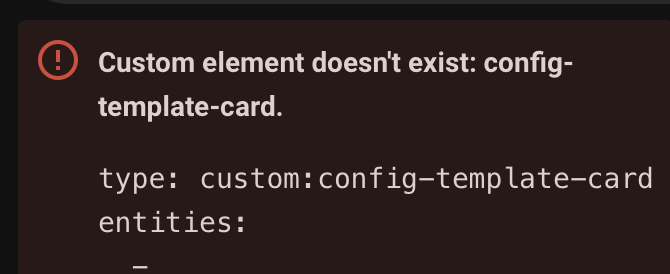
I still have issues with “config-template-card” not being recognised.
Any advise on where to start with these would be appreciated.
I’ve now resolved about 95% of the issues. Its just formatting and slight modifications now.
Thanks for a great thread! Really looking forward to using this in anger soon!
joeflan
June 6, 2025, 7:11pm
93
Do you have some decent working YAML to get started? I’ve been trying to modify myself but running into configuration issues every step of the way as well
So firstly I ended up with these mods installed:
Bubble-Card - GitHub - Clooos/Bubble-Card: Bubble Card is a minimalist card collection for Home Assistant with a nice pop-up touch. GitHub - FamousWolf/week-planner-card: Custom Home Assistant card displaying a responsive overview or multiple days with events from one of multiple calendars GitHub - ibz0q/better-moment-card: Digital date/time card for Lovelace 🕔 GitHub - bramkragten/weather-card: Weather Card with animated icons for Home Assistant Lovelace GitHub - thomasloven/lovelace-card-mod: 🔹 Add CSS styles to (almost) any lovelace card GitHub - iantrich/config-template-card: 📝 Templatable Lovelace Configurations GitHub - thomasloven/hass-browser_mod: 🔹 A Home Assistant integration to turn your browser into a controllable entity and media player
views:
- type: sections
title: Family Planner
path: family-planner
sections:
- type: custom:better-moment-card
parentStyle: |
line-height:normal;
moment:
- parentStyle: |
font-size:1em; text-align:center; margin-top:5px;
templateRaw: |
{{moment format=cccc}}
- parentStyle: |
font-size:1.5em; text-align:center; margin-top:5px;
templateRaw: |
{{moment format=LLLL dd, yyyy}}
- parentStyle: |
font-size:4em; text-align:center; font-weight:400;
templateRaw: |
{{moment format=HH:mm}}
card_mod:
style: |
ha-card {
background: transparent !important;
box-shadow: none !important;
border: none !important;
}
- type: custom:weather-card
entity: weather.forecast_home
current: true
details: true
forecast: false
card_mod:
style: |
ha-card {
background: transparent !important;
box-shadow: none !important;
border: none !important;
}
- type: grid
cards:
- show_current: false
show_forecast: true
type: weather-forecast
entity: weather.forecast_home
forecast_type: daily
forecast_slots: 10
card_mod:
style: |
ha-card {
background: transparent !important;
box-shadow: none !important;
border: none !important;
}
grid_options:
columns: 24
rows: 3
column_span: 2
- type: grid
cards:
- type: vertical-stack
cards:
- type: markdown
content: <font color="White" size="6">Family Planner</font>
grid_options:
columns: 48
rows: auto
column_span: 4
- cards:
- type: horizontal-stack
cards:
- type: custom:bubble-card
card_type: button
button_type: state
entity: person.person1
scrolling_effect: false
show_icon: true
show_name: true
show_state: false
tap_action:
action: perform-action
perform_action: script.person1_calendar_visible_filter
target: {}
button_action:
tap_action:
action: perform-action
perform_action: script.person1_calendar_visible_filter
target: {}
styles: |+
.bubble-button-background {
opacity: 1 !important;
background-color: ${hass.states['input_text.person1_calendar_filter'].state === '.*' ? 'light-grey' : '#2d7bcf'} !important;}
}
modules:
- default
- type: custom:bubble-card
card_type: button
button_type: state
entity: person.person2
scrolling_effect: false
show_icon: true
show_name: true
show_state: false
tap_action:
action: perform-action
perform_action: script.person2_calendar_visible_filter
target: {}
button_action:
tap_action:
action: perform-action
perform_action: script.person2_calendar_visible_filter
target: {}
styles: |
.bubble-button-background {
opacity: 1 !important;
background-color: ${hass.states['input_text.person2_calendar_filter'].state === '.*' ? 'light-grey' : '#e5f50c'} !important;}
}
modules:
- default
- type: custom:bubble-card
card_type: button
button_type: state
entity: person.person3
scrolling_effect: false
show_icon: true
show_name: true
show_state: false
tap_action:
action: perform-action
perform_action: script.person3_calendar_visible_filter
target: {}
button_action:
tap_action:
action: perform-action
perform_action: script.person3_calendar_visible_filter
target: {}
styles: |
.bubble-button-background {
opacity: 1 !important;
background-color: ${hass.states['input_text.person3_calendar_filter'].state === '.*' ? 'light-grey' : '#900cf5'} !important;}
}
modules:
- default
- type: custom:bubble-card
card_type: button
button_type: state
entity: person.person4
scrolling_effect: false
show_icon: true
show_name: true
show_state: false
tap_action:
action: perform-action
perform_action: script.person4_calendar_visible_filter
target: {}
button_action:
tap_action:
action: perform-action
perform_action: script.person4_calendar_visible_filter
target: {}
styles: |
.bubble-button-background {
opacity: 1 !important;
background-color: ${hass.states['input_text.person4_calendar_filter'].state === '.*' ? 'light-grey' : '#0cf537'} !important;}
}
modules:
- default
- type: custom:bubble-card
card_type: button
button_type: state
entity: person.person5
scrolling_effect: false
show_icon: true
show_name: true
show_state: false
tap_action:
action: perform-action
perform_action: script.person5_calendar_visible_filter
target: {}
button_action:
tap_action:
action: perform-action
perform_action: script.person5_calendar_visible_filter
target: {}
styles: |
.bubble-button-background {
opacity: 1 !important;
background-color: ${hass.states['input_text.person5_calendar_filter'].state === '.*' ? 'light-grey' : '#eb8af2'} !important;}
}
modules:
- default
- type: custom:bubble-card
card_type: button
button_type: state
entity: person.birthdays
name: Birthdays
scrolling_effect: false
show_icon: true
show_name: true
show_state: false
tap_action:
action: perform-action
perform_action: script.birthdays_calendar_visible_filter
target: {}
button_action:
tap_action:
action: perform-action
perform_action: script.birthdays_calendar_visible_filter
target: {}
styles: |
.bubble-button-background {
opacity: 1 !important;
background-color: ${hass.states['input_text.birthdays_calendar_filter'].state === '.*' ? 'light-grey' : 'red'} !important;}
}
modules:
- default
grid_options:
columns: 28
rows: auto
column_span: 3
- type: custom:bubble-card
card_type: button
button_type: name
card_layout: large
name: Add Event
icon: mdi:calendar-plus
tap_action:
action: navigate
navigation_path: '#addcalendarevent'
button_action:
tap_action:
action: navigate
navigation_path: '#addcalendarevent'
styles: |
* {
font-size: 1.05em !important;
}
ha-card {
--bubble-main-background-color: #393745 !important;
width: 300px;
}
.bubble-icon {
--mdc-icon-size: 30px !important;
color: snow !important;
opacity: 1;
}
.bubble-icon-container {
background: #393745 !important;
display: flex;
}
.bubble-name {
color: snow !important;
opacity: 1;
display: flex;
line-height: 18px;
flex-direction: row;
justify-content: center;
flex-grow: 1;
margin: 0 40px 0 0;
pointer-events: none;
position: relative;
overflow: hidden;
}
- type: custom:bubble-card
card_type: select
entity: input_select.calendar_view
show_name: true
show_state: true
name: Select View
show_last_changed: false
show_attribute: false
column_span: 1
- type: custom:config-template-card
entities:
- input_text.person1_calendar_filter
- input_text.person2_calendar_filter
- input_text.person3_calendar_filter
- input_text.person4_calendar_filter
- input_text.person5_calendar_filter
- input_text.birthdays_calendar_filter
- input_select.calendar_view
variables:
PERSONCAL: states['input_text.person1_calendar_filter']?.state
PERSON2CAL: states['input_text.person2_calendar_filter']?.state
PERSON3CAL: states['input_text.person3_calendar_filter']?.state
PERSON4CAL: states['input_text.person4_calendar_filter']?.state
PERSON5CAL: states['input_text.person5_calendar_filter']?.state
BIRCAL: states['input_text.birthdays_calendar_filter']?.state
VIEW: states['input_select.calendar_view']?.state
DAYS: |
(() => {
const calendarView = states['input_select.calendar_view']?.state;
if (calendarView === 'Today') return 1;
if (calendarView === 'Tomorrow') return 2;
if (calendarView === 'Overmorrow') return 3;
// Check for Month, Biweek, or Week based on screen width
if (calendarView === 'Week') return 7;
if (calendarView === 'Biweek') return 14;
if (calendarView === 'Month') return 28;
if (calendarView === 'Bimonth') return 56;
// Default fallback to 7 if no condition matches
return 28;
})()
card:
type: custom:week-planner-card
calendars:
- entity: calendar.person1
name: person1
color: '#2d7bcf'
filter: ${ PERSONCAL }
- entity: calendar.person2
name: person2
color: '#e5f50c'
filter: ${ PERSON2CAL }
- entity: calendar.person3
name: person3
color: '#900cf5'
filter: ${ PERSON3CAL }
- entity: calendar.person4
name: person4
color: '#0cf537'
filter: ${ PERSON4CAL }
- entity: calendar.person5
name: person5
color: '#eb8af2'
filter: ${ PERSON5CAL }
- entity: calendar.birthdays
name: Birthdays
color: red
filter: ${ BIRCAL }
days: ${ DAYS }
startingDayOffset: 0
hideWeekend: false
noCardBackground: false
compact: false
locale: en
showLocation: true
hidePastEvents: false
hideDaysWithoutEvents: false
hideTodayWithoutEvents: false
combineSimilarEvents: true
showLegend: false
legendToggle: false
showNavigation: true
texts:
monday: Mon
tuesday: Tue
wednesday: Wed
thursday: Thu
friday: Fri
saturday: Sat
sunday: Sun
yesterday: ''
today: ⭐TODAY⭐
tomorrow: ''
overmorrow: ''
card_mod:
style: |
ha-card {
.container .navigation .data-year {
position: static;
right: 60px;
}
.event.past {
opacity: .2;
background-color: gray !important;
}
.time {
color: #333333 !important;
font-size: 0.8em !important;
}
.event {
color: #333333 !important;
line-height: 16px !important;
background-color: var(--border-color) !important;
border-radius: 10px !important;
max-height: 80px !important;
overflow: hidden !important;
font-size: 1.1em !important;
}
.none {
background-color: transparent !important;
}
.today .number {
border-radius: 5px;
background-color: orange !important;
padding-left: 4px;
padding-right: 4px;
}
.day .date .text {
font-size: 1em !important;
font-weight: bold !important;
}
.day .date .number {
font-weight: bold !important;
font-size: 3em !important;
}
.day {
--background-color: red;
border: solid 1px whitesmoke;
padding: 0.2%;
width: 13% !important;
}
}
column_span: 4
- type: grid
cards:
- type: vertical-stack
cards:
- type: custom:bubble-card
card_type: pop-up
hash: '#addcalendarevent'
button_type: name
name: Add Calendar Event
icon: mdi:calendar-plus
scrolling_effect: false
show_icon: true
show_name: true
styles: |
.bubble-button-card-container {
background:
${hass.states['input_select.calendar_select'].state ==
'person1' ? '#2d7bcf
: hass.states['input_select.calendar_select'].state ==
'person2' ? '#e5f50c'
: hass.states['input_select.calendar_select'].state ==
'person3' ? '#900cf5'
: hass.states['input_select.calendar_select'].state ==
'person4' ? '#0cf537'
: hass.states['input_select.calendar_select'].state ==
'person5' ? '#eb8af2'
: hass.states['input_select.calendar_select'].state ==
'Birthdays' ? '#B2BEB5'
: 'red'} !important;
}
- type: vertical-stack
cards:
- type: entities
entities:
- entity: input_select.calendar_select
- entity: input_text.calendar_event_title
name: Event Title
- entity: input_text.calendar_event_description
name: Event Description
- entity: input_boolean.calendar_all_day_event
name: All Day Event
title: Add Calendar Event
state_color: false
- type: conditional
conditions:
- entity: input_boolean.calendar_all_day_event
state: 'off'
card:
type: entities
entities:
- entity: input_datetime.calendar_event_start
name: Start Time
- entity: input_datetime.calendar_event_end
name: End Time
- type: conditional
conditions:
- entity: input_boolean.calendar_all_day_event
state: 'on'
card:
type: entities
entities:
- entity: input_datetime.calendar_day_event_start
name: Event Start Date
- entity: input_datetime.calendar_day_event_end
name: Event End Date
- type: custom:button-card
name: Add Event to Calendar
tap_action:
action: call-service
service: script.add_google_calendar_event
styles:
card:
- background-color: |
[[[
if (states['input_select.calendar_select'].state == 'person1')
return "#2d7bcf";
if (states['input_select.calendar_select'].state == 'person2')
return "#e5f50c";
if (states['input_select.calendar_select'].state == 'person3')
return "#900cf5";
if (states['input_select.calendar_select'].state == 'person4')
return "#0cf537";
if (states['input_select.calendar_select'].state == 'person5')
return "#eb8af2";
if (states['input_select.calendar_select'].state == 'Birthdays')
return "#33a02c";
return "gray";
]]]
column_span: 4
- type: custom:week-planner-card
calendars:
- entity: calendar.person1
name: person1
color: '#2d7bcf'
filter: ${ PERSONCAL }
- entity: calendar.person2
name: person2
color: '#e5f50c'
filter: ${ PERSONCAL2 }
- entity: calendar.person3
name: person3
color: '#900cf5'
filter: ${ PERSONCAL3 }
- entity: calendar.person4
name: person4
color: '#0cf537'
filter: ${ PERSONCAL4 }
- entity: calendar.person5
name: person5
color: '#eb8af2'
filter: ${ PERSONCAL5 }
- entity: calendar.birthdays
name: Birthdays
color: '#B2BEB5'
filter: ${ BIRCAL }
days: ${ DAYS }
startingDay: today
startingDayOffset: 0
hideWeekend: false
noCardBackground: false
compact: false
weather:
showCondition: true
showTemperature: false
showLowTemperature: true
useTwiceDaily: false
entity: weather.forecast_home
locale: en
showLocation: true
hidePastEvents: false
hideDaysWithoutEvents: false
hideTodayWithoutEvents: false
combineSimilarEvents: true
showLegend: false
legendToggle: false
showNavigation: true
texts:
monday: Mon
tuesday: Tue
wednesday: Wed
thursday: Thu
friday: Fri
saturday: Sat
sunday: Sun
yesterday: ''
today: ''
tomorrow: ''
overmorrow: ''
column_span: 4
cards: []
Its not the prettiest and probably flaws in it, but this accommodates 5 peoples calendars plus birthdays.
You should be able to create a new blank dashboard, then click the top right 3 dots and choose ‘Raw configuration editor’ and paste the above code.
You obviously need to setup the google calendar integration - that requires oauth setup as well:https://console.cloud.google.com/apis/library/calendar-json.googleapis.com?inv=1&invt=AbqFXw&project=ha-calendar-integration-449813
You also need to create scripts ad helpers as well.
Im new to HA and all this, so hopefully this makes sense.
3 Likes
joeflan
June 7, 2025, 3:38pm
95
This is fantastic, thank you! I was able to get most of this together with this YAML
Glad to hear, no problem, i cant really take any credit for it. It was an initial Skylight planner from Mohases on another thread, and plenty of help from others.
I’ve been on a great learning journey - read that as “hack and slash” coding
looks great but I have a problem with one script
When adding an event I get an error
Action script.add_google_calendar_event uses action browser_mod.navigate which was not found.
Could someone help me
sorry, my fault. I thought I did it
Sagemajin
June 20, 2025, 10:33pm
101
This is a great write up. I am new to HA and can follow instructions pretty well. I was able to get
Browser Mod Week Planner Card Bubble Cards Grocy (for tasks, products, and lists)config-template-card**
google calendar intergration
but got lost after step 1. I wanted to ask if there was video we can follow or if someone could help guide me. And if it was possible to tie in the calendar from multiple Iphones
Are you referring to adding more ical’s?
Im not an iphone/icloud/ianything user so limited knowledge here. But it seems similar to that of google. Two options below. Let me know if this works and happy to help step through other sections then. Warning I am also new to this
Steps to create a new calendar:
On your iPhone or iPad:
Open the Calendar app.
Tap “Calendars” at the bottom.
Tap “Add Calendar”.
Choose “Add Calendar” to create an iCloud calendar, or “Add Subscription Calendar” to subscribe to an external calendar.
Enter a name for the new calendar and choose a color.
Tap “Done”.
On iCloud.com :
Go to iCloud.com and sign in.
Click the “+” icon in the sidebar.
Enter a name for the new calendar and press Return or Enter.
Sagemajin
June 25, 2025, 6:16pm
103
Thank you! I was able to connecte my iphone to google calendar by adding my google account to my calendar app i the settings that seemed to have done it. Where do we start to get the calendar started? Any way you are on a discord channel with HA?
So you’ve managed to add calendars now?
If so then follow steps 3 and 4 from the original posters guide creating the helpers and the scripts.
Once those are in place I’ve copy/pasted my code a few posts above which should make things a bit quicker. You will just need to search for “person1” for example and rename it to the first calendar name for example
Unfortunately im not on discord