EN 16798-1 Smart Setpoint Blueprint (v5.2.0) — Full Guide & Configuration
This post explains how the blueprint works internally, how to configure it quickly, and how to troubleshoot common issues.
Disclaimer: This blueprint is inspired by EN 16798-1 comfort categories and common building automation safety patterns (window shut-off, demand reduction, minimum limits). It is not a certified implementation and not legal advice.
1) What the Blueprint actually does
Instead of time-based schedules (“8:00 → 21 °C”), the automation computes a single “target_to_send” and applies it to your thermostat:
- every 15 minutes, and
- instantly when certain sensors change (window / occupancy / sleep / pre-heat), and
- when manual setpoint changes happen (grace period + optional hold + learning).
2) Triggers (when it runs)
- Home Assistant start
- Every 15 minutes (enforcement interval)
- Manual setpoint change (immediate + debounced “settled” trigger)
- Optional instant triggers:
- window open / close
- occupancy on / off
- pre-heat on / off
- sleep on / off
3) Decision Flow (priority order)
Trigger
  |
  |-- Device available? (not unknown/unavailable) -> otherwise stop
  |-- Unit check: °C required -> otherwise stop + Logbook
  |-- Echo filter: ignore our own write-backs -> otherwise stop
  |
  |-- [1] Window open?
  |      |-- If configured preset exists -> set preset -> STOP
  |      |-- Else if hvac_mode "off" supported -> set OFF -> STOP
  |      |-- Else -> set minimum temp (frost) -> STOP
  |
  |-- [2] Window close trigger?
  |      |-- If we were in the window preset -> reset to a safe preset
  |
  |-- [3] Manual change?
  |      |-- Grace period (immediate) -> STOP
  |      |-- Optional persistent hold -> arm timer
  |      |-- Debounced trigger -> optional learning update
  |
  |-- [4] Core calculation:
  |      profile base -> comfort band (static/adaptive) -> learning offset
  |      -> presence/sleep/eco shifts -> radiant correction
  |      -> frost/mold/dewpoint limits -> clamp + step rounding -> optional ramp
  |
  `-- [5] Apply:
         set hvac mode (if needed)
         enforce preset mode (optional)
         set temperature (only if change >= target step)
4) Quick Start (recommended config)
Required
- Climate Device (
climate_entity)
- Room Category (
room_type)
Strongly recommended
- Window sensor (
window_sensor)
- Outdoor/Trm sensor (
trm_sensor)
- Humidity sensor (
humidity_sensor) to enable mold/dewpoint protection
Nice to have
- Occupancy (
occupancy_sensor)
- Sleep (
sleep_sensor)
- Pre-Heat / Forced Comfort (
pre_heat_sensor)
- Operative/Globe temperature (
operative_temp_sensor)
- Helpers for Learning (
input_number) and Manual Hold (input_datetime)
5) Room Profiles (base setpoints)
These are the base targets before comfort bands, offsets, and safety floors apply:
| Room Profile |
Base Setpoint |
EN Category |
| Living Room / Office |
21.5 °C |
II |
| Children’s Room |
22.0 °C |
II |
| Bedroom |
18.5 °C |
III |
| Kitchen |
20.5 °C |
II |
| Bathroom |
22.5 °C |
I |
| WC / Restroom Office |
21.0 °C |
II |
| Hallway / Utility |
17.5 °C |
III |
| Workshop |
17.0 °C |
III |
| Storage / Frost Protection |
16.0 °C |
III |
6) Comfort Band: Static vs. Adaptive
A) Static comfort band
If adaptive is not applicable, the blueprint uses fixed category bands depending on the season (heating/cooling/transition).
B) Adaptive comfort band (optional)
Adaptive is active only if:
- Trm is numeric and within 10–30 °C
- If Trm entity is
weather.*, band shifting is disabled by default to avoid jumps
(enable Allow Adaptive from Weather if you really want it)
Neutral temperature:
T_neutral = 0.33 * Trm + 18.8 (rounded to 0.1)
Band width by category:
- Category I: ±2 K
- Category II: ±3 K
- Category III: ±4 K
Tip: For stable behavior, feed a smoothed sensor (true running mean) into trm_sensor.
7) Season logic & Summer lockout
Season derived from Trm:
- Trm < 10 °C → heating
- Trm > 15 °C → cooling
- 10–15 °C → transition
- If Trm missing → Quick Start behavior based on thermostat mode/action
Transition Season Policy
- Bias Heating / Bias Cooling / Neutral / Auto
Summer Cut-Off (Heating Limit)
- If Trm exceeds
summer_lock_trm (default 19 °C), heating can be shut down (OFF)
- If the thermostat does not support OFF, the blueprint falls back to the configured minimum temperature
8) Presence / Eco / Sleep behavior
Starting from the comfort target (already clamped into the chosen band):
Absent (Eco)
- Shift by
eco_shift_k (default 2.0 K)
- heating: lower target
- cooling: raise target
Sleep
- Shift by
sleep_shift_k (default 2.0 K)
- heating: always cooler
- cooling: configurable
- OFF (default): warmer / less cooling (energy saving)
- ON: cooler (comfort)
Allow Deep Eco
- Enabled (default): Eco may drop below strict band limits
- Disabled: Eco stays within the comfort band
9) Radiant correction (Operative / Globe sensor)
If you provide an operative temperature sensor:
rad_offset = clamp(air_temp - operative_temp, -3 … +3)target += rad_offset
This helps compensate for cold/warm surfaces (radiant discomfort).
10) Safety logic (Frost / Mold / Dewpoint)
Frost floor (heating)
minimum_limit_temp (default 16 °C)
Mold guard (heating only)
- If RH >
mold_protection_rh (default 65%), minimum becomes 18 °C
Dewpoint guard (cooling only, requires humidity sensor)
The blueprint uses a simple approximation:
dp ≈ current_temp - ((100 - RH) / 5)- enforces
target >= dp + 2 °C
11) Manual Override (don’t fight the user)
Grace period (always)
Manual setpoint changes immediately stop enforcement. Periodic enforcement also respects recent user interaction.
Persistent “Hold until …” (optional)
If Override Behavior = Keep until...:
- Provide an
input_datetime helper (must have date & time)
- Any manual change arms the hold for
manual_hold_minutes (default 75 minutes)
- While active, the automation will not overwrite setpoints (except window-close wake logic)
Detection sensitivity
- Strict: dashboard/app changes only (requires user_id context)
- Lenient (default): best-effort detection of physical/hardware changes
12) Smart Learning (optional)
If enabled and a learning helper is set:
- On the debounced “settled” manual change trigger, the blueprint adjusts a learned offset
- Step size:
learn_step_k (default 0.5 K)
- Maximum learned offset:
learn_max_k (default 1.0 K)
- Additional safety: learning is always clamped to the current comfort band
Best practice: Put the helper on your dashboard so you can reset it to 0.0 anytime.
13) Ramp Limiting (optional)
If enabled, setpoint changes happen gradually:
- Heating ramp speed:
ramp_up_kph (°C/h)
- Cooling ramp speed:
ramp_down_kph (°C/h)
This reduces valve movement and can improve battery life, but the system will feel “slower” to react.
14) Recommended Helpers (how to create)
A) Learning Offset Helper (input_number)
- Settings → Devices & Services → Helpers → Number
- Example:
- Name:
Heating Learn Offset
- Min:
-3
- Max:
+3
- Step:
0.1
B) Manual Hold Helper (input_datetime)
- Helpers → Date and/or Time
- Enable Date & Time (not date-only)
15) Suggested minimal dashboard
Entities card:
- Thermostat (climate)
- Window sensor
- Occupancy / Sleep
- Humidity
- Trm sensor
- Learn Offset (
input_number)
- Manual Hold until (
input_datetime)
Buttons (optional):
- Reset Learn Offset → set helper to 0
- Force Comfort (Pre-Heat) toggle
16) Troubleshooting
“It keeps overwriting my manual setpoint.”
- Enable Keep until… and provide the
input_datetime helper
- Use Lenient detection if you adjust the thermostat physically
“Adaptive comfort jumps around.”
- Don’t use
weather.* for band shifting unless you really want it
- Feed a smoothed / averaged sensor as Trm
“Thermostat won’t turn OFF.”
- Some devices don’t support
hvac_mode: off → use window_open_preset or rely on min temp fallback
“Too many tiny setpoint changes.”
- Enable Ramp Limiting
- Check your thermostat’s
target_temp_step
 EN 16798-1 Smart Setpoint Blueprint (v5.2.0) — “Fire-and-Forget” Room Setpoints
 Room profiles mapped to EN 16798-1 Categories I–III
Celsius only (°C). If your thermostat reports °F, the automation stops and logs a critical message.
 Install / Import
 Full guide & configuration walkthrough in Post 2/2 below.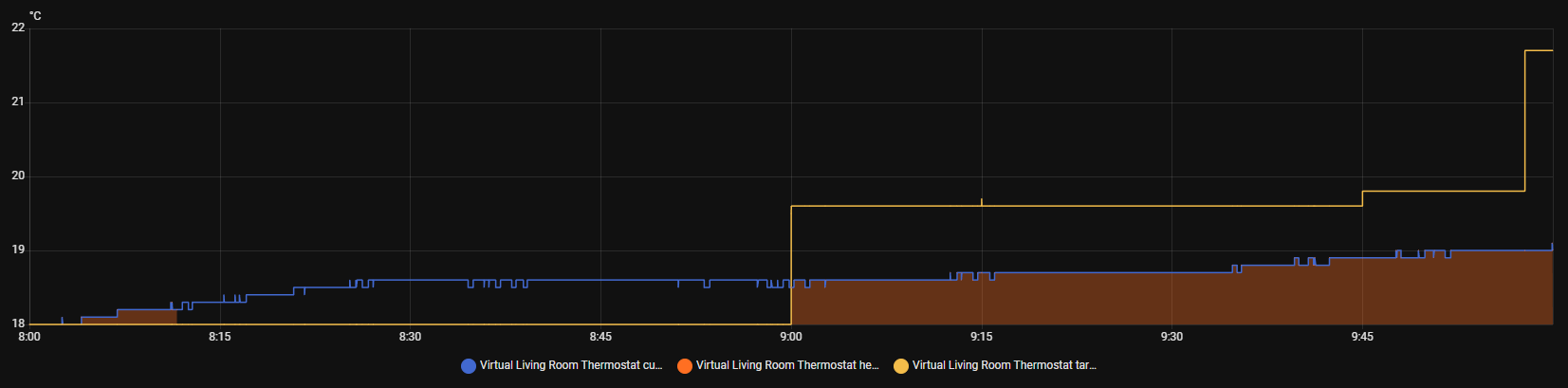
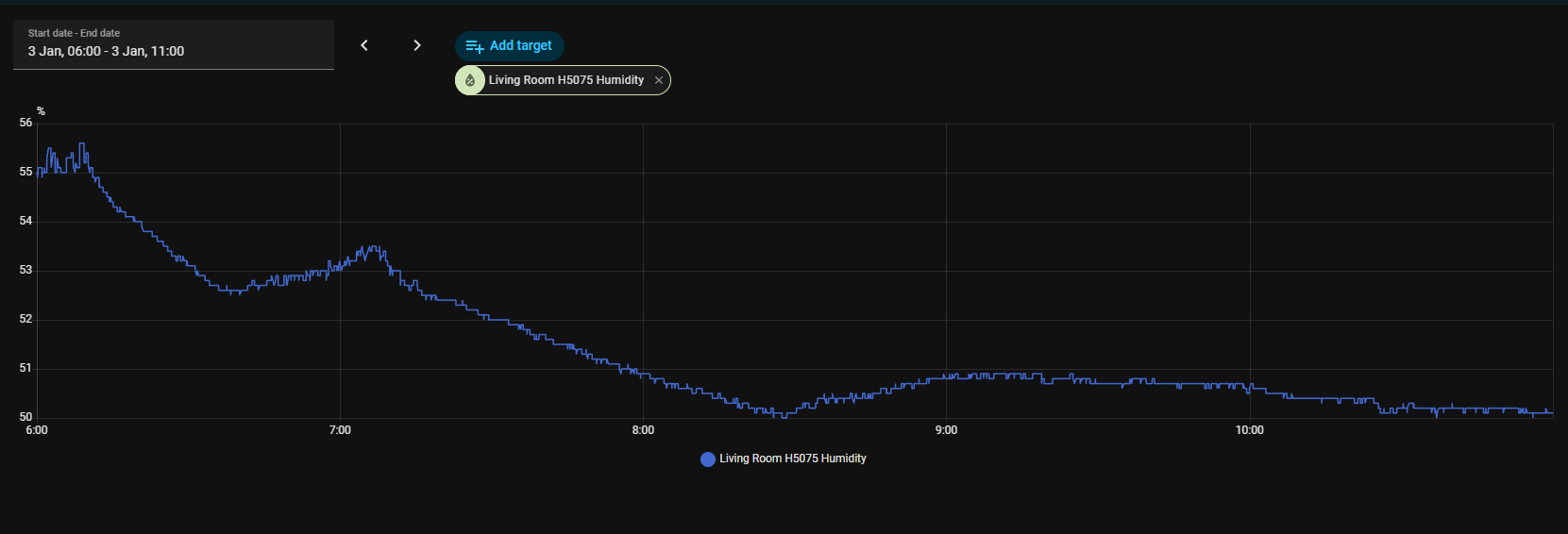
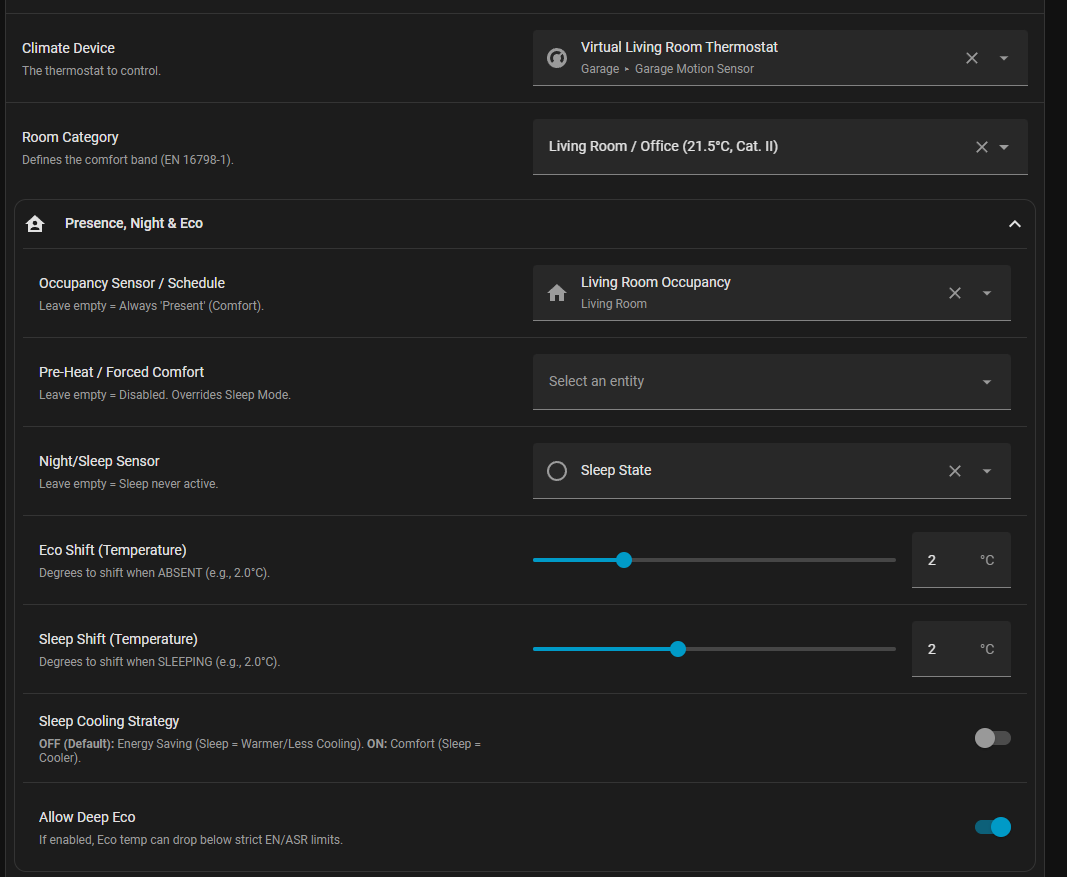

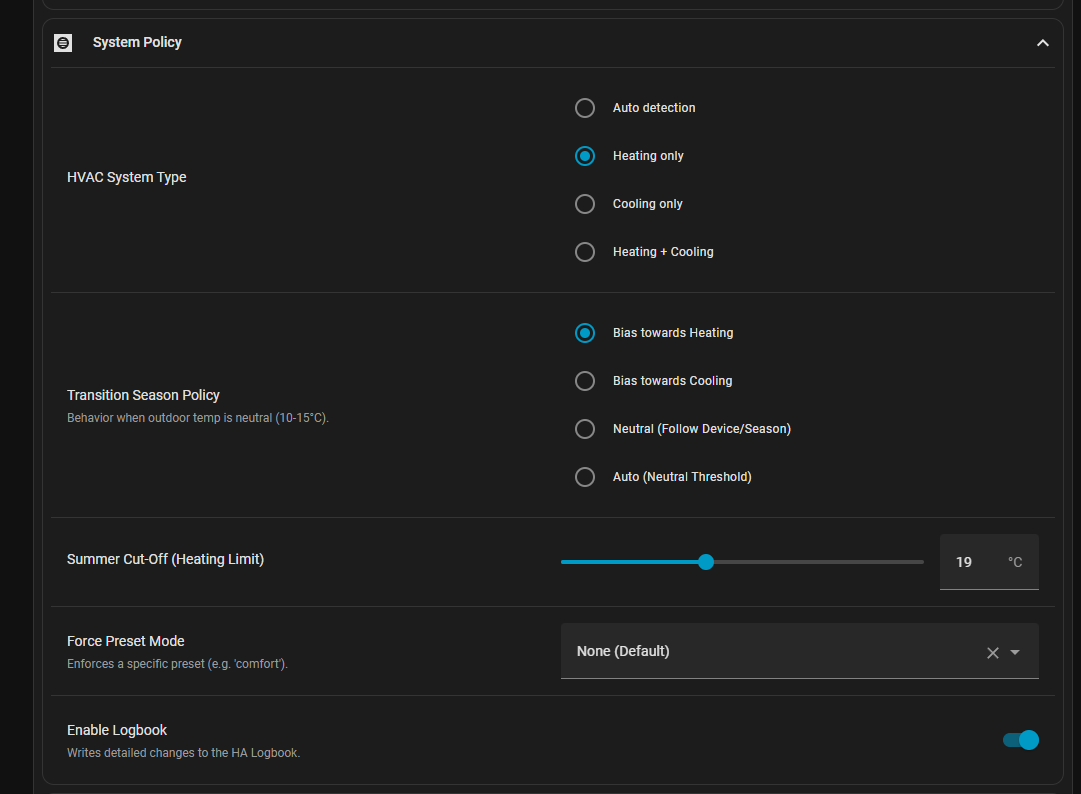
 Mathematically, the Blueprint calculates a minimum target of ~20.0°C (Category II) or ~19.5°C (Eco with Shift). It would never autonomously set 18.0°C in this scenario. However, 18.0°C is a classic default value for a native device schedule (Night Setback) on many smart thermostats.
 v5.3.1 Bugfix Release — Summer Cut-Off now actually works for heating-only devices


 Input change: Summer Cut-Off range & default
 Recommendation for heating-only setups: tune the Summer Cut-Off per room
 Updates v5.3.2 & v5.3.3 — Heating-only fixes + configurable window delays
 v5.3.3
 New: configurable Window Open & Close Delay