I’d like to invite everyone to vote/comment on this Home Assistant feature request:
Wouldnt it make sense to build hourly averages and calculate an hourly COP. I dont think minute COPs make any sense. COP granularity per day should be good enough. Hourly is already quite nerdy 
I do only calculate daily, monthly and yearly COP values. The diagram was just a visualization of the issue.
@brambo123 created a new branch, in which the energy is calculated on the ESP with a higher resolution now: GitHub - brambo123/esphome-sensostar at sub-integer-energy
Thus, the issue is solved for me. 
The second batch of PCBs arrived today. Shipping will begin after the New Year.
I would like to wish you all a happy New Year!
Good news! I can’t wait to test it next month! Michael
What type of JST connector is required for power supply?
Housing
JST PH2P BU
Crimp Contact
JST PH CKB
2mm pitch.
So well just wait for your email with the payment info right? Cant wait to test it
Yes, I’m currently crimping the cables and spot welding the batteries, etc.
I will send out a bunch of emails every time I have a sufficient amount of accessories. I hope that by the end of January, everything will have been shipped.
Dirk.
Hi Dirk,
I am happy to share that I have received my package (PCB, PowerDongle, Battery and USB-Cable) in good condition.
Have fitted it to my Sensostar yesterday and it is working like a charm.
Thank you very much for all your effort and your excellent work!!!
Ole
The second batch of orders has now been fully processed. Anyone who ordered an adapter should have received an email containing payment information.
All orders paid for by today have already been shipped.
Any orders that have not been paid for within 10 days will be automatically cancelled. There are some people on the waiting list. I will offer these adapters to them.
Regards,
Dirk
The PCB has arrived today and I installed it instantly.
It works like a charm!
Many Thanks to @STB3 for the good work.
I have an Brummerhoop F90U3 Sensor which comes from the same manufacturer as the Sensostar.
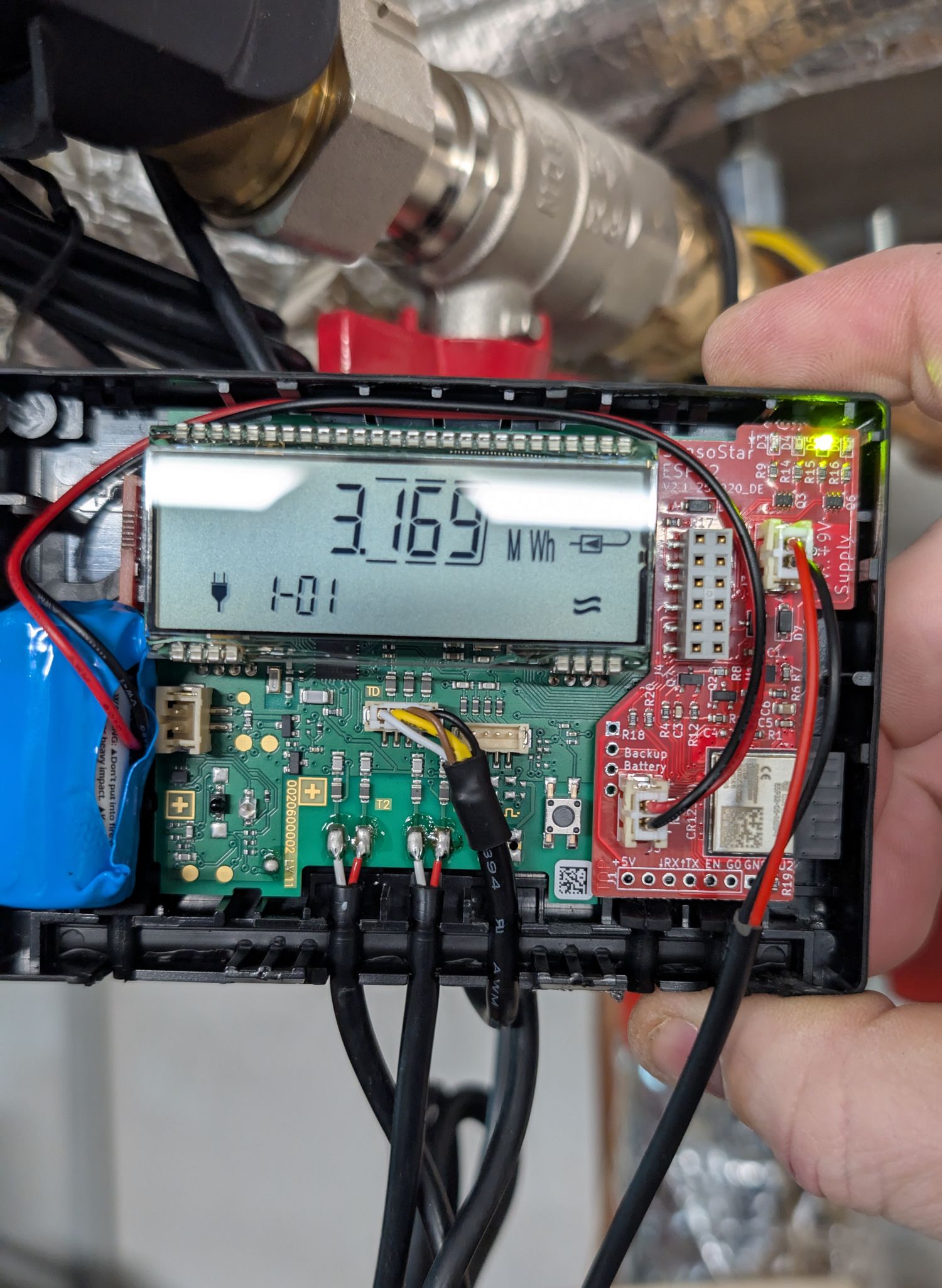
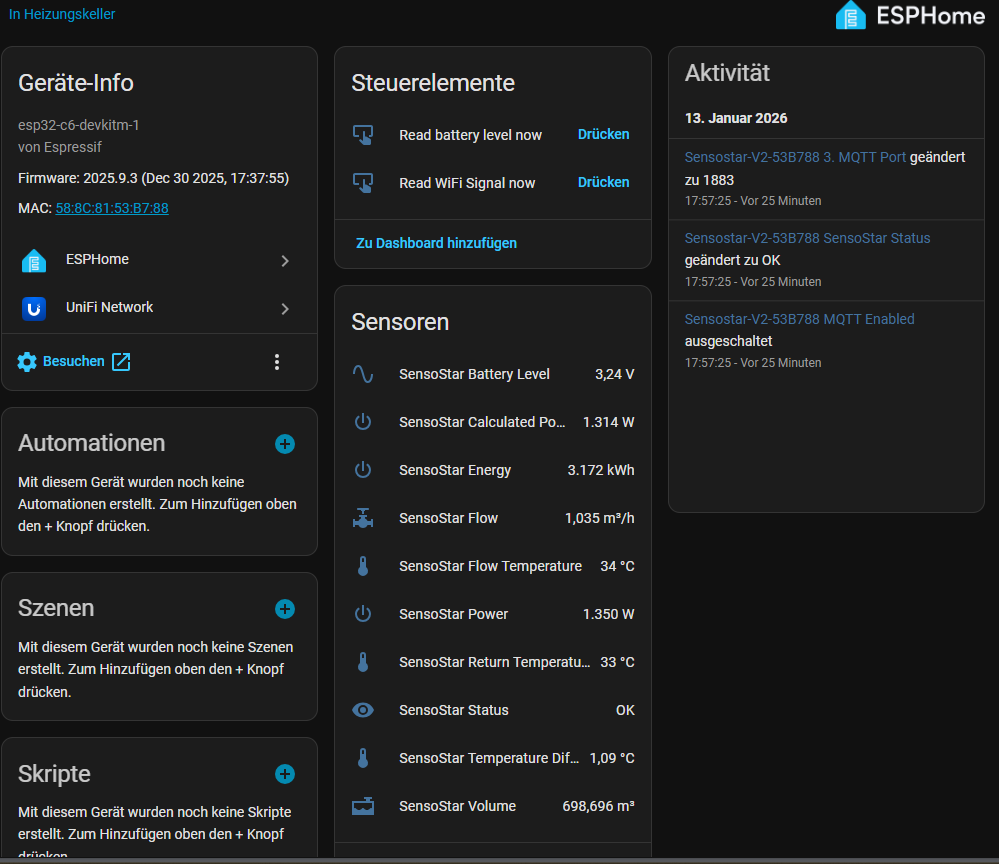
Thanks for the fast delivery. The PCB arrived today. Installation was easy. Your documentation is perfect! I can confirm: it works also well with “Wassergeräte GmbH - Volumess VI-E”. they seem to use the same chinese manufacturer as Sensostar and Brummerhoop.
Thanks for the board. Easy to install with your instruction, took just 10 minutes. Most struggle was about opening the plastic case 
I can confirm that it works with a “Molline Wingman C3” which is obviously a rebranded Engelmann Sensostar.
Thanks a lot for this fantastic project !
Uwe
Dirk, thank You very much. Installation worked fine and I was very much surprised to see the values immediately in my HomeAssistant System! Very nice and many thanks!!
Roland
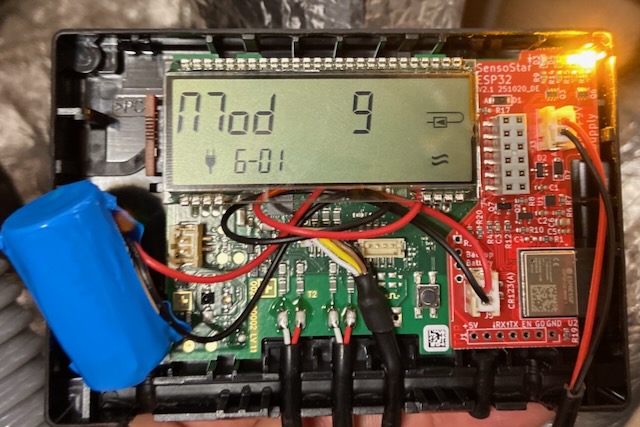
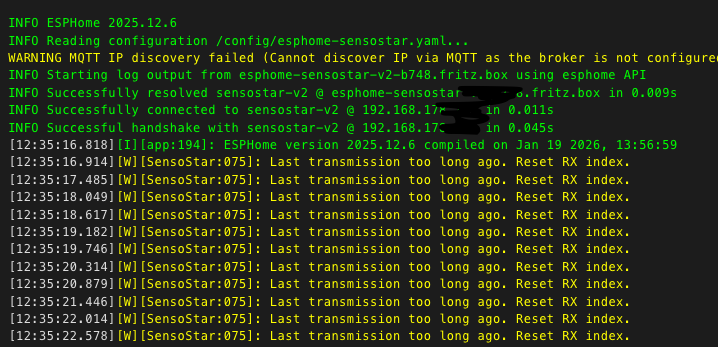
Yes, it looks like there is no data coming from the heat meter as is.
Did you flash modifications to the board or is it the stock firmware it came with?
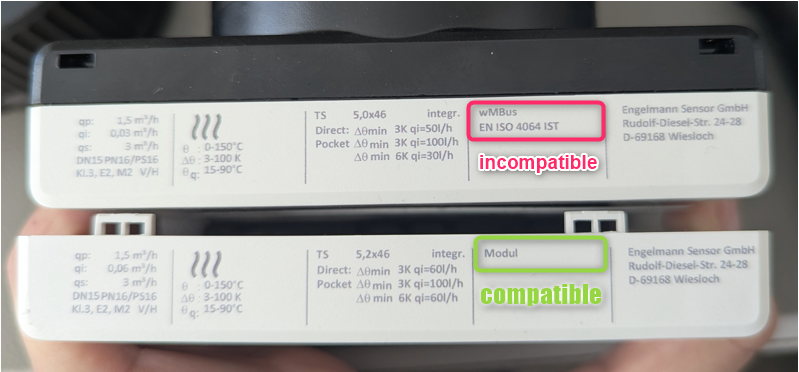
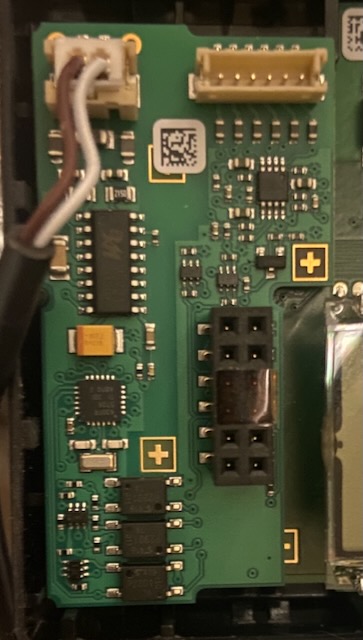
Could you post a picture of the MBUS module? I’d like to compare it with mine to see if there are any differences.
Is the red LED blinking?
Regards,
Dirk
Hi Dirk,
No, it’s not the firmware you played. I compiled it with the following yaml using esphome 2025.12.6. The red LED is not flashing.
# Flash using --device COMXX otherwise it is difficult to flash using USB
esphome:
  name: sensostar-v2
  name_add_mac_suffix: false
  comment: SensoStar Energy Meter
  platformio_options:
    board_build.arduino.memory_type: qio_opi
  on_boot:
    then:
      - mqtt.disable:
      - output.turn_off: adc_control  # IO14 LOW at boot
      - script.execute: read_adc_script  # Immediately read ADC once at boot
      - lambda: |-
          if (!id(wifi_connected)) {
            id(ap_mode_blink).execute();
          }
#          id(api_key_text).publish_state("${api_key_display}");    # uncommet if you want to use an api key

esp32:
  variant: esp32c6
  framework:
    type: esp-idf

wifi:
# Uncomment this if you have ented your credentials in the secrets.yaml
# anyway at least the api_encryption_key: section must be present in the secrets.yaml
  use_address: esphome-sensostar-xxxx.fritz.box
  ssid: !secret wifi_ssid
  password: !secret wifi_password
  power_save_mode: NONE
  ap:
    ssid: "Sensostar"
  reboot_timeout: 0s

  on_connect:
    - script.stop: ap_mode_blink
    - output.turn_on: wifi_led
    - lambda: |-
       if (id(mqtt_enabled).state) {
         ESP_LOGI("wifi", "Wi-Fi connected and MQTT switch is ON — enabling MQTT");
         id(mqtt_broker).enable();
       }

  on_disconnect:
    - script.execute: ap_mode_blink

captive_portal:

logger:
  level: info
#  hardware_uart: UART0
#  baud_rate: 115200

api:
  encryption:                                                              # uncommet if you want to use an api key
    key: "GzGxxxxxxxxxxxxxxxLJZkW40+Qok=" # create use openssl rand -base64 32   # uncommet if you want to use an api key
  reboot_timeout: 600min

ota:
  platform: esphome
  password: "8xxxxxxxxxxxx5d5a"

web_server:
  version: 3
  port: 80


external_components:
#  - source: github://pr#8103
#    components: [uart]
  - source:
      #type: local
      #path: !secret local_path
      type: git                                         # Be careful ESPhome is caching the repository. Do the following to update the cache
      url: https://github.com/STB3/esphome-sensostar    # Deleting the .esphome/external_components/ cache, or
      ref: main  # or a specific commit SHA             # Using a ref: to pin to a specific commit or branch.
    components: [ SensoStar_MBus ]

time:
  - platform: sntp
    id: sntp_time
    timezone: Europe/Amsterdam
    servers: ["0.nl.pool.ntp.org", "1.nl.pool.ntp.org", "2.nl.pool.ntp.org"]

uart:
  - id: uart_mbus
    tx_pin: GPIO6
    rx_pin: GPIO7
    baud_rate: 2400
    parity: EVEN

SensoStar_MBus:
  id: sensostar_id
  uart_id: uart_mbus
  update_interval: 10s
  data_led: mbus_data_led

sensor:
  - platform: SensoStar_MBus
    energy:
      name: "SensoStar Energy"
    volume:
      name: "SensoStar Volume"
    power:
      name: "SensoStar Power"
#      on_value:
#        then:
#          - output.turn_on: mbus_yellow_led
#          - delay: 200ms
#          - output.turn_off: mbus_yellow_led
    flow:
      name: "SensoStar Flow"
    temperature_flow:
      name: "SensoStar Flow Temperature"
    temperature_return:
      name: "SensoStar Return Temperature"
    temperature_diff:
      name: "SensoStar Temperature Difference"
    calculated_power:
      name: "SensoStar Calculated Power"

  - platform: adc
    pin: GPIO1
    id: adc_input_sensor
    name: "SensoStar Battery Level"
    update_interval: never  # done by interval:
    filters:
      - lambda: return x * 3.6; # Vbat is measured via a resistive divider 39k--o--15k

  - platform: wifi_signal
    name: "SensoStar WiFi Signal"
    id: wifi_signal_sensor
    update_interval: 60s

substitutions:
  api_key_display: "GzGXiZFbY8xslEQVoSnEZdwT7Fcwh80bLJZkW40+Qok=" #!secret api_encryption_key

text_sensor:
  - platform: SensoStar_MBus
    status:
      name: "SensoStar Status"

# Show API encryption key in the web interface
#  - platform: template                         # uncommet if you want to use an api key
#    name: "API Encryption Key"                 # uncommet if you want to use an api key
#    id: api_key_text                           # uncommet if you want to use an api key
#    entity_category: config                    # uncommet if you want to use an api key
#    lambda: |-                                 # uncommet if you want to use an api key
#      return std::string("${api_key_display}");# uncommet if you want to use an api key
#    update_interval: never                     # uncommet if you want to use an api key

output:
  - platform: gpio
    pin: GPIO14
    id: adc_control
  - platform: gpio
    pin: GPIO4
    id: heartbeat_output
  - platform: gpio
    pin: GPIO3
    id: wifi_led
  - platform: gpio
    pin: GPIO2
    id: mbus_data_led
  - platform: gpio
    pin: GPIO5
    id: mbus_yellow_led

script:
  - id: read_adc_script
    then:
      - output.turn_on: adc_control     # Set IO14 HIGH
      - delay: 8ms  # wait until the capacitor on the resistive divider is charged
      - component.update: adc_input_sensor  # Trigger ADC read
      - output.turn_off: adc_control      # Set IO14 LOW

  - id: ap_mode_blink
    mode: restart
    then:
#      - logger.log: "AP mode blinking started"
      - while:
          condition:
            lambda: 'return !id(wifi_connected);'
          then:
            - output.turn_on: wifi_led
            - delay: 200ms
            - output.turn_off: wifi_led
            - delay: 1000ms

interval:
  - interval: 600s
    then:
      - script.execute: read_adc_script
  - interval: 5s
    then:
      - light.turn_on: heartbeat_led
      - delay: 500ms
      - light.turn_off: heartbeat_led

button:
  - platform: template
    name: "Read battery level now"
    on_press:
      then:
        - script.execute: read_adc_script
  - platform: template
    name: "Read WiFi Signal now"
    on_press:
      then:
        - component.update: wifi_signal_sensor

light:
  - platform: binary
    id: heartbeat_led
    output: heartbeat_output
    internal: true  # hide from Home Assistant unless needed

binary_sensor:
  - platform: status
    name: "ESP Status"
    id: esp_status
    internal: true  # hide from Home Assistant unless needed

globals:
  - id: wifi_connected
    type: bool
    restore_value: no
    initial_value: 'false'

mqtt:
   enable_on_boot: false
   broker: ""
   id: mqtt_broker
   username: ""
   password: ""

text:
 - platform: template
   mode: text
   name: "1. MQTT address"
   id: "broker_address"
   icon: "mdi:text"
   optimistic: true
   internal: false
   entity_category: config
   initial_value: ""
   restore_value: true
   on_value:
      then:
        - logger.log:
            format: "%s"
            args: ["x.c_str()"]
        - lambda: |-
            id(mqtt_broker).set_broker_address(x.c_str());
            ESP_LOGI("mqtt", "MQTT broker set to %s", x.c_str());

 - platform: template
   mode: text
   name: "3. MQTT Username"
   id: "mqtt_user"
   icon: "mdi:text"
   optimistic: true
   internal: false
   entity_category: config
   initial_value: ""
   restore_value: true
   on_value:
      then:
        - logger.log:
            format: "%s"
            args: ["x.c_str()"]
        - lambda: |-
            id(mqtt_broker).set_username(x.c_str());
            ESP_LOGI("mqtt", "MQTT user set to %s", x.c_str());

 - platform: template
   mode: password
   name: "4. MQTT Password"
   id: "mqtt_pwd"
   icon: "mdi:text"
   optimistic: true
   internal: false
   entity_category: config
   initial_value: ""
   restore_value: true
   on_value:
      then:
        - logger.log:
            format: "%s"
            args: ["x.c_str()"]
        - lambda: |-
            id(mqtt_broker).set_password(x.c_str());
            ESP_LOGI("mqtt", "MQTT password set to %s", x.c_str());

 - platform: template
   mode: text
   name: "3. MQTT Port"
   id: "mqtt_port"
   icon: "mdi:text"
   optimistic: true
   internal: false
   entity_category: config
   initial_value: "1883"
   restore_value: true
   on_value:
      then:
        - logger.log:
            format: "%s"
            args: ["x.c_str()"]
        - lambda: |-
            // Convert string to integer
            uint16_t port = (uint16_t) atoi(x.c_str());
            // Safety check (valid range for MQTT ports)
            if (port < 1 || port > 65535) {
              ESP_LOGW("mqtt", "Invalid port %d, ignoring", port);
            } else {
              id(mqtt_broker).set_broker_port(port);
              ESP_LOGI("mqtt", "MQTT Port set to %d", port);
            }

switch:
  - platform: template
    name: "MQTT Enabled"
    id: mqtt_enabled
    optimistic: true
    restore_mode: "RESTORE_DEFAULT_OFF"
    entity_category: config

    turn_off_action:
      - logger.log: "MQTT disabled"
      - mqtt.disable:
      - lambda: |-
            ESP_LOGI("mqtt", "MQTT: disabled.");

    turn_on_action:
      - lambda: |-
          // Get values from text/number inputs
          std::string addr = id(broker_address).state;
          uint16_t port = (uint16_t)atoi(id(mqtt_port).state.c_str());

          // Validate broker address
          if (addr.empty()) {
            ESP_LOGW("mqtt", "Cannot enable MQTT: broker address is empty");
            id(mqtt_enabled).turn_off();
            return;
          }

          // Validate port
          if (port < 1 || port > 65535) {
            ESP_LOGW("mqtt", "Cannot enable MQTT: invalid port %d", port);
            id(mqtt_enabled).turn_off();
            return;
          }

          // All checks passed, enable MQTT
          ESP_LOGI("mqtt", "MQTT enabled on %s:%d", addr.c_str(), port);
          id(mqtt_broker).set_broker_address(addr.c_str());
          id(mqtt_broker).set_broker_port(port);
          id(mqtt_broker).set_username(id(mqtt_user).state.c_str());
          id(mqtt_broker).set_password(id(mqtt_pwd).state.c_str());
          // Non-blocking delay of 1 second before enabling MQTT
          App.scheduler.set_timeout(nullptr, "mqtt_enable", 1000, []() {
          id(mqtt_broker).enable(); });
          return;
Michael