Epever wifi 2.4g rj45 d

Hi, I followed the guide provided by ReRuBabs, but I’m having trouble connecting.
192.168.1.41 is the dongle’s IP address.

Here’s the error from the Epever solar client add-on:

Starting EPEVER solar client...
2025-05-06 23:13:50,502 - epever-solar-client - INFO - Program terminated.
2025-05-06 23:13:50,502 - epever-solar-client - INFO - Epever solar client started...
2025-05-06 23:13:50,502 - epever-solar-client - INFO - Running in hass.io add-on mode
2025-05-06 23:13:50,503 - epever-solar-client - INFO - Running method: get_device_info
2025-05-06 23:13:50,503 - epever-solar-client - INFO - Running...
2025-05-06 23:13:50,511 - pymodbus.logging - ERROR - Connection to (192.168.1.41, 9999) failed: [Errno 111] Connection refused
2025-05-06 23:13:50,511 - epever-solar-client - ERROR - Cannot connect to Epever server
2025-05-06 23:13:50,511 - epever-solar-client - ERROR - get_device_info
2025-05-06 23:13:50,511 - epever-solar-client - INFO - Running method: get_battery_settings
2025-05-06 23:13:50,514 - pymodbus.logging - ERROR - Connection to (192.168.1.41, 9999) failed: [Errno 111] Connection refused
2025-05-06 23:13:50,514 - epever-solar-client - ERROR - Cannot connect to Epever server
2025-05-06 23:13:50,514 - epever-solar-client - ERROR - get_battery_settings
2025-05-06 23:13:50,514 - epever-solar-client - INFO - Running method: get_data
2025-05-06 23:13:50,517 - pymodbus.logging - ERROR - Connection to (192.168.1.41, 9999) failed: [Errno 111] Connection refused
2025-05-06 23:13:50,517 - epever-solar-client - ERROR - Cannot connect to Epever server
2025-05-06 23:13:50,517 - epever-solar-client - ERROR - get_data
2025-05-06 23:13:50,518 - epever-solar-client - INFO - Running method: get_battery_stat
2025-05-06 23:13:50,520 - pymodbus.logging - ERROR - Connection to (192.168.1.41, 9999) failed: [Errno 111] Connection refused
2025-05-06 23:13:50,521 - epever-solar-client - ERROR - Cannot connect to Epever server
2025-05-06 23:13:50,521 - epever-solar-client - ERROR - get_battery_stat
2025-05-06 23:13:50,521 - epever-solar-client - INFO - Running method: get_battery_status
2025-05-06 23:13:50,524 - pymodbus.logging - ERROR - Connection to (192.168.1.41, 9999) failed: [Errno 111] Connection refused
2025-05-06 23:13:50,524 - epever-solar-client - ERROR - Cannot connect to Epever server
2025-05-06 23:13:50,524 - epever-solar-client - ERROR - get_battery_status
2025-05-06 23:13:50,524 - epever-solar-client - INFO - Running method: get_battery_load
2025-05-06 23:13:50,527 - pymodbus.logging - ERROR - Connection to (192.168.1.41, 9999) failed: [Errno 111] Connection refused
2025-05-06 23:13:50,527 - epever-solar-client - ERROR - Cannot connect to Epever server
2025-05-06 23:13:50,527 - epever-solar-client - ERROR - get_battery_load
2025-05-06 23:14:50,528 - epever-solar-client - INFO - Running method: get_data
2025-05-06 23:14:50,534 - pymodbus.logging - ERROR - Connection to (192.168.1.41, 9999) failed: [Errno 111] Connection refused
2025-05-06 23:14:50,534 - epever-solar-client - ERROR - Cannot connect to Epever server
2025-05-06 23:14:50,534 - epever-solar-client - ERROR - get_data```

And the error from the mosquitto broker add-on:

2025-05-06 23:15:07: New connection from 192.168.1.41:52309 on port 1883.
2025-05-06 23:15:07: Client 05490126093A5Q8H-00043 disconnected, not authorised.```
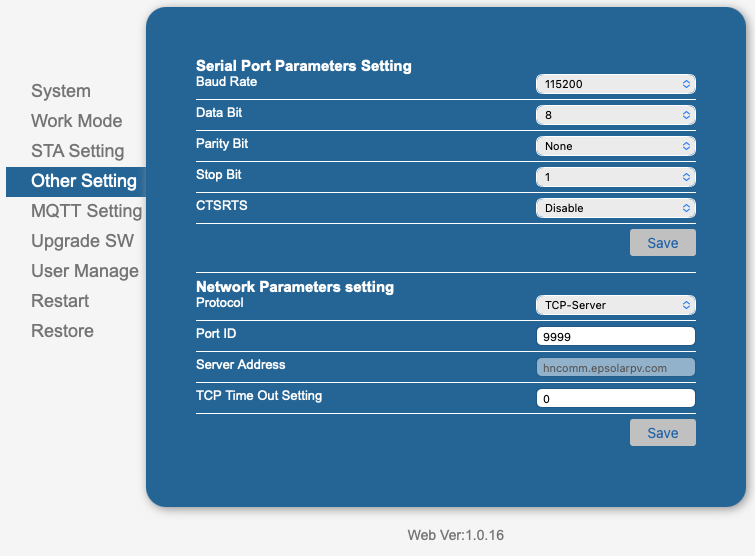
Thank you so much for documenting the how-to process you did to get this working. I am finally to a spot where I think it’s communicating, and the client doesn’t crash with errors, but I cannot find a user interface like in the picture here. where did you find that after you configured everything?.. / how did it show up for you? I’ve tried re-starting home assistant after everything says it’s communicating and the methods are running in the logs, but I cannot find the GUI

I have it set up and talking to the mqtt broker and I am getting messages in mqtt explorer now. can you tell me which configuration.yaml you added the sensor entries to? is that the main Home assistant configuration.yaml, just pasted in somewhere at the bottom? or specifically under the epever or Mqtt explorer or Mosquito configuration.yaml files?

yes, i can

configuration.yaml

mqtt: !include mqtt.yaml

mqtt.yaml

sensor:
  - name: "Mini Solar station input voltage"
    unique_id: mini_solar_station_input_voltage
    state_topic: "home/epever-solar/epever/data"
    value_template: '{{ value_json["chargingInputVoltage"] }}'
    unit_of_measurement: "V"
    device:
       identifiers: Tracer1206AN
       manufacturer: "Epever"
       name: My Mini Inverter 
       model: "V02.01+V01.22"

  - name: "Mini Solar station input current"
    unique_id: mini_solar_station_input_current
    state_topic: "home/epever-solar/epever/data"
    value_template: '{{ value_json["chargingInputCurrent"] }}'
    unit_of_measurement: "A"
    device:
       identifiers: Tracer1206AN
       manufacturer: "Epever"
       name: My Mini Inverter 
       model: "V02.01+V01.22"

  - name: "Mini Solar station input power"
    unique_id: mini_solar_station_input_power
    state_topic: "home/epever-solar/epever/data"
    device_class: power
    value_template: '{{ value_json["chargingInputPower"] }}'
    #last_reset_value_template: "{{value_json.lastUpdate | int | timestamp_custom('%d.%m.%Y %H:%M'}}"
    unit_of_measurement: "W"
    device:
       identifiers: Tracer1206AN
       manufacturer: "Epever"
       name: My Mini Inverter 
       model: "V02.01+V01.22"

  - name: "Mini Solar station energy today"
    unique_id: mini_solar_station_energy_today
    state_topic: "home/epever-solar/epever/stat"
    value_template: '{{value_json["generatedEnergyToday"] }}'
    device_class: energy
    #state_class: measurement
    state_class: total
    unit_of_measurement: "kWh" 
    last_reset_value_template: '{{today_at("00:00:00")}}'
    device:
       identifiers: Tracer1206AN
       manufacturer: "Epever"
       name: My Mini Inverter 
       model: "V02.01+V01.22"

  - name: "Mini Solar station consumed energy today"
    unique_id: mini_solar_station_consumed_energy_today
    state_topic: "home/epever-solar/epever/stat"
    value_template: '{{value_json["consumedEnergyToday"] }}'
    device_class: energy
    #state_class: measurement
    state_class: total
    unit_of_measurement: "kWh" 
    last_reset_value_template: '{{today_at("00:00:00")}}'
    device:
       identifiers: Tracer1206AN
       manufacturer: "Epever"
       name: My Mini Inverter 
       model: "V02.01+V01.22"

  - name: "Mini Solar station battery charge level"
    state_topic: "home/epever-solar/epever/data"
    unique_id: mini_solar_station_battery_charge_level
    value_template: '{{value_json["batterySoC"] }}'
    unit_of_measurement: "%"
    device_class: battery
    device:
       identifiers: Tracer1206AN
       manufacturer: "Epever"
       name: My Mini Inverter 
       model: "V02.01+V01.22"

Hello everyone,

Today my Epever Wiki 2.4G RJ45 D adapter arrived.

  • I connected it to my EPEver XTRA-N G3

  • I was able to connect to the device locally via Wifi and read data.

  • I created an account through the “Solar Guardian” app, added my gateway and my MPPT controller. Both offline.

  • Then integrated the stick into my network and came to the surface

  • I downloaded the repository of 10derOleg Denisenko as a zip, uploaded the files via the FileEditor in the path “/homeassistant/custom_components/hass-epever-solar-client/”

  • I entered the host name through the IP of the gateway under /homeassistant/custom_components/hass-epever-solar-client/config.yaml on server and used the port 9999.

  • I added my host, username and password in /homeassistant/custom_components/hass-epever-solar-client/config.yaml under MQTT

  • I changed the typo to “from pymodbus.pdu.mei_message import ReadDeviceInformationRequest” under /homeassistant/custom_components/hass-epever-solar-client/epever-solar-client.py

  • I have configured the following on the gateway under Other settings:

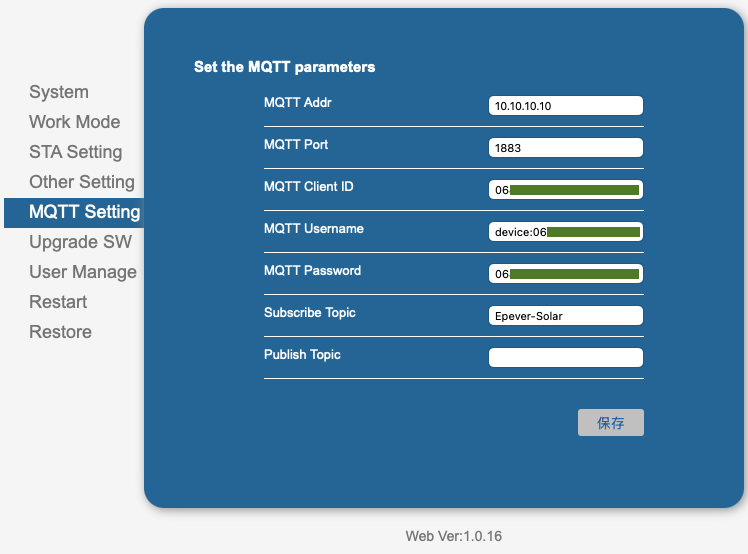
  • My MQTT configuration looks like this:

Where do I make a mistake?

What is not the case with me:

  • Nothing appears under AddOns by itself that shows me that the Aden is active (not even after several HA restarts)

  • My MQTT Explorer shows me no entry

I would be really attached to you if you could help me

In the meantime I have somehow got the add-on to work, but after the start I get the following error in the log:

s6-rc: info: service s6rc-oneshot-runner: starting

s6-rc: info: service s6rc-oneshot-runner successfully started

s6-rc: info: service fix-attrs: starting

s6-rc: info: service fix-attrs successfully started

s6-rc: info: service legacy-cont-init: starting

s6-rc: info: service legacy-cont-init successfully started

s6-rc: info: service legacy-services: starting

s6-rc: info: service legacy-services successfully started

Starting EPEVER solar client...

Traceback (most recent call last):

File "//./epever-solar-client.py", line 18, in <module>

from pymodbus.pdu.mei_message import ReadDeviceInformationRequest

ModuleNotFoundError: No module named 'pymodbus.pdu.mei_message'; 'pymodbus.pdu' is not a package

s6-rc: info: service legacy-services: stopping

s6-rc: info: service legacy-services successfully stopped

s6-rc: info: service legacy-cont-init: stopping

s6-rc: info: service legacy-cont-init successfully stopped

s6-rc: info: service fix-attrs: stopping

s6-rc: info: service fix-attrs successfully stopped

s6-rc: info: service s6rc-oneshot-runner: stopping

s6-rc: info: service s6rc-oneshot-runner successfully stopped

I use switch bots to activate load on and off much easier than coding

In the end I changed over to the Esphome Modbus stuff as detailed In the link, it has load control and much more.

I had really terrible experience with the small dongle (Epever 2.4G RJ45 D). The first unit I got was dead on arrival: no flashing diode, no AP. Then I got a replacement, and I was able to configure it to work with Home Assistant’s Modbus (TCP server; port 9999). I didn’t use their phone app, just the built-in web server. All seemed fine for about a week, and then it simply stopped responding to Modbus requests. I tried restarting it, unplugging it, resetting it to factory settings, and reconfiguring - nothing helped. All I see in the HA logs are timeouts and failed connection attempts.

Also, big warning: you cannot disable the AP on this device or change the default AP password! The website displays passwords in plain text, so if someone hacks into its web server, your Wi-Fi network will be also open to them.


Edit: so, their customer support indeed works and is fast. I emailed them, and they admitted not being able to change AP password is their oversight. I received a link to a firmware version that allows you to change the AP password (file name NW9272_LPT270_V3.0_HuiNeng_1.19-upgrade.bin). I can’t confirm it works because I already returned my broken device.

If you have the wifi connected and made it a server, you can use my HACS custom integration. For now, it just displays some sensors, but there is no need for MQTT and stuff. I’ll work on it some more, to provide more data. It works with my Tracer 2202AN quiet good. Documentation should appear in a few days, but if you know how to add a custom repository to HACS, then you can use it: GitHub - zuzkins/ha-epever: Epever in Home Assistant (experimental)

works good for me thanks, just some details for oss that dont know what we are doing :slight_smile: you need to log into the dongle at its IP address and enter user and password admin/admin and change setting to TCP-Server, and of course need to connect to same network that home assistant is on not just the AP

OMFG, You are the bee’s Knees. Once I figured out the TCP server setting, it just freaking worked. no sress, no messing with mqqt brokers / topics etc. you are amazing. thank you so much!!!

Oh my god, it works!

And what's more, it's incredibly easy.

Thank you so much.

Awesome work thank you - working fine with latest 0.2.1 on my (new to me) Tracer AN 3210. Working perfectly thank you!

Good evening. Could you please send me the file you describe above??
NW9272_LPT270_V3.0_HuiNeng_1.19-upgrade.bin

Okay. But there’s more to the story; I tested the firmware on another device, and nothing changed. After further communication with Epever, it turned out that it was intended for “Web Ver. 1.0.14” (that’s how the version is displayed on device’s website). But mine was version 1.0.16. So then they sent me a program to change the AP password, and it worked.

  1. Firmware (reupload, original link died) - this didn’t work for me, requires version 1.0.14; it should add the option to change the AP password to the web interface.

  2. Software program + video how to use it (original link) - this worked for me

Good evening. Thank you very much for the help and especially for the firmware file. I can’t download the video and the program in the second link. Finally it worked immediately and I’m happy. Thanks again.
ok I got the rest of the files

Same problem here — on this firmware the local settings are simply not saved (NW9272_LPT270_HuiNeng V1.0.22)

I have an EPEVER WiFi 2.4G RJ45 D (module HF-LPT270, firmware NW9272_LPT270_HuiNeng V1.0.22) on an off-grid installation, bought recently, and I can confirm what is reported further up this thread:

  • Other Settings → Network Parameters: setting Protocol = TCPSERVER and a local port is accepted (the adapter returns the success page), but after the adapter restarts the setting is back to TCP-CLIENT, port 15000, server sg.mysolarguardian.com. It never listens as a Modbus TCP server on the LAN.
  • MQTT (same page, do_cmd_cn.html): accepted and never applied — the adapter keeps pointing at the vendor broker.
  • The portal password cannot be changed either: accepted, not saved.

So on this firmware the web interface accepts every change and persists none of them; the cloud re-applies its own configuration on top. Other users report the same in the “EPEVER Modbus RS-485 Config” thread (settings reverting to port 9999 / TCP client).

One thing I did observe: while the TCPSERVER attempt was pending, port 8899 opened on the adapter — a transparent bridge to the controller’s RS-485 bus (it does answer Modbus frames) — and it stayed open after the setting reverted. I could not close it from the web interface.

Two more findings on this firmware, worth knowing for anyone reading this thread:

  • The configuration pages are served without any authentication (no login needed at all), including the STA Settings page that shows the configured Wi-Fi password in clear text.
  • The adapter’s own hotspot (HN_EP..., factory password 12345678) gives access to that same page, so anyone within range can read the Wi-Fi password of the house.

I am reporting all of this to EPEVER support as well and will post their answer here. If anyone has managed to make the TCP Server mode stick on a recent firmware — or knows the PC configuration tool for the HF-LPT270 module that the EPEVER TCP 306 manual mentions — I would be glad to hear it.

— Medrano Lacalle

I tried a total of 3 different units. The first one didn’t work at all; the second worked for a week and then stopped responding to Modbus requests. The last one also failed to respond to requests, leading me to think at that point that the controller itself might have broken down.

However, I decided to try my luck with the Elfin EW11. Result: it has been working flawlessly for about six months with the same solar controller. It also draws power from the RJ45 port - I used a short cable to avoid voltage drops. The only downside is that you have to modify the network cable at one end. Otherwise, it’s all advantages.