ESP 8266 and CC1101 Next/Beta

Hello everyone, I want to control 433.92 MHz outlets using an ESP8266 and a CC1101. It turns out I picked the hardest module, since neither Tasmota nor ESPHome support the CC1101. I tried OpenMQTTGateway, but that didn’t work either.

A few days ago, documentation for the beta/next version of ESPHome was released: CC1101 Low-Power Sub-1 GHz RF Transceiver - ESPHome - Smart Home Made Simple

I installed the beta on my MacBook, connected and flashed the ESP, and for the first time I was able to receive the codes from my remotes. But I still can’t get it to transmit. I’m not sure whether my YAML is wrong or if I wired the ESP and the CC1101 incorrectly.

Could someone take a look? The YAML also contains two buttons that showed up as entities in Home Assistant, but my outlets didn’t react to them.

Even though I’ve worked with ESP devices before, this is my first time using ESPHome. So please be patient with me :grimacing:

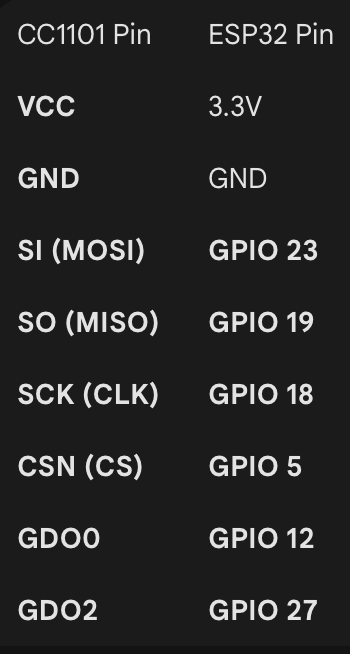
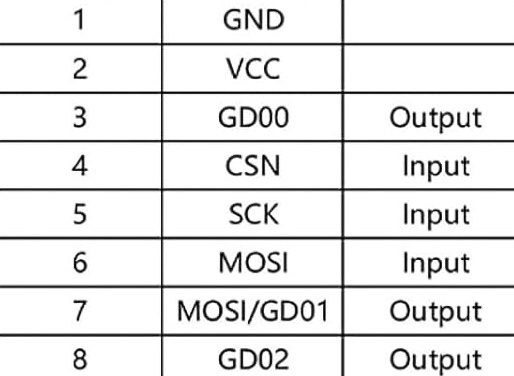
Here’s my ESP Layout and the 8 Pins from the CC1101

Here’s my current yaml code:

Summary

esphome:
name: cc1101_test

esp8266:
board: nodemcuv2

wifi:
ssid: “removed”
password: “removed”

logger:

api:

ota:
platform: esphome

spi:
clk_pin: GPIO14
mosi_pin: GPIO13
miso_pin: GPIO12

cc1101:
cs_pin: GPIO15
frequency: 433.92MHz

remote_transmitter:
pin: GPIO5
carrier_duty_percent: 100%
on_transmit:
then:
- cc1101.begin_tx
on_complete:
then:
- cc1101.begin_rx

remote_receiver:
pin: GPIO4
dump:
- rc_switch

button:

  • platform: template
    name: “Send ON”
    id: send_on
    on_press:

    • remote_transmitter.transmit_rc_switch_raw:
      code: ‘000000000001000000010101’
      protocol: 1
      repeat: 5
  • platform: template
    name: “Send OFF”
    id: send_off
    on_press:

    • remote_transmitter.transmit_rc_switch_raw:
      code: ‘000000000001000000010100’
      protocol: 1
      repeat: 5

I don’t know which module you have, anyway, pin 7 is miso/gd01.
I have not tried cc11011 yet on esphome, but I did not have problems with openmqttgateway.

That was a mistake in the pictures I posted. I wired pin 7 correctly as MISO. Most of the pins are straightforward, but how did you connect GDO0 and GDO2?
Which ESP did you use?

Unfortunately, I wasn’t able to receive anything with OpenMQTTGateway.

I didn’t have any problems with OMG, but I was using esp32.

I have not tried esphome setup yet, but when it’s natively out, I will.

Also, what makes you think they use signal that can be decoded with rc_switch?
They may not even use ASK modulation…

Try what you get on your logs with dump: raw

I’m not sure what you mean. They use the same frequency, 433.92 MHz. I was able to receive the codes from their remote with HomeESP. I have the codes, but I can’t send any.

I tried OpenMQTTGateway again with an ESP32, but I can’t even install the right firmware. I tried esp32dev-rf, but it doesn’t seem to support the CC1101. I also wanted to try esp32dev-pilight-cc1101, but it doesn’t have a web GUI or an AP, so I have no idea how to configure it.
Which firmware did you use with your ESP32?

I don’t follow you now, so your cc1101 is working for receiving part??

No, it doesn’t include cc1101 library. You have to choose esp32dev-multi_receiver or esp32dev-rtl_433 (for common esp32 board).

It has nice web-ui for configuration and for logging.

Yes, as I wrote in my initial post.

I think I give up. I tried esp32dev-multi_receiver and esp32dev-rtl_433, but I wasn’t even able to access the web GUI, and recognizing the CC1101 failed. All in all, I’ve already spent at least 12 hours on this over the past few days. It shouldn’t be this hard and time-consuming just to turn on some power outlets or lights. I’m afraid I’ll have to throw them away and buy some Matter-over-Thread outlets instead.

But thanks for your help

For sure 90% of this “hard” is coming from the fact that you use cc1101 (on esphome next) instead of simple ASK receiver / transmitter. CC1101 makes more sense if you need to adjust the frequency or use other modulation.

That’s absolutely true. At first, I thought I had chosen a good module because it combines transmitter and receiver in one device, but it turned out to be the worst possible choice for my use case and my skill set.

Can you recommend modules that are better suited? Transmitter and receiver can be separate. Once I have the codes, I don’t really need the receiver anymore I think.

I’d still like to implement this, because I really like the idea of making these old power outlets ‘smart’

1 Like

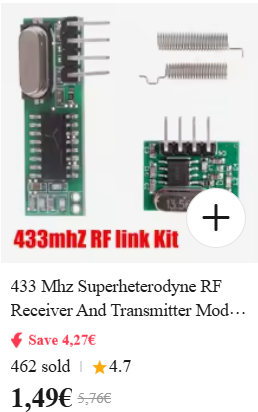
You can pick whatever 433 tx / rx modules as long as the receiver is superheterodyne.
Something like these:

1 Like

Thanks, I might give it a try.

CC1101 support is now included in the official version of ESPHome.

Maybe you’ll be able to get it working.

The new cc1101 component adds support for the Texas Instruments CC1101 Sub-1GHz transceiver, enabling 433MHz remote control integration and other sub-GHz wireless applications (#11849).

Key Features:

  • 433.92MHz support - Perfect for integrating 433MHz remotes and sensors
  • ASK/OOK modulation - Works with common remote control protocols
  • Core integration - Designed to work with remote_receiver and remote_transmitter components
  • Robust initialization - Non-blocking state machine with proper chip reset handling

I will, but on holidays. Hopefully 12.1 is out by then… :wink:

Have you had a chance to try it out yet?

I just found out that the Matter-over-Thread power outlets from IKEA that I want won’t be available before April 2026, so it would be nice to have a temporary solution until then.

That’s why I’d like to give it another try.

No I didn’t, it’s still on rtl_433 use.
But in these weeks I remember some forum members confirmed it’s working properly.
Use 2025.12.2 or later.

The CC1101 worked on ESPHome for me with versions 2025.12.2, 2025.12.4, 2025.12.5 and 2025.12.6, though I have only tested on ESP32 with the ESP-IDF framework and with ASK modulation. Certainly a lot nicer than the individual RX/TX modules.

2 Likes

Can you share your configuration YAML so I can compare it with mine?

Also, could someone please take a look at my configuration? I successfully installed ESPHome with this code, and it seems to recognize everything. At least there are no errors. However, I’m not receiving any signals from my remotes at all. And to be fully transparent, I used a lot of AI help to create this code, because I don’t really know how to write YAML myself.

esphome:
  name: meinesp
  friendly_name: meinESP
  on_boot:
    priority: -10
    then:
      - cc1101.begin_rx: my_cc1101

esp32:
  board: esp32dev
  framework:
    type: arduino

wifi:
  ssid: !secret wifi_ssid
  password: !secret wifi_password

api:
  encryption:
    key: "removed"

ota:
  - platform: esphome

logger:
  level: DEBUG

spi:
  clk_pin: GPIO18
  mosi_pin: GPIO23
  miso_pin: GPIO19

cc1101:
  - id: my_cc1101
    cs_pin: GPIO5
    frequency: 433.92MHz
    filter_bandwidth: 540kHz

remote_transmitter:
  - id: rf_transmitter
    pin: GPIO12
    carrier_duty_percent: 100%
    non_blocking: true
    on_transmit:
      then:
        - cc1101.begin_tx: my_cc1101
    on_complete:
      then:
        - cc1101.begin_rx: my_cc1101

remote_receiver:
  - id: rf_receiver
    pin: GPIO27
    dump: all
    tolerance: 50%
    filter: 100us

I used this wiring. I used an ESP32

Here is mine, mine is ethernet connected and I have removed this from the config as is it will only confuse you, keep the Wifi bits in you have. I wouldn’t necessarily copy the pins I have used, I’m really short of pins due to the Ethernet. I can’t see anything particularly wrong with your config i’d probably remove the ‘filter_bandwidth’ unless you know you need. I’d probably try ‘dump: raw’ instead of all as a test. Finally I’d use the ‘esp-idf’ framework though you will need to first time update via USB cable if you do.

I use these to send and receive RAW codes that control an RF blind.

PS Are you sure your transmitter source is 433MHz might be something else, what is it?

esphome:
  name: esp433poe
  friendly_name: ESP433POE


esp32:
  board: esp32dev
  framework:
    type: esp-idf

# Enable logging
logger:

  
# Enable Home Assistant API
api:
  encryption:
    key: "removed"

ota:
  - password: "removed"
    platform: esphome

# 1:GND Black
# 2:Vcc Red
# 3:GD00 White : GPIO33
# 4:CS Orange : GPIO14
# 5:SCK Grey : GPIO32 
# 6:MOSI Yellow : GPIO12 # Strapping
# 7:MISO/GD01 Purple : GPIO16
# 8:GD02 Green : GPIO35

spi:
  clk_pin: GPIO32
  mosi_pin: GPIO12
  miso_pin: GPIO16

cc1101:
  cs_pin: GPIO14
  frequency: 433.92MHz

remote_transmitter:
  pin: GPIO33 # Must match GDO0
  carrier_duty_percent: 100%
  non_blocking: true
  on_transmit:
    then:
      - cc1101.begin_tx
  on_complete:
    then:
      - cc1101.begin_rx

remote_receiver:
  pin: GPIO35 # Must match GDO2
  dump: raw
  tolerance: 50%
  idle: 5ms # set to match gap between transmissions

button:
  - platform: template
    name: "Channel_3_Up"
    id: Channel_3_Up
    internal: True
    on_press:
      - remote_transmitter.transmit_raw:
            code: [4885,-2450,1700,-340,
                  340,-680,680,-340,680,-340,340,-680,680,-340,340,-680,680,-340,680,-340,
                  680,-340,340,-680,340,-680,340,-680,340,-680,340,-680,340,-680,340,-680,
                  680,-340,680,-340,340,-680,340,-680,340,-680,340,-680,680,-340,680,-340,
                  680,-340,340,-680,340,-680,340,-680,340,-680,340,-680,340,-680,340,-680,
                  340,-680,680,-340,680,-340,340,-680,340,-680,680,-340,680,-340,340,-680]

            repeat:
              times: 6
              wait_time: 90us
  - platform: template
    name: "Channel_3_Stop"
    id: Channel_3_Stop
    internal: True
    on_press:
      - remote_transmitter.transmit_raw:
            code: [4885,-2450,1700,-340,
                  340,-680,680,-340,680,-340,340,-680,680,-340,340,-680,680,-340,680,-340,
                  680,-340,340,-680,340,-680,340,-680,340,-680,340,-680,340,-680,340,-680,
                  680,-340,680,-340,340,-680,340,-680,680,-340,340,-680,680,-340,340,-680,
                  680,-340,340,-680,340,-680,340,-680,340,-680,340,-680,340,-680,340,-680,
                  340,-680,680,-340,680,-340,340,-680,680,-340,340,-680,680,-340,680,-340]

            repeat:
              times: 6
              wait_time: 90us
  - platform: template
    name: "Channel_3_Down"
    id: Channel_3_Down
    internal: True
    on_press:
      - remote_transmitter.transmit_raw:
            code: [4885,-2450,1700,-340,
                  340,-680,680,-340,680,-340,340,-680,680,-340,340,-680,680,-340,680,-340,
                  680,-340,340,-680,340,-680,340,-680,340,-680,340,-680,340,-680,340,-680,
                  680,-340,680,-340,340,-680,340,-680,680,-340,340,-680,340,-680,340,-680,
                  680,-340,340,-680,340,-680,340,-680,340,-680,340,-680,340,-680,340,-680,
                  340,-680,680,-340,680,-340,340,-680,680,-340,340,-680,340,-680,340,-680]

            repeat:
              times: 6
              wait_time: 90us
cover:
  - platform: time_based    
    name: "Channel_3_Blinds"
    icon: "mdi:roller-shade"
    id: cover_channel3
    open_action:
      - button.press: Channel_3_Up
    open_duration: 95s
    close_action:
      - button.press: Channel_3_Down
    close_duration: 81s 
    stop_action:
      - button.press: Channel_3_Stop
    #optimistic: True
    assumed_state: True
    device_class: shade

binary_sensor:
  #Blind travel time 95s
  - platform: remote_receiver
    name: "Bathroom_Stop_sensor"
    id: Bathroom_Stop_sensor
    internal: True
    raw:
      code: [-2442,1621,-303,
	          695,-307,372,-649,345,-664,693,-294,716,-295,690,-322,689,-301,709,-301,
            383,-642,692,-317,360,-638,359,-641,685,-332,676,-317,707,-320,672,-319,
	          694,-320,691,-320,341,-645,368,-640,701,-319,351,-639,702,-311,370,-637,
            686,-317,357,-665,355,-640,360,-640,363,-642,363,-666,338,-667,339,-666,
            364,-642,690,-316,362,-639,357,-639,360,-666,337,-666,690,-316,686,-314]

    on_state:
      then:
        - cover.stop: cover_channel3
  - platform: remote_receiver
    name: "Bathroom_Up_sensor"
    id: Bathroom_Up_sensor
    internal: True
    raw:
      code: [-2420,1615,-321,
            684,-333,340,-649,346,-673,673,-316,699,-313,702,-291,697,-315,696,-317,
            367,-631,692,-323,360,-646,365,-644,690,-313,688,-323,684,-313,687,-323,
            685,-312,689,-322,362,-648,364,-644,364,-646,338,-668,692,-316,686,-312,
            694,-313,368,-638,357,-638,362,-666,338,-667,338,-668,337,-667,338,-666,
            364,-643,692,-304,353,-642,363,-641,712,-311,360,-644,689,-312,362,-647]
    on_state:
      then:
        - cover.open: cover_channel3

  - platform: remote_receiver
    name: "Bathroom_Down_sensor"
    id: Bathroom_Down_sensor
    internal: True
    raw:
      code: [-2416,1623,-324,
            674,-327,347,-672,351,-644,700,-290,706,-321,673,-316,709,-303,696,-306,
            367,-649,698,-303,369,-648,349,-644,700,-314,685,-314,700,-314,684,-322,
            684,-333,667,-336,341,-649,370,-649,672,-315,368,-662,342,-646,367,-645,
            694,-301,357,-668,338,-668,337,-669,340,-665,365,-643,364,-642,366,-642,
            340,-666,692,-317,360,-639,354,-638,361,-666,336,-666,338,-666,365,-641]
    on_state:
      then:
        - cover.close: cover_channel3

1 Like

Thank you so much! It’s working now.
I’m using ESP-IDF now as well, and I also adopted your pin configuration. I can both receive and send codes now!

I’ve added switches in the configuration, and they show up in Home Assistant. I even managed to set it up so that the CC1101 listens for signals from the original remote. For example, when I turn something on or off with the physical remote, the switch in Home Assistant updates automatically as well. It works perfectly!

It’s awesome. These 433 MHz power outlets are over 15 years old, I think, and now they work with Home Assistant. It works so well that at the moment I’m not even sure I’ll buy the IKEA Matter-over-Thread outlets when they become available.

No problem, glad you got it sorted. I agree it is very good, a lot better than the individual RX/TX modules.