Ah okay, I understand now. Flickering during an OTA update on ESP32 P4 is usually caused by the processor being “starved” of the resources needed to maintain the display’s refresh rate while simultaneously handling the high-bandwidth WiFi data stream.
The simple way would be to reduce refresh rate during this time or just turn off the display and switch it back on when OTA is done through yaml additions to OTA section.
I generally mostly use USB to do it and only do OTA when I’m away from the device so can’t even see the flicker.
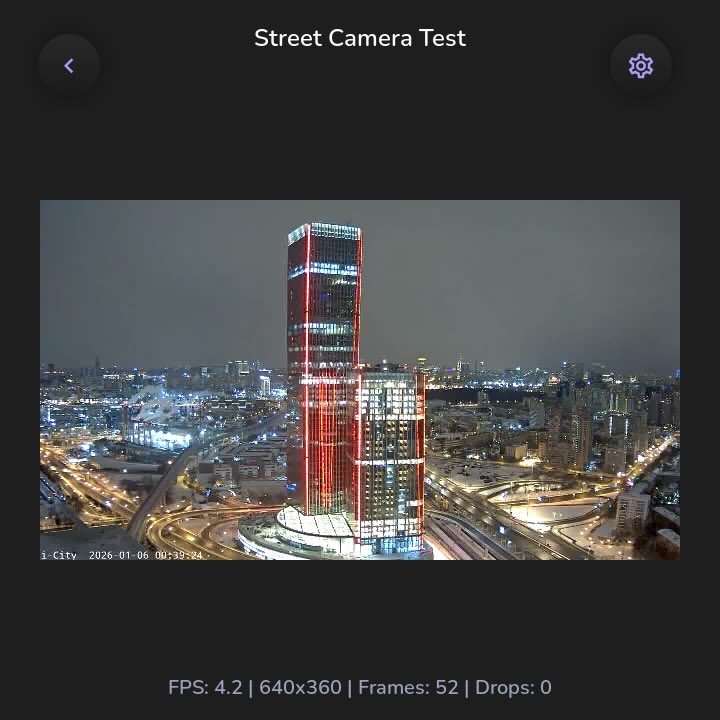
The PPA works correctly with the ESP32-P4 only on the master branch of LVGL (LVGL 9.5), which isn’t yet released. I was able to run a stream from Home Assistant cameras on our device, not on ESPHome, but on ESP-IDF. The source resolution is up to 1920x1080. The output is 640x360, with FPS fluctuating between 2 and 8 without any loss of quality; it’s not yet fully stable. But that’s on an RGB888. Results should be significantly better on an RGB565. With reduced quality, you can get around 20 FPS.
What do you think it would take to get RGB565 video at 20FPS working in ESPHome? It seems like ESPhome will be supporting LVGL 9.4 soon and an upgrade to 9.5 should be fairly straight forward after that.
I don’t know, there’s an online_image component that depends on http_request; we need to create an online_stream (online_camera) component. But there are a lot of nuances. I’m still experimenting with this, and I don’t know what the reference FPS figures are. As an idea, maybe it would be worth copying frames directly to the display buffer, bypassing LVGL. I don’t know about ESPHome, but I think 30 frames per second is realistic for esp-idf in RGB565.
The difficulty is that ESPHome’s components aren’t tailored to specific hardware. You’ll need to carefully configure all the components involved to make it work: memory, network sockets, buffers, cache, PPA, hardware JPEG decoder, LVGL, HTTP, and others. This will be a fairly non-trivial task. But nothing is impossible.
For a start maybe limit development to an ESP32-P4 with an MIPI display. Use something like this as a reference platform. The P4 is designed for video much more then the older ESP32 chips.
From what I have seen that would cover most of the existing P4 hardware and the Waveshare-ESP32-P4-86-Panel you are already developing for.
What does it mean to limit development to the ESP32-P4? The project is already being developed for a specific device. Waveshare has its own BSP for this device:
However, the standard display configuration isn’t suitable, as it severely limits the use of PSRAM buffers. Furthermore, the hardware JPEG decoder requires a DMA buffer link, and if the heap is corrupted or fragmented, everything will crash. This can be somewhat alleviated by making the buffer allocation a singleton, but this also has its own side effects, but it always guarantees a DMA link allocation. The problem isn’t how to get the camera stream working on the device; the problem is ensuring it doesn’t crash and delivers a stable FPS when your project has a ton of features, including a Vue web server, a full-fledged websocket with HA, a bunch of complex widgets, neomorphic buttons, a voice assistant, ARGB888, and so on…
Hello,
This seems like the perfect wall switch, but reading waveshare’s docs it seems it can only be powered by 6-30v, so it cannot be directly mounted inside a wall box.
So, how have you resolved? Do you power it with an external Type-C cable? Or have you hid a 12v/20 psu in your wall box somehow…?
Yes, for now I’m just testing on my table using USB C. If it’s in the wall, you’ll have to route the USB to the side of the device. If you want to use mains, then you’ll have to tuck the adapter in the wall and connect the wires to the back.
Easiest way would be to use POE splitter, connect lan and power individually.
Unfortunately I don’t have rj-45 cables passed to the light boxes, and honestly, passing them there would be quite a pain. Is ethernet better than wifi? Yes, of course. But I also think I have a quite good unifi wireless setup, so I don’t think wifi will pose a problem.
Still, quite a bummer that this device cannot be powered by mains.
I’ll have to wait for the next version to update all my light boxes! Maybe it’ll even have dimmers and not just relays…
Thank you. Yes, I have a Guition 480 mounted in a room- seems to be pretty close to what you linked. But what picked my interest is that these new panels with esp32-p4 also have mic&speaker, which would make possible to finally replace these obnoxious Alexa speakers.
The key to all ESPHome projects it only having enough features for the CPU power available. Streaming video, audio (for voice and music), and a some buttons (not dynamic) would be a very useful screen.