kcr
November 28, 2025, 12:41pm
1
I’ve just got one of these devices:
ESP32-S3 1.8inch AMOLED Touch Display Development Board, 32-bit LX7 Dual-core Processor, 368×448 Pixels, Accelerometer And Gyroscope Sensor, ESP32 With Display | ESP32-S3-Touch-AMOLED-1.8
SH8601 Display Driver and FT3168 Touch
It is not officially supported by ESPHome, but I wondered if anyone has managed to get it working and could share an example? I’ve had a search through the forum and I can see some references to working with the SH8601 and FT3168 separately.
kcr
December 4, 2025, 3:29pm
2
I can’t find a specific example for this device, but I managed to get a basic configuration together by cribbing bits and pieces from data sheets and various ESPHome and non ESPHome configs that other people have built for similar boards.
The display works successfully, but I can’t get the touch screen working. When I tap the screen, I just get the following errors logged:
[15:20:10.094][D][esp-idf:000]: E (29193) i2c.master: I2C hardware NACK detected
[15:20:10.094][D][esp-idf:000]: E (29194) i2c.master: I2C transaction unexpected nack detected
[15:20:10.096][D][esp-idf:000]: E (29195) i2c.master: s_i2c_synchronous_transaction(945): I2C transaction failed
[15:20:10.098][D][esp-idf:000]: E (29197) i2c.master: i2c_master_execute_defined_operations(1401): I2C transaction failed
I’ve experimented with various frequencies, without success.
esphome:
  name: home-monitor-2

esp32:
  variant: esp32s3
  framework:
    type: esp-idf
  flash_size: 16MB

psram:
  mode: octal

# Enable logging
logger:

# Enable Home Assistant API
api:
  on_client_connected:
    - logger.log: "api_connected"

# Allow Over-The-Air updates
ota:
- platform: esphome

wifi:
  ssid: !secret wifi_ssid
  password: !secret wifi_password
  manual_ip:
    static_ip: 192.168.1.51
    gateway: 192.168.1.254
    subnet: 255.255.255.0

i2c:
  id: i2c_1
  scl: GPIO14
  sda: GPIO15
  frequency: 40kHz
  scan: false

pca9554:
  - id: 'pca9554_device'

touchscreen:
  platform: cst816
  display: display_1
  i2c_id: i2c_1
  id: touchscreen_1
  interrupt_pin: GPIO21
  reset_pin:
    pca9554: pca9554_device
    number: 0
  skip_probe: true
  on_touch:
    - lambda: |-
        ESP_LOGI("cal", "x=%d, y=%d, x_raw=%d, y_raw=%0d",
          touch.x,
          touch.y,
          touch.x_raw,
          touch.y_raw
        );
spi:
  type: quad
  clk_pin: GPIO11
  data_pins: [GPIO4, GPIO5, GPIO6, GPIO7]

# Display configuration
display:
  - platform: mipi_spi
    id: display_1
    bus_mode: quad
    dimensions:
      width: 368
      height: 448
    model: CUSTOM
    cs_pin: GPIO12
    init_sequence:
      - [0x00]
      - delay 120ms
      - [0x01, 0xD1]
      - [0x00]
      - [0x20]
      - delay 10ms
      - [0x00, 0x00, 0x01, 0x6F]
      - [0x00, 0x00, 0x01, 0xBF]
      - [0x00]
      - delay 10ms
      - [0x00]
      - delay 10ms
      - [0xFF]

lvgl:
  #buffer_size: 25%
  widgets:
    - label:
        align: CENTER
        text: 'Hello World!'
    - button:
        x: 84
        y: 100
        width: 200
        height: 80
        id: btn_id
        checkable: true
        widgets:
          - label:
              align: center
              text: "Tap me"
        on_value:
          then:
            - logger.log:
                format: "Button checked state: %d"
                args: [ x ]
    - slider:
        id: dimmer_slider
        x: 20
        y: 50
        width: 30
        height: 220
        pad_all: 8
        min_value: 0
        max_value: 255
Karosm
December 4, 2025, 5:11pm
3
schematic gives ext02 for touch reset pin…
kcr
December 4, 2025, 5:23pm
4
You’re correct. The “0” in the config I posted was incorrectly included because I wasn’t sure if I was reading the spec correctly and was experimenting with different values.
kcr
December 5, 2025, 12:31am
5
Success!GitHub - waveshareteam/ESP32-display-support: Waveshare ESP32 with screen product code summary ) and found the two missing pieces of information to get the touchscreen working:
Backtracking on the preceding discussion, pin 0 is actually the correct value for the pca9554 I/O extender reset_pin, not pin 2 (in retrospect this is obvious from the schematic pin names: LCD_RESET EXIO0 rather than TP_RESET EXIO2)
address: 0x38 is required for the touchscreen: definition
I also removed the frequency: value from my i2c: definition and it seems to be running OK on the default.
esphome:
  name: home-monitor-2

esp32:
  variant: esp32s3
  framework:
    type: esp-idf
  flash_size: 16MB

psram:
  mode: octal

# Enable logging
logger:

# Enable Home Assistant API
api:
  on_client_connected:
    - logger.log: "api_connected"

# Allow Over-The-Air updates
ota:
- platform: esphome

wifi:
  ssid: !secret wifi_ssid
  password: !secret wifi_password
  manual_ip:
    static_ip: 192.168.1.51
    gateway: 192.168.1.254
    subnet: 255.255.255.0

i2c:
  id: i2c_1
  scl: GPIO14
  sda: GPIO15
  scan: false

pca9554:
  - id: 'pca9554_device'

touchscreen:
  platform: cst816
  display: display_1
  address: 0x38
  i2c_id: i2c_1
  id: touchscreen_1
  interrupt_pin: GPIO21
  reset_pin:
    pca9554: pca9554_device
    number: 0
  skip_probe: true
  on_touch:
    - lambda: |-
        ESP_LOGI("cal", "x=%d, y=%d, x_raw=%d, y_raw=%0d",
          touch.x,
          touch.y,
          touch.x_raw,
          touch.y_raw
        );
spi:
  type: quad
  clk_pin: GPIO11
  data_pins: [GPIO4, GPIO5, GPIO6, GPIO7]

# Display configuration
display:
  - platform: mipi_spi
    id: display_1
    bus_mode: quad
    dimensions:
      width: 368
      height: 448
    model: CUSTOM
    cs_pin: GPIO12
    init_sequence:
      - [0x00]
      - delay 120ms
      - [0x01, 0xD1]
      - [0x00]
      - [0x20]
      - delay 10ms
      - [0x00, 0x00, 0x01, 0x6F]
      - [0x00, 0x00, 0x01, 0xBF]
      - [0x00]
      - delay 10ms
      - [0x00]
      - delay 10ms
      - [0xFF]

lvgl:
  #buffer_size: 25%
  widgets:
    - label:
        align: CENTER
        text: 'Hello World!'
    - button:
        x: 84
        y: 100
        width: 200
        height: 80
        id: btn_id
        checkable: true
        widgets:
          - label:
              align: center
              text: "Tap me"
        on_value:
          then:
            - logger.log:
                format: "Button checked state: %d"
                args: [ x ]
    - slider:
        id: dimmer_slider
        x: 20
        y: 50
        width: 30
        height: 220
        pad_all: 8
        min_value: 0
        max_value: 255
kcr
December 5, 2025, 10:32am
6
A small change that fixes some issues and simplifies the config:model: configuration I had cobbled together from some code examples, but discovered that I could drop the custom init_sequence and just use the model: WAVESHARE-ESP32-S3-TOUCH-AMOLED-1.75 option, which seems to work fine (the pin errors in my initial config efforts obscured the fact that this option was valid).
[Edit: I have an unresolved issue with the touchscreen only working immediately after flashing; if I subsequently power cycle the device the touch screen no longer responds ]
Updated config:
esphome:
  name: home-monitor-2

esp32:
  variant: esp32s3
  framework:
    type: esp-idf
  flash_size: 16MB

psram:
  mode: octal

# Enable logging
logger:

# Enable Home Assistant API
api:
  on_client_connected:
    - logger.log: "api_connected"

# Allow Over-The-Air updates
ota:
- platform: esphome

wifi:
  ssid: !secret wifi_ssid
  password: !secret wifi_password
  manual_ip:
    static_ip: 192.168.1.51
    gateway: 192.168.1.254
    subnet: 255.255.255.0

i2c:
  id: i2c_1
  scl: GPIO14
  sda: GPIO15
  scan: false
  frequency: 100kHz

pca9554:
  - id: 'pca9554_device'

touchscreen:
  platform: cst816
  display: display_1
  address: 0x38
  i2c_id: i2c_1
  id: touchscreen_1
  interrupt_pin: GPIO21
  reset_pin:
    pca9554: pca9554_device
    number: 0
  skip_probe: true
  on_touch:
    - lambda: |-
        ESP_LOGI("cal", "x=%d, y=%d, x_raw=%d, y_raw=%0d",
          touch.x,
          touch.y,
          touch.x_raw,
          touch.y_raw
        );
spi:
  type: quad
  clk_pin: GPIO11
  data_pins: [GPIO4, GPIO5, GPIO6, GPIO7]

# Display configuration
display:
  - platform: mipi_spi
    id: display_1
    brightness: 150
    bus_mode: quad
    dimensions:
      width: 368
      height: 448
    model: WAVESHARE-ESP32-S3-TOUCH-AMOLED-1.75
    cs_pin: GPIO12
    # init_sequence:
    #   - [0x00]
    #   - delay 120ms
    #   - [0x01, 0xD1]
    #   - [0x00]
    #   - [0x20]
    #   - delay 10ms
    #   - [0x00, 0x00, 0x01, 0x6F]
    #   - [0x00, 0x00, 0x01, 0xBF]
    #   - [0x00]
    #   - delay 10ms
    #   - [0x00]1
    #   - delay 10ms
    #   - [0xFF]

lvgl:
  #buffer_size: 25%
  pages:
    - id: main_page
      bg_color: black
      widgets:
        - label:
            align: CENTER
            text: 'Hello World!'
            text_color: white
        - button:
            bg_color: LightGreen
            x: 84
            y: 100
            width: 200
            height: 80
            id: btn_id
            checkable: true
            checked:
              bg_color: Grey
            widgets:
              - label:
                  align: center
                  text: "Tap me"
            on_value:
              then:
                - logger.log:
                    format: "Button checked state: %d"
                    args: [ x ]
        - slider:
            id: dimmer_slider
            x: 20
            y: 50
            width: 30
            height: 220
            pad_all: 8
            min_value: 0
            max_value: 255
argsnd
December 7, 2025, 5:03pm
7
You can get the touch screen working reliably like this:
touchscreen:
  - platform: ft5x06
    id: my_touchscreen
    display: my_display
    interrupt_pin: GPIO21
    address: 0x38
kcr
December 7, 2025, 6:33pm
8
Thanks very much. That was a well timed reply because I was just about to post another message after failing to find a solution to the reboot problem.
I switched to platform: ft5x06 and can confirm that the touchscreen is working correctly when flashed, and also continuing to work when the device is rebooted.
My revised configuration is below. With the fx5x06 plaform, the reset_pin and skip_probe options are no longer valid, and the pca9554 definition is therefore no longer required.
Thanks again!
Revised config:
esphome:
  name: home-monitor-2

esp32:
  variant: esp32s3
  framework:
    type: esp-idf
  flash_size: 16MB

psram:
  mode: octal

# Enable logging
logger:

# Enable Home Assistant API
api:
  on_client_connected:
    - logger.log: "api_connected"

# Allow Over-The-Air updates
ota:
- platform: esphome

wifi:
  ssid: !secret wifi_ssid
  password: !secret wifi_password
  manual_ip:
    static_ip: 192.168.1.51
    gateway: 192.168.1.254
    subnet: 255.255.255.0

i2c:
  id: i2c_1
  scl: GPIO14
  sda: GPIO15
  scan: true
  frequency: 100kHz

touchscreen:
  platform: ft5x06
  display: display_1
  address: 0x38
  i2c_id: i2c_1
  id: touchscreen_1
  interrupt_pin: GPIO21
  on_touch:
    - lambda: |-
        ESP_LOGI("cal", "x=%d, y=%d, x_raw=%d, y_raw=%0d",
          touch.x,
          touch.y,
          touch.x_raw,
          touch.y_raw
        );
spi:
  type: quad
  clk_pin: GPIO11
  data_pins: [GPIO4, GPIO5, GPIO6, GPIO7]

# Display configuration
display:
  - platform: mipi_spi
    id: display_1
    brightness: 150
    bus_mode: quad
    dimensions:
      width: 368
      height: 448
    model: WAVESHARE-ESP32-S3-TOUCH-AMOLED-1.75
    cs_pin: GPIO12

lvgl:
  #buffer_size: 25%
  pages:
    - id: main_page
      on_swipe_right:
        - lvgl.page.previous:
      on_swipe_left:
        - lvgl.page.next:
      bg_color: black
      widgets:
        - label:
            align: CENTER
            text: 'Hello World!'
            text_color: white
        - button:
            bg_color: LightGreen
            x: 84
            y: 100
            width: 200
            height: 80
            id: btn_id
            checkable: true
            checked:
              bg_color: Grey
            widgets:
              - label:
                  align: center
                  text: "Tap me"
            on_value:
              then:
                - logger.log:
                    format: "Button checked state: %d"
                    args: [ x ]
        - slider:
            id: dimmer_slider
            x: 20
            y: 50
            width: 30
            height: 220
            pad_all: 8
            min_value: 0
            max_value: 255
    - id: page_2
      on_swipe_right:
        - lvgl.page.previous:
      on_swipe_left:
        - lvgl.page.next:
      bg_color: black
      widgets:
        - label:
            align: CENTER
            text: 'Hello World 2!'
            text_color: white
argsnd
December 7, 2025, 7:54pm
9
Audio works fine too, here’s a tap to talk voice assistant with a volume slider:
esphome:
  name: esp-assistant
  friendly_name: esp-assistant

esp32:
  board: esp32-s3-devkitc-1
  framework:
    type: esp-idf

psram:
  mode: octal

logger:

api:

ota:

wifi:
  ssid: !secret wifi_ssid
  password: !secret wifi_password

captive_portal:

# I2C Bus - Shared by touchscreen (FT5x06) and audio codec (ES8311)
i2c:
  id: i2c_bus
  sda: GPIO15
  scl: GPIO14
  frequency: 200kHz
  scan: true

# Quad SPI Bus - AMOLED display
spi:
  - id: quad_spi
    type: quad
    clk_pin: GPIO11
    data_pins:
      - GPIO4   # D0
      - GPIO5   # D1
      - GPIO6   # D2
      - GPIO7   # D3

# AMOLED Display (368x448)
display:
  - platform: mipi_spi
    id: my_display
    brightness: 150
    bus_mode: quad
    dimensions:
      width: 368
      height: 448
    model: WAVESHARE-ESP32-S3-TOUCH-AMOLED-1.75
    cs_pin: GPIO12

# FT5x06 Capacitive Touchscreen
touchscreen:
  - platform: ft5x06
    id: my_touchscreen
    display: my_display
    interrupt_pin: GPIO21
    address: 0x38
    transform:
      swap_xy: false
      mirror_x: false
      mirror_y: false

# ============================================================================
# AUDIO CONFIGURATION
# ============================================================================

# I2S Audio Bus - Connects ESP32 to ES8311 codec
i2s_audio:
  - id: i2s_audio_bus
    i2s_lrclk_pin: GPIO45  # Word select / left-right clock
    i2s_bclk_pin: GPIO9     # Bit clock
    i2s_mclk_pin: GPIO16    # Master clock

# ES8311 Audio Codec
audio_dac:
  - platform: es8311
    id: es8311_codec
    address: 0x18
    i2c_id: i2c_bus
    use_mclk: true
    use_microphone: false  # Analog microphone (not PDM digital)
    bits_per_sample: 16bit
    sample_rate: 16000
    mic_gain: 18DB

# Speaker - Audio output through ES8311 DAC
speaker:
  - platform: i2s_audio
    id: external_speaker
    dac_type: external
    audio_dac: es8311_codec
    i2s_audio_id: i2s_audio_bus
    i2s_dout_pin: GPIO8
    sample_rate: 16000
    bits_per_sample: 16bit
    timeout: 2s

# Microphone - Audio input through ES8311 ADC
microphone:
  - platform: i2s_audio
    id: external_microphone
    adc_type: external
    i2s_audio_id: i2s_audio_bus
    i2s_din_pin: GPIO10
    bits_per_sample: 16bit
    sample_rate: 16000

# Power Amplifier - GPIO46 controls speaker amplifier enable
switch:
  - platform: gpio
    pin: GPIO46
    id: pa_enable
    name: "Speaker Amplifier"
    restore_mode: ALWAYS_ON
    internal: false

# Volume Control - Synced with ES8311 hardware volume and UI slider
number:
  - platform: template
    id: volume_control
    name: "Volume"
    min_value: 0
    max_value: 100
    initial_value: 70
    step: 5
    optimistic: true
    set_action:
      - lambda: |-
          id(es8311_codec).set_volume(x / 100.0);
          ESP_LOGI("volume", "Volume set to: %.0f%%", x);

# RTTTL Ringtone Player - Plays simple tones and melodies
rtttl:
  id: buzzer
  speaker: external_speaker

# ============================================================================
# VOICE ASSISTANT
# ============================================================================

voice_assistant:
  id: va
  microphone: external_microphone
  speaker: external_speaker

  # Listening state - Button turns blue
  on_listening:
    - logger.log: "Voice assistant started listening"
    - lvgl.label.update:
        id: status_label
        text: "Listening..."
    - lvgl.widget.update:
        id: btn_id
        bg_color: DodgerBlue

  # Speech-to-text complete - Display recognized text
  on_stt_end:
    - logger.log:
        format: "Speech recognized: %s"
        args: [ 'x.c_str()' ]
    - lvgl.label.update:
        id: status_label
        text: !lambda 'return "You said: " + x;'

  # Text-to-speech starting - Display speaking status
  on_tts_start:
    - logger.log: "Speaking response..."
    - lvgl.label.update:
        id: status_label
        text: "Speaking..."

  # Session complete - Button returns to green
  on_end:
    - logger.log: "Voice assistant session ended"
    - lvgl.label.update:
        id: status_label
        text: "Ready"
    - lvgl.widget.update:
        id: btn_id
        bg_color: LightGreen

  # Error handling - Flash red, then return to green
  on_error:
    - logger.log:
        format: "Voice assistant error: %s"
        args: [ 'code.c_str()' ]
    - lvgl.label.update:
        id: status_label
        text: "Error!"
    - lvgl.widget.update:
        id: btn_id
        bg_color: Red
    - delay: 1s
    - lvgl.widget.update:
        id: btn_id
        bg_color: LightGreen
    - lvgl.label.update:
        id: status_label
        text: "Ready"

# ============================================================================
# USER INTERFACE (LVGL)
# ============================================================================

lvgl:
  pages:
    - id: main_page
      bg_color: black
      widgets:
        # Status label - Shows current voice assistant state
        - label:
            id: status_label
            align: CENTER
            y: 50
            text: 'Ready'
            text_color: white

        # Main voice assistant button - Tap to activate
        - button:
            bg_color: LightGreen
            x: 84
            y: 100
            width: 200
            height: 160
            id: btn_id
            widgets:
              - label:
                  align: center
                  text: "Tap to Talk"

            on_click:
              then:
                - if:
                    condition:
                      not: voice_assistant.is_running
                    then:
                      - rtttl.play: 'beep:d=16,o=5,b=100:c6'
                      - delay: 200ms
                      - voice_assistant.start:
                    else:
                      - logger.log: "Ignored tap: Voice Assistant already running"

        # Volume slider - Vertical slider on left side
        - slider:
            id: volume_slider
            x: 20
            y: 50
            width: 30
            height: 308
            pad_all: 8
            min_value: 0
            max_value: 100
            value: 70
            on_value:
              then:
                - logger.log:
                    format: "Volume slider: %d"
                    args: [ x ]
                - number.set:
                    id: volume_control
                    value: !lambda 'return x;'

        # Volume label
        - label:
            x: 60
            y: 180
            text_color: white
            text: "Vol"
asyd
December 26, 2025, 9:39am
10
Thanks to everyone for you work! I just received this device
cobaltfish
December 30, 2025, 11:52pm
11
Thanks for the previous posts - I started with the example @argsnd gave at the beginning of the month last night. Then today, while thinking about wake words rather than continuous listening, I stumbled across the examples in realdeco xiaozhi-esphome gh repo for the waveshare esp32-s3 1.85C lcd . I replaced the values for gpio pins and display settings and such like for the values in the examples here, and fairly quickly had my first protype up and running.
I’ll do a bit more checking on how it works / behaves, and will also compare with the 206 watch config, as I have seen a comment on using that.
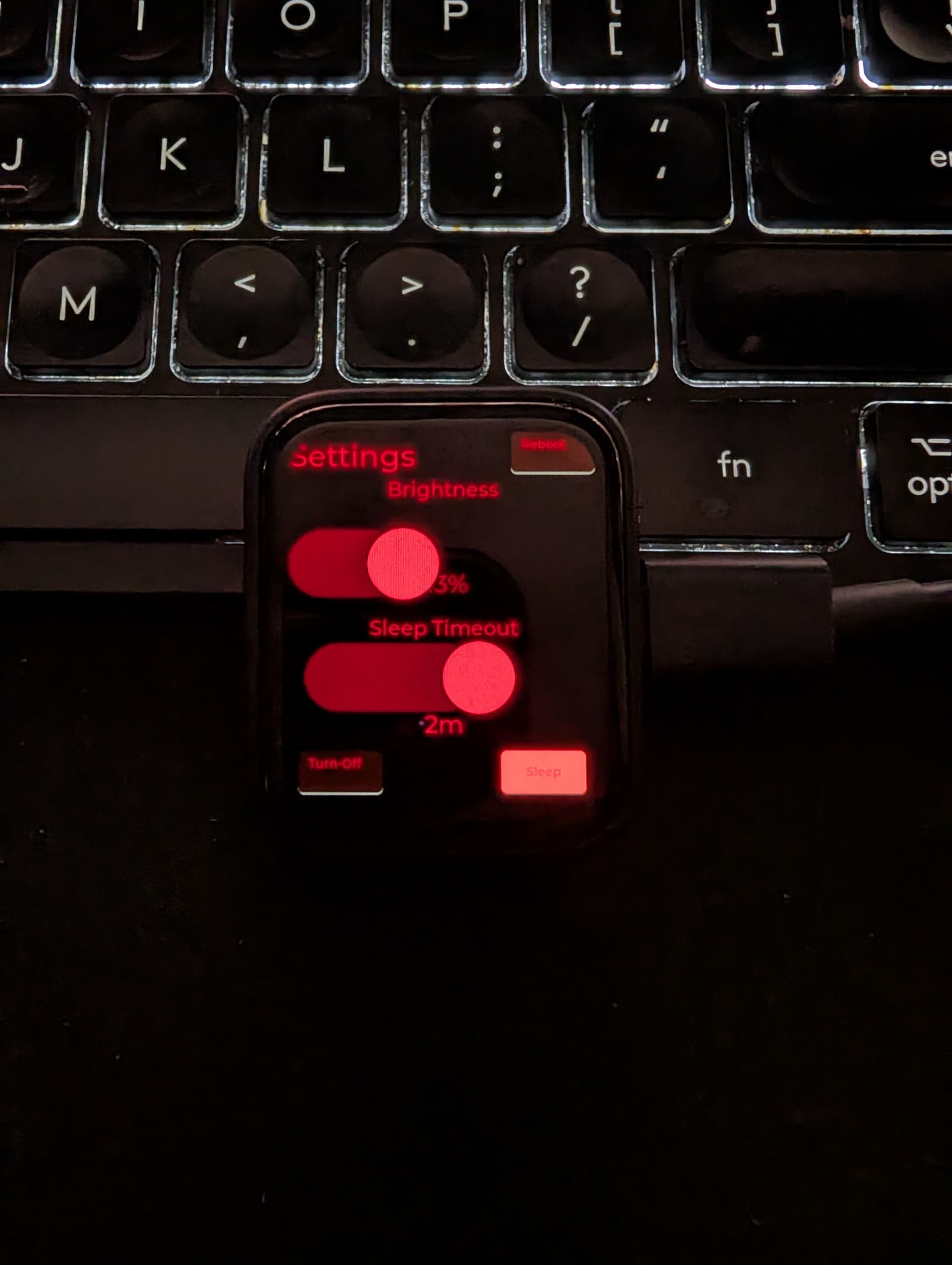
I got mine working with ESP-NOW, LVGL, Touch on ESPHome.
Repo for yaml (along with a few other devices).
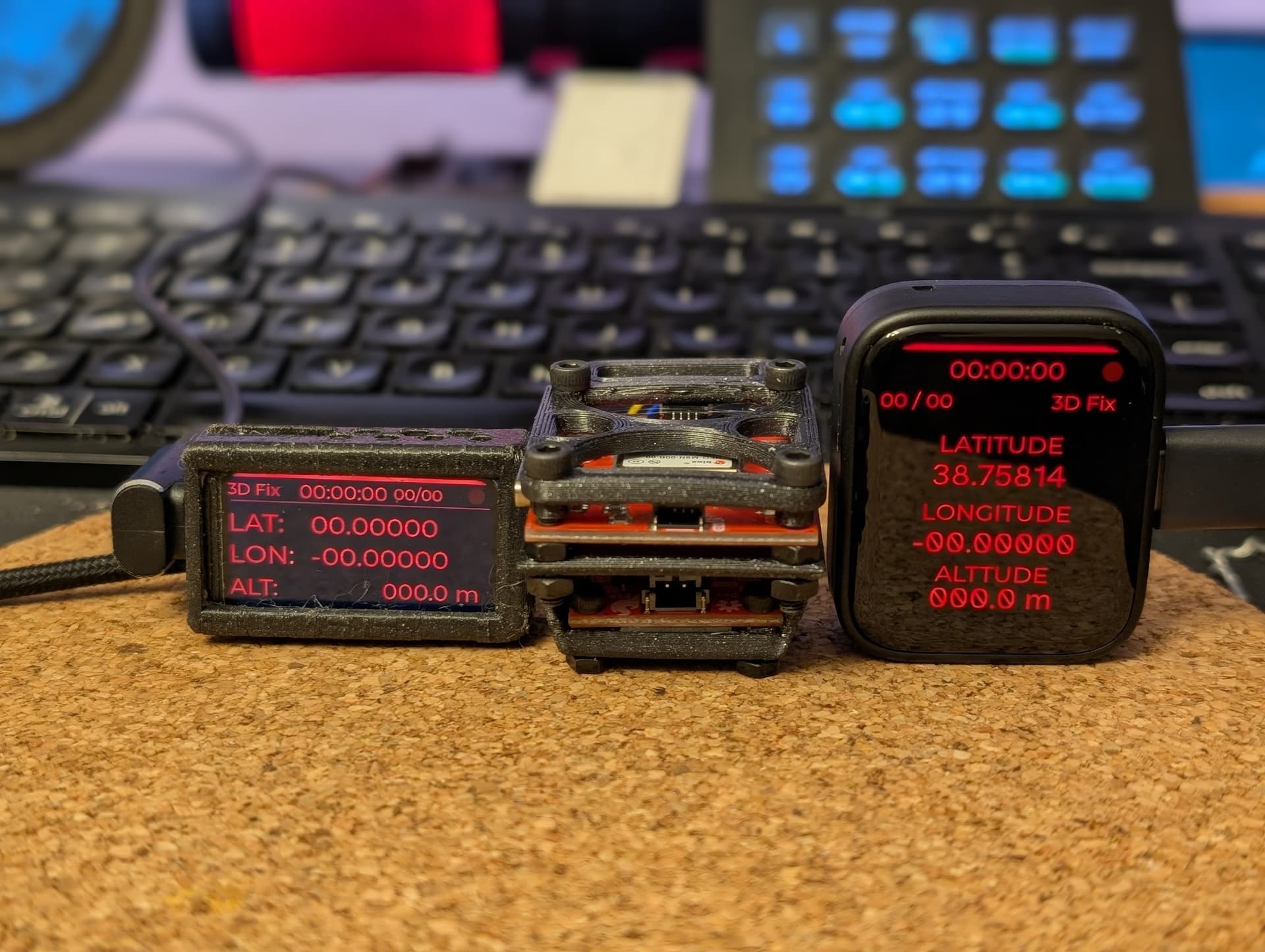
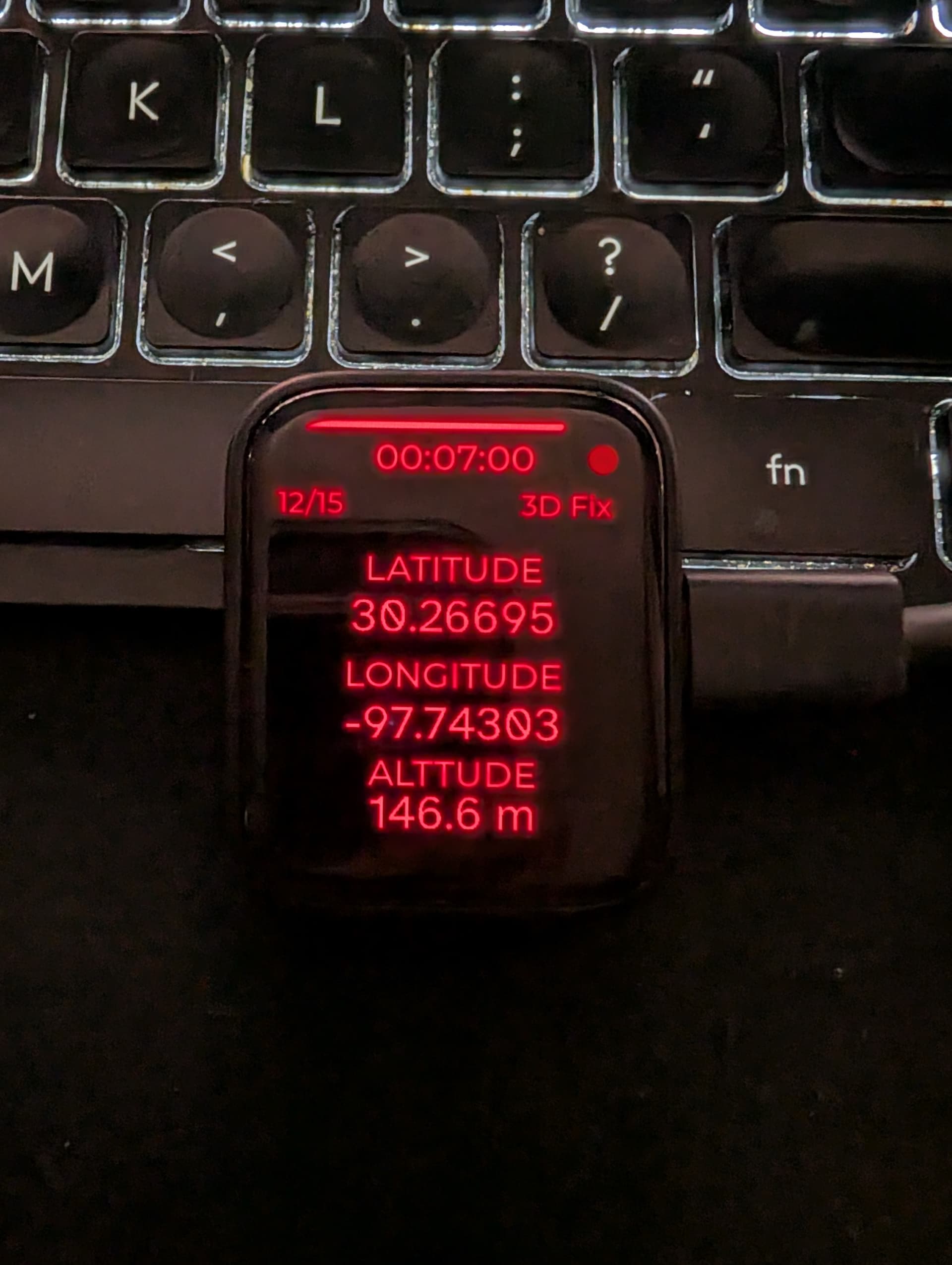
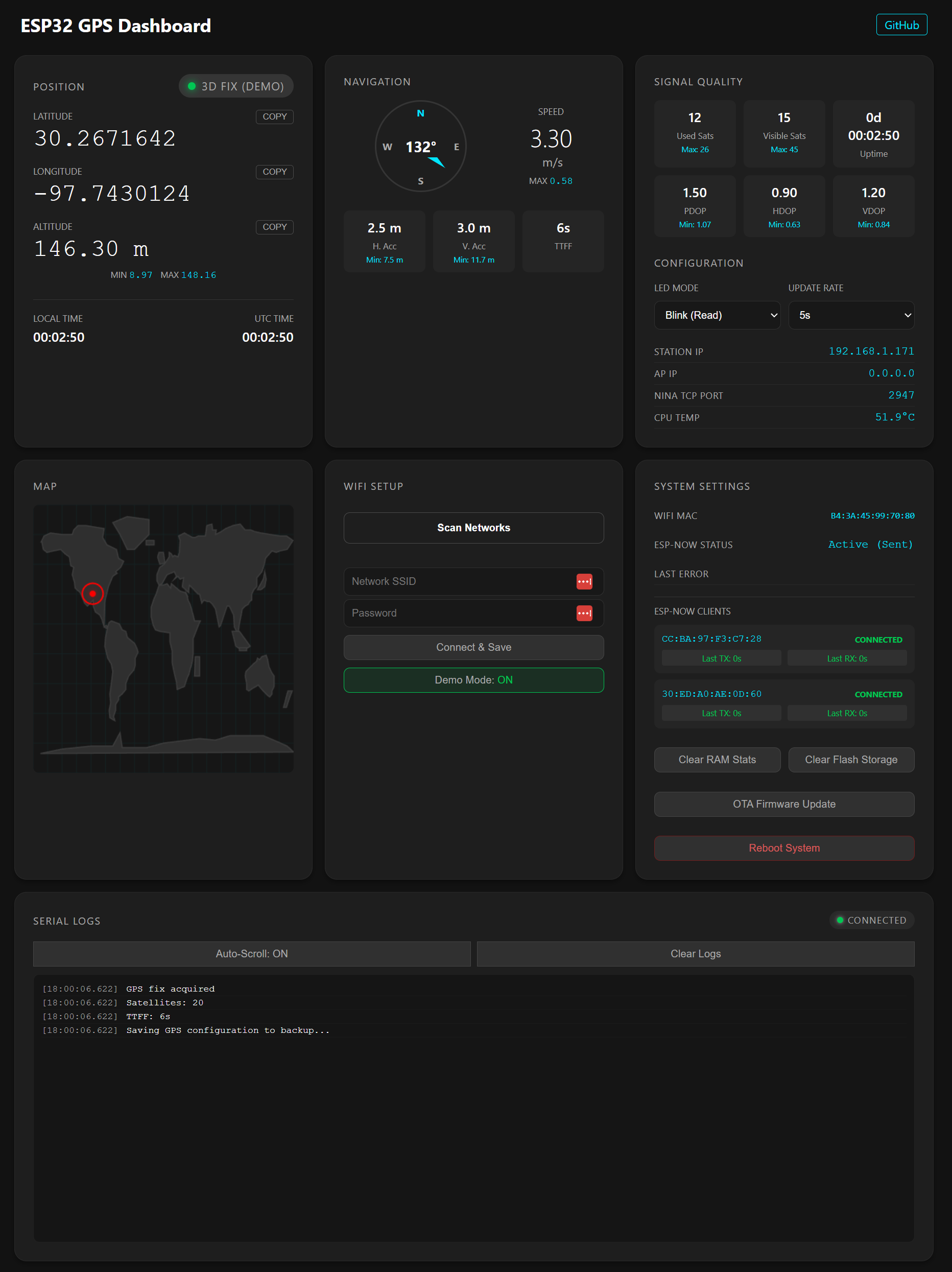
The project is for an offline GPS receiver that runs on an ESP32C6 and sends data over to two displays running ESPHome using ESP-NOW
ESP32 based GPS location source for NINA astro
All three ESP32 things (on the left is the ESP32-C6-LCD-1.47
Waveshare ESP32-S3-Touch-AMOLED-1.8 :
Sender GPS ESP32C6 also running the dashboard:
mavanmanen
January 10, 2026, 2:43pm
13
Having problems with this one, any ideas?
[15:43:29][D][rtttl:062]: Playing song beep
[15:43:29][D][i2s_audio.speaker:102]: Starting
[15:43:29][D][i2s_audio.speaker:106]: Started
[15:43:29][D][ring_buffer:034][speaker_task]: Created ring buffer with size 16000
[15:43:29][D][voice_assistant:478]: State changed from IDLE to START_MICROPHONE
[15:43:29][D][voice_assistant:485]: Desired state set to START_PIPELINE
[15:43:29][D][voice_assistant:207]: Starting Microphone
[15:43:29][D][ring_buffer:034]: Created ring buffer with size 16384
[15:43:29][D][voice_assistant:478]: State changed from START_MICROPHONE to STARTING_MICROPHONE
[15:43:29][E][i2s_audio.microphone:516]: Driver failed to start; retrying in 1 second
[15:43:29][E][component:362]: i2s_audio.microphone set Error flag: unspecified
[15:43:29][D][i2s_audio.speaker:111]: Stopping
[15:43:29][D][i2s_audio.speaker:116]: Stopped
[15:43:29][D][rtttl:405]: Playback finished
[15:43:30][E][component:379]: i2s_audio.microphone cleared Error flag
[15:43:30][D][voice_assistant:478]: State changed from STARTING_MICROPHONE to START_PIPELINE
[15:43:30][D][voice_assistant:228]: Requesting start
[15:43:30][D][voice_assistant:478]: State changed from START_PIPELINE to STARTING_PIPELINE
[15:43:30][D][voice_assistant:500]: Client started, streaming microphone
[15:43:30][D][voice_assistant:478]: State changed from STARTING_PIPELINE to STREAMING_MICROPHONE
[15:43:30][D][voice_assistant:485]: Desired state set to STREAMING_MICROPHONE
m-gnaedig
January 15, 2026, 10:12pm
14
Hi together
I have received my ESP32-S3-Touch-AMOLED-1.8 today.
Should i be possible to use this device with the “ESP32-S3-BOX voice assistant” configuration? Has already anybody thy this?
PBDUB
January 19, 2026, 4:15pm
15
Mine was delivered 2 days ago, thanks to the work others have done setting up the config file. I would like to use this little 1.8 as a remote to control entities in HA for my motorhome. I’m just starting to learn how to set this up. I would like to create several pages with buttons for control, with the status being displayed. Any help would be appreciated.
PBDUB
January 20, 2026, 2:24am
16
Has anyone set it up to show the battery percentage on the display? I’ve already run the battery down several times testing out code.
wizmo
May 15, 2026, 2:30am
17
Here's a (more-or-less complete) Home-Assistant 'WAKE_WORD_VOICE_ASSISTANT' script for this device.
It is based on the esphome HA example, and includes micro-wake-word and timer support.
###################################################################
# Home-Assistant Voice Assistant #
# for Waveshare ESP32-S3-Touch-AMOLED-1.8 or clone #
# Version: 2026.05.16 #
###################################################################
substitutions:
name: esp32-s3-touch
friendly_name: esp32-s3-touch
# These unique characters have been extracted from every test file of every language available
# on https://github.com/home-assistant/intents (14 March 2024)
# However, the Figtree font only contains Latin characters, so there is no point using this...
# unlessyou change the font configuration accordingly.
allowed_characters: " !#%'()+,-./0123456789:;<>?@ABCDEFGHIJKLMNOPQRSTUVWYZ[]_abcdefghijklmnopqrstuvwxyz{|}°²³µ¿ÁÂÄÅÉÖÚßàáâãäåæçèéêëìíîðñòóôõöøùúûüýþāăąćčďĐđēėęěğĮįıļľŁłńňőřśšťũūůűųźŻżŽžơưșțΆΈΌΐΑΒΓΔΕΖΗΘΚΜΝΠΡΣΤΥΦάέήίαβγδεζηθικλμνξοπρςστυφχψωϊόύώАБВГДЕЖЗИКЛМНОПРСТУХЦЧШЪЭЮЯабвгдежзийклмнопрстуфхцчшщъыьэюяёђєіїјљњћאבגדהוזחטיכלםמןנסעפץצקרשת،ءآأإئابةتجحخدذرزسشصضطظعغفقكلمنهوىيٹپچڈکگںھہیےংকচতধনফবযরলশষস়ািু্చయలిెొ్ംഅആഇഈഉഎഓകഗങചജഞടഡണതദധനപഫബഭമയരറലളവശസഹാിീുൂെേൈ്ൺൻർൽൾაბგდევზთილმნოპრსტუფქყშჩცძჭხạảấầẩậắặẹẽếềểệỉịọỏốồổỗộớờởợụủứừửữựỳ—、一上不个中为主乾了些亮人任低佔何作供依侧係個側偵充光入全关冇冷几切到制前動區卧厅厨及口另右吊后吗启吸呀咗哪唔問啟嗎嘅嘛器圍在场執場外多大始安定客室家密寵对將小少左已帘常幫幾库度庫廊廚廳开式後恆感態成我戲戶户房所扇手打执把拔换掉控插摄整斯新明是景暗更最會有未本模機檯櫃欄次正氏水沒没洗活派温測源溫漏潮激濕灯為無煙照熱燈燥物狀玄现現瓦用發的盞目着睡私空窗立笛管節簾籬紅線红罐置聚聲脚腦腳臥色节著行衣解設調請謝警设调走路車车运連遊運過道邊部都量鎖锁門閂閉開關门闭除隱離電震霧面音頂題顏颜風风食餅餵가간감갔강개거게겨결경고공과관그금급기길깥꺼껐꼽나난내네놀누는능니다닫담대더데도동됐되된됨둡드든등디때떤뜨라래러렇렌려로료른를리림링마많명몇모무문물뭐바밝방배변보부불블빨뽑사산상색서설성세센션소쇼수스습시신실싱아안않알았애야어얼업없었에여연열옆오온완외왼요운움워원위으은을음의이인일임입있작잠장재전절정제져조족종주줄중줘지직진짐쪽차창천최추출충치침커컴켜켰쿠크키탁탄태탬터텔통트튼티파팬퍼폰표퓨플핑한함해했행혀현화활후휴힘,?"
# Add support for non-unicode characters by using better glyphset
font_glyphsets: "GF_Latin_Core"
font_family: Figtree
font_size: 30
# Voice Assistant settings.
# These are direct links to te v1 models. The v2 models dont fit in the tensor space.
# The alex model was much easier to trigger than the okay_nabu.
micro_wake_word_model: github://esphome/micro-wake-word-models/models/alexa.json@main
#micro_wke_word_model: github://esphome/micro-wake-word-models/models/okay_nabu.json@main
esphome:
name: ${name}
friendly_name: ${friendly_name}
min_version: 2025.2.0
name_add_mac_suffix: true
on_boot:
priority: 600
then:
- delay: 0.4s
- if:
condition:
lambda: 'return id(auto_off).state > 0;'
then:
- light.turn_on: led
# - if:
# condition:
# lambda: 'return id(auto_sleep).state > 0;'
# then:
# - lambda: |-
# id(sleep_0).set_run_duration(id(auto_sleep).state * 60000);
# - deep_sleep.allow: sleep_0
#- component.update: batpercent
# - delay: 30s
# - if:
# condition:
# lambda: return id(init_in_progress);
# then:
# - lambda: id(init_in_progress) = false;
# - script.execute: draw_display
- pcf85063.read_time
esp32:
variant: esp32s3
flash_size: 16MB
framework:
type: esp-idf
sdkconfig_options:
CONFIG_ESP32S3_DEFAULT_CPU_FREQ_240: "y"
CONFIG_COMPILER_OPTIMIZATION: "Performance"
CONFIG_ESP32S3_DATA_CACHE_64KB: "y"
CONFIG_ESP32S3_DATA_CACHE_LINE_64B: "y"
CONFIG_SPIRAM_FETCH_INSTRUCTIONS: y
CONFIG_SPIRAM_RODATA: y
# CONFIG_FATFS_LFN_STACK: "y"
# advanced:
# enable_idf_experimental_features: true
psram:
mode: octal
speed: 80MHz
logger:
hardware_uart: USB_SERIAL_JTAG
level: DEBUG
api:
on_client_connected:
- lvgl.image.update:
id: img_id
src: casita_initializing
on_client_disconnected:
- lvgl.image.update:
id: img_id
src: error_no_ha
ota:
- platform: esphome
password: !secret basic_pwd
id: ota_esphome
# on_begin:
# then:
# - deep_sleep.prevent: sleep_0
# - logger.log: "OTA started!"
# - lambda: |-
# id(ota_active) = true;
# - script.execute: draw_display
# - lambda: |-
# id(main_display).update();
wifi:
#ssid: !secret wifi_ssid
#password: !secret wifi_password
ap:
ssid: $friendly_name Hotspot
password: !secret basic_pwd
on_connect:
- lvgl.image.update:
id: img_id
src: error_no_ha
on_disconnect:
- lvgl.image.update:
id: img_id
src: error_no_wifi
captive_portal:
i2c:
id: i2c_bus
sda: GPIO15
scl: GPIO14
frequency: 200kHz
scan: true
spi:
- id: quad_spi
type: quad
clk_pin: GPIO11
data_pins:
- GPIO4 # D0
- GPIO5 # D1
- GPIO6 # D2
- GPIO7 # D3
pca9554:
- id: ext_io
i2c_id: i2c_bus
time:
- platform: pcf85063
id: pcf85063_time
i2c_id: i2c_bus
# repeated synchronization is not necessary unless the external RTC
# is much more accurate than the internal clock
update_interval: never
- platform: homeassistant
# instead try to synchronize via network repeatedly ...
on_time_sync:
then:
# ... and update the RTC when the synchronization was successful
pcf85063.write_time:
# AMOLED Display (368x448)
display:
- platform: mipi_spi
id: my_display
brightness: 150
bus_mode: quad
dimensions:
width: 368
height: 448
model: WAVESHARE-ESP32-S3-TOUCH-AMOLED-1.75
cs_pin: GPIO12
# FT5x06 Capacitive Touchscreen
# no reset_pin support so sometimes needs reboot!
touchscreen:
- platform: ft5x06
id: my_touchscreen
display: my_display
interrupt_pin: GPIO21
address: 0x38
transform:
swap_xy: false
mirror_x: false
mirror_y: false
# ============================================================================
# AUDIO CONFIGURATION
# ============================================================================
# I2S Audio Bus - Connects ESP32 to ES8311 codec
i2s_audio:
- id: i2s_audio_bus
i2s_lrclk_pin: GPIO45 # Word select / left-right clock
i2s_bclk_pin: GPIO9 # Bit clock
i2s_mclk_pin: GPIO16 # Master clock
# ES8311 Audio Codec
audio_dac:
- platform: es8311
id: es8311_codec
address: 0x18
i2c_id: i2c_bus
use_mclk: true
use_microphone: false # Analog microphone (not PDM digital)
bits_per_sample: 16bit
sample_rate: 16000
mic_gain: 18DB
# Speaker - Audio output through ES8311 DAC
speaker:
- platform: i2s_audio
id: i2s_speaker
dac_type: external
audio_dac: es8311_codec
i2s_audio_id: i2s_audio_bus
i2s_dout_pin: GPIO8
sample_rate: 16000
bits_per_sample: 16bit
timeout: 2s
# Microphone - Audio input through ES8311 ADC
microphone:
- platform: i2s_audio
id: i2s_microphone
adc_type: external
i2s_audio_id: i2s_audio_bus
i2s_din_pin: GPIO10
bits_per_sample: 16bit
sample_rate: 16000
button:
- platform: factory_reset
id: factory_reset_btn
internal: true
switch:
# Power Amplifier - mute_pin not supported by dac driver
# currently uses the media player on_mute/unmute
- platform: gpio
pin: GPIO46
id: pa_enable
name: "Amplifier"
restore_mode: ALWAYS_ON
internal: true
# Touchscreen - reset_pin not supported by touch driver
# touch screen sometimes does not initialize. This does not help!
- platform: gpio
pin:
pca9554: ext_io
number: 2
id: tp_reset
name: "Touch Reset"
restore_mode: ALWAYS_ON
internal: false
- platform: template
name: Mute
id: mute
icon: "mdi:microphone-off"
optimistic: true
restore_mode: RESTORE_DEFAULT_OFF
entity_category: config
on_turn_off:
- script.execute: start_voice_assistant
on_turn_on:
- script.execute: stop_voice_assistant
- platform: template
id: timer_ringing
name: Alarm
icon: "mdi:alarm-note"
optimistic: true
internal: false
restore_mode: ALWAYS_OFF
on_turn_off:
# Turn off the repeat mode and disable the pause between playlist items
- lambda: |-
id(speaker_media_player)
->make_call()
.set_command(media_player::MediaPlayerCommand::MEDIA_PLAYER_COMMAND_REPEAT_OFF)
.set_announcement(true)
.perform();
id(speaker_media_player)->set_playlist_delay_ms(speaker::AudioPipelineType::ANNOUNCEMENT, 0);
# Stop playing the alarm
- media_player.stop:
announcement: true
- delay: 500ms
- script.execute: start_voice_assistant
on_turn_on:
- script.execute: stop_voice_assistant
- delay: 200ms
# Turn on the repeat mode and pause for 1000 ms between playlist items/repeats
- lambda: |-
id(speaker_media_player)
->make_call()
.set_command(media_player::MediaPlayerCommand::MEDIA_PLAYER_COMMAND_REPEAT_ONE)
.set_announcement(true)
.perform();
id(speaker_media_player)->set_playlist_delay_ms(speaker::AudioPipelineType::ANNOUNCEMENT, 1000);
- media_player.speaker.play_on_device_media_file:
media_file: timer_finished_sound
announcement: true
- lvgl.image.update:
id: img_id
src: casita_timer_finished
- text_sensor.template.publish:
id: text_response
state: "Timer complete!"
- delay: 15min
- switch.turn_off: timer_ringing
text_sensor:
- id: text_request
platform: template
on_value:
- lvgl.label.update:
id: request_id
text: !lambda "return x.c_str();"
- id: text_response
platform: template
on_value:
- lvgl.label.update:
id: response_id
text: !lambda "return x.c_str();"
select:
- platform: template
entity_category: config
name: Wake word engine location
id: wake_word_engine_location
icon: "mdi:account-voice"
optimistic: true
restore_value: true
options:
- In Home Assistant
- On device
initial_option: On device
on_value:
#- wait_until:
# lambda: return id(voice_assistant_phase) == ${voice_assist_muted_phase_id} || id(voice_assistant_phase) == ${voice_assist_idle_phase_id};
- script.execute: stop_voice_assistant
- delay: 200ms
- script.execute: start_voice_assistant
number:
- platform: template
id: volume_control
name: "Volume"
min_value: 0
max_value: 100
initial_value: 70
step: 5
optimistic: true
disabled_by_default: true
set_action:
- lambda: |-
id(es8311_codec).set_volume(x / 100.0);
ESP_LOGI("volume", "Volume set to: %.0f%%", x);
- platform: template
name: "Screen Off"
id: auto_off
optimistic: true
restore_value: true
min_value: -1
max_value: 300
step: 1
unit_of_measurement: s
icon: 'mdi:television-off'
disabled_by_default: true
initial_value: 0
binary_sensor:
- platform: gpio
pin:
number: GPIO0
mode: INPUT_PULLUP
inverted: true
name: "Boot Button"
on_multi_click:
# Click
- timing:
- ON for at most 500ms
- OFF for at least 200ms
then:
- script.execute: press_to_talk
# Double-click
- timing:
- ON for at most 500ms
- OFF for at most 400ms
- ON for at most 500ms
then:
- switch.toggle: mute
# Press-and-hold
# - timing:
# - ON for at least 2s
# - OFF for at least 400ms
# then:
# - deep_sleep.enter: sleep_0
# Press-and-hold-long
- timing:
- ON for at least 10s
then:
- button.press: factory_reset_btn
output:
- platform: template
id: backlight_output
type: float
write_action:
- lambda: |-
id(my_display).set_brightness(state*255);
light:
- platform: monochromatic
id: led
name: Screen
icon: "mdi:television"
entity_category: config
output: backlight_output
restore_mode: RESTORE_DEFAULT_ON
default_transition_length: 250ms
on_turn_on:
then:
- if:
condition:
lambda: 'return id(auto_off).state > 0;'
then:
- delay: !lambda 'return id(auto_off).state*1000;'
- light.turn_off:
id: led
transition_length: 10s
media_player:
- platform: speaker
name: None
id: speaker_media_player
volume_min: 0.5
volume_max: 0.9
announcement_pipeline:
speaker: i2s_speaker
format: FLAC
sample_rate: 48000
files:
- id: timer_finished_sound
file: https://github.com/esphome/home-assistant-voice-pe/raw/dev/sounds/timer_finished.flac
on_mute:
- switch.turn_off: pa_enable
on_unmute:
- switch.turn_on: pa_enable
#on_announcement:
# - if:
# condition:
# not:
# voice_assistant.is_running:
# then:
# - script.execute: set_idle_status
on_idle:
- script.execute: start_voice_assistant
#- deep_sleep.allow: sleep_0
#on_play:
# - deep_sleep.prevent: sleep_0
# ============================================================================
# VOICE ASSISTANT
# ============================================================================
micro_wake_word:
models:
- ${micro_wake_word_model}
on_wake_word_detected:
- logger.log: "MWW detected"
- voice_assistant.start:
wake_word: !lambda return wake_word;
voice_assistant:
id: va
microphone: i2s_microphone
media_player: speaker_media_player
use_wake_word: true
noise_suppression_level: 2 #4
auto_gain: 31dBFS
volume_multiplier: 8.0
on_listening:
#- deep_sleep.prevent: sleep_0
- logger.log: "ASSIST listening"
- lvgl.image.update:
id: img_id
src: casita_listening
- text_sensor.template.publish:
id: text_request
state: "..."
- light.turn_on: led
on_stt_vad_end:
- logger.log: "ASSIST stt_vad_end"
- lvgl.image.update:
id: img_id
src: casita_thinking
on_stt_end:
- logger.log: "ASSIST stt_end"
- text_sensor.template.publish:
id: text_request
state: !lambda return x;
on_tts_start:
- logger.log: "ASSIST tts_start"
- text_sensor.template.publish:
id: text_response
state: !lambda return x;
- lvgl.image.update:
id: img_id
src: casita_replying
on_end:
- logger.log: "ASSIST end"
- wait_until:
and:
- not:
media_player.is_announcing:
- not:
voice_assistant.is_running:
- script.execute: set_idle_status
- if:
condition:
and:
- switch.is_off: mute
- lambda: return id(wake_word_engine_location).state == "On device";
#- lambda: return id(voice_assistant_phase) != ${voice_assist_timer_finished_phase_id};
then:
- micro_wake_word.start:
on_error:
- if:
condition:
lambda: return !id(init_in_progress);
then:
- lvgl.image.update:
id: img_id
src: casita_error
- delay: 1s
- script.execute: set_idle_status
on_client_connected:
- lambda: id(init_in_progress) = false;
- script.execute: start_voice_assistant
on_client_disconnected:
- script.execute: stop_voice_assistant
- lvgl.image.update:
id: img_id
src: error_no_ha
on_timer_started:
- wait_until:
media_player.is_announcing:
- voice_assistant.stop:
- script.execute: set_timer_status
on_timer_cancelled:
- script.execute: set_timer_status
on_timer_updated:
- script.execute: set_timer_status
on_timer_tick:
- if:
condition:
not:
- voice_assistant.is_running
then:
- script.execute: set_timer_status
on_timer_finished:
- switch.turn_on: timer_ringing
- light.turn_on: led
globals:
- id: ota_active
type: bool
initial_value: 'false'
- id: mic_muted
type: bool
restore_value: no
initial_value: 'false'
- id: init_in_progress
type: bool
restore_value: false
initial_value: "true"
- id: global_first_active_timer
type: voice_assistant::Timer
restore_value: false
- id: global_is_timer_active
type: bool
restore_value: false
- id: global_first_timer
type: voice_assistant::Timer
restore_value: false
- id: global_is_timer
type: bool
restore_value: false
script:
- id: update_timers
then:
- lambda: |
const auto timers = id(va).get_timers();
auto output_timer = timers.begin()->second;
bool output = false;
auto active_timer = timers.begin()->second;
bool active = false;
for (auto &timer : timers) {
if (timer.second.seconds_left <= output_timer.seconds_left) {
output_timer = timer.second;
output = true;
}
if (timer.second.is_active && timer.second.seconds_left <= active_timer.seconds_left) {
active_timer = timer.second;
active = true;
}
}
id(global_first_active_timer) = active_timer;
id(global_is_timer_active) = active;
id(global_first_timer) = output_timer;
id(global_is_timer) = output;
- id: set_timer_status
then:
- script.execute: update_timers
- logger.log: "TIMER update"
- lambda: |
auto seconds = 0;
auto total_seconds = 100;
if (id(global_is_timer_active)) {
seconds = id(global_first_active_timer).seconds_left;
total_seconds = id(global_first_active_timer).total_seconds;
} else if (id(global_is_timer)) {
seconds = id(global_first_timer).seconds_left;
total_seconds = id(global_first_timer).total_seconds;
}
int percent = 0;
if (total_seconds > 0) {
percent = round( 100 * seconds / total_seconds );
}
auto *bar = id(progress_id);
lv_bar_set_value(bar, percent, LV_ANIM_ON);
std::string display_string = "00:00";
if (seconds > 0) {
int hours_left = floor(seconds / 3600);
int minutes_left = floor((seconds - hours_left * 3600) / 60);
int seconds_left = seconds - hours_left * 3600 - minutes_left * 60 ;
auto display_hours = (hours_left < 10 ? "0" : "") + std::to_string(hours_left);
auto display_minute = (minutes_left < 10 ? "0" : "") + std::to_string(minutes_left);
auto display_seconds = (seconds_left < 10 ? "0" : "") + std::to_string(seconds_left) ;
if (hours_left > 0) {
display_string = display_hours + ":" + display_minute;
} else {
display_string = display_minute + ":" + display_seconds;
}
}
auto *label = id(timer_id);
lv_label_set_text(label, display_string.c_str());
- id: start_voice_assistant
then:
- if:
condition:
lambda: return !id(init_in_progress);
then:
- if:
condition:
switch.is_off: mute
then:
- if:
condition:
lambda: return id(wake_word_engine_location).state == "In Home Assistant";
then:
- lambda: id(va).set_use_wake_word(true);
- voice_assistant.start_continuous:
- if:
condition:
lambda: return id(wake_word_engine_location).state == "On device";
then:
- lambda: id(va).set_use_wake_word(false);
- micro_wake_word.start
- script.execute: set_idle_status
- id: stop_voice_assistant
then:
- if:
condition:
lambda: return !id(init_in_progress);
then:
- lambda: id(va).set_use_wake_word(false);
- micro_wake_word.stop:
- voice_assistant.stop:
- script.execute: set_idle_status
- id: set_idle_status
then:
- if:
condition:
switch.is_off: mute
then:
- lvgl.image.update:
id: img_id
src: casita_idle
else:
- lvgl.image.update:
id: img_id
src: casita_initializing
- id: press_to_talk
then:
- if:
condition:
- switch.is_on: timer_ringing
then:
- switch.turn_off: timer_ringing
else:
- script.execute: stop_voice_assistant
#- rtttl.play: 'beep:d=16,o=5,b=100:c6'
- delay: 200ms
- voice_assistant.start:
- light.turn_on: led
# ============================================================================
# USER INTERFACE (LVGL)
# ============================================================================
image:
- file: https://github.com/esphome/wake-word-voice-assistants/raw/main/casita/error_320_240.png
id: casita_error
resize: 320x240
type: RGB565
transparency: alpha_channel
- file: https://github.com/esphome/wake-word-voice-assistants/raw/main/casita/idle_320_240.png
id: casita_idle
resize: 320x240
type: RGB565
transparency: alpha_channel
- file: https://github.com/esphome/wake-word-voice-assistants/raw/main/casita/listening_320_240.png
id: casita_listening
resize: 320x240
type: RGB565
transparency: alpha_channel
- file: https://github.com/esphome/wake-word-voice-assistants/raw/main/casita/thinking_320_240.png
id: casita_thinking
resize: 320x240
type: RGB565
transparency: alpha_channel
- file: https://github.com/esphome/wake-word-voice-assistants/raw/main/casita/replying_320_240.png
id: casita_replying
resize: 320x240
type: RGB565
transparency: alpha_channel
- file: https://github.com/esphome/wake-word-voice-assistants/raw/main/casita/timer_finished_320_240.png
id: casita_timer_finished
resize: 320x240
type: RGB565
transparency: alpha_channel
- file: https://github.com/esphome/wake-word-voice-assistants/raw/main/casita/loading_320_240.png
id: casita_initializing
resize: 320x240
type: RGB565
transparency: alpha_channel
- file: https://github.com/esphome/wake-word-voice-assistants/raw/main/error_box_illustrations/error-no-wifi.png
id: error_no_wifi
resize: 320x240
type: RGB565
transparency: alpha_channel
- file: https://github.com/esphome/wake-word-voice-assistants/raw/main/error_box_illustrations/error-no-ha.png
id: error_no_ha
resize: 320x240
type: RGB565
transparency: alpha_channel
font:
- file:
type: gfonts
family: ${font_family}
weight: 300
italic: true
id: font_request
size: ${font_size}
glyphsets:
- ${font_glyphsets}
- file:
type: gfonts
family: ${font_family}
weight: 300
id: font_response
size: ${font_size}
glyphsets:
- ${font_glyphsets}
- file:
type: gfonts
family: ${font_family}
weight: 300
id: font_timer
size: ${font_size}
glyphsets:
- ${font_glyphsets}
lvgl:
pages:
- id: main_page
bg_color: black
widgets:
# Timer
- container:
id: alarm_id
align: TOP_MID
y: 2
widgets:
- bar:
id: progress_id
min_value: 0
max_value: 100
value: 0
align: TOP_MID
height: !lambda 'return ${font_size} + 8;'
- label:
id: timer_id
text: '00:00'
text_font: font_timer
text_color: white
align: TOP_MID
# Voice Assistant
- button:
id: btn_id
bg_color: black
align: CENTER
widgets:
- image:
id: img_id
align: center
src: error_no_wifi
radius: 11
clip_corner: true
- label:
id: request_id
text: '...'
align_to:
id: img_id
align: OUT_TOP_LEFT
y: ${font_size}
width: 320
height: !lambda 'return ${font_size} + 10;'
text_font: font_request
text_color: white
#text_align: LEFT
long_mode: SCROLL_CIRCULAR
- label:
id: response_id
align_to:
id: btn_id
align: OUT_BOTTOM_RIGHT
y: ${font_size}
width: 320
height: !lambda 'return ${font_size} + 10;'
text: '...'
text_font: font_response
text_color: white
text_align: RIGHT
long_mode: SCROLL_CIRCULAR
on_click:
then:
- script.execute: press_to_talk
# Volume slider - Vertical slider on left side
#- slider:
# id: volume_slider
# align: TOP_MID
# y: 2
# min_value: 0
# max_value: 100
# value: 70
# on_value:
# then:
# - logger.log:
# format: "Volume slider: %d"
# args: [ x ]
# - number.set:
# id: volume_control
# value: !lambda 'return x;'
Definitely, still room for improvement, but a good step forwards! Struggling with LVGL and there may still be stability issues when switching between modes,
mash727
September 10, 2026, 2:51pm
18
Thanks for the helpfull information. I now have a working system. As I am trying to learn about the device and add HA entities such as toggle a switch is there an example or a guide that i could read regarding the componets needed and the process? Many thanks
kcr
September 30, 2026, 2:58pm
19
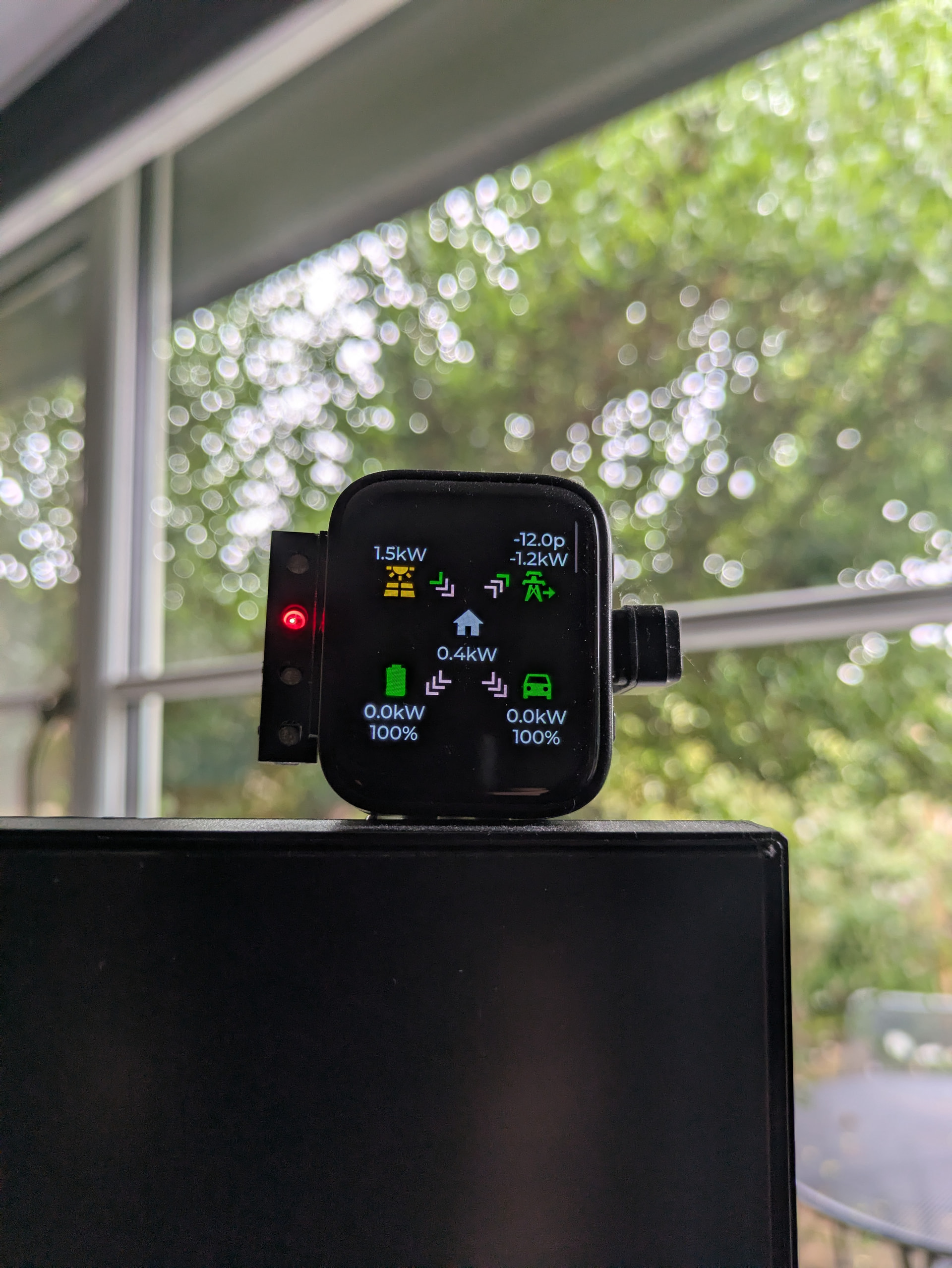
After starting off this discussion, I never came back and posted about what happened to my own project:
The first dashboard animation reports where my electricity is going. I installed PV, a heat pump and a battery last year, and started using Predbat, so it has been useful to keep an eye on what everything is doing and iron out some teething issues. The second dashboard reports weather forecast data from the HomeAssistant Met Office add-on, and I have another screen monitoring home temperatures.
The strip on the side is a set of addressable leds wired to an output on the ESP32 board. I use these to highlight unlocked doors or if the power is on in my external garage (the main touch display powers off when unused).
Thanks once more to everyone who contributed to the thread and helped me get this working. I think it is a really handy device, and it is interesting to see the different uses people have made of it.