Hello, I've been working on an open-source motion detection system that uses Wi-Fi signals instead of PIR sensors or cameras. It's now mature enough to share with the community!
What is it?
ESPectre analyzes Wi-Fi Channel State Information (CSI) to detect movement. When someone moves in a room, they "disturb" the Wi-Fi waves traveling through the air - similar to how your hand creates shadows when you wave it in front of a flashlight.
Key features:
ESPHome external component - One-click adoption, auto-discovery in Home Assistant
ESP32 hardware - Tested on ESP32-S3, ESP32-C6 and ESP332-C3
No cameras, no microphones - Privacy-preserving motion detection
Works through walls - Wi-Fi penetrates drywall
Zero configuration - Automatic subcarrier calibration (NBVI algorithm)
How does it integrate with Home Assistant?
ESPectre exposes:
Binary sensor: motion_detected (on/off)
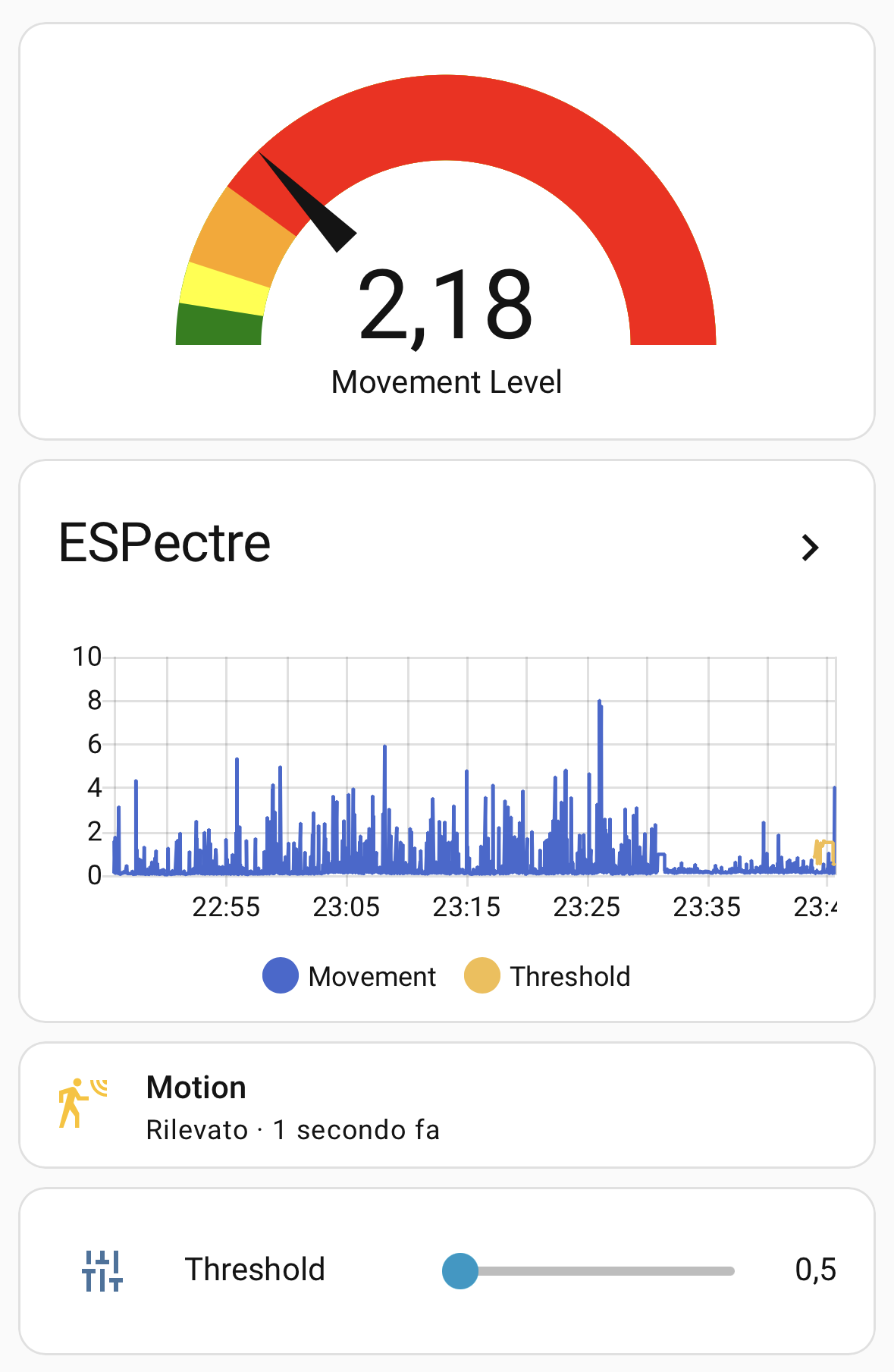
Sensor: movement_score (motion intensity 0-100)
Number entity: threshold (adjust sensitivity from HA dashboard)
All entities are auto-discovered via ESPHome's Native API.
Flash via ESPHome Dashboard or CLI
Wait 10 seconds (keep room still for auto-calibration)
This looks pretty amazing, thank you for your efforts.
I started reading through the docs, but I am not yet clear; does this require the esp device to be dedicated for this purpose?
And if not, how can we use this with existing esp32 based devices, particularly without affecting their other/original primary purpose?
For example, I have a few existing esp based devices, ratgdo32, bed presence, voice previews, sonoff s31’s… some of which are probably not esp32. I don’t currently have any bare bones esp32 dev devices laying around.
Is there a way to add the ESPectre functionality onto them for testing, if they can cope with the load?
If so, what would be the simplest code snippets to achieve that?
What are your ambitions on implementing proper presence detection instead of basic motion detection? Motion sensing is nice, tho error or rather inconvenience prone when it comes to the most important presence based automations like lighting and heating.
You already mention the topics in pair with your micropython implementation. But do you have any plans to implement more advanced processing on the data coming from esphome based sensors, best case on the HA end, for presence detection and maybe activity classification?
I’d say the major difference between presence and motion is that presence is limited to known individuals whereas movement includes unwanted guests enter my home sweet home while being on vacation.
Playes with ESPresence for some hours now … looks promissing, way better but an investment into movement sensors for each room. It really detects movement in multiple rooms if places centrsalized.
But due to the winter there’s next to no flies so it’s a bit hard to set the threshold to a level which prevents false positives.
Hi @Saoshen, as far as I know, Sonoff S31 is a device based on ESP8266, and CSI extraction requires specific hardware/firmware support that only the ESP32 family provides.
The good news is that ESP32-XX dev boards are very affordable (I suggest ESP32-C6) and work great as dedicated ESPectre sensors.
One device can cover multiple rooms since Wi-Fi signals penetrate walls.
Hi @chairstacker! In theory, you could add ESPectre to a Bluetooth Proxy device but I haven’t tested this combination myself.
If you want to try it anyway, you’ll need to add:
SDK config options (required to enable CSI):
esp32:
  framework:
    type: esp-idf
    sdkconfig_options:
      CONFIG_PM_ENABLE: n
      CONFIG_ESP_WIFI_STA_DISCONNECTED_PM_ENABLE: n
      CONFIG_ESP_WIFI_CSI_ENABLED: y
Important: ESPectre requires esp-idf framework. If your Bluetooth Proxy uses the Arduino framework, you’ll need to switch to esp-idf which might break compatibility with some components. Let me know how it goes if you try it.
@Pfandadler ESPectre does motion detection, meaning it detects when someone is actively moving. If you sit perfectly still, it will eventually report “no motion” (like a PIR sensor would). My future plans for presence detection are:
Micro-movements analysis: Detecting subtle movements like breathing or typing. The CSI data contains this information, but extracting it reliably requires more sophisticated signal processing.
Activity classification: The micro-espectre Python platform (in the same repo) is specifically designed for R&D on this. I’m collecting labeled datasets to train ML models that can distinguish:
Empty room vs. stationary person
Walking vs. sitting vs. sleeping
Number of people (1 vs. 2+)
Home Assistant integration: Once presence detection is reliable, the plan is to port the algorithms from Python to C++ and add new entities like presence_detected (binary) and activity_state (enum: empty/sitting/walking/sleeping).
ESPectre is still a young project, so no hard dates. But presence detection and gesture recognition are next on my roadmap - already experimenting with this on the develop branch.
The Movement Score represents motion intensity - higher values mean more significant movement. The Threshold determines simply when the system reports “motion detected”.
Watch the Movement Score in Home Assistant for a few minutes while the room is empty
Note the baseline noise level (usually 0.1-0.5 in quiet environments)
Walk around and observe the score jump (typically 2-10x higher than baseline)
Set threshold just above your baseline noise
I’m trying to understand how to auto calibrate this at boot, cause every time you power on your device I already made a soft calibration for the very first 10 seconds, skipping for instance noise subcarriers (so don’t move at the beginning for optimal results).
Threshold
Sensitivity
Use Case
0.5-1.0
High
Detect subtle movements
1.0-3.0
Medium
General purpose (default)
3.0-5.0
Low
Noisy environments
You can adjust the threshold directly from Home Assistant (no re-flash needed) - changes persist across reboots. Full tuning guide: TUNING.md
About the “Send error: -1 (errno: 12)” warnings:
This is ENOMEM (out of memory). The ESP32-C3 has limited RAM compared to S3/C6, and the traffic generator is hitting memory pressure. Despite these warnings, your system is still receiving CSI packets (34-55 pkt/s in your logs) and detecting motion correctly. The traffic generator sends packets in bursts, and some fail when memory is temporarily low - but enough get through. If you want to reduce these warnings, try lowering the traffic rate:
espectre:
  traffic_generator_rate: 50  # Default is 100
This will reduce memory pressure while still providing enough packets for motion detection.
That’s amazing. I’m very excited to see what future development will bring
Have you experimented with or spent any thought on an approach that analyzes the signals between two esp32s directly, instead of the ap used for communication with the network? So the optimal distance between the ap and esp could be more easily achieved by placing two devices in, for example, opposite corners of a room.
This somewhat results in a data transmission problem ofc, but would it be interesting to see if a more decentralized approach like that provides a significant improvement to accuracy(room boundaries, resolution,…)? Or is the current approach already precise enough to not warrant experimentation like that?^^
I used Tommy and it worked pretty well for me. I used it with device running as BT proxy and several HA voice devices. It was able to pick up movement before PIR in same room.
Tommy is bot open source. It stop working after the last esphome update. It was fixed pretty quickly but I found espresence and figured I would move to this or forget about this concept completely
Founder of TOMMY here. The BT proxy seems to have some conflicts with TOMMY for some users, but not for others. It’s on my todo to debug why this is happening and if there’s a possible fix to deploy on the TOMMY side. I hope to be able to do this soon, but right now I’m highly focused on some other promised features.
Also, as I have said before @francescopace, I wish your project all the best. Wi-Fi sensing is really cool technology and I hope a lot of people get to try it out. For people who want this as open source, your project fits right into that.
I’m testing it on ESPHome using ESP32-S3-N16R8 and I’m speechless!
It works perfectly.
Excellent!!!
But I would like to ask two questions:
The compiler was giving me an error and I had to remove the section: “version: 5.5.1”
2) Although ESPectre was detected in the esphome devices and the “Motion Detected” sensor is working normally, in the ESPHome Device Builder section ESPectre is constantly offline.
Thank you!
EDIT:
Tested by adding ssid: !secret wifi_ssid, password: !secret wifi_password in the WiFi: section with no luck
Hi @jolas, glad to hear it’s working on your ESP32-S3!
Regarding the ESP-IDF version issue: that’s useful feedback. Could you tell me which version of ESPHome you’re using? You can check it in the ESPHome dashboard or with esphome version.
When you removed version: 5.5.1, ESPHome used its default ESP-IDF version. I’m curious to know which version it picked - this helps me understand the minimum required version for ESPectre.
You can check the ESP-IDF version used during compilation in the build logs. Look for something like:
ESPHome version is 2025.9.3
ESP-IDF version from my validation screen is esp-idf-v5.4.2
Thank you!
Edit:
Something else I forgot to mention is that every time after a Power loss, returning value of ‘threshold’ reports in ESPHome as “unknown” even if the slider is somewhere around 5, I guess.
 Security: Alerts when someone enters while you're away
 Elderly care: Monitor activity patterns
 Smart automation: Lights/heating only when present
 Energy saving: Turn off devices in empty rooms
 ESPectre on Github: Overview, architecture, setup, tuning and performance.

