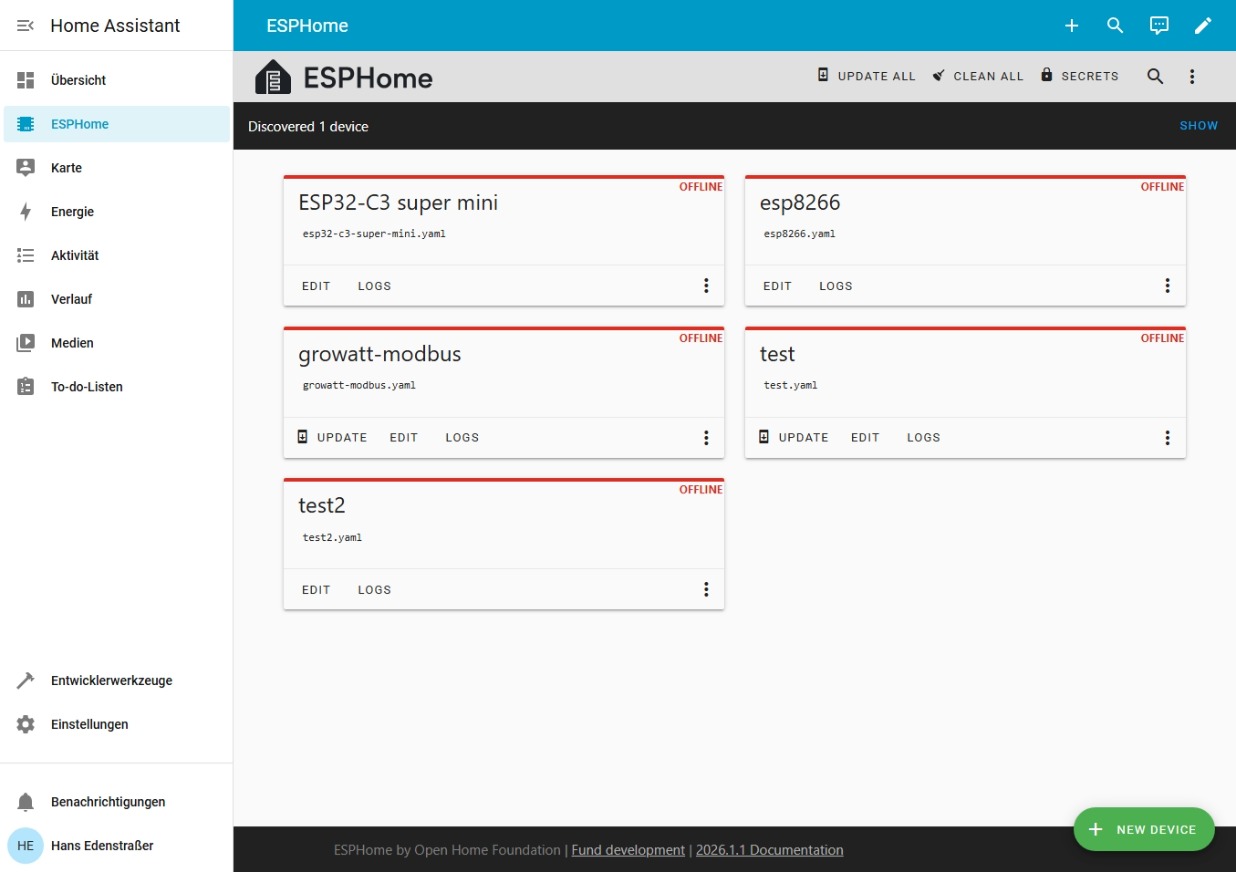
I’m slowly running out of ideas and hope someone here can help me. Over the past few days, I’ve tested several ESP boards, but none of them are detected by ESPHome after uploading the basic YAML configuration — even though the flashing process itself works without any issues.
Boards I tested:
WT32‑ETH01
ESP8266 LoLin NodeMCU C3 (ESP8266MOD)
ESP32‑C3 Super Mini (ESP32‑C3 XMCC3 ESP)
I’m using ESPHome inside Home Assistant, freshly installed. The firmware upload works fine on all devices, but afterwards none of them show up in the network.
Behavior of each board
ESP8266 (LoLin NodeMCU C3)
Does not support WiFi 6 or WPA3/WPA2? (of course)
Tested with WPA2 and WPA
The fallback AP does not appear
Device does not show up in the router at all
ESP32‑C3 Super Mini
Does not connect to my WiFi router or to an Android hotspot
I have flashed the devices countless times — still no success.
Problem
After many hours and several days of troubleshooting, I’m completely stuck. None of the devices appear in the network, no fallback AP is created, and ESPHome does not detect them.
Question to the community
Does anyone have an idea what might be going wrong? Are the C3 boards particularly picky with WiFi settings? Or am I missing something obvious?
Any help would be greatly appreciated — thank you!
Hi, can you upload a trace from the serial shell showing the boot process of the affected devices? Also include a complete yaml for one of the affected units.
You can also enable verbose logging to help us.
I connected to the onboard USB interface via the serial interface using Putty. Unfortunately, the serial interface disconnects when I press the reset button.
I have now connected Putty immediately after the reset process and hope that the data is complete.
YAML
esphome:
  name: esp32-c3-super-mini
  friendly_name: ESP32-C3 super mini

esp32:
  board: esp32-c3-devkitm-1
  framework:
    type: esp-idf

# Enable logging
logger:

# Enable Home Assistant API
api:
  encryption:
    key: "mKO6t+wJtIbifuPzVo25GcJS+SkZQijJ5COuE0UvWQU="

ota:
  - platform: esphome
    password: "31e70157d28b210010ea74ab278926c8"

wifi:
  ssid: !secret wifi_ssid
  password: !secret wifi_password

  # Enable fallback hotspot (captive portal) in case wifi connection fails
  ap:
    ssid: "Esp32-C3-Super-Mini"
    password: "mJycSIJEYSJd"

captive_portal:
Serial Output over Putty:
I (232) esp_image: segment 4: paddr=00140170 vaddr=403802a8 size[I][logger:121]: Log initialized
[C][safe_mode:084]: Unsuccessful boot attempts: 3
[D][esp32.preferences:149]: Writing 1 items: 0 cached, 1 written, 0 failed
[I][app:077]: Running through setup()
[C][component:208]: Setup preferences took 0ms
[C][component:208]: Setup esp32_ble took 0ms
[C][component:208]: Setup esp32_ble_server took 0ms
[C][component:208]: Setup esp32_improv took 0ms
[C][component:208]: S[W][component:490]: esp32_ble took a long time for an operation (222 ms)
[W][component:493]: Components should block for at most 30 ms
[I][app:194]: ESPHome version 2025.12.6 compiled on Jan 17 2026, 01:54:57
[I][app:196]: Project esphome.web version 26.1.0
[C][logger:261]: Logger:
  Max Level: DEBUG
  Initial Level: DEBUG
[C][logger:267]:   Log Baud Rate: 115200
  Hardware UART: USB_SERIAL_JTAG
[C][logger:274]:   Task Log Buffer Size: 768
[C][esp32_ble:656]: BLE:
  MAC address: 8C:D0:B2:A9:8F:34
  IO Capability: none
[C][esp32_ble_server:232]: ESP32 BLE Server:
[C][esp32_improv.component:305]: ESP32 Improv:
[D][esp32_ble_server:089]: BLE server setup successfully
[D][esp32_improv.component:098]: Creating Improv service
[C][captive_portal:118]: Captive Portal:
[C][wifi:1132]: WiFi:
  Connected: NO
[C][wifi:897]:   Local MAC: 8C:D0:B2:A9:8F:32
[C][wifi:908]:   SSID: ''
  BSSID: 00:00:00:00:00:00
  Hostname: 'esphome-web-a98f32'
  Signal strength: -127 dB ××××
  Channel: 1
  Subnet: 0.0.0.0
  Gateway: 0.0.0.0
  DNS1: 0.0.0.0
  DNS2: 0.0.0.0
[C][esphome.ota:092]: Over-The-Air updates:
  Address: esphome-web.local:3232
  Version: 2
[C][safe_mode:018]: Safe Mode:
  Successful after: 60s
  Invoke after: 10 attempts
  Duration: 300s
[W][safe_mode:030]: Last reset too quick; invoke in 7 restarts
[C][web_server.ota:241]: Web Server OTA
[C][api:211]: Server:
  Address: esphome-web.local:6053
  Listen backlog: 4
  Max connections: 8
[C][api:223]:   Noise encryption: NO
[C][improv_serial:063]: Improv Serial:
[D][esp32_improv.component:232]: State transition: STOPPED (0x00) -> AUTHORIZED (0x02)
[D][esp32_improv.component:131]: Service started!
[C][mdns:177]: mDNS:
  Hostname: esphome-web-a98f32
[I][safe_mode:042]: Boot seems successful; resetting boot loop counter
[D][esp32.preferences:149]: Writing 1 items: 0 cached, 1 written, 0 failed
Ich habe mich jetzt mit dem geöffnetem Fallback WLAN vom ESP32-C3 Super mini verbunden und habe dort die WLAN Daten von meinem Heim WLAN eingegeben. Nun ist der ESP mit dem WLAN Router verbunden.
ESPHome erkennt ihn aber noch immer als offline
Alle Geräte befinden sich natürlich im selben WLAN.
ESP-ROM:esp32c3-api1-20210207
[I][logger:121]: Log initialized
[C][safe_mode:084]: Unsuccessful boot attempts: 1
[D][esp32.preferences:149]: Writing 1 items: 0 cached, 1 written, 0 failed
[I][app:077]: Running through setup()
[C][component:208]: Setup preferences took 1ms
[C][component:208]: Setup esp32_ble took 0ms
[C][component:208]: Setup esp32_ble_server took 0ms
[C][component:208]: Setup esp32_improv took 0ms
[C][component:208]: S[D][wifi:1068]: Found networks:
[I][wifi:1041]: - 'FRITZ!Box 7490' (38:10:D5:BC:14:AA) ▂▄▆█
[D][wifi:1044]:   Channel:  1, RSSI: -82 dB, Priority:    0
[D][wifi:1046]: - 'Home@Kitz' (60:B5:8D:4A:D0:C2) ▂▄▆█
[D][wifi:1046]: - 'Home@Kitz' (60:B5:8D:4A:F8:FB) ▂▄▆█
[D][wifi:1046]: - 'Home@Kitz' (60:B5:8D:32:D1:C0) ▂▄▆█
[D][wifi:1361]: Retry phase: INITIAL_CONNECT → SCAN_CONNECTING
[I][wifi:774]: Connecting to 'FRITZ!Box 7490' (38:10:D5:BC:14:AA) (priority 0, attempt 1/2 in phase SCAN_CONNECTING)...
[W][wifi_esp32:773]: Disconnected ssid='FRITZ!Box 7490' bssid=38:10:D5:BC:14:AA reason='Authentication Failed'
[W][wifi:1210]: Connecting to network failed (callback)
[D][wifi:1532]: Failed 'FRITZ!Box 7490' (38:10:D5:BC:14:AA), priority 0 → 0
[D][wifi:1603]: Retry attempt 2/2 in phase SCAN_CONNECTING
[I][wifi:774]: Connecting to 'FRITZ!Box 7490' (38:10:D5:BC:14:AA) (priority 0, attempt 2/2 in phase SCAN_CONNECTING)...
[I][wifi:1149]: Connected
[C][wifi:897]:   Local MAC: 8C:D0:B2:A9:8F:32
[C][wifi:904]:   IP Address: 192.168.1.190
[C][wifi:908]:   SSID: 'FRITZ!Box 7490'
  BSSID: 38:10:D5:BC:14:AA
  Hostname: 'esphome-web-a98f32'
  Signal strength: -75 dB ▂▄▆█
  Channel: 1
  Subnet: 255.255.255.0
  Gateway: 192.168.1.1
  DNS1: 192.168.1.1
  DNS2: 0.0.0.0
[D][wifi:1173]: Disabling AP
[W][component:373]: wifi cleared Warning flag
Is the device visible in the home assistant dashboard?
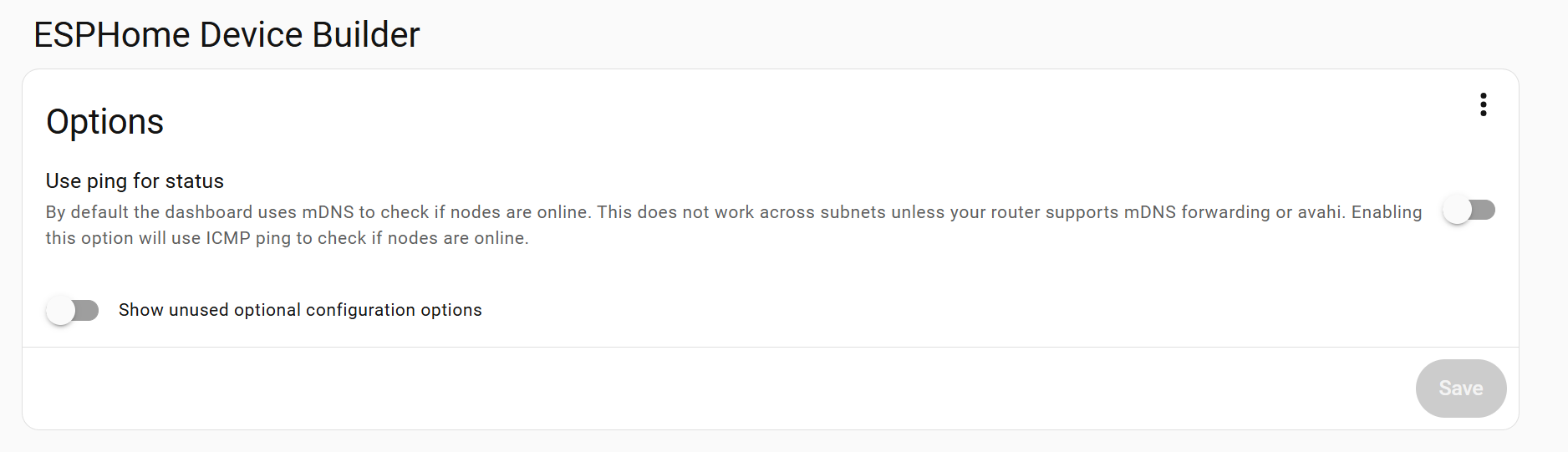
When the device device isn’t visible in the esphome dashboard it isn’t detected by mdns. this happens when the device is connected on a different subnet than the esphome/homeassistant server. Your device gets 192.168.1.190 Is esphome running also on 192.168.1.x ?
If not then you should change a setting in the esphome add-on config
It could be due to mDNS discovery issues. Can you ping the device from the HA instance using the mDNS .local address? It should be:
ping esphome-web-a98f32.local
I also like to add in this statement, but it should be enabled by default, and also have the webserver available on port 80.
(base) ronnie@Wyse-7040:~/$ avahi-browse -all
+ enp0s31f6 IPv4 GoogleTV9447                                  _androidtvremote2._tcp local
+ enp0s31f6 IPv4 boiler-piping                                 Web Site             local
+ enp0s31f6 IPv4 heating-setback                               Web Site             local
+ enp0s31f6 IPv4 athom-without-relay-plug-574e9f               Web Site             local
+ enp0s31f6 IPv4 athom-dryer-f16520                            Web Site             local
+ enp0s31f6 IPv4 athom-presence-sensor-9ce36e                  Web Site             local
+ enp0s31f6 IPv4 athom-dishwasher-f12a6a                       Web Site             local
+ enp0s31f6 IPv4 airquality                                    Web Site             local