How did you take the backup in the VM? Was it via HA, or via VMware?
If via HA, is the backup encrypted? You will probably need an unencrypted backup to restore on onboarding.
Your screenshot seems to show the properties of an entity named “After barn liquor cabinet switch” after HA was loaded successfully. Does this mean that your new install is showing restored entities?
I have the same problem since yesterday 2025-02-21 afternoon.
Custom backup 2025.2.5
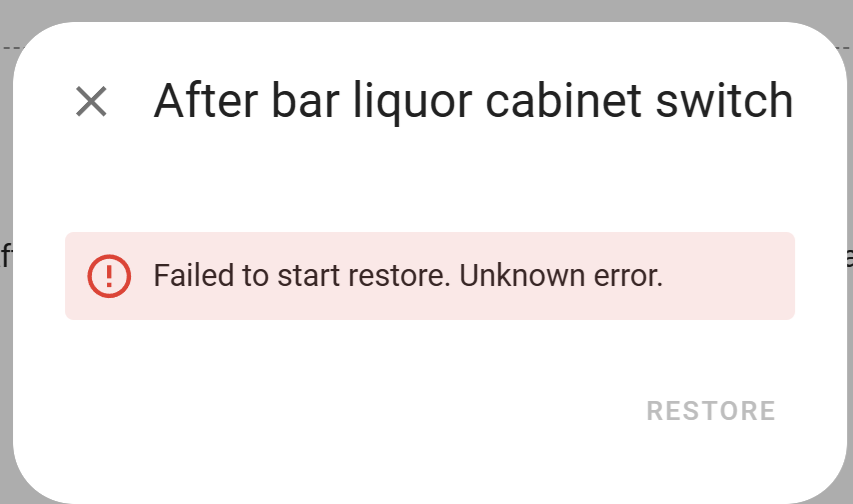
Failed to start restore. Unknown error.
I have done several restores from a BackUp from HA Green to a HA VM successfully all morning of 2025-02-21 and at a certain point after accepting some updates to HA to version 2025.2.5 the Restore no longer works.
I note that the system no longer asks for the Encryption Key!
Why?
I tried to change the Encryption Key hoping to reset the error, but the system continues not to ask for it as it did before.
With 2025 it is not possible to do Backup without Encryption Key and now it no longer asks for it from Version 2025.2.5.
Can anyone help us?
With 2025.2.x it is entirely possible to backup without an encryption key. Even with 2025.1.x it was possible, though you had to do it via a service call in dev tools, not via UI.
Either way, if you create an unencrypted backup while on 2025.2.x, you can restore without any encryption complications.
PS- do not change the encryption key. That makes things worse because you won’t know which key was valid at the time of backup.
Rather than restoring using the RESTORE FROM BACKUP button on the first screen. I clicked CREATE MY SMART HOME, entered new user and location details, went to the backup section, uploaded and restored from there and it has worked.
I had same error today when trying to migrate Home Assistant from Raspberry Pi 3 to a Raspberry Pi 5 - unknown error and restore did not start at all.
Then I created new user in RPI5 Home Assistant and got it working. After logging in, I went to Settings → System → Backups and uploaded my latest backup (without encryption) and restored from there.
This method worked perfectly, and now my entire setup, including all devices, integrations, and automations are running as expected.
Could you please explain how ? I’m using 2025.2.5 .
I created a dummy user on my Raspberry Pi. Then, I was asked for the encryption key when restoring the backup, which truly baffles me since I never turned on encryption on the manual backup.
I went back to the VM and tried to do another manual backup. I was not prompted to enable or disable encryption.
Somehow, my nightly backups from the Samba backup add-on are not encrypted. But the manual backups are. How can I stop this ?
I went to “configure backup settings”, and I see that there is an encryption key and a way to change it, but nowhere to turn off the encryption.
So, I went to download the same backup using Chrome. It took many attempts, but finally I was able to download the TAR file. Last night, I had copied the TAR file using the Samba add-on .
The files are the same size. But the content is not the same.
It appears that using the download function in HA decrypts the backup. But when using the Samba add-on to copy the file over, the backup is actually encrypted.
I did not use the download function originally, because it is broken in Firefox. See my edited OP with a reference to the HA bug.
I see a lot of room for improvement with the backup experience. In no particular order, here are my suggestions :
when restoring an encrypted snapshot to a new system, there should be a more informative message than “failed to start restore. Unknown error”, and probably a prompt to input the the encryption key at that point.
encryption should be opt-in when performing local backups, not opt-out. Anything else is asking for trouble. If one isn’t even aware that the backup is encrypted, they will not know of the need to backup the corresponding encryption key.
the backup UI should clearly denote which backups are encrypted and unencrypted in the backup list
the backup TAR file should be the same when downloading it through the download function in the UI, or copying it over through the Samba share add-on. It is extremely confusing that they are not.
the bugs with the backup download function should be fixed. It is completely broken in Firefox, but even Chrome requires many tries to download the backup.
Many thanks for your reply.
You are right about the possibility of making backups without an encryption key!
I discovered it only today, thanks to you, with a lot of effort because it is not easy to see it and I learned it from the change log. Thanks again!
Thanks for the suggestion not to change the Encryption Key, but I am not so naive because I always keep the log of changes made with date and time.
But in any case, even without an encryption key, the restore from RESTORE FROM BACKUP no longer works!
It was useful to go through the creation of a new instance with CREATE MY SMART HOME and with a dummy user and then use the backup section as per your suggestion and I thank you very much.
This method works! Thanks ShadowFist! , but it would be better to also restore the canonical method that worked until 2025-02-21.
The above is the yaml for it, but you can simply to to Developer Tools > Actions and type in “backup” to do it in the UI. One of the options will be “Home Assistant Supervisor: Create a full backup.”
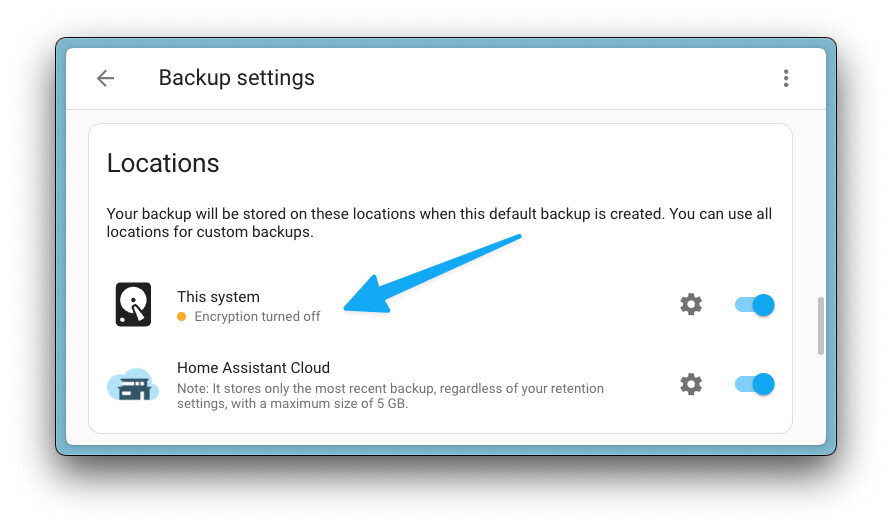
EDIT2: Got curious and updated to 2025.2.5. It’s pretty simple to disable encryption of local backups by default. Just go to Backup Settings > Location and switch off Encryption from the cog icon
As I learned from ShadowFist’s suggestions, I went to Settings-> System-> Backups-Backup Settings-> Locations and then choose the location you want to avoid encryption and click on the settings wheel.
I, thanks to ShadowFist’s suggestion, found the instructions on:
Settings-> About-> Changelog !
Good luck and thanks to ShadowFist, always ready to follow us!
Yes, I found that is the case, also. The “restore backup” option available immediately after imaging 14.2 on Pi4 just does not work, whether I upload an encrypted or unencrypted TAR backup.