Because: well, would the availability template also help in this case which bothers me MASSIVELY:
Smart plug has value 10 kWh
Smart Plug wrongly sends (or the integration reads) 6 kWh when the host restarts (HA OS / ZigBee addon is started)
Smart Plug wrongly sends (or the integration reads) 10 kWh again shortly after
Utility meters count the difference of 4 kWh as consumption → all utility meter based entities, additional cost entities and of course the energy dashboard are broken. I need to hurry and fix that which takes at least one hour per incident
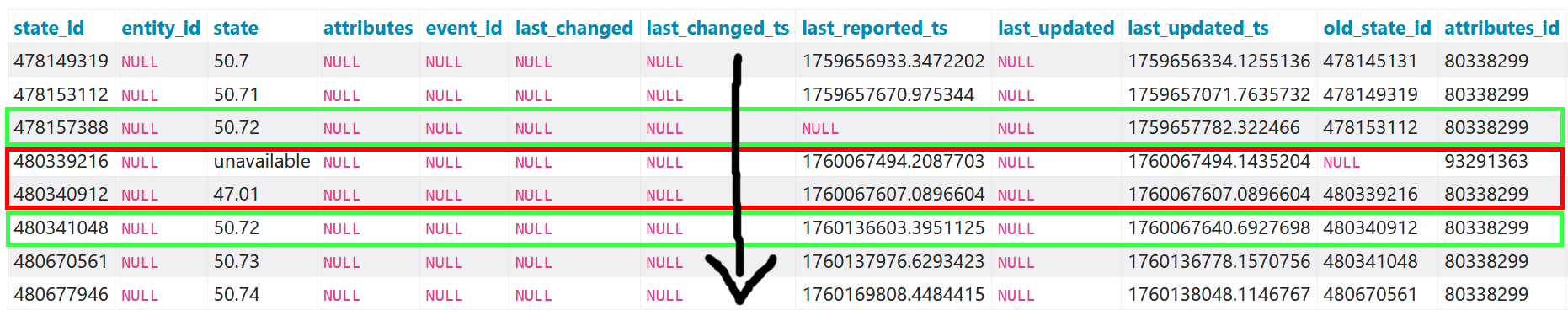
Here is a real-life example from yesterdays latest incident:
SELECT *
FROM "states"
WHERE metadata_id=(SELECT metadata_id FROM states_meta WHERE entity_id="sensor.xyz_total_consumption")
AND state_id>=478149319 AND state_id<=480677946
ORDER BY state_id ASC;
So therefore I plan to “copy” the raw/input sensor (the smart plug giving false values on HA OS restarts) via a template sensor and use that “filtered”, “drop-free” template sensor as input sensor for my utility meter sensors (where one of them - the total sensor - is also used in the energy dashboard):
raw input sensor from device --> template sensor --> utility meter based sensors --> energy dashboard
The important question now is:
Would it be enough to filter out for the unavailable “input sensor from device”?
Based on the database query I don’t think so, as the availability template would help filter out the unavailable input sensor state. But my problem here is the next state 47.01 before the correct 50.72 follows next. So I think I would need to filter out the 47.01 (overall: lower values) instead of or additionally to the unavailable state.
Ran again into this issue as HA OS restarted unexpectedly 2 days ago. Fixing the statistics and utility meter of 3 affected ZigBee devices cost me almost 2 hours now. Also restarting HA OS/host or performing HA OS updates can cause these issues. Horrible.
Is this a total that is ever increasing and not resetting? If soI thing setting the sensor to the wrong state class (total) might actually help. When the value drops it will look like production but that is negted when the value returns to normal. What you loose is the right value when the entity does reset to 0. You’d have to fix statistics for those moments.
The other option would be to create a template sensor that does not accept any values lower than the previous, but that too would fail to get the right result on meter resets.
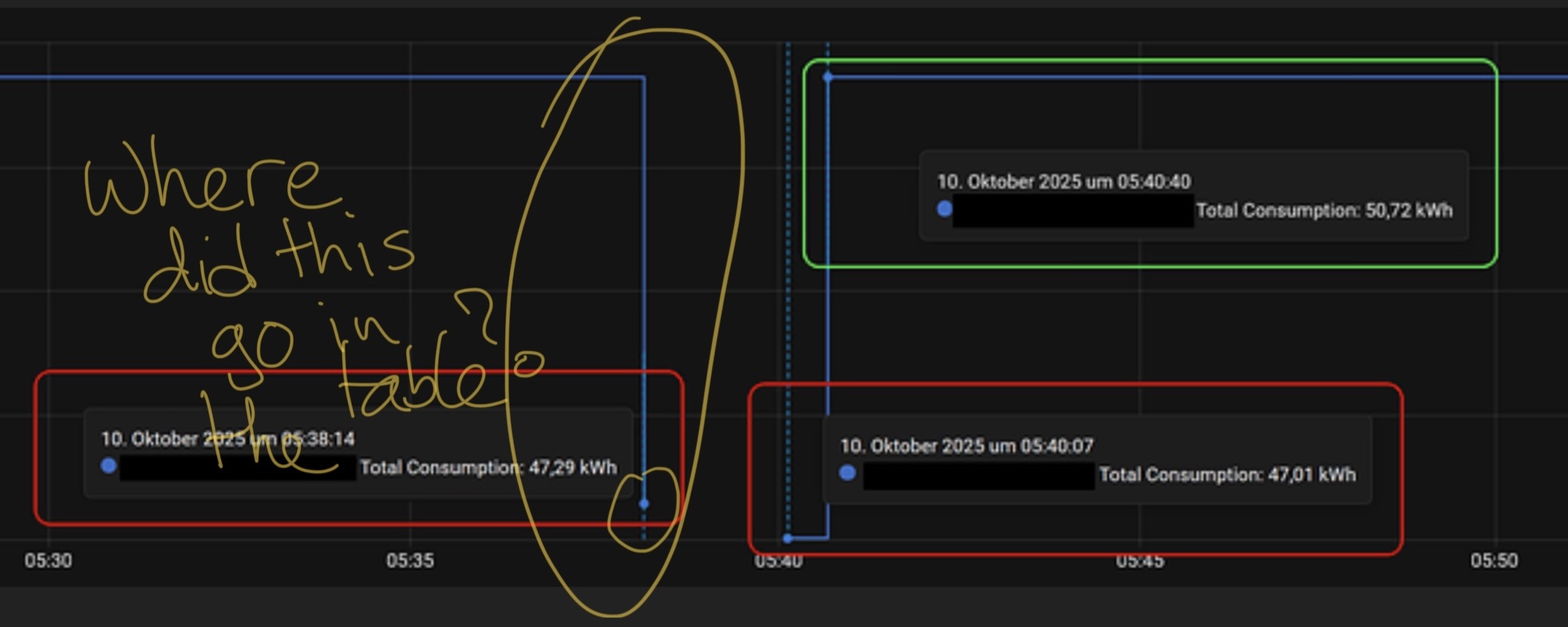
The problem is that when the device becomes available again it does not return directly to the previous value (50.72) . It logs some intermediate value first (47.01). The transition from 47 to 50 is seen as an almost instant production of 3kWh.
As I said before:
I’m guessing Tuya hardware?
Personally I’d replace it with something more reliable. You can update the utility meter source sensor without losing any history.
I’m not suggesting filtering it out. If it is total, then all drops and rises will eventually cancel each other out. It is not ideal, bit once the errors from 5:37 will be canceld out at 5:42.
They won’t. It drops instantly to unavailable. Which the utility meter will ignore. Just like it will ignore unavailable to 47kWh. Only 47 to 57 is summed.
No, it first has a datapoint at 47.2. that drop from 50 is registered as production. Then it goes unavailable. Then from unavailable it goes to 47. If that difference from 47.2 is not counted by the utility meter that would be a bug. then the increase back to 50 is registered and cancels out the production. So either the problem is reduced to a 0.2 error (and I really think that would be a bug) or the 0.2 is regstered, and all is canceled out.