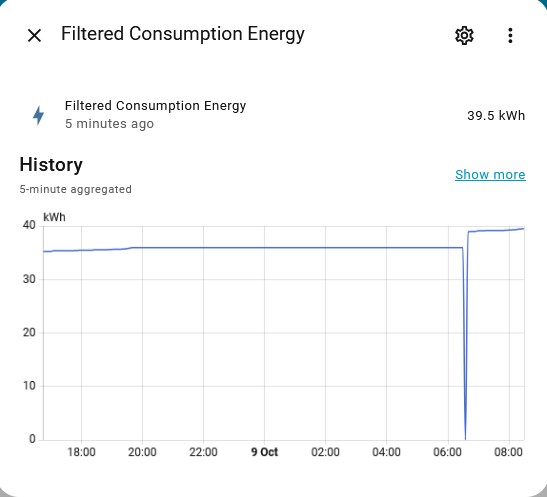
I cannot for the life of me get the utility meter to reset to zero each day

I have set up a number of utility meter to capture the daily kWh usage from a running total, but it keeps on starting off from whatever the running total is on the day. I have tried reset daily, delta, everything I can think of but to no avail.
It resets to zero but picks up the running total as soon as the inverter comes online.
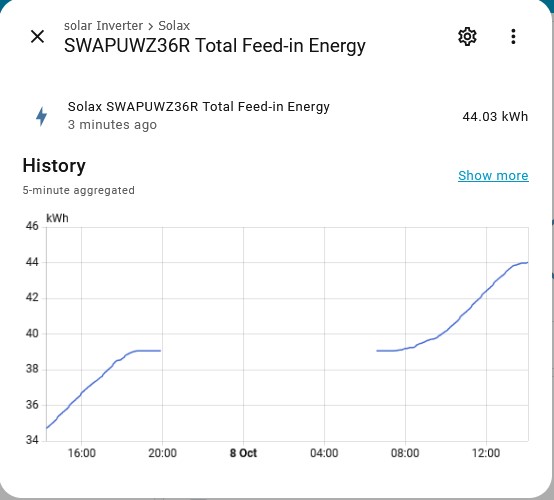
This used to work on a running total that was available 24/7 (Eastron meter), now I only have the running total available when the Solax inverter is running during the day. This graph is from the next day after I created the meter.
Can someone suggest what I might be doing wrong?
Edit: I now have the inverter connected to the Energy meter which is why I can no longer connect directly to the energy meter any more.

Version info:

  • Installation method Home Assistant OS
  • Core 2025.10.1
  • Supervisor 2025.10.0
  • Operating System 16.2
  • Frontend 20251001.0

Share the history graph for the sensor you are feeding the utility meter for the same time period.

Share your utility meter settings.

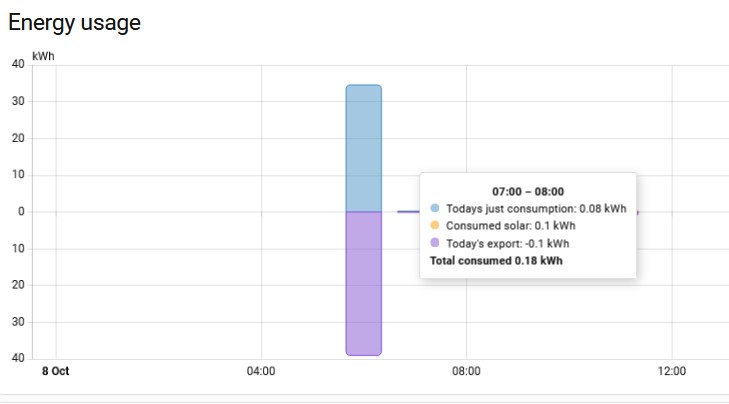
I put a history graph on there. You can see where the utility meter resets to zero at midnight but I suspect that the value that is produced when the Inverter comes alive in the morning is classified as usage.
Can you suggest a way of showing the settings once the utility meter has been created?

Not the one I asked for though.

I am not understanding the word ‘feeding’ in the context of this discussion, i am assuming you mean the total meter I am basing the utility meter on.
Here goes:


Correct. Almost.

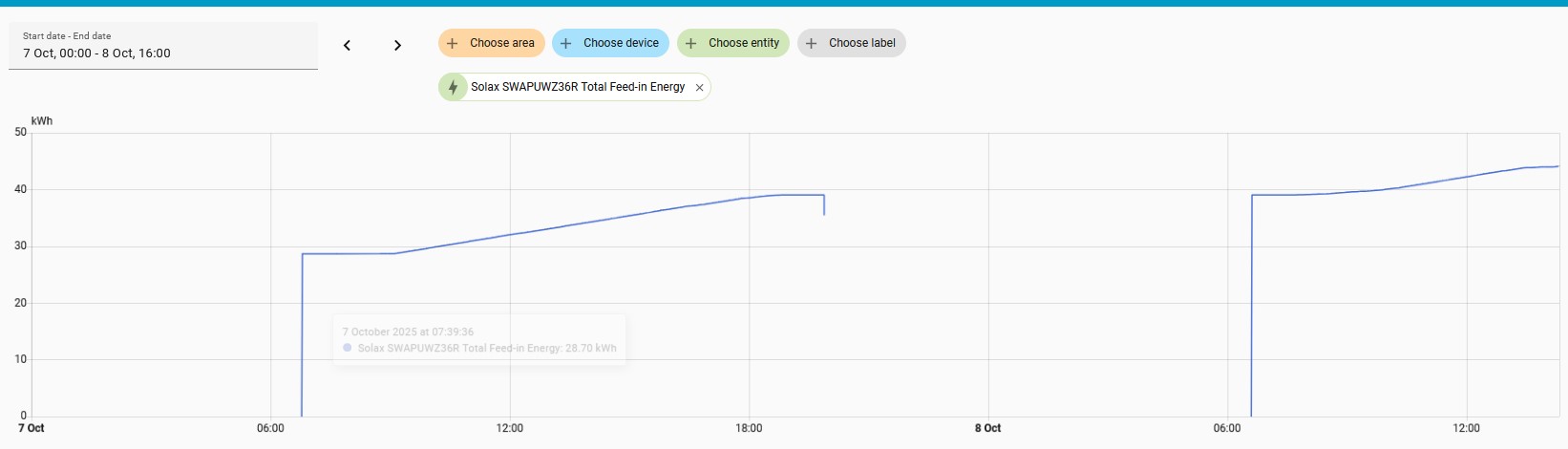
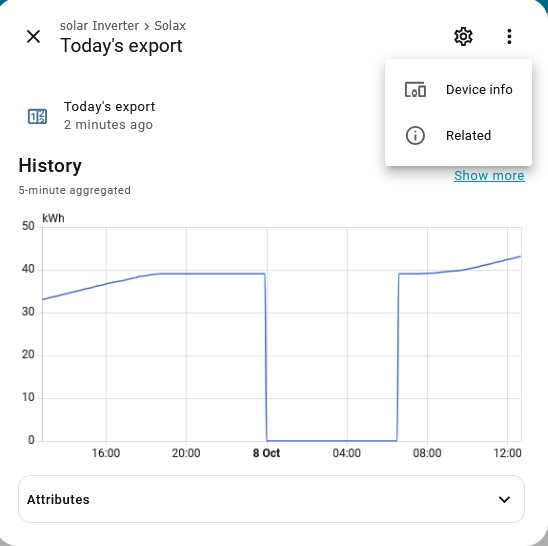
Please click the “show more” link on the pop up so that you are showing the actual state history and not long term statistics (that is what the pop-up shows so it loads faster).

What happened to the state in the middle of the night?

Did it go unavailable or go to zero?


The feed in information is extracted from the solar inverter which goes to sleep when the sun goes down and wakes up again when the sun rises. looking at this graph, it looks like the inverter sends out zero as the first output. Is that what the issue is?

Yep. The utility meter counts the 0 to 40kWh jump as energy consumed.

unknown to 40kWh would not be counted.

Which integration is supplying this sensor?

This is a modbus over IP from the Solax Power integration in settings / Devices & services.

Can you share the sensor config.

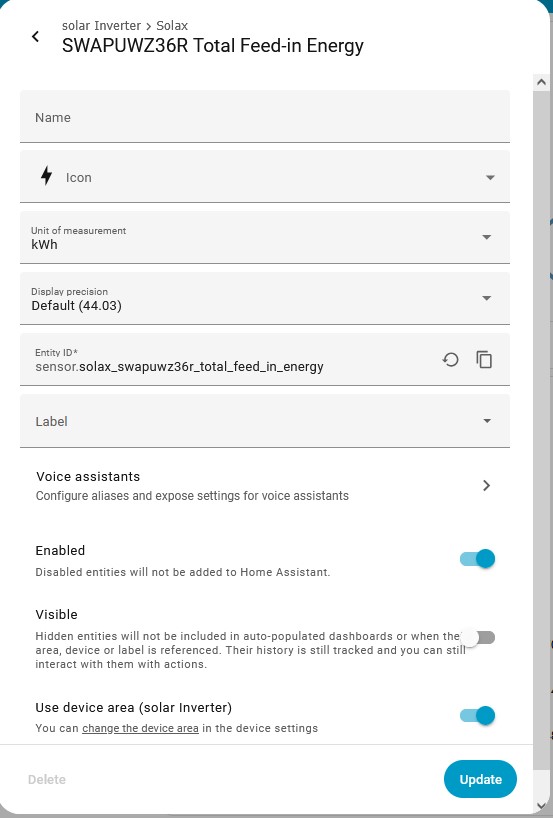
I have put a screen shot of what I believe is the sensor config in an earlier post. If you want something else, can you be more specific?

That is the sensor properties. I need the YAML config you used to create the sensor.

The Solax Power integration was the built in Integrations in HA. I just entered the IP address, port etc. It generated the 26 entities that I am using. Not all of them contain values as I don’t have a solar battery. I believe this is Modbus over IP but I have heard it being referred to as a restful interface. The only thing I have in the Yaml config file is the PVoutput updates ( and automations.yaml to run it every 5 mins)

Ok, sorry I thought you used the modbus integration.

Looks like this is a known issue: Solax integration occasionally returning all zeros · Issue #67 · squishykid/solax · GitHub

Thanks for your time and assistance. I really appreciate the time you have spent working on this with me. Is there any workaround that you know of?

You could try filtering it though a template sensor with an availability template:

configuration.yaml

template:
  - sensor:
      - name: Filtered Export Energy
        device_class: energy
        state_class: total
        unit_of_measurement: kWh
        state: "{{ states('sensor.solax_swapuwz36r_total_feed_in_energy') }}"
        availability: "{{ states('sensor.solax_swapuwz36r_total_feed_in_energy')|float(0) - this.state|default(0) >= 0 }}"

Restart HA after adding that if it is the fist time you have used the template integration. If you already have template sensors then a template sensor reload will do.

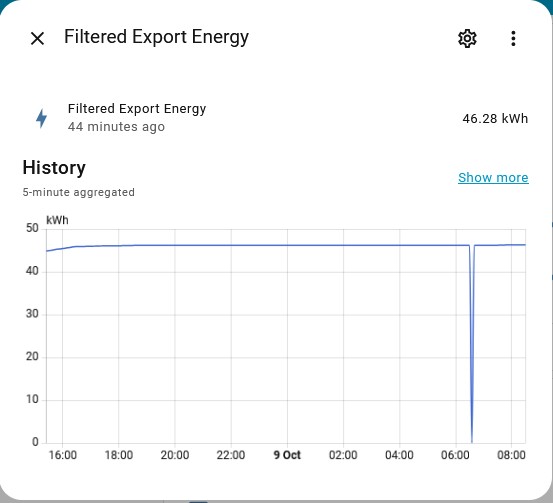
Check the state of sensor.filtered_export_energy and let that run overnight and make sure there is an actual gap in the history graph and no zeros. If that works then you can use it in your daily utility meter.
There is more than one sensor doing this. Would this be acceptable syntax for two sensors ? I think I have figured it out:

template:
  - sensor:
      - name: Filtered Export Energy
        device_class: energy
        state_class: total
        unit_of_measurement: kWh
        state: "{{ states('sensor.solax_swapuwz36r_total_feed_in_energy') }}"
        availability: "{{ states('sensor.solax_swapuwz36r_total_feed_in_energy')|float(0) - this.state|default(0) >= 0 }}"
  - sensor:
      - name: Filtered consumption Energy
        device_class: energy
        state_class: total
        unit_of_measurement: kWh
        state: "{{ states('sensor.ssensor.solax_swapuwz36r_total_consumption') }}"
        availability: "{{ states('sensor.sensor.solax_swapuwz36r_total_consumption')|float(0) - this.state|default(0) >= 0 }}"
template:
  - sensor:
      - name: Filtered Export Energy
        device_class: energy
        state_class: total
        unit_of_measurement: kWh
        state: "{{ states('sensor.solax_swapuwz36r_total_feed_in_energy') }}"
        availability: "{{ states('sensor.solax_swapuwz36r_total_feed_in_energy')|float(0) - this.state|default(0) >= 0 }}"

      - name: Filtered consumption Energy
        device_class: energy
        state_class: total
        unit_of_measurement: kWh
        state: "{{ states('sensor.ssensor.solax_swapuwz36r_total_consumption') }}"
        availability: "{{ states('sensor.sensor.solax_swapuwz36r_total_consumption')|float(0) - this.state|default(0) >= 0 }}"

Didn’t score a win on that one…


template:
  - sensor:
      - name: Filtered Export Energy
        device_class: energy
        state_class: total
        unit_of_measurement: kWh
        state: "{{ states('sensor.solax_swapuwz36r_total_feed_in_energy') }}"
        availability: "{{ states('sensor.solax_swapuwz36r_total_feed_in_energy')|float(0) - this.state|default(0) >= 0 }}"

      - name: Filtered Consumption Energy
        device_class: energy
        state_class: total
        unit_of_measurement: kWh
        state: "{{ states('sensor.solax_swapuwz36r_total_consumption') }}"
        availability: "{{ states('sensor.solax_swapuwz36r_total_consumption')|float(0) - this.state|default(0) >= 0 }}"

Try changing >= 0 to > 0