Yes it’s a custom resource that can be installed via HACS…if you search for mod-card on the forum you’ll find thread for it with instructions, etc
It’s a fairly powerful tool to extend cards and the like so worth reading up a bit on it
I had a similar question to you and decided that it was a new Template Sensor that needed to be created…I’ve done that and it’s working fine for me
(happy to share my yaml code for it but I’ve changed names, etc to suit my setup so don’t want to confuse things)
Hi Gav_in,
This is exactly what I needed! I’ve found and added “Lovelace card mod” from HACS, so now “type: custom:mod-card” is recognized correctly.
And for the “sensor.f1_circuit_locatie”, I’ve added the following code in configuration.yaml:
The moment I installed the integration I have not adjusted the delay on the question.
Now I have been able to measure the delay between my light going on and my TV showing the yellow/red flag.
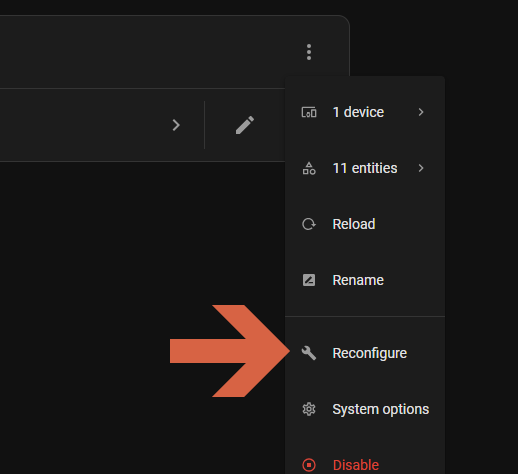
Now I am looking to adjust the delay time, but have been driving myself nuts finding the setting.
Could you help me along where I can find this so I can adjust the 0 to 4-5 seconds?
Right after the start of the Singapore race yesterday at 14:05:47, binary_sensor.f12025_race_week changed to false. I didn’t expect this to happen. I guess I’ll have to find another way to enable my automations only during race week
Indeed I already use that for controlling the lights during F1 live session. But I also used a F1 automation for receiving race control messages and those are also before and after the “live” status. But anyways a good idea as I can also pre or extend after live.
Nice blueprint
I’ve already actually got a automation running for this but just looked through your blueprint and wish I had that a few weeks back ha ha.
Is there a typo though in race phase options ?
I’m my drop-down box there’s no option for race is live but there’s 2 for race is finished.
This is a great integration, thank you for all the work on it. One question. During live sessions, is there any way to get a sensor with the current track position of the drivers (that updates with overtakes/pits/lap timing changes)? Near term I want to map a lighting scene to the realtime leaders of a session, but longer term it would be very cool to recreate the timing tower during a session.
Edit: one additional question: Is it possible with the integration to determine what type of activity is currently live? (practice, quali, sprint quali, sprint race, race)? Worst case, I guess I could try and compare the current time to the session start datetime attributes in f1_next_race, but sure would be nice to have an attribute in F1_session_status that indicates this?
I’m currently working on this, but there are a few challenges with handling that amount of data in a stable and reliable way. At the moment, I’m not sure if it will be released or not.
This feature is planned for the next version, you can read more about it here.
Version 2.2.0 introduces two new sensors powered by the F1 Live API, bringing richer and more dynamic real-time data to Home Assistant.
sensor.f1_current_session
Provides complementary information to sensor.f1_session_status.
While f1_session_status shows if a session is live, this sensor tells you which session is currently running — for example Practice 1, Qualification, or Race.
Ideal for dashboards and automations that adapt to the active session type.
sensor.f1_driver_list
A new sensor listing all drivers of the current season directly from the Live API.
Each driver includes key details such as:
racing_number – driver’s race number
team_color – hex color of the team (great for custom cards and charts)
name / tla / team – driver name, abbreviation, and team
Perfect for building custom cards and dynamic dashboards showing live driver and team data.
Improvements
Optimized Live API update logic for faster and more stable data refresh.
Improved session transition handling for smoother updates.
Enhanced error handling and data validation for better reliability.
Bug Fixes
Fixed initialization issues and Live API reconnection errors.
Corrected inconsistent data types and improved log clarity.
Better recovery when API responses are missing or delayed.
Other
This release lays the foundation for future real-time features such as live driver timing, enhanced race tracking, and improved visual components for dashboards.
Hi, thanks for the update, I’ve just installed it and restarted HA but I get this error in the logs
Logger: homeassistant.config_entries
Source: config_entries.py:975
First occurred: 08:06:21 (1 occurrence)
Last logged: 08:06:21
Error unloading entry F1 for f1_sensor
Traceback (most recent call last):
File “/usr/src/homeassistant/homeassistant/config_entries.py”, line 975, in async_unload
result = await component.async_unload_entry(hass, self)
^^^^^^^^^^^^^^^^^^^^^^^^^^^^^^^^^^^^^^^^^^^^^^
File “/config/custom_components/f1_sensor/init.py”, line 984, in async_unload_entry
await coordinator.async_close()
^^^^^^^^^^^^^^^^^^^^^^^
AttributeError: ‘NoneType’ object has no attribute ‘async_close’
Don’t know if it’s something I’ve done or the update? thanks again



 F1 Sensor v2.2.0
 New Sensors
 Improvements
 Bug Fixes
 Other
Other