I haven’t updated yet, mainly because I was working on the power system yesterday and I have to work tonight. Maybe I can fit it in tomorrow.
Managed to make the weekend with no new features. (easier said than done)
I did however exercise the room manager components edge cases and have a bunch of minor fixes around the room transition behavior I’ll be punching those up today. So if you’re testing those features look for it.
Posted. Clears some weirdness around toom transition ladder issues and solidifies interfaces for Dashboard interface (UI/UX) (basically I had to have some minimums to clear UAT on room manager these are those fixes and changes.)
Just an FYI; if you use ProxMox, avoid 2026.9.0b0. There is a bug that sticks you in a load screen loop, which should be fixed in 2026.9.0b1.
Good to know I was planned updating my 8.0 farm this upcoming weekend.
All the Proxmox container mgt edits are in. You should be able to use the tool to cert your agent to restart certain containers but not others.
There’s some things affecting admin accounts and scripts in Homeassistant v.next (beta dropped today) I’m watching pretty closely though so I’m glad Im limiting new features in next month’s release. I suspect I’m going to have to change a few minor things.
You’re going to have to make a settings change to your HAOS VM on ProxMox before 2026.9.0 lands on September 2. The processors entry needs to have x86-64-v2-AES added for it to work, assuming the default doesn’t already have that on your hardware.
Just a quick update on the goings on of the last few days.
I spent a lot of time forcing weirdness in the edges of the room model - that took a rash of fixes but the rooms seem to behaving themselves much better less thrash and a whole lot more info. (including whether a human or automation turned on that scene…  )
)
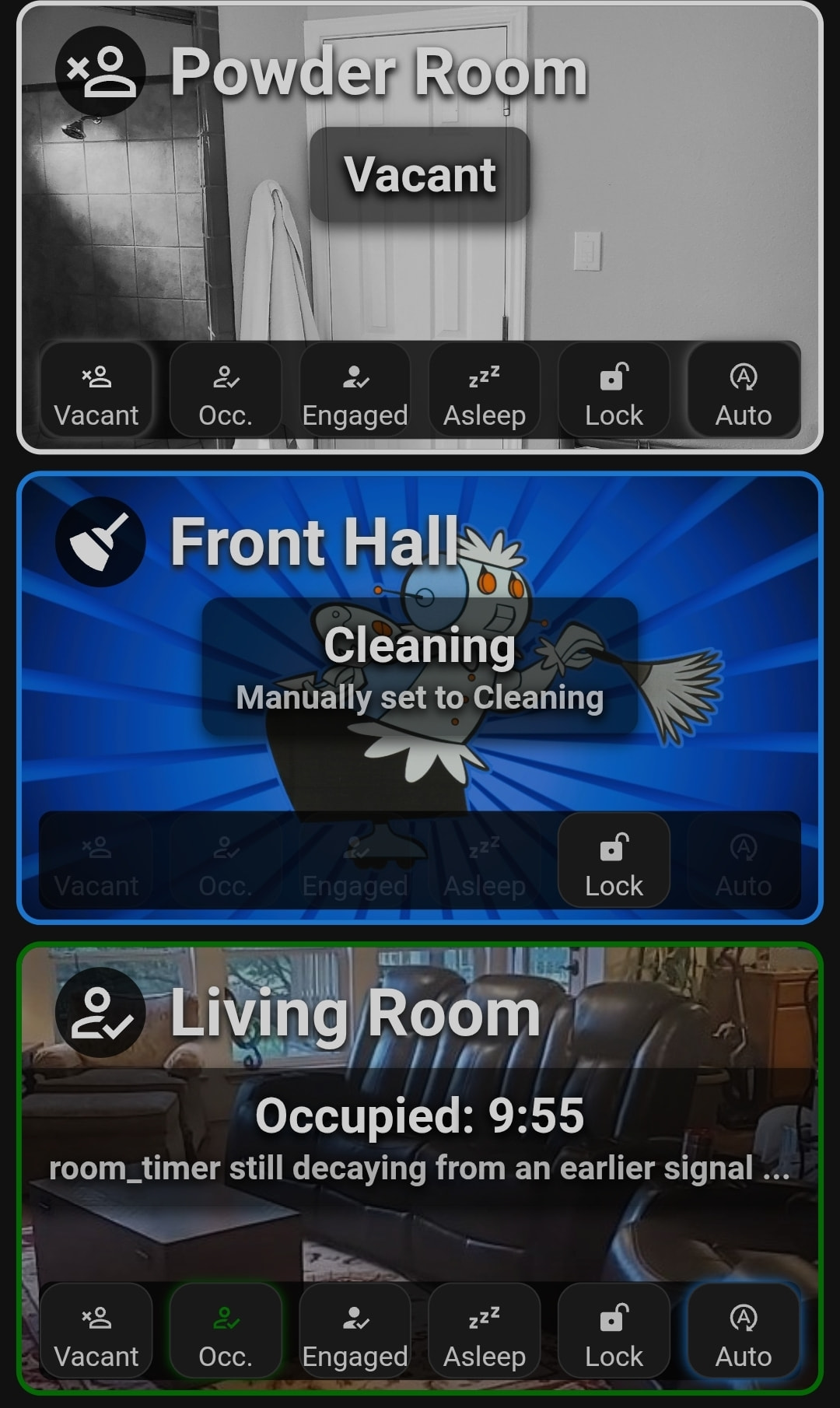
I also have a side project running for a prototype UI for rooms based on my old room cards. They’re heavy in button card and card mod so I’m making a version using tile and tile custom actions with UIX instead.
These are some of the ones based on button card so far.
And tile…
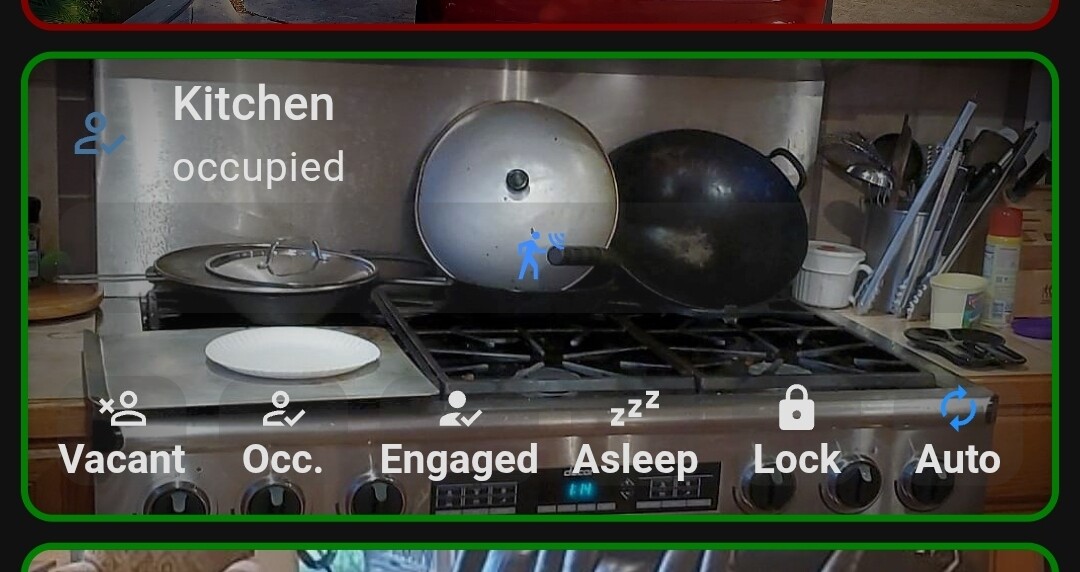
The tile one is the one I’ll likely go forward with.
Currently the card works as a decluttering card and you add the room slug… The card then reads the room mgr construction for that room and… That.
Finally. 2026.8.1
Im going to release a point release for 2026.8 before I migrate 2026.9.0 to main next week.
2026.8.1 will backport any fix from 2026. 9 OR 2026.10 (I’ve already been working on it) I deem ‘critical’ for stable operations as of this week, but will NOT backport the steel magnolia output envelope (there’s some more there than just making it pretty), security partitioning infrastructure, or the universal entity selector.
So you’ll get all the fixes I’ve found since x.8 released but none of the security stuff as long as the fix does not DEPEND on the SP1 security infrastructure. This is also going to be a milestone and I’m saying officially right now… I won’t backport anything else, this is a one time only deal. This allows anyone on less than 8.* to get there and hold until they’re ready to do the security stuff. But if you have a problem, my first question will be did you update and is the problem still there…
Also I had to port my vac from the old Xiaomi integration to Roborock this week.
Yeah autovac is also taking a few fixes. If you have a Roborock it is now at parity with autovac + xiaomi integration because I was able to test it thoroughly this week, it needed a touch up. (or my spouse was gonna throttle me)
 As Mel Brooks says, “it’s good to be the king.” My backlog, autovac suddenly becomes priority…
Those cards look good.
The AI will proactively fix that, won’t it? A vested interest for survival?
Won’t it? Looks anxiously over shoulder, waving at Claude, using all fingers.
No. It wont
2026.8.1 is up - cherry picked autovac and a couple other fixes into it. Now correctly room tracks and doesn’t try to read the nonexistent battery attribute anymore.
2026.9.0 RC is up with the Autovac and Room Manager fixes and a few other random happy fun time issues I found after beating it up pretty hard this week. It seems to be behaving, and the logic seems sound and I’m out of ways to break it so far.
Just a heads-up; if you’re not using all the labels, the latest version of Spook is going to “whine” about it. I had to go through and tell it to shut up about each one. 
I already know. And I’m putting a patch into the Spook tool to clear them out.
(Also he JUST released 5.2 that fixes a lot of the false positives but I think labels are still an issue. If you’re on 5.1 update before doing ANYTHING. The token check was wrong and could kill a token you’re using. There were also a lot of false positives in dead ent identification.)
The manifest as of 9.0 can already I’d a label in use (because I’m autostamping required labels proactively) the problem is.
An ignore all repairs exists. An ignore repair X leave the rest. Does NOT. (I’m currently looking for alternatives and may submit a pr or two to some projects soon)
Frenk added the ability to expose / unexpose ents in the 5.1 release so its not all bad. Actually most of the new stuff is pretty good and I already know how I’m going to use it.
And that nugget he added in 5.2 for lighting is getting IMMEDIATELY implemented in zenlux omg… I have a week left in beta it may make it into 9 and I might backport to 8.
‘hey Friday can you make the lights more… Blue?’. ‘that scene but, purple…’ and done in code without token burn.
That said you guys who wanted power monitoring in v. Next…
Here you go.
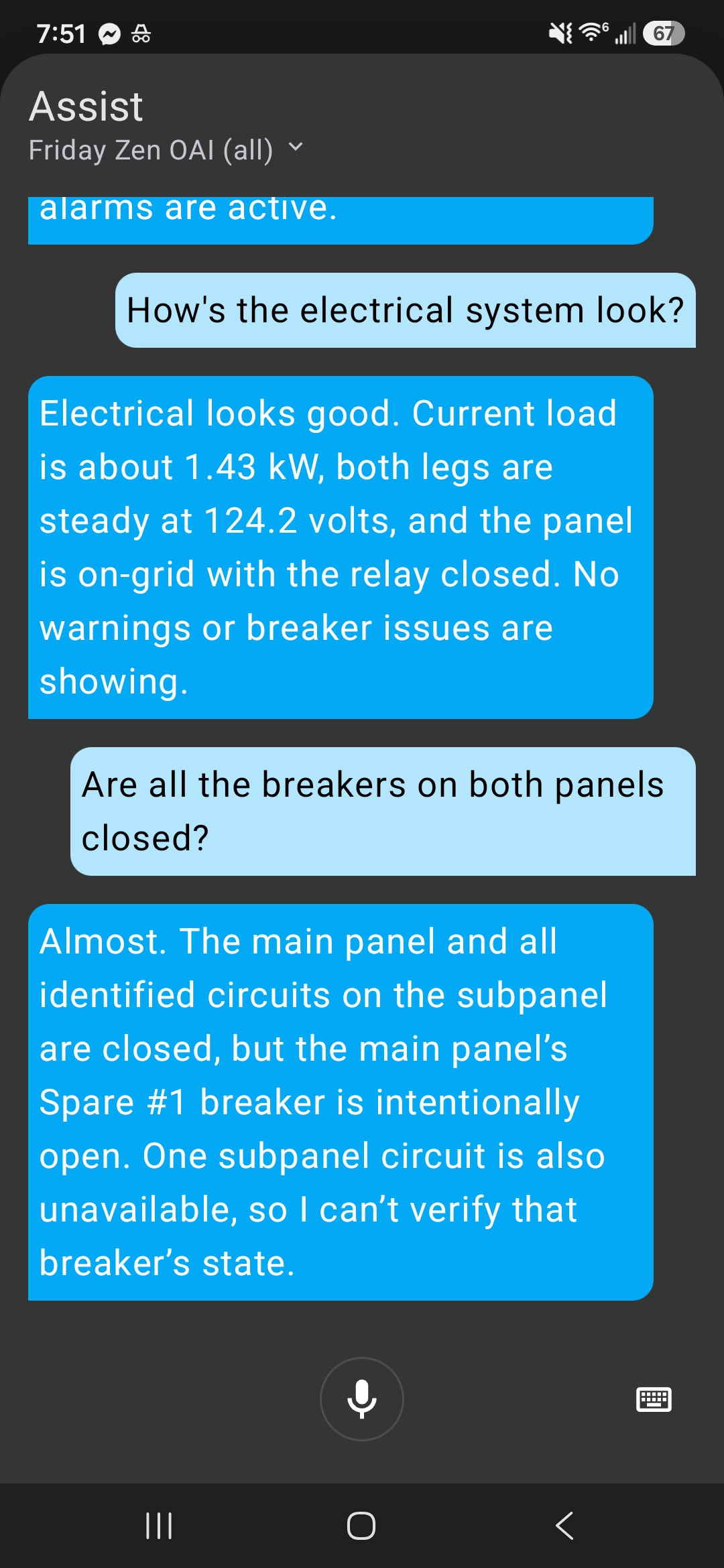
I’m reading Vue sensors and SPAN (yes even the most recent update that enables the solar device) now… Should work for most ZWave setups too or specifically tagged ents. It’s pretty cool.
Very nice work. I’m sure that it will also be able to provide solar production data if requested as well.
Yep a certain someone’s battery stack was used as the model..
I currently have 4, though only two are directly managed by the inverter. That will be changing over the next few months.
Pushed a few minors this morning - functionality fixes to minor irritating issues in RoomManager and REFLEX.
Notably there was a chance to misfire the room scene but once that happened, the room thought it was done leaving you in the dark and punching the ‘occupied’ button did nothing because the room basically said - I’m already good dawg, I’m hangin’ out.
Now any retrigger force applies the scene, retriggering auto re-calculates the scene and then force fires it.
Now as to why it didn’t fire in the first place, when you have a script that’s supposed to be in parallel mode, make sure it’s actually in parallel mode and it has enough in the max: setting to cover expected headroom… 
Oh - yeah I’ve been running my own home on this for almost two weeks now. It’s running almost as well as my previous Node Red solution - but notably once you have your room sensors setup (yeah sorry that’s still manual) telling the agent how you want your room to work and seeing it actually do it - is pretty damn cool. I’m refraining from calling this code free automation but - for most people’s grandma - his covers 95% of what they’ll use most often which is higher than my original bar for the plan was.
…so far nothing has stopped the clock still on schedule for Sat. I’ll be in doc writing mode next few days updating the onbaording and verifying the OOBE experience.
Documentation is good, especially detailed information about properly configuration of Postman for user access control.
you mean…
Getting started - your first Alert…
zenos-ai/zenos_ai/docs/getting_started/first_alert.md at feat/2026.9.0 · nathan-curtis/zenos-ai · GitHub
and
Security Manager and Certificate Ref.
zenos-ai/zenos_ai/docs/components/security_manager.md at feat/2026.9.0 · nathan-curtis/zenos-ai · GitHub
and
Postman Refernce
zenos-ai/zenos_ai/docs/scripts/zen_dojotools_postman_readme.md at feat/2026.9.0 · nathan-curtis/zenos-ai · GitHub
I was actually writing the revision to the install doc tonight when I get home from work - I’m adding setting you r mobile device up ahead of time and/or knowledge of how to mint a cert into the doc. If im going to require it you should at least know how to do it.
Here’s the draft I’ll be pulling in:
Pre-Installation Checklist
Before installing ZenOS-AI, confirm the following prerequisites are in place.
Home Assistant
-
Home Assistant 2025.x or newer is installed and running.
-
You have administrator access to Home Assistant.
-
You have SSH, Samba, Studio Code Server, or another method of copying files into the Home Assistant configuration directory.
-
Home Assistant packages are enabled, or you are prepared to enable them during installation.
Required Integrations
-
HACS is installed and working.
-
The Spook integration is installed through HACS.
AI Conversation Agent
-
A Home Assistant conversation agent is configured.
-
The selected model supports tool/function calling.
-
An approximately 8B parameter or larger model is recommended for reliable ZenOS-AI operation.
-
Verify the agent can complete a normal Home Assistant conversation before installing ZenOS-AI.
Home Assistant Companion App
Postman uses Home Assistant notification actions to deliver push notifications. At least one working notification target should be configured before ZenOS-AI installation.
For each primary user who should receive notifications:
-
Install the Home Assistant Companion App on the user’s mobile device.
-
Connect the app to this Home Assistant instance.
-
Allow notification permissions when requested.
-
Confirm Home Assistant exposes a notification action similar to:
notify.mobile_app_<device_name> -
Send a test notification from Home Assistant and confirm it reaches the device.
If the mobile notification action does not appear, restart Home Assistant after completing Companion App setup.
ZenOS Notification Targets
ZenOS Postman routes notifications through stable Home Assistant notification aliases rather than directly targeting device-specific mobile_app actions.
Before first use, configure these recommended notification targets:
-
notify.admin_devices -
notify.default_user
For a single-user installation, both targets may point to the same Companion App device.
Example:
notify:
  - platform: group
    name: admin_devices
    services:
      - action: mobile_app_your_phone

  - platform: group
    name: default_user
    services:
      - action: mobile_app_your_phone
Replace mobile_app_your_phone with the actual notification action created by the Home Assistant Companion App.
Restart Home Assistant after modifying notification configuration and verify both of the following actions are available:
-
notify.admin_devices -
notify.default_user
Additional notification targets may be configured later for multi-user households:
-
notify.family_devices -
notify.family_devices_verbose -
notify.secondary_user
These are not required for a basic single-user installation.
Ready to Install
Before continuing, you should have:
-
A working Home Assistant installation
-
Spook installed
-
A tool-capable conversation agent
-
Filesystem access to the Home Assistant configuration
-
At least one tested mobile notification device
-
notify.admin_devicesandnotify.default_useravailable
Once these checks pass, continue with the ZenOS-AI installation.
Looks good, and I will have to edit the configuration.yaml file to make sure I have everything I need in it.