Coming soon, demo in May
Thanks Andrew for your amazing work! I’m now a bit confused with the new repo structure.
Concerning the covers, “toggle” is not that obvious… when it’s half-open. I preferred that kind of layout.
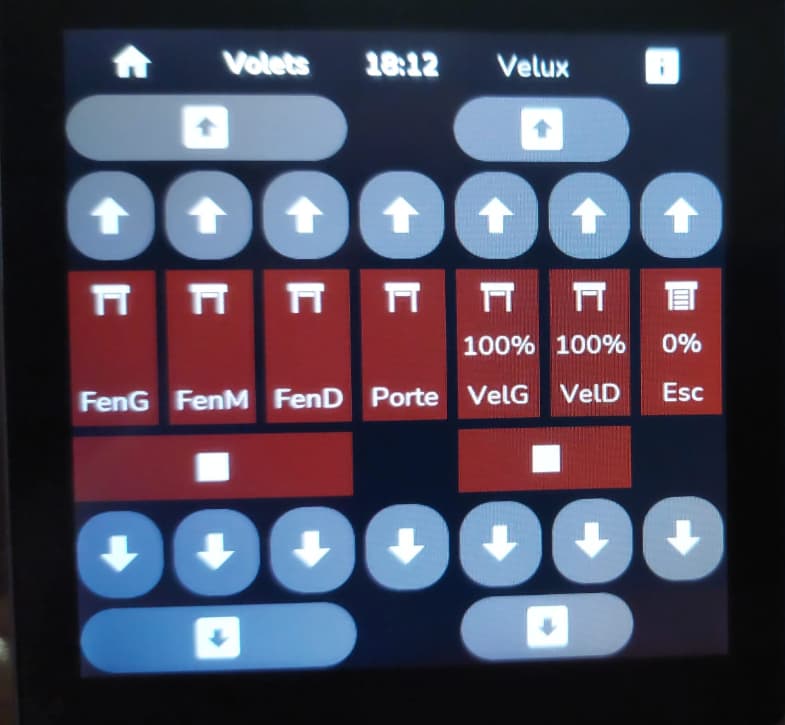
Glad to see that media_player features should appear soon. I’m driving webradios to play on Alexa.
I also display pictures (stored on HA) on some buttons: webradio logos,…
If needed I can share what I made.
Yes some documentation says that switching standard malloc to PSRAM (8MB ?) can cause some issues, but internal RAM is very small (512KB ?), so it also causes issues (for ex. online_image is using standard new/malloc and there is sometimes not enough space in internal RAM for it - I am testing change that doesn’t use HA helper integrations to display images in media player widget and my change currently works better with switching malloc to SPRAM as online_image needs more RAM for images processing then internal RAM allows) I also added screensaver that reads slideshow of images from sdcard (works as photo-frame when idle) and uses SPRAM. I am not advising doing similar changes without thorough testing, because of mentioned warnings in docs.
Greetings! Yes, the online_image component is a pain, and it's very unstable. Perhaps because it's a general-purpose component and doesn't work well with memory, I think this component needs to be improved and made more sensitive to the microcontroller and PSRAM capabilities. Perhaps you could even write a custom component for your project! Malloc, which simply translates to PSRAM, can help if the component's implementation accommodates this, but that's not always the case. I haven't looked at the code for this component's implementation, so I can't say for sure. But what I can say for sure is that a good implementation can be written using, say, esp-idf that won't crash even with large images.
I want to buy a display like that too, but I am looking for a housing to put it in. I want to place it on a desk or, for example, a nightstand. I don't have a 3D printer myself.
Does anyone have an idea?
Hello,
Probably you can use the sonoff deskstands: Desk Enclosure Stand for NSPanel & NSPanel Pro
I don't know if this has already been posted... but I found a quick and easy project to install on Guition displays. Installation is quick and easy without too much hassle.
Dont need ESPHOME to controll... or yes if u want it.
simply connect the display to the PC, the compilation takes place via browser and it is immediately ready. Then it is configured via the web interface.
Graphically it's not the best but it's very simple to set up and works great with automatic updates.
there is also a version to show only the media players currently playing:
Where can i buy this one? I don't have a 3d printer! 
There are a huge number of companies that will print a 3d project for you. Use google to find one near you!
Perhaps this is a good excuse to buy one? Having a 3d printer is extremly useful, that's for sure...
those that don't have a 3d printer can use ready made 86x86 wall mounts like these: https://www.aliexpress.com/item/1005006149480110.html

I need help.
i just got hold of some waveshare esp32-p4 86 box devices as I wonder if my guition devices are giving me some phantom touches.
I am trying to install it but I am really struggling.
I cloned the GIT from Agillis
I updated my secrets.yaml
I selected new device, and used the waveshare-esp32-p4-86-panel-display-modular.yaml as the yaml information
I go to build so i can get a bin so that I can flash it - and this is the error i keep getting.
help!!
''''
INFO ESPHome 2026.5.0
INFO Reading configuration /config/esphome/waveshare-esp32-p4-86-panel-display-modular.yaml...
Failed config
Source for extension of ID 'popup_close' was not found.
''''
Blockquote
I too got such an error, but with a jc8012p4a1 device...
Hi
I used the built in AI into git and managed to get it to work .
it asked me to add:
  popups: !include esphome-modular-lvgl-buttons/pages/popups.yaml
  color_picker: !include esphome-modular-lvgl-buttons/ui/popup/color_picker_popup.yaml  #
both of these to the packages area.
then it worked.
it also asked me to actually put in my wifi details, so i will try again using the substitutions.
I appreciate you dont have all the devices to test, Agillis, but appreciate all the hard work
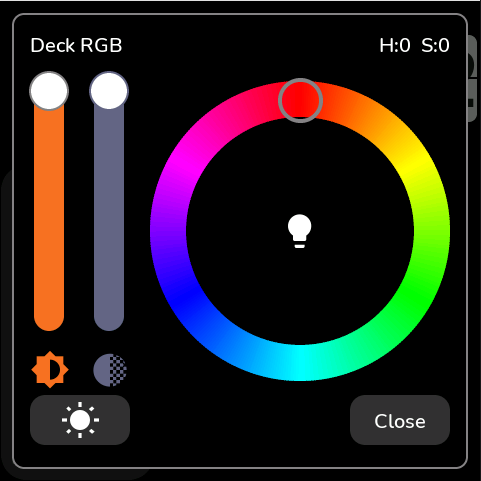
Can you try the new color picker? I am interested if it works on other screens.
They work - and they are pretty cheap tbh.
Cheap is a good way or bad? If you don't like then can they be improved? How?