Ha-paneld — The universal Home Assistant dashboard app for Android wall panels

Wall panels are great for Home Assistant until the dashboard becomes painfully slow or you try to use the actual panel hardware. Access to the LEDs, buttons, sensors, relays and proper screen control depends on the manufacturer, model and firmware, so every panel becomes its own little project.

I got tired of that, so I built ha-paneld — an open-source Android app intended to end that per-vendor fragmentation.

ha-paneld started as a hardware helper for the HA Companion App for different makes of panel. It now covers much more of the stack: hardware control, dashboard rendering, launcher and navigation, performance analysis, software management and fleet provisioning.

The killer feature added in 0.9.2 is automatic dashboard entity filtering.

By default, a Home Assistant dashboard receives updates for every entity in the system. On a mature installation that can mean thousands of states and a constant firehose of updates being sent to each low-powered panel that brings it to its knees.

ha-paneld’s built-in renderer learns which entities the dashboard actually uses and asks Home Assistant to send only those states. A typical panel can go from subscribing to 1,000+ entities to perhaps 20–80. The performance improvement is transformative and will likely make any panel useable.

The official Home Assistant Companion app remains fully supported for panels that need Voice Assist or native notifications. The built-in renderer is for dedicated dashboards where performance, remote provisioning and long-running reliability matter more.

As of 0.9.3, panel support can also be created or refined through user built hardware profiles without rebuilding the Android app. Owners and manufacturers can edit, test and share support for new hardware while ha-paneld keeps privileged operations within known, bounded drivers.

Profiles currently cover Sonoff NSPanel Pro, Tuya TPA10, Electron WF1589T, ZHICAI SMT1019, Smatek S9E, and Shelly Wall Display families.

It is all free and open source. I just want these panels to be properly usable in Home Assistant without everyone having to solve the same vendor-specific problems again.

GitHub, releases and documentation: maxlyth/ha-paneld

This project is growing much faster than I expected and I have already expanded custom support to Shelly Wall Displays and the some of the latest Android 14 class panels coming out China.

I have not forgotten the bedrock panels either and already have built PoC Thread mesh radio firmware for the Sonoff NSPanel Pro devices.

I realise the UI has exploded and is cluttered but this is still a pre-release project and a user-interface refactor is one of the goals for 0.9 ahead a v1.0 release later this summer.

Right now I am looking for firmware and diagnostics from other panels types to broaden coverage before freezing the requirements set.

If anyone has a panel that they want supported then please get in touch.

I'll try and give this a go over the weekend on my Rockchip 15.6" Android 12 wall tablet.

Should I disable the built-in MQTT function?

Hi! I got an 'EPOS Expand Control' . This is not really a panel... Seems to run a very locked Android unknown version. There's no USB port, POE ethernet only.
Is this something you can give a try?

You should not need the built-in MQTT functionality. My aim is to replace the capabilities of all vendor supplied apps/firmware (yes even cameras and intercoms are on the backlog) with a single unified and open-source product. If ha-paneld does not automatically recognise hardware features then raise an issue on the Github repo and I will take a look.

ha-paneld actually has a recent feature called "Tame" that is intended to seek out and disable vendor supplied cr*pware. I realise that vendors often remove the standard Android NavBar and Launcher to keep users within their own ecosystem so recent versions of ha-paneld have this capability built in so you don't need to install 3rd party launchers. All you need is ha-paneld and HA Companion App.

This product is still pre-release but I have worked hard to check that the installer script preflights every action so should never be detrimental to an otherwise working panel.

Theoretically ha-paneld should work on 'EPOS Expand Control' as it is an Android 10 device based on a Rockchip SoC (likely RK3399) so is well covered.

You may be able to install with F-Droid or enable network-ADB through the vendor software but given it is a sales terminal I would imagine it is heavily locked down as it is designed to run in a security sensitive workflow.

I checked the FCC filing and it does appear to have an internal USB connector and reveals it is a SOL-E-HP10S-GAL1LEO-V2-1.3" (Solaborate's "Galileo" RK3399)

From research I think the device is a centrally managed via Microsoft Teams Rooms on Android and unless you are the admin of that system the device is locked. You would need to unenroll the device from MTR and then look in Android settings for an option to enable Developer Options.

ha-paneld — a month of progress :rocket:

Since I first posted about ha-paneld here ~4 weeks ago, it's had eight releases (0.8.0 → 0.8.7). Big thanks to everyone testing and sending /diag dumps — a lot of this came straight from your reports.

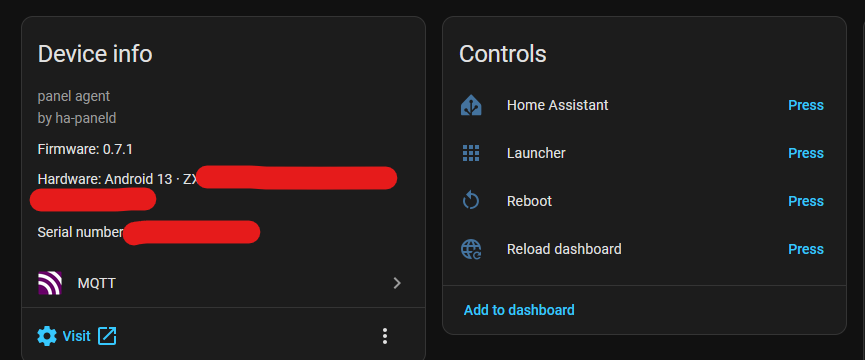
(What it is: a free, open source Android agent that exposes wall-panel hardware — screen, LEDs, buttons, sensors, relays, audio — to Home Assistant over MQTT auto-discovery + mDNS, consistently across panels from different makers. It leaves the dashboard to the official HA Companion app.)

Reliability

  • MQTT that survives broker/HA restarts and network flaps — panels that used to sit unavailable until an app restart now self-heal in ~2–3 min, over whichever of IPv4/IPv6 actually holds.
  • A panel can never be left dark and dead — stale screen-off commands are ignored, a watchdog re-lights the screen, and touch-to-wake always works. The dashboard app is relaunched if it crashes.

Hardware

  • Full control on locked-down, no-root panels — screen, brightness, density, CPU governor, screenshots, LED and buttons all work via a small peer-authenticated root helper.
  • Broader support — profiles for Sonoff NSPanel Pro, Tuya TPA10, Electron WF1589T, ZHICAI SMT1019 and Smatek S9E (plus preliminary Shelly Wall Display), a soft on-screen nav bar for key-less panels, auto-brightness, and TPA10 room temp/humidity sensors.

Web UI, management & fleet

  • Redesigned :8888 web UI with a schema-driven config form and per-entity "expose to HA" toggles.
  • The Install tab is a software-management hub — update ha-paneld, the Companion and the WebView from the browser, with one-tap self-heal for the common blank-dashboard causes, plus encrypted backup/restore and live logs.
  • Fleet-first — zero-touch provisioning + one-command fleet updates, and 0.8.7 substantially hardened the install scripts (if you hit a provisioning snag, please report it!).

Security — LAN-only control surface, a screenshot-safe info page, a peer-authenticated helper socket, and CSRF/DNS-rebinding protection with HTTPS-only, signature-pinned updates.


Still a v0.x preview but it installs and uninstalls as an ordinary app — no firmware changes. Full notes in the CHANGELOG; code + releases on GitHub. More testers welcome, especially on panels not in my own fleet. :folded_hands:

Thanks.

I tried installing it using the curl command from Powershell on Windows 11 but it errored at the bash part.

There is no Windows Powershell installer. If you have ADB (Android Debug Bridge) installed (which is a documented pre-requisite) then you already have WSL (Windows Subsystem for Linux) which includes a true version of curl and bash.

Unfortunately Powershell has a an alias for curl that is not fully curl capable so it looks like it a bug in the script but is actually the entire WSL subsystem missing.

I have improved the documentation to make the pre-requisites clearer for Windows users.

Thanks. It would seem that I need to revisit the WSL installation which I thought had completed successfully.

ADB was just a case of unzipping some files, no installation per se.

No probs. I think I made some incorrect assumptions about ADB on Windows. As I said, I don’t have a single Windows install across my dozens of machines and I don’t know anyone who has one either so it’s a genuine hole in my testing.

I appreciate the feedback and if you find anything else substandard about the Windows experience then please don’t be afraid to call it out.

Great work @maxlyth! ha-paneld solves exactly the right problem a clean, open-source, multi-vendor hardware abstraction layer for panel LEDs, buttons, sensors, and TTS. The mDNS auto-pairing and fleet provisioning approach is genuinely well thought out. I especially appreciate the performance-first mindset with WebSocket event firehose analysis and DevTools relay — that’s real-world thinking cheap panels actually need.

Building on that, I’d suggest a complementary piece. Your ha-paneld handles the panel hardware layer; knoop7/Ava (https://github.com/knoop7/Ava) extends it further as the backend service layer:

  • Zigbee + Bluetooth (BLE Proxy) gateway
  • Local voice assistant (Wake Word + STT/TTS, on-device, no cloud)
  • Music streaming protocol support (Snapcast, multi-room sync, audio-over-LAN)
  • Floating overlays & intercom
  • Powerful Mod system for custom optimizations
  • Tiny APK optimized for Rockchip PX30/rk3566/rk3576, Allwinner, and similar constrained SoCs

The idea: ha-paneld as front-end hardware agent, Ava as backend service layer. Together they cover the full panel stack from LED/button control to Zigbee mesh, BLE proxy, and local voice. Everything free, no subscription.

Would love to collaborate on making the two work seamlessly side-by-side!

Those instructions were a synch to follow. I went with Git for Windows and using Git Bash rather than faffing around with WSL.

The app is now installed, thank you.

I’m seeing this error on the Dashboard:
image
however, there is a configured MQTT device in Home Assistant:


so I’m not sure if the error message is valid?

EDIT: the message was valid and I’m now connected to MQTT with all the controls and sensors.

Thanks for the support, I saw Ava early in ha-paneld development and that inspired me to build a PoC branch that used ESPHome protocol instead of MQTT. I switched back as there was no functional gain but it makes total sense for Ava as it is the protocol the HA Foundation has chosen for its preview voice products.

Your timing to chime-in is uncanny because one of the reasons I stuck promoting Home Assistant Companion App (HACA) was that it was not just a dashboard renderer but also, a wake-work activated, voice assistant. In ha-paneld 0.9.0, I will be releasing a preview of a built-in dashboard renderer as people are still drawn to Free/FullyKiosk, which I believe is a bad fit for the HA panel community.

I don’t intend to include voice assistant functionality any time soon so Ava is genuinely complimentary for users looking to not install HACA.

I like the idea of managing the HA app installs via Ha-paneld but, since I had originally installed the HA app via the Play Store it didn’t seem to be able to manage an available update. I then uninstalled the HA app and Ha-paneld recognises that there is now no app and that there is a version that can be installed however the Install button is disabled:
image

The MQTT credentials error is a thread error because mqtt is a connectionless protocol a single transitional error does not get cleared immediately. I thought I had fixed this problem in 0.8.6 but it must still be there.

I will take another look at the issue but I think you can ignore the error if your MQTT connection is functioning

It’s OK. I edited my post a few minutes ago. I entered my MQTT credentials anyway and the additional switches/sensors all appeared so I believe the error message was correct.

This feature I wrote a while ago now and I remember I added logic to not stomp on Play Store installed versions of Companion App but did not consider if it was subsequently uninstalled. One of my panels is Play Store capable so I can test this.

The next release is a big one (0.9.0) and does not have a firm ship date. I know the dashboard renderer will not be perfect but I am trying to decide a point to preview it to users.

Mine has the Play Store but I read that, for security reasons, it’s best to log out of the Play Store on these types of panels which means the app doesn’t auto-update and it’s a pain for me to go and log into the Play Store to manage this.

I’m more than happy to test :+1:

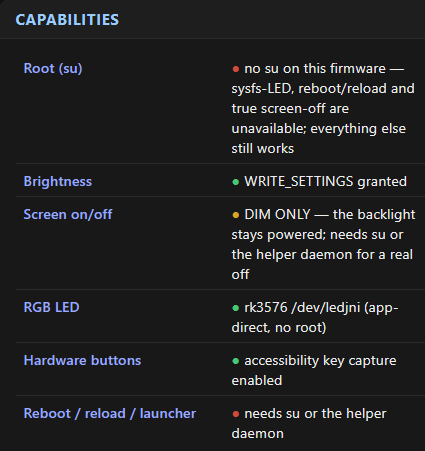
I’ve opened an issue on your repository with the panel diagnostics since it appears to have a slightly different name/profile. Getting around the lack of su to enable me to turn the screen off would be amazing:

You are correct that, for panels with side-loaded apps, disconnecting from Play Store is good practice as your Google credentials are at risk, not just from my code but also panels, by definition, are in a public location and unlocked.

I worked as an cloud architect for many years so I am very security conscious, and that should be reflected in the ha-paneld code, but the process does run with escalated permissions and I can’t predict what happens to this project in the future.

At a minimum you should create a single purpose Google Play account that is used for panels. However it is very unlikely that vendors will release security patches to the core Android for these panels so there is little benefit to Google Play as ha-paneld does all the webview and dashboard app updates for you.