HAIR 1.0: Admin UI for your Infrared Network - Capture, Store and Trigger IR Devices

Home Assistant 2026.4 added a native infrared platform. Transmit entities shipped, receive entities are slated for 2026.6 or 2026.7. What's still missing is an admin UI for managing your IR devices, which is the part most people actually want.

HAIR is that admin UI. A sidebar panel for capturing, organizing, and controlling IR commands. No YAML. Works with ESPHome IR or Broadlink RM hardware.

I built it because I wanted to control a bunch of candles around the house from a dashboard, and every existing path led through a stack of template entities and script: YAML. Once I had it working for myself I figured I'd make it usable for everyone, and that turned into a full management UI.

A few highlights:

  • The Sniffer. Press buttons on a remote and signals show up live, fingerprinted, deduplicated, grouped by source. No "create command" form to fill out first. The button press is the entry point.

  • Action mapping. Bind a learned command to volume_up and the media_player's volume buttons fire that IR command through the standard HA service call. Entity features only expose when you actually map them.

  • IR-triggered automations. Turn any captured signal (even unknown ones from random remotes) into a native HA event entity. Pressing your TV's power button can dim the lights, lock the door, fire whatever automation chain you want. A "min hits" threshold prevents accidental fires. I haven't seen another HA integration do this.

  • Native entity types. media_player, climate, fan, light, switch, cover, plus a generic remote and a button entity per learned command.

The Sniffer pulls from the HA event bus today (esphome.remote_received events, Broadlink events) and will move to the native receiver entities once those ship.

  1. Install via HACS as a custom repo: https://github.com/DAB-LABS/HAIR.
  2. Restart, find HAIR in the sidebar.
  3. Requires HA 2026.4+ and at least one ESPHome IR or Broadlink RM device.

This is 1.0. Bugs will happen. Feedback welcome, please be patient.

Full README, screenshots, and architecture notes:

Walk-ins welcome. :wink:

3 Likes

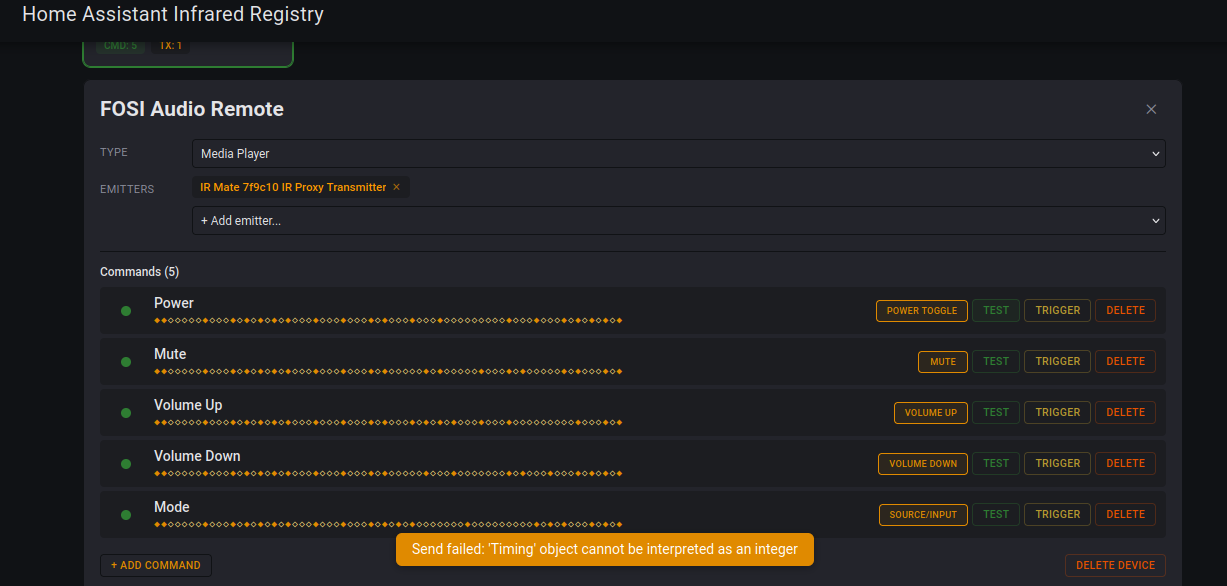
Using a Seeed studio IR Mate, I'm able to sniff codes, but I get the same error whenever I try to transmit any of the sniffed codes:

Send failed: Timing object cannot be interpreted as an integer

IR Mate config
remote_transmitter:
  id: ir_tx
  pin: GPIO3
  carrier_duty_percent: 50%
  non_blocking: true

remote_receiver:
  id: ir_rx
  pin:
    number: GPIO4
    inverted: true
  dump: all
  tolerance: 25%
  idle: 10ms

  on_pronto:
    then:
      - homeassistant.event:
          event: esphome.remote_received
          data:
            protocol: "PRONTO"
            code: !lambda 'return x.data;'

infrared:
  # IR transmitter instance
  - platform: ir_rf_proxy
    name: IR Proxy Transmitter
    id: ir_proxy_tx
    remote_transmitter_id: ir_tx
  # IR receiver instance
  - platform: ir_rf_proxy
    name: IR Proxy Receiver
    id: ir_proxy_rx
    remote_receiver_id: ir_rx

I get the same error if I use the other IR proxy transmitter that I have set up.

1 Like

Hey @Didgeridrew, thanks for the report and the screenshot, really helpful! :grinning_face:

Good news: the Sniffer working means your RX pipeline is set up correctly. I looked at your ESPHome config and it looks solid ~ the ir_rf_proxy setup for both TX and RX is correct, and the on_pronto: bridge is wired up properly.

The TX error is interesting. We tested the same send path on our ESP32-based emitters (generic builds, not the IR Mate) and TX works without issues. The "Timing object cannot be interpreted as an integer" error points to something in the send chain between HAIR and the ESPHome device, but it's not something we can reproduce on our hardware.

To narrow it down, can you share a few things?

  1. Your HA version (Settings > About)
  2. Your ESPHome version (ESPHome dashboard > top right)
  3. The full error traceback from your HA logs (Settings > System > Logs, search for "Timing" or "infrared" after hitting TEST on a command)

The version info is key. The error message suggests something downstream from HAIR is rejecting the timing data format, and we want to see if you're on a different HA or ESPHome version than what we're running (2026.4.4). The full traceback will show us exactly where in the chain it fails.

Also curious: do you have any other ESPHome IR transmitters (non-IR Mate) you could test with? That would tell us if it's IR Mate specific or a broader issue on your HA instance.

Side note ~ we've been wanting to get our hands on an IR Mate for a while but they've been sold out every time we've checked. Really glad you're testing with one, and happy to work through this with you.

~DAB

1 Like
  • HA version info

    • Core 2026.5.2
    • Supervisor 2026.05.0
    • Operating System 17.3
  • ESPHome version

    • 2026.4.5
  • I have enabled debug logging for the integration, but I am not getting any errors in the logs.

I do have another ESPHome IR transmitter. It's just a old ESP32 WROOM dev board with a transistor and some IR LEDs... very "DIY". But, I get the same error in the frontend with it as the emitter in HAIR. There aren't any log entries for it either.

EDIT:

I was able to find a HAIR-related log

Logger: homeassistant.util.loop
Source: util/loop.py:137
First occurred: 10:30:39 PM (2 occurrences)
Last logged: 10:30:39 PM

Detected blocking call to read_bytes with args (PosixPath('/config/custom_components/hair/frontend/dist/ha-panel-ir-devices.js'),) inside the event loop by custom integration 'hair' at custom_components/hair/__init__.py, line 122: raw = bundle_path.read_bytes() (offender: /config/custom_components/hair/__init__.py, line 122: raw = bundle_path.read_bytes()), please create a bug report at https://github.com/DAB-LABS/HAIR/issues For developers, please see https://developers.home-assistant.io/docs/asyncio_blocking_operations/#read_bytes Traceback (most recent call last): File "<frozen runpy>", line 198, in _run_module_as_main File "<frozen runpy>", line 88, in _run_code File "/usr/src/homeassistant/homeassistant/__main__.py", line 229, in <module> sys.exit(main()) File "/usr/src/homeassistant/homeassistant/__main__.py", line 215, in main exit_code = runner.run(runtime_conf) File "/usr/src/homeassistant/homeassistant/runner.py", line 289, in run return loop.run_until_complete(setup_and_run_hass(runtime_config)) File "/usr/local/lib/python3.14/asyncio/base_events.py", line 706, in run_until_complete self.run_forever() File "/usr/local/lib/python3.14/asyncio/base_events.py", line 677, in run_forever self._run_once() File "/usr/local/lib/python3.14/asyncio/base_events.py", line 2046, in _run_once handle._run() File "/usr/local/lib/python3.14/asyncio/events.py", line 94, in _run self._context.run(self._callback, *self._args) File "/usr/src/homeassistant/homeassistant/config_entries.py", line 955, in async_setup_locked await self.async_setup(hass, integration=integration) File "/usr/src/homeassistant/homeassistant/config_entries.py", line 694, in async_setup await self.__async_setup_with_context(hass, integration) File "/usr/src/homeassistant/homeassistant/config_entries.py", line 787, in __async_setup_with_context result = await component.async_setup_entry(hass, self) File "/config/custom_components/hair/__init__.py", line 89, in async_setup_entry await _async_register_panel(hass, entry) File "/config/custom_components/hair/__init__.py", line 122, in _async_register_panel raw = bundle_path.read_bytes()

Detected blocking call to open with args (PosixPath('/config/custom_components/hair/frontend/dist/ha-panel-ir-devices.js'),) inside the event loop by custom integration 'hair' at custom_components/hair/__init__.py, line 122: raw = bundle_path.read_bytes() (offender: /usr/local/lib/python3.14/pathlib/__init__.py, line 777: with self.open(mode='rb', buffering=0) as f:), please create a bug report at https://github.com/DAB-LABS/HAIR/issues For developers, please see https://developers.home-assistant.io/docs/asyncio_blocking_operations/#open Traceback (most recent call last): File "<frozen runpy>", line 198, in _run_module_as_main File "<frozen runpy>", line 88, in _run_code File "/usr/src/homeassistant/homeassistant/__main__.py", line 229, in <module> sys.exit(main()) File "/usr/src/homeassistant/homeassistant/__main__.py", line 215, in main exit_code = runner.run(runtime_conf) File "/usr/src/homeassistant/homeassistant/runner.py", line 289, in run return loop.run_until_complete(setup_and_run_hass(runtime_config)) File "/usr/local/lib/python3.14/asyncio/base_events.py", line 706, in run_until_complete self.run_forever() File "/usr/local/lib/python3.14/asyncio/base_events.py", line 677, in run_forever self._run_once() File "/usr/local/lib/python3.14/asyncio/base_events.py", line 2046, in _run_once handle._run() File "/usr/local/lib/python3.14/asyncio/events.py", line 94, in _run self._context.run(self._callback, *self._args) File "/usr/src/homeassistant/homeassistant/config_entries.py", line 955, in async_setup_locked await self.async_setup(hass, integration=integration) File "/usr/src/homeassistant/homeassistant/config_entries.py", line 694, in async_setup await self.__async_setup_with_context(hass, integration) File "/usr/src/homeassistant/homeassistant/config_entries.py", line 787, in __async_setup_with_context result = await component.async_setup_entry(hass, self) File "/config/custom_components/hair/__init__.py", line 89, in async_setup_entry await _async_register_panel(hass, entry) File "/config/custom_components/hair/__init__.py", line 122, in _async_register_panel raw = bundle_path.read_bytes()
1 Like

Hey @Didgeridrew, good news, we found it and pushed a fix.

Root cause: HA 2026.5 ships infrared-protocols v2.0.0, which removed the Timing dataclass entirely. The get_raw_timings() return type changed from list[Timing] to list[int] (signed microseconds). HAIR was still producing Timing objects via a fallback stub, and when the ESPHome emitter on 2026.5 tried to pass those directly to aioesphomeapi, it choked because it expected plain integers. This is an upstream breaking change that wasn't listed in the HA 2026.5 release notes.

Why your logs were empty: Our WebSocket send handler was catching the exception and returning it to the frontend, but never logging it. That's fixed now too ~ TX errors will show up in HA logs going forward.

The fix (HAIR 0.1.1):

  • ProntoCommand and RawTimingsCommand now return list[int] with signed microseconds
  • Works on both HA 2026.4 and 2026.5+
  • Error logging added to the send handler

Update HAIR through HACS and restart HA. TX should work after that. Let us know.

Your ESPHome config looks solid by the way, the ir_rf_proxy setup is correct and the on_pronto: bridge is wired up right. This was entirely on our side, not your hardware.

We've been wanting to get our hands on an IR Mate for a while but they've been sold out every time we check. Really glad you're helping us test with one. Let us know how it works out! :clinking_beer_mugs:

~DAB

2 Likes

Yeah, I ordered 2 during the beta for 2026.4 and just got them a little over a week ago.

Thanks for the quick update. Everything seems to be working now.

1 Like

Glad to hear TX is working! We were developing on 4.4 and that 5.0 update changed some things... :anxious_face_with_sweat:

We just published all releases to GitHub (v0.1.0 through v0.1.2) so HACS should now show v0.1.2 as available.

That release fixes the missing Name field in the Add Device dialog and adds a more visible "Add Device" button in the tab bar.

After updating via HACS and restarting HA, do a hard refresh in your browser (Cmd+Shift+R or Ctrl+Shift+R) to clear the cached frontend bundle.

Sorry for the bumpy onboarding, you caught us right in the middle of 5.0 breaking a few things under us. Really appreciate your patience and the detailed reports, they helped us track down issues fast.

Once you've had a chance to play with it, we'd love to hear how it's working for you and any suggestions you might have. Feature requests, workflow friction, UI gripes -- all fair game. :clinking_beer_mugs:

~DAB

Are there plans to talk with the Devs and integrate this into home assistant core?

1 Like

Help spread the word! :barber_pole:

More installs, the better we can hone it… :clap:t2:

How is it working for you?

~DAB

Unfortunately I only got a link link eMotion Pro with IR support which is not supported as an IR emitter yet.

Hello,

Just wanted to start off by saying this is a very cool integration, seems simple and intuitive to use which is awesome! I see you have been advertising it everywhere so keep it up if you want to grow the users. I was a long time harmony user and have been dealing with sofa batons shitty software, hardware and inconsistencies for a few years now. I am finally ready to build a robust Media center remote solution in home assistant.

I was able to get the XIAO Smart IR Mate installed and running somewhat, I had to modify it from the stock settings and used Gemini to help. I am not very good with ESPhome, I understand the very basics so it could be misconfigured but at least its trying to work. Here is the configuration I am using:

> esphome:
>   name: xiao-ir-mate
>   friendly_name: IR mate LR 1
>   # Automatically add the mac address to the name
>   # so you can use a single firmware for all devices
>   name_add_mac_suffix: False
> 
> esp32:
>   board: esp32-c3-devkitm-1
>   framework:
>     type: esp-idf
> 
> # Enable logging
> logger:
> 
> # Enable Home Assistant API
> api:
>   id: api_id
>   encryption:   # Uses key set by Home Assistant
>   services:
>     - service: transmit_pronto
>       variables:
>         code: string
>       then:
>         - remote_transmitter.transmit_pronto:
>             transmitter_id: ir_tx
>             data: !lambda 'return code;'
> 
>             
> # Allow Over-The-Air updates
> ota:
>   - platform: esphome
>     id: ota_esphome
> 
> wifi:
>   ssid: !secret wifi_ssid
>   password: !secret wifi_password
> 
> 
> # ==========================================
> # 1. CORE IR HARDWARE INITIALIZATION
> # ==========================================
> 
> # IR Transmitter hardware profile
> remote_transmitter:
>   - id: ir_tx
>     pin: GPIO3
>     carrier_duty_percent: 50%
> 
> # IR Receiver hardware profile
> remote_receiver:
>   - id: ir_receiver
>     pin:
>       number: GPIO4
>       inverted: true   
>     dump: pronto
>     on_pronto:
>       then:
>         - homeassistant.event:
>             event: esphome.remote_received
>             data:
>               protocol: "PRONTO"
>               code: !lambda 'return x.data;'
> 
> # ==========================================
> # 2. INFRARED NATIVE DOMAIN (Required for HAIR Transmitter Selection)
> # ==========================================
> infrared:
>   - platform: ir_rf_proxy
>     name: "IR Proxy Transmitter"
>     id: hair_tx_proxy
>     remote_transmitter_id: ir_tx

I am starting with a 8ish year old Samsung TV remote and have successfully captured the inputs for power on/off, volume up, volume down and mute. I have also tested them and they are transmitting as expected! So I would assume my setup is right. It does not see the commands for any of the other buttons from my remote including basic other ones like channel up, channel down, navigation directions, menu button, pause/play. Is there something I am missing or is the IR range limited on these devices? I don't mind buying something different if it can cover my full media center setup. I could always use these small IR Mates for fan controls or simple devices.

1 Like

FWIW, here is the ESPHome config I'm using...

IR Mate Config
substitutions:
  name: ir-mate
  friendly_name: IR Mate

esphome:
  name: ${name}
  name_add_mac_suffix: true
  friendly_name: ${friendly_name}

# Enable logging
logger:

# Enable Home Assistant API
api:
  encryption:
    key: "#ENCRYPTION_KEY#"

ota:
  - platform: esphome
    password: "#PASSWORD#"


captive_portal:

esp32:
  board: seeed_xiao_esp32c3
  framework:
    type: esp-idf

network:
  enable_ipv6: true

wifi:
  ssid: !secret wifi_ssid
  password: !secret wifi_password
  on_connect:
      - globals.set:
          id: is_wifi_connected
          value: 'true'
      - light.turn_on: rgb_light
  on_disconnect:
    - globals.set:
        id: is_wifi_connected
        value: 'false'
    - light.turn_off: rgb_light
  ap:
    ssid: "Ir-Mate-7Cf660 Fallback Hotspot"
    password: "#PASSWORD#"


globals:
  - id: is_wifi_connected
    type: bool
    initial_value: 'false'

  - id: reset_press_time
    type: uint32_t
    initial_value: '0'

  - id: touch_timer
    type: unsigned long
    restore_value: no
    initial_value: '0'

button:
  - platform: factory_reset
    id: factory_reset_button
    name: "Factory Reset"
    entity_category: diagnostic
    internal: true
  - platform: restart
    id: restart_button
    name: "Restart"
    entity_category: config
    disabled_by_default: true
    icon: "mdi:restart"

event:
  - platform: template
    name: Momentary Touch
    id: touch_sensor
    event_types:
      - single
    device_class: "button"
    on_event:
      then:
        - lambda: |-
            ESP_LOGD("main", "Event %s triggered.", event_type.c_str());

remote_transmitter:
  id: ir_tx
  pin: GPIO3
  carrier_duty_percent: 50%
  non_blocking: true

remote_receiver:
  id: ir_rx
  pin:
    number: GPIO4
    inverted: true
  dump: all
  tolerance: 25%
  idle: 10ms
 
  on_pronto:
    then:
      - homeassistant.event:
          event: esphome.remote_received
          data:
            protocol: "PRONTO"
            code: !lambda 'return x.data;'


infrared:
  # IR transmitter instance
  - platform: ir_rf_proxy
    name: Proxy Tx
    id: ir_proxy_tx
    remote_transmitter_id: ir_tx
  # IR receiver instance
  - platform: ir_rf_proxy
    name: Proxy Rx
    id: ir_proxy_rx
    remote_receiver_id: ir_rx

binary_sensor:
  - platform: gpio
    id: touch_pad
    pin:
      number: GPIO5 # D3
      mode: INPUT_PULLDOWN
    on_state:
      then:
        - lambda: |-
            id(vibe).execute(100);
            id(touch_timer) = millis();
            if (id(check_touch_delay).is_running()) {
              id(check_touch_delay).stop();
              delay(10);
            }
            id(check_touch_delay).execute();
        - event.trigger:
            id: touch_sensor
            event_type: "single"

output:
  - platform: gpio
    id: vibration_output
    pin: GPIO6 # D4

script:
  - id: vibe
    parameters:
      delay_ms: int
    then:
      - switch.turn_on: vibration_switch
      - delay: !lambda return delay_ms;
      - switch.turn_off: vibration_switch

  - id: check_touch_delay
    then:
      - delay: 300ms


switch:
  - platform: output
    id: vibration_switch
    name: "Vibration device"
    output: vibration_output

light:
  - platform: esp32_rmt_led_strip
    rgb_order: GRB
    pin: GPIO7 # D5
    num_leds: 1
    chipset: WS2812
    name: "RGB Light"
    id: rgb_light
    rmt_symbols: 48

It's a blend of the Official Ready-Made-Projects version and the stock Seeed Studio version. I especially wanted to keep the touch sensor, which was left out of the ESPHome version.

See ShadowFist's post below

Are you sure it's using IR for those commands? Most cell phone cameras will pick up IR, so you can check use that to check if the remote's emitter flashes when you press those buttons.

One of my remotes only seems to use IR for a couple commands. In my case the streaming device sometimes complains about not being paired with the remote, so I assume it's using bluetooth or some similar protocol for all the other commands.

2 Likes

Here's an old trick to see if your remote is working (or if it's actually using IR for all buttons).

Look at the end of your remote through a phone camera & press the volume button on the remote. You should see the IR light pulsing on your phone screen. Now, repeat with the channel & navigation buttons.

If you don't see the IR light, then you have one of those "magic remotes" which only transmit a small number of buttons via IR - the rest is done via bluetooth or similar.

1 Like

I was literally just adding that to my previous post.... :slight_smile:

2 Likes

Whelp son of... did not know this... thank you! I just checked and sure enough only the buttons I was able to capture were the only ones firing the IR transmitter. So the devices like harmany and sofabaton are using bluetooth commands for that? I am about to bring my sofabaton and just use that since it has even more commands programmed than there are buttons on some of these older remotes.

1 Like

No, both Harmony & Sofabaton still use IR afaik. Just because your remote isn't transmitting an IR command, doesn't mean your TV isn't set up to accept it. That's one of the reasons why on Harmony, you can get individual power on & off commands despite your remote only having a single power toggle button.

There's 3 ways you can get the missing & discrete IR commands for your TV:

  • The Easy Way: Buy the dumb (non-magic) version of the remote for your tv off ebay or your favourite site. Most manufacturers make these for cheaper markets & places like bars, so shouldn't be that hard to find. You won't get discrete commands, but at least you'll get the missing buttons.
  • The Hard Way: Search the internet for IR hex codes for Samsung TV. It doesn't have to be your exact model since manufacturers don't really change their commands. Anything from the general era of your TV should work, but I wouldn't be surprised if they're still using the same IR codes today. Luckily for you, remotecentral is back online, so play around there. Device codes are here. Discrete codes are here.
  • The (almost) Impossible Way: Borrow or steal a Harmony or Sofabaton from someone, download the commands & use it to teach your blaster. Return the remote to whoever you got it from (optional step) :upside_down_face:
1 Like

Oh I still have my old harmony and sofabaton! I stopped using the Harmony because the remote was becoming flakey and the sofa baton has always been very buggy. The app won't connect to the hub and the remote wheel is messed up so its hard to navigate sometimes. I have to reboot it a lot and even then macros like I would program for Harmony for whatever reason are not consistent when using the sofabaton.

I am pulling the codes right now from the sofa baton and its so easy!

Did some testing and its working as expected, its so exciting.

Also shout out to @Didgeridrew, thanks for sharing your configuration. I am using it now as well.

I have not looked into setting up the remote interface for my dashboard, I know I can just configure a bunch of buttons and lay it out however I want but assume there is a cool easy to use interface already made for this? Anyone have something you like?

2 Likes

Great peer support on this thread, thanks @Didgeridrew and @ShadowFist. The phone-camera trick and the magic-remote explainer probably saved a few people the same headache.

@ShadowFist, RemoteCentral is a solid pointer. Long-term we'd like HAIR to pull from HA's infrared-protocols library so users can pick "Samsung TV" from a dropdown. The library is still maturing, so RemoteCentral as a manual reference is the right move for now.

@antpman, on the Sofabaton: that trick works because HAIR doesn't care where the IR comes from. Your physical remote, a Sofabaton or Harmony hub, even a phone IR blaster app -- if it reaches the receiver, HAIR captures it. Sofabaton hubs are especially handy as code donors since their database covers buttons your original remote doesn't. Honestly, seeing "so easy" and "so exciting" in your latest reply is exactly what we hoped to hear. :clinking_beer_mugs: :blush:

For dashboards: HAIR creates standard HA entities, so the built-in media_player card works out of the box (Mushroom and Mini Media Player too). For a remote-style layout, a Grid card with HAIR's per-command button entities works well.

Thanks for the energy, Gents. :saluting_face::barber_pole:

~DAB

@Didgeridrew tangent question.

Your ESPHome config is solid as it preserves the IR Mate's full hardware (touch pad, RGB LED, vibration) and wires the on_pronto bridge for HAIR correctly.

Would you be open to us including it in HAIR's examples/esphome/ folder with attribution to you?

Plan is two tiers per device: minimal (just IR) and full (yours). Saves new users from the same scavenger hunt.

No worries if it's a no. Either way, thanks for the rigor on this thread. :clinking_beer_mugs:

~DAB

Feel free to share it.

1 Like