Any update on your Athom AR01V3ESP? I was hoping it would work out of the box, but I've never worked with IR/RF on ESPhome so I'm a little lost.
@wshankles , not making any promises, but I have that Athom device and got it working just today. My config is below.
I got it into HA, and then took control so I could edit the yaml file. I copied the one from the Athom site and edited it according to the HAIR instructions. You might have to edit the wifi section or make sure you have a secrets.yaml file.
And, of course, some of this will change anyway with 2026.6.
substitutions:
  # Default name
  name: "athom-rf-ir-remote"
  # Default friendly name
  friendly_name: "Athom RF IR Remote"
  # Allows ESP device to be automatically linked to an 'Area' in Home Assistant. Typically used for areas such as 'Lounge Room', 'Kitchen' etc
  room: ""
  # Description as appears in ESPHome & top of webserver page
  device_description: "athom esp32 RF433 IR Remote"
  # Project Name
  project_name: "China Athom Technology.Athom RF IR Remote"
  # Projection version denotes the release version of the yaml file, allowing checking of deployed vs latest version
  project_version: "v3.0.1"
  # Define a domain for this device to use. i.e. iot.home.lan (so device will appear as athom-smart-plug-v2.iot.home.lan in DNS/DHCP logs)
  dns_domain: ".local"
  # Set timezone of the smart plug. Useful if the plug is in a location different to the HA server. Can be entered in unix Country/Area format (i.e. "Australia/Sydney")
  timezone: ""
  # Set the duration between the sntp service polling ntp.org servers for an update
  sntp_update_interval: 6h
  # Network time servers for your region, enter from lowest to highest priority. To use local servers update as per zones or countries at: https://www.ntppool.org/zone/@
  sntp_server_1: "0.pool.ntp.org"
  sntp_server_2: "1.pool.ntp.org"
  sntp_server_3: "2.pool.ntp.org"
  # Enables faster network connections, with last connected SSID being connected to and no full scan for SSID being undertaken
  wifi_fast_connect: "false"
  # Define logging level: NONE, ERROR, WARN, INFO, DEBUG (Default), VERBOSE, VERY_VERBOSE
  log_level: "DEBUG"
  # Enable or disable the use of IPv6 networking on the device
  ipv6_enable: "false"
  # valid value: ballu, coolix, daikin, daikin_arc, daikin_brc, delonghi, emmeti, fujitsu_general, gree, hitachi_ac344, hitachi_ac424, climate_ir_lg, midea_ir, mitsubishi, noblex, tcl112, toshiba, whirlpool, yashima, whynter, zhlt01, heatpumpir
  # https://esphome.io/components/climate/climate_ir/
  AC_Platform_name: "coolix"

#########################GPIO######################
  RF_RX_PIN: GPIO19
  RF_TX_PIN: GPIO18
  IR_RX_PIN: GPIO33
  IR_TX_PIN: GPIO25
  Button_PIN: GPIO0
  LED_PIN: GPIO27
#########################GPIO######################

esphome:
  name: "${name}"
  friendly_name: "${friendly_name}"
  comment: "${device_description}"
  area: "${room}"
  name_add_mac_suffix: true
  min_version: 2026.5.1
  project:
    name: "${project_name}"
    version: "${project_version}"
  platformio_options:
    board_build.flash_mode: dio

esp32:
  board: esp32dev
  variant: esp32
  flash_size: 8MB
  framework:
    type: esp-idf
    version: recommended
    sdkconfig_options:
      # @grigi found in testing that these options resulted in better responsiveness.
      # BLE 4.2 is supported by ALL ESP32 boards that have bluetooth, the original and derivatives.
      CONFIG_BT_BLE_42_FEATURES_SUPPORTED: y
      # Extend the watchdog timeout, so the device reboots if the device appears locked up for over 10 seconds.
      CONFIG_ESP_TASK_WDT_TIMEOUT_S: "10"

preferences:
  flash_write_interval: 1min

api:
  reboot_timeout: 0s
  # Only enable BLE tracking when wifi is up and api is connected
  # Gives single-core ESP32-C3 devices time to manage wifi and authenticate with api
  on_client_connected:
     - esp32_ble_tracker.start_scan:
        continuous: true
  # Disable BLE tracking when there are no api connections live
  on_client_disconnected:
    if:
      condition:
        not:
          api.connected:
      then:
        - esp32_ble_tracker.stop_scan:

ota:
  - platform: esphome

logger:
  baud_rate: 0
  level: ${log_level}

mdns:
  disabled: false

web_server:
  port: 80
  version: 3

network:
  enable_ipv6: ${ipv6_enable}

# wifi:
#   # This spawns an AP with the device name and mac address with no password.
#   ap: {}
#   # Allow rapid re-connection to previously connect WiFi SSID, skipping scan of all SSID
#   fast_connect: "${wifi_fast_connect}"
#   # Define dns domain / suffix to add to hostname
#   domain: "${dns_domain}"

wifi:
  ssid: !secret wifi_ssid
  password: !secret wifi_password

esp32_ble_tracker:
  scan_parameters:
    # Don't auto start BLE scanning, we control it in the `api` block's automation.
    continuous: false
    active: true  # send scan-request packets to gather more info, like device name for some devices.
    interval: 320ms  # default 320ms - how long to spend on each advert channel
    window:   300ms  # default 30ms - how long to actually "listen" in each interval. Reduce this if device is unstable.
    # If the device cannot keep up or becomes unstable, reduce the "window" setting. This may be
    # required if your device is controlling other sensors or doing PWM for lights etc.

bluetooth_proxy:
  active: true

captive_portal:

esp32_improv:
  authorizer: none

dashboard_import:
  package_import_url: github://athom-tech/esp32-configs/athom-rf-ir-remote.yaml

remote_receiver:
  - pin:
      number: ${RF_RX_PIN}
      inverted: true
    dump: rc_switch
    tolerance: 25%
    id: rf_receiver

  - pin:
      number: ${IR_RX_PIN}
      inverted: true
    dump: pronto
    tolerance: 25%
    id: ir_receiver
    on_pronto:
      then:
        - homeassistant.event:
            event: esphome.remote_received
            data:
              protocol: "PRONTO"
              code: !lambda 'return x.data;'

remote_transmitter:
  - pin:
      number: ${RF_TX_PIN}
    # OOK modulation for RF433 — keep duty at 100%
    carrier_duty_percent: 100%
    non_blocking: true
    id: rf_transmitter

  - pin:
      number: ${IR_TX_PIN}
      inverted: false
    carrier_duty_percent: 50%
    non_blocking: true
    id: ir_transmitter

infrared:
  - platform: ir_rf_proxy
    name: IR Proxy Transmitter
    id: ir_proxy_transmitter
    remote_transmitter_id: ir_transmitter

  - platform: ir_rf_proxy
    name: IR Proxy Receiver
    id: ir_proxy_receiver
    receiver_frequency: 38kHz
    remote_receiver_id: ir_receiver

  # RF transmitter instance
radio_frequency:
  - platform: ir_rf_proxy
    name: 433MHz RF Transmitter
    id: rf_proxy_transmitter
    frequency: 433.92MHz
    remote_transmitter_id: rf_transmitter

  - platform: ir_rf_proxy
    name: 433MHz RF Receiver
    id: rf_proxy_receiver
    frequency: 433.92MHz
    remote_receiver_id: rf_receiver

climate:
  - platform: ${AC_Platform_name}
    transmitter_id: ir_transmitter
    name: "AC"
    receiver_id: ir_receiver

binary_sensor:
  - platform: status
    name: "Status"
    entity_category: "diagnostic"

  - platform: gpio
    pin:
      number: ${Button_PIN}
      mode:
        input: true
      inverted: true
    name: "Button"
    disabled_by_default: true
    on_multi_click:
      - timing:
          - ON for at least 4s
        then:
          - button.press: Reset

sensor:
  - platform: uptime
    name: "Uptime Sensor"
    id: uptime_sensor
    type:
      timestamp
    entity_category: "diagnostic"

  - platform: wifi_signal
    name: "WiFi Signal dB"
    id: wifi_signal_db
    update_interval: 60s
    entity_category: "diagnostic"

  - platform: copy
    source_id: wifi_signal_db
    name: "WiFi Signal Percent"
    filters:
      - lambda: return min(max(2 * (x + 100.0), 0.0), 100.0);
    unit_of_measurement: "Signal %"
    entity_category: "diagnostic"
    device_class: ""

button:
  - platform: restart
    name: "Restart"
    entity_category: config

  - platform: factory_reset
    name: "Factory Reset"
    id: Reset
    entity_category: config

  - platform: safe_mode
    name: "Safe Mode"
    internal: false
    entity_category: config

light:
  - platform: status_led
    name: "Status LED"
    disabled_by_default: true
    pin: ${LED_PIN}

text_sensor:
  - platform: wifi_info
    ip_address:
      name: "IP Address"
      id: ip_address
      entity_category: diagnostic
    ssid:
      name: "Connected SSID"
      id: ssid
      entity_category: diagnostic
    mac_address:
      name: "Mac Address"
      id: mac_address
      entity_category: diagnostic

  - platform: template
    name: "Last Restart"
    id: device_last_restart
    icon: mdi:clock
    entity_category: diagnostic

time:
  - platform: sntp
    id: sntp_time
  # Define the timezone of the device
    timezone: "${timezone}"
  # Change sync interval from default 5min to 6 hours (or as set in substitutions)
    update_interval: ${sntp_update_interval}
  # Set specific sntp servers to use
    servers:
      - "${sntp_server_1}"
      - "${sntp_server_2}"
      - "${sntp_server_3}"
  # Publish the time the device was last restarted
    on_time_sync:
      then:
        # Update last restart time, but only once.
        - if:
            condition:
              lambda: 'return id(device_last_restart).state == "";'
            then:
              - text_sensor.template.publish:
                  id: device_last_restart
                  state: !lambda 'return id(sntp_time).now().strftime("%a %d %b %Y - %I:%M:%S %p");'
Following up on the blank-Sniffer piece, @KimmoJ. My earlier "try Show Dismissed" guess was wrong (your post made that clear).
In 2.0, Sniffer Test button now opens an emitter picker which should give you more control.
On the two old remotes, I reproduced your reassignment test on a v0.2.0 box. Assigned a signal, the unknown row vanished as expected, pressed the same physical button again, and the row repopulated the Sniffer immediately. So neither the dismiss list nor our internal "known command" filter is what's dropping your old remotes. Whatever is happening is local to your install and I can't see it from here.
If you're up for it, two files would let me actually trace it:
- Your Xiao ESPHome YAML, both the
remote_receiver:block (with whatever actions are under it) and theremote_transmitter:/ir_rf_proxy:/ TX-side block. Even though your TX works fine from a device card, seeing both halves together lets me check whether RX and TX agree on protocols and whether the bridge actions cover the protocols your two old remotes use. .storage/hair_signals.jsonfrom your HA config dir. That's HAIR's persisted signal store. Lets me see what state the integration is actually loading at startup.
I plan on waiting to release 2.0 on Wednesday, but could release it earlier if you guys want to try it.
DM, GitHub issue, paste here, whichever you prefer. Redact anything sensitive; the parts I need are structural.
~DAB
HAIRlarious! 

(Thanks for helping and testing in the Beta!)
@wshankles Just received my Athom AR01V3 today. (Devices are now branded as ‘IoTorero’, but manufactured & sold by Athom.)
I will try it out of the box, & then will also likely follow @MattB314 YAML suggestions. Will let you know.
These will be are live with 2.0, but here they are if you need them now, they are on my branch:
It should be noted that you will no longer need the bridge yaml after 2026.6 drops and the manufacturer's component does already include the infrared entities usable in 2026.6...
~DAB
(P.S. You'll be able to see which versions you're running in 2.0.)
Quick follow-up, @KimmoJ.
Your thread drove one of the polish items in v0.2.0: Show Dismissed now pulses blue with a small persistent dot when previously hidden remotes are still firing.
If you (or anyone else) hides something and forgets, the panel quietly raises its hand the next time activity arrives instead of staying silent.
Thanks for taking the time to write up what was happening, that's what made this one easy to scope.

~DAB
Follow-up on Athom AR01V3: I followed @MattB314 path, and all worked well. Device works well, including across-the-room distance. I changed only minimal YAML code: device name, added API key & OTA password for security, removed hard-coded ‘Coolix’ A/C reference. Thanks @MattB314!
I see @DAB-LABS has repo now for AR01V3 device. Thanks for that! I’ll re-flash to that & test again.
Also I could provide code with my minimal YAML for the AR-01 (original IR-only device), if that would be helpful. FYI, it’s not capable of BT Proxy, because it runs on ESP8285 (a variant of 8266).
@DAB-LABS - I did notice one anomaly in HAIR UI. When I try to add or remove emitters from a device within HAIR, I receive message “Update failed - Unknown error.” But when I hit browser refresh I find that it actually did perform the action.
Looking forward to 2026.6 !
Thank you for this amazing integration. 
My Nr. 1 thought after the 2026.4 beta release notes was the same:
We need an integration that can map the IR events to devices without writing a dedicated integration for each possible device / manufacturer.
I'm on 2026.6 beta using the latest code of the HAIR main branch an everything works perfectly. 
Currently I use a Seeed XIAO IR Mate.
Only downside: Transmitting power seems to be VERY weak.
I can't even place the device behind the sideboard of the TV to control it.
Must be placed on the sideboard, which isn't looking good.
The harmony IR hub could even be place behind the TV itself or at the other side of the room without a problem.
Does anyone know of a more powerful IR device compatible with this new HA IR stuff?
edit: And thank you for switching back to "human" speech after the first AI slop replies.
This is so much more readable. 
Doesn't matter if it's really written by you or just a better grounding of the AI. 
edit2: I see that the Tasmota / Athom is recommended above.
1 Like
@Thyraz Yes, I’ve been pleased with the Athom units for transmitter power– either the AR-01 or the AR01V3. They both have a ring of IR LED’s, to provide an “IR blaster” effect in the room vs single beam. External “hockey-puck” case appears identical between the AR units; I can’t tell how many IR LED’s in each.
The AR-01 is about $15, and is IR-only. It comes with Tasmota firmware, but that’s very easily replaceable with ESPHome (using a USB cable). The AR01V3 is about $20, and has both IR and RF-433; comes with ESPHome pre-flashed (but needs OTA re-flashing for HAIR usage). It also can do BT Proxy, which the AR-01 cannot. Delivery times from Athom to me (in USA) lately have been around 2 - 2.5 weeks; shipping runs about $8.
BTW, if you happen to already own a Broadlink CM4 (Mini or Pro), you might already have all you need. Since you’ve got the Seeed Xiao IR Mate, you can do the IR sniffing with that, then the Broadlink can be used as your emitter for the TV, which should provide better IR range. (Known to work; I’ve done it.)
1 Like
0.2.0 is up
2 Likes
Installed 2.0. For some reason my ESPHome devices no longer appear as IR Receivers nor IR Proxy. (Broadlink still does.) They do still show as emitters. I’ll wait to see what shows up after HA 2026.6 later today.
1 Like
That's odd, @tim.plas. I was able to test on 5.2-6.0b. Let me know what you find out....
~ DAB
Just installed 2026.6 (w/ v0.2.0), and it’s back to all good, with ESPHome devices returning in Receivers and Proxies lists.
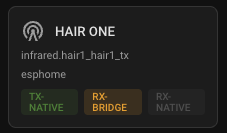
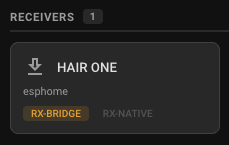
Broadlink shows TX-NATIVE emitter, RX-BRIDGE receiver, and TX-NATIVE / RX-BRIDGE proxy.
I’m slightly confused by one ESPHome not showing RX-BRIDGE, and other one does. (So one shows proxy as TX-NATIVE / RX-NATIVE / RX-BRIDGE.) But not gonna worry about it; will remove bridge code from both anyway.
Thanks, @tim.plats!
I'm happy to hear it's all working as intended. 
The RX-BRIDGE only shows after the RX-BRIDGE device exposes that it is there. If you point an IR device at the ESPHome device with the ESPHome bridge component that is not displaying our RX-BRIDGE as anticipated, it should activate RX-BRIDGE in the card.
It's more of a reminder than a state...
~ DAB
1 Like
can I use a Broadlink rm4 pro as the receiver to learn commands with HAIR?
never mind
From my research, Broadlink shipped TX ub HA 2026.5. No RX work in flight, tho. Might want to open a request in their repo...
Glad it working for you.
~ DAB
Yes, Thank you.
It works well. It makes IR so easy to capture now.
Good work.
Thanks again.
1 Like