0.2.0 broke my setup (wont receive IR), but 0.1.2 still works with receiving signals.
Darn. Can you explain more or open an issue on our GH. I want to make the transition easy for everyone...
~ DAB
Well what do you prefer? On 0.1.2 Hair register when i press a button on the remote, but after update 0.2.0 Hair dont recognize a button press form the remote... So i went back to 0.1.2 and it works as intended for me.
Dont really know what i could describe more/less then that, would gladly give you more info or troubleshooting if you tell me what to look for / jwp to provide it and where to post it.
Edit: update 0.3.1 works for me again, installed form 0.1.2 and no issue what i seen so far, thanks for a great integration!
HAIR v0.3.0 is out, and it brings a new tab: the Clipper.
Quick update for everyone following along. The Sniffer handles remotes you can point at a receiver. But sometimes you have a code and nothing to press it with, it came from an online Pronto converter, a vendor datasheet, an old ESPHome log, or a post right here on the forum. The Clipper is for exactly that.
You build a virtual remote by pasting a Pronto hex code, one per button. As you paste, it validates the code live: detected carrier frequency, burst-pair count, an S/L diamond preview, and a clear message telling you what to fix if something is off, so you know it is good before you save. From there a pasted signal behaves exactly like a sniffed one.
Test it through an emitter, turn it into a trigger, assign it to a device, or promote the whole remote into a new one.
A few other things landed in this release:
- Signal aliases. Click a signal's diamond pattern and give it a name, in both the Sniffer and the Clipper. Makes it easy to tell signals apart before you assign them. An alias is just a label on the signal, not a command name, so the same signal can still become differently-named commands on different devices.
- Signals stick around after you assign them. Assigning now copies a signal into your device and leaves the original in place, so you can reuse one signal across several devices or as several commands.
- The Sniffer now shows each signal's captured carrier frequency.
Update through HACS, or grab it here:
As always, if something misbehaves, open a GitHub issue and include your infrared platform (ESPHome, Tuya Local, Broadlink, SMLIGHT) and your HA version.
Walk-ins welcome. 
2 Likes
Awesome.
As I generally add remote code via direct read from a original remote.
However some of my remotes have a few button that just don't work.
Now I can add broken remote buttons via known pronto code. Nice.

1 Like
0.3.1 ~ Added the ability to copy raw Pronto codes from sniffed signals... 
~ DAB
2 Likes
Dont know if it helps much but got this error in the log.
I have two Seeed/Xiao IR devices (not plugged in all the time but when i test if it works), ESPhome updated with "full.yaml" from your github.
Traceback (most recent call last):
  File "/usr/src/homeassistant/homeassistant/components/websocket_api/decorators.py", line 26, in _handle_async_response
    await func(hass, connection, msg)
  File "/config/custom_components/hair/websocket_api.py", line 260, in ws_update_device
    await manager.async_update_device(device)
  File "/config/custom_components/hair/device_manager.py", line 96, in async_update_device
    await self._entity_factory.async_update_entities(device)
  File "/config/custom_components/hair/entity_factory.py", line 129, in async_update_entities
    on_update(device)
    ~~~~~~~~~^^^^^^^^
  File "/config/custom_components/hair/fan.py", line 49, in _on_update
    entity.update_device(device)
    ~~~~~~~~~~~~~~~~~~~~^^^^^^^^
  File "/config/custom_components/hair/fan.py", line 150, in update_device
    self.async_write_ha_state()
    ~~~~~~~~~~~~~~~~~~~~~~~~~^^
  File "/usr/src/homeassistant/homeassistant/helpers/entity.py", line 1055, in async_write_ha_state
    self._async_verify_state_writable()
    ~~~~~~~~~~~~~~~~~~~~~~~~~~~~~~~~~^^
  File "/usr/src/homeassistant/homeassistant/helpers/entity.py", line 1014, in _async_verify_state_writable
    raise RuntimeError(f"Attribute hass is None for {self}")
RuntimeError: Attribute hass is None for <entity unknown.unknown=unknown>
1 Like
Wow, great job! This is exactly the sort of advanced IR device management UI and functionality I'd hope home assistant to have natively one day. And I mean that in the best way possible haha 
Works perfectly with one XIAO Smart IR Mate and 2026.6.1 in my case.
1 Like
@Dan1jel thanks for the traceback. That was the giveaway for a race condition in the device-update path.
When an update fired before HA finished registering the entity, the entity instance existed in HAIR's internal tracking but had no hass reference yet, so async_write_ha_state failed verification and rolled back your operation. It fired most often during promote-with-multiple-commands or during fast successive assignments.
Just shipped v0.3.3 with the fix. Every entity platform (fan, media_player, climate, light, switch, cover, remote, button) now defers the state write when self.hass is None, and HA writes the initial state once registration completes. Added a 14-test regression suite that reproduces the failure on all seven device-type platforms so it stays fixed.
HACS should pick up v0.3.3 within a few minutes. Update, retry whatever was happening when the trace fired, and the operation should succeed. If you still see it, let me know and I will dig in.
Thanks for the report.
~ DAB
2 Likes
Thanks, @ndom91! 
After an update and a reboot followed by testing the Hair integration again, no errors so far!
Thank for being a great Dev! Keep up the superb work with Hair, love it so far! 
3 Likes
Hey folks, being quite green to ESPHome in general I'm hoping someone can provide some clarity to my confusion before I flash my IR Mate with the 'full' YAML config.
For the API encryption key the instructions say to generate one with python3 -c "import secrets,base64; print(base64.b64encode(secrets.token_bytes(32)).decode())", however I already had one from flashing the IR Mate with the ESPHome config to adopt it. Can I just copy that one over or does it have to be a newly generated one?
Then there's these two entries:
ota:
  - platform: esphome
    password: "#PASSWORD#"
# and...
wifi:
  ap:
    ssid: "${friendly_name} Fallback"
    password: "#PASSWORD#"
I have no idea what #PASSWORD# is supposed to be here. Looking at XIAO's original config it seems that the ap: password is the default device hotspot password of 12345678 and the ota password is a 32 character random string of some sort. What am I supposed to put in here?
Thanks in advance for any and all help and clarity any of you may be able to provide.
You can use your existing key.
The OTA password can be any string. Many user will use the same OTA password for all their devices and store it in secrets.
The AP password can be any string (or even left blank if you prefer). You can also use secrets for this value if desired.
Truthfully, you could probably just comment out the ap section and captive_portal. Since the majority of the functionality is being handled off-device by HAIR, they really aren't going to offer you much except change the WiFi they connect to. ESPHome recommends disabling AP as best practice once you are no longer actively developing a device's configuration. I usually only leave them active if the device is going to be in a location that is physically difficult to access.
1 Like
Thanks, guess I was over thinking it again.
@Didgeridrew
Many thanks for this. Using another guide I found, was able to capture IR but not transmit it (plus this involved adding the codes to ESHome, recompile!). Your code below worked straight away, wish I knew about it earlier would have saved me so much time. Don't know whey don't include in on the official wiki.
Got a couple of questions though if that's ok, sorry I dont really understand ESPhome xml:-
(1) I'm not sure what this part does (triggered by the touch sensor). Im guessing it sends some kind of event to HA so you can use that to trigger something?
event:
  - platform: template
    name: Momentary Touch
    id: touch_sensor
    event_types:
      - single
    device_class: "button"
    on_event:
      then:
        - lambda: |-
            ESP_LOGD("main", "Event %s triggered.", event_type.c_str())
(2) Same with the bit that starts as follows
binary_sensor:
  - platform: gpio
    id: touch_pad
    pin:
      number: GPIO5 # D3
      mode: INPUT_PULLDOWN
You're welcome, but I really contributed very little to this project... @DAB-LABS deserves any thanks you have for this integration.
It creates an event entity that HA can use in State triggers and conditions. The on_event portion at the bottom is an automation that posts a message to the device's log when the event is triggered.
That is what instantiates the actual capacitive touch sensor, it tells the micro-controller that it needs to listen to that pin and how to handle what it "hears".
Is that the esphome.remote_received event?
No, esphome.remote_received is not an entity... that is the result of a Home Assistant event action which posts an event to HA's Event bus. These can also be used to trigger automations, but the method is a little more fiddly.
The section JohnyB asked about creates an entity in HA with the domain event. Here's what one of mine looks like:

The repetitive terminology is a little confusing... event entities were created to give certain (basically-stateless) events a state so that State triggers and Condition could be used for them. They are mostly used for momentary button press events, especially where there might be different press types like single-press, double-press, hold, etc.
I am also having problems with rxbridge on a new Athom AR01V3. I can see the ir signal in the logs but its not working on the sniffer. And rxbridge is not showing on the ui.
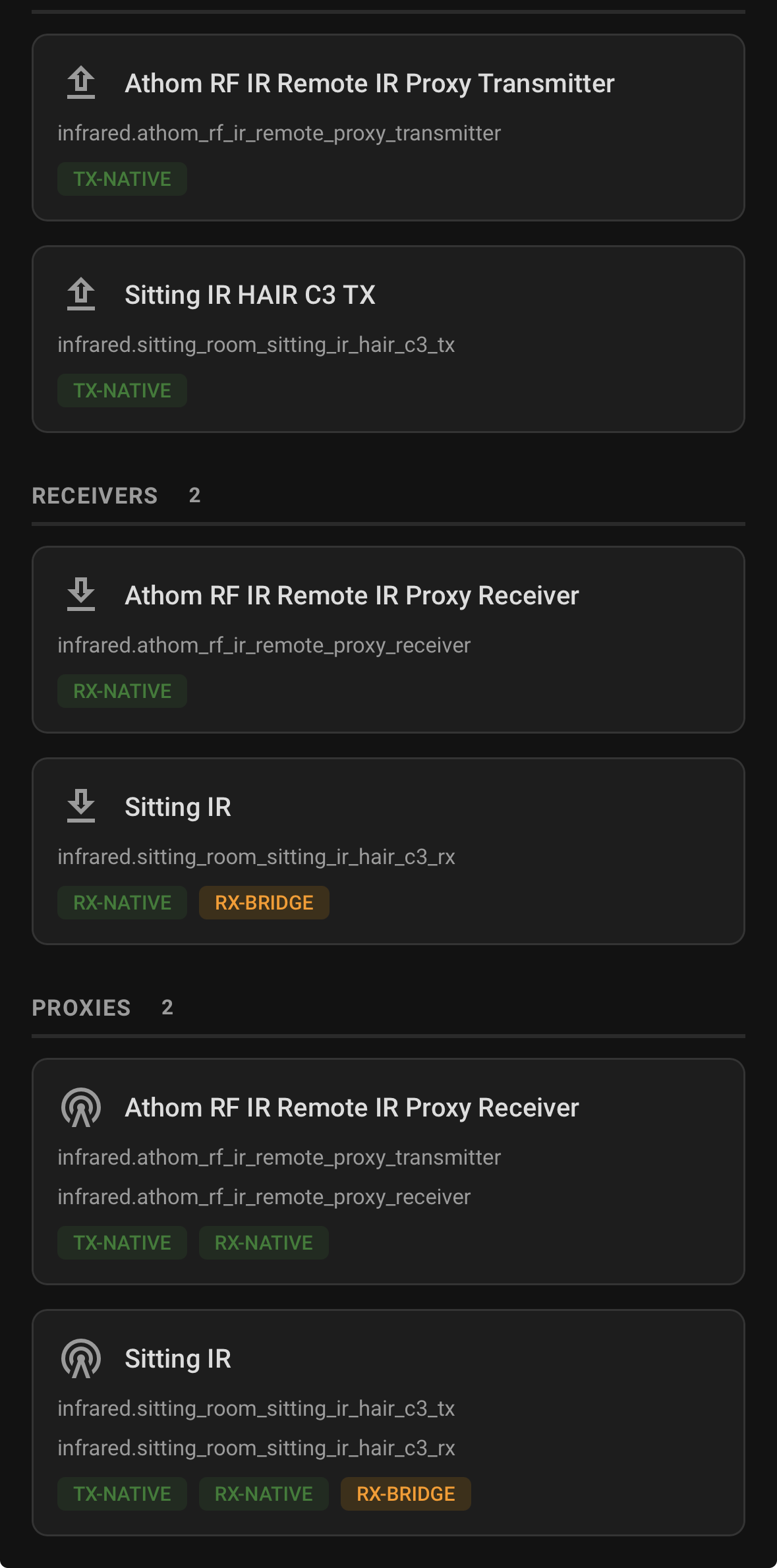
I have used your code for the Athom.
Hair Version 0.4.0
Can I see the yaml you have for the Athom?
~ DAB