Help! OS 16 killed my Home Assistant Yellow?

Thanks @ogiewon . Very dumb question but how can I tell whether the backup file is encrypted? It’s a tarball which I pulled onto my Mac and can successfully expand… but some of the files within it are .tar.gz files that gunzip is not able to recognize…

(And I do have my “emergency kit” saved, FWIW)

Since you have your emergency kit saved, you’ll be fine regardless of if the backup files are encrypted or not.

I personally don’t know how to test the files, except to open them up. Have you tried opening up a backup file on the Raspberry Pi? It should be able to open the internal files, I think…

@ogiewon Apparently that is not true. I got a new NVMe, installed a new image using the raspberry pi imager, uploaded my backup, hit restore… and it refused to accept the encryption key copied from my “Emergency Kit” (which I had dutifully stored about 3 months ago).

This is an incredibly confidence-shattering experience regarding HomeAssistant generally: the OS update kills my device, and I discover that my backups are useless… (Not to mention that this seems to be happening to many users… at least the OS update part)

If the OS update killed the device’s ability to boot, but I still have an intact filesystem, there should theoretically be some way to replace the OS on the drive without affecting the Home Assistant Core, and all of my settings/history/etc. But I don’t know enough about the system structure to do this (or really want to become an expert, just to set timers on my lights and blinds). Are there any instructions?

Alternatively there should be some theoretically way for me to manually overwrite many files on the clean installation with the files from the old disk (effectively manually restoring from a “backup” – well the real thing, actually). Can anyone point me to those steps?

Thanks…

Just copy over the content of the old /config directory, including all hidden files and directories.

First thing I did using the new backup system was turning off encryption

1 Like

Thank you @francisp ! Does copying the contents of /config restore everything ? I’m considering:

  • Devices (integrations, devices added via those integrations)
  • Settings (dashboards, automations, etc.)
  • Users/passwords/etc.
  • Add-ons (including things from HACS)
  • Z-wave devices
  • ESPHome devices/configurations/etc.
  • History (i.e., logged historical readings from sensors)

Thanks!

Not everything


[quote="mike15, post:65, topic:909365"]
* Devices (integrations, devices added via those integrations)  **YES**
* Settings (dashboards, automations, etc.)                      **YES**
* Users/passwords/etc.                                          **YES**
* Add-ons (including things from HACS)                          **HACS YES, Add-ons NO**
* Z-wave devices                                                **don't know**
* ESPHome devices/configurations/etc.                           **YES**
* History (i.e., logged historical readings from sensors)           **YES**
[/quote]

if you don’t forget the hidden files and directories

Add-ons (including ZWave) are stored higher up

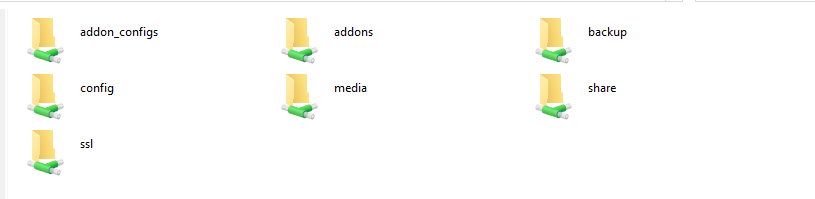
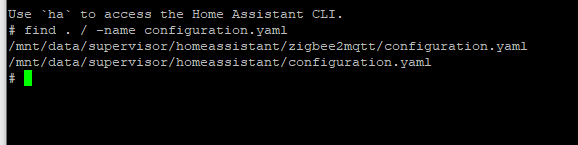
Thanks again, @francisp , however which /config directory are you referring to? When I connect my HA’s NVMe, I see a number of volumes, such as hassos-data and hassos-overlay, but none of them seem to contain a folder named /config …

Thanks!

Seems these days it is homeassistant

1 Like

Hi Developers,
Any new info you can share how this is going and when we possible can see a new version for our HA Yellows?

Hi
It apeard as an update today to my Yellow.
I updated and everything went well!

1 Like

I happened to me as well after updating to OS 16. Here’s the output on console:pastebin

I reinstalled the image (rpi imagewriter had v16) and also a fresh install doesn’t work. IT seems the network interface never comes up

Installing version 15.2 is working.

1 Like

Same here, Zigbee on my Yellow broken after the 16.0 upgrade today :grimacing:
Downgraded to 15.2 via CLI fixed it for me: ha os update --version 15.2

1 Like

Upgraded to HO OS 16 on my Yellow and unfortunately Zigbee is broken again.

Downgraded with: ha os update --version 15.2

That release was published twice causing the same problem. That must NOT happen!

Yes, my Yellow Box was broken again (no Zigbee) and I downgraded and did the ha os update --version 15.2 to make it work.

1 Like

Same issue, this was the solution. Many thanks!

2 Likes

This is what worked for me also.

1 Like

Just to state my expectations as a user, that is not a hacker / programmer and only has basic knowledge.

Until now, I have been able to setup the system and have been running it for a couple of years now. The only interventions I do are the updates offered by HA (or add-ons). Until now, that worked smoothly and without issues.

The HA OS 16.0 update caused the same problem now twice. I don’t have time nor do I have interest to tweak, debug etc.

I am expecting, that updates provided by HA are working without problems