Home Assistant card (replacing former bar-card config)

for completeness how to use the template in your dashboard:

type: custom:button-card
template: ts_bar_card
entity: sensor.phase_1_current
icon: mdi:current-ac
name: Phase 1
variables:
  min_value: 0
  max_value: 35
  color_10: 0,200,0
  color_20: 0,200,0
  color_30: 0,200,0
  color_40: 0,200,0
  color_50: 0,250,0
  color_60: 255,255,0
  color_70: 200,150,0
  color_80: 200,50,0
  color_90: 200,0,0
  color_100: 200,0,0
  new_unit: A
2 Likes

I’ve been using a similar setup to one posted earlier in this topic, to replace my use of the original bar card. However, after updating to the latest version of card_mod, my background colouring of the row is no longer applying.
I read the breaking changes on v4 of card_mod, however I’m not sure how to adapt my card_mod code accordingly. This is my card config, originally targeting hui-generic-entity-row :

type: entities
entities:
  - entity: sensor.memory_use_percent
    name: RAM usage / 8GB
    icon: mdi:memory
    card_mod:
      style: |
        hui-generic-entity-row {
          {% set raw = states(config.entity) | float(0) %}
          {% set min = 0 %}
          {% set max = 100 %}
          {% set val = ((raw - min) / (max - min)) * 100 %}
          {% if raw <= 50 %}
            {% set bar = '0,168,0' %}
          {% elif raw <= 80 %}
            {% set bar = '255,136,0' %}
          {% else %}
            {% set bar = '255,0,0' %}
          {% endif %}
          background: linear-gradient(to right,
            rgba({{bar}},0.9) 0%,
            rgba({{bar}},0.8) {{val}}%,
            rgba({{bar}},0.3) {{val}}%,
            rgba({{bar}},0.1) 100%);
        }

  - entity: sensor.disk_use_percent
    name: Disk usage / 32GB
    icon: mdi:harddisk
    card_mod:
      style: |
        hui-generic-entity-row {
          {% set raw = states(config.entity) | float(0) %}
          {% set min = 0 %}
          {% set max = 100 %}
          {% set val = ((raw - min) / (max - min)) * 100 %}
          {% if raw <= 70 %}
            {% set bar = '0,168,0' %}
          {% elif raw <= 90 %}
            {% set bar = '255,136,0' %}
          {% else %}
            {% set bar = '255,0,0' %}
          {% endif %}
          background: linear-gradient(to right,
            rgba({{bar}},0.9) 0%,
            rgba({{bar}},0.8) {{val}}%,
            rgba({{bar}},0.3) {{val}}%,
            rgba({{bar}},0.1) 100%);
        }
card_mod:
  style: |
    ha-card {
      grid-area: stats;
      border-radius: 20px !important;
      background-color: rgba(0,0,0,0.1);
    }

can anyone help with what I need to change to get the styling back again?

should be ok, this is what I have

  - entity: sensor.processor_use
    name: Cpu
    card_mod:
      style: |
        hui-generic-entity-row {
          background:
            {% set perc = states(config.entity)|float(0) %}
            {% if perc >= 59 %} {% set bar = '255,0,0' %}
            {% elif perc >= 44 %} {% set bar = '128,0,0' %}
            {% elif perc >= 24 %} {% set bar = '255,165,0' %}
            {% elif perc >= 9 %} {% set bar = '0,100,0' %}
            {% else %} {% set bar = '0,128,0' %}
            {% endif %}
            linear-gradient(to right, rgb({{bar}},0.9) 0%, rgb({{bar}},0.6) {{perc}}%,
                                      rgb({{bar}},0.3){{perc}}%, rgb({{bar}},0.1) 100%);
        }

note I also have a card_mod in the top entities card applying to the individual rows generically

Full card
type: entities
card_mod:
  style:
    hui-sensor-entity-row:
      $: |
        hui-generic-entity-row {
          height: 25px;
          padding: 0px 16px;
          border: 1px groove var(--primary-color);
        }
    .: |
      {% set light = is_state('binary_sensor.donker_thema','off') %}
      {% set kleur = 'var(--ha-color)' if light else 'var(--primary-color)' %}
      ha-card {
        box-shadow: var(--box-shadow);
        background: linear-gradient(90deg, {{kleur}} 30%,var(--card-background-color) 100%);
        color: white;
        --icon-primary-color: white;
        --mdc-icon-size: 20px;
        font-weight: bold;
      }

entities:
  - type: custom:hui-element
    card_type: vertical-stack # required because hui-element does not support visibility
    cards:
      - visibility:
          - condition: state
            entity: binary_sensor.donker_thema
            state: 'on'
        image: /local/home-assistant/home-assistant-wordmark-color-on-dark.png
        <<: &picture
          type: picture
          entity: device_tracker.ha_main
          card_mod:
            style: |
              ha-card {
               {% set light = is_state('binary_sensor.donker_thema','off') %}
               {% set kleur = 'var(--ha-color)' if light else 'var(--primary-color)' %}
                background: linear-gradient(90deg, {{kleur}} 30%,var(--card-background-color) 100%);
              }
          tap_action:
            action: more-info
          hold_action:
            action: navigate
            navigation_path: /config/system
      - visibility:
          - condition: state
            entity: binary_sensor.donker_thema
            state: 'off'
        image: /local/home-assistant/home-assistant-wordmark-monochrome-on-dark.png
        <<: *picture

  - entity: sensor.last_boot
    format: datetime
    <<: &no_border
      card_mod:
        style: |
          hui-generic-entity-row {
            border: none !important;
          }
  - entity: sensor.uptime
    <<: *no_border
  - entity: sensor.processor_use
    name: Cpu
    card_mod: &perc
      style: |
        hui-generic-entity-row {
          background:
            {% set perc = states(config.entity)|float(0) %}
            {% if perc >= 59 %} {% set bar = '255,0,0' %}
            {% elif perc >= 44 %} {% set bar = '128,0,0' %}
            {% elif perc >= 24 %} {% set bar = '255,165,0' %}
            {% elif perc >= 9 %} {% set bar = '0,100,0' %}
            {% else %} {% set bar = '0,128,0' %}
            {% endif %}
            linear-gradient(to right, rgb({{bar}},0.9) 0%, rgb({{bar}},0.6) {{perc}}%,
                                      rgb({{bar}},0.3){{perc}}%, rgb({{bar}},0.1) 100%);
        }

  - entity: sensor.processor_temperature
    name: Temp
    card_mod:
      style: |
        hui-generic-entity-row {
          background:
            {% set temp = states(config.entity)|float(0) %}
            {% if temp >= 85 %} {% set bar = '255,0,0' %}
            {% elif temp >= 75 %} {% set bar = '128,0,0' %}
            {% elif temp >= 65 %} {% set bar = '255,99,71' %}
            {% elif temp >= 55 %} {% set bar = '255,69,0' %}
            {% elif temp >= 45 %} {% set bar = '255,140,0' %}
            {% elif temp >= 35 %} {% set bar = '255,165,0' %}
            {% else %} {% set bar = '0,128,0' %}
            {% endif %}
            linear-gradient(to right, rgba({{bar}},0.9) 0%, rgba({{bar}},0.9) {{temp}}%,
                                      rgba({{bar}},0.6){{temp}}%, rgba({{bar}},0.2) 100%);
        }

  - entity: sensor.memory_use_percent
    name: Memory
    card_mod:
      style: |
        hui-generic-entity-row {
          background:
            {% set perc = states(config.entity)|float(0) %}
            {% if perc >= 85 %} {% set bar = '255,0,0' %}
            {% elif perc >= 75 %} {% set bar = '128,0,0' %}
            {% elif perc >= 60 %} {% set bar = '255,140,0' %}
            {% elif perc >= 50 %} {% set bar = '255,165,0' %}
            {% else %} {% set bar = '0,128,0' %}
            {% endif %}
            linear-gradient(to right, rgba({{bar}},0.9) 0%, rgb({{bar}},0.9) {{perc}}%,
                                      rgba({{bar}},0.6){{perc}}%, rgba({{bar}},0.2) 100%);
        }

  - entity: sensor.disk_use_percent_home
    name: Disk
    card_mod: *perc

  - entity: sensor.swap_use_percent
    name: Swap
    card_mod:
      style: |
        hui-generic-entity-row {
          background:
            {% set swap = states(config.entity)|float(0) %}
            {% if swap >= 768 %} {% set bar = '255,0,0' %}
            {% elif swap >= 640 %} {% set bar = '255,215,0' %}
            {% else %} {% set bar = '50,205,50' %}
            {% endif %}
            linear-gradient(to right, rgba({{bar}},0.9) 0%, rgba({{bar}},0.9) {{swap}}%,
                                      rgba({{bar}},0.1){{swap}}%, rgba({{bar}},0.1) 100%);
        }

  - entity: sensor.system_monitor_open_file_descriptors_python3
    name: Python3
    card_mod:
      style: |
        hui-generic-entity-row {
          background:
            {% set py = states(config.entity)|float(0) %}
            {% set max = 2048 %}
            {% set percent = (py / max * 100) | round(1) %}
            {% if py >= 2000 %}
              {% set bar = '255,0,0' %}          {# Red #}
            {% elif py >= 1500 %}
              {% set bar = '255,69,0' %}         {# OrangeRed #}
            {% elif py >= 1000 %}
              {% set bar = '255,140,0' %}        {# DarkOrange #}
            {% elif py >= 500 %}
              {% set bar = '255,215,0' %}        {# Gold #}
            {% elif py >= 250 %}
              {% set bar = '173,255,47' %}       {# GreenYellow #}
            {% elif py >= 100 %}
              {% set bar = '144,238,144' %}      {# LightGreen #}
            {% else %}
              {% set bar = '0,128,0' %}          {# Green #}
            {% endif %}
            linear-gradient(to right, rgba({{bar}},0.9) 0%,
                                      rgba({{bar}},0.9) {{percent}}%,
                                      rgba({{bar}},0.6){{percent}}%,
                                      rgba({{bar}},0.2) 100%);
        }
  - entity: sensor.home_assistant_v2_db_size
    name: Db
# footer:
#   type: custom:hui-element
#   card_type: statistics-graph
#   entities:
#     - sensor.home_assistant_v2_db_size

# green #0, 128, 0
# darkgreen #0, 100, 0
# limegreen 50, 205, 50
# gold 255, 215, 0
# brown # 165, 42, 42
# orange #255, 165, 0
# darkorange #255, 140, 0
# orangered #255, 69, 0
# tomato # 255, 99, 71
# maroon #128, 0, 0
# red #255, 0, 0

# {{'-dark' if dark }}
# url('/local/homeassistant/homeassistant_background.png');
# {% set dark = states('input_select.theme') is search('ight|Dark|Matrix',ignorecase=True) %}
# {% set bcolor = 'var(--ha-color)' if dark else 'rgb(49,150,207)' %}
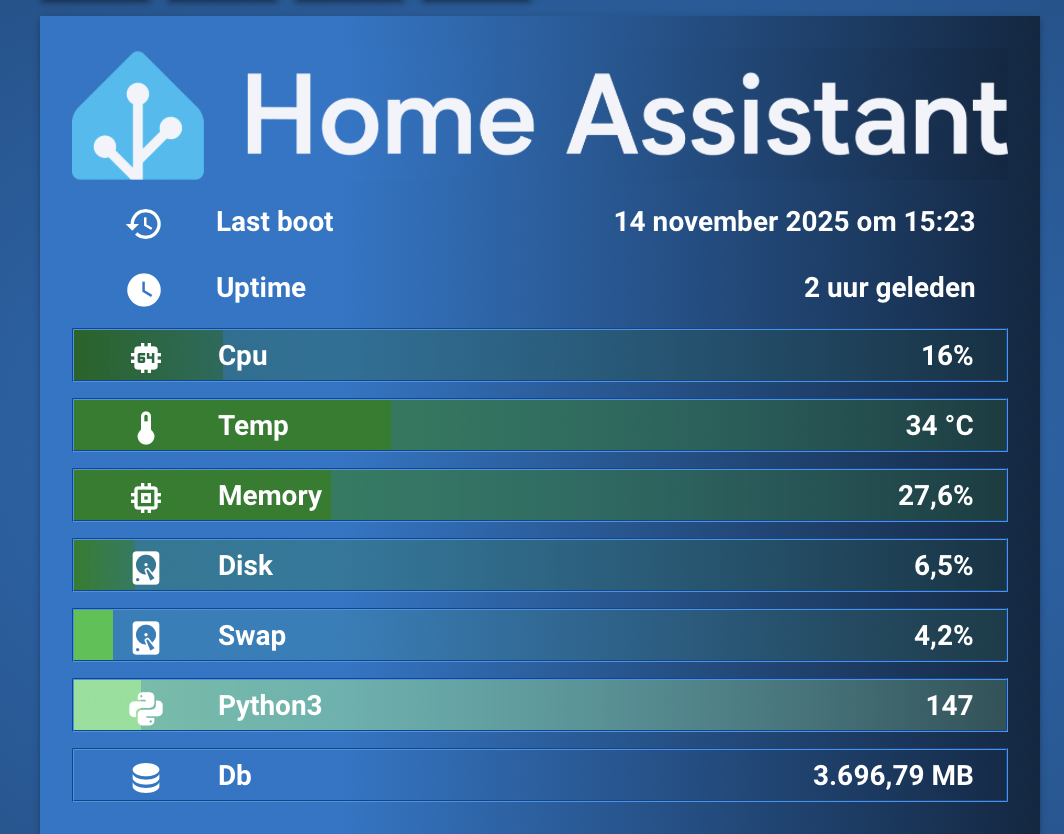
Thanks for your reply, that’s interesting. As a quick test I’ve copied your exact card config into a test dashboard, and I already had some of the same system monitor entities, just to see what styling was applied. I can see the blue gradient colour styling applied to the main entity card’s background, like in your screenshot, however the background ‘bar’ gradient colour for each entity is not showing on any of the entities on my card (using default HA theme)

I’m wondering if maybe the card_mod update has caused an issue on my system, and I’ll try downloading the latest version again and clearing caches etc and see if it makes any difference.

Yeah might be that. Add the cache buster and reload . Same as always.

?v=1234567

1 Like

That done the trick :slight_smile: The Card_mod v4 breaking changes were a red herring in this particular case - thanks for providing your code and confirming what I had in place was still correct :+1:

2 Likes

Sweet! Thanks for confirming and great you got the card back to working :wink:

1 Like

I know this is a little old but I have two questions as I am trying to replicate this:
Where did you get: sensor.system_monitor_open_file_descriptors_python3?
Also, where can I find the png file you used.
Thanks very much.

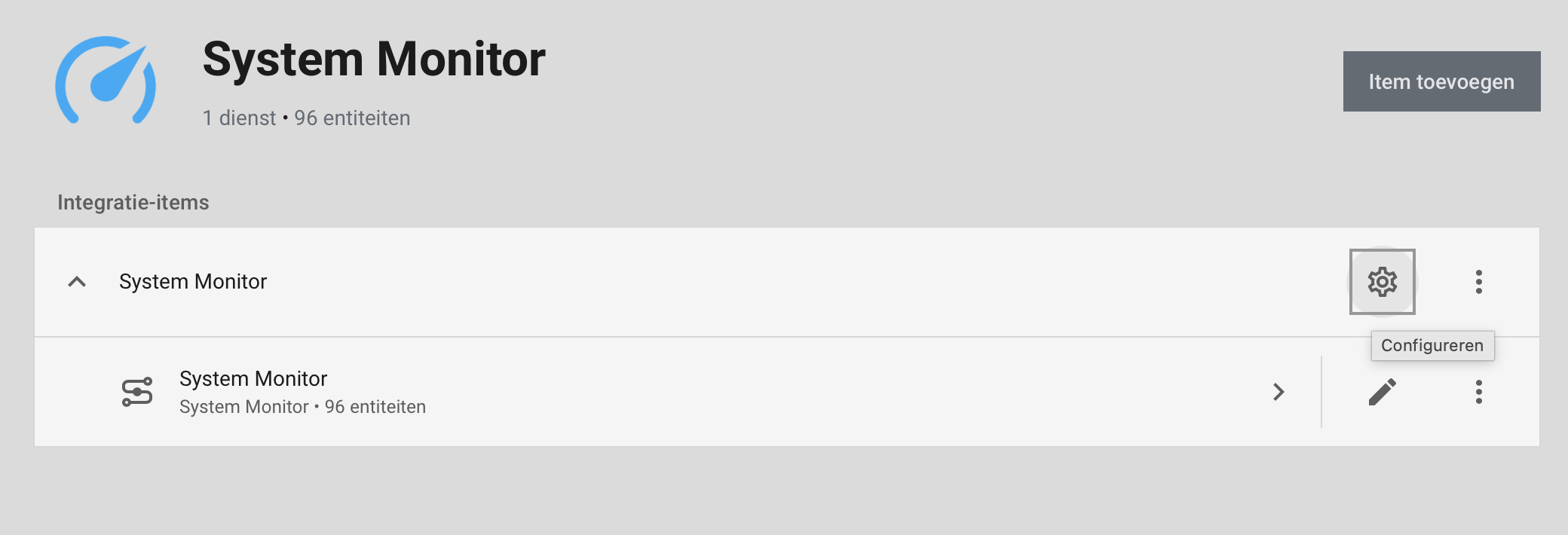
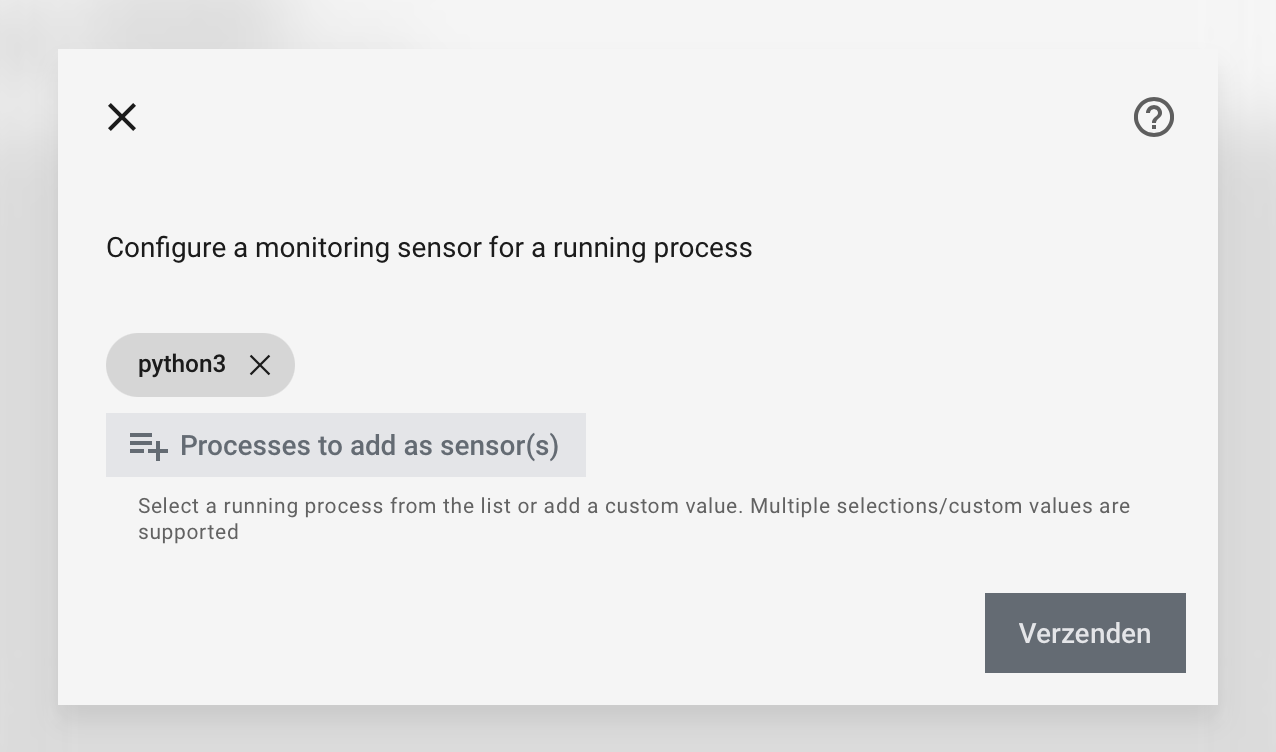
The entity is made after instruction System Monitor in a special setting, you can look it up there.

click the cogwheel

and next select a monitoring sensor you want to install

also check this instruction set About open file (descriptor) limits on Home Assistant OS · home-assistant/operating-system · Discussion #4166 · GitHub

The background is from the official HA logos, downloaded from the projects pages somewhere , don’t recall the exact address but that too can be found in the official pages

edit: here it is Home Assistant Design

or straight download from assets/logo/home-assistant-logo.zip at master · home-assistant/assets · GitHub

Thanks for this Marius. As a newbe in Home Assistant replicating most of these dashboards has become very difficult. This is especially true since most of these are a few years old.
Cheers.

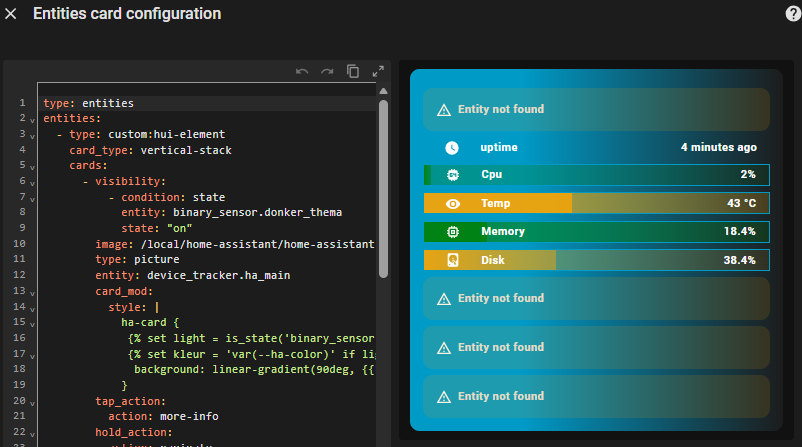
Hi Marius. I’m getting a lot closer. I am however having an issue with the image entry.


I haven’t change the code for the image part. Not sure what I’ve got wrong.
Thanks. Getting a lot closer.

if its a fronted error, there should be something in the Inspector pane, did you check?
also be sure to change the calculations/thresholds for the temps. We use C here, and you’re way up in red there :wink:

the others errors are missing entities, so just adjust the card for those

general update to my original card, required because nowadays (not sure when it was introduced) Ha sets an active background to an entity when returning from its more-info dialog, called focus-visible, resulting in this seemingly unstyled row (which in fact is getting the focus-visible…. :

with guidance from @dcapslock how to set a background to none in that case, we arrive doing this


  - entity: sensor.processor_use
    name: Cpu
    uix:
      style:
        # see discussion at https://github.com/Lint-Free-Technology/uix/discussions/307
        hui-generic-entity-row $: |
          .row:focus-visible {
            background: none !important;
          }

on each individual row. Ive thrown that in a yaml anchor to not have to repeat it, and final complete card is in the following yaml


Full card
```
type: entities
uix:
  style:
    hui-sensor-entity-row:
      $: |
        hui-generic-entity-row {
          height: 25px;
          padding: 0px 16px;
          border: 1px groove var(--primary-color);
        }
    .: |
      {% set light = is_state('binary_sensor.donker_thema','off') %}
      {% set kleur = 'var(--ha-color)' if light else 'var(--primary-color)' %}
      ha-card {
        box-shadow: var(--box-shadow);
        background: linear-gradient(90deg, {{kleur}} 30%,var(--card-background-color) 100%);
        color: white;
        --icon-primary-color: white;
        --mdc-icon-size: 20px;
        font-weight: bold;
      }

entities:
  - type: custom:hui-element
    card_type: vertical-stack # required because hui-element does not support visibility
    cards:
      - visibility:
          - condition: state
            entity: binary_sensor.donker_thema
            state: 'on'
        image: /local/home-assistant/home-assistant-wordmark-color-on-dark.png
        <<: &picture
          type: picture
          entity: device_tracker.ha_main
          uix:
            style: |
              ha-card {
               {% set light = is_state('binary_sensor.donker_thema','off') %}
               {% set kleur = 'var(--ha-color)' if light else 'var(--primary-color)' %}
                background: linear-gradient(90deg, {{kleur}} 30%,var(--card-background-color) 100%);
              }
          tap_action:
            action: more-info
          hold_action:
            action: navigate
            navigation_path: /config/system
      - visibility:
          - condition: state
            entity: binary_sensor.donker_thema
            state: 'off'
        image: /local/home-assistant/home-assistant-wordmark-monochrome-on-dark.png
        <<: *picture

  - entity: sensor.last_boot
    format: datetime
    <<: &no_border
      uix:
        style: |
          hui-generic-entity-row {
            border: none !important;
          }
  - entity: sensor.uptime
    <<: *no_border
  - entity: sensor.processor_use
    name: Cpu
    uix: &perc
      style:
        # see discussion at https://github.com/Lint-Free-Technology/uix/discussions/307
        <<: &focus
          hui-generic-entity-row $: |
            .row:focus-visible {
              background: none !important;
            }
        .: |
          hui-generic-entity-row {
            background:
              {% set perc = states(config.entity)|float(0) %}
              {% if perc >= 59 %} {% set bar = '255,0,0' %}
              {% elif perc >= 44 %} {% set bar = '128,0,0' %}
              {% elif perc >= 24 %} {% set bar = '255,165,0' %}
              {% elif perc >= 9 %} {% set bar = '0,100,0' %}
              {% else %} {% set bar = '0,128,0' %}
              {% endif %}
              linear-gradient(to right, rgb({{bar}},0.9) 0%, rgb({{bar}},0.6) {{perc}}%,
                                        rgb({{bar}},0.3){{perc}}%, rgb({{bar}},0.1) 100%);
          }
  - entity: sensor.processor_temperature
    name: Temp
    uix:
      style:
        <<: *focus
        .: |
          hui-generic-entity-row {
            background:
              {% set temp = states(config.entity)|float(0) %}
              {% if temp >= 85 %} {% set bar = '255,0,0' %}
              {% elif temp >= 75 %} {% set bar = '128,0,0' %}
              {% elif temp >= 65 %} {% set bar = '255,99,71' %}
              {% elif temp >= 55 %} {% set bar = '255,69,0' %}
              {% elif temp >= 45 %} {% set bar = '255,140,0' %}
              {% elif temp >= 35 %} {% set bar = '255,165,0' %}
              {% else %} {% set bar = '0,128,0' %}
              {% endif %}
              linear-gradient(to right, rgba({{bar}},0.9) 0%, rgba({{bar}},0.9) {{temp}}%,
                                        rgba({{bar}},0.6){{temp}}%, rgba({{bar}},0.2) 100%);
          }

  - entity: sensor.memory_use_percent
    name: Memory
    uix:
      style:
        <<: *focus
        .: |
          hui-generic-entity-row {
            background:
              {% set perc = states(config.entity)|float(0) %}
              {% if perc >= 85 %} {% set bar = '255,0,0' %}
              {% elif perc >= 75 %} {% set bar = '128,0,0' %}
              {% elif perc >= 60 %} {% set bar = '255,140,0' %}
              {% elif perc >= 50 %} {% set bar = '255,165,0' %}
              {% else %} {% set bar = '0,128,0' %}
              {% endif %}
              linear-gradient(to right, rgba({{bar}},0.9) 0%, rgb({{bar}},0.9) {{perc}}%,
                                        rgba({{bar}},0.6){{perc}}%, rgba({{bar}},0.2) 100%);
          }

  - entity: sensor.disk_use_percent_home
    name: Disk
    uix: *perc

  - entity: sensor.swap_use_percent
    name: Swap
    uix:
      style:
        <<: *focus
        .: |
          hui-generic-entity-row {
            background:
              {% set swap = states(config.entity)|float(0) %}
              {% if swap >= 768 %} {% set bar = '255,0,0' %}
              {% elif swap >= 640 %} {% set bar = '255,215,0' %}
              {% else %} {% set bar = '50,205,50' %}
              {% endif %}
              linear-gradient(to right, rgba({{bar}},0.9) 0%, rgba({{bar}},0.9) {{swap}}%,
                                        rgba({{bar}},0.1){{swap}}%, rgba({{bar}},0.1) 100%);
          }

  - entity: sensor.system_monitor_open_file_descriptors_python3
    name: Python3
    uix:
      style:
        <<: *focus
        .: |
          hui-generic-entity-row {
            background:
              {% set py = states(config.entity)|float(0) %}
              {% set max = 2048 %}
              {% set percent = (py / max * 100) | round(1) %}
              {% if py >= 2000 %}
                {% set bar = '255,0,0' %}          {# Red #}
              {% elif py >= 1500 %}
                {% set bar = '255,69,0' %}         {# OrangeRed #}
              {% elif py >= 1000 %}
                {% set bar = '255,140,0' %}        {# DarkOrange #}
              {% elif py >= 500 %}
                {% set bar = '255,215,0' %}        {# Gold #}
              {% elif py >= 250 %}
                {% set bar = '173,255,47' %}       {# GreenYellow #}
              {% elif py >= 100 %}
                {% set bar = '144,238,144' %}      {# LightGreen #}
              {% else %}
                {% set bar = '0,128,0' %}          {# Green #}
              {% endif %}
              linear-gradient(to right, rgba({{bar}},0.9) 0%,
                                        rgba({{bar}},0.9) {{percent}}%,
                                        rgba({{bar}},0.6){{percent}}%,
                                        rgba({{bar}},0.2) 100%);
          }
  - entity: sensor.home_assistant_v2_db_size
    name: Db
# footer:
#   type: custom:hui-element
#   card_type: statistics-graph
#   entities:
#     - sensor.home_assistant_v2_db_size

# green #0, 128, 0
# darkgreen #0, 100, 0
# limegreen 50, 205, 50
# gold 255, 215, 0
# brown # 165, 42, 42
# orange #255, 165, 0
# darkorange #255, 140, 0
# orangered #255, 69, 0
# tomato # 255, 99, 71
# maroon #128, 0, 0
# red #255, 0, 0

# {{'-dark' if dark }}
# url('/local/homeassistant/homeassistant_background.png');
# {% set dark = states('input_select.theme') is search('ight|Dark|Matrix',ignorecase=True) %}
# {% set bcolor = 'var(--ha-color)' if dark else 'rgb(49,150,207)' %}
```
1 Like