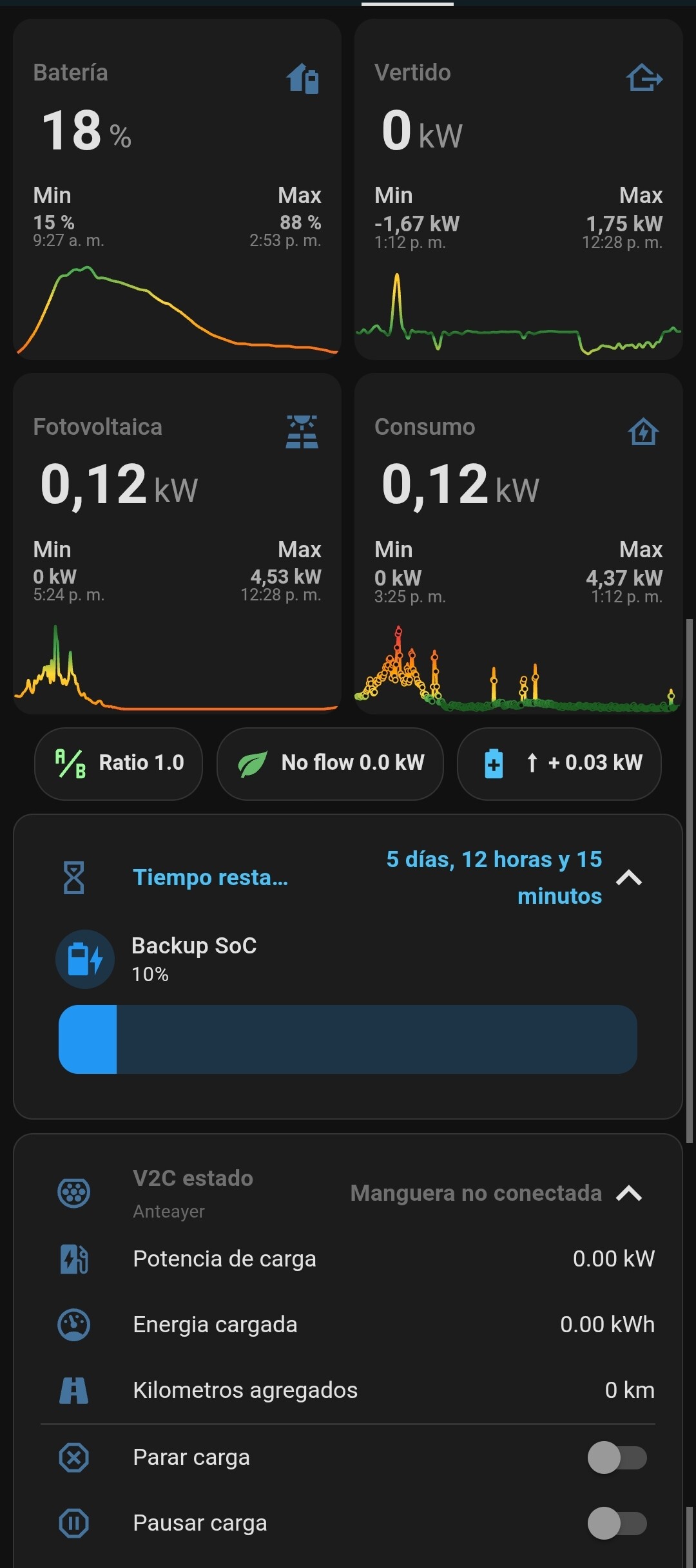
I’d like to share a small automation I created to solve a common issue when charging an Electric Vehicle (EV) during cheap night hours while using a residential battery system.
The Problem: When my EV charger (V2C) starts charging at night, the car often draws power from my home battery (Huawei) instead of solely using the cheap grid energy, defeating the purpose of storing power for daytime use.
The Solution: I’ve implemented a simple automation that “freezes” the minimum discharge level (SOC) of the home battery to its current level the moment the car starts charging. This forces the EV to draw power directly from the grid and ensures the valuable stored energy is preserved.
My Setup:
EV Charger: V2C Charger (using the HACS integration for its status sensor).
Home Battery: Huawei LUNA2000 (using the Huawei Solar integration in Administrator Mode to control the minimum SOC setting).
EV: Any electric vehicle. This automation is universal as it only controls the home battery, not the car.
The Automation Logic
The automation has two parts:
Freeze Automation (Night): When the car starts charging between 00:00 and 08:00, it sets the battery reserve level (number.baterias_carga_de_reserva_soc) to the battery’s current SOC (State of Charge). Crucially, it includes a safety check to ensure the reserve never drops below 10%, even if the sensor fails or the battery is already low.
Unfreeze Automation (Morning): (Required but not shown here) A second automation must reset the reserve back to your normal level (e.g., 10%) when charging is complete or after 08:00.
Automation Code (Freeze Battery Level)
This is the YAML code for the first part (the freezing action):
alias: EV Charging - Freeze Home Battery SOC
description: >-
  Sets the home battery reserve to its current SOC (min 10%) when the EV starts
  charging during cheap hours (00:00 - 08:00).
triggers:
  - platform: state
    entity_id: sensor.v2c_hacs_estado_de_carga
    to: "Manguera conectada (CARGANDO)"
conditions:
  - condition: time
    after: "00:00:00"
    before: "08:00:00"
actions:
  - service: number.set_value
    target:
      entity_id: number.baterias_carga_de_reserva_soc
    data:
      # This template sets the reserve to the current SOC,
      # but ensures it is at least 10% (safety feature).
      value: >
        {{ [states('sensor.baterias_estado_de_la_capacidad') | int(default=10), 10] | max }}
mode: single
I hope this helps anyone trying to optimize their EV charging and home battery usage! Let me know if you have any questions or suggestions for improvements.
Thanks mabusdogma, that’s really useful. My plan is to get an EV in the next couple of months and I have been trying to work that problem out.
Do you have PV’s as well?
I’ll need to add another piece that charges the EV when the Luna battery is at 100% from the PV yield. It’s going to get complicated because I’ll need to use the next days solar forecast to determine if I charge the house battery and car battery at night.
I’ve already got that working with the house and it’s not too difficult so I’ll just split the time with the car at night.
I did think about putting the car charger before the inverters so that the car would only charge from the grid but shame not to use the sun when there is surplus.
What EV charger do you have? I assume that integrates with HA?
Anyone know if the Huawai EV charger can ‘talk’ to the Luna or inverter control to do all this?
And as far as I know, Huawei charger can talk directly to the luna2000 battery. Unfortunately I don’t have a Huawei charger (mine is V2C) so I don’t know how it appears on Home Assistant.
Do you see any entities of the charger? If you do, I think it would be easier to charge when the luna2000 battery is 100%
The ide would be an automatization doing something like this:
When? Luna2000 battery is 100%
Condition: Huawei charger detects a car is connected but no charging
Action:
Backup SoC of the Luna battery freezes at 100
Start Huawei charger
Do you use Huawei solar integration? Specially as administrator mode. I’m pretty sure you can control the Huawei charger that way.
Thanks, this is really useful.
I don’t have a charger yet, hopefully will have the car in Feb/March but want to get the charger soon to get it configured etc.
I do have use the Huawei integration for the inverters and the battery. I’ll ask the supplier if the Huawei charger connects to the management system, might be worth a bit more money to get it all in harmony.
I connect the hardware to the management system with the sDongle, it works ok but suffers from regular dropouts on the integration, apparently its a fault of the Dongle because it reboots if it can’t connect to the management system. Anyway, that is a different thread!
I’m looking forward to doing this but its a real brain melt with all the variables;
The grid is cheap at night and at weekends here in Spain but not as cheap as solar of course.
Probably won’t need to charge the car every day but need to be able to force that if necessary for a trip the next day.
Solar power forecast.
Is it cold enough to need the heating the following day (I have a heat pump.)
Hi again.
So this went on a lot longer than planned, mainly due to Renault not being able to get the car. But it’s due any day now.
I was close to ordering the Huawei charger but I think I’m going to have issues with Home Assistant as I connect direct to the Inverter with a serial connection at the moment but that works so well I don’t really want to go back to IP which didn’t work well at all because I have two inverters so can’t point the integration to them both at the same time.
Apparently the Renault integration enables you to turn the charging on and off so I might not even need to control the charger.
Anyway, my question, your V2C charger, I can see that integrates with Hassio, does it give you everything you need? Would you change it if you had the chance?
I can see that integrates with Hassio, does it give you everything you need? Would you change it if you had the chance?
Yes, it gives me everything I need and (so far) I don’t think I would change the V2C charger or the Huawei battery
What I have done is a complex automation to have a better control of the dynamic charge, to use 99.99% as a self consumption:
 My Setup:
 The Automation Logic
 Automation Code (Freeze Battery Level)