 Home Flow Card
Hello there 
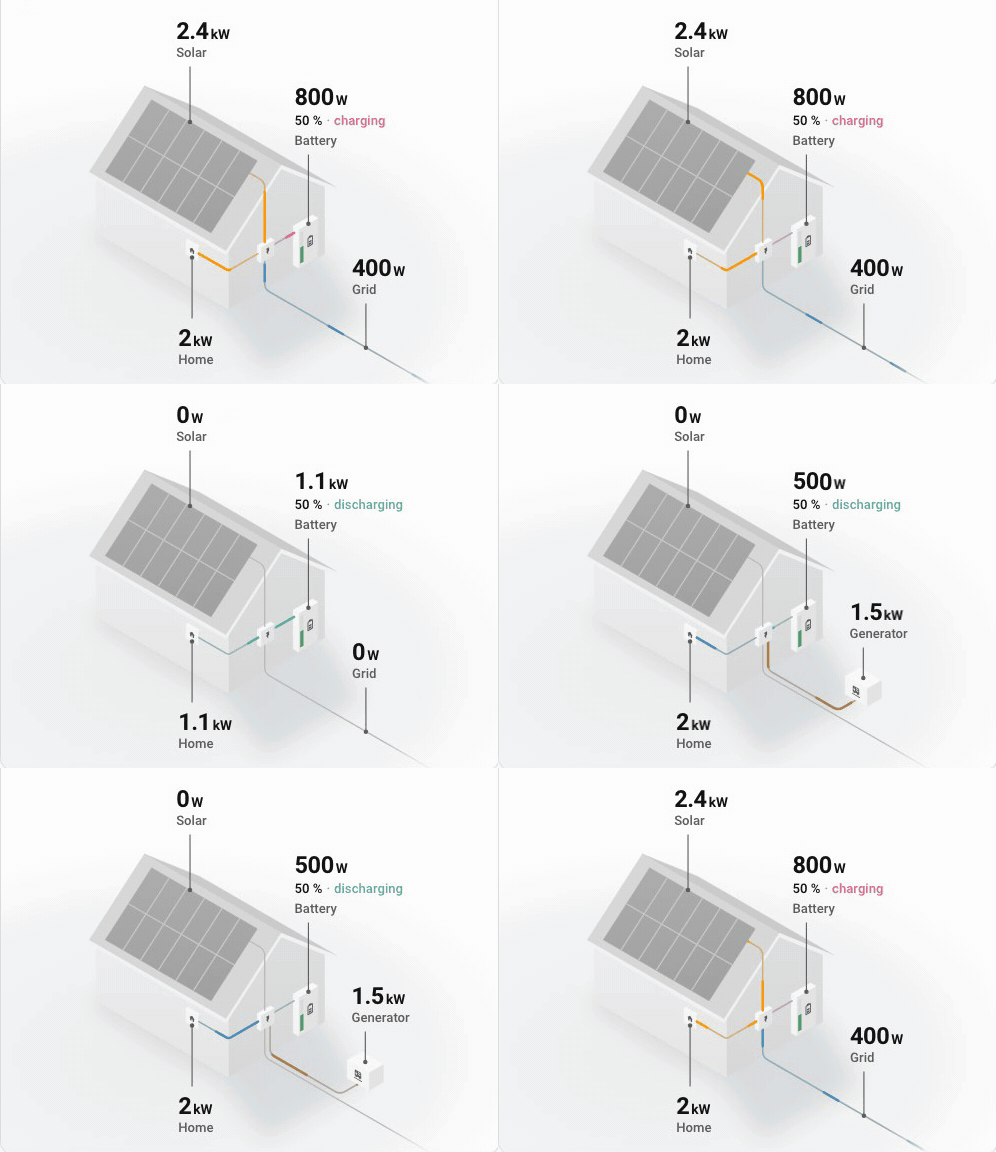
Some of you might remember when I created my Power Flow Card Plus back in 2023. Since then I’ve kept asking myself: what if the card didn’t just show where your power goes, but looked like the place it actually goes to?
So I built a new card: Home Flow Card. It draws your live power on a little isometric house. Solar panels sit on the roof, the battery hangs on the wall, the grid runs off to the street, and every wire meets at the inverter. One look and you know where your power comes from and where it goes, before you read a single number.
Here’s what it can do:
- A house that only draws what you have - Solar, battery, grid and home: leave one out and the house simply doesn’t draw it. Solar only, a battery and the grid, or the whole house all work.
- Motion that means something - A pulse runs along every wire in the direction its power flows. The more power, the faster and longer the pulse.
- Numbers that roll - Values roll to their new reading, and units slide along with them. When the battery switches from charging to discharging, only the letters that change animate: “dis” grows in, “charging” stays put. Prefer a calm dashboard?
animate_numbers: falseanddisable_dots: true. - A battery you can read at a glance - Its icon follows the state of charge, like in Power Flow Card Plus, and its charge bar turns yellow and then red at thresholds you choose (
state_of_charge_severity). Its state of charge and whether it’s charging sit right under its value. - Ready for power outages - When the grid goes down, its cable goes dead and its label says so. Got a generator? It appears next to the house, wired to the inverter (never to the grid cable, because that would be dangerous
 ) and only while the grid is down.
- Made for your dashboard - Monotone greys taken from your theme, in light and dark mode, with colour only where power flows. It scales to any card width.
- Visual editor - A page per node, defaults shown under each field, and an advanced page for the rest. No YAML required.
- Feels familiar - It reads the same sensors as Power Flow Card Plus, and
grid,solar,batteryandhometake the same options. Coming from Power Flow Card Plus? Change thetype, move the nodes out ofentities, and your house is ready.
You don’t even need to install it to try it: the docs have a playground where you can pick a moment of the day (a sunny afternoon, an evening on the battery, a grid outage…), drag the sensors around and paste your own config.  Full docs: cards.flixlix.com/home-flow-card
Installation: Home Flow Card isn’t in the default HACS store yet, so add https://github.com/flixlix/home-flow-card as a custom repository (category Dashboard), or use this button:

A minimal config:
type: custom:home-flow-card
grid:
  entity: sensor.grid_power
solar:
  entity: sensor.solar_power
battery:
  entity: sensor.battery_power
  state_of_charge: sensor.battery_soc
What’s next? I’ve got quite a few plans for the house:
- Energy mode - Today it shows live power. The name was chosen on purpose: the same house will be able to show your energy over a day, a week or any period, like Energy Flow Card Plus does.
- Individual devices - Your EV, heat pump or washing machine, drawn in and around the house.
- The default HACS store - So you can find it without adding a custom repository.
Don’t worry: Power Flow Card Plus is going nowhere!  Home Flow Card is a new card next to it, not a replacement. I’ve actually been working on Power Flow Card Plus quite a bit lately too: its flow dots now move on the compositor instead of the main thread, which makes them a lot smoother and lighter on your device (with 40 dots, from 314 ms of main-thread work every 4 seconds down to 4 ms), and there’s a nice batch of bug fixes coming with it.
Overall I’m really interested in hearing your feedback!