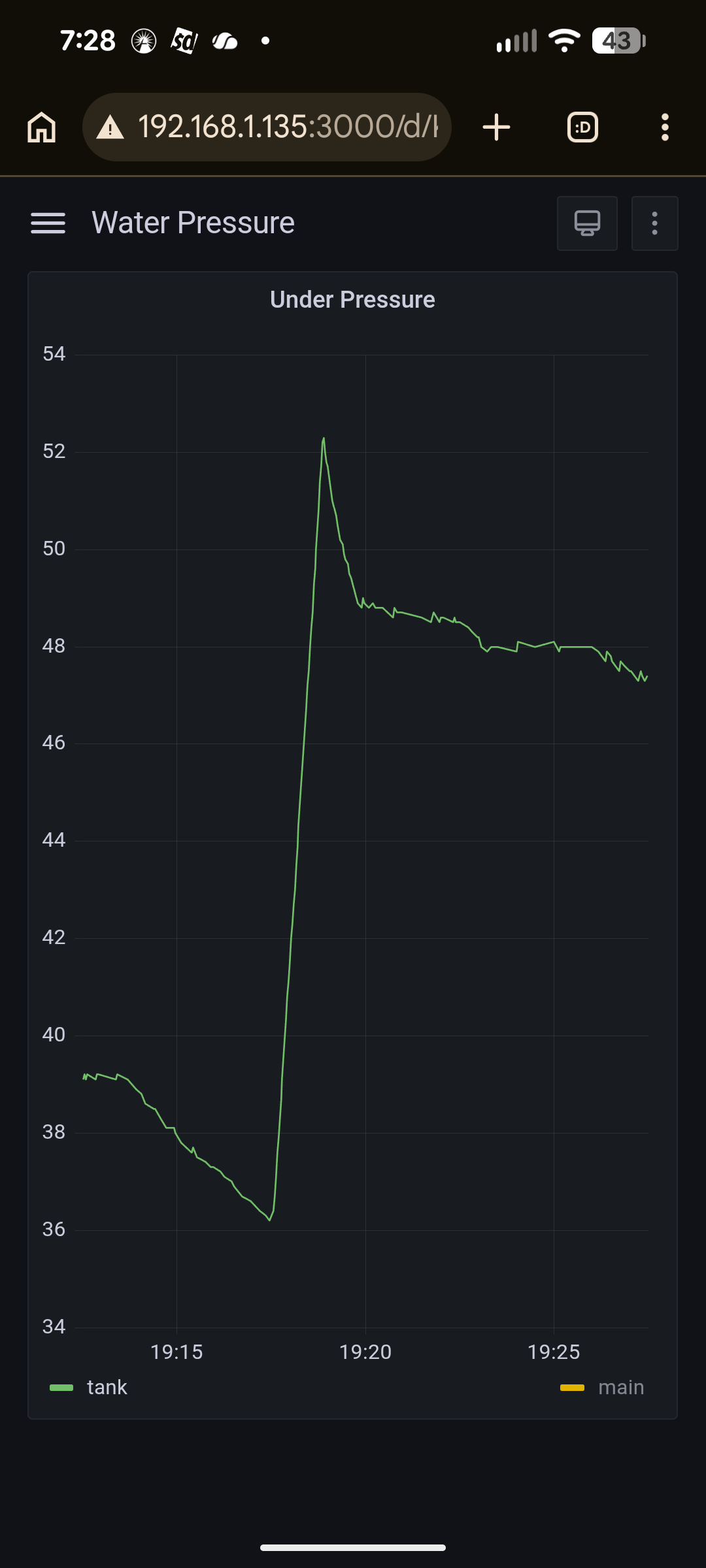
This guide provides information on monitoring your home well based water system. The objective is to understand when water is being utilized and to monitor the health of the system components. The implementation looks at the system’s water pressure and the utilization of power. This gives the capability to accomplish the following:
- Know when water is being used so you can detect unexpected utilization
- Discover slow leaks in the pluming system
- Know if the well pump power utilization pattern changes which could indicate a pump problem
- Know if the bladder tank is working correctly
The first part of the guide looks at monitoring of the well power usage while the second part looks at monitoring the system water pressure.
Power monitoring
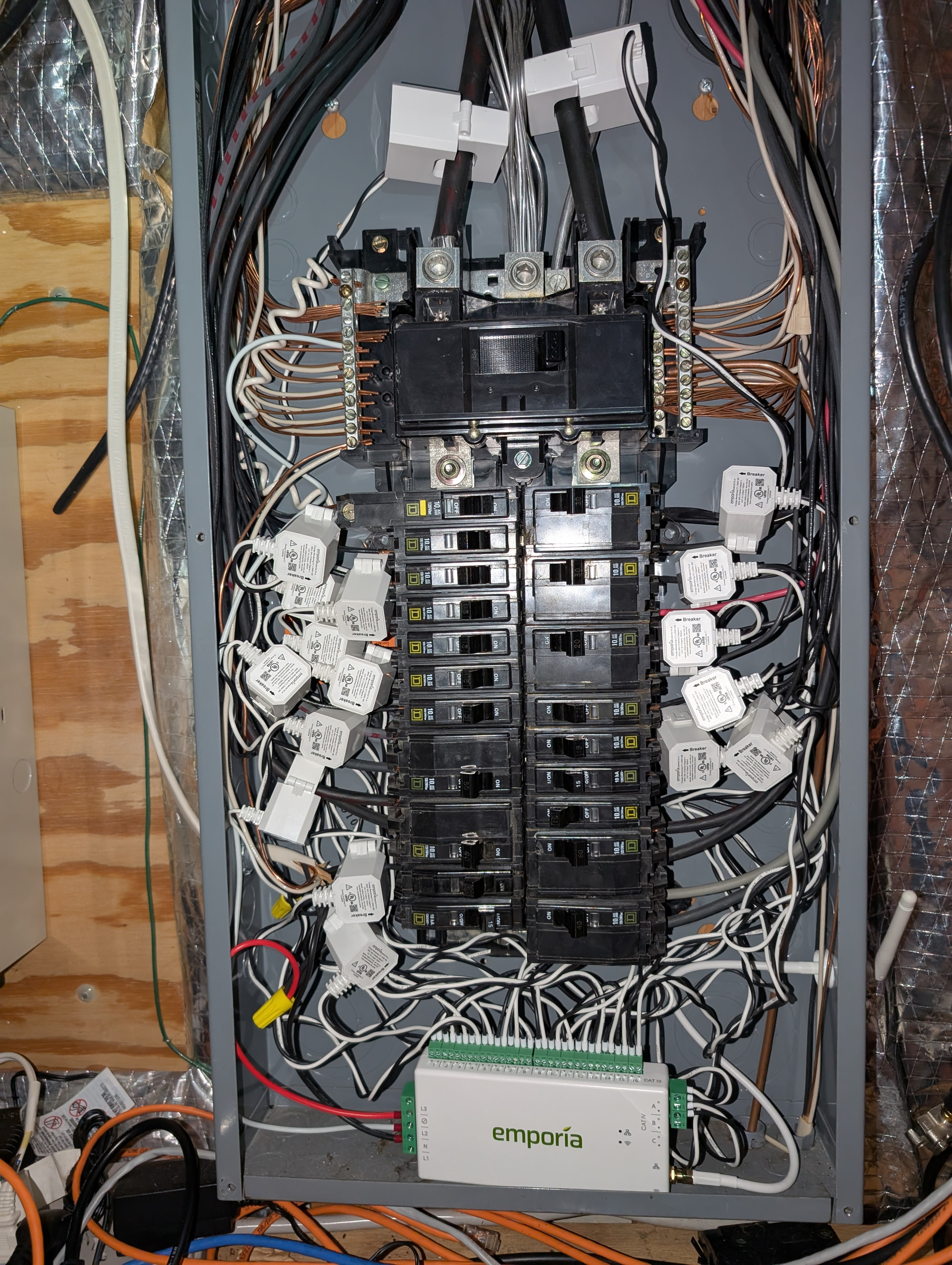
A while ago I installed an Emporia VUE3 to provide power monitoring at the circuit panel. All major appliances are on their own dedicated circuits. A power sensor is created for each circuit, providing an easy method to monitor the washer, dryer and dishwasher running state. The well pump also has a dedicated circuit and thus its electric utilization be monitored. Here’s a picture of the Emporia ESPhome device installed:
Assuming you don’t what to monitor at the circuit breaker, there are multiple discussion of utilizing CT clamps with and esp and ESPhome to monitor power. You could put the CT clamp on the power line right at the well pump pressure switch.
If you have a well pump you should have a bladder tank similar to the one shown in this post. As the pump push more water than the pipes in the house can distribute, the tank provides a water buffer which reduces stress on the well pump. The bladder tank ensure the water system is pressurized and ready to deliver water. The bladder tank limits how often and how long the pump needs to run. However, the bladder tank will fail at some point resulting in increased stress on the well pump. If you’re not looking for the failed bladder tank you might not know it’s failed until the pump also fails. Monitoring the power allows you to watch the health of the water system. Here is a little less than one hour graph of my pump’s power usage.
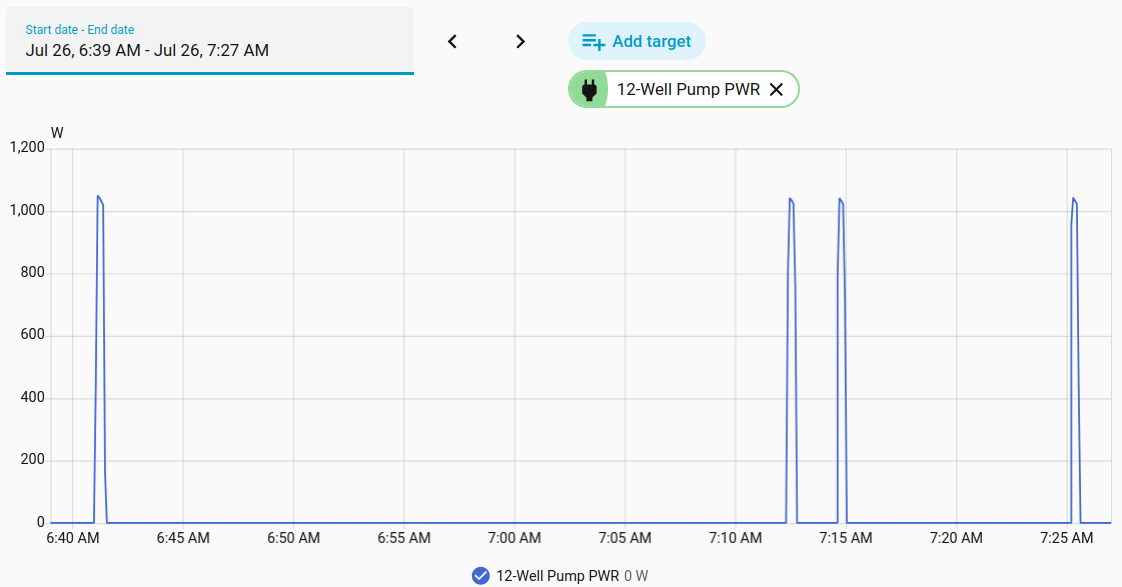
You can see the power utilization is very spiky in nature. The pump runs for about 25 seconds at a time. Once the pump stops, If the water is fulling running, we get just under 2 minutes before the pump kicks on again. The amount of off time between spikes can be used to determine if the bladder has a problem. Once the bladder fails the pump will turn off for only a second or two before turning back on. By monitoring the power usage pattern, you can tell when the bladder fails.
Monitoring the power can also provide an indication that the pump is failing. If the power draw goes above the normal 1000+ watts or doesn’t make it above 800 watts the pump is most likely failing. Likewise, the pump running for a continuous duration beyond the normal 25 second burst also indicate something you need to investigate. The power draw, cycle duration and enter cycle gaps will be different for your specific implementation.
To track the pumps power usage, I create a number of sensor and add a few automations. The sensors are
- Well Pump Running
- Well Pump Last Cycle Power Draw
- Well Pump Peak Power This Cycle
- Well Pump Last Off Duration
- Well Pump Last Run Duration
The automations create actionable notifications based on the above sensors. I created the file well_pump_monitoring.yaml under the homeassistant/packages directory on my controller. I also had to created the packages directory. The contents of the file follow:
# =============================================================================
# WELL PUMP MONITORING
# =============================================================================
# Power sensor: sensor.emporiavue3_well_pump_12_power (Emporia Vue 3, CT on well pump leg)
# Notifications go to notify.persistent_notification (HA UI only) - swap in
# a mobile_app notify service too if you want a push alert on your phone.
# Tune all thresholds marked with a comment to your actual pump's behavior.
# =============================================================================

# -----------------------------------------------------------------------------
# TEMPLATE SENSORS
# -----------------------------------------------------------------------------

template:
  # Debounced running state, used by the runtime + max-power automations below.
  - binary_sensor:
      - name: "Well Pump Running"
        unique_id: well_pump_running
        device_class: running
        state: "{{ states('sensor.emporiavue3_well_pump_12_power') | float(0) > 100 }}"
        delay_on:
          seconds: 1   # must stay above threshold 3s to count as "started" (debounce)
        delay_off:
          seconds: 2   # must stay below threshold 5s to count as "stopped"

# -----------------------------------------------------------------------------
# YOUR EXISTING TRIGGER-BASED SENSORS (kept as-is, feeding the automations below)
# -----------------------------------------------------------------------------

  # NOTE: these two duration sensors trigger off binary_sensor.well_pump_running,
  # NOT the raw power sensor. The raw sensor's value jitters slightly even while
  # idle/running (CT noise), which constantly resets its own last_changed - so
  # duration math against it reads "time since the last noise blip," not the
  # real on/off duration. The debounced binary_sensor only changes at genuine
  # transitions, so its last_changed is trustworthy.
  - trigger:
      - platform: state
        entity_id: binary_sensor.well_pump_running
        to: "on"
    sensor:
      - name: "Well Pump Last Off Duration"
        unique_id: well_pump_last_off_duration
        icon: mdi:timer-sand
        unit_of_measurement: "s"
        availability: "{{ trigger.from_state is not none }}"
        state: >
          {{ (now() - trigger.from_state.last_changed).total_seconds() | round(0) }}

  # Tracks the running MAX power seen during the current cycle, updating on
  # every raw sensor reading while the pump is on. Resets to the current
  # reading each time a new cycle starts. This exists because the raw
  # power sensor is instantaneous, not accumulated - grabbing a single
  # sample at shutoff (the old approach) has a real chance of landing on
  # a low tail-off reading and missing the actual peak entirely.
  - trigger:
      - platform: state
        entity_id: binary_sensor.well_pump_running
        to: "on"
        id: "cycle_start"
      - platform: state
        entity_id: sensor.emporiavue3_well_pump_12_power
        id: "power_update"
    sensor:
      - name: "Well Pump Peak Power This Cycle"
        unique_id: well_pump_peak_power_this_cycle
        icon: mdi:flash-alert
        unit_of_measurement: "W"
        state: >
          {% if trigger.id == "cycle_start" %}
            {{ states('sensor.emporiavue3_well_pump_12_power') | float(0) }}
          {% elif is_state('binary_sensor.well_pump_running', 'on') %}
            {{ [states('sensor.well_pump_peak_power_this_cycle') | float(0),
                states('sensor.emporiavue3_well_pump_12_power') | float(0)] | max }}
          {% else %}
            {{ states('sensor.well_pump_peak_power_this_cycle') | float(0) }}
          {% endif %}

  - trigger:
      - platform: state
        entity_id: binary_sensor.well_pump_running
        to: "off"
    sensor:
      - name: "Well Pump Last Run Duration"
        unique_id: well_pump_last_run_duration
        icon: mdi:timer-outline
        unit_of_measurement: "s"
        availability: "{{ trigger.from_state is not none }}"
        state: >
          {{ (now() - trigger.from_state.last_changed).total_seconds() | round(0) }}
      # Snapshots the running peak tracked above, right as the cycle ends -
      # by this point the delay_off debounce has already elapsed, so the
      # peak sensor has stopped updating and holds the true max for the cycle.
      - name: "Well Pump Last Cycle Power Draw"
        unique_id: well_pump_last_cycle_power_draw
        icon: mdi:flash
        unit_of_measurement: "W"
        availability: "{{ trigger.from_state is not none }}"
        state: >
          {{ states('sensor.well_pump_peak_power_this_cycle') | float(0) | round(0) }}

# -----------------------------------------------------------------------------
# AUTOMATIONS
# -----------------------------------------------------------------------------

automation:

  # ---------------------------------------------------------------------
  # 1. REAL-TIME (HARD ALARM): pump still running past a safe duration,
  # right now. This is the live catch for a stuck valve / dry well - it
  # fires while the pump is still on, unlike the end-of-cycle check below
  # which can only ever report on a run that has already finished.
  # Deliberately set higher than the "soft" long-cycle flag below it, so
  # a cycle that runs a bit long but stops on its own only gets the soft
  # notice, while one that's still going gets escalated here.
  # ---------------------------------------------------------------------
  - alias: "Well Pump - Still Running (Live Alert)"
    id: well_pump_still_running_live
    trigger:
      - platform: state
        entity_id: binary_sensor.well_pump_running
        to: "on"
        for:
          minutes: 2   # tune: should be comfortably above your longest normal cycle
    action:
      - service: notify.persistent_notification
        data:
          title: "🚨 Well Pump Alert: Still Running"
          message: >
            The well pump has been running continuously for over 2 minutes
            and has not yet stopped. Check for a stuck check valve, an open
            line, or a dry well right now.

  # ---------------------------------------------------------------------
  # 2. END-OF-CYCLE: short-cycling, total runtime, and power deviation.
  # Evaluated once per completed cycle, off your three trigger-based sensors.
  # Uses independent if/then blocks (not choose) so multiple simultaneous
  # issues on the same cycle all get reported, instead of only the first
  # match suppressing the rest.
  # ---------------------------------------------------------------------
  - alias: "Safety: Well Pump Diagnostics & Deviation Guard"
    id: well_pump_diagnostics_deviation_guard
    description: >-
      Evaluates well pump health at the end of every cycle for short-cycling,
      over-run, or power anomalies.
    triggers:
      - entity_id: sensor.well_pump_last_run_duration
        trigger: state
    conditions: []
    actions:
      - if:
          - condition: numeric_state
            entity_id: sensor.well_pump_last_off_duration
            below: 60   # tune: minimum seconds you'd expect between normal cycles
          - condition: template
            value_template: "{{ states('sensor.well_pump_last_off_duration') | float > 0 }}"
        then:
          - action: notify.persistent_notification
            data:
              title: "🚨 Well Pump Alert: Short Cycling"
              message: >-
                The well pump turned back on after only {{
                states('sensor.well_pump_last_off_duration') }} seconds. Your
                pressure bladder tank may be waterlogged.

      - if:
          # SOFT flag: the cycle finished on its own, but took longer than
          # typical. Lower threshold than the live "still running" alert -
          # this catches sluggish cycles that never trip the hard alarm.
          - condition: numeric_state
            entity_id: sensor.well_pump_last_run_duration
            above: 60   # 1 min - tune once you know your normal cycle length
        then:
          - action: notify.persistent_notification
            data:
              title: "⚠️ Well Pump Notice: Long Cycle"
              message: >-
                The well pump ran for an unusual duration of {{
                (states('sensor.well_pump_last_run_duration') | float / 60) |
                round(1) }} minutes. Worth a look if this keeps happening.

      - if:
          - condition: or
            conditions:
              - condition: numeric_state
                entity_id: sensor.well_pump_last_cycle_power_draw
                above: 1200
              - condition: numeric_state
                entity_id: sensor.well_pump_last_cycle_power_draw
                below: 500
        then:
          - action: notify.persistent_notification
            data:
              title: "🚨 Well Pump Alert: Power Deviation"
              message: >-
                The pump power peaked at {{
                states('sensor.well_pump_last_cycle_power_draw') }} Watts during
                its last cycle. This is outside safe baseline parameters.
    mode: single
The above file is include in my system by adding the following to /root/homeassistant/configuration.yaml file:
homeassistant:
  packages: !include_dir_named packages
My configuration file already had the “homeassistant:” tag, so I just added the packages line under it.
System water pressure monitoring
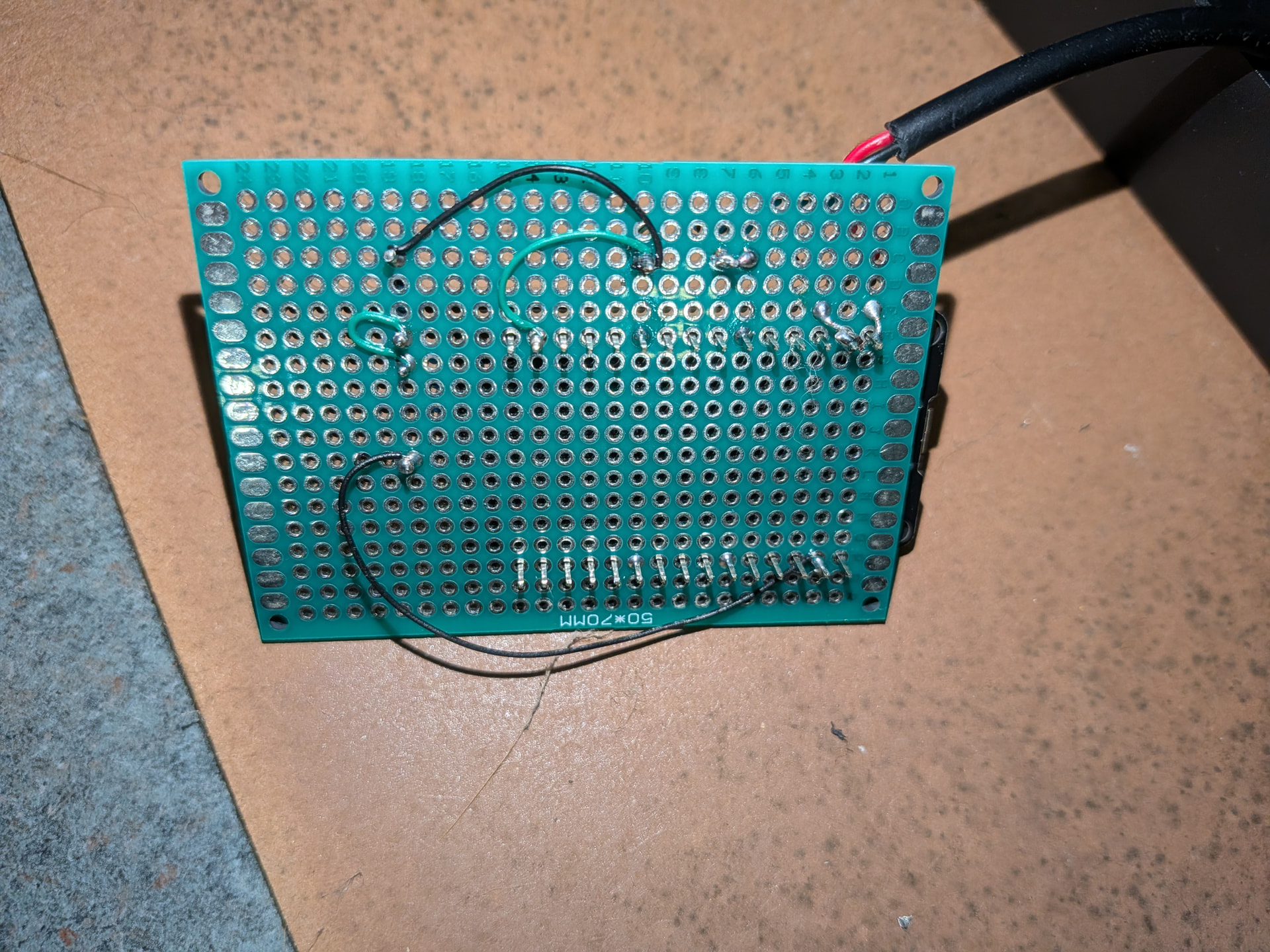
Monitoring the water pressure will let you know when water is running and when the water system has a slow leak. The link I provided above with the picture of the bladder tank includes this second link. This link provides instructions for building a ESPhome based water pressure monitor. Here are pictures of the ESP32 controller I wired together. The black wire coming is from the well pressure sensor. I utilized 3 10k Ohm resistors to reduce the water pressure sensor voltage from 0-5v to 0-3.3V
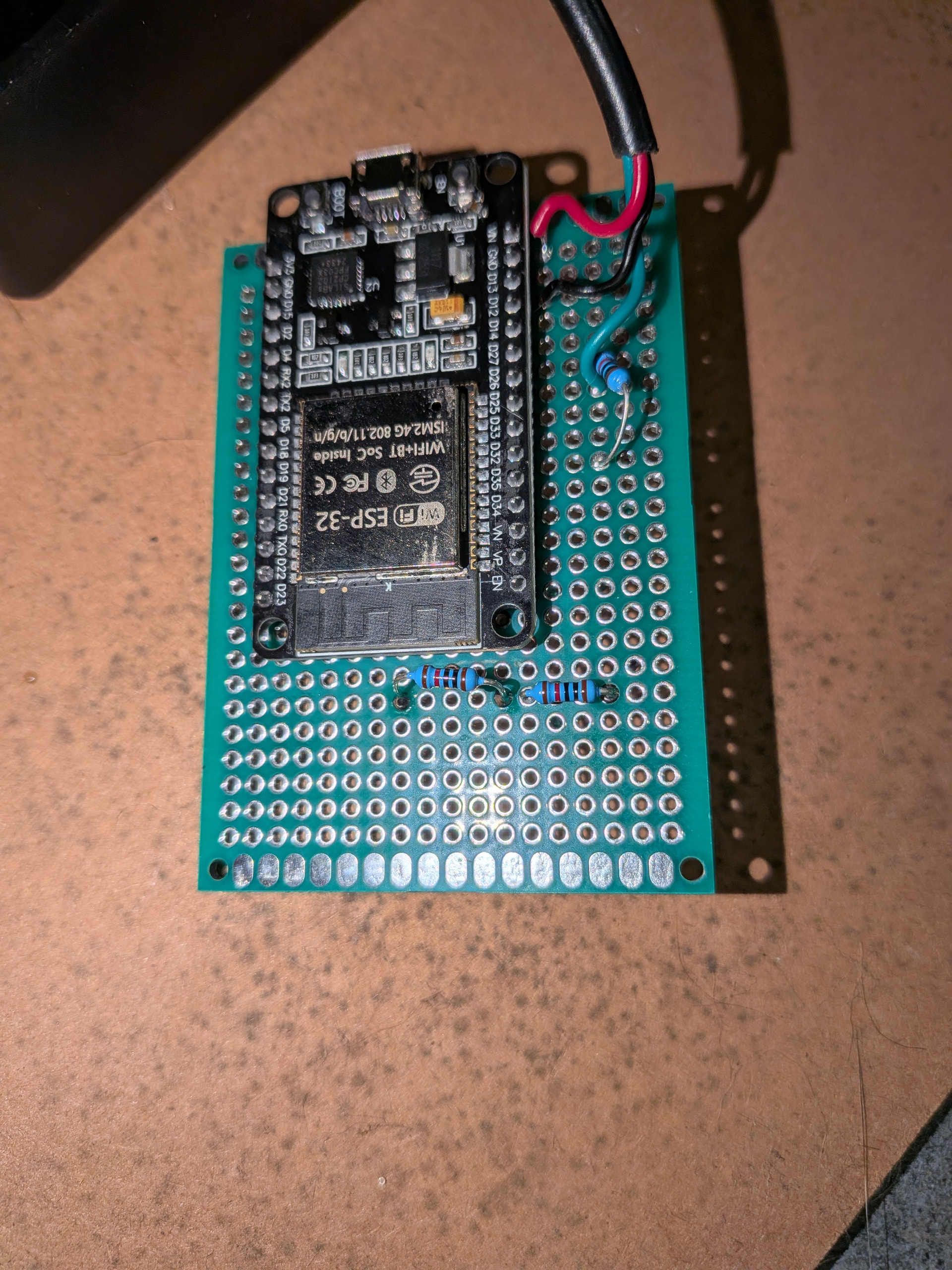
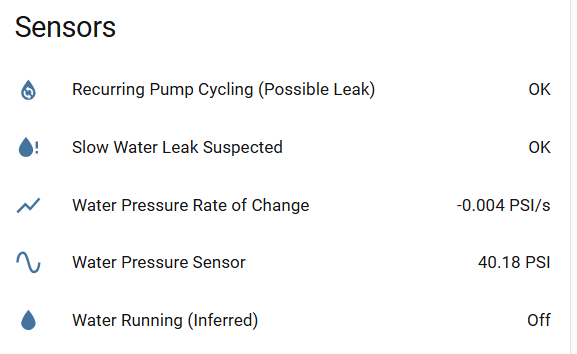
The link for building the ESP32 device has basic yaml for creating a sensor to monitor the water pressure. I added a couple of additional sensors. One sensor tells me if water is running and the second sensor reports if a slow leak is detected. The water running sensor reporting lags by about 15 seconds. In addition, if the water is turned off but the pump is currently running, it will not report the water is off until after the pump turns off. The slow leak detector takes about 15 minutes to look for a small decrease water pressure. If a decrease is detected, then you have a water leak. There is a second test in the yaml that looks for the pump kicking on three times without the water ever being turned on. I haven’t had this one go off as of yet. I added it to look for a really slow leak that I only expect would kick off if I wasn’t home for a day or two. Here is my water pressure monitoring yaml for the esp32dev board as it stands today.
esphome:
  name: well-pump-pressure
  friendly_name: Well pump pressure

# Replace this with your actual platform if you aren't using ESP32.
esp32:
  board: esp32dev
#  framework:
#    type: arduino

# Enable logging
logger:
  level: DEBUG

# Enable Home Assistant API
api:
  encryption:
    key: !secret api_key

ota:
  platform: esphome
  password: !secret ota_password

wifi:
  ssid: !secret wifi_ssid
  password: !secret wifi_password

  # Optional manual IP
  manual_ip:
    static_ip: 192.168.10.123
    gateway: 192.168.10.2
    subnet: 255.255.255.0
    dns1: 192.168.10.2

  # Enable fallback hotspot (captive portal) in case wifi connection fails
  ap:
    ssid: "Well-Pump"
    password: !secret wifi_password


web_server:
  port: 80

# =============================================================================
# WATER-RUNNING / SLOW-LEAK INFERENCE
# =============================================================================
# All derived purely from the pressure trend - this ESP32 has no visibility
# into the well pump's power draw, so "running" is inferred from rate of
# change: a fast decline (tap open, pump not yet engaged), a fast rise (pump
# actively pressurizing), or the slow settling tail that follows a pump
# cycle, are all treated as "running." Only once the rate has been genuinely
# flat for a while does it clear back to "not running."
#
# Empirical basis (from your 14:18-14:32 log):
#   - Tap open / pump not yet engaged: pressure falls ~0.08-0.09 PSI/s
#   - Pump actively pressurizing:       pressure rises up to  ~0.84 PSI/s
#   - Post-pump settling tail:          pressure falls   ~0.01-0.02 PSI/s,
#                                        tapering to ~0 as it flattens out
#
# Rate of change is smoothed over a rolling 15-second window (4 samples at
# your ~5s publish interval) rather than a longer window, to keep detection
# latency low - slow leak detection tolerates lag fine (per your call), but
# on/off status shouldn't.
# =============================================================================

globals:
  # Rolling 15-second buffer (4 samples @ ~5s publish interval) used to
  # compute a smoothed rate of change - this averages out ADC/calibration
  # quantization noise that a single 5s delta would be too jumpy to use.
  # Shorter window = faster detection of on/off transitions, at the cost of
  # slightly less smoothing (compensated by the off-threshold below).
  - id: pressure_history
    type: float[4]
    restore_value: no
    initial_value: '{0,0,0,0}'
  - id: pressure_history_filled
    type: int
    restore_value: no
    initial_value: '0'

  # Slow-leak tracking (drift test)
  - id: leak_baseline_pressure
    type: float
    restore_value: no
    initial_value: '-1'   # -1 = not yet established
  - id: leak_had_activity
    type: bool
    restore_value: no
    initial_value: 'false'
  - id: leak_strike_count
    type: int
    restore_value: no
    initial_value: '0'

  # Slow-leak tracking (recurring-refill test)
  # A pump refill (rapid pressure RISE) that happens with no genuine tap-draw
  # (rapid pressure FALL) seen since the previous refill is unexplained - the
  # pump only kicks in because pressure dropped low enough on its own, which
  # a leak does just as well as a big legitimate draw. Several such
  # unexplained refills in a row, even spaced many minutes apart, is a second
  # independent leak signal - distinct from the drift test above, since it
  # catches a leak via the pump's own cut-in/cut-out cycling pattern rather
  # than by measuring the bleed rate directly.
  - id: leak_tap_draw_seen
    type: bool
    restore_value: no
    initial_value: 'false'
  - id: leak_refill_streak
    type: int
    restore_value: no
    initial_value: '0'

interval:
  # Every 5 minutes: check whether pressure has quietly bled down since the
  # last checkpoint. Windows containing pump/tap activity are skipped rather
  # than counted against the leak (a refill triggered by a leak is evidence
  # FOR the leak, not against it) - only a clean window with no meaningful
  # drop clears progress. Requires 3 qualifying windows (not necessarily
  # back-to-back in wall-clock time, since activity windows are skipped)
  # before alarming, to avoid a one-off noisy window.
  - interval: 5min
    then:
      - lambda: |-
          float current = id(water_pressure_sensor).state;

          if (id(leak_baseline_pressure) < 0) {
            // first run - just establish a baseline, nothing to compare yet
            id(leak_baseline_pressure) = current;
            id(leak_had_activity) = false;
            return;
          }

          if (!id(leak_had_activity)) {
            float drop = id(leak_baseline_pressure) - current;
            // tune: PSI of unexplained drop over 5 min that counts as suspicious.
            if (drop > 0.3f) {
              id(leak_strike_count) += 1;
            } else {
              // A clean window with no meaningful drop is real evidence
              // AGAINST a leak - pressure held steady on its own. This is
              // the only case that should clear accumulated strikes.
              id(leak_strike_count) = 0;
            }
          }
          // else: this window contained a pump refill (or real tap use) -
          // there's no clean drop to measure, but a refill isn't evidence
          // AGAINST a leak either - in fact a leak-driven refill is what
          // typically causes this. Skip the window without penalizing
          // prior progress, so a leak that periodically triggers its own
          // pump cycle doesn't keep resetting itself right before crossing
          // the strike threshold (this is exactly what happened in your log).

          id(slow_water_leak).publish_state(id(leak_strike_count) >= 3);

          id(leak_baseline_pressure) = current;
          id(leak_had_activity) = false;

sensor:
  - platform: adc
    id: water_pressure_sensor
    pin: GPIO36
    name: "Water Pressure Sensor"
    attenuation: 12db
    update_interval: 0.5s
    unit_of_measurement: PSI
    filters:
      - median:
          window_size: 10
          send_every: 10
          send_first_at: 1
      - lambda: 'ESP_LOGD("adc", "Raw ADC Value: %f", x); return x;'
      - calibrate_linear:
        - 0.34 -> 0
        - 0.61 -> 10
        - 0.90 -> 20
        - 1.14 -> 30
        - 1.43 -> 40
        - 1.69 -> 50
        - 1.95 -> 60
        - 2.22 -> 70
        - 2.42 -> 80
        - 2.67 -> 90
        - 2.90 -> 100
    on_value:
      then:
        - lambda: |-
            // shift the 15s rolling buffer and insert the latest reading
            for (int i = 0; i < 3; i++) id(pressure_history)[i] = id(pressure_history)[i + 1];
            id(pressure_history)[3] = x;
            if (id(pressure_history_filled) < 4) id(pressure_history_filled) += 1;

            if (id(pressure_history_filled) >= 4) {
              float rate = (id(pressure_history)[3] - id(pressure_history)[0]) / 15.0f;
              id(pressure_rate_of_change).publish_state(rate);

              // Hysteresis: different threshold to START "running" vs. to
              // STOP it, so the settling tail after a pump cycle correctly
              // keeps "running" true until the rate has genuinely gone flat,
              // rather than clearing the moment the rate first dips low.
              bool currently_running = id(water_running).state;
              bool now_running;
              if (currently_running) {
                now_running = (fabs(rate) > 0.012f);   // tune: "truly flat" cutoff
              } else {
                now_running = (fabs(rate) > 0.03f);    // tune: "onset" cutoff
              }
              id(water_running).publish_state(now_running);

              if (now_running) {
                id(leak_had_activity) = true;
              }

              // Recurring-refill leak test: only evaluated right at the
              // moment "running" starts (not currently_running -> now_running),
              // using the sign of rate at that instant to tell a pump refill
              // (rising) apart from a genuine tap draw (falling).
              if (!currently_running && now_running) {
                if (rate > 0.0f) {
                  // Pump refill. Unexplained unless a real tap draw was
                  // seen since the previous refill.
                  if (!id(leak_tap_draw_seen)) {
                    id(leak_refill_streak) += 1;
                  } else {
                    id(leak_refill_streak) = 0;   // this one was explained
                  }
                  id(leak_tap_draw_seen) = false;   // reset for the next interval
                  id(recurring_pump_cycling).publish_state(id(leak_refill_streak) >= 3);
                } else {
                  // Genuine tap draw - explains any refill that follows it.
                  id(leak_tap_draw_seen) = true;
                }
              }
            }

  - platform: template
    name: "Water Pressure Rate of Change"
    id: pressure_rate_of_change
    unit_of_measurement: "PSI/s"
    accuracy_decimals: 3
    icon: mdi:chart-line-variant
    update_interval: never   # purely driven by publish_state() above
    lambda: return {};

binary_sensor:
  - platform: template
    name: "Water Running (Inferred)"
    id: water_running
    icon: mdi:water
    # No lambda here on purpose: without one, ESPHome never auto-polls this
    # sensor. It only changes when publish_state() is called on it directly,
    # which happens inside the pressure sensor's on_value lambda above.

  - platform: template
    name: "Slow Water Leak Suspected"
    id: slow_water_leak
    device_class: problem
    icon: mdi:water-alert
    # Same as above - publish-only, driven by the 5-minute interval lambda.

  - platform: template
    name: "Recurring Pump Cycling (Possible Leak)"
    id: recurring_pump_cycling
    device_class: problem
    icon: mdi:water-sync
    # Publish-only, driven by the refill-vs-tap-draw logic in the pressure
    # sensor's on_value lambda above. Independent evidence from the drift
    # test: this one fires off the pump's own refill pattern rather than
    # measuring the bleed rate directly, so it still catches a leak even
    # if the drift test's windows keep getting interrupted.
Here’s a picture of the sensors that get created
I still need to add a couple of automations to run on home assistant. The first it to provide a notification if the water starts running when no one is home. The second automation will provide a notification if either of the slow leak detector goes off. The second slow leak detector is the Recurring Pump Cycling sensor.