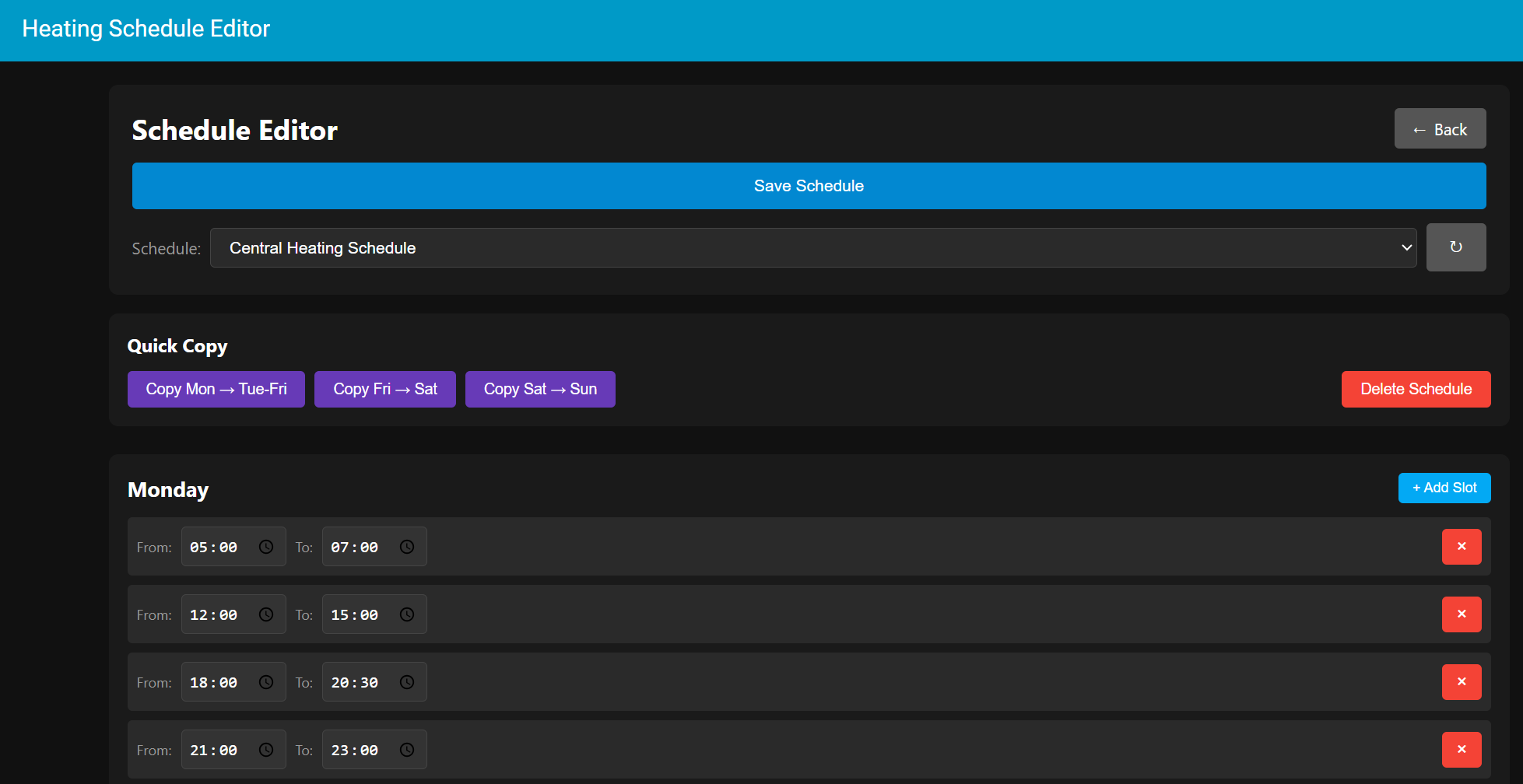
Here is the updated Code for the inti.py file (split in to two parts due to the 32000 character limitation):
Part 1:
"""Schedule Editor Integration."""
import logging
import json
import os
from aiohttp import web
from homeassistant.core import HomeAssistant
from homeassistant.components.http import HomeAssistantView
from homeassistant.components import frontend
_LOGGER = logging.getLogger(__name__)
DOMAIN = "schedule_editor"
async def async_setup(hass: HomeAssistant, config: dict):
"""Set up the Schedule Editor component."""
_LOGGER.info("Setting up Schedule Editor")
# Register API endpoints first
hass.http.register_view(ScheduleGetView(hass))
hass.http.register_view(ScheduleSaveView(hass))
hass.http.register_view(SchedulePanelView(hass))
hass.http.register_view(ScheduleRestartView(hass))
# Register as iframe panel (not async)
frontend.async_register_built_in_panel(
hass,
component_name="iframe",
sidebar_title="Heating Schedule Editor",
sidebar_icon="mdi:calendar-clock",
frontend_url_path="schedule-editor",
config={
"url": "/api/schedule_editor/panel",
},
require_admin=False,
)
_LOGGER.info("Schedule Editor setup complete")
return True
class SchedulePanelView(HomeAssistantView):
"""View to serve the schedule editor HTML."""
url = "/api/schedule_editor/panel"
name = "api:schedule_editor:panel"
requires_auth = False
def __init__(self, hass):
"""Initialize."""
self.hass = hass
async def get(self, request):
"""Serve the editor HTML."""
html_content = """
<!DOCTYPE html>
<html>
<head>
<meta charset="UTF-8">
<meta name="viewport" content="width=device-width, initial-scale=1.0">
<title>Central Heating Schedule Editor</title>
<style>
* { box-sizing: border-box; margin: 0; padding: 0; }
body {
font-family: -apple-system, BlinkMacSystemFont, "Segoe UI", Roboto, sans-serif;
background: #111;
color: #fff;
padding: 12px;
}
.container { max-width: 1200px; margin: 0 auto; }
.header {
display: flex;
flex-direction: column;
gap: 12px;
margin-bottom: 16px;
padding: 16px;
background: #1a1a1a;
border-radius: 8px;
position: relative;
}
.header-top {
display: flex;
justify-content: space-between;
align-items: center;
}
.btn-back {
padding: 8px 16px;
background: #555;
color: white;
border: none;
border-radius: 4px;
cursor: pointer;
font-size: 14px;
font-family: inherit;
display: inline-flex;
align-items: center;
gap: 6px;
white-space: nowrap;
}
.btn-back:hover {
background: #666;
}
.btn-back:active {
background: #777;
}
h1 {
font-size: 20px;
text-align: center;
flex: 1;
}
.file-selector {
display: flex;
align-items: center;
gap: 8px;
flex-wrap: wrap;
}
.file-selector label {
color: #999;
font-size: 14px;
white-space: nowrap;
}
.file-selector select {
flex: 1;
min-width: 150px;
padding: 8px 12px;
background: #2a2a2a;
border: 1px solid #444;
border-radius: 4px;
color: #fff;
font-size: 14px;
cursor: pointer;
}
@media (min-width: 768px) {
body { padding: 20px; }
.header { padding: 20px; }
h1 {
font-size: 24px;
text-align: left;
}
}
.btn-small {
padding: 8px 12px;
background: #555;
color: white;
border: none;
border-radius: 4px;
cursor: pointer;
font-size: 14px;
flex-shrink: 0;
}
.btn-small:hover {
background: #666;
}
.btn {
padding: 12px 20px;
border: none;
border-radius: 4px;
cursor: pointer;
font-size: 14px;
font-weight: 500;
width: 100%;
}
.btn-primary { background: #03a9f4; color: white; }
.btn-primary:hover { background: #0288d1; }
@media (min-width: 768px) {
.btn {
width: auto;
}
}
.message {
padding: 12px;
border-radius: 4px;
margin-bottom: 12px;
text-align: center;
display: none;
font-size: 14px;
}
.message.show { display: block; }
.message.success { background: #4caf50; }
.message.error { background: #f44336; }
.day-card {
background: #1a1a1a;
border-radius: 8px;
padding: 12px;
margin-bottom: 12px;
}
.day-header {
display: flex;
justify-content: space-between;
align-items: center;
margin-bottom: 12px;
}
.day-header h3 {
font-size: 16px;
text-transform: capitalize;
}
.btn-add {
padding: 6px 10px;
background: #03a9f4;
color: white;
border: none;
border-radius: 4px;
cursor: pointer;
font-size: 11px;
white-space: nowrap;
}
@media (min-width: 768px) {
.day-card {
padding: 16px;
margin-bottom: 16px;
}
.day-header h3 {
font-size: 18px;
}
.btn-add {
padding: 6px 12px;
font-size: 12px;
}
}
.time-slot {
display: flex;
align-items: center;
gap: 6px;
padding: 8px;
background: #2a2a2a;
border-radius: 4px;
margin-bottom: 8px;
flex-wrap: wrap;
}
.time-slot label {
color: #999;
font-size: 11px;
}
.time-input {
padding: 8px 6px;
border: 1px solid #444;
border-radius: 4px;
background: #333;
color: #fff;
font-size: 14px;
min-width: 90px;
}
.btn-delete {
padding: 6px 10px;
background: #f44336;
color: white;
border: none;
border-radius: 4px;
cursor: pointer;
margin-left: auto;
font-size: 16px;
}
@media (min-width: 768px) {
.time-slot {
gap: 8px;
flex-wrap: nowrap;
}
.time-slot label {
font-size: 12px;
}
.time-input {
padding: 6px;
}
.btn-delete {
padding: 6px 12px;
}
}
.no-slots {
color: #666;
font-style: italic;
font-size: 13px;
}
.modal {
display: none;
position: fixed;
top: 0;
left: 0;
right: 0;
bottom: 0;
background: rgba(0, 0, 0, 0.8);
align-items: center;
justify-content: center;
z-index: 1000;
padding: 20px;
}
.modal.show {
display: flex;
}
.modal-content {
background: #1a1a1a;
border-radius: 8px;
padding: 20px;
max-width: 500px;
width: 100%;
border: 1px solid #333;
}
.modal-content h2 {
margin-bottom: 12px;
color: #fff;
font-size: 18px;
}
.modal-content p {
margin-bottom: 16px;
color: #ccc;
line-height: 1.5;
font-size: 14px;
}
@media (min-width: 768px) {
.modal-content {
padding: 24px;
}
.modal-content h2 {
margin-bottom: 16px;
font-size: 20px;
}
.modal-content p {
margin-bottom: 24px;
font-size: 15px;
}
}
.modal-buttons {
display: flex;
gap: 10px;
justify-content: flex-end;
flex-direction: column;
}
@media (min-width: 480px) {
.modal-buttons {
flex-direction: row;
gap: 12px;
}
}
.btn-secondary {
background: #555;
color: white;
padding: 12px 20px;
border: none;
border-radius: 4px;
cursor: pointer;
font-size: 14px;
}
.btn-secondary:hover {
background: #666;
}
.btn-danger {
background: #f44336;
color: white;
padding: 12px 20px;
border: none;
border-radius: 4px;
cursor: pointer;
font-size: 14px;
}
.btn-danger:hover {
background: #d32f2f;
}
.quick-actions {
background: #1a1a1a;
border-radius: 8px;
padding: 12px;
margin-bottom: 16px;
}
.quick-actions h3 {
margin-bottom: 12px;
color: #fff;
font-size: 16px;
}
.quick-actions-buttons {
display: flex;
gap: 8px;
flex-wrap: wrap;
}
.btn-copy {
padding: 10px 14px;
background: #673ab7;
color: white;
border: none;
border-radius: 4px;
cursor: pointer;
font-size: 12px;
white-space: nowrap;
}
.btn-copy:hover {
background: #7e57c2;
}
.btn-delete-schedule {
padding: 10px 14px;
background: #f44336;
color: white;
border: none;
border-radius: 4px;
cursor: pointer;
font-size: 12px;
white-space: nowrap;
}
.btn-delete-schedule:hover {
background: #d32f2f;
}
@media (min-width: 768px) {
.quick-actions {
padding: 16px;
margin-bottom: 24px;
}
.btn-copy, .btn-delete-schedule {
padding: 8px 16px;
font-size: 13px;
}
.btn-delete-schedule {
margin-left: auto;
}
}
</style>
</head>
<body>
<div class="container">
<div class="header">
<div class="header-top">
<h1>Schedule Editor</h1>
<button class="btn-back" onclick="navigateBack()">
<span>←</span>
<span>Back</span>
</button>
</div>
<button class="btn btn-primary" onclick="saveSchedule()">Save Schedule</button>
<div class="file-selector">
<label for="schedule-select">Schedule:</label>
<select id="schedule-select" onchange="loadSelectedSchedule()">
<option value="schedule">Default Schedule</option>
</select>
<button class="btn btn-small" onclick="refreshScheduleList()">↻</button>
</div>
</div>
<div id="message" class="message"></div>
<!-- Quick Copy Buttons -->
<div class="quick-actions">
<h3>Quick Copy</h3>
<div class="quick-actions-buttons">
<button class="btn btn-copy" onclick="copyMondayToWeekdays()">Copy Mon → Tue-Fri</button>
<button class="btn btn-copy" onclick="copyFridayToSaturday()">Copy Fri → Sat</button>
<button class="btn btn-copy" onclick="copySaturdayToSunday()">Copy Sat → Sun</button>
<button class="btn btn-delete-schedule" onclick="confirmDeleteSchedule()">Delete Schedule</button>
</div>
</div>
<!-- Delete Confirmation Modal -->
<div id="delete-modal" class="modal">
<div class="modal-content">
<h2>Delete Schedule?</h2>
<p id="delete-message">Are you sure you want to delete this schedule?</p>
<p style="color: #f44336; font-weight: bold; margin-top: 12px;" id="delete-name"></p>
<div class="modal-buttons">
<button class="btn btn-secondary" onclick="closeDeleteModal()">Cancel</button>
<button class="btn btn-danger" onclick="deleteSchedule()">Delete</button>
</div>
</div>
</div>
<!-- Restart Warning Modal -->
<div id="restart-modal" class="modal">
<div class="modal-content">
<h2>Restart Home Assistant?</h2>
<p>The schedule has been saved successfully. Would you like to restart Home Assistant now to apply the changes?</p>
<div class="modal-buttons">
<button class="btn btn-secondary" onclick="closeRestartModal()">Not Now</button>
<button class="btn btn-danger" onclick="restartHomeAssistant()">Restart Now</button>
</div>
</div>
</div>
<div id="schedule-container"></div>
</div>
<script>
let scheduleData = null;
let currentScheduleIndex = 0;
const days = ['monday', 'tuesday', 'wednesday', 'thursday', 'friday', 'saturday', 'sunday'];
async function loadSchedule() {
try {
const response = await fetch('/api/schedule_editor/get');
if (!response.ok) {
throw new Error('HTTP ' + response.status);
}
scheduleData = await response.json();
updateScheduleList();
renderSchedule();
} catch (error) {
console.error('Load error:', error);
showMessage('Error loading schedule: ' + error.message, 'error');
}
}
function updateScheduleList() {
const select = document.getElementById('schedule-select');
select.innerHTML = '';
scheduleData.data.items.forEach((item, index) => {
const option = document.createElement('option');
option.value = index;
option.textContent = item.name || item.id;
if (index === currentScheduleIndex) {
option.selected = true;
}
select.appendChild(option);
});
}
function loadSelectedSchedule() {
const select = document.getElementById('schedule-select');
currentScheduleIndex = parseInt(select.value);
renderSchedule();
const scheduleName = scheduleData.data.items[currentScheduleIndex].name;
showMessage('Loaded: ' + scheduleName, 'success');
}
function refreshScheduleList() {
loadSchedule();
}
function getAuthToken() {
// Try to get token from parent window (Home Assistant)
try {
if (window.parent && window.parent !== window) {
const haAuth = window.parent.localStorage.getItem('hassTokens');
if (haAuth) {
const tokens = JSON.parse(haAuth);
return tokens.access_token;
}
}
} catch (e) {
console.error('Could not access parent auth:', e);
}
// Fallback: try local storage
try {
const haAuth = localStorage.getItem('hassTokens');
if (haAuth) {
const tokens = JSON.parse(haAuth);
return tokens.access_token;
}
} catch (e) {
console.error('Could not access local auth:', e);
}
return '';
}
function renderSchedule() {
const container = document.getElementById('schedule-container');
container.innerHTML = '';
const schedule = scheduleData.data.items[currentScheduleIndex];
days.forEach(day => {
const dayCard = document.createElement('div');
dayCard.className = 'day-card';
const header = document.createElement('div');
header.className = 'day-header';
header.innerHTML = `
<h3>${day}</h3>
<button class="btn-add" onclick="addTimeSlot('${day}')">+ Add Slot</button>
`;
dayCard.appendChild(header);
const slots = schedule[day] || [];
if (slots.length > 0) {
slots.forEach((slot, index) => {
const slotDiv = document.createElement('div');
slotDiv.className = 'time-slot';
slotDiv.innerHTML = `
<label>From:</label>
<input type="time" class="time-input" value="${slot.from.substring(0, 5)}"
onchange="updateTimeSlot('${day}', ${index}, 'from', this.value)">
<label>To:</label>
<input type="time" class="time-input" value="${slot.to.substring(0, 5)}"
onchange="updateTimeSlot('${day}', ${index}, 'to', this.value)">
<button class="btn-delete" onclick="removeTimeSlot('${day}', ${index})">×</button>
`;
dayCard.appendChild(slotDiv);
});
} else {
const noSlots = document.createElement('p');
noSlots.className = 'no-slots';
noSlots.textContent = 'No time slots';
dayCard.appendChild(noSlots);
}
container.appendChild(dayCard);
});
}
function addTimeSlot(day) {
const schedule = scheduleData.data.items[currentScheduleIndex];
if (!schedule[day]) schedule[day] = [];
schedule[day].push({ from: "09:00:00", to: "17:00:00" });
renderSchedule();
}
function removeTimeSlot(day, index) {
scheduleData.data.items[currentScheduleIndex][day].splice(index, 1);
renderSchedule();
}
function updateTimeSlot(day, index, field, value) {
scheduleData.data.items[currentScheduleIndex][day][index][field] = value + ":00";
}
function copyMondayToWeekdays() {
const schedule = scheduleData.data.items[currentScheduleIndex];
const mondaySlots = schedule.monday ? JSON.parse(JSON.stringify(schedule.monday)) : [];
['tuesday', 'wednesday', 'thursday', 'friday'].forEach(day => {
schedule[day] = JSON.parse(JSON.stringify(mondaySlots));
});
renderSchedule();
showMessage('Monday schedule copied to Tuesday-Friday', 'success');
}
function copyFridayToSaturday() {
const schedule = scheduleData.data.items[currentScheduleIndex];
const fridaySlots = schedule.friday ? JSON.parse(JSON.stringify(schedule.friday)) : [];
schedule.saturday = JSON.parse(JSON.stringify(fridaySlots));
renderSchedule();
showMessage('Friday schedule copied to Saturday', 'success');
}
function copySaturdayToSunday() {
const schedule = scheduleData.data.items[currentScheduleIndex];
const saturdaySlots = schedule.saturday ? JSON.parse(JSON.stringify(schedule.saturday)) : [];
schedule.sunday = JSON.parse(JSON.stringify(saturdaySlots));
renderSchedule();
showMessage('Saturday schedule copied to Sunday', 'success');
}
async function saveSchedule() {
try {
const response = await fetch('/api/schedule_editor/save', {
method: 'POST',
headers: {
'Content-Type': 'application/json'
},
body: JSON.stringify(scheduleData)
});
if (response.ok) {
const scheduleName = scheduleData.data.items[currentScheduleIndex].name;
showMessage('Schedule "' + scheduleName + '" saved successfully!', 'success');
// Show restart modal after successful save
setTimeout(() => {
showRestartModal();
}, 1000);
} else {
const errorText = await response.text();
showMessage('Error saving schedule: ' + response.status, 'error');
}
} catch (error) {
console.error('Save error:', error);
showMessage('Error saving schedule: ' + error.message, 'error');
}
}
function showRestartModal() {
document.getElementById('restart-modal').classList.add('show');
}
function closeRestartModal() {
document.getElementById('restart-modal').classList.remove('show');
}
function confirmDeleteSchedule() {
const schedule = scheduleData.data.items[currentScheduleIndex];
const scheduleName = schedule.name || schedule.id;
document.getElementById('delete-name').textContent = scheduleName;
document.getElementById('delete-modal').classList.add('show');
}
function closeDeleteModal() {
document.getElementById('delete-modal').classList.remove('show');
}
function deleteSchedule() {
const scheduleName = scheduleData.data.items[currentScheduleIndex].name;
// Remove the schedule from the array
scheduleData.data.items.splice(currentScheduleIndex, 1);
// Check if there are any schedules left
if (scheduleData.data.items.length === 0) {
showMessage('Cannot delete the last schedule!', 'error');
closeDeleteModal();
// Reload to restore the schedule
loadSchedule();
return;
}
// Reset to first schedule if we deleted the current one
if (currentScheduleIndex >= scheduleData.data.items.length) {
currentScheduleIndex = 0;
}
closeDeleteModal();
updateScheduleList();
renderSchedule();
showMessage('Schedule "' + scheduleName + '" deleted. Click Save to confirm.', 'success');
}
async function restartHomeAssistant() {
closeRestartModal();
showMessage('Restarting Home Assistant...', 'success');
try {
const response = await fetch('/api/schedule_editor/restart', {
method: 'POST'
});
if (response.ok) {
showMessage('Home Assistant is restarting. Please wait...', 'success');
} else {
showMessage('Could not restart Home Assistant', 'error');
}
} catch (error) {
// This is expected as HA will disconnect during restart
showMessage('Home Assistant is restarting. This page will reload automatically...', 'success');
// Try to reload the page after 30 seconds
setTimeout(() => {
window.location.reload();
}, 30000);
}
}
function showMessage(text, type) {
const msg = document.getElementById('message');
msg.textContent = text;
msg.className = `message ${type} show`;
setTimeout(() => {
msg.className = 'message';
}, 3000);
}
function navigateBack() {
console.log('Back button clicked!');
try {
if (window.parent && window.parent !== window) {
console.log('Parent window detected');
// Try accessing Home Assistant's history API directly
if (window.parent.history) {
console.log('Trying parent.history');
window.parent.history.pushState(null, '', '/lovelace-hauxtona7/default_view');
// Trigger popstate event
const popStateEvent = new PopStateEvent('popstate', { state: null });
window.parent.dispatchEvent(popStateEvent);
}
// Try Home Assistant specific navigation
if (window.parent.document && window.parent.document.querySelector('home-assistant')) {
console.log('Found home-assistant element');
const ha = window.parent.document.querySelector('home-assistant');
if (ha && ha.navigate) {
console.log('Calling ha.navigate');
ha.navigate('/lovelace-hauxtona7/default_view');
}
}
// Fire a custom event on parent
const navEvent = new CustomEvent('hass-navigate', {
detail: { path: '/lovelace-hauxtona7/default_view' },
bubbles: true,
composed: true
});
window.parent.dispatchEvent(navEvent);
} else {
console.log('No parent window, navigating directly');
window.location.href = '/lovelace-hauxtona7/default_view';
}
} catch (error) {
console.error('Navigation error:', error);
}
}
loadSchedule();
</script>
</body>
</html>
"""
return web.Response(text=html_content, content_type='text/html')
class ScheduleGetView(HomeAssistantView):
"""View to get the schedule data."""
url = "/api/schedule_editor/get"
name = "api:schedule_editor:get"
requires_auth = False
def __init__(self, hass):
"""Initialize."""
self.hass = hass
async def get(self, request):
"""Get schedule data."""
schedule_path = self.hass.config.path(".storage/schedule")
try:
if os.path.exists(schedule_path):
with open(schedule_path, 'r') as f:
data = json.load(f)
return web.json_response(data)
else:
# Return default schedule if file doesn't exist
default_schedule = {
"version": 1,
"minor_version": 1,
"key": "schedule",
"data": {
"items": [{
"id": "central_heating_2",
"name": "Central Heating Schedule",
"icon": "mdi:home-clock-outline",
"monday": [],
"tuesday": [],
"wednesday": [],
"thursday": [],
"friday": [],
"saturday": [],
"sunday": []
}]
}
}
return web.json_response(default_schedule)
except Exception as e:
_LOGGER.error(f"Error loading schedule: {e}")
return web.json_response({"error": str(e)}, status=500)