How to display a Fullscreen schedule view as a Dashboard?

Is it possible to display the schedule in a dashboard and then be able to edit from there? I have a heating schedule set up and want to make it more user friendly for the wife to make changes rather than having to go in to the back end and possible changing the schedule name by mistake etc…

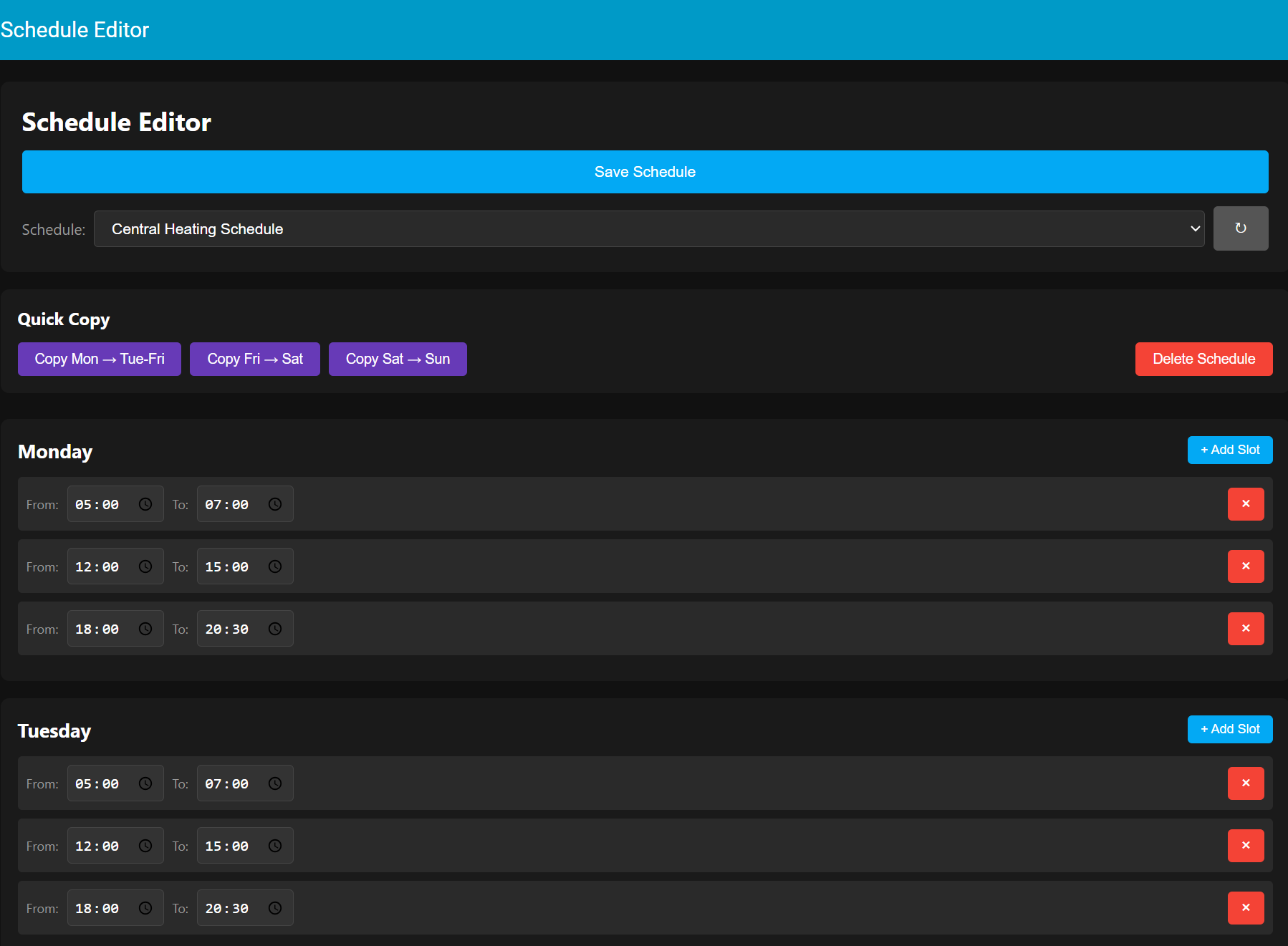
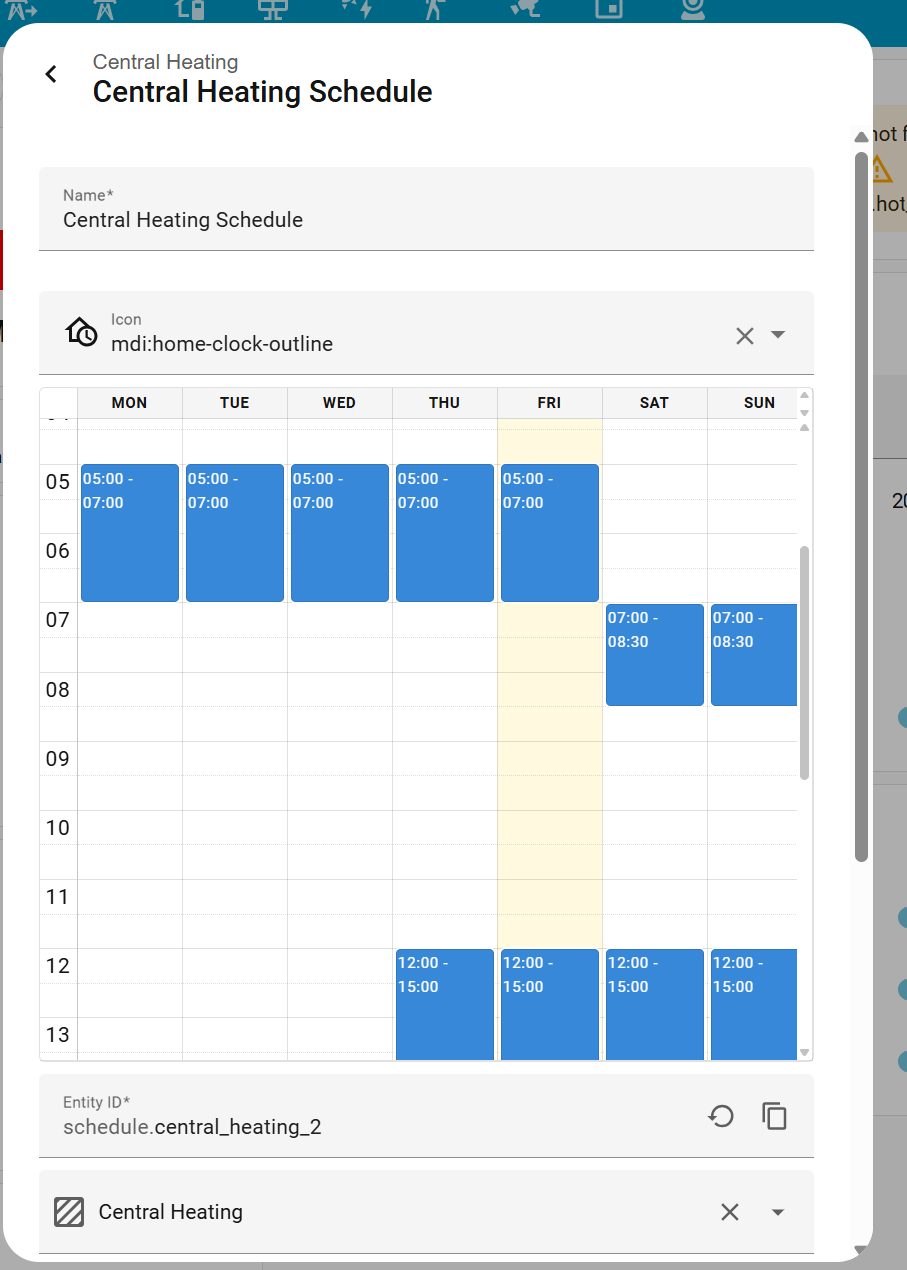
Here is the backend view of the schedule, if it could be displayed as a full dashboard panel that would be great:

I have also installed and tried the " scheduler-card" but it seems to be entity based so would required multiple entities to be added for on and for off and then multiplied by the number of climate controllers that I have (around 7) then to edit the schedule would required those same multiple number of entities to update.
This seems to have been a lingering issue never resolved in HA. It would be good to have the Frontend development team focus on scheduling and timers in the future system updates. The calendar approach is clunky and does not allow a quick timer updating process. With the built-in scheduler it allows for click and drag updates and tap and drag to insert new timers, but the editing can only be done in the backend…having only the schedule table available as a dashboard which is editable would seem to be an obvious approach?

2 Likes

Sorry, not a direct answer to your question, but have you seen this one?
Climate Scheduler - Share your Projects! / Custom Integrations - Home Assistant Community

Nice interface and you can group entities to be manage together.

2 Likes

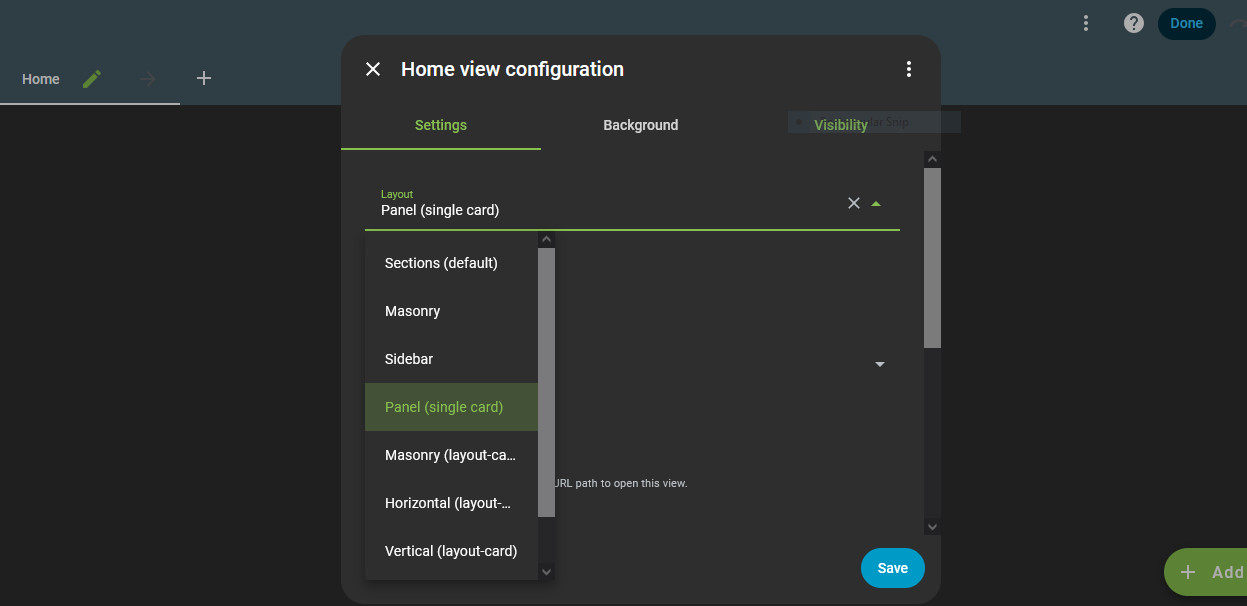
Choose Panel-View

As far as I can determin even in full panel-view there is no way to add the helper schedule to it.

Thanx for the link. I will che k it out in detail tomorrow. My original question to the community still applies; how to add a schedule from the HA backend in to a full panel dashboard.

I was also trying exactly the same with no results. I have a dashboard where the users can control the heating for all rooms and I would like they can modify the scheduler also to adjust it by themselves but I didn’t find a way.
A card where the user could modify the scheduler as the admin do it in the backend would be great

1 Like

That is exactly what the HA developer team should implement as it’s be a long time request for many years… here’s going they can implement that seemingly basic function.

I have discovered that this feature was already requested here:

So please vote for it if you find it useful

1 Like

The Helper Schedule is an entity, you can place in any cards ( an modify with i.e more-info/ And using other custom:Cards and card-mod ),

Edit: But indeed cumbersome , would be more appropriate with a type Calendar-Card, dedicated to the Scheduler-entitys “settings”

1 Like

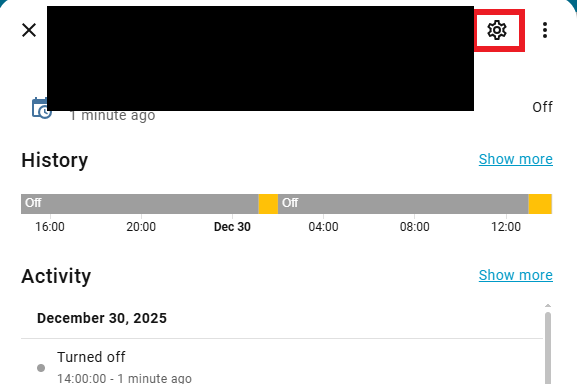
I can place the scheduler entity in cards and action it with the more-info but the popup is going to show only the entity state, history and attributes. To be able to modify the scheduler you should clic in the settings button which is only available for admin users.

Did you find a way to workaround this issue?

Currently there is no way to display and easily edit schedules in home assistant for the normal users. The current method is very “backend” and not user friendly…

Nope, i haven’t digged to deep into this, as don’t usually logg in with my User-Account , however, the “Schedule” entity-file is located in .storage in .json format

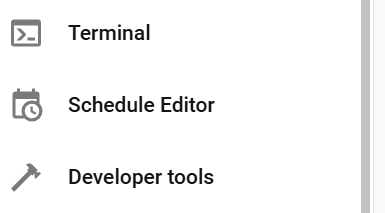
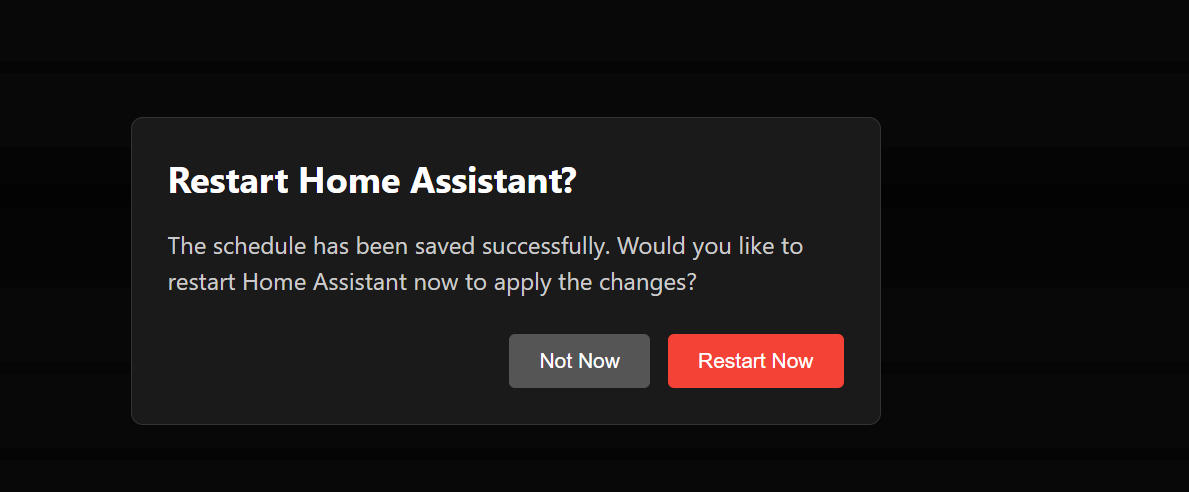
OK guys, I have created my own solution. It creates a new side bar menu item called “Schedule Editor”. When you select the Schedule Editor it opens the schedule file from the HA “homeassistant/.storage” folder (thanx to @boheme61 for pointing me in the right file direction) and you can easily edit the schedule, add additional slots, delete slots etc… On saving the changes you will get a prompt that HA s about to restart and you can accept or decline that restart. The restart is required to correctly reload the new edited schedule, it was the only way that I have found which sets the changes. I tried several other methods such as opening the clunky back end schedule editor and then using the “Update” button but that will over write your edited changes with the original version as that it the one currently “loaded” in the HA system until after a restart. I also tried out the other reload options found in the Developer section but none worked.

Its a Custom_Component so to manually install this, follow these steps.

Use the FileBrowser or File Editor tools to create folders and files as follows:

  1. Navigate to the “custom_components” folder within the Config folder.
  2. Create a new folder called “schedule_editor”.
  3. Inside the new folder create a new file called “init.py” and paste in the following code:
"""Schedule Editor Integration."""
import logging
import json
import os
from aiohttp import web

from homeassistant.core import HomeAssistant
from homeassistant.components.http import HomeAssistantView
from homeassistant.components import frontend

_LOGGER = logging.getLogger(__name__)

DOMAIN = "schedule_editor"


async def async_setup(hass: HomeAssistant, config: dict):
    """Set up the Schedule Editor component."""
    
    _LOGGER.info("Setting up Schedule Editor")
    
    # Register API endpoints first
    hass.http.register_view(ScheduleGetView(hass))
    hass.http.register_view(ScheduleSaveView(hass))
    hass.http.register_view(SchedulePanelView(hass))
    hass.http.register_view(ScheduleRestartView(hass))
    
    # Register as iframe panel (not async)
    frontend.async_register_built_in_panel(
        hass,
        component_name="iframe",
        sidebar_title="Schedule Editor",
        sidebar_icon="mdi:calendar-clock",
        frontend_url_path="schedule-editor",
        config={
            "url": "/api/schedule_editor/panel",
        },
        require_admin=False,
    )
    
    _LOGGER.info("Schedule Editor setup complete")
    
    return True


class SchedulePanelView(HomeAssistantView):
    """View to serve the schedule editor HTML."""
    
    url = "/api/schedule_editor/panel"
    name = "api:schedule_editor:panel"
    requires_auth = False
    
    def __init__(self, hass):
        """Initialize."""
        self.hass = hass
    
    async def get(self, request):
        """Serve the editor HTML."""
        html_content = """
<!DOCTYPE html>
<html>
<head>
    <meta charset="UTF-8">
    <meta name="viewport" content="width=device-width, initial-scale=1.0">
    <title>Schedule Editor</title>
    <style>
        * { box-sizing: border-box; margin: 0; padding: 0; }
        body {
            font-family: -apple-system, BlinkMacSystemFont, "Segoe UI", Roboto, sans-serif;
            background: #111;
            color: #fff;
            padding: 12px;
        }
        .container { max-width: 1200px; margin: 0 auto; }
        .header {
            display: flex;
            flex-direction: column;
            gap: 12px;
            margin-bottom: 16px;
            padding: 16px;
            background: #1a1a1a;
            border-radius: 8px;
        }
        h1 { 
            font-size: 20px;
            text-align: center;
        }
        .file-selector {
            display: flex;
            align-items: center;
            gap: 8px;
            flex-wrap: wrap;
        }
        .file-selector label {
            color: #999;
            font-size: 14px;
            white-space: nowrap;
        }
        .file-selector select {
            flex: 1;
            min-width: 150px;
            padding: 8px 12px;
            background: #2a2a2a;
            border: 1px solid #444;
            border-radius: 4px;
            color: #fff;
            font-size: 14px;
            cursor: pointer;
        }
        @media (min-width: 768px) {
            body { padding: 20px; }
            .header { padding: 20px; }
            h1 { 
                font-size: 24px;
                text-align: left;
            }
        }
        .btn-small {
            padding: 8px 12px;
            background: #555;
            color: white;
            border: none;
            border-radius: 4px;
            cursor: pointer;
            font-size: 14px;
            flex-shrink: 0;
        }
        .btn-small:hover {
            background: #666;
        }
        .btn {
            padding: 12px 20px;
            border: none;
            border-radius: 4px;
            cursor: pointer;
            font-size: 14px;
            font-weight: 500;
            width: 100%;
        }
        .btn-primary { background: #03a9f4; color: white; }
        .btn-primary:hover { background: #0288d1; }
        @media (min-width: 768px) {
            .btn {
                width: auto;
            }
        }
        .message {
            padding: 12px;
            border-radius: 4px;
            margin-bottom: 12px;
            text-align: center;
            display: none;
            font-size: 14px;
        }
        .message.show { display: block; }
        .message.success { background: #4caf50; }
        .message.error { background: #f44336; }
        .day-card {
            background: #1a1a1a;
            border-radius: 8px;
            padding: 12px;
            margin-bottom: 12px;
        }
        .day-header {
            display: flex;
            justify-content: space-between;
            align-items: center;
            margin-bottom: 12px;
        }
        .day-header h3 {
            font-size: 16px;
            text-transform: capitalize;
        }
        .btn-add {
            padding: 6px 10px;
            background: #03a9f4;
            color: white;
            border: none;
            border-radius: 4px;
            cursor: pointer;
            font-size: 11px;
            white-space: nowrap;
        }
        @media (min-width: 768px) {
            .day-card {
                padding: 16px;
                margin-bottom: 16px;
            }
            .day-header h3 {
                font-size: 18px;
            }
            .btn-add {
                padding: 6px 12px;
                font-size: 12px;
            }
        }
        .time-slot {
            display: flex;
            align-items: center;
            gap: 6px;
            padding: 8px;
            background: #2a2a2a;
            border-radius: 4px;
            margin-bottom: 8px;
            flex-wrap: wrap;
        }
        .time-slot label {
            color: #999;
            font-size: 11px;
        }
        .time-input {
            padding: 8px 6px;
            border: 1px solid #444;
            border-radius: 4px;
            background: #333;
            color: #fff;
            font-size: 14px;
            min-width: 90px;
        }
        .btn-delete {
            padding: 6px 10px;
            background: #f44336;
            color: white;
            border: none;
            border-radius: 4px;
            cursor: pointer;
            margin-left: auto;
            font-size: 16px;
        }
        @media (min-width: 768px) {
            .time-slot {
                gap: 8px;
                flex-wrap: nowrap;
            }
            .time-slot label {
                font-size: 12px;
            }
            .time-input {
                padding: 6px;
            }
            .btn-delete {
                padding: 6px 12px;
            }
        }
        .no-slots {
            color: #666;
            font-style: italic;
            font-size: 13px;
        }
        .modal {
            display: none;
            position: fixed;
            top: 0;
            left: 0;
            right: 0;
            bottom: 0;
            background: rgba(0, 0, 0, 0.8);
            align-items: center;
            justify-content: center;
            z-index: 1000;
            padding: 20px;
        }
        .modal.show {
            display: flex;
        }
        .modal-content {
            background: #1a1a1a;
            border-radius: 8px;
            padding: 20px;
            max-width: 500px;
            width: 100%;
            border: 1px solid #333;
        }
        .modal-content h2 {
            margin-bottom: 12px;
            color: #fff;
            font-size: 18px;
        }
        .modal-content p {
            margin-bottom: 16px;
            color: #ccc;
            line-height: 1.5;
            font-size: 14px;
        }
        @media (min-width: 768px) {
            .modal-content {
                padding: 24px;
            }
            .modal-content h2 {
                margin-bottom: 16px;
                font-size: 20px;
            }
            .modal-content p {
                margin-bottom: 24px;
                font-size: 15px;
            }
        }
        .modal-buttons {
            display: flex;
            gap: 10px;
            justify-content: flex-end;
            flex-direction: column;
        }
        @media (min-width: 480px) {
            .modal-buttons {
                flex-direction: row;
                gap: 12px;
            }
        }
        .btn-secondary {
            background: #555;
            color: white;
            padding: 12px 20px;
            border: none;
            border-radius: 4px;
            cursor: pointer;
            font-size: 14px;
        }
        .btn-secondary:hover {
            background: #666;
        }
        .btn-danger {
            background: #f44336;
            color: white;
            padding: 12px 20px;
            border: none;
            border-radius: 4px;
            cursor: pointer;
            font-size: 14px;
        }
        .btn-danger:hover {
            background: #d32f2f;
        }
        .quick-actions {
            background: #1a1a1a;
            border-radius: 8px;
            padding: 12px;
            margin-bottom: 16px;
        }
        .quick-actions h3 {
            margin-bottom: 12px;
            color: #fff;
            font-size: 16px;
        }
        .quick-actions-buttons {
            display: flex;
            gap: 8px;
            flex-wrap: wrap;
        }
        .btn-copy {
            padding: 10px 14px;
            background: #673ab7;
            color: white;
            border: none;
            border-radius: 4px;
            cursor: pointer;
            font-size: 12px;
            white-space: nowrap;
        }
        .btn-copy:hover {
            background: #7e57c2;
        }
        .btn-delete-schedule {
            padding: 10px 14px;
            background: #f44336;
            color: white;
            border: none;
            border-radius: 4px;
            cursor: pointer;
            font-size: 12px;
            white-space: nowrap;
        }
        .btn-delete-schedule:hover {
            background: #d32f2f;
        }
        @media (min-width: 768px) {
            .quick-actions {
                padding: 16px;
                margin-bottom: 24px;
            }
            .btn-copy, .btn-delete-schedule {
                padding: 8px 16px;
                font-size: 13px;
            }
            .btn-delete-schedule {
                margin-left: auto;
            }
        }
    </style>
</head>
<body>
    <div class="container">
        <div class="header">
            <h1>Schedule Editor</h1>
            <button class="btn btn-primary" onclick="saveSchedule()">Save Schedule</button>
            <div class="file-selector">
                <label for="schedule-select">Schedule:</label>
                <select id="schedule-select" onchange="loadSelectedSchedule()">
                    <option value="schedule">Default Schedule</option>
                </select>
                <button class="btn btn-small" onclick="refreshScheduleList()">↻</button>
            </div>
        </div>
        <div id="message" class="message"></div>
        
        <!-- Quick Copy Buttons -->
        <div class="quick-actions">
            <h3>Quick Copy</h3>
            <div class="quick-actions-buttons">
                <button class="btn btn-copy" onclick="copyMondayToWeekdays()">Copy Mon → Tue-Fri</button>
                <button class="btn btn-copy" onclick="copyFridayToSaturday()">Copy Fri → Sat</button>
                <button class="btn btn-copy" onclick="copySaturdayToSunday()">Copy Sat → Sun</button>
                <button class="btn btn-delete-schedule" onclick="confirmDeleteSchedule()">Delete Schedule</button>
            </div>
        </div>
        
        <!-- Delete Confirmation Modal -->
        <div id="delete-modal" class="modal">
            <div class="modal-content">
                <h2>Delete Schedule?</h2>
                <p id="delete-message">Are you sure you want to delete this schedule?</p>
                <p style="color: #f44336; font-weight: bold; margin-top: 12px;" id="delete-name"></p>
                <div class="modal-buttons">
                    <button class="btn btn-secondary" onclick="closeDeleteModal()">Cancel</button>
                    <button class="btn btn-danger" onclick="deleteSchedule()">Delete</button>
                </div>
            </div>
        </div>
        
        <!-- Restart Warning Modal -->
        <div id="restart-modal" class="modal">
            <div class="modal-content">
                <h2>Restart Home Assistant?</h2>
                <p>The schedule has been saved successfully. Would you like to restart Home Assistant now to apply the changes?</p>
                <div class="modal-buttons">
                    <button class="btn btn-secondary" onclick="closeRestartModal()">Not Now</button>
                    <button class="btn btn-danger" onclick="restartHomeAssistant()">Restart Now</button>
                </div>
            </div>
        </div>
        
        <div id="schedule-container"></div>
    </div>

    <script>
        let scheduleData = null;
        let currentScheduleIndex = 0;
        const days = ['monday', 'tuesday', 'wednesday', 'thursday', 'friday', 'saturday', 'sunday'];

        async function loadSchedule() {
            try {
                const response = await fetch('/api/schedule_editor/get');
                if (!response.ok) {
                    throw new Error('HTTP ' + response.status);
                }
                scheduleData = await response.json();
                updateScheduleList();
                renderSchedule();
            } catch (error) {
                console.error('Load error:', error);
                showMessage('Error loading schedule: ' + error.message, 'error');
            }
        }

        function updateScheduleList() {
            const select = document.getElementById('schedule-select');
            select.innerHTML = '';
            
            scheduleData.data.items.forEach((item, index) => {
                const option = document.createElement('option');
                option.value = index;
                option.textContent = item.name || item.id;
                if (index === currentScheduleIndex) {
                    option.selected = true;
                }
                select.appendChild(option);
            });
        }

        function loadSelectedSchedule() {
            const select = document.getElementById('schedule-select');
            currentScheduleIndex = parseInt(select.value);
            renderSchedule();
            const scheduleName = scheduleData.data.items[currentScheduleIndex].name;
            showMessage('Loaded: ' + scheduleName, 'success');
        }

        function refreshScheduleList() {
            loadSchedule();
        }

        function getAuthToken() {
            // Try to get token from parent window (Home Assistant)
            try {
                if (window.parent && window.parent !== window) {
                    const haAuth = window.parent.localStorage.getItem('hassTokens');
                    if (haAuth) {
                        const tokens = JSON.parse(haAuth);
                        return tokens.access_token;
                    }
                }
            } catch (e) {
                console.error('Could not access parent auth:', e);
            }
            
            // Fallback: try local storage
            try {
                const haAuth = localStorage.getItem('hassTokens');
                if (haAuth) {
                    const tokens = JSON.parse(haAuth);
                    return tokens.access_token;
                }
            } catch (e) {
                console.error('Could not access local auth:', e);
            }
            
            return '';
        }

        function renderSchedule() {
            const container = document.getElementById('schedule-container');
            container.innerHTML = '';
            
            const schedule = scheduleData.data.items[currentScheduleIndex];
            
            days.forEach(day => {
                const dayCard = document.createElement('div');
                dayCard.className = 'day-card';
                
                const header = document.createElement('div');
                header.className = 'day-header';
                header.innerHTML = `
                    <h3>${day}</h3>
                    <button class="btn-add" onclick="addTimeSlot('${day}')">+ Add Slot</button>
                `;
                dayCard.appendChild(header);
                
                const slots = schedule[day] || [];
                if (slots.length > 0) {
                    slots.forEach((slot, index) => {
                        const slotDiv = document.createElement('div');
                        slotDiv.className = 'time-slot';
                        slotDiv.innerHTML = `
                            <label>From:</label>
                            <input type="time" class="time-input" value="${slot.from.substring(0, 5)}" 
                                   onchange="updateTimeSlot('${day}', ${index}, 'from', this.value)">
                            <label>To:</label>
                            <input type="time" class="time-input" value="${slot.to.substring(0, 5)}" 
                                   onchange="updateTimeSlot('${day}', ${index}, 'to', this.value)">
                            <button class="btn-delete" onclick="removeTimeSlot('${day}', ${index})">×</button>
                        `;
                        dayCard.appendChild(slotDiv);
                    });
                } else {
                    const noSlots = document.createElement('p');
                    noSlots.className = 'no-slots';
                    noSlots.textContent = 'No time slots';
                    dayCard.appendChild(noSlots);
                }
                
                container.appendChild(dayCard);
            });
        }

        function addTimeSlot(day) {
            const schedule = scheduleData.data.items[currentScheduleIndex];
            if (!schedule[day]) schedule[day] = [];
            schedule[day].push({ from: "09:00:00", to: "17:00:00" });
            renderSchedule();
        }

        function removeTimeSlot(day, index) {
            scheduleData.data.items[currentScheduleIndex][day].splice(index, 1);
            renderSchedule();
        }

        function updateTimeSlot(day, index, field, value) {
            scheduleData.data.items[currentScheduleIndex][day][index][field] = value + ":00";
        }

        function copyMondayToWeekdays() {
            const schedule = scheduleData.data.items[currentScheduleIndex];
            const mondaySlots = schedule.monday ? JSON.parse(JSON.stringify(schedule.monday)) : [];
            
            ['tuesday', 'wednesday', 'thursday', 'friday'].forEach(day => {
                schedule[day] = JSON.parse(JSON.stringify(mondaySlots));
            });
            
            renderSchedule();
            showMessage('Monday schedule copied to Tuesday-Friday', 'success');
        }

        function copyFridayToSaturday() {
            const schedule = scheduleData.data.items[currentScheduleIndex];
            const fridaySlots = schedule.friday ? JSON.parse(JSON.stringify(schedule.friday)) : [];
            
            schedule.saturday = JSON.parse(JSON.stringify(fridaySlots));
            
            renderSchedule();
            showMessage('Friday schedule copied to Saturday', 'success');
        }

        function copySaturdayToSunday() {
            const schedule = scheduleData.data.items[currentScheduleIndex];
            const saturdaySlots = schedule.saturday ? JSON.parse(JSON.stringify(schedule.saturday)) : [];
            
            schedule.sunday = JSON.parse(JSON.stringify(saturdaySlots));
            
            renderSchedule();
            showMessage('Saturday schedule copied to Sunday', 'success');
        }

        async function saveSchedule() {
            try {
                const response = await fetch('/api/schedule_editor/save', {
                    method: 'POST',
                    headers: { 
                        'Content-Type': 'application/json'
                    },
                    body: JSON.stringify(scheduleData)
                });
                
                if (response.ok) {
                    const scheduleName = scheduleData.data.items[currentScheduleIndex].name;
                    showMessage('Schedule "' + scheduleName + '" saved successfully!', 'success');
                    // Show restart modal after successful save
                    setTimeout(() => {
                        showRestartModal();
                    }, 1000);
                } else {
                    const errorText = await response.text();
                    showMessage('Error saving schedule: ' + response.status, 'error');
                }
            } catch (error) {
                console.error('Save error:', error);
                showMessage('Error saving schedule: ' + error.message, 'error');
            }
        }

        function showRestartModal() {
            document.getElementById('restart-modal').classList.add('show');
        }

        function closeRestartModal() {
            document.getElementById('restart-modal').classList.remove('show');
        }

        function confirmDeleteSchedule() {
            const schedule = scheduleData.data.items[currentScheduleIndex];
            const scheduleName = schedule.name || schedule.id;
            
            document.getElementById('delete-name').textContent = scheduleName;
            document.getElementById('delete-modal').classList.add('show');
        }

        function closeDeleteModal() {
            document.getElementById('delete-modal').classList.remove('show');
        }

        function deleteSchedule() {
            const scheduleName = scheduleData.data.items[currentScheduleIndex].name;
            
            // Remove the schedule from the array
            scheduleData.data.items.splice(currentScheduleIndex, 1);
            
            // Check if there are any schedules left
            if (scheduleData.data.items.length === 0) {
                showMessage('Cannot delete the last schedule!', 'error');
                closeDeleteModal();
                // Reload to restore the schedule
                loadSchedule();
                return;
            }
            
            // Reset to first schedule if we deleted the current one
            if (currentScheduleIndex >= scheduleData.data.items.length) {
                currentScheduleIndex = 0;
            }
            
            closeDeleteModal();
            updateScheduleList();
            renderSchedule();
            showMessage('Schedule "' + scheduleName + '" deleted. Click Save to confirm.', 'success');
        }

        async function restartHomeAssistant() {
            closeRestartModal();
            showMessage('Restarting Home Assistant...', 'success');
            
            try {
                const response = await fetch('/api/schedule_editor/restart', {
                    method: 'POST'
                });
                
                if (response.ok) {
                    showMessage('Home Assistant is restarting. Please wait...', 'success');
                } else {
                    showMessage('Could not restart Home Assistant', 'error');
                }
            } catch (error) {
                // This is expected as HA will disconnect during restart
                showMessage('Home Assistant is restarting. This page will reload automatically...', 'success');
                
                // Try to reload the page after 30 seconds
                setTimeout(() => {
                    window.location.reload();
                }, 30000);
            }
        }

        function showMessage(text, type) {
            const msg = document.getElementById('message');
            msg.textContent = text;
            msg.className = `message ${type} show`;
            setTimeout(() => {
                msg.className = 'message';
            }, 3000);
        }

        loadSchedule();
    </script>
</body>
</html>
        """
        return web.Response(text=html_content, content_type='text/html')


class ScheduleGetView(HomeAssistantView):
    """View to get the schedule data."""
    
    url = "/api/schedule_editor/get"
    name = "api:schedule_editor:get"
    requires_auth = False
    
    def __init__(self, hass):
        """Initialize."""
        self.hass = hass
    
    async def get(self, request):
        """Get schedule data."""
        schedule_path = self.hass.config.path(".storage/schedule")
        
        try:
            if os.path.exists(schedule_path):
                with open(schedule_path, 'r') as f:
                    data = json.load(f)
                return web.json_response(data)
            else:
                # Return default schedule if file doesn't exist
                default_schedule = {
                    "version": 1,
                    "minor_version": 1,
                    "key": "schedule",
                    "data": {
                        "items": [{
                            "id": "central_heating_2",
                            "name": "Central Heating Schedule",
                            "icon": "mdi:home-clock-outline",
                            "monday": [],
                            "tuesday": [],
                            "wednesday": [],
                            "thursday": [],
                            "friday": [],
                            "saturday": [],
                            "sunday": []
                        }]
                    }
                }
                return web.json_response(default_schedule)
        except Exception as e:
            _LOGGER.error(f"Error loading schedule: {e}")
            return web.json_response({"error": str(e)}, status=500)


class ScheduleSaveView(HomeAssistantView):
    """View to save the schedule data."""
    
    url = "/api/schedule_editor/save"
    name = "api:schedule_editor:save"
    requires_auth = False
    
    def __init__(self, hass):
        """Initialize."""
        self.hass = hass
    
    async def post(self, request):
        """Save schedule data."""
        schedule_path = self.hass.config.path(".storage/schedule")
        
        try:
            data = await request.json()
            
            # Create backup of existing file
            if os.path.exists(schedule_path):
                backup_path = f"{schedule_path}.backup"
                with open(schedule_path, 'r') as f:
                    backup_data = f.read()
                with open(backup_path, 'w') as f:
                    f.write(backup_data)
                _LOGGER.info("Created backup of schedule")
            
            # Save new data
            with open(schedule_path, 'w') as f:
                json.dump(data, f, indent=2)
            
            _LOGGER.info("Schedule saved successfully")
            
            # Reload the schedule integration
            try:
                await self.hass.services.async_call(
                    "homeassistant",
                    "reload_config_entry",
                    {"entry_id": "schedule"},
                    blocking=True
                )
                _LOGGER.info("Schedule integration reloaded")
            except Exception as reload_error:
                _LOGGER.warning(f"Could not reload schedule automatically: {reload_error}")
                # Try alternative reload method
                try:
                    # Fire an event to trigger schedule reload
                    self.hass.bus.async_fire("schedule_updated")
                    _LOGGER.info("Fired schedule_updated event")
                except Exception as e:
                    _LOGGER.warning(f"Could not fire reload event: {e}")
            
            return web.json_response({"success": True, "message": "Schedule saved and reloaded successfully"})
        except Exception as e:
            _LOGGER.error(f"Error saving schedule: {e}")
            return web.json_response({"error": str(e)}, status=500)


class ScheduleRestartView(HomeAssistantView):
    """View to restart Home Assistant."""
    
    url = "/api/schedule_editor/restart"
    name = "api:schedule_editor:restart"
    requires_auth = False
    
    def __init__(self, hass):
        """Initialize."""
        self.hass = hass
    
    async def post(self, request):
        """Restart Home Assistant."""
        try:
            _LOGGER.info("Restarting Home Assistant via Schedule Editor")
            
            # Call the homeassistant.restart service
            await self.hass.services.async_call(
                "homeassistant",
                "restart",
                blocking=False
            )
            
            return web.json_response({"success": True, "message": "Home Assistant is restarting"})
        except Exception as e:
            _LOGGER.error(f"Error restarting Home Assistant: {e}")
            return web.json_response({"error": str(e)}, status=500)
  1. Create another new file and name it “manifest.json” and paste in the following:
{
  "domain": "schedule_editor",
  "name": "Schedule Editor",
  "version": "1.0.0",
  "documentation": "https://github.com/yourusername/ha-schedule-editor",
  "requirements": [],
  "dependencies": [],
  "codeowners": ["@yourusername"],
  "iot_class": "local_polling"
}
  1. go to your “configuration.yaml” file and below the “homeassistant:” section (no indentation) add the following:
schedule_editor:

Restart HA and then in your menu bar on the left you will find the “Schedule Editor”.
(Note that you will first see a non fatal error, which does not prevent Home Assistant from restarting, this is because you added the schedule_editor: to your configuration file, however until you restart and load the new initi.py file it is not available to HA. The error only occurs on first installation).

Use and enjoy!!
1 Like

Some screen shots:

1 Like

Sorry, just out of interest:

  • What happens on Mondays 7:00h - 12:00h and 15:00h - 18:00h, nothing, i.e. heating is turned off?
  • Do you set a temperature or is the heat ‘just on’?
  • Setting it up this way requires me to display the custom component/schedule editor in the sidebar and every change requires an HA restart?

Mean and raw , but in right direction :slight_smile: , i have no idea how you got so far (im far from a “programmer” )… but i have “some” thoughts
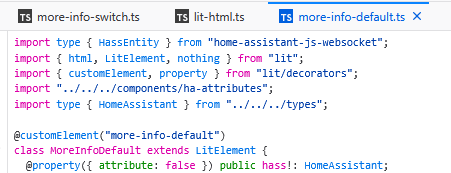
If you could figure out which Event is executed, when clicking the “Update-Button”, then maybe you can get around the restart.
Use the devtools in the browser, to see if you need additional imports, and can “locate” their “Uknown” path’s ( been awhile since i had fun with poking around in the backend )

Yes, Free slots, wanna book time ? :slight_smile:

@boheme61 I started liking you until you said my “rough and raw” solution… please use the like button to redeem yourself :rofl:

I have edited the inti.py file with some further scheduling copy/paste and multi schedule selector drop down functionality…

2 Likes

I Did ! , but now i even gave you 1 for Bringing up the Topic (again), And as you see above, there has and still been an interest for a “More Handy” Solution for this," The Feature Requests " From 22 !
I think that was about the time i lost interest for both Calendar and Scheduler, as one has to do Automations and Scripts/templates anyways, so why not “keep it all behind curtains”
In anyways and always, im in charge of my house "safety and comfort “Noone else need to know” And it’s diffinitly not something that anyone is Alowed to tamper with or Change

1 Like

I have further refund my initi.py to accommodate editing of multiple schedules. My original post file has been updated. I’m now working on adding a “Create New schedule” option from within my editor, but ultimately that is already easily handled by going to the helper section and creating a new schedule from there.

HA only creates a single file called “schedule” and within that, saves multiple schedules if they have been created.

The new code provides a drop down box which lists all available schedules. Just select the schedule that you want to view and change. No changes are stored until you press the save button. Once saved, you will be prompted to allow a HA restart that is required to implement the schedule changes immediately. Otherwise you can ignore the immediate restart and continue editing your other schedules, in which case the schedule changes while saved to the schedule file, won’t be loaded in to the system until after the next restart.

"""Schedule Editor Integration."""
import logging
import json
import os
from aiohttp import web

from homeassistant.core import HomeAssistant
from homeassistant.components.http import HomeAssistantView
from homeassistant.components import frontend

_LOGGER = logging.getLogger(__name__)

DOMAIN = "schedule_editor"


async def async_setup(hass: HomeAssistant, config: dict):
    """Set up the Schedule Editor component."""
    
    _LOGGER.info("Setting up Schedule Editor")
    
    # Register API endpoints first
    hass.http.register_view(ScheduleGetView(hass))
    hass.http.register_view(ScheduleSaveView(hass))
    hass.http.register_view(SchedulePanelView(hass))
    hass.http.register_view(ScheduleRestartView(hass))
    
    # Register as iframe panel (not async)
    frontend.async_register_built_in_panel(
        hass,
        component_name="iframe",
        sidebar_title="Schedule Editor",
        sidebar_icon="mdi:calendar-clock",
        frontend_url_path="schedule-editor",
        config={
            "url": "/api/schedule_editor/panel",
        },
        require_admin=True,
    )
    
    _LOGGER.info("Schedule Editor setup complete")
    
    return True


class SchedulePanelView(HomeAssistantView):
    """View to serve the schedule editor HTML."""
    
    url = "/api/schedule_editor/panel"
    name = "api:schedule_editor:panel"
    requires_auth = False
    
    def __init__(self, hass):
        """Initialize."""
        self.hass = hass
    
    async def get(self, request):
        """Serve the editor HTML."""
        html_content = """
<!DOCTYPE html>
<html>
<head>
    <meta charset="UTF-8">
    <meta name="viewport" content="width=device-width, initial-scale=1.0">
    <title>Schedule Editor</title>
    <style>
        * { box-sizing: border-box; margin: 0; padding: 0; }
        body {
            font-family: -apple-system, BlinkMacSystemFont, "Segoe UI", Roboto, sans-serif;
            background: #111;
            color: #fff;
            padding: 12px;
        }
        .container { max-width: 1200px; margin: 0 auto; }
        .header {
            display: flex;
            flex-direction: column;
            gap: 12px;
            margin-bottom: 16px;
            padding: 16px;
            background: #1a1a1a;
            border-radius: 8px;
        }
        h1 { 
            font-size: 20px;
            text-align: center;
        }
        .file-selector {
            display: flex;
            align-items: center;
            gap: 8px;
            flex-wrap: wrap;
        }
        .file-selector label {
            color: #999;
            font-size: 14px;
            white-space: nowrap;
        }
        .file-selector select {
            flex: 1;
            min-width: 150px;
            padding: 8px 12px;
            background: #2a2a2a;
            border: 1px solid #444;
            border-radius: 4px;
            color: #fff;
            font-size: 14px;
            cursor: pointer;
        }
        @media (min-width: 768px) {
            body { padding: 20px; }
            .header { padding: 20px; }
            h1 { 
                font-size: 24px;
                text-align: left;
            }
        }
        .btn-small {
            padding: 8px 12px;
            background: #555;
            color: white;
            border: none;
            border-radius: 4px;
            cursor: pointer;
            font-size: 14px;
            flex-shrink: 0;
        }
        .btn-small:hover {
            background: #666;
        }
        .btn {
            padding: 12px 20px;
            border: none;
            border-radius: 4px;
            cursor: pointer;
            font-size: 14px;
            font-weight: 500;
            width: 100%;
        }
        .btn-primary { background: #03a9f4; color: white; }
        .btn-primary:hover { background: #0288d1; }
        @media (min-width: 768px) {
            .btn {
                width: auto;
            }
        }
        .message {
            padding: 12px;
            border-radius: 4px;
            margin-bottom: 12px;
            text-align: center;
            display: none;
            font-size: 14px;
        }
        .message.show { display: block; }
        .message.success { background: #4caf50; }
        .message.error { background: #f44336; }
        .day-card {
            background: #1a1a1a;
            border-radius: 8px;
            padding: 12px;
            margin-bottom: 12px;
        }
        .day-header {
            display: flex;
            justify-content: space-between;
            align-items: center;
            margin-bottom: 12px;
        }
        .day-header h3 {
            font-size: 16px;
            text-transform: capitalize;
        }
        .btn-add {
            padding: 6px 10px;
            background: #03a9f4;
            color: white;
            border: none;
            border-radius: 4px;
            cursor: pointer;
            font-size: 11px;
            white-space: nowrap;
        }
        @media (min-width: 768px) {
            .day-card {
                padding: 16px;
                margin-bottom: 16px;
            }
            .day-header h3 {
                font-size: 18px;
            }
            .btn-add {
                padding: 6px 12px;
                font-size: 12px;
            }
        }
        .time-slot {
            display: flex;
            align-items: center;
            gap: 6px;
            padding: 8px;
            background: #2a2a2a;
            border-radius: 4px;
            margin-bottom: 8px;
            flex-wrap: wrap;
        }
        .time-slot label {
            color: #999;
            font-size: 11px;
        }
        .time-input {
            padding: 8px 6px;
            border: 1px solid #444;
            border-radius: 4px;
            background: #333;
            color: #fff;
            font-size: 14px;
            min-width: 90px;
        }
        .btn-delete {
            padding: 6px 10px;
            background: #f44336;
            color: white;
            border: none;
            border-radius: 4px;
            cursor: pointer;
            margin-left: auto;
            font-size: 16px;
        }
        @media (min-width: 768px) {
            .time-slot {
                gap: 8px;
                flex-wrap: nowrap;
            }
            .time-slot label {
                font-size: 12px;
            }
            .time-input {
                padding: 6px;
            }
            .btn-delete {
                padding: 6px 12px;
            }
        }
        .no-slots {
            color: #666;
            font-style: italic;
            font-size: 13px;
        }
        .modal {
            display: none;
            position: fixed;
            top: 0;
            left: 0;
            right: 0;
            bottom: 0;
            background: rgba(0, 0, 0, 0.8);
            align-items: center;
            justify-content: center;
            z-index: 1000;
            padding: 20px;
        }
        .modal.show {
            display: flex;
        }
        .modal-content {
            background: #1a1a1a;
            border-radius: 8px;
            padding: 20px;
            max-width: 500px;
            width: 100%;
            border: 1px solid #333;
        }
        .modal-content h2 {
            margin-bottom: 12px;
            color: #fff;
            font-size: 18px;
        }
        .modal-content p {
            margin-bottom: 16px;
            color: #ccc;
            line-height: 1.5;
            font-size: 14px;
        }
        @media (min-width: 768px) {
            .modal-content {
                padding: 24px;
            }
            .modal-content h2 {
                margin-bottom: 16px;
                font-size: 20px;
            }
            .modal-content p {
                margin-bottom: 24px;
                font-size: 15px;
            }
        }
        .modal-buttons {
            display: flex;
            gap: 10px;
            justify-content: flex-end;
            flex-direction: column;
        }
        @media (min-width: 480px) {
            .modal-buttons {
                flex-direction: row;
                gap: 12px;
            }
        }
        .btn-secondary {
            background: #555;
            color: white;
            padding: 12px 20px;
            border: none;
            border-radius: 4px;
            cursor: pointer;
            font-size: 14px;
        }
        .btn-secondary:hover {
            background: #666;
        }
        .btn-danger {
            background: #f44336;
            color: white;
            padding: 12px 20px;
            border: none;
            border-radius: 4px;
            cursor: pointer;
            font-size: 14px;
        }
        .btn-danger:hover {
            background: #d32f2f;
        }
        .quick-actions {
            background: #1a1a1a;
            border-radius: 8px;
            padding: 12px;
            margin-bottom: 16px;
        }
        .quick-actions h3 {
            margin-bottom: 12px;
            color: #fff;
            font-size: 16px;
        }
        .quick-actions-buttons {
            display: flex;
            gap: 8px;
            flex-wrap: wrap;
        }
        .btn-copy {
            padding: 10px 14px;
            background: #673ab7;
            color: white;
            border: none;
            border-radius: 4px;
            cursor: pointer;
            font-size: 12px;
            white-space: nowrap;
        }
        .btn-copy:hover {
            background: #7e57c2;
        }
        .btn-delete-schedule {
            padding: 10px 14px;
            background: #f44336;
            color: white;
            border: none;
            border-radius: 4px;
            cursor: pointer;
            font-size: 12px;
            white-space: nowrap;
        }
        .btn-delete-schedule:hover {
            background: #d32f2f;
        }
        @media (min-width: 768px) {
            .quick-actions {
                padding: 16px;
                margin-bottom: 24px;
            }
            .btn-copy, .btn-delete-schedule {
                padding: 8px 16px;
                font-size: 13px;
            }
            .btn-delete-schedule {
                margin-left: auto;
            }
        }
    </style>
</head>
<body>
    <div class="container">
        <div class="header">
            <h1>Schedule Editor</h1>
            <button class="btn btn-primary" onclick="saveSchedule()">Save Schedule</button>
            <div class="file-selector">
                <label for="schedule-select">Schedule:</label>
                <select id="schedule-select" onchange="loadSelectedSchedule()">
                    <option value="schedule">Default Schedule</option>
                </select>
                <button class="btn btn-small" onclick="refreshScheduleList()">↻</button>
            </div>
        </div>
        <div id="message" class="message"></div>
        
        <!-- Quick Copy Buttons -->
        <div class="quick-actions">
            <h3>Quick Copy</h3>
            <div class="quick-actions-buttons">
                <button class="btn btn-copy" onclick="copyMondayToWeekdays()">Copy Mon → Tue-Fri</button>
                <button class="btn btn-copy" onclick="copyFridayToSaturday()">Copy Fri → Sat</button>
                <button class="btn btn-copy" onclick="copySaturdayToSunday()">Copy Sat → Sun</button>
                <button class="btn btn-delete-schedule" onclick="confirmDeleteSchedule()">Delete Schedule</button>
            </div>
        </div>
        
        <!-- Delete Confirmation Modal -->
        <div id="delete-modal" class="modal">
            <div class="modal-content">
                <h2>Delete Schedule?</h2>
                <p id="delete-message">Are you sure you want to delete this schedule?</p>
                <p style="color: #f44336; font-weight: bold; margin-top: 12px;" id="delete-name"></p>
                <div class="modal-buttons">
                    <button class="btn btn-secondary" onclick="closeDeleteModal()">Cancel</button>
                    <button class="btn btn-danger" onclick="deleteSchedule()">Delete</button>
                </div>
            </div>
        </div>
        
        <!-- Restart Warning Modal -->
        <div id="restart-modal" class="modal">
            <div class="modal-content">
                <h2>Restart Home Assistant?</h2>
                <p>The schedule has been saved successfully. Would you like to restart Home Assistant now to apply the changes?</p>
                <div class="modal-buttons">
                    <button class="btn btn-secondary" onclick="closeRestartModal()">Not Now</button>
                    <button class="btn btn-danger" onclick="restartHomeAssistant()">Restart Now</button>
                </div>
            </div>
        </div>
        
        <div id="schedule-container"></div>
    </div>

    <script>
        let scheduleData = null;
        let currentScheduleIndex = 0;
        const days = ['monday', 'tuesday', 'wednesday', 'thursday', 'friday', 'saturday', 'sunday'];

        async function loadSchedule() {
            try {
                const response = await fetch('/api/schedule_editor/get');
                if (!response.ok) {
                    throw new Error('HTTP ' + response.status);
                }
                scheduleData = await response.json();
                updateScheduleList();
                renderSchedule();
            } catch (error) {
                console.error('Load error:', error);
                showMessage('Error loading schedule: ' + error.message, 'error');
            }
        }

        function updateScheduleList() {
            const select = document.getElementById('schedule-select');
            select.innerHTML = '';
            
            scheduleData.data.items.forEach((item, index) => {
                const option = document.createElement('option');
                option.value = index;
                option.textContent = item.name || item.id;
                if (index === currentScheduleIndex) {
                    option.selected = true;
                }
                select.appendChild(option);
            });
        }

        function loadSelectedSchedule() {
            const select = document.getElementById('schedule-select');
            currentScheduleIndex = parseInt(select.value);
            renderSchedule();
            const scheduleName = scheduleData.data.items[currentScheduleIndex].name;
            showMessage('Loaded: ' + scheduleName, 'success');
        }

        function refreshScheduleList() {
            loadSchedule();
        }

        function getAuthToken() {
            // Try to get token from parent window (Home Assistant)
            try {
                if (window.parent && window.parent !== window) {
                    const haAuth = window.parent.localStorage.getItem('hassTokens');
                    if (haAuth) {
                        const tokens = JSON.parse(haAuth);
                        return tokens.access_token;
                    }
                }
            } catch (e) {
                console.error('Could not access parent auth:', e);
            }
            
            // Fallback: try local storage
            try {
                const haAuth = localStorage.getItem('hassTokens');
                if (haAuth) {
                    const tokens = JSON.parse(haAuth);
                    return tokens.access_token;
                }
            } catch (e) {
                console.error('Could not access local auth:', e);
            }
            
            return '';
        }

        function renderSchedule() {
            const container = document.getElementById('schedule-container');
            container.innerHTML = '';
            
            const schedule = scheduleData.data.items[currentScheduleIndex];
            
            days.forEach(day => {
                const dayCard = document.createElement('div');
                dayCard.className = 'day-card';
                
                const header = document.createElement('div');
                header.className = 'day-header';
                header.innerHTML = `
                    <h3>${day}</h3>
                    <button class="btn-add" onclick="addTimeSlot('${day}')">+ Add Slot</button>
                `;
                dayCard.appendChild(header);
                
                const slots = schedule[day] || [];
                if (slots.length > 0) {
                    slots.forEach((slot, index) => {
                        const slotDiv = document.createElement('div');
                        slotDiv.className = 'time-slot';
                        slotDiv.innerHTML = `
                            <label>From:</label>
                            <input type="time" class="time-input" value="${slot.from.substring(0, 5)}" 
                                   onchange="updateTimeSlot('${day}', ${index}, 'from', this.value)">
                            <label>To:</label>
                            <input type="time" class="time-input" value="${slot.to.substring(0, 5)}" 
                                   onchange="updateTimeSlot('${day}', ${index}, 'to', this.value)">
                            <button class="btn-delete" onclick="removeTimeSlot('${day}', ${index})">×</button>
                        `;
                        dayCard.appendChild(slotDiv);
                    });
                } else {
                    const noSlots = document.createElement('p');
                    noSlots.className = 'no-slots';
                    noSlots.textContent = 'No time slots';
                    dayCard.appendChild(noSlots);
                }
                
                container.appendChild(dayCard);
            });
        }

        function addTimeSlot(day) {
            const schedule = scheduleData.data.items[currentScheduleIndex];
            if (!schedule[day]) schedule[day] = [];
            schedule[day].push({ from: "09:00:00", to: "17:00:00" });
            renderSchedule();
        }

        function removeTimeSlot(day, index) {
            scheduleData.data.items[currentScheduleIndex][day].splice(index, 1);
            renderSchedule();
        }

        function updateTimeSlot(day, index, field, value) {
            scheduleData.data.items[currentScheduleIndex][day][index][field] = value + ":00";
        }

        function copyMondayToWeekdays() {
            const schedule = scheduleData.data.items[currentScheduleIndex];
            const mondaySlots = schedule.monday ? JSON.parse(JSON.stringify(schedule.monday)) : [];
            
            ['tuesday', 'wednesday', 'thursday', 'friday'].forEach(day => {
                schedule[day] = JSON.parse(JSON.stringify(mondaySlots));
            });
            
            renderSchedule();
            showMessage('Monday schedule copied to Tuesday-Friday', 'success');
        }

        function copyFridayToSaturday() {
            const schedule = scheduleData.data.items[currentScheduleIndex];
            const fridaySlots = schedule.friday ? JSON.parse(JSON.stringify(schedule.friday)) : [];
            
            schedule.saturday = JSON.parse(JSON.stringify(fridaySlots));
            
            renderSchedule();
            showMessage('Friday schedule copied to Saturday', 'success');
        }

        function copySaturdayToSunday() {
            const schedule = scheduleData.data.items[currentScheduleIndex];
            const saturdaySlots = schedule.saturday ? JSON.parse(JSON.stringify(schedule.saturday)) : [];
            
            schedule.sunday = JSON.parse(JSON.stringify(saturdaySlots));
            
            renderSchedule();
            showMessage('Saturday schedule copied to Sunday', 'success');
        }

        async function saveSchedule() {
            try {
                const response = await fetch('/api/schedule_editor/save', {
                    method: 'POST',
                    headers: { 
                        'Content-Type': 'application/json'
                    },
                    body: JSON.stringify(scheduleData)
                });
                
                if (response.ok) {
                    const scheduleName = scheduleData.data.items[currentScheduleIndex].name;
                    showMessage('Schedule "' + scheduleName + '" saved successfully!', 'success');
                    // Show restart modal after successful save
                    setTimeout(() => {
                        showRestartModal();
                    }, 1000);
                } else {
                    const errorText = await response.text();
                    showMessage('Error saving schedule: ' + response.status, 'error');
                }
            } catch (error) {
                console.error('Save error:', error);
                showMessage('Error saving schedule: ' + error.message, 'error');
            }
        }

        function showRestartModal() {
            document.getElementById('restart-modal').classList.add('show');
        }

        function closeRestartModal() {
            document.getElementById('restart-modal').classList.remove('show');
        }

        function confirmDeleteSchedule() {
            const schedule = scheduleData.data.items[currentScheduleIndex];
            const scheduleName = schedule.name || schedule.id;
            
            document.getElementById('delete-name').textContent = scheduleName;
            document.getElementById('delete-modal').classList.add('show');
        }

        function closeDeleteModal() {
            document.getElementById('delete-modal').classList.remove('show');
        }

        function deleteSchedule() {
            const scheduleName = scheduleData.data.items[currentScheduleIndex].name;
            
            // Remove the schedule from the array
            scheduleData.data.items.splice(currentScheduleIndex, 1);
            
            // Check if there are any schedules left
            if (scheduleData.data.items.length === 0) {
                showMessage('Cannot delete the last schedule!', 'error');
                closeDeleteModal();
                // Reload to restore the schedule
                loadSchedule();
                return;
            }
            
            // Reset to first schedule if we deleted the current one
            if (currentScheduleIndex >= scheduleData.data.items.length) {
                currentScheduleIndex = 0;
            }
            
            closeDeleteModal();
            updateScheduleList();
            renderSchedule();
            showMessage('Schedule "' + scheduleName + '" deleted. Click Save to confirm.', 'success');
        }

        async function restartHomeAssistant() {
            closeRestartModal();
            showMessage('Restarting Home Assistant...', 'success');
            
            try {
                const response = await fetch('/api/schedule_editor/restart', {
                    method: 'POST'
                });
                
                if (response.ok) {
                    showMessage('Home Assistant is restarting. Please wait...', 'success');
                } else {
                    showMessage('Could not restart Home Assistant', 'error');
                }
            } catch (error) {
                // This is expected as HA will disconnect during restart
                showMessage('Home Assistant is restarting. This page will reload automatically...', 'success');
                
                // Try to reload the page after 30 seconds
                setTimeout(() => {
                    window.location.reload();
                }, 30000);
            }
        }

        function showMessage(text, type) {
            const msg = document.getElementById('message');
            msg.textContent = text;
            msg.className = `message ${type} show`;
            setTimeout(() => {
                msg.className = 'message';
            }, 3000);
        }

        loadSchedule();
    </script>
</body>
</html>
        """
        return web.Response(text=html_content, content_type='text/html')


class ScheduleGetView(HomeAssistantView):
    """View to get the schedule data."""
    
    url = "/api/schedule_editor/get"
    name = "api:schedule_editor:get"
    requires_auth = False
    
    def __init__(self, hass):
        """Initialize."""
        self.hass = hass
    
    async def get(self, request):
        """Get schedule data."""
        schedule_path = self.hass.config.path(".storage/schedule")
        
        try:
            if os.path.exists(schedule_path):
                with open(schedule_path, 'r') as f:
                    data = json.load(f)
                return web.json_response(data)
            else:
                # Return default schedule if file doesn't exist
                default_schedule = {
                    "version": 1,
                    "minor_version": 1,
                    "key": "schedule",
                    "data": {
                        "items": [{
                            "id": "central_heating_2",
                            "name": "Central Heating Schedule",
                            "icon": "mdi:home-clock-outline",
                            "monday": [],
                            "tuesday": [],
                            "wednesday": [],
                            "thursday": [],
                            "friday": [],
                            "saturday": [],
                            "sunday": []
                        }]
                    }
                }
                return web.json_response(default_schedule)
        except Exception as e:
            _LOGGER.error(f"Error loading schedule: {e}")
            return web.json_response({"error": str(e)}, status=500)


class ScheduleSaveView(HomeAssistantView):
    """View to save the schedule data."""
    
    url = "/api/schedule_editor/save"
    name = "api:schedule_editor:save"
    requires_auth = False
    
    def __init__(self, hass):
        """Initialize."""
        self.hass = hass
    
    async def post(self, request):
        """Save schedule data."""
        schedule_path = self.hass.config.path(".storage/schedule")
        
        try:
            data = await request.json()
            
            # Create backup of existing file
            if os.path.exists(schedule_path):
                backup_path = f"{schedule_path}.backup"
                with open(schedule_path, 'r') as f:
                    backup_data = f.read()
                with open(backup_path, 'w') as f:
                    f.write(backup_data)
                _LOGGER.info("Created backup of schedule")
            
            # Save new data
            with open(schedule_path, 'w') as f:
                json.dump(data, f, indent=2)
            
            _LOGGER.info("Schedule saved successfully")
            
            # Reload the schedule integration
            try:
                await self.hass.services.async_call(
                    "homeassistant",
                    "reload_config_entry",
                    {"entry_id": "schedule"},
                    blocking=True
                )
                _LOGGER.info("Schedule integration reloaded")
            except Exception as reload_error:
                _LOGGER.warning(f"Could not reload schedule automatically: {reload_error}")
                # Try alternative reload method
                try:
                    # Fire an event to trigger schedule reload
                    self.hass.bus.async_fire("schedule_updated")
                    _LOGGER.info("Fired schedule_updated event")
                except Exception as e:
                    _LOGGER.warning(f"Could not fire reload event: {e}")
            
            return web.json_response({"success": True, "message": "Schedule saved and reloaded successfully"})
        except Exception as e:
            _LOGGER.error(f"Error saving schedule: {e}")
            return web.json_response({"error": str(e)}, status=500)


class ScheduleRestartView(HomeAssistantView):
    """View to restart Home Assistant."""
    
    url = "/api/schedule_editor/restart"
    name = "api:schedule_editor:restart"
    requires_auth = False
    
    def __init__(self, hass):
        """Initialize."""
        self.hass = hass
    
    async def post(self, request):
        """Restart Home Assistant."""
        try:
            _LOGGER.info("Restarting Home Assistant via Schedule Editor")
            
            # Call the homeassistant.restart service
            await self.hass.services.async_call(
                "homeassistant",
                "restart",
                blocking=False
            )
            
            return web.json_response({"success": True, "message": "Home Assistant is restarting"})
        except Exception as e:
            _LOGGER.error(f"Error restarting Home Assistant: {e}")
            return web.json_response({"error": str(e)}, status=500)