censay
December 13, 2025, 9:32pm
1
IKEA BILRESA E2489 Matter Smart Button - Blueprint
This blueprint provides automation for controlling the IKEA BILRESA E2489 Matter Smart Button in Home Assistant.
Options for use (tested with lights and scripts):
Turn on/off lights
Control the brightness
Initiate scenes
Start scripts
Installation (options)
OR Search for “IKEA BILRESA” in Settings > Automation & Secenes > Blueprints (tab) > “Discover more blueprints”
OR Manually copy full yaml below to /blueprints/automation/censay/bilresa-remote.yaml
OR Import a blueprint from this address: github.com/censay/haos-blueprints
Restart Home Assistant or go to Devleoper Tools and check all yaml to reload your yaml files including the new blueprint.
Usage
To use this blueprint, follow these steps:
Navigate to the “Automations” section in the Home Assistant UI.
Click on " + Create automation" in the corner button.
Define how you want the buttons to work.
Enjoy!
Inputs
The following inputs are required for this blueprint:
Button Type : Select the type of button press (single, double, long press, etc.).
Action : Select the action to perform when the button is pressed (turn on, turn off, change brightness, etc.).
Entity : Select the entity to control (e.g., switch, light, camera toggle).
Requirements
This blueprint is built from “Triggering the holidays” 2025.12 guidance so is designed to work best with…
Home Assistant version 2025.12.1 or later.
License
This blueprint is licensed under the MIT License .
Contributing
Contributions are welcome! If you have any suggestions, improvements, or bug fixes, please submit a pull request or open an issue on this repository.
Credits
This blueprint was created by censay .
Changelog
Version 1.0.2 : Initial release
YAML
# ===================================================================
# IKEA BILRESA E2489 Dual Button
# Blueprint Template v1.0.2
#
# Internal Versioning:
# schema_version: 1.0.2
# last_updated: 2025-12-13
#
# Power-User Notes:
# - This device exposes two event entities, one per physical button.
# - You must select the correct event entity for Button 1 and Button 2.
# - Each press updates the entity state (timestamp) and sets attributes.event_type.
# ===================================================================
blueprint:
name: IKEA BILRESA E2489 Dual Button (Matter)
author: censay
description: >
Full-featured automation for the IKEA BILRESA E2489 Matter dual-button
remote. Supports single press, double press, and long press (on release)
for both buttons. Uses event entities exposed by Home Assistant for
Matter devices. Single-press actions are prioritized for reliability.
domain: automation
source_url: https://github.com/censay/haos-blueprints
homeassistant:
min_version: 2025.12.0
input:
target_device:
name: BILRESA Button Device
description: >
Select the IKEA BILRESA E2489 device. This is informational only in
v1.0.2; triggers are bound to the per-button event entities below.
selector:
device:
filter:
- manufacturer: IKEA of Sweden
button1_event:
name: Button 1 – Event Entity
description: >
Select the event entity for Button 1 (for example:
event.bilresa_dual_button_button_1_2).
selector:
entity:
domain: event
button2_event:
name: Button 2 – Event Entity
description: >
Select the event entity for Button 2 (for example:
event.bilresa_dual_button_button_2_2).
selector:
entity:
domain: event
# ---------------------------------------------------------------
# BUTTON 1 ACTIONS
# ---------------------------------------------------------------
button1_single:
name: Button 1 – Single Press
description: Action for Button 1 single press (multi_press_1).
default: []
selector:
action: {}
button1_double:
name: Button 1 – Double Press
description: Action for Button 1 double press (multi_press_2).
default: []
selector:
action: {}
button1_long:
name: Button 1 – Long Press (on release)
description: Action for Button 1 long press completion (long_release).
default: []
selector:
action: {}
# ---------------------------------------------------------------
# BUTTON 2 ACTIONS
# ---------------------------------------------------------------
button2_single:
name: Button 2 – Single Press
description: Action for Button 2 single press (multi_press_1).
default: []
selector:
action: {}
button2_double:
name: Button 2 – Double Press
description: Action for Button 2 double press (multi_press_2).
default: []
selector:
action: {}
button2_long:
name: Button 2 – Long Press (on release)
description: Action for Button 2 long press completion (long_release).
default: []
selector:
action: {}
# ===================================================================
# AUTOMATION LOGIC
# ===================================================================
variables:
button1_entity: !input button1_event
button2_entity: !input button2_event
trigger:
- platform: state
id: button1
entity_id: !input button1_event
- platform: state
id: button2
entity_id: !input button2_event
# No 'to:' filter because event entities use timestamp states
condition: []
action:
- variables:
press_type: "{{ trigger.to_state.attributes.event_type }}"
trigger_id: "{{ trigger.id }}"
- choose:
# -------------------------------------------------------------
# BUTTON 1
# -------------------------------------------------------------
- conditions:
- condition: template
value_template: >
{{ trigger_id == 'button1' and press_type == 'multi_press_1' }}
sequence: !input button1_single
- conditions:
- condition: template
value_template: >
{{ trigger_id == 'button1' and press_type == 'multi_press_2' }}
sequence: !input button1_double
- conditions:
- condition: template
value_template: >
{{ trigger_id == 'button1' and press_type == 'long_release' }}
sequence: !input button1_long
# -------------------------------------------------------------
# BUTTON 2
# -------------------------------------------------------------
- conditions:
- condition: template
value_template: >
{{ trigger_id == 'button2' and press_type == 'multi_press_1' }}
sequence: !input button2_single
- conditions:
- condition: template
value_template: >
{{ trigger_id == 'button2' and press_type == 'multi_press_2' }}
sequence: !input button2_double
- conditions:
- condition: template
value_template: >
{{ trigger_id == 'button2' and press_type == 'long_release' }}
sequence: !input button2_long
mode: restart
11 Likes
Thank you. Blueprint is working great
henk86
December 21, 2025, 7:16pm
3
First of all, Thank you very much for the blueprint.
I had to Update the matter Server. After that Both Buttons were activated and the related automation was carried out. Is there a possibility to avoid this?
Many thanks.
Thanks for this blueprint!
I have two “Rodret” remote controllers in my home. They both control lights in my livingroom.
But - one of the configured automations does not work with reducing the brightness (off_hold_action). At all! I have the exact same config (checked the yaml code). The only difference is the entity name.
But one works, the other doesn’t.
Is there an idea on how I should debug this issue further ?
Thanks for any help!
censay
December 22, 2025, 9:00pm
5
Thanks for this blueprint!
I have two “Rodret” remote controllers in my home. They both control lights in my livingroom.
But - one of the configured automations does not work with reducing the brightness (off_hold_action). At all! I have the exact same config (checked the yaml code). The only difference is the entity name.
But one works, the other doesn’t.
Is there an idea on how I should debug this issue further ?
Thanks for any help!
If they share the same hardware and blueprint and the home assistant is restarted and the batteries in the working one have been swapped I’m not sure what to tell you EXCEPT that I have a nicely polished RODRET automation that isn’t publish-ready since zigbee uses device specific data. Dimming never worked unless I set short press (up and down) to increment or decrement the brightness by 25 percent in a single step. If it’s at 25 it drops to 1 and holding on goes full brightness and sets a warm scene, and hold off turns off all grouped items. Stay tuned!
neoscaler
(Julian)
December 23, 2025, 8:14am
6
Thanks a lot, working really great!
josvink66
(Josvink66)
December 26, 2025, 12:57pm
7
Hi,
First of al great work. The automation works very well and stable. Unfortunately I do have a “little” problem.
The problem is that after a restart, the last action of both buttons gets re-triggered during automation. For example, if I last pressed the upper button with a single press and the lower button with a double press, then after restarting Home Assistant (or just the Matter server addon), both actions are triggered again — meaning the upper button will trigger the single press action and the lower button will trigger the double press action again.
This leads to unexpected behaviors and conflicts in my automations. Does anyone have a solution or suggestions to prevent these actions from being re-triggered upon restart?
Thanks in advance for any help!
Insolein
(Insolein)
December 26, 2025, 4:31pm
8
Thanks a lot. Working great.
The following change to the condition part should fix this specific issue:
...
trigger:
- platform: state
...
condition:
- condition: template
value_template: "{{ trigger.event.data.old_state.state != 'unavailable' }}"
...
josvink66
(Josvink66)
December 26, 2025, 8:35pm
10
Hi, thanks for your reply. I have tried your solution but that throws an error: Error: In ‘template’ condition: UndefinedError: ‘dict object’ has no attribute ‘event’
uh, you are right, this blueprint uses trigger state (and not trigger event), then the following should work
...
trigger:
- platform: state
not_from: 'unavailable'
...
1 Like
josvink66
(Josvink66)
December 26, 2025, 9:17pm
12
Removing the condition and adding the not_from option resulted in the trigger to be triggered when the addon was shutting down instead of booting. So I also added
not_to: unavailable
That seems to have fixed the issue. @jhol-byte thanks for the solutions. @censay can you implement this in the blueprint for others to use?
1 Like
censay
December 27, 2025, 10:30pm
13
@josvink66 - I’m tracking, this is the totality of the change, correct?
trigger:
- platform: state
id: button1
entity_id: !input button1_event
not_from: 'unavailable'
not_to: 'unavailable'
- platform: state
id: button2
entity_id: !input button2_event
not_from: 'unavailable'
not_to: 'unavailable'
# Added not_from/not_to filters to prevent re-triggering on HA/Matter restarts; event entities use timestamp states
I made that edit locally and am testing it to see what if anything breaks but so far so good. I can push the update to the original post after I make sure I didn’t break everything to fix an edge case
censay
December 28, 2025, 4:00pm
14
Updated to 1.0.3
All links in OP still work, but edit window is closed. When prompted overwrite previous blueprint using same instructions.
IKEA BILRESA E2489 Matter Smart Button - Blueprint
This blueprint provides automation for controlling the IKEA BILRESA E2489 Matter Smart Button in Home Assistant.
Options for use (tested with lights and scripts):
Turn on/off lights
Control the brightness
Initiate scenes
Start scripts
Installation (options)
OR Search for “IKEA BILRESA” in Settings > Automation & Secenes > Blueprints (tab) > “Discover more blueprints”
OR Manually copy full yaml below to /blueprints/automation/censay/bilresa-remote.yaml
OR Import a blueprint from this address: github.com/censay/haos-blueprints
Restart Home Assistant or go to Devleoper Tools and check all yaml to reload your yaml files including the new blueprint.
Usage
To use this blueprint, follow these steps:
Navigate to the “Automations” section in the Home Assistant UI.
Click on " + Create automation" in the corner button.
Define how you want the buttons to work.
Enjoy!
Inputs
The following inputs are required for this blueprint:
Button Type : Select the type of button press (single, double, long press, etc.).
Action : Select the action to perform when the button is pressed (turn on, turn off, change brightness, etc.).
Entity : Select the entity to control (e.g., switch, light, camera toggle).
Requirements
This blueprint is built from “Triggering the holidays” 2025.12 guidance so is designed to work best with…
Home Assistant version 2025.12.1 or later.
License
This blueprint is licensed under the MIT License .
Contributing
Contributions are welcome! If you have any suggestions, improvements, or bug fixes, please submit a pull request or open an issue on this repository.
Credits
This blueprint was created by censay .
Changelog
Version 1.0.3 : Added not_from/not_to filters to prevent re-triggering on HA/Matter restarts ()
Version 1.0.2 : Initial release
YAML
# ===================================================================
# IKEA BILRESA E2489 Dual Button
# Blueprint Template v1.0.3
#
# Internal Versioning:
# schema_version: 1.0.3
# last_updated: 2025-12-27
#
# Changelog:
# v1.0.3: Added not_from/not_to filters to prevent re-triggering on HA/Matter restarts (https://community.home-assistant.io/t/ikea-bilresa-matter-button-blueprint-for-ikea-matter-over-thread-button-actions-scripts-and-entities/962344/12)
# v1.0.2: Initial release
#
# Power-User Notes:
# - This device exposes two event entities, one per physical button.
# - You must select the correct event entity for Button 1 and Button 2.
# - Each press updates the entity state (timestamp) and sets attributes.event_type.
# ===================================================================
blueprint:
name: IKEA BILRESA E2489 Dual Button (Matter)
author: censay
description: >
Full-featured automation for the IKEA BILRESA E2489 Matter dual-button
remote. Supports single press, double press, and long press (on release)
for both buttons. Uses event entities exposed by Home Assistant for
Matter devices. Single-press actions are prioritized for reliability.
domain: automation
source_url: https://github.com/censay/haos-blueprints
homeassistant:
min_version: 2025.12.1
input:
target_device:
name: BILRESA Button Device
description: >
Select the IKEA BILRESA E2489 matter device.
selector:
device:
filter:
- manufacturer: IKEA of Sweden
button1_event:
name: Button 1 – Event Entity
description: >
Select the event entity for Button 1 (for example:
event.bilresa_dual_button_button_1_2).
selector:
entity:
domain: event
button2_event:
name: Button 2 – Event Entity
description: >
Select the event entity for Button 2 (for example:
event.bilresa_dual_button_button_2_2).
selector:
entity:
domain: event
# ---------------------------------------------------------------
# BUTTON 1 ACTIONS
# ---------------------------------------------------------------
button1_single:
name: Button 1 – Single Press
description: Action for Button 1 single press (multi_press_1).
default: []
selector:
action: {}
button1_double:
name: Button 1 – Double Press
description: Action for Button 1 double press (multi_press_2).
default: []
selector:
action: {}
button1_long:
name: Button 1 – Long Press (on release)
description: Action for Button 1 long press completion (long_release).
default: []
selector:
action: {}
# ---------------------------------------------------------------
# BUTTON 2 ACTIONS
# ---------------------------------------------------------------
button2_single:
name: Button 2 – Single Press
description: Action for Button 2 single press (multi_press_1).
default: []
selector:
action: {}
button2_double:
name: Button 2 – Double Press
description: Action for Button 2 double press (multi_press_2).
default: []
selector:
action: {}
button2_long:
name: Button 2 – Long Press (on release)
description: Action for Button 2 long press completion (long_release).
default: []
selector:
action: {}
# ===================================================================
# AUTOMATION LOGIC
# ===================================================================
variables:
button1_entity: !input button1_event
button2_entity: !input button2_event
trigger:
- platform: state
id: button1
entity_id: !input button1_event
not_from: 'unavailable'
not_to: 'unavailable'
- platform: state
id: button2
entity_id: !input button2_event
not_from: 'unavailable'
not_to: 'unavailable'
# Added not_from/not_to filters to prevent re-triggering on HA/Matter restarts; event entities use timestamp states
condition: []
action:
- variables:
press_type: "{{ trigger.to_state.attributes.event_type }}"
trigger_id: "{{ trigger.id }}"
- choose:
# -------------------------------------------------------------
# BUTTON 1
# -------------------------------------------------------------
- conditions:
- condition: template
value_template: >
{{ trigger_id == 'button1' and press_type == 'multi_press_1' }}
sequence: !input button1_single
- conditions:
- condition: template
value_template: >
{{ trigger_id == 'button1' and press_type == 'multi_press_2' }}
sequence: !input button1_double
- conditions:
- condition: template
value_template: >
{{ trigger_id == 'button1' and press_type == 'long_release' }}
sequence: !input button1_long
# -------------------------------------------------------------
# BUTTON 2
# -------------------------------------------------------------
- conditions:
- condition: template
value_template: >
{{ trigger_id == 'button2' and press_type == 'multi_press_1' }}
sequence: !input button2_single
- conditions:
- condition: template
value_template: >
{{ trigger_id == 'button2' and press_type == 'multi_press_2' }}
sequence: !input button2_double
- conditions:
- condition: template
value_template: >
{{ trigger_id == 'button2' and press_type == 'long_release' }}
sequence: !input button2_long
mode: restart
2 Likes
josvink66
(Josvink66)
December 28, 2025, 4:03pm
15
@censay I was just about to reply to your first post but you already released an update. Yes the not_from and not_to where the only changes.
Thanks for the quick action!
1 Like
Great blueprint! I do have a request and suggestion to improve it.
Request: Allow multiple button even selection. I have 2 Bilresa’s in the bedroom (one for each side of the bed), and both should do the same thing. Rather than have to define the actions in 2 automations, it would be much better if I could just select the events from both remotes in the same automation. Looking at the yaml it seems it should just be adding “multiple: true” to the input entities, since all the logic is using the trigger event.
Suggestion: Support the hold event so you can easily do dimming. This could be accomplished by changing the mode to restart instead of single, having the hold even do a loop with a delay, and when the release event fires it would cancel the loop because the automation would restart and not do anything.
Can the blueprint be applied to a light group/helper entity?
I’m very new to home assistant and so glad you’ve written this ! Worked perfectly. I’m using button 1 for my main light, button 2 for sidelights. Actions are Increase/decrease/off. Excellent!! Thanks!
This is the first blueprint i’ve used, and though it’s great so far i’m trying to overload it a bit. Given there are only three actions per button, i’d like to add a a conditional statement to acheive four results. currently i have single=increase light, double=decrease light, longpress=turn off. What id like to do is have the light start at a fixed brightness if the bulb is being switched on. I’ve read that actions end if a condition is false, and it’s hurting my poor programming head to figure out how to achieve that within the blueprint. Is it even possible? Any pointers would be gratefully received
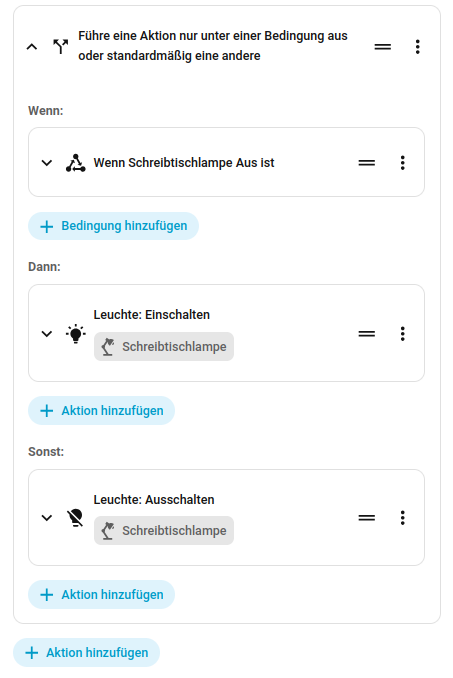
As action you have to start with an if block, either in UI like this:
or in YAML:
if:
- condition: state
entity_id: light.schreibtischlampe_licht
state:
- "off"
then:
- action: light.turn_on
metadata: {}
target:
entity_id: light.schreibtischlampe_licht
data:
brightness_pct: 80
else:
- action: light.turn_off
metadata: {}
target:
entity_id: light.schreibtischlampe_licht
data: {}
1 Like