Fabulous! that’s exactly the help i needed…thank you ! I’ll be setting up all the Ceiling and Side Lights like this i think…
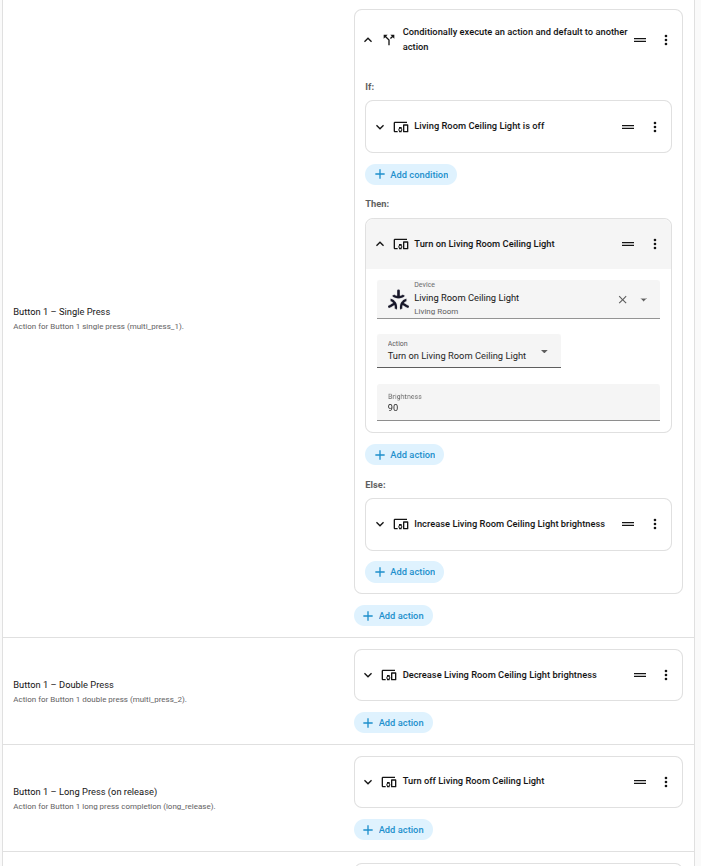
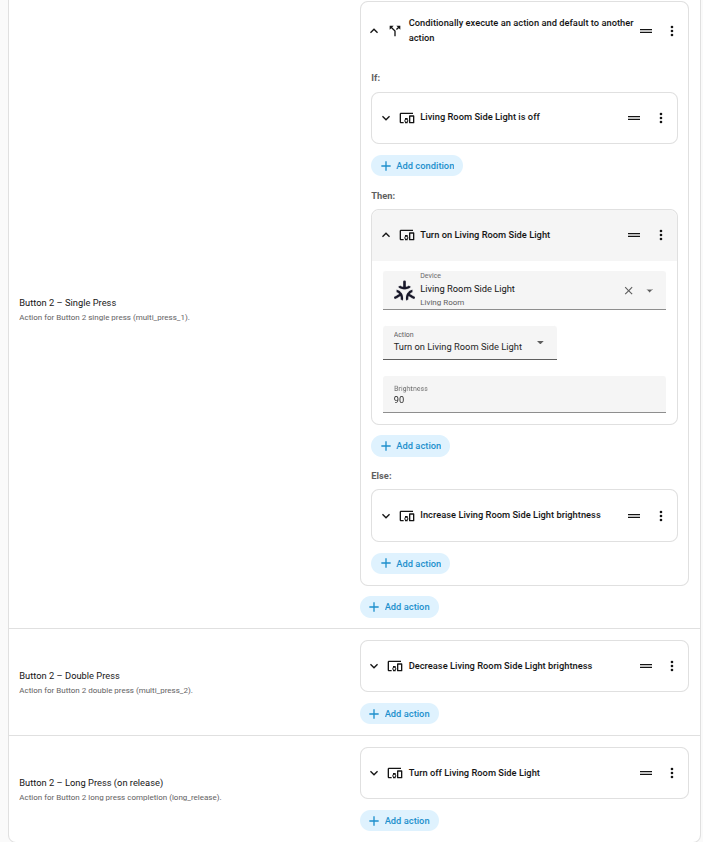
I just updated the blueprint and see that it’s been implemented in the automation.
However, the change doesn’t seem to be working for me.
not_from: ‘unavailable’
not_to: ‘unavailable’
When I reload the Matter integration, the last event is still triggered and executed.
However, the logging shows that the device was unavailable.
Am I doing something wrong?
Can you be specific on what you event is triggered? Are you restarting the integration or restarting the matter add on or the OTBR? I’m afraid I would need more detail.
I have a custom “party” light script that changes groups of lights on a button press through the color wheel. My first lesson was if any such loop doesn’t self terminate it has to have a corresponding button or manually issued command to stop the script or it will run forever to the exclusion of other scripts (depending on mode: ). Taking the batteries out of my controller after the script starts and putting them back in does not re-start my script. Neither does restarting the Matter Add on. Any detail you can provide would be helpful.
The trigger last used in the automation is restarted when you restart the matter integration.
The result could be, for example, a light turning on without you even knowing it.
So, it seems to still trigger in the unavailable state, despite the adjustment you made to the blueprint.
However, I’ve since created an automation myself where this doesn’t happen.
So, the issue is now resolved for me.
Do you mind sharing?
Thank you for the blueprint. It’s been working perfectly so far.
The only thing I changed in the blueprint is that I replaced the long-press release with a simple long-press action.
I think this gives a much better user experience because you see the result of the action immediately when the long press is completed. Otherwise, you don’t know how long you’re supposed to press for it to count as a “long press”.
Hi - @hasenpups I’d be interested in the change you made - could you please share? Many thanks
@hansenp I love that  , would you care to add your edits to my github (if you are tracking) and or paste them here and I can update them for everyone?
@kalmma same with your changes. I would love to make sure this is as complete as possible for everyone.
@censay could this be an example on long_press change:
# ===================================================================
# IKEA BILRESA E2489 Dual Button
# Blueprint Template v1.0.4
#
# Internal Versioning:
#   schema_version: 1.0.4
#   last_updated: 2026-01-18
#
# Changelog:
#   v1.0.4: Added Long Press to triggend during long press when button are still held down (long_press)
#   v1.0.3: Added not_from/not_to filters to prevent re-triggering on HA/Matter restarts (https://community.home-assistant.io/t/ikea-bilresa-matter-button-blueprint-for-ikea-matter-over-thread-button-actions-scripts-and-entities/962344/12)
#   v1.0.2: Initial release
#
# Power-User Notes:
#   - This device exposes two event entities, one per physical button.
#   - You must select the correct event entity for Button 1 and Button 2.
#   - Each press updates the entity state (timestamp) and sets attributes.event_type.
# ===================================================================

blueprint:
  name: IKEA BILRESA E2489 Dual Button (Matter)
  author: censay,bjornh
  description: >
    Full-featured automation for the IKEA BILRESA E2489 Matter dual-button
    remote. Supports single press, double press, and long press (on release)
    for both buttons. Uses event entities exposed by Home Assistant for
    Matter devices. Single-press actions are prioritized for reliability.
  domain: automation
  source_url: https://github.com/censay/haos-blueprints
  homeassistant:
    min_version: 2025.12.1

  input:
    target_device:
      name: BILRESA Button Device
      description: >
        Select the IKEA BILRESA E2489 matter device.
      selector:
        device:
          filter:
            - manufacturer: IKEA of Sweden

    button1_event:
      name: Button 1 – Event Entity
      description: >
        Select the event entity for Button 1 (for example:
        event.bilresa_dual_button_button_1_2).
      selector:
        entity:
          domain: event

    button2_event:
      name: Button 2 – Event Entity
      description: >
        Select the event entity for Button 2 (for example:
        event.bilresa_dual_button_button_2_2).
      selector:
        entity:
          domain: event

    # ---------------------------------------------------------------
    # BUTTON 1 ACTIONS
    # ---------------------------------------------------------------

    button1_single:
      name: Button 1 – Single Press
      description: Action for Button 1 single press (multi_press_1).
      default: []
      selector:
        action: {}

    button1_double:
      name: Button 1 – Double Press
      description: Action for Button 1 double press (multi_press_2).
      default: []
      selector:
        action: {}

    button1_long:
      name: Button 1 – Long Press (on release)
      description: Action for Button 1 long press completion (long_release).
      default: []
      selector:
        action: {}

    button1_long_press:
      name: Button 1 – Long Press (held down)
      description: Action for Button 1 long press during button are down (long_press).
      default: []
      selector:
        action: {}

    # ---------------------------------------------------------------
    # BUTTON 2 ACTIONS
    # ---------------------------------------------------------------

    button2_single:
      name: Button 2 – Single Press
      description: Action for Button 2 single press (multi_press_1).
      default: []
      selector:
        action: {}

    button2_double:
      name: Button 2 – Double Press
      description: Action for Button 2 double press (multi_press_2).
      default: []
      selector:
        action: {}

    button2_long:
      name: Button 2 – Long Press (on release)
      description: Action for Button 2 long press completion (long_release).
      default: []
      selector:
        action: {}

    button2_long_press:
      name: Button 2 – Long Press (held down)
      description: Action for Button 2 long press during button are down (long_press).
      default: []
      selector:
        action: {}

# ===================================================================
# AUTOMATION LOGIC
# ===================================================================

variables:
  button1_entity: !input button1_event
  button2_entity: !input button2_event

trigger:
  - platform: state
    id: button1
    entity_id: !input button1_event
    not_from: 'unavailable'
    not_to: 'unavailable'
  - platform: state
    id: button2
    entity_id: !input button2_event
    not_from: 'unavailable'
    not_to: 'unavailable'
  # Added not_from/not_to filters to prevent re-triggering on HA/Matter restarts; event entities use timestamp states

condition: []

action:
  - variables:
      press_type: "{{ trigger.to_state.attributes.event_type }}"
      trigger_id: "{{ trigger.id }}"

  - choose:

      # -------------------------------------------------------------
      # BUTTON 1
      # -------------------------------------------------------------

      - conditions:
          - condition: template
            value_template: >
              {{ trigger_id == 'button1' and press_type == 'multi_press_1' }}
        sequence: !input button1_single

      - conditions:
          - condition: template
            value_template: >
              {{ trigger_id == 'button1' and press_type == 'multi_press_2' }}
        sequence: !input button1_double

      - conditions:
          - condition: template
            value_template: >
              {{ trigger_id == 'button1' and press_type == 'long_release' }}
        sequence: !input button1_long

      - conditions:
          - condition: template
            value_template: >
              {{ trigger_id == 'button1' and press_type == 'long_press' }}
        sequence: !input button1_long_press

      # -------------------------------------------------------------
      # BUTTON 2
      # -------------------------------------------------------------

      - conditions:
          - condition: template
            value_template: >
              {{ trigger_id == 'button2' and press_type == 'multi_press_1' }}
        sequence: !input button2_single

      - conditions:
          - condition: template
            value_template: >
              {{ trigger_id == 'button2' and press_type == 'multi_press_2' }}
        sequence: !input button2_double

      - conditions:
          - condition: template
            value_template: >
              {{ trigger_id == 'button2' and press_type == 'long_release' }}
        sequence: !input button2_long

      - conditions:
          - condition: template
            value_template: >
              {{ trigger_id == 'button2' and press_type == 'long_press' }}
        sequence: !input button2_long_press

mode: restart
I added the BILRESA dual button via Zigbee2MQTT. Would this blueprint work in that case as well?
Thank you for the sample. I did it in exactly this way.
@censay can you integrade the option for the long_press into you solution?
Can you share your long press action you mentioned earlier and clarify the user experience you are seeking? Either here or as a github suggestion/issue.
Thanks!
I use exactly this implementation: IKEA BILRESA Matter Button 👈 [Blueprint] for Ikea *Matter over Thread* Button (Actions, Scripts, and Entities)! - #29 by bjornh1337
1 Like
I cant get this script to dim up or down when long press. Only steps by pressing multiple times on the button.
How does long press is working here? Is it possible to start some action when starting to hold the button and stop the action when the button is released?
Long press will activate something when the button is released. Putting in smoothly changing lighting into the core script over engineered it.
The different types of button presses are listed in the blueprint. Single-press, double-press, long-press-release. Those are 3 modes for the button.
Adding in dimming requires looping logic (although each HAOS update brings new things to triggers that simplify things). I personally have never had success with transition times provided through the UI. And each type of bulb likes to handle brightness a little differently.
Thanks, this is just what I was looking for.
1 Like
 I just updated the blueprint thanks to a community contribution to incorporate long press (on press) in addition to the current (on release)!
To celebrate I’m sharing “party”  mode script I use with my Bilresa on a group of lights grouped as “Attic lights”. You can save this in homeassistant/scripts.yaml and assign a button to turn it on. It runs a maximum of 4 times to avoid an infinite loop. I assign the second button to “stop” the script which freezes it at whatever color it was displaying.
/homeassistant/scripts.yaml
cycle_neon_colors_on_selected_lights:
  alias: Cycle Neon Colors on Selected Lights
  mode: restart
  sequence:
  - variables:
      presets:
      - name: Neon Red
        hs:
        - 0
        - 100
      - name: Hot Pink
        hs:
        - 330
        - 100
      - name: Neon Magenta
        hs:
        - 300
        - 100
      - name: Electric Purple
        hs:
        - 280
        - 100
      - name: Neon Blue
        hs:
        - 220
        - 100
      - name: Neon Teal
        hs:
        - 180
        - 100
      - name: Lime Green
        hs:
        - 100
        - 100
      - name: Neon Yellow
        hs:
        - 60
        - 100
      - name: Neon Orange
        hs:
        - 20
        - 100
      target_lights: '{{ target_lights | default(''light.attic_lights'') }}'
      dwell_seconds: '{{ dwell_seconds | default(5) }}'
      transition_seconds: 3
      max_loops: 15
  - repeat:
      count: '{{ max_loops }}'
      sequence:
      - repeat:
          for_each: '{{ presets }}'
          sequence:
          - action: light.turn_on
            target:
              entity_id: '{{ target_lights }}'
            data:
              hs_color: '{{ repeat.item.hs }}'
              brightness: 255
              transition: '{{ transition_seconds }}'
          - delay: '{{ dwell_seconds }}'
Hopefully they work for you, these lights are full RGB Linkind Matter bulbs, and I have bulbs are very particular about their RGB :).