Hey mate, this is absolutely brilliant and I can’t express my gratitude enough. I found (probably I configured something wrong) a hickup - when configure temp and hue, or temp or hue only, with no user defined action, it does work only in relaxed mode. When switching to instant, it stops working. Not a big deal, just maybe something you wanna have a look into?
Hi, thanks so much for this blueprint, if I’d not stumbled across it I’d have been here for a LONG time getting it to do anything useful!
Th only issue I seem to be having is with lowering the brightness of my light in instant mode, but ONLY on channel one. It simply doesn’t work, but is fine in relaxed mode. And instant works fine on channels 2 and 3.
I also renamed my device just to double check it wasn’t suffering from the naming issue and still no luck.
(And side note, anyone using it well with Zigbee2MQTT yet?)
@Cloli, @KE55ARD these issues with instant mode seems weird and I cannot reproduce
Please try the following:
- double check all sensor entity names:
the battery related names must not end in a number
the switch names must end in a single number - disable your existing automation
- reload Matter Integration
- create a new automation with only the problematic instant mode case
- check if it is working as expected now
I’m not sure what’s any different now… But I removed it, tried it in Zigbee2MQTT to see what events worked, realised it wasn’t quite there yet, so re-added it via Matter, and created the automation again, and somehow it works now.
Thanks! 
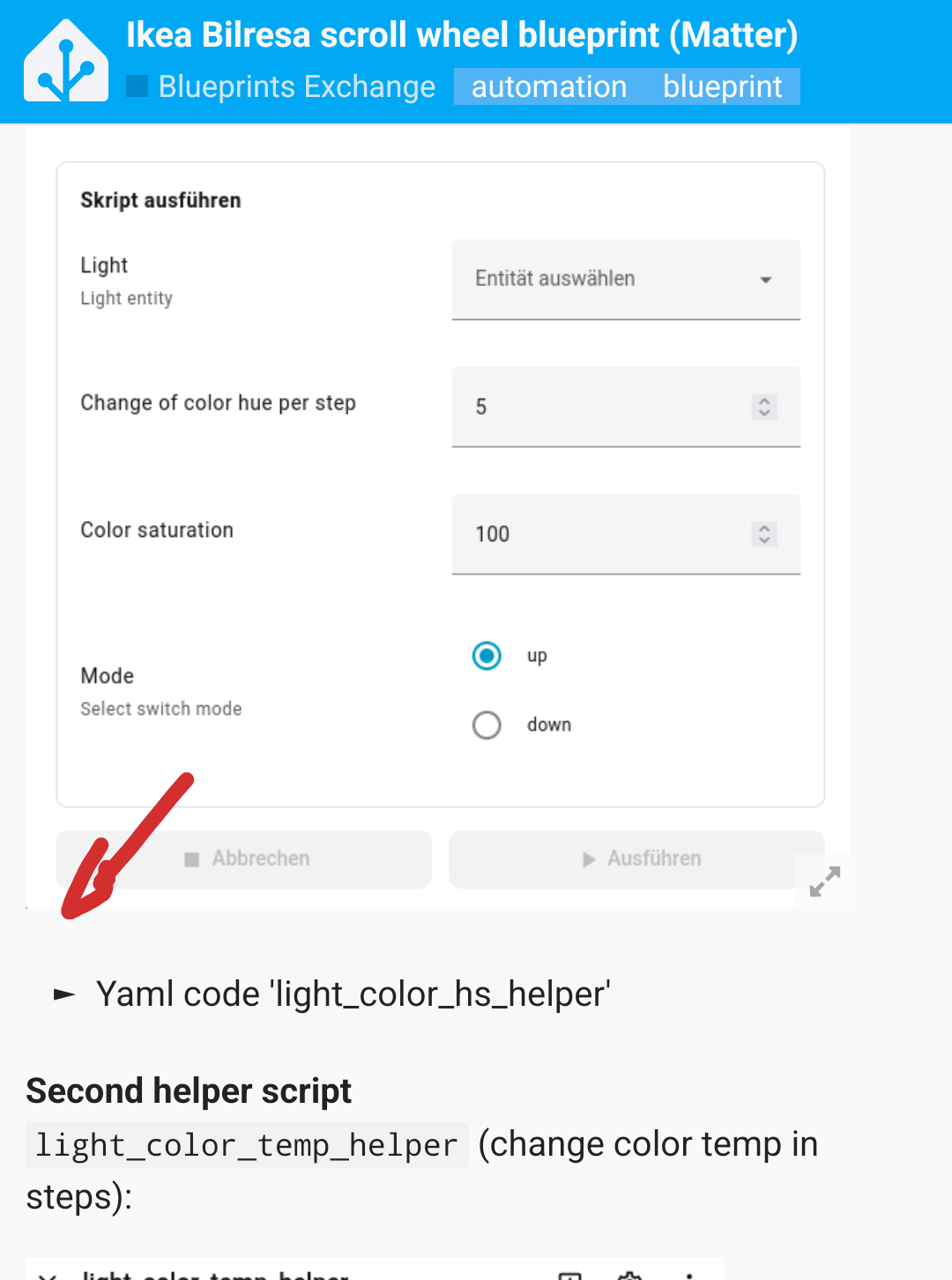
I have the error whenever i want to change the Color of my LED i get “script.light_color_temp_helper” Error.
Am i missing any script ?
Yes, the scripts are in the description/first post. The Yaml code is in hidden sections you must open first:
1 Like
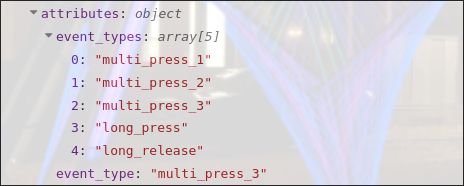
It seems like there is a triple press event type for button 3, 6 and 9. "
1 Like
@odh since I am not really able to perform a triple click (and remember to do so), I did not add this feature at the beginning. 
But hey, if it’s useful for you, the update is available now in version 2026-01-24
Thank you! Working great, easier to use triple click than long press.
1 Like
Thanks a lot for this blueprint! However… I can’t get the wheel to work for changing volume on my amp. I’ve enabled the 9 disabled sensors, but instant doesn’t work, and relaxed doesn’t either. I tried from all 3 channels, just in case, and also re-created the automation from scratch after enabling the sensors. Regular click actions work, such as simple volume up or down to my media player entity. But not from the wheel.
I’m still trying to debug, but the trace is “failing” on the 4 conditions (dim, temp, hue, volume) and not going down the volume code path.
It seems to be with this:
  - conditions:
      - condition: template
        value_template: >-
          {{ vars['scroll_wheel_mode_' ~ channel] == 'media: volume control' and
          is_state(repeat.item, 'playing')}}
Since I do see channel: ch1 in one of the previous steps, and also scroll_wheel_mode_ch1: 'media: volume control' in my automation config, I suspect the repeat being the problem. This is what I see in the step’s changed variables:
repeat:
  first: true
  index: 1
  last: true
  item: media_player.marantz_cinema_70s_2
Maybe this playing is the issue? I’m trying to change the volume of an amplifier, which is likely never reporting itself as playing… I actually checked its state, and it’s on. It does also have a device_class: receiver attribute, in case you were trying to avoid unexpected/unwanted volume changes while nothing was playing.
1 Like
I figured out volume can be set up/volume up/down only if the Alexa is playing, as you confirmed in the code block. If Alexa is not playing the volume command is skipped.
I was going to get one of these but they had 3 on display to try and two were really bad on scrolling too smooth to turn and a bit wonky which tells me they will be easy to wear out the scrolling mechanism and one was not still had the like dimple feel to it so I just got the two button version.
You can try user defined action with the volume example in the description/first post and see if this is working for you.
Added state = 'on' to repeat loop in version 2026-01-25 (I cannot test but I think it’s a valid change). Please try if this fixes your issue.
Thanks, that “or” fixes the volume control on my amplifier indeed!
1 Like
How do you get the scroll wheel to change the colour or the light kelvin temp?
Did you add the helper scripts from the description?
see Ikea Bilresa scroll wheel blueprint (Matter) - #4 by jhol-byte as well
I added a user defined example for covers in the description, maybe you can make use of it or post some improvements
I encountered the exact same issue with two remotes where specifically ch1 left on instant mode won’t work but seemingly got it resolved by re-pairing one of them as a matter device.
This trigger simply never triggers for some reason.
event_type: state_changed
event_data:
  entity_id: '{{ var_scroll_left_ext_ch1 }}'
trigger: event
id: scroll_left_ext_ch1
The device itself shows both the events and button sensors working fine
Looked into it deeper and found the silly culprit.
var_scroll_left_ext_ch1: |-
  sensor.scroll_wheel_living_room_current_switch_position_2

    sensor.scroll_wheel_living_room_battery_type_2
Using the Battery Notes integration creates a battery type sensor that is picked up by your regex for switch position 2.
2 Likes
Thank you very very much for the blueprint. It is helping a lot!
I want to control a WLED Controller with this remote. Unfortunately, I have some trouble with the scroll scroll wheel. Using the user defined scroll action, I can get it to log messages or do other actions. But none of the other options work, although i created the two helpers.
The “normal” button works like a charm