I have just tried this out and it’s probably the best blueprint I’ve found for the scroll wheel to control lights.
I haven’t tested the hue/colour options yet, but for dimming it’s highly responsive and very fast - I had tried using Matter and blueprints that use Matter, but the ones I tried felt slow and didn’t work as well.
I’ve been experimenting with the IKEA scroll wheel to control lights for a while and I had pretty much given up until I found this blueprint.
I currently use Moes/Tuya zigbee smart knobs to control lights, and they’re OK but I was hoping to change over to IKEA as they use rechargable batteries.
I am not sure if I will change though as even with this blueprint the IKEA scroll wheel isn’t quite perfect.
The main issue I have is that it works very well held in the hand and turning the wheel with your thumb, but I want something that works well attached to the wall - and the physical action of trying to turn the IKEA wheel when it’s attached to the wall is very awkward - it’s not very well designed for that use.
I won’t rush to replace all the light controls in my house just yet - but this blueprint is definitely the best I’ve found so far.
Thank you so much for this blueprint! I’m new to Zigbee and MQTT, and your work has been incredibly helpful.
I run two Zigbee2MQTT instances with separate topics (automating across two locations), which meant the hardcoded zigbee2mqtt topic didn’t quite work for my zigbee2mqtt_house setup. With some help, I modified the blueprint to add a configurable MQTT Base Topic input field, and now it works perfectly across both my instances.
The dual Z2M/ZHA support, mode cycling with helpers, and overall robustness is really impressive. The core logic is beautifully coded - my modification was tiny compared to the solid foundation you built.
If you’re interested in supporting multiple MQTT base topics out of the box, I’m happy to share the modification. Either way, thank you for creating such a well-designed blueprint!
Quick follow-up: Just realized the auto-reset timeout feature has a bug that causes it to fail silently.
The problem: Line 243’s datetime comparison throws TypeError: can't subtract offset-naive and offset-aware datetimes, which breaks the auto-reset functionality.
The fix: Replace:
yaml and (now() - (states(last_activity_helper) | as_datetime)).total_seconds() > reset_timeout
With:
yaml
and (as_timestamp(now()) - as_timestamp(states(last_activity_helper))) > reset_timeout
Converting to Unix timestamps before comparison avoids the timezone issue. Tested and working perfectly now!
I just tried this and I’m having some issues when using it with the media player mode. if i just use the scroll wheel it works fine but if i change the volume from something else from 50% to 20% and then try to turn it up again it goes to 60% instead of 30%.
Thanks for this. I have configured this on my system and it is working fine with the button to turn on/off an associated zigbee light. However, when trying to use the scroll wheel to manage the brightness I get this error in the trace
Triggered by the event ‘zha_event’ at 26 January 2026 at 15:06:01
If: No action executed
Choose: Option 2 executed
Stopped because an error was encountered at 26 January 2026 at 15:06:01 (runtime: 0.02 seconds)
Error rendering data template: TypeError: ‘int’ object is not iterable
I am using ZHA and was hesitant to send this as it is probably just me being stupid somewhere but any advice welcome.
Thanks. In the end I used Gemini to help me fix this and took control like you did but changed the whole thing to the following, which also fine tuned some of the transition for me to feel a little smoother. It stripped out the non ZHA stuff as I am not using.
Hi!
Thank you very.much for the blueprint.
I am using this scroll wheel as a volume controller for my onkyo avr but I have an issue that i dont know how to resolve.
My onkyo vokume is 0-80 with a step every 0.5.
When i use my.old ikea scroll wheel i can fine tune this for a very granular control that half a wheel rotate changes the volume by 0.5
With this blueprint i can only jump every 5 units of.volume and this is not so good.
How could I change this step to be smaller?
Thank you.
I am using ZHA.
The Blueprint works well after the changes mentioned in this thread.
I was testing why my blueprint does not change the mode when a double-click is performed.
I might found the reason for my case. The Billresa Scroll wheel does not send any ZHA event when double-clicking or long-pressing.
Have you guys noticed something similar?
Do you know if there’s a quirk that would fix this, or is the only option to move from ZHA to z2m?
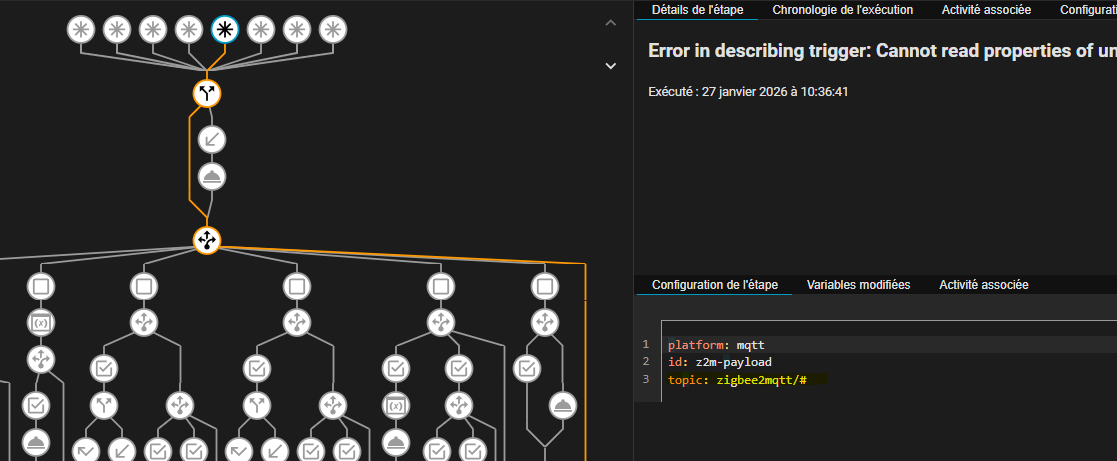
Thank you for the blueprint @mcinnes01. I’ve added configurable min brightness input to prevent light turning off via scrolling, and also added an optional z2m_topic text input so users can subscribe to a specific device topic instead of the zigbee2mqtt/# wildcard (prevents the action from triggering with unrelated messages).
Pay attention you have a generic MQTT trigger without filters, this can flood your system on every message.
Imho this should not be active by default
platform: mqtt
id: z2m-payload
topic: zigbee2mqtt/#