I question, how do you setup remote access and https? I have nginx running as an app on my truenas, but I need to somehow bypass the certs from that to home assistant OS, cant really figure that one out…
I have remote access through Nabu Casa, so I’m sorry, I won’t be able to help. Your best bet will probably be starting a new thread asking for help. It might even be worth posting in the TrueNAS forums as well. I know what you are trying to accomplish is possible, but I don’t have any experience with that.
Hey Troy,
That server died and I’m waiting for another motherboard, plus I’m going to Japan for two weeks next Monday.
I’ll get things running again after that.
Frank
Hey Troy,
I followed the instructions, immediately above, after following the instructions (up to and including the lines of code) in the first post and, voila, it all worked.
I repeat; thank you, I would not have a functioning HAOS without you.
Kindest regards,
Frank
1 Like
I’ll try to get a fully updated guide for TrueNAS 25.04 (Fangtooth) posted ASAP. But it’s going to be at least a few days before I have time.
To get people by, for now, the installation part (download, extract, and write the image to zvol) has not changed.
Screenshots of the new instances setup can be found here
(Screenshots may be a little dated since they are from the beta release, but I think the only change is the addition of PCIe passthrough)
So, I guess there are some other changes related to using an existing ZVOL
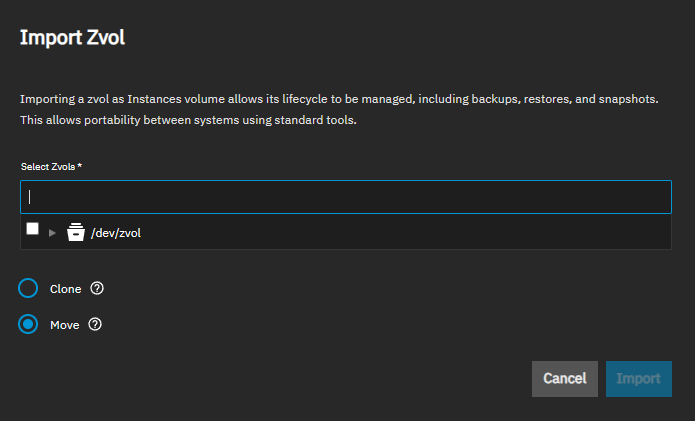
I haven’t had time to update yet, or investigate the difference between clone and move or when and why to select one over the other
Just set up HomeAssistant on a brand new fresh TrueNAS install using this updated guide from @troy and it worked beautifully. OP could we maybe update the top post to reflect the new changes? I spent quite a bit of time looking confused at the old version 
I appreciate you sharing for us noobs Thanks!
btw it blew my mind that this magically showed up on my network as homeassistant.local with no further work required! I thought I was going to have to set up local DNS or something!
1 Like
Work is busy right now, but I’ll get something together as soon as possible.
I need to think about whether it’s better to update this guide or make a new one. I imagine some people will still be on EE for a while. It might also be better to start fresh, so information related to using Incus VMs will be separate and easier to find. I also need to figure out whether it’s best to recommend a clone or move when importing the zvol. And I’m thinking about expanding this slightly to cover setting up a bridge and configuring backups to TrueNAS.
1 Like
I think a new post with a big clear link to the old post (and visa verca) would be super useful!
I don’t want to get too excited just yet, but on the T3 podcast, they were talking about some continued improvements to the Instances coming in the fall 25.10 release, hopefully including the ability to import from other formats like qcow2. HAOS was mentioned, and with a little luck, on future releases of TrueNAS, we’ll be able to simply download the HAOS image and select it from the UI to import it. No more having to use the command line extract or write the image to a zvol!
Anybody had success with Fangtooth instances yet? I’m currently simply trying to install fresh, followed the original post for creating the zvol (thank you!) and was able to import the zvol into incus instances.
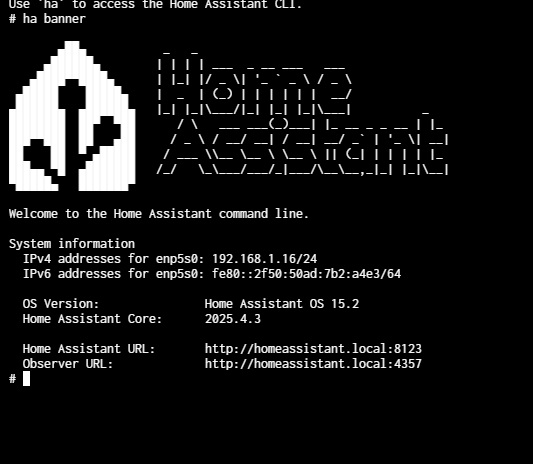
HAOS is running, I can access the CLI through the instance console, I can even access the observer through http://homeassistant.local:4357/ and everything is running. However, I am unable to access the web UI from either https://homeassistant.local:8123/ or the IP address the VM is pulling.
Edit: After searching some previous in this thread, decided to include some screenshots (well I guess I’m limited to 1 screenshot):
Yes. I have in testing…
Everything looks good as far as I can see. How long did you wait before trying to access Home Assistant? I’ve noticed that it may show ready in the CLI as shown in your screenshot, but the web page is not available as quickly. The speed of your NAS will affect how quickly the web UI becomes available, but I would assume a 5 - 10 minute wait at most. (First time startup or after updates things may still be installing in the background)
I would also stick with the IP address for now. Using homeassistant.local can be hit or miss depending on your network - maybe try without using http or https at the beginning, so try 192.168.1.16:8123
It’s been at least an hour now. Tried with and without http(s) as you had mentioned already with the IP. No dice.
Also of note I had this setup in EE as a VM and it was accessible just fine, but hadn’t hardly set up anything yet so I just decided to start fresh.
I’m stumped 
Edit: also of note it is showing connection refused, and not unreachable, so it’s hitting something
I’m a bit stumped myself.
I’m not sure how you set up your network settings, but it certainly looks like you have a valid IP address.
On mine, I have left the Incus Global settings at default
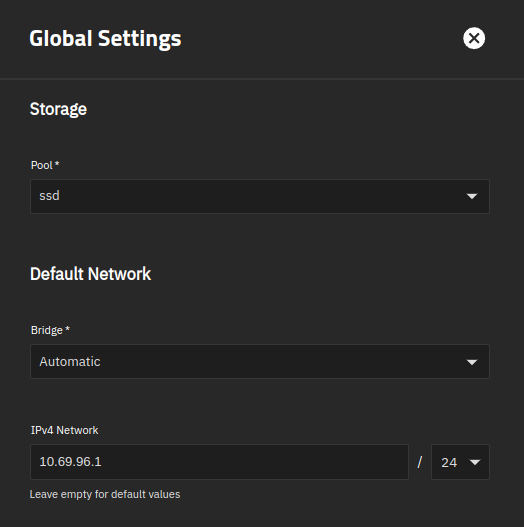
And when creating the VM, I attached it to the bridge I created on TrueNAS. Notice that my bridge br0 shows up under Bridged Adaptors and Macvlan. I needed to select the first one for it to work
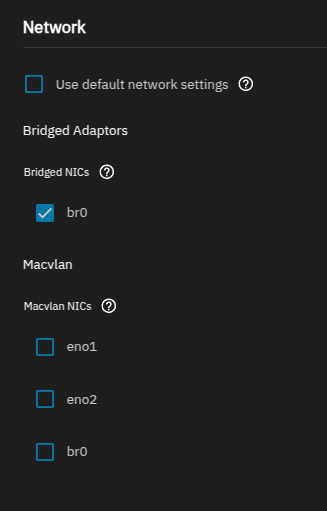
EDIT: I also tried Macvlan attached to my NIC (not br0) and that also worked, but I was unable to reach back to TrueNAS, so I switched to the bridge set up so I could configure Home Assistant backups to save on TrueNAS
1 Like
I did not set up a bridge, as, quite frankly, I’m clearly over my head here, and not sure specifically what networks to bridge.
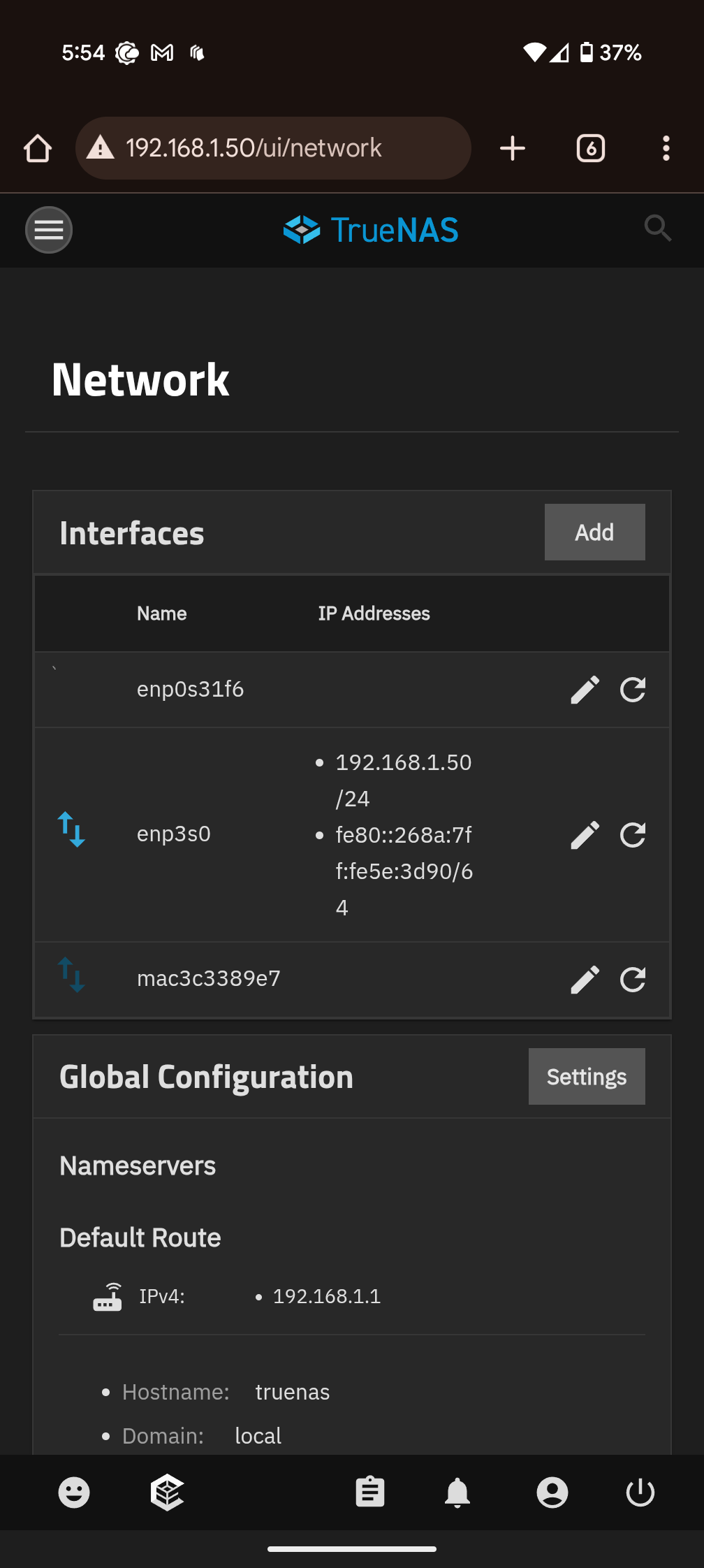
I had left the global settings network as the default, but manually set it to 192.168.1.1/24 and still no success.
It looks like the macvlan is automatically created with the instance, shown in screenshot.
Also just want to say thank you for putting in the effort and responding so quickly, you’re awesome.
Ok, we’re looking in different places here. Your screenshot is of TrueNAS global settings.
I was referring to the Instances – Global Settings. Sorry, I should have explained that better. Here are better screenshots to show what I’m referring to. These are the settings I left at the default.
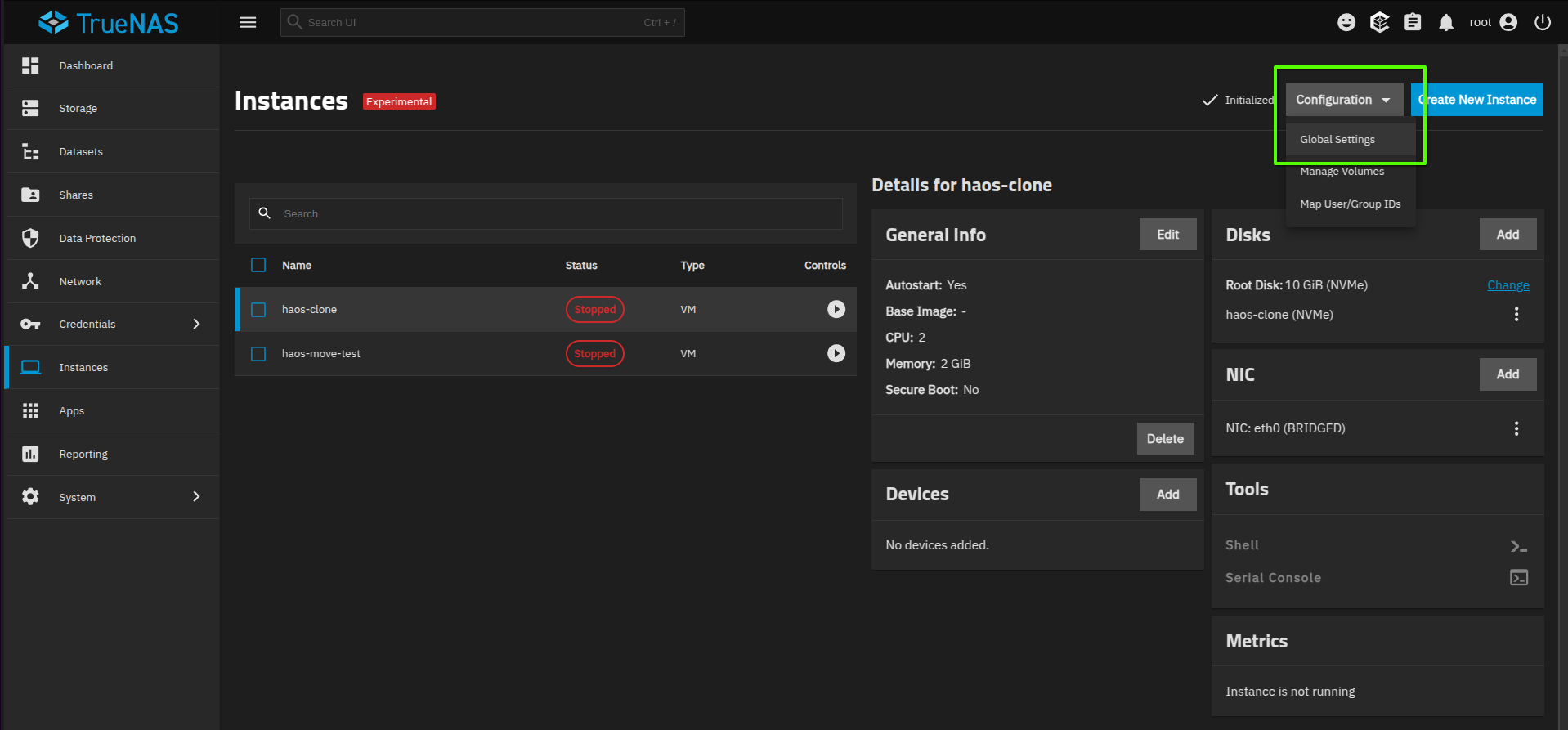
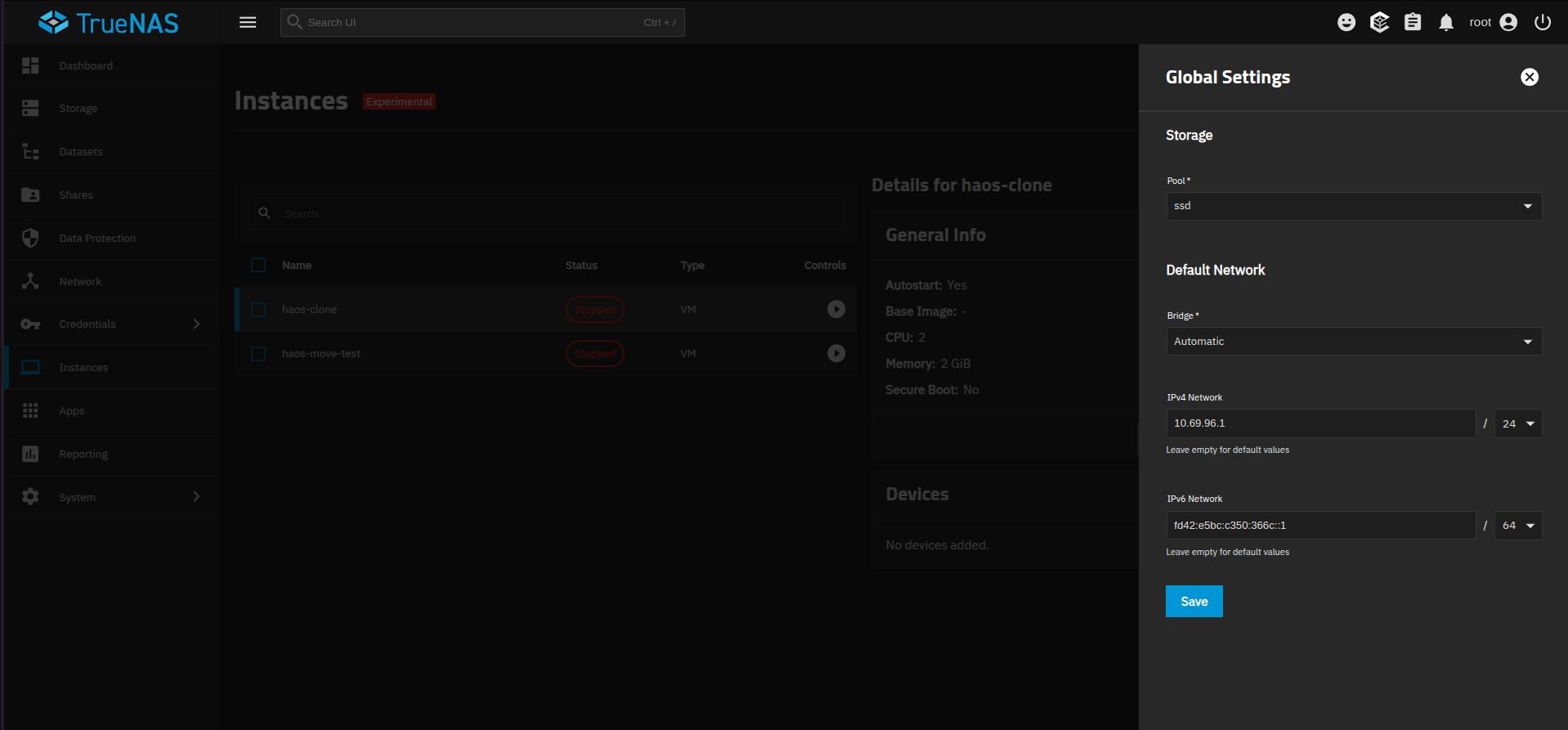
Since you do not have a bridge right now, when creating the VM, uncheck Use default network settings, and select your NIC under Macvlan instead.
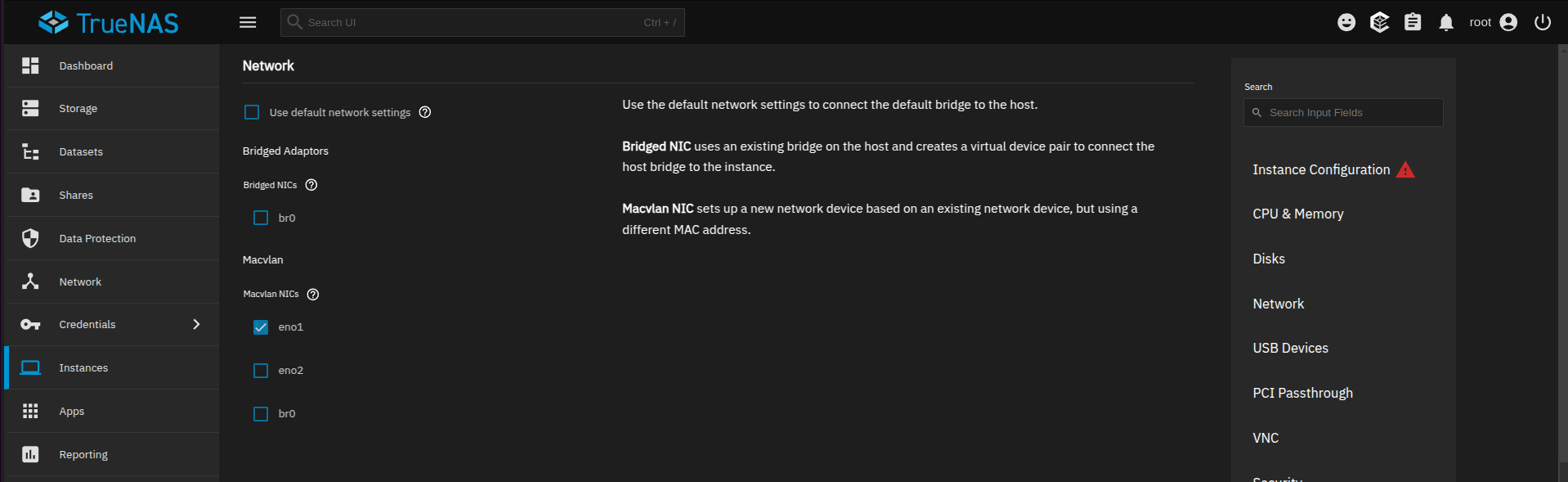
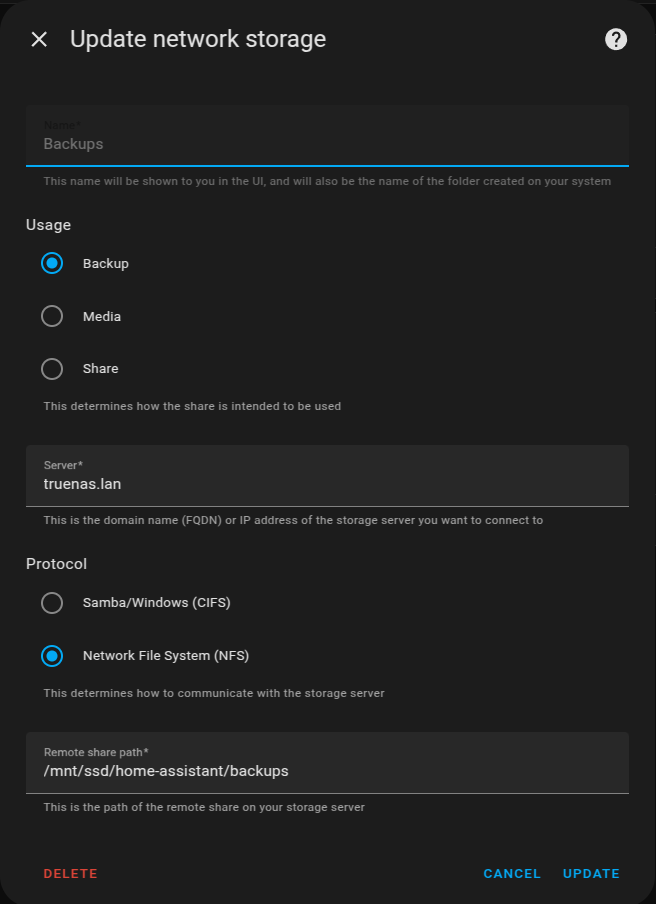
You need to configure a bridge on TrueNAS if you want the VM to be able to communicate back to TrueNAS. For Home Assistant, you need a bridge if you want any network storage connected back to TrueNAS. For example, I have (in Home Assistant) set up a network storage location to save backups using an NFS share on TrueNAS.
(screenshot is from Home Assistant)
Here is a good video to follow if you want to set up a bridge. For HAOS VM, any mention of jailmaker or sandbox does not apply.

EDIT2: I just ran another test on my system using Macvlan and compared to your screenshot of TrueNAS network, it looks like you’ve done everything correctly. I also have macvlan automatically created when I start the VM
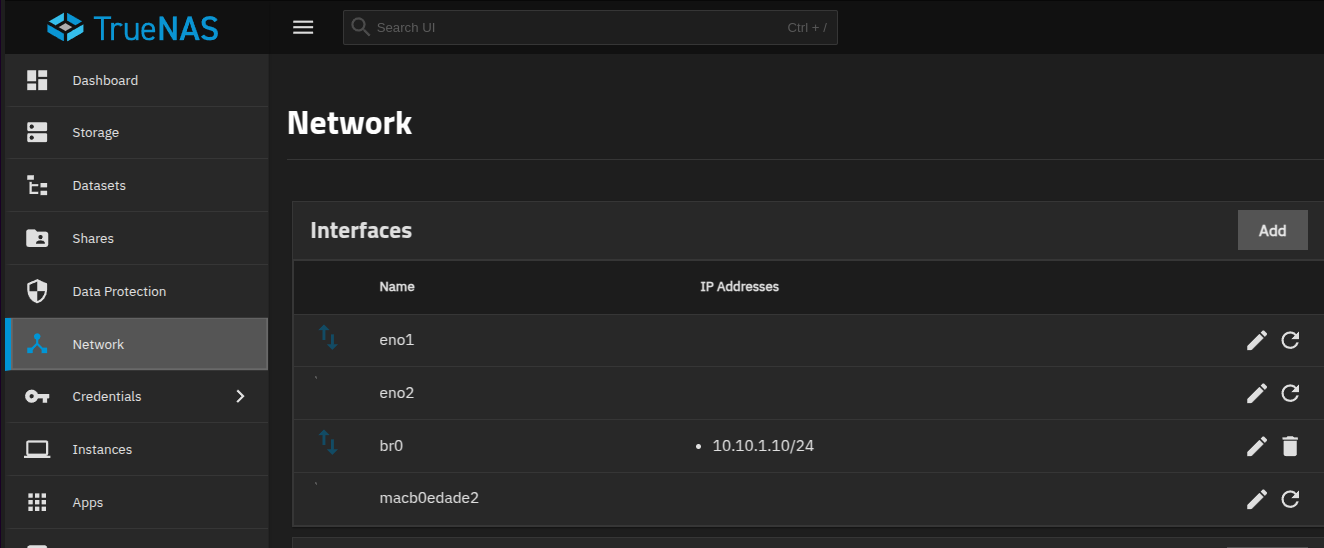
Note that I used eno2 for this test, but it’s not plugged in so I don’t have any connection showing
1 Like
Thank you again for all the help and thorough write up, I truly appreciate it. Tried everything above and still the same situation. I also tried my other physical NIC just to rule something else out, and same situation. Able to access the observer but not web GUI.
I also reset the truenas boot configuration just to rule that out as well.
I think I’ll hold off for now and see if an update magically fixes it, or if somebody else runs into a similar issue.
Hi.
I’m new to TrueNAS and have just moved from QNAP to Fangtooth. Not the easiest of transitions, I can tell you that…
After 3 days of work, I’ve now got all of my containers in order but since I want to run HAOS in a VM as well I came to this post when searching Google for how to do it.
I’ve done the 3 initial commands, up to
qemu-img convert -O raw haos_ova-15.2.qcow2 /dev/zvol/FirstPool/HAOS where HAOS is the name of my newly created Zvol in my first and only pool.
I then went to Instances and chose Upload ISO, import a zvol or use another volume under VM Image Options as I couldn’t see the option of Use Zvol with previously installed OS.
I clicked Select Volume and then Import Zvols. When given the option, I chose Move.
I filled in the rest of the information for the VM to the best of my ability but then when I clicked Create I was met by this error message:
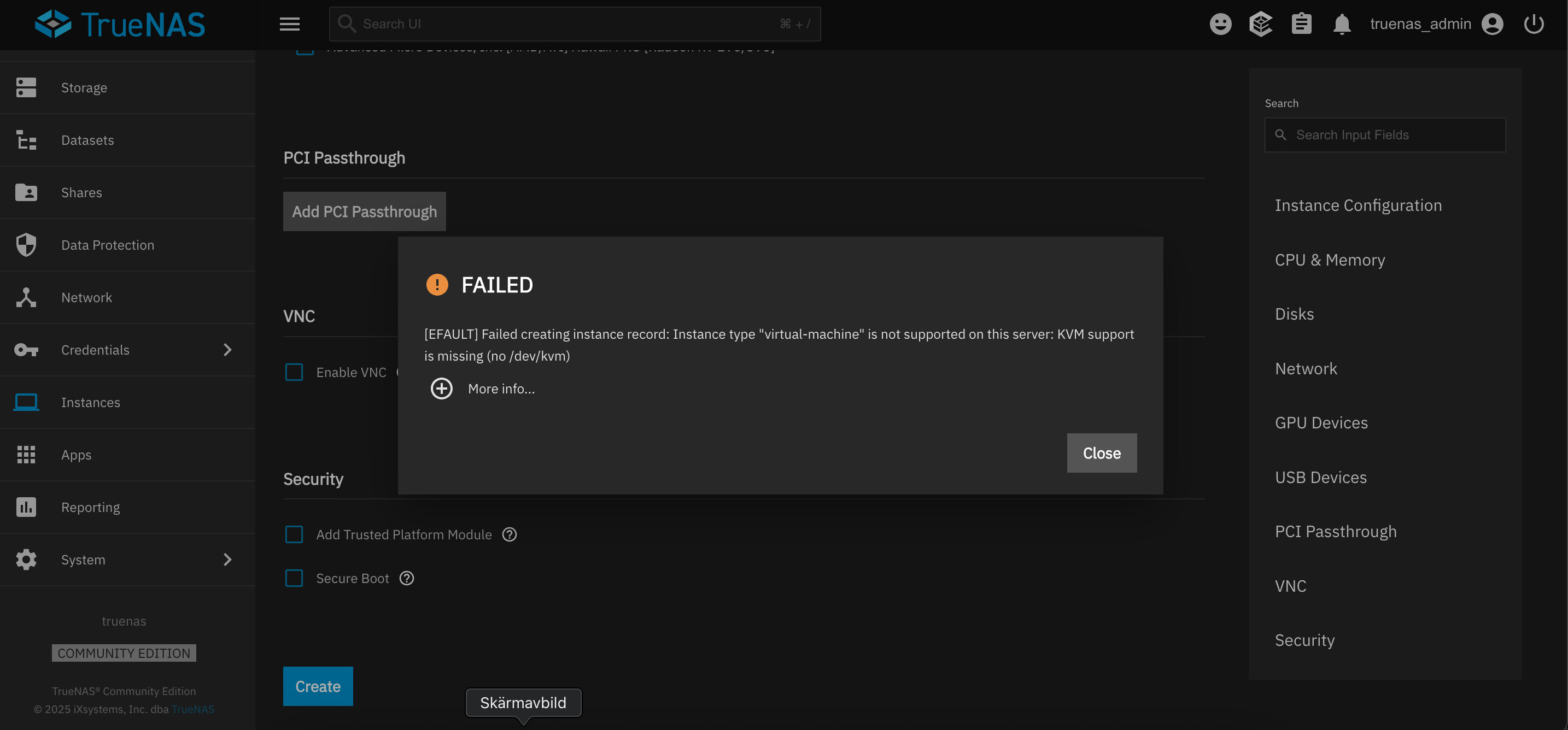
Since people have said that they have been able to make a clean VM install of HAOS in Fangtooth, I’m wondering where I’ve gone wrong? I’m guessing that maybe the qcow2 never got converted to raw as I don’t get the same options as @troy . Is qemu-img some kind of service that I need to download before doing all of this?
qemu-img is already included in the TrueNAS installation.
The options shown in the first post are different because I have not had a chance to update the Create the Virtual Machine portion yet. TrueNAS switched from libvirt to Incus for managing VMs in the 25.04 release, so the setup screens are a bit different now.
The error message Instance type “virtual-machine” is not supported on this server: KVM support is missing leads me to believe that either your server does not support VMs or may be disabled in the computer BIOS.
(Copied from Google)
To enable KVM support in the BIOS, you need to navigate to the CPU-related settings, locate the virtualization settings (usually named “VT-x” for Intel or “AMD-V” for AMD), and enable them. Once enabled, you can use KVM to run virtual machines.
Have you run any Virtual Machines on this server hardware in the past?
If so, please confirm that KVM support is enabled in the BIOS. If it is, we may be looking at a bug in TrueNAS.
I had HA running fine as a vm for a while with the old guide you did, I moved my zvol over to the ./ix-virt volume and then my damn zfs crashed on my ssd and I had to start over. AHHH
I should have cloned my zvol vs moving it in retrospect.