Thanks, this looks like a great replacement. Any consideration on a stand alone docker version that would work with a home assistant container install? I’m using this one for now but yours looks much better and supports mqtt.
That must be some kind of local issue, try resetting the HA for example. It should work.
Yes, that’s exactly what I based it on. I’m running HAOS, so I wrapped it as an add-on. For easier integration I added MQTT with autodiscovery for Home Assistant. If you go with the original version, you’ll just need to manually configure the sensors in your setup.
Hello everyone,
Like many of you, I was concerned to see that the native SMS notifications via GSM-modem integration is being deprecated. I rely on SMS for critical alerts like power outages, water leaks and internet failures, so I wanted to create a future-proof and extremely reliable solution.
After a lot of testing, I’ve landed on a setup that is working brilliantly, and I wanted to share the logic and architecture in case it helps others. Instead of trying to find a direct replacement integration, I’ve offloaded the entire task to a dedicated Raspberry Pi 4, acting as a relay.
The goal was to completely separate the modem and its dependencies from my main Home Assistant instance. The solution is a relatively simple but powerful Python web server running on the RPi4, which acts as an API gateway. When an automation in Home Assistant needs to send an SMS, it doesn’t use an integration, instead it just makes a simple HTTP web request to the RPi relay.
I used an old Raspberry Pi 4 with Raspberry Pi OS and an old Teltonika TRM240 modem, which the system identifies as using a Quectel EC21 LTE chipset.
Getting the modem to work reliably was the main challenge. Gammu Isn’t always the answer. My first attempt was to use gammu. Unfortunately, it proved very unreliable with this specific Quectel modem, constantly timing out and failing to connect. Maybe I did something wrong, but anyway. The breakthrough was abandoning gammu entirely. Instead, the script now uses the pyserial Python library to open a direct serial connection to the modem and send AT commands manually. This has been rock-solid.
A critical step was disabling the default ModemManager service on the Raspberry Pi. This service automatically tries to control any modem it finds, which created “device busy” errors and prevented my script (and gammu) from accessing the hardware.
Since this reliable relay was already in place, I also added endpoints to it for handling my cross-VLAN Wake-on-LAN and remote shutdown commands for various devices, making the RPi a “physical interaction” gateway for my Home Assistant.
I hope this overview of the logic is helpful for anyone looking to build a replacement for the old SMS integration. It’s been a fun project.
Happy automating!
I think I’m running into the same problem. When adding the @pavelve repository, use this link GitHub - PavelVe/home-assistant-addons and not the one in @pavelve’s post, which links to a specific add-on.
BTW: @ocalvo, maintainer of original integration, published it also as an add-on: GitHub - HomeOps/hassio-addons: Home of the SMS addon for Home Assistant
Hi.
I turned my HA instance to new add-on.
Add-on from @ocalvo does not work. Rewriting integration from local one to new installed in docker is not straightforward  I wish the author good luck with the modification, although I have the impression that it will be more about writing the integration from scratch.
Add-on from @pavelve works properly but in different way than old integration. With the help of Copilot I configured the Add-on to work with MQTT and rewrote my automatitions. Trigerring from MQTT after publication by add-on information about SMS receiving works very well.
A few thoughts to @pavelve after my struggles with starting his integration:
- instruction is very well written … if the reader understands how works MQTT or REST

- Gammu gives a little more information about state of the modem, so maybe you can publish more to MQTT and next display in HA (I think I can create some sensors using REST and results from port 5000)
- after reading docs it can be noticed that add-on and integration with MQTT is mainly for sending SMSes from HA, as a result receiving through MQTT has a small issue: SMSes are not deleted from modem’s memory - probably it can be overflowed and additionally after add-on restart all messages from memory are republished in MQTT (I created a bash script which deletes all messages from memory after reading the last one in HA, using localhost:5000/sms/getsms with curl)
Regards, Mickey
Hi. Thank you for your excellent add-on. Could you add unicode support to sending from button and to HA sms service? Thanks in advance
EDIT:
Never mind I’ve found the way:
notify:
  - name: SMS Gateway
    platform: rest
    resource: http://homeassistant.local:5000/sms
    method: POST_JSON
    authentication: basic
    username: admin
    password: !secret sms_admin_password
    target_param_name: number
    message_param_name: message
    data:
      unicode: "{{data.unicode}}"
Thanks everyone for the feedback — I did my best to cover everything you mentioned, hope I didn’t overlook anything!
 What’s New in the SMS Gateway Addon
Based on your feedback, I’ve implemented a bunch of new features! 
 Automatic Unicode detection – ensures correct delivery of messages with diacritics
 Persistent sent SMS counter + optional total cost sensor
 Button to reset counters
 Auto-delete of read SMS + button to delete all messages
 New REST API endpoints for SMS management
 Extended modem diagnostics (IMEI, model, IMSI, manufacturer)
 SMS storage capacity sensor
 Added new translations – now available in 10 languages
 Extended Device Support – added /dev/ttyUSB2, /dev/ttyUSB3, and /dev/ttyS0 for broader hardware compatibility
 Update now and explore all the new features!
Wow! Somebody reading messages on forum  Thanks @pavelve for an update. Everything works properly after update No reconfiguration was required
Unfortunately with my modem:

there is constant problem with offline status :
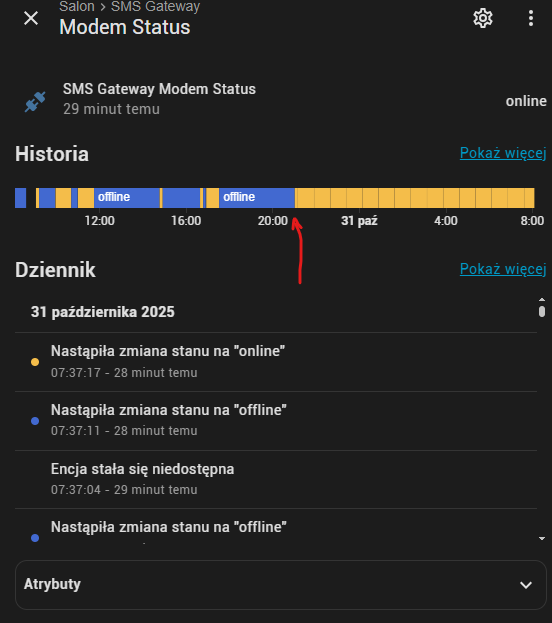
With arrow I marked moment in which I started using an automation to restart addon after “offline” status. Here are logs:
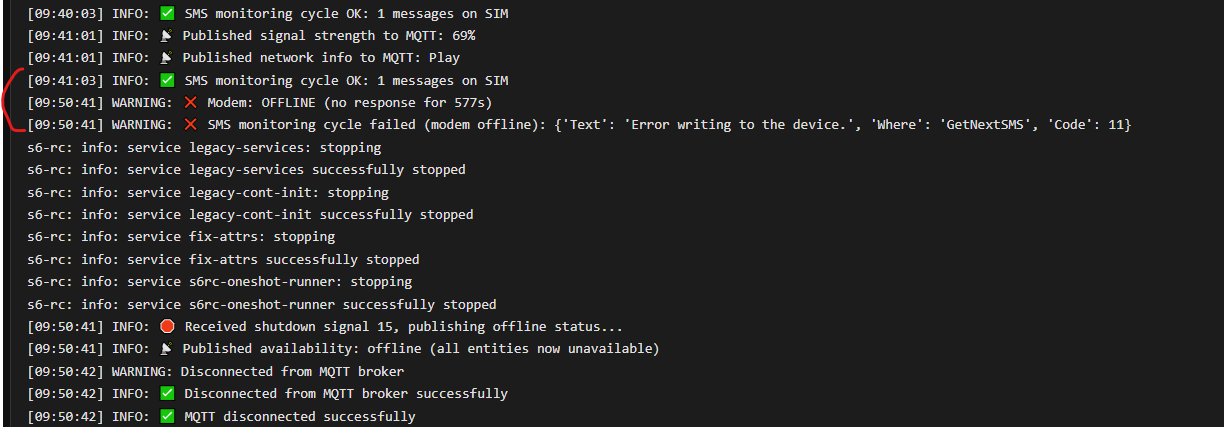
Could you please add an option to set logger level to debug? Now the addon is starting with Debug mode: off (as seen in logs)
The offline status is only informational and doesn’t affect functionality, so you can safely ignore it. I’m still testing this feature — it’s sometimes tricky to detect the connection state reliably. I tested it with a one-minute read interval, and it worked so that if data wasn’t read from the modem twice in a row, the status switched to offline. As soon as data is read again, it goes back online.
Did the addon stop by itself? It shouldn’t do that. In previous versions, the offline status detection wasn’t really working, so it may have seemed fine before.
The debug mode was left there from development for troubleshooting. There should already be enough log messages even without debug mode. The log shows a problem with reading from the device.
Try reducing the read interval to 60 seconds and see if that improves stability. I haven’t fully tested longer intervals yet.
Here is log in text form:
[08:06:11] INFO: ✅ SMS monitoring cycle OK: 1 messages on SIM
[08:07:11] INFO: ✅ SMS monitoring cycle OK: 1 messages on SIM
[08:08:11] INFO: ✅ SMS monitoring cycle OK: 1 messages on SIM
[08:09:11] INFO: ✅ SMS monitoring cycle OK: 1 messages on SIM
[08:10:11] INFO: ✅ SMS monitoring cycle OK: 1 messages on SIM
[08:11:09] INFO: 📡 Published signal strength to MQTT: 63%
[08:11:09] INFO: 📡 Published network info to MQTT: Play
[08:19:49] WARNING: ❌ Modem: OFFLINE (no response for 519s)
[08:19:49] WARNING: ❌ SMS monitoring cycle failed (modem offline): {'Text': 'Error writing to the device.', 'Where': 'GetNextSMS', 'Code': 11}
As you can see offline status does affect functionality - it causes monitoring cycle failure BEfore I’ve implemented addon restart it couldn’t properly monitor SMS after modem going offline. So I think that it’s “real” offline (error message states write problem)
Addon doesn’t stop by itself. I restart it after offline status event.
The cycle is already at 60 seconds. I haven’t changed default value
I’ve checked the E1750 specs and it might have a buffer issue. I’ve updated the addon to handle a smaller buffer and also improved the timeouts — this could help. You can try updating to the latest version.
Unfortunately no go :
[18:03:47] INFO: ✅ SMS monitoring cycle OK: 1 messages on SIM
[18:05:02] ERROR: ⏱️ Gammu operation 'retrieveAllSms' timed out after 15s
[18:13:25] WARNING: ❌ SMS monitoring cycle failed (modem offline): Gammu operation 'retrieveAllSms' timed out after 15s
[18:13:25] WARNING: ❌ Modem: OFFLINE (no response for 578s)
[18:14:25] WARNING: ❌ SMS monitoring cycle failed (modem offline): {'Text': 'Error writing to the device.', 'Where': 'GetSMSStatus', 'Code': 11}
[18:15:25] WARNING: ❌ SMS monitoring cycle failed (modem offline): {'Text': 'Error writing to the device.', 'Where': 'GetSMSStatus', 'Code': 11}
[18:15:25] WARNING: 🔄 Attempting modem soft reset after 5 failures...
[18:15:25] ERROR: ❌ Modem soft reset failed: {'Text': 'Error writing to the device.', 'Where': 'Reset', 'Code': 11}
[18:16:25] WARNING: ❌ SMS monitoring cycle failed (modem offline): {'Text': 'Error writing to the device.', 'Where': 'GetSMSStatus', 'Code': 11}
[18:17:25] WARNING: ❌ SMS monitoring cycle failed (modem offline): {'Text': 'Error writing to the device.', 'Where': 'GetSMSStatus', 'Code': 11}
[18:18:25] WARNING: ❌ SMS monitoring cycle failed (modem offline): {'Text': 'Error writing to the device.', 'Where': 'GetSMSStatus', 'Code': 11}
[18:19:25] WARNING: ❌ SMS monitoring cycle failed (modem offline): {'Text': 'Error writing to the device.', 'Where': 'GetSMSStatus', 'Code': 11}
[18:20:25] WARNING: ❌ SMS monitoring cycle failed (modem offline): {'Text': 'Error writing to the device.', 'Where': 'GetSMSStatus', 'Code': 11}
[18:21:25] WARNING: ❌ SMS monitoring cycle failed (modem offline): {'Text': 'Error writing to the device.', 'Where': 'GetSMSStatus', 'Code': 11}
[18:22:25] WARNING: ❌ SMS monitoring cycle failed (modem offline): {'Text': 'Error writing to the device.', 'Where': 'GetSMSStatus', 'Code': 11}
[18:22:25] WARNING: 🔄 Attempting modem soft reset after 15 failures...
[18:22:25] ERROR: ❌ Modem soft reset failed: {'Text': 'Error writing to the device.', 'Where': 'Reset', 'Code': 11}
[18:23:25] WARNING: ❌ SMS monitoring cycle failed (modem offline): {'Text': 'Error writing to the device.', 'Where': 'GetSMSStatus', 'Code': 11}
[18:24:25] WARNING: ❌ SMS monitoring cycle failed (modem offline): {'Text': 'Error writing to the device.', 'Where': 'GetSMSStatus', 'Code': 11}
[18:24:25] WARNING: 🔄 Attempting modem soft reset after 20 failures...
[18:24:25] ERROR: ❌ Modem soft reset failed: {'Text': 'Error writing to the device.', 'Where': 'Reset', 'Code': 11}
[18:25:25] WARNING: ❌ SMS monitoring cycle failed (modem offline): {'Text': 'Error writing to the device.', 'Where': 'GetSMSStatus', 'Code': 11}
[18:26:25] WARNING: ❌ SMS monitoring cycle failed (modem offline): {'Text': 'Error writing to the device.', 'Where': 'GetSMSStatus', 'Code': 11}
[18:27:25] WARNING: ❌ SMS monitoring cycle failed (modem offline): {'Text': 'Error writing to the device.', 'Where': 'GetSMSStatus', 'Code': 11}
[18:28:25] WARNING: ❌ SMS monitoring cycle failed (modem offline): {'Text': 'Error writing to the device.', 'Where': 'GetSMSStatus', 'Code': 11}
[18:29:25] WARNING: ❌ SMS monitoring cycle failed (modem offline): {'Text': 'Error writing to the device.', 'Where': 'GetSMSStatus', 'Code': 11}
[18:30:25] WARNING: ❌ SMS monitoring cycle failed (modem offline): {'Text': 'Error writing to the device.', 'Where': 'GetSMSStatus', 'Code': 11}
[18:31:25] WARNING: ❌ SMS monitoring cycle failed (modem offline): {'Text': 'Error writing to the device.', 'Where': 'GetSMSStatus', 'Code': 11}
[18:31:25] WARNING: 🔄 Attempting modem soft reset after 30 failures...
[18:31:25] ERROR: ❌ Modem soft reset failed: {'Text': 'Error writing to the device.', 'Where': 'Reset', 'Code': 11}
[18:32:25] WARNING: ❌ SMS monitoring cycle failed (modem offline): {'Text': 'Error writing to the device.', 'Where': 'GetSMSStatus', 'Code': 11}
[18:33:25] WARNING: ❌ SMS monitoring cycle failed (modem offline): {'Text': 'Error writing to the device.', 'Where': 'GetSMSStatus', 'Code': 11}
[18:33:25] WARNING: 🔄 Attempting modem soft reset after 35 failures...
[18:33:25] ERROR: ❌ Modem soft reset failed: {'Text': 'Error writing to the device.', 'Where': 'Reset', 'Code': 11}
[18:34:25] WARNING: ❌ SMS monitoring cycle failed (modem offline): {'Text': 'Error writing to the device.', 'Where': 'GetSMSStatus', 'Code': 11}
[18:35:25] WARNING: ❌ SMS monitoring cycle failed (modem offline): {'Text': 'Error writing to the device.', 'Where': 'GetSMSStatus', 'Code': 11}
[18:36:25] WARNING: ❌ SMS monitoring cycle failed (modem offline): {'Text': 'Error writing to the device.', 'Where': 'GetSMSStatus', 'Code': 11}
[18:37:25] WARNING: ❌ SMS monitoring cycle failed (modem offline): {'Text': 'Error writing to the device.', 'Where': 'GetSMSStatus', 'Code': 11}
[18:37:25] WARNING: 🔄 Attempting modem soft reset after 40 failures...
[18:37:25] ERROR: ❌ Modem soft reset failed: {'Text': 'Error writing to the device.', 'Where': 'Reset', 'Code': 11}
[18:38:25] WARNING: ❌ SMS monitoring cycle failed (modem offline): {'Text': 'Error writing to the device.', 'Where': 'GetSMSStatus', 'Code': 11}
[18:39:25] WARNING: ❌ SMS monitoring cycle failed (modem offline): {'Text': 'Error writing to the device.', 'Where': 'GetSMSStatus', 'Code': 11}
[18:39:25] WARNING: 🔄 Attempting modem soft reset after 45 failures...
[18:39:25] ERROR: ❌ Modem soft reset failed: {'Text': 'Error writing to the device.', 'Where': 'Reset', 'Code': 11}
I’ve disabled my automation so now there’s no add-on restart
Got it — so your automation handles the reset itself? In that case, does it work properly once the reset is triggered? And have you tried the official integration before — did that one work fine?
The official integration worked without issues. I don’t remember a single incident with it. So the modem is ok.
Previous version of your add-on worked well when restarted by automation. The older one worked without restarting. If I recall well the status reporting version was the first to cause problems…
You can enable the automatic restart for now since everything works fine with it, until I figure out where the issue might be. It looks like the problem is actually in Gammu itself — I built it on top of another repository that was originally meant for Docker, not as an add-on, so I basically just wrapped it into the add-on format. I’ll see what other feedback comes in.
It’s also possible that the previous version just went silent without reporting it, so it only looked like it was working. I’ve put a lot of effort into improving the detection to make it more reliable.
I’m currently testing it with a SIM800L module, and it works reliably for me so far.
Thanks a lot for testing and for your feedback!
Hi @pavelve,
Thanks for your great work !!!
Would it be possible to get the sender phone number exposed in MQTT ?
Thanks for the kind words!
That’s a good idea! I’ll add it to the MQTT in the next update.
Thanks.
Anyway I realised that it’s an attribute of the Last SMS entity. So the information is available.