Battery devices that are “farther away” from the controller are the best candidates for the Long Range protocol. If you have any such devices that are 800-series, have you considered removing them from the mesh protocol and re-adding them as LR devices? This might 1) improve reliability of those devices and 2) reduce mesh traffic.
I initially did consider LR for the very few newer devices I have after getting the ZWA-2 which supported it. But after reading a bit, I decided to just leave them as mesh. A large majority of my devices have been in place for several years now, prior to 700, 800 series and LR - mostly 500 series. The particular one in the above example is an older 500 series, so LR is not an option for it, unless I replace it. The article you sent was illustrative and informative, thanks. I also read through both the ZWJS and ZWJS UI online guides again. Always a good refresher. I may try some priority routes again. I’ll also dig deeper into the logs, perhaps on debug.
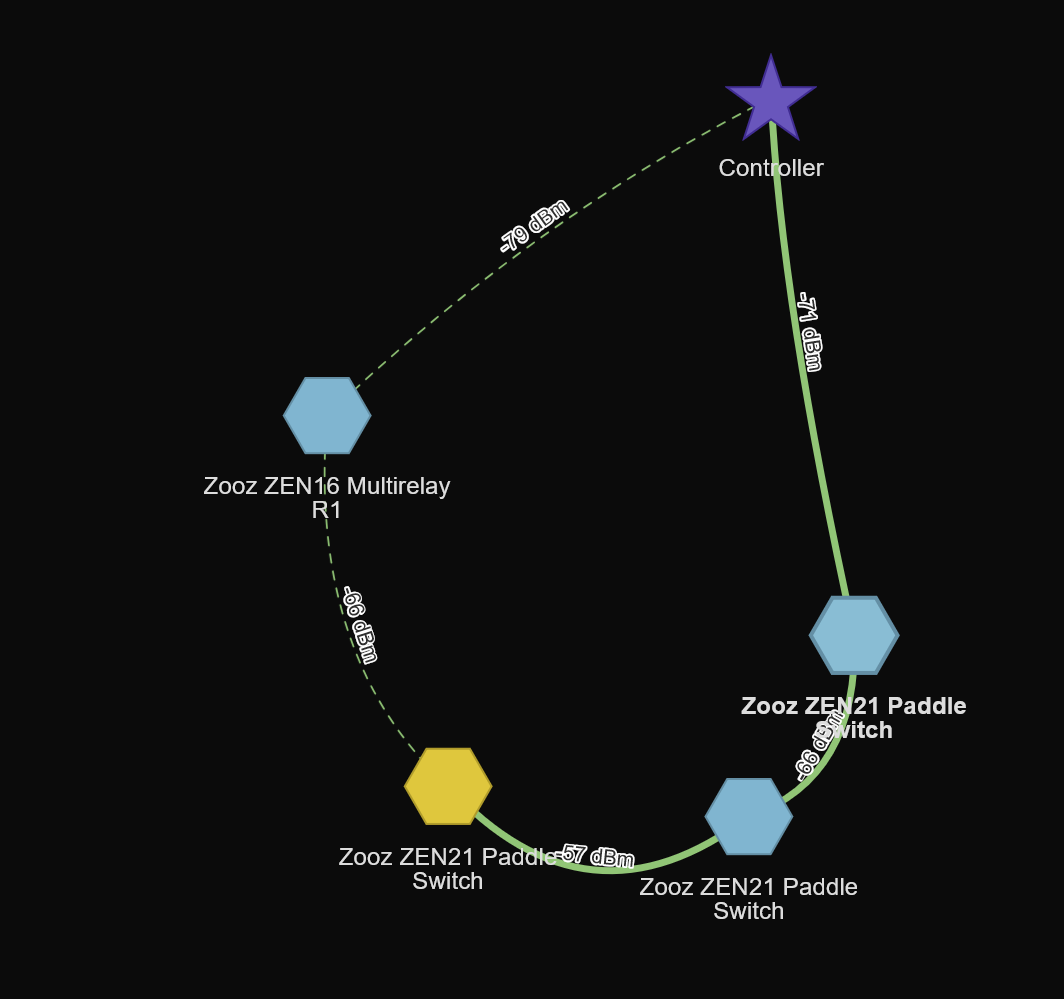
So, this is interesting, regarding rebuilding routes. In the image, the dashed line is the previous route, the new route is done after moving the controller (ZWA-2) 3 feet away, off the table and out a doorway at about the same height - further from the target node. The target node (the yellow ZEN21 Paddle Switch was initially 5-6 feet from the controller, and now is 7-8 feet away.
I appears, based upon this image, that zwave routing prefers higher signal strengths per hop on routes, even it if adds more hops, and presumably longer transit times, to the route.
The first ZEN21 in the new route is one floor directly below the controller, the second ZEN21 is a half floor up and diagonally across the room about 10 feet, before continuing diagonally and up a half floor and 10 feet back to the target. The Original route went down an half floor about 30 feet away and back to the target. Both of these, instead of a direct route 6 feet away  . Also, both the first and second ZEN21 on the new route show as 1 hop (if I’m understanding the color coding correctly). And there seems to be an issue with the Silicon Labs FW that prevents us from setting a priority route from controller directly to an endpoint node.
Here is my understating of routes
a) when routes are rebuilt, the firmware creates a list of routes per device (8 max?)
b) the device starts using the first route
c) if the route fails it gets pushed to the bottom and the next route is used
d) over time the more successful routes are at the top of the list.
The whole process takes time, as the rebuild routes is the starting point and further optimization occurs as routes fail. So give it 24 hours.
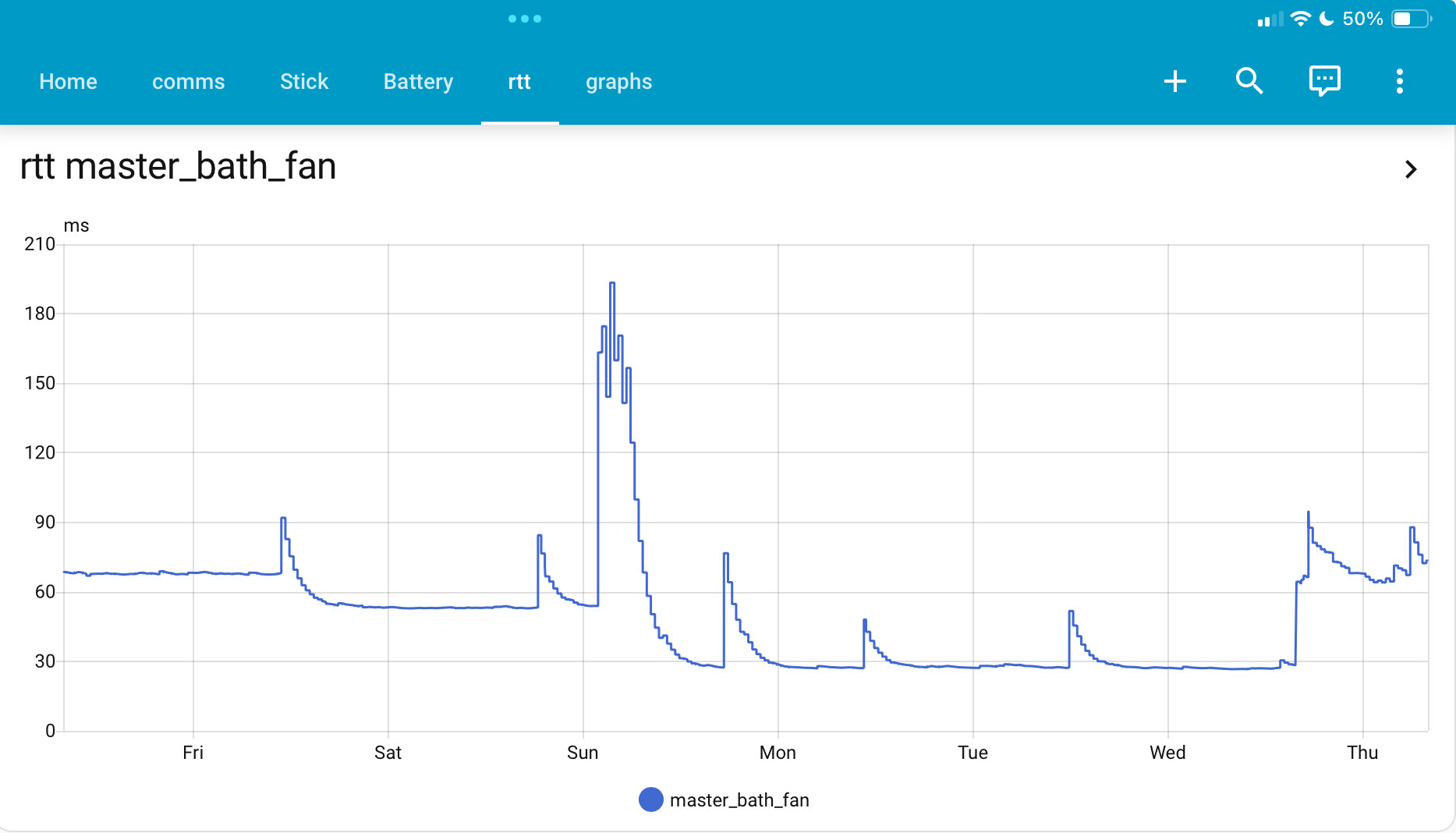
Routes fail all the time due to RF interference (microwaves, furnace blowers, EMI noise on the power lines [line powered devices have very cheap dc power converters]. Here’s an example
This device was working at 60ms, then something happened (spike to 180), it then selected a different route that is twice as fast (30ms) and is probably a direct connection, which worked for several days before it failed and the device reverted to the 60ms route (one hop). This is not an anomaly as many or my devices exhibit this behavior.
Thanks for this information. It is helpful. Is this plot from HA’s history?

I recently switched from a zooz 800LR to the zwa-2 and have had nothing but problems with it. Mostly with bad routes and dead nodes. I’ve already moved it to different locations around my house, and swapped out usb extension cables to shorter ones, usb 2, usb 3 even, and no change. I’m not sure how to troubleshoot random dead nodes, but im almost ready to return the zwa-2 and switch back to the zooz.
Question: did you create the chart you posted? Is it a built-in element, or a dashboard page you created? If so, would you post the code?
I feel you. After a bit of frustration, my network seems to have stabilized (I think). I’m not getting the same kind and frequency of errors I reported earlier. But in my gut, I don’t believe the ZWA-2 is providing any benefit (to me) over my ZStick 5+. I only have a few non-500 series devices, and only two or three LR devices, that I didn’t add that as LR even with the ZWA-2. I also don’t believe the range is any better, or is faster, based upon my own experience.
It took me re-calculating the routes manually for every one of my 80+ devices, half of them battery powered, some in hard to reach places. This was after trying the recalculate all routes option multiple times. It was a lot of unnecessary work to get the ZWA-2 to work correctly (although enough time may have healed everything, but too much didn’t work correctly to wait for that to happen).
Honestly, knowing what I know now, I probably wouldn’t update if I had it to do over again. If I had been on an 800 series with LR, I would not have even considered upgrading, but it seemed to offer much more potential over the 5+ specs.
The team did a great job making it easy to migrate from the ZStick 5+; that part was painless. It was the effort to get it working correctly on my network that was unexpected.
I would suggest anyone planning to upgrade to build a chart like PeteRage shows above BEFORE you migrate, gather some data, and then migrate, and then compare the two sets of data. I wish I had done that. If enough people do it, especially those with larger networks, it might give us some indication what is happening, or if there is any real benefit to upgrading (other than the added capability of LR, etc., not provided by the 500 series controllers).
Given the size, design specs, special antenna, etc., I truly expected range issues to disappear completely, but it seems no better in my case. I hope you get it sorted. I would recommend you recalculate routes to every devices one at a time, waking your battery powered ones (multiple times) until it completes (which is a real PITA, and battery-powered devcies going to sleep after starting an interview or routing is clearly a ZWave design flaw).
I think you’re over-simplifying the issues common to poor signal strength or quality. It’s frequently a combination of range AND multipath reflection, which reduces signal to a receiver as a result of vector mathematics. Generally the only fix in that case is repositioning the device or removing the source of reflections, which can be difficult to impossible if it’s in the building material.
You can read up on the subject, but it’s plagued engineers for decades.
Tomorrow i’m reverting to the zooz 800 LR and starting a return for the ZWA-2. At least on the zooz, it might be slow but they’d all work. on the zwa-2 nodes go into dead state at random every day. I have over 60 nodes so random dead nodes is not an option. Too bad, i heard great things about this device, but i’m truly disappointed in it after using it for a few months now.
When switching to new controller I’d suggest individually rebuild route for each device starting from closest in to furthest out.
Existing routes are based on existing controller but new controller has very different characteristics. It take long time for them to correct on their own.
Being a physicist and SW Engineer, with hands-on experience building tcp/ip networks, I think I have a pretty good handle on how things work. But in this case, I replaced one controller on a stable network that was working great with another one with supposedly superior design and longer range due to better antenna design, and it performed worse, even after recalculating routes (multiple times). As I said, after manually recalculating routes near to far as was suggested, things did stabilize and the dead nodes disappeared, but I don’t believe it is any better or faster than the old controller, but I don’t have numbers to prove that since I didn’t take them prior to conversion. But I’ve added more nodes since, so reverting would be a pain. I’m going to stick with it for now but, personally, I think it’s being oversold based on the performance I’m seeing. Just my personal opinion.
View
path: comms
title: comms
panel: true
cards:
  - type: horizontal-stack
    cards:
      - type: custom:flex-table-card
        title: Zwave Comms
        sort_by: to-
        entities:
          include: sensor.zw_comms*
          exclude: sensor.zw_comms_zwave_stick*
        columns:
          - name: name
            data: nm
            modify: >-
              '<a href="../lovelace-zwave/zwave_details#binary_sensor.zw_' + x + '_online">' + x + '</a>'
          - name: Rx
            data: rx
            align: right
            modify: parseFloat(x)
          - name: Tx
            data: tx
            align: right
            modify: parseFloat(x)
          - name: Dopped RX
            data: d_rx
            align: right
            modify: parseFloat(x)
          - name: Dropped TX
            data: d_tx
            align: right
            modify: parseFloat(x)
          - name: Timeout
            data: to
            align: right
            modify: parseFloat(x)
          - name: RTT
            data: rtt
            align: right
            modify: parseFloat(x)
          - name: rssi
            data: rssi
            align: right
            modify: parseFloat(x)
Then create one of these per device (I use a sh script to replicate them)
  - sensor:
      - name: zw_comms_bedroom_remote
        state: "{{states('sensor.bedroom_remote_node_status')}}"
        attributes:
          d_rx: "{{ states('sensor.bedroom_remote_commands_dropped_rx')  }}"
          d_tx: "{{ states('sensor.bedroom_remote_commands_dropped_tx')  }}"
          rtt: "{{ states('sensor.bedroom_remote_round_trip_time')  }}"
          rx: "{{ states('sensor.bedroom_remote_successful_commands_rx')  }}"
          tx: "{{ states('sensor.bedroom_remote_successful_commands_tx')  }}"
          to: "{{ states('sensor.bedroom_remote_timed_out_responses')  }}"
          lat: "{{ states('sensor.zw_bedroom_remote_latency')  }}"
          online: "{{ states('binary_sensor.zw_bedroom_remote_online')  }}"
          last_seen: "{{ as_timestamp(states('sensor.bedroom_remote_last_seen'),0) | timestamp_custom('%Y-%m-%d %H:%M:%S') }}"
          last_scan: "{{ states('sensor.zw_bedroom_remote_last_updated') }}"
          nm: "bedroom_remote"
          node_id: 52
          rssi: "{{ states('sensor.bedroom_remote_rssi')  }}"
Very cool! Thanks for sharing this. I’m going to build one using this. Cheers!
OK, I have the table created and a single sensor as a test, shown below. Seems to be working. But I’m not sure where the hyperlink is supposed to point. It must be one of the other Views you have on the image you posted before the table View earlier in this thread (mine just goes to the default View)? If that is the case, could you also share the configuration for the other Views as well, particularly the Chart. Are these data Recorded automatically as a statistic or must they be explicitly included (I use a recorder.yaml file to limit the amount of the data written). I’m also a little unsure about the couple of lines in your config for the sensor that have the zw_ prefix on the sensor entity name. Who is generating those?
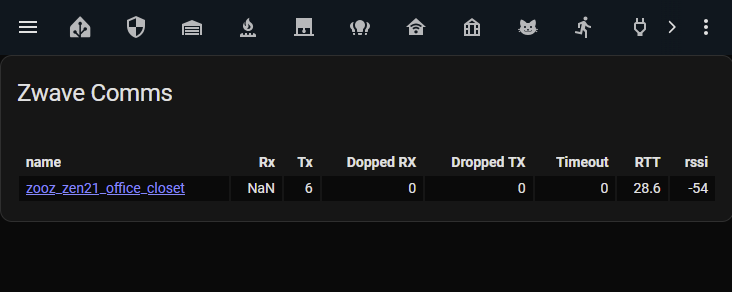
Thanks! This is really great work!
Here’s the details view, which has some charts. I add the diag sensors to my recorder and have an automation that purges them so I only keep 30 days of those sensors. The other displays use lovelace_gen and require some other items. Basically I have a CSV file that I edit in Excel - that has the list of zwave devices; run a script and it all gets generated. I can try to put that up somewhere if you want to look at it.
path: zwave_details
panel: true
title: Details
subview: true
cards:
  - type: vertical-stack
    cards:
      - type: custom:auto-entities
        card:
          type: entities
          state_color: true
        filter:
          template: |
            {% set suffix = hash.split(".")[1].replace("_online","") %}
            {% set zw_name = suffix.replace("zw_","") %}
            binary_sensor.{{suffix}}_online,
            binary_sensor.al_{{suffix}}_alert,
            alert.al_{{suffix}},
            input_boolean.al_{{suffix}}_alert_enable,
            sensor.{{suffix}}_latency,
            sensor.{{zw_name}}_node_status
            sensor.{{zw_name}}_commands_dropped_rx
            sensor.{{zw_name}}_commands_dropped_tx
            sensor.{{zw_name}}_timed_out_responses
            sensor.{{zw_name}}_round_trip_time
            sensor.{{zw_name}}_successful_commands_rx
            sensor.{{zw_name}}_successful_commands_tx
            sensor.{{zw_name}}_rssi
            sensor.{{zw_name}}_last_seen
            sensor.{{suffix}}_last_updated

      - type: custom:auto-entities
        card:
          type: history-graph
          hours_to_show: 96
        filter:
          template: |
            {% set suffix = hash.split(".")[1].replace("_online","") %}
            binary_sensor.{{suffix}}_online,
      - type: custom:auto-entities
        card:
          type: history-graph
          hours_to_show: 96
        filter:
          template: |
            {% set suffix = hash.split(".")[1].replace("_online","") %}
            {% set zw_name = suffix.replace("zw_","") %}
            sensor.{{zw_name}}_round_trip_time,
            sensor.{{zw_name}}_rssi,
      - type: custom:auto-entities
        card:
          type: history-graph
          hours_to_show: 96
        filter:
          template: |
            {% set suffix = hash.split(".")[1].replace("_online","") %}
            {% set zw_name = suffix.replace("zw_","") %}
            sensor.{{zw_name}}_commands_dropped_rx
            sensor.{{zw_name}}_commands_dropped_tx
            sensor.{{zw_name}}_timed_out_responses
      - type: custom:auto-entities
        card:
          type: history-graph
          hours_to_show: 96
        filter:
          template: |
            {% set suffix = hash.split(".")[1].replace("_online","") %}
            {% set zw_name = suffix.replace("zw_","") %}
            sensor.{{zw_name}}_successful_commands_rx
            sensor.{{zw_name}}_successful_commands_tx
This is awesome and looks like it took a LOT of work. Sharing it is greatly appreciated. I would love to see the script you wrote as I could make use of it. I have quite a few devices which, when I went looking for the diag entities, makes quite the long list. Cheers, and thanks again.
I’m in a similar boat, seeing a fair amount of nodes incorrectly marked dead.
I’m in a newly renovated house, and rebuilt my network from scratch on the ZWA-2, adding devices closest to the controller first. I have ~50 devices, all of my dimmers are zwave, and I’m in a bungalow so signal should be respectable throughout.
My previous house was a 5-level side-split with a few less devices, running on the Zooz stick and I never had issues, so it’s pretty frustrating.
It would be nice if there was a way to get official support. Even knowing what to try or how to diagnose possible issues.
Anybody done the ZWA-2 Firmware upgrade yet? I’m not sure I want to brick my HA installation just yet. Any brave souls out there who have done it successfully without any issues?