Legacy sensor template deprecation converting problem

You mean like this?

template:
- sensor:
  - unit_of_measurement: W
    default_entity_id: sensor.power_export_oben
    availability: '{{ [ states(''sensor.shellypro3em_oben_phase_a_active_power''),
      states(''sensor.shellypro3em_oben_phase_b_active_power''), states(''sensor.shellypro3em_oben_phase_c_active_power'')
      ] | map(''is_number'') | min }}'
    name: Power Export oben
    state: "{% if (states('sensor.shellypro3em_oben_phase_a_active_power')|float +
      states('sensor.shellypro3em_oben_phase_b_active_power')|float + states('sensor.shellypro3em_oben_phase_c_active_power')|float)
      < 0 %}\n  {{ (states('sensor.shellypro3em_oben_phase_a_active_power')|float
      + states('sensor.shellypro3em_oben_phase_b_active_power')|float + states('sensor.shellypro3em_oben_phase_c_active_power')|float)
      * -1 }}\n{% else %}\n  {{ 0 }}\n{% endif %}"
- sensor:
  - unit_of_measurement: W
    default_entity_id: sensor.power_import_oben
    availability: '{{ [ states(''sensor.shellypro3em_oben_phase_a_active_power''),
      states(''sensor.shellypro3em_oben_phase_b_active_power''), states(''sensor.shellypro3em_oben_phase_c_active_power'')
      ] | map(''is_number'') | min }}'
    name: Power Import oben
    state: "{% if (states('sensor.shellypro3em_oben_phase_a_active_power')|float +
      states('sensor.shellypro3em_oben_phase_b_active_power')|float + states('sensor.shellypro3em_oben_phase_c_active_power')|float)
      > 0 %}\n  {{ states('sensor.shellypro3em_oben_phase_a_active_power')|float +
      states('sensor.shellypro3em_oben_phase_b_active_power')|float + states('sensor.shellypro3em_oben_phase_c_active_power')|float
      }}\n{% else %}\n  {{ 0 }}\n{% endif %}"
- sensor:
  # Template sensor for values of power consumption
  - unit_of_measurement: W
    default_entity_id: power_consumption_oben
    name: Power Consumption oben
    state: >-
                {% if (states('sensor.power_export_oben')|float(0)) > 0 and (states('sensor.power_solargen_oben')|float(0) - states('sensor.power_export_oben')|float(0)) < 0 %}
                {{ 0 }} 
                {% elif (states('sensor.power_export_oben')|float(0)) > 0 and (states('sensor.power_solargen_oben')|float(0) - states('sensor.power_export_oben')|float(0)) > 0 %}
                {{ (states('sensor.power_solargen_oben')|float(0)) - states('sensor.power_export_oben')|float(0) }}    
                {% else %}
                {{ states('sensor.power_import_oben')|float(0) + states('sensor.power_solargen_oben')|float(0) }}
                {% endif %}
- sensor:
  # Template sensor for values of energy Solar generation (solar_power > 0)
  # YOU NEED TO UPDATE THE NAMES BELOW!!!
  - unit_of_measurement: W
    default_entity_id: power_solargen_oben
    name: Power Solar Generation oben
    state: >-
                {% if (states('sensor.wechselrichter_1_power')|float(0) + states('sensor.wechselrichter_2_power')|float(0)) > 0 %}
                {{ (states('sensor.wechselrichter_1_power')|float(0) + states('sensor.wechselrichter_2_power')|float(0)) }}
                {% else %}
                {{ 0 }}
                {% endif %}


sensor:
  # Sensor for Riemann sum of energy import (W -> Wh)
    - platform: integration
      source: sensor.power_import_oben
      name: energy_import_oben_sum
      unit_prefix: k
      round: 2
      method: left

  # Sensor for Riemann sum of energy export (W -> Wh)
    - platform: integration
      source: sensor.power_export_oben
      name: energy_export_oben_sum
      unit_prefix: k
      round: 2
      method: left

  # Sensor for Riemann sum of energy consumption (W -> Wh)
    - platform: integration
      source: sensor.power_consumption_oben
      name: energy_consumption_oben_sum
      unit_prefix: k
      round: 2
      method: left

utility_meter:
  energy_import_oben_daily:
    source: sensor.energy_import_oben_sum
    name: Energy Import oben Daily
    cycle: daily
  energy_import_oben_monthly:
    source: sensor.energy_import_oben_sum
    name: Energy Import oben Monthly
    cycle: monthly
  energy_export_oben_daily:
    source: sensor.energy_export_oben_sum
    name: Energy Export oben Daily
    cycle: daily
  energy_export_oben_monthly:
    source: sensor.energy_export_oben_sum
    name: Energy Export oben Monthly
    cycle: monthly
  energy_consumption_oben_daily:
    source: sensor.energy_consumption_oben_sum
    name: Energy Consumption oben Daily
    cycle: daily
  energy_consumption_oben_monthly:
    source: sensor.energy_consumption_oben_sum
    name: Energy Consumption oben Monthly
    cycle: monthly
Yep that should work @JokerGermany don’t forget to read the docs.

You should probably add a unique_id: to each as you are going, that will give you some UI control.

Common Device Configuration Options

Each entity platform has its own set of configuration options, but there are some common options that can be used across all entity platforms.

# Example configuration.yaml entry
template:
  - binary_sensor:
      # Common configuration options
    - default_entity_id: binary_sensor.my_alert
      unique_id: my_unique_sensor_id
      variables:
        my_entity: sensor.watts
      availability: "{{ my_entity | has_value }}"
      icon: "{{ 'mdi:flash-alert' if states(my_entity) | float > 100 else 'mdi:flash' }}"
      name: "{{ states(my_entity) }} Alert"
      # Entity specific configuration options
      state: "{{ states(my_entity) | float > 100}}"
      device_class: problem

YAML

Configuration Variables

Looking for your configuration file?

availability template (Optional, default: true)

Defines a template to get the available state of the entity. If the template either fails to render or returns True, "1", "true", "yes", "on", "enable", or a non-zero number, the entity will be available. If the template returns any other value, the entity will be unavailable. If not configured, the entity will always be available. Note that the string comparison is not case sensitive; "TrUe" and "yEs" are allowed.

default_entity_id string (Optional)

Use default_entity_id instead of name for automatic generation of the entity id. E.g. sensor.my_awesome_sensor. When used without a unique_id, the entity id will update during restart or reload if the entity id is available. If the entity id already exists, the entity id will be created with a number at the end. When used with a unique_id, the default_entity_id is only used when the entity is added for the first time. When set, this overrides a user-customized Entity ID in case the entity was deleted and added again.

icon template (Optional)

Defines a template for the icon of the entity.

picture template (Optional)

Defines a template for the entity picture of the sensor.

name template (Optional)

Defines a template to get the name of the entity.

unique_id string (Optional)

An ID that uniquely identifies this entity. Will be combined with the unique ID of the configuration block if available. This allows changing the name, icon and entity_id from the web interface. Changing the entity_id from the web interface will overwrite the value in default_entity_id.

variables map (Optional)

Key-value pairs of variable definitions which can be referenced and used in the templates below (for trigger-based entities only). Mostly used by blueprints. With State-based template entities, variables are only resolved when the configuration is loaded or reloaded. Trigger based template entities resolve variables between triggers and actions.

variable_name: value string Required

The variable name and corresponding value.

1 Like

This is not exactly true - what you need to be aware is that ‘template’ needs to be at the root of your packages and you can use a document marker (—) at the start of a file to merge in multiple files that define template entities.

I am not sure what you mean by root of the folder. ( There is two different methods for packages)
Maybe I should have said each yaml file within a package?

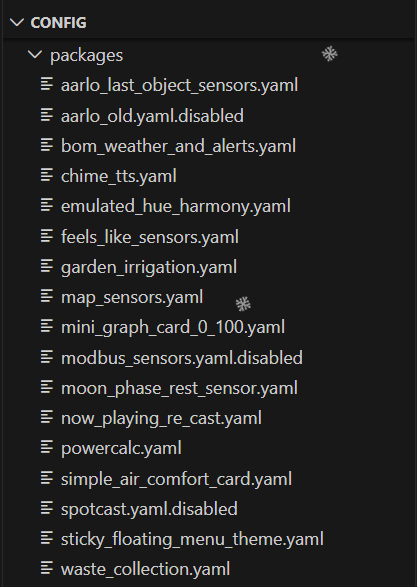
Nearly every file in my below packages folder has template: defined in it once

My Configuration

In configuration.yaml

# Home Assistant Core Configuration
homeassistant:
  allowlist_external_dirs:
    - "/config"
  packages: !include_dir_named packages

My Packages Folder
/config/packages

I think using the term ‘folder’ was incorrect (apologies).

Basically if you use a document marker (—) you indicate that you are importing at the ‘root’ level for yaml.

So in your packages folder you could have:

/config/packages/my_big_package/mbp-templates1.yaml

---
template:
  - sensor: mbp_template_sensor_1
     [Rest  of sensor definition]

/config/packages/my_big_package/mbp-templates2.yaml

---
template:
  - sensor: mbp_template_sensor_2
     [Rest  of sensor definition]

Yes this is how I have mine setup. Each *.yaml file within my packages folder becomes the package name and then listed as per your example.

Hmm,
which unique_id should i choose?

Hmm this one?

You can put anything there, as long as it is not repeated multiple times in HA

As @pepe59 mentioned you can put anything there. Keeping inline with the default_entity_id: but dropping the domain prefix would probably be an easy (human readable) way to ensue unique id’s.

The unique_id: is not visible in the UI, just makes the UI magic work.

e.g.

default_entity_id: sensor.my_example_sensor
unique_id: my_example_sensor

I used to use the right click function is VS Studio, which would generate a UUID at the cursor but this feature seems to be deprecated.

Your online generator will work though.