Looking for assistance with a 'door ajar' alert after a delay

I am attempting to use Node-RED for door monitoring in my workshop. I am fairly new to Node-RED, and HA for that matter.

What I would like to have happen is as follows (most of this works):

When the door is opened, check to see if the shop lights are currently on.

If the lights are on, speak a welcome message through the Amazon Echo Dot in the shop. (This works)

If the lights are not on, send a notification to my mobile, speak a different message through the Echo Dot, and turn on the shop lights. This also works.

What I want to also happen is for a message to be spoken if the door has been open for x amount of time - I.E. after 2 minutes say something like ‘the door has been left open’ or whatever I decide upon. It is this 2 minute delay that I am struggling with. What I want to happen is, when the door is opened a timer starts. If the door is closed before it expires, the timer is stopped and reset until the next time the door is open. If the timer expires, then I want the door ajar message to be spoken.

At this stage, I am still learning how to get things linked together. I worked out what I have so far through searches and reading the assorted documents. This time thing has me stumped. I thought the delay function might be what I need, but it only seems to delay the passing of the message/signal. I need a simple resettable timer that can be stopped.

Here is what I currently have:
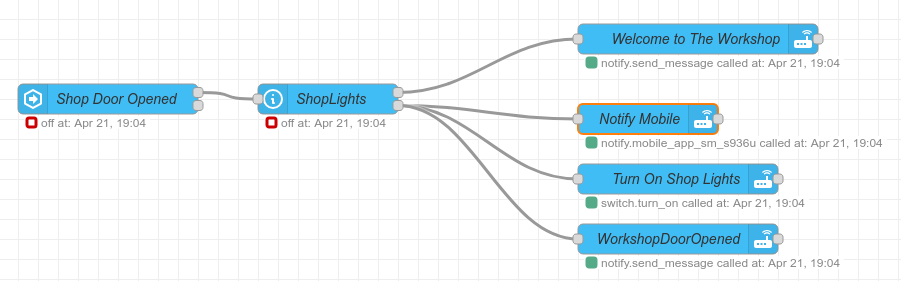
(Edited to clarify the timer line at the end)

Isn’t there a time component to the state trigger in Node red?
It was such a long time since I used Node red, but that is the key.
Just like in a Home Assistant automation you set the “for” time in the trigger

Node-RED is a full programming language, and there are many ways to achieve what you want.

As a general guide, I suggest that the core Node-RED nodes can be used to do almost everything, so I would always start with the basic Delay node. These nodes are much more sophisticated than might first appear, and the Delay node can support both delay (hold each message) and rate limit (only allow messages through at a given rate). The node is also controllable using input message properties. For the ‘delay’ operation, any input message with msg.delay property set will cause the node to use that message to change the delay period, overriding the UI setting. There is also a msg.reset option, which causes the node to cancel all held messages.

msg.reset is used by several of the core nodes as a “reset and clear” control, and in this case all you need to do is issue a message with msg.reset set (boolean true if you like, but anything will work) from the event ‘door closed’.

This gives you a ‘resetable timer’.

Documentation is readily available for each node in the debug window using the ‘help’ tab and selecting the node. In this case, the “input” section shows exactly what input message properties are recognised by the node, and the action they perform.

1 Like

There is no need for the delay node.
Just use the correct trigger node.

Yes it is easy to add the “For” condition and thus set a timer inside the Event: State node.

However, that means that the node will only issue a message after the timer has completed. I believe the OP wishes to turn lights on and send notifications immediately the door is opened, so this would require two Event: state nodes, one without a timer so as to start the immediate actions, and a second one to include the wait-for to see if the door remains open for the full 2 minutes.

Using a delay node, in this case, allows for just the one Event: state node, which passes ‘open’ triggers immediately. Also setting a timer, and then using the conditional test to drive a second output at ‘close’ with a change node, can cancel the timer. If the subsequent ‘close’ is not seen within the timer period, then the followup actions will be run.

This is very much a personal choice, and yes there are many many ways to do this. For myself, given the specific requirements here, I would use a timer to provide both simplicity (all driven from one Event: state node) as well as flexibility. Whilst the Event node can only have the timer cancelled by changing the monitored entity state, a Delay node can be reset using more than one input pathway.

Personal choice.

1 Like

Thanks for the information - the msg.reset sounds like it would be what I am looking for. It appears I have some reading to do. I need to take a look at the docs then do some further testing when I get home from work.

I looked at this, however as is pointed out by Geoff, this would not work in the manner I am intending. I want the door open to trigger multiple events, only one of which needs the delay - the others should be immediate. Because of this, I decided I needed to look at something other than the time delay available in the state node.

The msg.reset with the delay node sounds like it may be what I am looking for. Because my HA installation is not accessible remotely, I will have to test after work. Thanks for the thought, though.

It does work. But not as one sequence.
You need two trigger nodes, two action nodes and two connections.
Far easier to see what is happening, and far easier to debug.
And to nit pick, one fewer nodes and three fewer connections.

You obviously can chose which method you want, but in my opinion simple automations should be simple, no need to make them extra complicated.

easy button…

This did the trick. Thanks! Here is what I ended up with:

The delay being 30s is just for testing. Didn’t want to have to wait for it to timeout otherwise :slight_smile:

Thanks for the help. Much appreciated!