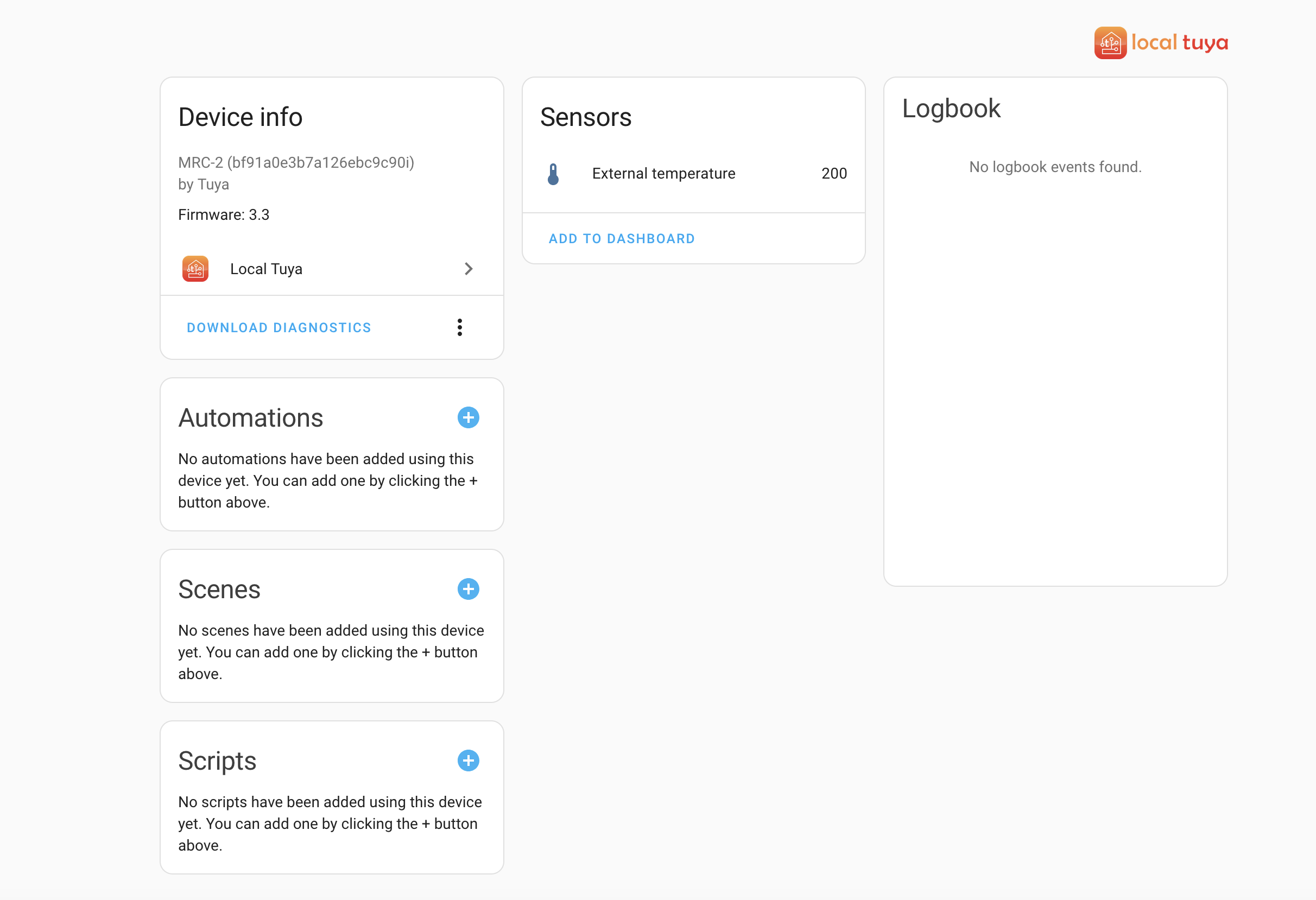
suspect it’s because my devices are on a 192.168.20.x subnet, and the home assistant server is on 192.268.0.x
Edit, yes it was.
Got a sensor, but no control…
suspect it’s because my devices are on a 192.168.20.x subnet, and the home assistant server is on 192.268.0.x
Edit, yes it was.
Got a sensor, but no control…
Looking at the local Tuya page I can reconfigure the device, as it didn’t auto configure the control entity. I’ve tried a few options on this page, but non seem to make this become visible as an entity.
Would anyone be able to share their config?
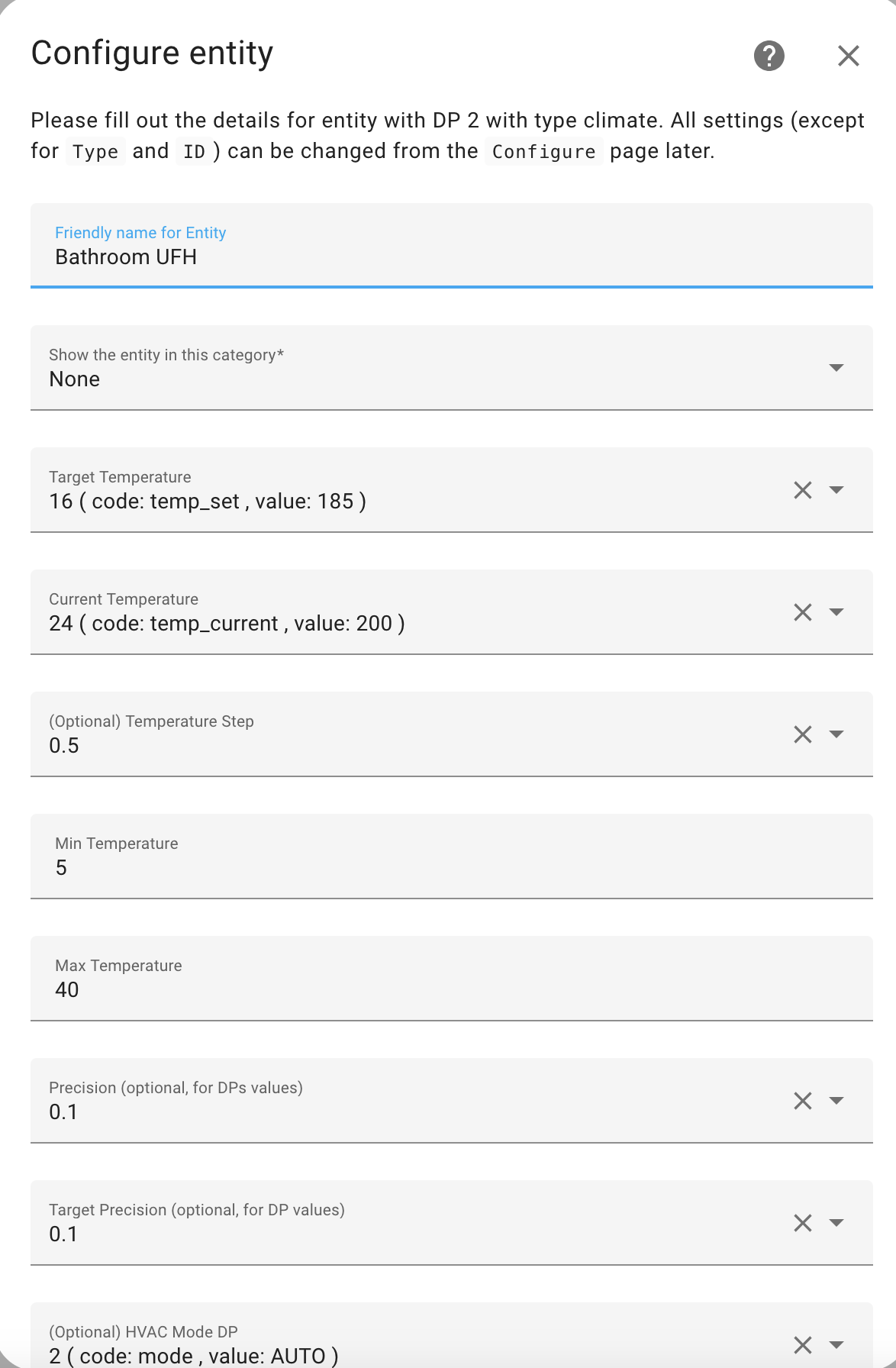
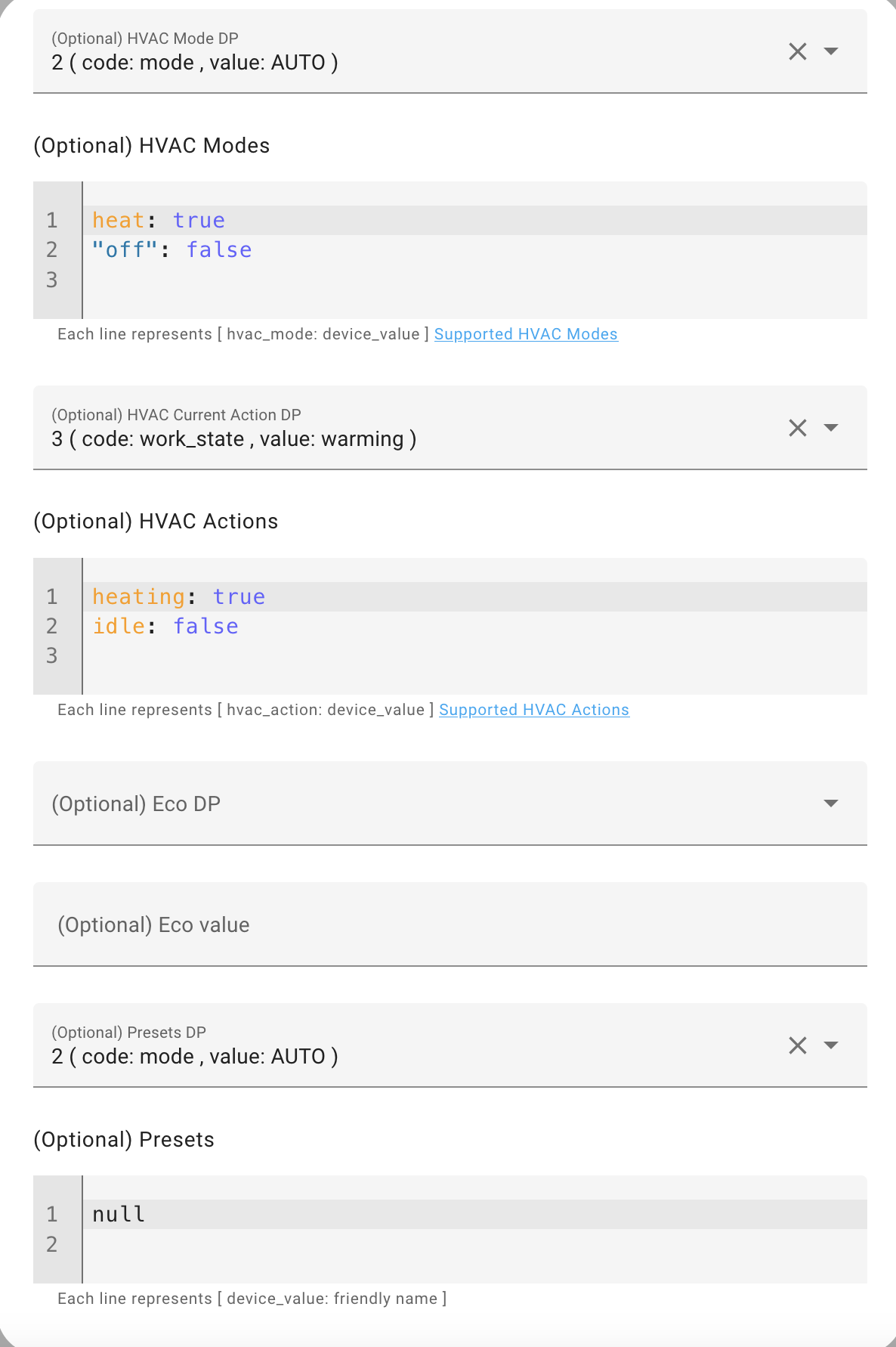
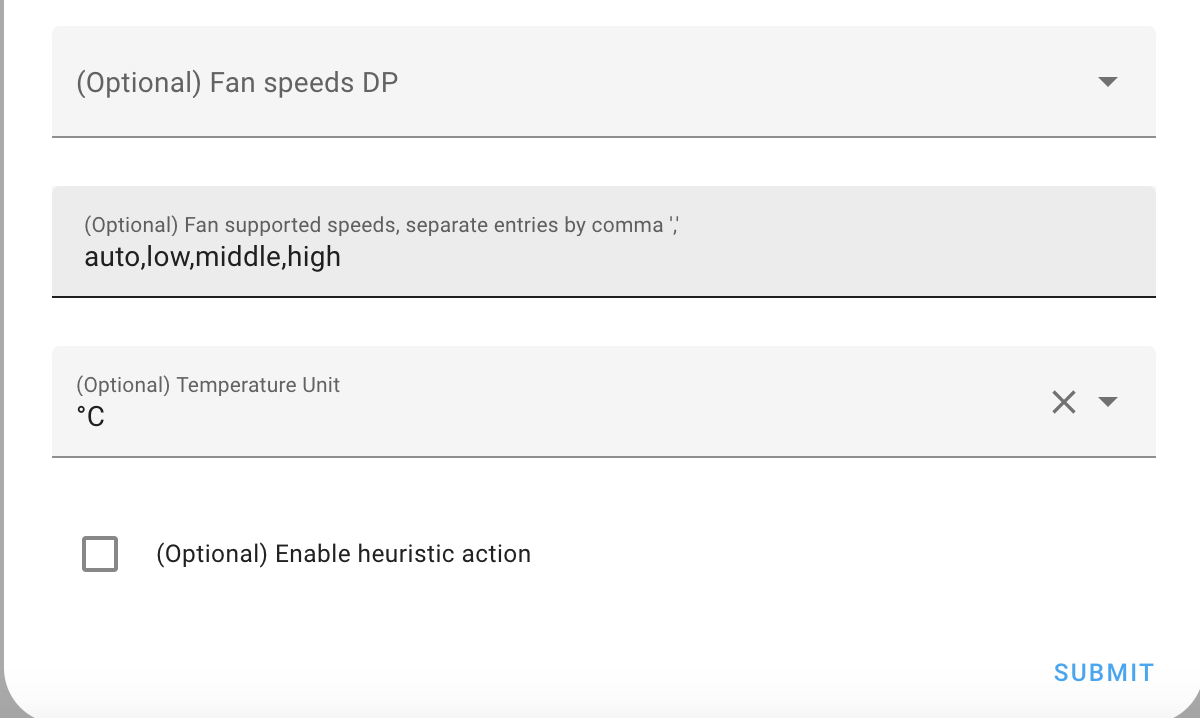
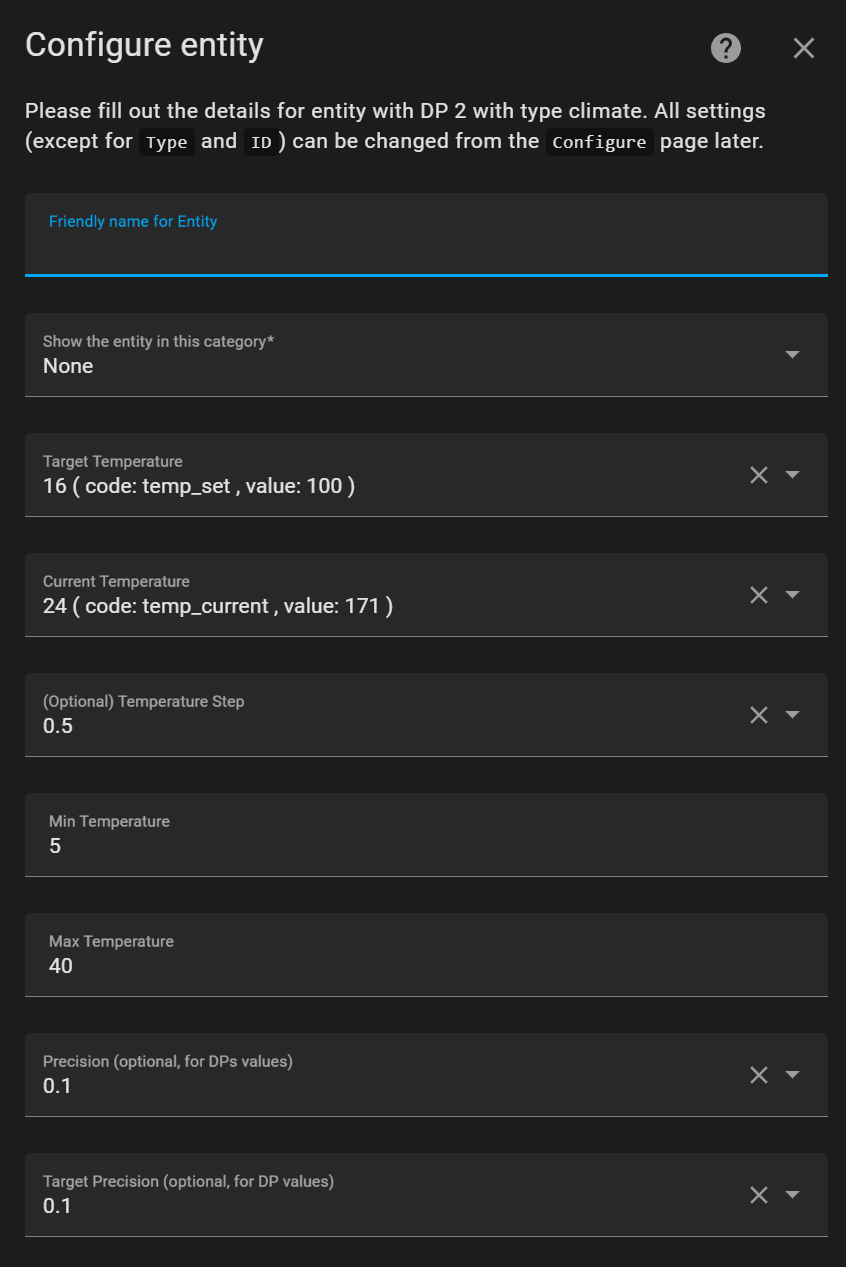
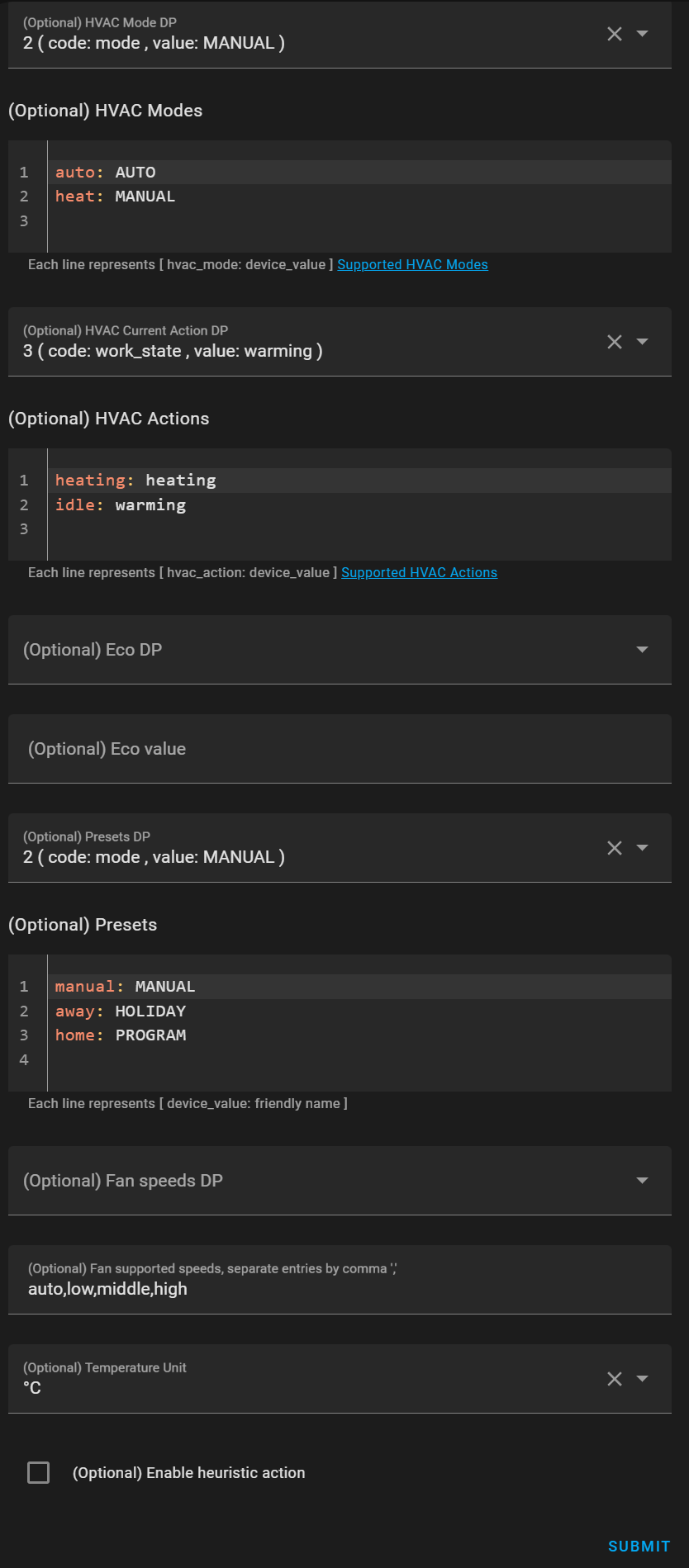
This is my config, see below. After this, I added a climate card and could select the magnum floor heating from the thermostat entities.
Your config images above really helped. Thanks!
Hi there,
HA beginner here. After a few days and a long read I managed to make my Magnum Heat thermostat integrated in HA with xZetsubou local tuya integration.
Almost everything works, except Presets. And i don’t know why.
I can change the temperature, switch to auto or manual, but when i select one of the 3 presets (Manual, Holiday, Program) it’s just switching to Auto and at the bottom of my dashboard i get this error:
“Preset mode is not valid. Valid preset modes are: MANUAL, HOLIDAY, PROGRAM”
Any suggestions?
Thank you
I think you need to configure the presets in upper case
i tried in two ways, the second one i can’t remember where i found it. But the same result.
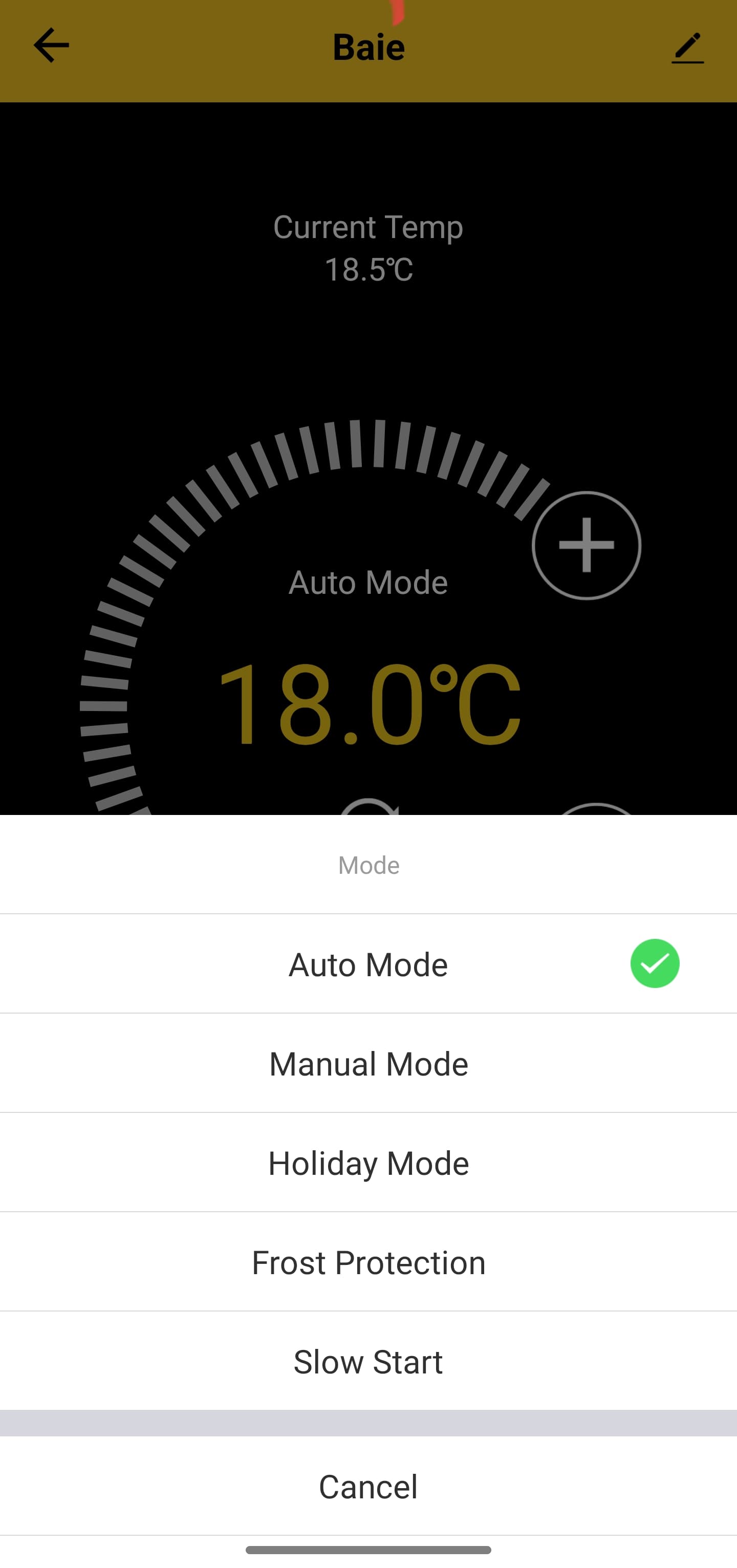
This is how presets appear in Tuya app:
You use some non-existent presets. The presets you try to configure don’t exist in the LocalTuya integration.
See the source code of the climate entity of LocalTuya for valid entities (klik show original in below link, search for presets)
I was just wondering, is the Magnum Floor Heating thermostat only switching on or off the 230V, and could it be replaced by a Shelly switch device, with even a Shelly Add-on for temperature measurement?
When you use it only automatic with automations, or by HA app? So you can even measure the power usage in HA. And when you want a display, add the Shelly H&T.
I’m trying to configure the LocalTuya, which is not so easy and complex for just one device. I’ve it connected to my HA, but I think I have to do some more configurations, it only shows wrong temperatures now, much too high.
The Magnum thermostat is a 230v switch for the spiral heating system in the floor. But it also measures floor temperature (when you have the floor sensor installed), and it can measure room temperature (at location thermostat). In addition it provides local control.
So if you can do without the temperature measurements, and don’t need a local controller, you can replace the thermostat itself with a remote controlled switch.
I read through the topic. But I’m afraid I got a little confused and don’t really understand how to practically tackle this.
So I have 2 Magnum Floor Heating units in my home. And, in a very bare-bone step-by-step, I should install it like this, right?
Remove the Magnum app from your device(s).
Open the Tuya Smart app on your phone
Have the (wallmounted) Magnum Floor Heating Controller unit connected to the Tuya app.
Then - with the TuyaLocal integration from HACS - have it setup in your HA?
I saw stuff with rooted phones and Bluestacks, MRC, and it kinda got me confused.
Bluestack, rooted phones, etc. is not required any more.
Follow this link for a step by step guide how to setup your Magnum’s.
It seems that I’m doing something wrong to get the MRC configured in the Tuya App.
I’m on a 2.4ghz network, but it won’t show up on the standard and AP mode.I have uninstalled the Magnum app on all my devices, but whatever I do, it’s not showing and I can’t get it connected.
I think I’m totally misinterpretting something right now.
Edit:
I figured it out, it was kinda stupid of me to not think about this.
In the Tuya App, whend adding the device. On the left, sroll all the way to “Other” and then select: “Other (Wi-Fi)”.
Then go through the setup and use for wifi the “fast blinking” method. And for AP the “slow blinking” method.
1 worked directly with the “fast blinking” / WiFi method and the other only through the AP method. Now I have them in my Tuya app.
I was wondering (after swapping the official Tuya integration out for the Tuya Local integration which gives me a lot more options) how I can turn on or turn off the heating of the Magnum flooring based on an automation?
It seems that I am able to see when the floor changes to ‘heating’ or turning off, and now get a notfication when it starts heating or stops heating:
trigger: state
entity_id:
  - climate.serrevloerverwarming
attribute: hvac_action
to: heating
id: Serrevloer-aan
But I can’t actively turn heating on myself, I only can change the HVAC_mode (which is auto vs heat which seems like the preset but not the actual heating part) but not the HVAC_action (so actively heating or no, like in the trigger state written above). I can call out the climate function, but it doesn’t seem to work:
action: climate.set_hvac_mode
metadata: {}
data:
  hvac_mode: heat
target:
  device_id: 07339bb6514dc88881d152011df03f86
Which has all the options my AC has too, from heat to auto to cool to off (but the magnum can’t cool afaik).
FYI, I mainly use the visual editor, am not very versed in YAML yet, so no clue if there’s something wrong in this code, but this is what the visual editor gives me, haha.
unfortunately, the local tuya integration only supports the “heat” setting, not the “off” setting. (I have never tried the non-local tuya integration, don’t know whether this integration does support “off”).
What I do in my automations (and schedules) for the Magnum is always to use “heat” but using the “set temperature” to control off/heat. So I use “heat” with a “set temperature” of 5 degrees (Celsius) as an “off” value, and “heat” with a “set temperature” of 21 degrees for actual heating.
Do you know if there’s a marked difference between the local tuya and tuya local integrations in terms of what you can control? Saw that there were two of those.
And that’s unfortunate. Is it the HVAC_mode or the HVAC_action for ‘heat’ that you mean?
But it’s a possible workaround. The issue with it’s own temperature measurement is that it’s not really a good way to measure the warmth in the room. Ie., now it shows 16.2°C and that’s a good floor-temperature for the sunroom (my shelly shows the room is actually 24.2°C). However, sometimes it can show 19°C for instance, with the same shelly room temperature. The biggest issue I have is that sometimes magnum will start heating because it thinks the floor is too cold, but the AC is actually trying to cool down the room.
What would you recommend in this case?
For now I’ve set the temperature programming to 16°C for the magnum, so that it doesn’t happen as often, but that’s why I’d like to control the heating instead of having to rely on it’s programming and what temperature it thinks it is (setting currently is temperature control by floor, it’s what the builder recommended, instead of temperature control by room).
I have not checked the differences between various integrations, I’m using xZetsubou (clone of rospogrigio) for a while now, happy with this one, just controlling by setting different temperatures during the day (using scheduler integration for making daily schedule, not using the magnum internal scheduler).
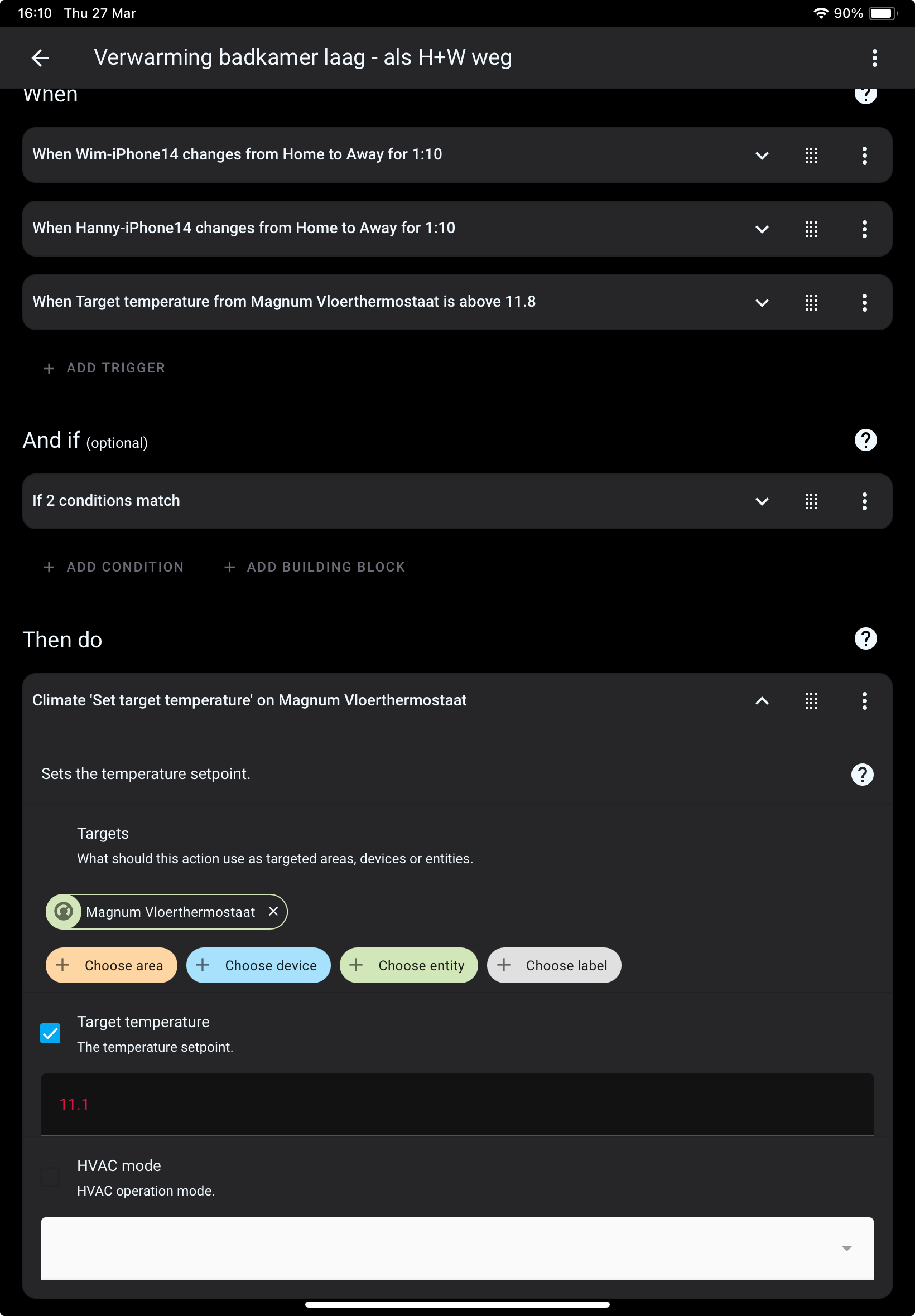
See a screenshot of one of my automations, I never work with the device itself, always with the entities of the device, so in the automation I can select “set temperature “ and then select the set temp entity of the magnum.
Your airco measures room temp, so indeed can start cooling when you are heating the floor. I had similar issues, I switched the magnum from measuring floor temp to measuring room temperature (setting in the magnum device itself)., despite what my installer said, makes no sense heating floor when cooling down bathroom.
Thanks! I’ve switched the thermostat settings and now the temperature it gives is closer to that of the Shelly thermostat. I want to wait and see how it behaves, maybe now the bottom margin of the preferred temperature isn’t that far off so it won’t conflict as much. Otherwise I’ll look into implementing your idea, thanks!
Thanks for all the info in this thread 
I now have my Magnum floor heating successfully integrated in my new Home Assistent config.
But, frustratingly, I still can’t get the presets to show/work properly.
I have the Optional preset settings (like in this thread was suggested):
manual: Manual
away: Holiday
home: Program
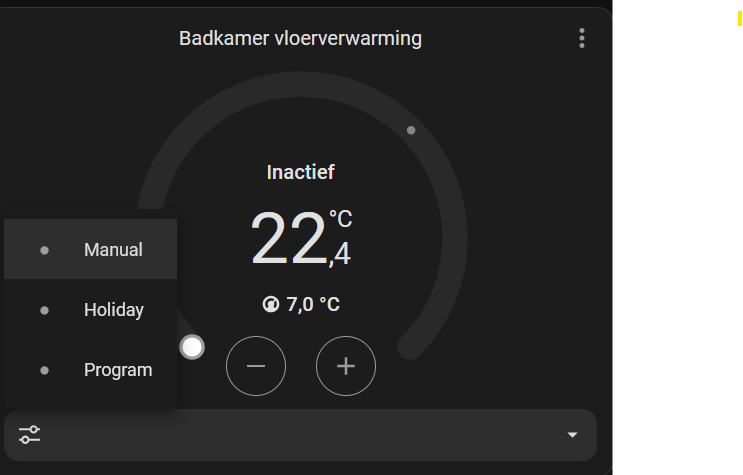
With a Climate card on my dashboard I can indeed select one of these three values:
And after selecting a value, it is shown in the Climate card.
But whenever I switch from the dashboard to another page and back, the climate card again shows an empty value:
Does anybody have this working?
If so, could you please share your config / setup?
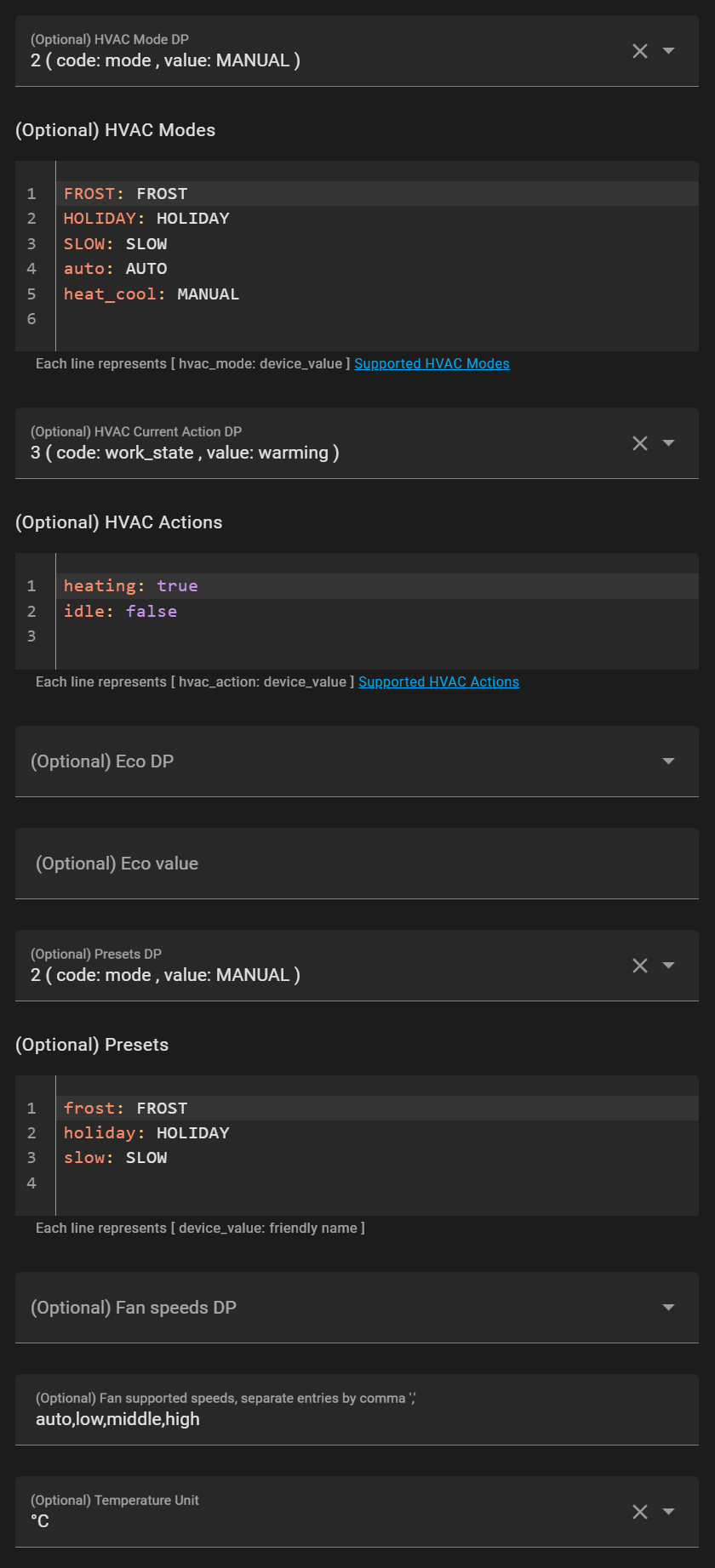
I got a bit further with the presets. I now use the following settings:
MANUAL: Manual
HOLIDAY: Holiday
AUTO: Program
FROST: Anti-Frost
SLOW: Slow
Using these presets actually changes the modes of the thermostat. Though not perfect yet:
HOLIDAY you should enter amount of days on the screen. But this is not possible so the mode will never start.HOLIDAY, SLOW and FROST HA throws an error: failed to perform the action climate/set_hvac_mode. expected HVACMode or one of 'off', 'heat', 'cool', 'heat_cool', 'auto', 'dry', 'fan_only' for dictionary value @ data['hvac_mode'] I guess because the thermostat enters a HVAC state that localTuya does not support.The FROST and SLOW programs do actually start though! So you should be able to use them in automations, i.e. ‘turn off by entering FROST mode’.
Someone any ideas how to fix these final things?
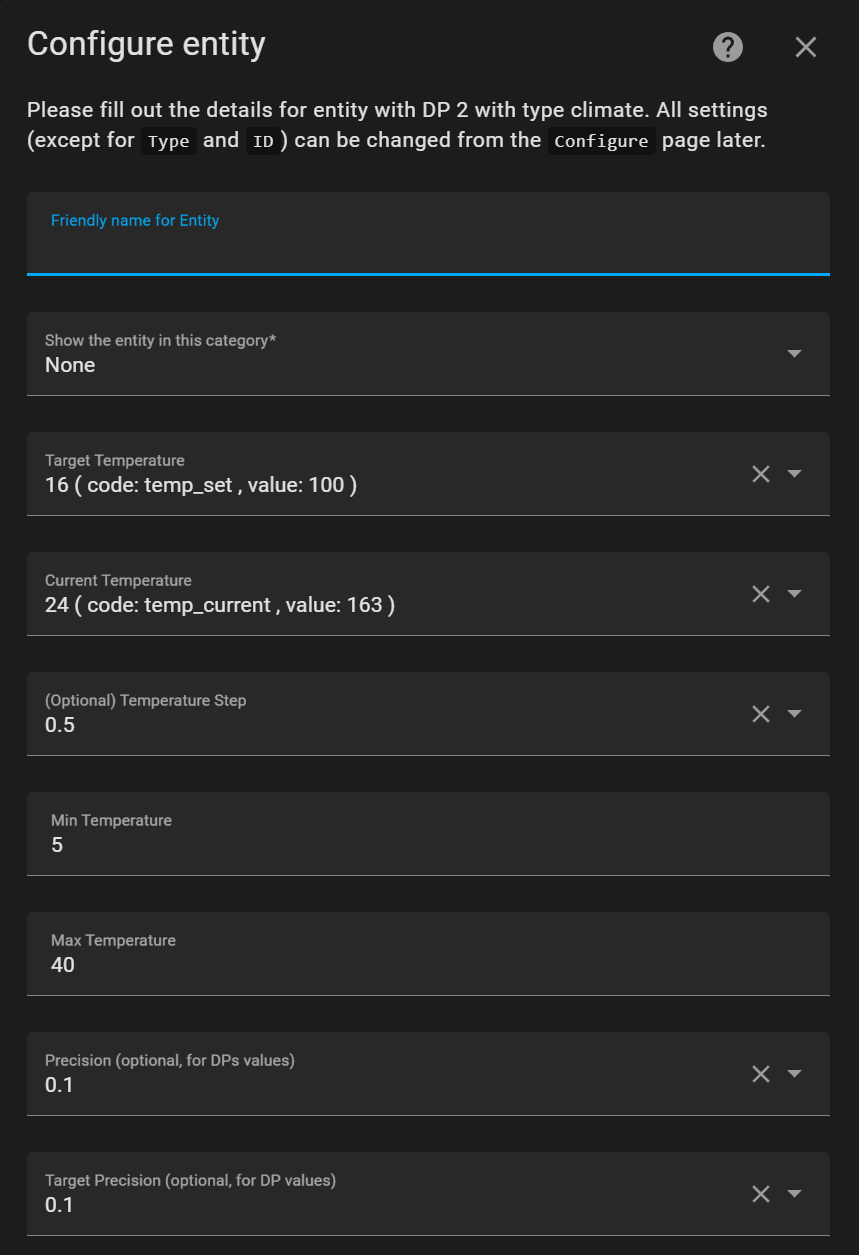
My settings: