Make your own Thread Border Router for just $5

Yes, you heard me right. In this post I’m going to describe how to make your own cheap Thread Border Router for just ~$5.

Steps

1. Get the materials

  • An ESP32-C6 board with a USB port.
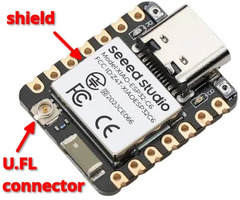
    • Any ESP32-C6 board will work, but the Seeed Studio XIAO ESP32-C6 is highly recommended for the best range and stability.
  • (Optional) An external U.FL antenna for better coverage.

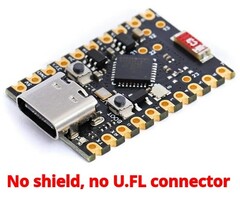
    • This is highly recommended. Line of sight is not required for communication: signals can bounce and spread around, even unshielded boards without an antenna can communicate across nearby rooms. But using an external antenna lets you reliably punch through multiple walls or dense materials like brick or concrete.
    • Antennas are not plug and play! In most cases, you’ll need to switch your board from using the internal antenna to use the external antenna yourself. If you buy the XIAO ESP32-C6 board mentioned above, this can be done entirely in the software, and the instructions are available below.
    • 4.5dBi - 5dBi gain antennas are fine, higher gain values don’t always mean better range.
  • A USB-C cable that can transfer data.

    • Beware, cheap phone charger cables sometimes don’t have data pins.

2. Make the ESP board an OpenThread RCP (Radio Co-Processor)

You’ll need a Linux machine or VM for these steps.

You can create a Linux container with all dependencies included with distrobox:

distrobox create --image debian:latest --name esp-idf --additional-packages "git python3.13 libusb-1.0-0 python3-venv cmake micro"

You can then enter the container with:

distrobox enter esp-idf

If you don’t want to use distrobox, you’ll need to manually install the following packages (listed are apt names):

  • python3.13 (any version above 9 is fine)
  • libusb-1.0-0
  • python3-venv
  • cmake

1. Install esp-idf toolchain

Run the commands below. A fast internet connection is recommended.

rm -rf cheap-esp-tbr && mkdir cheap-esp-tbr && cd cheap-esp-tbr
git clone -b v6.0-beta1 --recursive https://github.com/espressif/esp-idf.git .
./install.sh esp32-c6

2. Configure the firmware

Now we’ll configure the firmware in order for the board to communicate with OTBR over USB.

. ./export.sh 
cd examples/openthread/ot_rcp
export LC_ALL=C.UTF-8 TERM=xterm
idf.py set-target esp32c6
# Open the configuration menu
idf.py menuconfig

In the menu, navigate to: Component config → OpenThread → Thread Core Features → Thread Radio Co-Processor Feature → The RCP transport type and select USB, then save and quit by pressing s, then esc, and then q.

3. (Optional) Connect the external antenna

If you got an external U.FL antenna, now is the time to connect it to your board. Align it straight and press straight down until you feel/hear a soft click. Be careful, U.FL connectors are delicate.

Now, you’ll need to switch the board to use the external antenna. How to do this is entirely board-dependent, most boards have a jumper to solder to switch. Here, we provide the specific instructions for the Seeed Studio XIAO ESP32-C6 board.

Click to show instructions for XIAO ESP32-C6

The documentation states that we need to set the pin 3 to LOW and the pin 14 HIGH to select the external antenna. We can modify the OpenThread RCP example to achieve this.

In the distrobox terminal, open the program file with the micro editor:

micro main/esp_ot_rcp.c

First delete the existing file contents and then copy and paste the modified program below:

/*
 * SPDX-FileCopyrightText: 2021-2025 Espressif Systems (Shanghai) CO LTD
 *
 * SPDX-License-Identifier: CC0-1.0
 *
 * OpenThread Radio Co-Processor (RCP) Example
 *
 * This example code is in the Public Domain (or CC0-1.0 licensed, at your option.)
 *
 * Unless required by applicable law or agreed to in writing, this
 * software is distributed on an "AS IS" BASIS, WITHOUT WARRANTIES OR
 * CONDITIONS OF ANY KIND, either express or implied.
 */

#include <stdio.h>
#include <unistd.h>

#include "esp_event.h"
#include "nvs_flash.h"
#include "esp_openthread.h"
#include "esp_ot_config.h"
#include "esp_vfs_eventfd.h"

#if CONFIG_ESP_COEX_EXTERNAL_COEXIST_ENABLE
#include "ot_examples_common.h"
#endif

#if !SOC_IEEE802154_SUPPORTED
#error "RCP is only supported for the SoCs which have IEEE 802.15.4 module"
#endif

#define TAG "ot_esp_rcp"

#include "driver/gpio.h"
#include "freertos/FreeRTOS.h"
#include "freertos/task.h"

static void xiao_select_external_antenna(void)
{
    gpio_set_direction(GPIO_NUM_3, GPIO_MODE_OUTPUT);
    gpio_set_level(GPIO_NUM_3, 0);
    vTaskDelay(pdMS_TO_TICKS(100));
    gpio_set_direction(GPIO_NUM_14, GPIO_MODE_OUTPUT);
    gpio_set_level(GPIO_NUM_14, 1);
}

extern void otAppNcpInit(otInstance *instance);

void app_main(void)
{
    xiao_select_external_antenna();

    // Used eventfds:
    // * ot task queue
    // * radio driver
    esp_vfs_eventfd_config_t eventfd_config = {
        .max_fds = 2,
    };

    ESP_ERROR_CHECK(nvs_flash_init());
    ESP_ERROR_CHECK(esp_event_loop_create_default());
    ESP_ERROR_CHECK(esp_vfs_eventfd_register(&eventfd_config));

#if CONFIG_ESP_COEX_EXTERNAL_COEXIST_ENABLE
    ot_external_coexist_init();
#endif

    static esp_openthread_platform_config_t config = {
        .radio_config = ESP_OPENTHREAD_DEFAULT_RADIO_CONFIG(),
        .host_config = ESP_OPENTHREAD_DEFAULT_HOST_CONFIG(),
        .port_config = ESP_OPENTHREAD_DEFAULT_PORT_CONFIG(),
    };

    ESP_ERROR_CHECK(esp_openthread_start(&config));
}

You can save and quit by pressing Ctrl+S and then Ctrl+Q.

3. Flash the firmware

Connect your ESP32-C6 board to your computer with a USB cable and run:

idf.py build flash

If idf.py can’t auto-detect which USB port your board is connected to, you can supply the port with -p argument.

3. Set up Home Assistant

  • Connect the ESP32-C6 board to one of your HA server’s USB ports.

  • Install the Open Thread Border Router add-on.

  • In the add-on’s configuration:

    • Under Device, select the option: /dev/serial/by-id/usb-Espressif_USB_JTAG....
      Don’t select the option /dev/ttyAMA..., that won’t work.
    • Disable Hardware Flow Control
  • Start the addon.

4. Share network credentials with your phone

If you want to add Matter-based Thread devices, your phone needs to know the credentials of your Thread network. Follow the instructions in step 3 here to share the credentials with your phone using the Home Assistant Companion app.

Now you have a Thread Border Router for (possibly) as low as ~$5!

I’m just a student tinkering with Home Assistant in my spare time. If this guide helped you, consider making a donation here.

Feel free to leave any questions, suggestions, or your experiences setting this up in the comments below.


Notes

  • You can use an ESP32-H2 board too. To do so, replace the board name in the above commands. ESP32-C6 is preferred because it’s both cheaper (at the moment of writing) and more performant.
  • Standard advice on avoiding RF interference applies here since this is a USB-connected radio dongle operating at 2.4GHz.
  • If you’ve purchased an ESP board without an external antenna connector, you can still modify it to fit one.

Related:

15 Likes

Hi OP, do you have issue when using usb for rcp transport ? on my setup it seems like to hang quite often

I’m not using Thread right now, but I will once my (Aliexpress) order arrives.

Can you share the name of your board and the OTBR add-on logs when it hangs?

I think its independent of what running on top of openthread rcp… but i use zigbee on host and it did that twice in a day. Here i also found other esp user who said that rcp over usb seems to never recover. Might also explain other user experience with esp32 h2 on the other thread.

I use nanoESP with esp32c6, and it has ttyusb and usb from the chip. I try both input, and it turn out my finding is in line with poster in esp32 forum

I think I found the solution to your issue. The other user who was having the same issue you linked also asked about it on Github and it was fixed with a patch. The patch has landed on the v6.0-beta1 release in esp-idf.

I’ve updated the guide to use the v6.0-beta1 branch, since it also contains the other patch which we we’re manually cherry-picking. Go through the guide again and the issue should be fixed.

1 Like

its been running stable for one day right now, after switching to beta6.0 branch. Hopefully last 3 days and beyond :grin:

1 Like

I have managed to build this on this board WeAct Studio ESP32-C6-Mini — Zephyr Project Documentation

seems to be correctly listed under /dev/serial///

but no luck to add it to to homeassistant… OpenThread Border Router integration keeps asking me for an url.

1 Like

That’s weird. Afaict, OTBR integration will only ask you for an URL if you manually install it, and we are not doing that. The integration should be automatically installed when you install the OTBR addon.

  • Try removing the integration and adding it back.
  • Did you disable Hardware Flow Control in OTBR addon’s configuration?
  • Can you paste the logs from the OTBR addon?

Nice job!
One correction, the second board (image ) is unshielded and your arrow points to SMD antenna.

1 Like

Are you sure? My source is a chatbot, it says that metal plate’s purpose is RF shielding, similar to the on-chip shield in the first image. If you are sure I can fix that.

Yep, I’m sure.
If you have doubts, search “stamped metal smd antenna”.

2 Likes

All worked once it did sync (see below) …
My setup: esp32-c6 on RaspPi HA, using esp32h2 matter light example

  1. Sync Thread Credentials: This is the most common fix. Open the HA Companion App (iOS/Android), go to Settings > Companion app > Troubleshooting, and tap Sync Thread credentials.

Thanks @Karosm and @antonioasaro, I included your feedback.

Everybody who went through this guide: apparently external antennas are not plug and play, you need to switch the board from using the internal antenna to the external antenna. I updated the guide accordingly.

1 Like

got the time to get into it… all works issue was deploying otbr integration on a bare metal home assistant install… for others that may struggle… i used this GitHub - ownbee/hass-otbr-docker: Stand-alone Home Assistant OpenThread Border Router docker container. and then worked fine in HA… tested only with ikea Temperature sensor at the moment… more to come.

I used the esp-idf release/v6.0 branch (w/ Seeed Studio XIAO ESP32-C6), but I seem to be having the same issue as @optilumin0x1 unfortunately… It works for 10-20 minutes at a time, but eventually
hangs:

Jan 16 13:35:42 adam systemd[1]: Started OpenThread Border Router Agent.
Jan 16 13:35:42 adam otbr-agent[20169]: [NOTE]-AGENT---: Backbone interface: enp0s31f6
Jan 16 13:35:44 adam otbr-agent[20169]: otbr-agent[20169]: 49d.17:39:17.543 [W] P-SpinelDrive-: Wait for response timeout
Jan 16 13:35:44 adam otbr-agent[20169]: 49d.17:39:17.543 [W] P-SpinelDrive-: Wait for response timeout
Jan 16 13:35:46 adam otbr-agent[20169]: otbr-agent[20169]: 49d.17:39:19.544 [W] P-SpinelDrive-: Wait for response timeout
Jan 16 13:35:46 adam otbr-agent[20169]: 49d.17:39:19.544 [W] P-SpinelDrive-: Wait for response timeout
Jan 16 13:35:48 adam otbr-agent[20169]: otbr-agent[20169]: 49d.17:39:21.546 [W] P-SpinelDrive-: Wait for response timeout
Jan 16 13:35:48 adam otbr-agent[20169]: otbr-agent[20169]: 49d.17:39:21.546 [C] Platform------: Init() at spinel_driver.cpp:87: Failure
Jan 16 13:35:48 adam otbr-agent[20169]: 49d.17:39:21.546 [W] P-SpinelDrive-: Wait for response timeout
Jan 16 13:35:48 adam otbr-agent[20169]: 49d.17:39:21.546 [C] Platform------: Init() at spinel_driver.cpp:87: Failure
Jan 16 13:35:50 adam otbr-agent[20169]: otbr-agent[20169]: 49d.17:39:23.548 [W] P-SpinelDrive-: Wait for response timeout
Jan 16 13:35:50 adam otbr-agent[20169]: 49d.17:39:23.548 [W] P-SpinelDrive-: Wait for response timeout
Jan 16 13:35:50 adam systemd[1]: otbr-agent.service: Main process exited, code=exited, status=1/FAILURE

Any advice? I can provide more info if needed, thanks so much for creating this thread!

Hey there, the release/v6.0 branch is not correct, you must use the v6.0-beta1 branch. The two are different.

That did the trick, it’s been working for a couple days now. Thanks!

On a side note, will the patches from this branch be integrated into a future release? Maybe I’m misinterpreting the branch name, but I’m a bit surprised that the release/v6.0 branch doesn’t seem to have everything from the v6.0-beta1 branch.

1 Like

Presumably yes, the 2 patches that are needed will be merged into a stable release. When that happens I can update this guide.

I can confirm that v6.0-beta1 functions much better than prior versions. There is a small change needed to the XAIO ESP32-C6 external antenna instructions. The definition of the config needs to be updated. The correction is here:

/*
 * SPDX-FileCopyrightText: 2021-2025 Espressif Systems (Shanghai) CO LTD
 *
 * SPDX-License-Identifier: CC0-1.0
 *
 * OpenThread Radio Co-Processor (RCP) Example
 *
 * This example code is in the Public Domain (or CC0-1.0 licensed, at your option.)
 *
 * Unless required by applicable law or agreed to in writing, this
 * software is distributed on an "AS IS" BASIS, WITHOUT WARRANTIES OR
 * CONDITIONS OF ANY KIND, either express or implied.
 */

#include <stdio.h>
#include <unistd.h>

#include "esp_event.h"
#include "nvs_flash.h"
#include "esp_openthread.h"
#include "esp_ot_config.h"
#include "esp_vfs_eventfd.h"

#if CONFIG_ESP_COEX_EXTERNAL_COEXIST_ENABLE
#include "ot_examples_common.h"
#endif

#if !SOC_IEEE802154_SUPPORTED
#error "RCP is only supported for the SoCs which have IEEE 802.15.4 module"
#endif

#define TAG "ot_esp_rcp"

#include "driver/gpio.h"
#include "freertos/FreeRTOS.h"
#include "freertos/task.h"

static void xiao_select_external_antenna(void)
{
    gpio_set_direction(GPIO_NUM_3, GPIO_MODE_OUTPUT);
    gpio_set_level(GPIO_NUM_3, 0);
    vTaskDelay(pdMS_TO_TICKS(100));
    gpio_set_direction(GPIO_NUM_14, GPIO_MODE_OUTPUT);
    gpio_set_level(GPIO_NUM_14, 1);
}

extern void otAppNcpInit(otInstance *instance);

void app_main(void)
{
    xiao_select_external_antenna();

    // Used eventfds:
    // * ot task queue
    // * radio driver
    esp_vfs_eventfd_config_t eventfd_config = {
        .max_fds = 2,
    };

    ESP_ERROR_CHECK(nvs_flash_init());
    ESP_ERROR_CHECK(esp_event_loop_create_default());
    ESP_ERROR_CHECK(esp_vfs_eventfd_register(&eventfd_config));

#if CONFIG_ESP_COEX_EXTERNAL_COEXIST_ENABLE
    ot_external_coexist_init();
#endif

    static esp_openthread_config_t config = {
        .netif_config = {0},
        .platform_config = {
            .radio_config = ESP_OPENTHREAD_DEFAULT_RADIO_CONFIG(),
            .host_config = ESP_OPENTHREAD_DEFAULT_HOST_CONFIG(),
            .port_config = ESP_OPENTHREAD_DEFAULT_PORT_CONFIG(),
        },
    };


    ESP_ERROR_CHECK(esp_openthread_start(&config));
}