I have a motion sensor set. Today, the motion sensor was accidentally unplugged and the lights turned off after the time delay. Is there a way to have the automation stop working if the motion sensor is not active? Essentially, a way to have it work as a bypass?
You could probably make a sensor that when your motion sensor is unavailable it turns ON. Then use it in the bypass option 3.
Blacky 
1 Like
Did just that, thanks!
1 Like
Hello, great automation.
However, I have a problem with the Grace Period.
If I have Trigger - Lights 1 light entity for 30 seconds + Motion Sensor + Grace Period for 10 seconds, the Grace Period works.
If I have Trigger - Lights 3 light entities for 30 seconds + Motion Sensor + Grace Period for 10 seconds, the Grace Period doesn’t work.
Trace timeline:
"
Triggered by the state of binary_sensor.pokoj_slawek_motion_occupancy at December 7, 2025 at 10:52:19 PM
Test If any of 13 conditions matches
Test If any of 9 conditions matches
Choose: No action executed
Choose: No action executed
Choose: Motion detected
Stopped because an error was encountered at December 7, 2025 at 10:52:19 PM (runtime: 0.01 seconds)
Error rendering service target template: TypeError: unhashable type: ‘list’
"
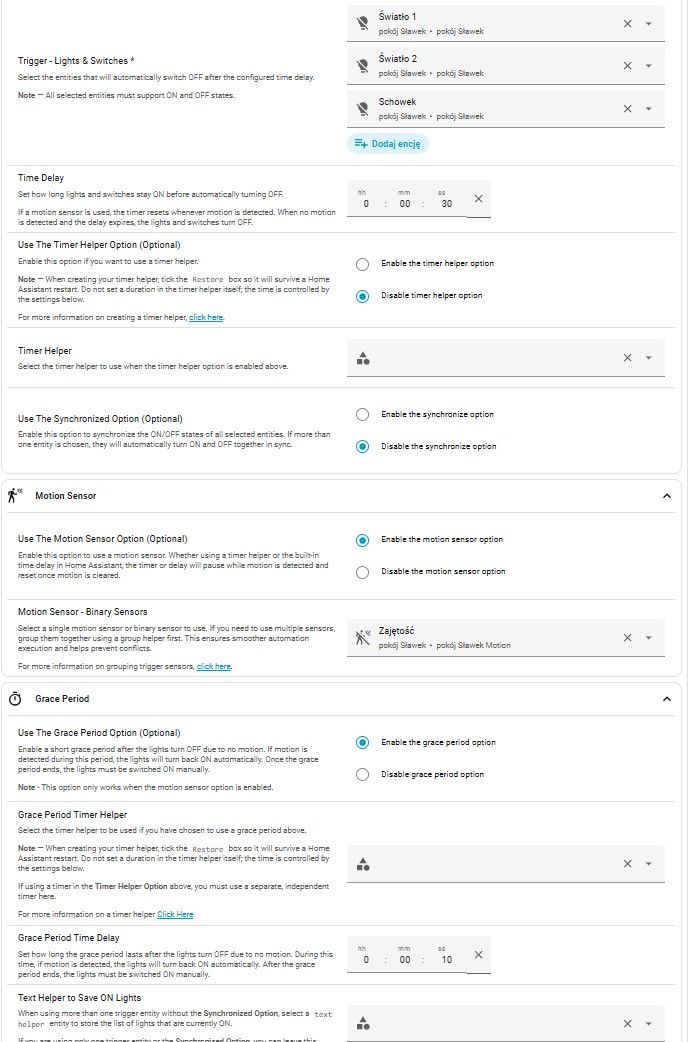
You need to add the following inputs that are missing in Grace Period.
- Grace Period Timer Helper
- Text Helper to Save ON Lights
You can only use the 2 helpers in these inputs and can’t be used anywhere else.
TIP: If you click on the input and scroll down to the bottom you will see a ADD option.
Blacky
Awesome! Thanks.
1 Like
Hello.
Version: 1.3 Home Assistant OS 2025.12.5
I noticed that when I set “Use The Synchronized Option (Optional)” to “Enable the synchronize option,” the following errors start appearing in the log:
The service homeassistant.turn_on cannot be called without a target
I tried with both.
I tried testing it on the old Version: 1.0.
Everything is fine here, no errors.
Could you please provide us your YAML of the automation? This YAML code are the settings you have selected in the automation so I can help. To do this go into your automation, top right 3 dots, Edit in YAML, copy all the code, come back to the forum and in your reply at the top tool bar click on “</>” and paste code in there.
Blacky
Yes, of course, the code is simple. One lamp, switch via a relay to the light, motion sensor.
  timer:
    svet_tualet:
      name: time_ven
      duration: '00:05:00'

      alias: Manual Tualet Light
      description: ''
      use_blueprint:
        path: Blackshome/manual-light.yaml
        input:
          trigger_input:
          - light.marpou_rgbcw_30_light
          - switch.ventilation
          time_delay:
            hours: 0
            minutes: 0
            seconds: 10
          include_timer_helper: enable_timer_helper
          timer_helper: timer.svet_tualet
          include_motion_trigger: enable_motion_trigger
          motion_trigger: binary_sensor.marpou_rgbcw_30_presence
          include_trigger_sync: enable_trigger_sync
          include_grace_period: enable_grace_period
Thanks for your YAML. The reason you will be getting these errors and not in a Version 1.0 is because your using a new feature called Grace Period. If you would like to use this feature your will need 2 new helpers (Time & Text). You then need to add the helpers into Grace Period Timer Helper & Text Helper to Save ON Lights.
Note: The time helper must be a new helper and not the one you used in Time Helper option timer.svet_tualet.
Blacky
Thanks for your reply.
I needed a simple action in the code: turning on the light based on a presence sensor, with the option to use the light and switch together, and then turning the light off with a timer delay when leaving the room, with the option to restore it and reset the timer when returning. I couldn’t find a way to implement motion-activated activation in the code here, it didn’t work.
I didn’t want to bother with the code, but I had to write my own Blueprint code with my own coding requirements and other additions and protections, but thanks for the help anyway! 
Hello Blacky, I am not able to get any Zwave Scene to work as the bypass entity. I would like to use Scene 001 Keypressed2x as the entity .

Scenes do not have an ON / OFF state and the bypass needs that to work. What you can do is create a toggle helper and add that toggle helper to the scene so the scene will turn the helper ON and OFF. You then use that toggle helper in the bypass.
Blacky
Hi, thanks a lot for all your blueprints. They’re really helpful.
Any way that lux sensor can be added to this?
So far I have been manually turning on the light, then, while being in the studio the sun finally light up (living in Norway you never know how the weather is, so cannot rely on sun elevation either) and i forgot thay the light was on. As i have the presence sensor then the light stays on but is not needed due to proper sunlight 
I will consider it but another blueprint may do what your after already.
Have you seen the  Sensor Light blueprint. It will turn you light ON when presence is detected and if you use the ambient condition the light will only come ON then presence is detected and below you lux setting. If the lux rises then the light will turn OFF for you.
It is not a manual turn light ON but thinking of the logic. If I was to add a lux sensor option to this blueprint, if there is proper sunlight and the light was turned OFF then you would have to manually turn the light back ON if later in the day there is not proper sunlight. The sensor light blueprint will do this automatically for you and has a low and high setting with time delays to prevent the light going ON / OFF on those cloudy days.
Blacky
Hi, in the bypass section, is it possible to add an option identify the state of the bypass switch you want to use? For instance, I had manual light automations that only fired WHILE/ AND IF (Montion Sensors) a toggle switch helper is on. My wife can easily say turn off motions sensors or turn on motion sensors to pause or restart all motion automations.
From my understanding, the bypass reads the on state of the trigger being used to bypass. So turning motions sensors off would actually pause the automation if I wanted to use option C, Correct?
I know I could likely create another helper and automation to have the opposite state of my “motion sensors” toggle, but it would be simpler if in the bypass there was a state selection of ON or OFF.
Yes, but it is option 3 not C. Use C if you like to turn the bypass OFF automatically if you forget to say "Turn On Motion Sensors"
Yes it would be simpler for the end user but the amount of code that would be required along with the testing and maintenance would be massive. So it is best to just create a toggle helper and scripts that suits the automation.
This is how you do it.
Looks like you would like to pause the automations when you say "Turn Off Motion Sensors"
That being the case then;
- Create a toggle helper called Bypass - Pause Lights or whatever you like.
- Then create a script and the action to turn ON the
Bypass - Pause Lightstoggle helper by addingInput boolean: Turn on input booleanaction and selecting your toggle helper. - When saving the script call it Turn Off Motion Sensors
- Once saved click on the 3 dots top right and select settings.
- Click on Voice assistants and toggle Expose ON and any other option you have for voice.
Now when you say "Turn Off Motion Sensors" it will turn ON your toggle helper.
We are 1/2 way there. Now we need to turn OFF the toggle helper.
- Create another script and the action to turn OFF the
Bypass - Pause Lightstoggle helper by addingInput boolean: Turn off input booleanaction and selecting your toggle helper. - When saving the script call it Turn On Motion Sensors
- Once saved click on the 3 dots top right and select settings.
- Click on Voice assistants and toggle Expose ON and any other option you have for voice.
Now when you say "Turn On Motion Sensors" it will turn OFF your toggle helper.
All done  easy yeah.
Add that toggle helper into all my blueprints automations you have in the bypass option you like. I think option 3 would be best for this type of thing3 - Enable the Bypass - Keep the Lights Current State.
Now your wife can easily say turn off motions sensors or turn on motion sensors to pause or restart all motion automations.
Let us know how you go.
Blacky 
Hei Blacky, not sure what i did wrong but now when i am entering the room the lights turn ON even when the only automation is this one to shut down when the lights are manually turned on.
What am I doing wrong? I understand that the motion sensor is to keep it alive if in turn it on manually and read a book so my presence keep it on, but not that my presence turn it on even when is off (?)
alias: Turn off Manual Kids Light
description: ""
use_blueprint:
  path: Blackshome/manual-light.yaml
  input:
    trigger_input:
      - light.kids_light
    time_delay:
      hours: 2
      minutes: 0
      seconds: 0
    include_trigger_sync: disable_trigger_sync
    include_motion_trigger: enable_motion_trigger
    motion_trigger: binary_sensor.radar_kids_presence
    include_grace_period: enable_grace_period
You have enabled the Grace Period. Disable this option and you be all good.
If you would like to use the Grace Period then you will need to select your Grace Period Timer Helper and your Text Helper to Save ON Lights.
Blacky 
1 Like