Yes I don’t join the players, always separate. Maybe you could make a Russound helper group for volume.
Amazing card - thanks!
I’m also trying to use it with Music Assistant but struggle with the favorites. The card doesn’t find any. In Music Assistant, being a favorite is a property of a title, an album, an artist or a playlist. The get_library action can retrieve the favorites: Get Library Action - Music Assistant but I have no idea how to show them here.
Maybe universal media player could solve your problem. for me an absolutely underated funcionality  it can combine multiple media player entities to act as one:
1 Like
Hi there,
Could somebody please tell me how to get two different accent colors?
For the icons (see screenshot blue rectangle) I want the accent color to be black.
For the selected media player (see screenshot orange rectangle) e.g. purple.
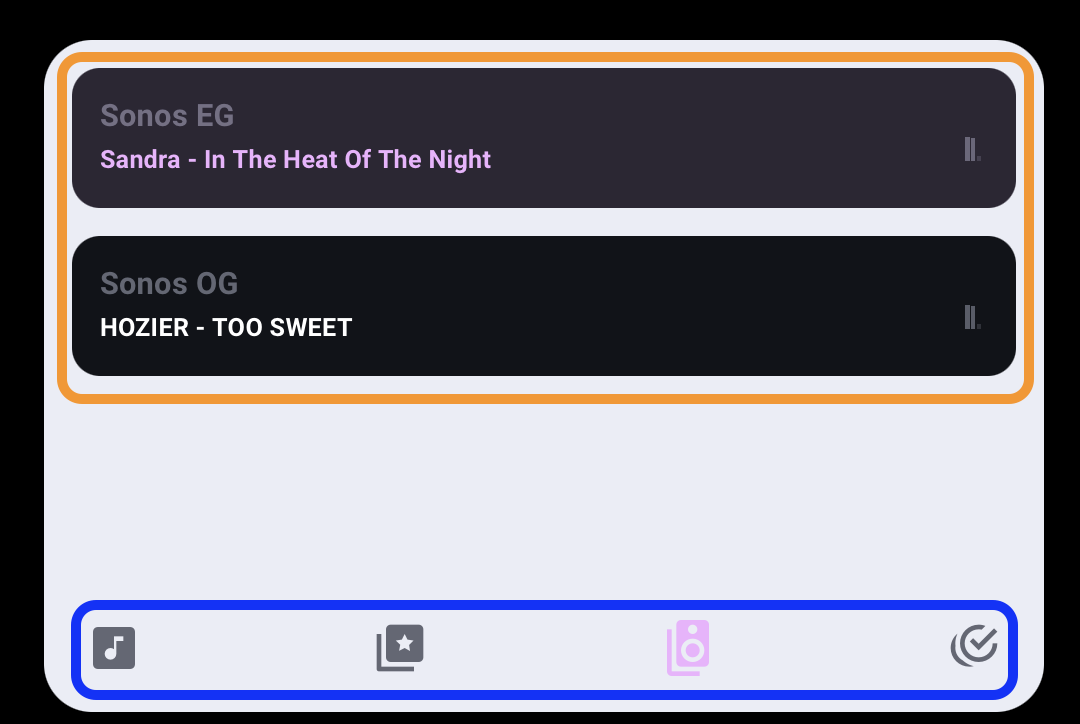
This snippet changes the accent color for all elements in the card…
card_mod:
  style:
    .: |
      ha-card {
        --accent-color: purple;
      }
I have a problem with my universal media player (integration which allows to combine 2 devices or entitoies to act as 1, alike amplifier and audiosource), with normal media player card and mini media player, it works good. with maxi player i can’t adjust the volume. on the card the volume changes visually, but it’ doesn’t change the real volume on my denon avc. any idea what i’m doing wrong?
Try add a groupings page which also has volume control. See if the volume changes there.
Please create an issue in Github so we can dig deeper into this.
Hi
Anyone have this card, nice and clean but for use with music assistant and google home speakers?
I want to add it to my dashboard and have a clean way to select music from spotify, radio, able to search easily in spotify but all using music assistant players and be able to group the google speakers.
Thx
@skank I use Maxi Media for player and groupings pages. I use Mass Player card for playlist and secondary browse.
Also see this post Maxi Media Player - #125 by Chykan
& this post Maxi Media Player - #120 by Chykan
Updated Card Code using Maxi Media Player with Mass Player
              type: horizontal-stack
              cards:
                - type: custom:maxi-media-player
                  sections:
                    - player
                    - grouping
                  entityId: media_player.speaker_group_ma #HA MediaPlayer
                  entities:
                    - media_player.speaker_group_ma #HA MediaPlayer
                    - media_player.attic_speaker #Google Cast Integration
                    - media_player.kitchen_speaker #Google Cast Integration
                    - media_player.master_bedroom_speaker #Google Cast Integration
                  hidePlayerControlPowerButton: true
                  topFavorites:
                    - ''
                  hideBrowseMediaButton: false
                  artworkAsBackground: false
                  showBrowseMediaInPlayerSection: true
                  hidePlaylistInPlayer: false
                  showSourceInPlayer: false
                  widthPercentage: auto
                  heightPercentage: 119
                  fallbackArtwork: >-
                    https://framerusercontent.com/images/94qQBLwuGDFYsi4Xs5Bumr61ao.gif
                  card_mod:
                    style:
                      mxmp-player$: |
                        [background] {
                          background-color: rgba(0,0,0, 0.5) !important;
                        }
                      mxmp-player$ mxmp-player-controls$: |
                        .icons {
                          margin-bottom: 1rem;
                        }
                        .icons * {
                          --mdc-icon-size: 3rem !important;
                          --mdc-icon-button-size: 3rem !important;
                        }
                        mxmp-ha-player,ha-icon-button {
                          --mdc-icon-size: 7rem !important;
                          --mdc-icon-button-size: 6rem !important;
                        }
                        .big-icon {
                          --mdc-icon-size: 7rem !important;
                          --mdc-icon-button-size: 6rem !important;
                        }
                      mxmp-grouping$: |
                        mxmp-grouping-button {
                          display: none;
                        }
                        .item {
                          padding-top: 1rem !important;
                          padding-bottom: 1rem !important;
                          border-bottom: 1px solid #333;
                          font-size: 20px;
                        }
                      .: |
                        ha-card {
                          color: white !important;
                          --accent-color: rgba(0,191,255, 0.8);  /* Transparent deepskyblue */
                          --primary-color: white;
                          --secondary-text-color: white;
                          --secondary-background-color: rgba(0,0,0, 0.5);
                        }
                - type: custom:mass-player-card
                  entities:
                    - media_player.speaker_group_ma
                  player:
                    enabled: false
                  queue:
                    enabled: true
                    limit_before: 2
                    limit_after: 100
                    show_album_covers: true
                    show_artist_names: true
                    hide:
                      move_down_button: true
                      move_up_button: true
                  media_browser:
                    enabled: false
                    favorites:
                      radios:
                        enabled: true
                      podcasts:
                        enabled: false
                      audiobooks:
                        enabled: false
                  players:
                    enabled: false
                - type: custom:mass-player-card
                  entities:
                    - media_player.speaker_group_ma
                  player:
                    enabled: false
                  queue:
                    enabled: false
                    show_album_covers: true
                    show_artist_names: true
                  media_browser:
                    enabled: true
                    favorites:
                      albums:
                        enabled: true
                        limit: 500
                      artists:
                        enabled: true
                        limit: 500
                      tracks:
                        enabled: true
                        limit: 500
                      playlists:
                        enabled: true
                        limit: 500
                      radios:
                        enabled: false
                      podcasts:
                        enabled: false
                      audiobooks:
                        enabled: false
                  players:
                    enabled: false
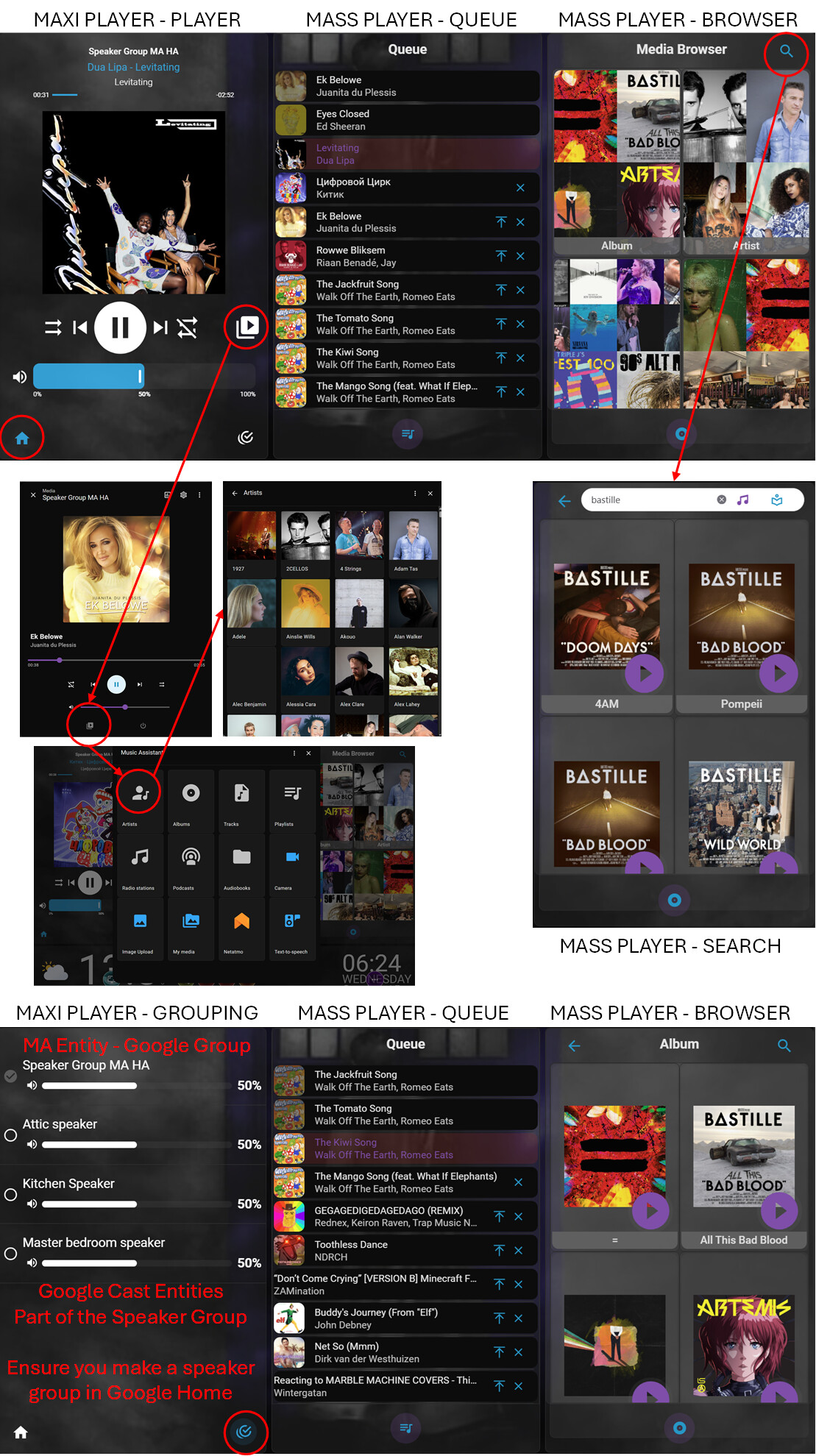
For Google Speakers & Individual Group Member Volume Control
- Make a Speaker Group in Google Home App
- Ensure you add all Google Cast speakers to Home Assistant via Google Cast Integration
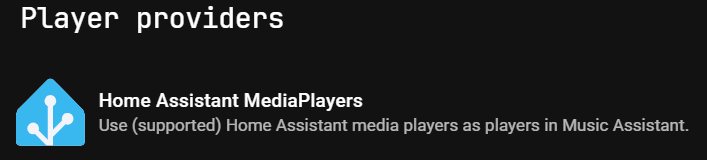
- Add the Speaker Group as a player in Music Assistant via Home Assistant MediaPlayers.
- I find adding Google Cast Player flaky, pollutes players with speakers not used for music playback and players randomly dissapear.
- I find adding Google Cast Player flaky, pollutes players with speakers not used for music playback and players randomly dissapear.
- Add the Home Assistant MediaPlayers Speaker Group as your main player.
- Add members of the group to the groupings page from the Google Cast Integration
- This will give you individual control of Group Member Volumes and Only one player to choose from in Music Assistant.
NOTE: The groupings funtion of this card is not used and buttons hidden
Whats the difference with this card and the mass polayer card?
SO much cards alike
Mass player card is built for Music Assistant.
Maxi Media Player is not, but is aiming to support built-in features in home assistant.
Other than that… look and feel, and various small features.
1 Like
@skank I made them look the same
Maxi allows you to use the Groupings page to adjust the volume of you Google Speaker Group made in the Google Home App.
Maxi Also gives you full access and Browse feature.
Mass Player gives you full playlist control.
Mass limits how many entries you can see.
@PunxsutawneyPhil If you can implement
Your Groupings and Browse Media is Better than Mass Player. Hence why I use in combination. This does not help me on a phone when I want to flip from page to page within the card.
I agree, queue is better in mass player, also the player.
MAxi media player has better browser and grouping
Although the browser in maxi media player shows camera and my media and images, i dont like that, how do i get rid that?
Also the fall back picture when nothing is playing should be used like something of music assistant
You can customise your fallback. I use this on some of my players. Right click and copy the hyperlink or place them in your www folder.
Although the browser in maxi media player shows camera and my media and images, i dont like that, how do i get rid that?
I do not think there is a way unless Home Assistant core allows you to reduce the options.
2 Likes
You know mass player reduces the options of the browser, i dont see the camera, images, media there…
EDIT:
Yes it does, REDUCES it Way too much MASS can’t get more than 100 results. It only picks up favourites in Music Assistant.
Hence why I have them both there MAXI and MASS. MAX Does a more comprehensive search via default media browser.
My main display automatically switches to the full music assistant app anyway. Which give me full browse and control.
1 Like
?? i think we misunderstand eachother
EDIT Above
For anyone that wants an animated Music Assistant Logo as Fallback Artwork.
Music Assistant Logo Animated Transparent Background
https://gist.github.com/user-attachments/assets/62899132-c90e-4bbb-b81ac720cdb5ebbe
Music Assistant Logo Animated Black Background
https://gist.github.com/user-attachments/assets/096ccea0-9d4a-423e-9375-9e7ec2b63fac
Music Assistant Logo Animated More Transparency
https://gist.github.com/user-attachments/assets/1e226045-e79a-43a7-81cd-34aefe25c4ee