I’ve been working on a custom integration that solves a problem that’s been bugging me for a while: voice assistants sending massive entity dumps to LLMs with every single request.
The Problem
Traditional voice assistant setups send your entire entity list (lights, switches, sensors, etc.) to the LLM every time you ask a question. For a typical home with 200+ devices, that’s:
12,000+ tokens sent every time
Expensive API costs if using cloud LLMs
Slow response times
Context window limitations
Poor performance with large homes
The Solution: MCP Assist
Instead of dumping all entities, MCP Assist uses the Model Context Protocol (MCP) to give your LLM tools for dynamic entity discovery. The LLM only fetches what it needs, when it needs it.
Token reduction: 95% (from 12,000+ tokens down to ~400 per request)
How It Works
MCP Assist starts an MCP server on Home Assistant
Your LLM connects and gets access to discovery tools:
get_index - Smart Entity Index with system structure (~400-800 tokens)
discover_entities - Find entities by type, area, domain, device_class, or state
get_entity_details - Get current state and attributes
perform_action - Control devices
run_script / run_automation - Execute scripts and automations
list_areas / list_domains - List available areas and device types
LLM discovers on-demand instead of getting everything upfront
Example: Complex Query
User: “Do we have a leak?”
Behind the scenes:
1. LLM calls get_index → Sees moisture sensors exist
2. LLM calls discover_entities(device_class="moisture")
   → Returns all leak sensors
3. LLM calls get_entity_details for each
   → Finds laundry sensor is "on", others "off"
4. LLM synthesizes response
Assistant: “Yes, the laundry room leak sensor is detecting water. The bathroom and kitchen sensors are dry.”
Key Features
95% Token Reduction - Massive efficiency gain
Multi-Platform Support - Works with LM Studio, llama.cpp, Ollama, OpenAI, Google Gemini, Anthropic Claude, and OpenRouter
Multi-turn Conversations - Maintains context and history
Smart Entity Index - Pre-generated system structure for context-aware queries
Web Search Tools - Optional DuckDuckGo or Brave Search integration
Works with 1000+ Entities - Efficient even with large installations
Multi-Profile Support - Run multiple agents with different models/personalities
Local or Cloud - Your choice of local LLMs or cloud APIs
Installation
HACS (Recommended)
Click the badge above or manually add as custom repository in HACS
Install “MCP Assist”
Restart Home Assistant
Add integration via Settings → Devices & Services
Manual Installation
Copy custom_components/mcp_assist to your HA custom_components directory
Restart Home Assistant
Setup
The integration walks you through a 4-step setup:
Profile name and server type selection
Server URL (for local) or API key (for cloud)
Model selection and prompts (models auto-load from your provider)
Advanced settings (temperature, response mode, web search, etc.)
Then set it as your voice assistant in Settings → Voice Assistants.
What’s New in v0.11.0
Just released a major update with a complete conversation flow system overhaul:
User-controlled endings - Say “bye”, “thanks”, “stop” and it actually stops
Mode-specific behaviors - None/Smart/Always modes with distinct personalities
Configurable detection - Customize follow-up phrases and ending words per profile
This has been working really well for me, but I’d love feedback from the community! If you run into issues or have suggestions, feel free to reach out here or on GitHub Issues.
This is very cool and quite useful especially for those with GPUs / CPUs that have lower memory bandwidth, and the conversation smart modes definitely is something I think the current HA implementation is lacking.
I just wanted to point something out though:
This is only true if you configure it that way. You can easily decide in HA which entities are passed in and in most cases there is a small subset of devices that generally need to be accessed by HA. It still grows of course depending on your needs, but you can already slim down from that considerably by reducing the entities that are passed to assist instead of having it pass everything.
Yeah, can absolutely just expose a small number of entities, but the voice experience is restricted to basic single function calls - turn on/off, what is the status of … etc.
The cool thing about using an MCP and having many more entities exposed, is that the LLM can connect dots in natural and unexpected ways that makes the whole experience feel so much more real.
Interesting, I’d be curious to know more about that to see what could be missing.
I haven’t had any issues with it connecting multiple tool calls, for example:
Adjusting multiple devices at the same time
Using a web search to then search for a specific song to play on a speaker
I gave it the ability to search the YouTube API, and it is able to search YouTube and then play the search result on the TV that I specify
To be clear, not downplaying the work that has been done, just curious to see more specifics as I am not sure the abilities of assist are related to exposing so many more entities to it vs better prompting and descriptions on the tools which make it more capable.
You’re totally correct, and can of course chain multiple responses and tool calls together with the current apps, but the big issue is passing the entire context every time. So it all gets continually slower as we add more and more smart devices to our homes that we want connected and available to an LLM.
Anyway, each to their own, I just one day want the full Jarvis style experience of having everything interconnected.
Yeah, that is the goal that I have as well. I decided to give this a try, and in my specific case it was a bit slower. I believe this is because depending on your hardware the MCP approach can be slower than a larger prompt, a GPU that is capable of high prompt tok/s doesn’t really get slowed down by a few more tokens with additional devices.
This definitely would have been useful for when I was using a 3050 and the prompt reading was slowing everything down. On a 3090 with 4000 tok/s prompt reading, it is not as much of an issue.
Anyway, sorry for the rambling, just wanted to share my perspective as I don’t think there is one approach to rule them all, there are so many variables depending on priorities
To try and provide some helpful feedback:
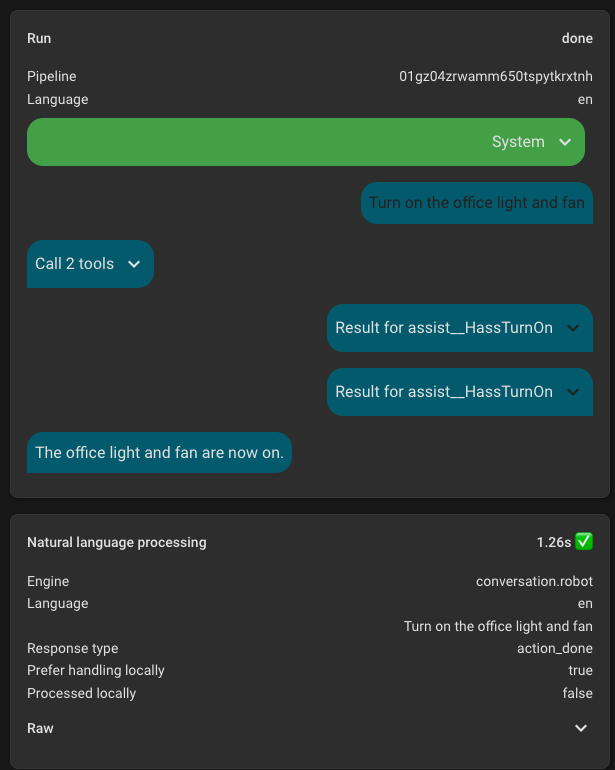
One thing that makes this more difficult for me is that it doesn’t look like the tool calls get added to the debug view in home assistant, which makes it more difficult to debug my tools and see exactly what the LLM passed in. For scripts you can use the trace feature but for other python based tools it is more difficult to see.
Can it strip emojis from LLM responses? I’m using Local OpenAI LLM with Ollama. It’s been good so far but keen to test yours especially to reduce context window and add more entities.
Yeah I’ve tried that but honestly it’s hit and miss. My prompt is quite long with all the tool definitions and entity context, and the LLM just ignores the formatting instructions half the time.
I’m using Qwen3 4b with 8k context as it’s the fastest model to fit my RTX 5070 Ti and keep responses < 1s but also found that other models with greater params can ignore emoji instructions too.
The hass_local_openai_llm integration does this at the code level instead - uses the demoji library to strip them during streaming:
Works every time regardless of what model you’re using or how long your prompt is. Would be a pretty small change if you’re open to adding it as a config option? Would be awesome!
I just set this up but noticed that there isn’t a way to get the Voice Assistant to ‘prefer’ local first, before going to a LLM. Is that something that can be added?
Ignore me the now - I’ll come back to this, someone on GH is asking just about the same questions as I am but better - will check back in a couple of days

 95% Token Reduction - Massive efficiency gain



 Looking forward to try it