Medication Reminder: a custom integration for tracking pet & human medication doses

Sorry to be a pain. Covers eyes... Your choice of those two RED and white pills may distract those looking for a RED/GREEN status from afar on an always on dashboard.

Can we change them to blue/white, or some other color that doesn't detract from being recognised as OK/not OK?

Otherwise this looks to be a robust solution to a pressing need.

I like the pill count remaining functionality - useful to determine if loss, spoilage or theft may be suspected. Meds are rarely free.

You could have a threshold level for re-order, set up once during initial entry for a medication, as sometimes there are differing lead times to process delivery of different meds, depending on their source. You get a reminder notification to reorder pop up. With further development, you could get it to place the order for you as well by just pressing an acknowledgement button, but I suspect that might be outside the scope of this app and something a vendor keen to monopolise business may find attractive, or your local drugstore would be keen on.

Big update: everything that's changed since I first shared this

When I first posted this it was a bare-bones alpha. Thanks to the feedback in this thread it's grown into something genuinely useful. Here's the rundown (now at v0.10.0).

Early-dose guard with one-tap undo (newest). If a dose gets marked given well before its scheduled time, you get a warning right then with two buttons: Undo (it was an accidental tap, so it unchecks the dose and puts the supply count back) or Keep it (you meant to give it early). It's there to catch a misfire before it turns into a missed or doubled dose. This grew out of the over-dose-guard idea @IOT7712 raised.

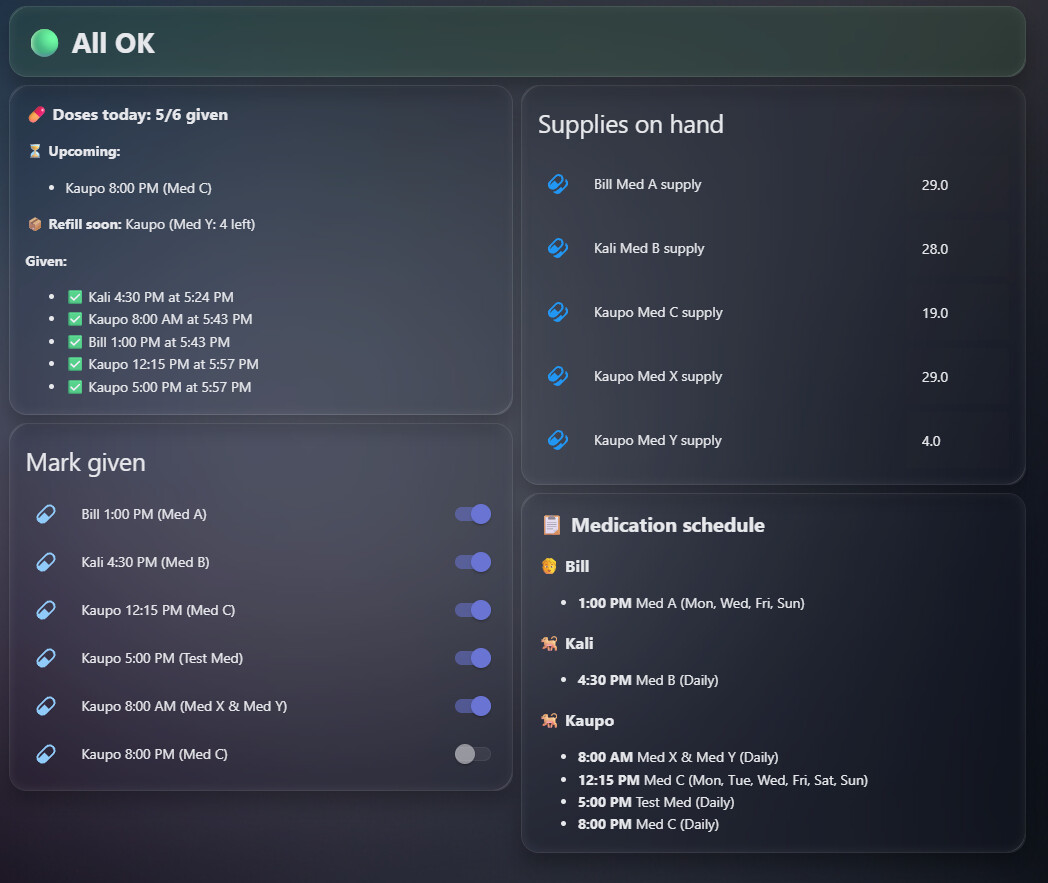
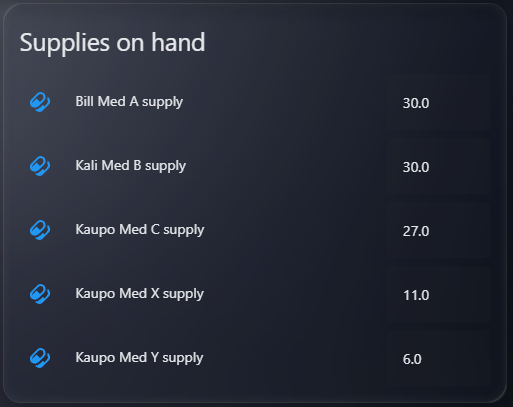
Supply & refill tracking. Track how much of each medication you have on hand. The count drops as doses are marked given, shows doses-left and an estimated run-out date, turns red at a per-medication reorder threshold you set once (so slow-to-deliver meds can trigger earlier), and sends a refill reminder. Idea from @Tadies; the reorder-threshold detail came from feedback here.

Glanceable status. A per-patient "needs attention" sensor (problem class): red when a dose is overdue, green when all is well. It trips on elapsed time alone and fails safe toward "problem," so it works as a wall-panel light or siren too. That whole direction came from @IOT7712.

or

image

Scheduling. Each dose can now be daily or specific days (Mon/Wed/Fri), with 12h or 24h time display.

Cleaner dashboard. It auto-discovers every patient and dose (nothing to hand-edit), and the pill icons are blue so they don't compete with the red/green status from across the room. The today summary now splits pending doses into overdue and upcoming, the status banner tints red or green at a glance, and a refill soon line appears when a supply runs low. There's a per-patient schedule overview, and now two card files to pick from: the original single-column layout, plus a wide two-column one (a full-width status banner over two columns) sized to fill a 2-column Sections view section.

One-click automation blueprints. The companion automations (dose reminders, the mark-given confirmation, the low-supply alert, and the new early-dose warning) are now importable Home Assistant blueprints, so you add them from a button instead of pasting YAML. For anything custom there are also medication_reminder_dose_given and medication_reminder_dose_undone events to trigger off.

Plus the earlier additions: per-patient notify targets, UI reminder settings (reset time, nag window, re-nag interval), an "all doses given" sensor, patient types (person/dog/cat/...), and medications shown inline on each dose.

Still UI-driven, no YAML for schedules; entities auto-create per patient and state survives restarts.

A note on safety

Since this deals with medication, a few choices are deliberate:

  • It fails safe, not silent. The "needs attention" status errs toward red: if a dose is overdue, or if it can't evaluate a dose for any reason, it flags a problem rather than showing a false "all OK." When in doubt, it tells you to look.
  • It trips on time, not just taps. It re-checks every minute, so an overdue dose turns red on its own even if nobody opens the app. No stale "all clear."
  • It double-checks an early tap. Mark a dose given well before its scheduled time and it warns you on the spot, with a one-tap undo that also restores the supply count, so an accidental tap doesn't quietly become a missed or doubled dose.
  • It escalates a miss. Past the nag window a missed dose fires once as a high-priority, time-sensitive alert, and because it's a standard problem sensor you can drive a physical light or siren off it so the alert is visible across the room.
  • It survives restarts. What's been given today is remembered across Home Assistant restarts, so a reboot won't reset your tracking and risk a double or a missed dose.
  • The tracking runs locally. The schedule, status, and red/green logic are entirely local with no cloud dependency; only the phone push needs a connection, like any HA notification.
  • It won't let you run out quietly. Supply tracking flags low stock and reminds you to refill before a critical med runs out.

And, just as important, what it deliberately is not:

  • It's a reminder aid, not a medical device. It can't detect that a dose was actually given, you tell it by tapping "Mark given." It warns on an early tap, but it doesn't enforce minimum gaps between doses or a maximum per day; it tracks, reminds, and nudges, it doesn't police.
  • Treat it as a second set of eyes, not the only one. It's still alpha, so keep a backup method you trust, and confirm any dosing schedule with your doctor or vet.

Genuinely, thanks all! This feedback has really shaped the release into something more useful for everyone.
1 Like

Update: every-N-days just shipped in v0.11.0.

  • Weekly already worked: when you add a dose, pick the days it applies to and select a single day (say Mondays), and it only reminds and counts that day each week. The same picker handles Mon/Wed/Fri.

  • New in v0.11.0: every-N-days. When adding a dose, set Repeat to "Every N days", choose the interval and a start date, and it's due on that date and every N days after (every other day, every third day, and so on). Grab the update in HACS (Redownload) and restart. If you use the bundled dashboard, re-paste lovelace-card.yaml so the schedule reads "Every N days".

Still on the roadmap: day-of-month / monthly and on/off cycles (like a 21-on / 7-off pack). Those need the same date-anchored "is it due today?" logic, so they'll follow.

If you can share the exact pattern you're after (for example "every 3 days" or "the 1st of each month"), that helps me prioritize what's next. Thanks again for the nudge, it's what got this built!

1 Like

Dang!...Your fast!...
i didn't had the chance yet to give the stuff
and ya already nailed it!
worked like a charm!
Keep rocking!

this stuff is indeed where i did look for
no fancy crap to add pills for paharmacy etc...
just the doses and what's in stock....
and get notified when they almost out of stock!
cause my brain farts lots!
so yeah... this is exactly what i needed THANK YOU!

1 Like

Haha, glad it hit the mark! That's exactly the vibe: track the doses and what's on hand, nudge you before you run out, and skip the pharmacy-database stuff nobody asked for.

And credit where it's due, the supply and refill tracking exists because you showing off the dashboard, so thank you for that. The low-stock reminder is built for exactly the brain-fart moments you described.

If you ever hit a dosing pattern the scheduler doesn't cover (it does daily, specific weekdays, and every-N-days now, with monthly and on/off cycles still on the list), give me a shout.

Keep rocking! :call_me_hand:

1 Like

New: more ways to schedule a dose

The most-requested addition is here. On top of daily and specific weekdays, a dose can now be:

  • Every N days (every other day, every third day, and so on) from a start date.
  • An on/off cycle (e.g. 21 days on, 7 days off) from a start date, for things like oral contraceptives or cyclic HRT.

Just pick the pattern when you add the dose. Reminders, the given-today counts, the overdue check, and the supply run-out estimate all follow it automatically, and both the dashboard and the new calendar show the cadence ("Every 2 days", "21 on / 7 off"). Existing doses are unchanged.

Update: what else is new (now at v0.13.0)

Alongside the new schedule types, recent releases also added:

  • Next-dose sensor (sensor.<patient>_next_dose) and a medication calendar (calendar.<patient>_medication) per patient, so you can see what's coming and the schedule laid out over the weeks.
  • One-tap refill button for each tracked supply, instead of editing the number by hand.
  • Fix: the "Already given at HH:MM" time no longer resets after a Home Assistant restart.
  • Repairs warning if a tracked supply's medication matches no dose (so it would never count down).
  • A proper test suite and CI under the hood.

All backward compatible. Update in HACS and restart, and re-paste the dashboard card if you use it. Still a reminder aid, not a medical device. Thanks for the feedback that drives these!

1 Like

i still have that > 6:00 PM at 6:00 PM on given.......
while i use 24 hours......
and is it needed to add the first time?
since that is already on the schedule?
just a thought.....
ty

Good catches, both of them, thank you!

  1. You're right that the "Already given" line (and the overdue/upcoming lines) are stuck in 12-hour even when you've set 24-hour. The schedule card respects your 24h setting, but those summary lines hardcode it. That's a bug on my end, and I'll have them follow your time format so you get 18:00 instead of 6:00 PM.

  2. And good point on the redundancy: the scheduled time there is unnecessary since it's already in the schedule. I'll trim it down to just who and when it was actually given (something like ":white_check_mark: Name, given at 18:00", probably with the medication), so the line is about the give-time rather than a repeat of the schedule.

Both will go into the next release. Appreciate you keeping an eye on the details, as always! :call_me_hand:

Just a few lines of yaml edits will get this sorted..

1 Like

Ty.... :smiley:
Great job on the new stuff too!

1 Like

I love this! I'm totally thinking about how to misuse this to track if my elderly cat not only got her pain meds, but combined with a surefeed if she ate... the feeder tracking the eaten amount should make it possible to create triggers for 2 "doses" of food.

Also, unrelated: if two patients are using the same meds, e.g. B12 vitamins or something.. and i do track this. will this be counted as two stashes of meds, or substract from one stash B12 pills? because likely i do have one stack both persons use.

Whatever: I LOVE this

"Misuse" is a strong word for what is clearly the intended use. Tracking whether a cat ate is just medication tracking where the medication is dinner. Ship it.

On the SureFeed hack: annoyingly for your sense of mischief, this works without any misuse at all. Each "mark given" control is a plain switch, so anything that can call switch.turn_on can flip it, including a SurePetcare feeder event. Set the cat up as a "patient" with two food "doses," then an automation like "when bowl weight drops by X grams, turn on the morning meal switch" marks it for you. The toggles reset each day, so tomorrow it's clean again. Pain meds and dinner, same cat, no judgment.

On the shared B12 stash: ah, the question I was hoping nobody would ask. Supply counts are tracked per patient, not as one shared pile. So if you add B12 under both people, you get two separate "units on hand" counters, and dosing person A only shrinks person A's number. One bottle, two imaginary bottles, as far as the integration is concerned.

Two ways to keep it honest today:

  • Count the supply under one patient only. Give person B the B12 dose with no supply count, so the real bottle is counted once. You lose the "B is low" nudge, but the total stays truthful.
  • Just refill both whenever you top up the bottle and make peace with the duplication.

A proper shared supply pool (one bottle, multiple patients drawing it down) is on my radar. If enough people admit they share a vitamin jar, it moves up the list.

I love it as well, solved an issue I had!

Ah, yes. :smiley: i was quite sure it would be an acceptable "misuse", cat needs food, so everythings fine. I will set this up. Might also think about tracking the maximum allowed dose of snacks with another, younger cat with a tendency to become chubby. So many useful things that can be done with it.
For the b12 i will likely just split the available amounts in two. should work the same with reordering.

"Cat needs food, so everything's fine" is the official design philosophy now.

The snack budget is a great fit: give the young one a few snack "doses," and the dashboard's "2/3 given" becomes a live treat counter that resets each day. No supply tracking needed, the daily count does the work. Whether you actually stop at 3/3 is between you and the cat, and let's be honest, the cat will swear it's at 0/3 with a completely straight face =)

And splitting the B12 in two works fine: each half is its own counter, reorder when either runs low. Have fun setting it up.

is it possible also
to add meds for refill etc usage when needed?
so not daily or weekly etc but with tag (When Needed)
sometimes i need those meds for pain managment...
ther's no schedule for it.....

Good news, just shipped this in 0.14.0.

You can now set a dose's schedule to "As needed (PRN) - no schedule, no reminders." A PRN med:

  • Never reminds, nags, or shows as overdue, and stays off the next-dose sensor and calendar. No schedule at all.
  • Gets its own "Log dose" button. Tap it every time you actually take the med (pain meds, rescue inhalers, etc., including several times in a day) and it decrements that medication's tracked supply, so your refill and run-out tracking stays accurate.

So you get exactly what you asked for: no schedule for it, but full usage and refill tracking whenever you do take it. Set up a supply for the med as usual, then just hit "Log dose" each time.

Update via HACS to 0.14.0 and the new option shows up when you add or edit a dose.

2 Likes

Thank You!!! :smiley:

This is awesome - thanks very much! Will likely be able to replace the "Medisafe" app on my phone.

Question: I added a dose but forgot to set the time - it defaulted to 12am. What is the best way to change it to 10:00 am? I presume removing the dose and then adding it correctly will work, but can I instead edit the existing dose somehow?

For your consideration/roadmap: A way to add and then display additional detail about a medication, such as the amount (mg), dosage summary (eg "2 tablets twice per day"), full name (as opposed to a simplified name used in the daily reminders), etc.). A use case for this is when I need to give a new medical provider a full listing of "my current medications". This view would be about the "what", not the "when".

My dog takes a pill monthly, so here's another vote for a monthly schedule option.

Thanks again - excellent work!

Thanks, really glad it's useful, and replacing Medisafe is exactly what I hoped it could do.

Changing a dose time: right now there's no in-place edit, so your instinct is correct. Open the integration's Configure → Remove dose, then Add dose again with the right time (10:00 am). Entities auto-rebuild, so there's nothing else to clean up. Adding an "Edit dose" option so you can change the time without removing and re-adding is a good call, I'll put it on the list.

Medication detail / "what" view: I like this one a lot, and you've framed it well: it's the "what" (mg, "2 tablets twice a day", full name vs the short reminder name) rather than the "when". A printable "current medications" list to hand a new provider is a great use case. Onto the roadmap it goes, optional per-med detail fields plus a summary view.

Monthly schedule:** already on the roadmap (day-of-month), and your dog's vote is counted. The every-N-days and on/off-cycle types anchor to a start date, so a true day-of-month is the natural next one to add. Monthly just shipped in 0.15.0, so your dog's monthly pill is covered, pick 'Monthly' and choose the day.

Thanks for the thoughtful feedback, this is exactly the kind that shapes where it goes next!

Tested today the new stuff out...
I love the button for those meds...
And counter worked fine too...
But it shows up in schedule as 00:00 medname (dayli)
Now that's not a hughe prob tho...i thought it would show as another name....
I like the fact it shows tho in the schedule
So ya known what's going on there...
Btw....dose given today still shows in 12 hour format
Shouldn't it shows as medname and then time when given?
Instead persons name time at time....
Just my 2 cents
