Another request for the roadmap: Create a way that I can specify the time a med was taken. E.g., its 9:00 am now, but I want to record that the med was taken at 8:00 am. In Medisafe, this is enabled by different "Take Now" and "Specify Time" buttons.
Awesome, thanks for testing it and for the detailed notes, super helpful.
"00:00 medname (Daily)" in the schedule is two things:
The "(Daily)" label was a gap in the bundled dashboard, the schedule-overview card didn't know about the new "as needed" type yet, so it fell back to "Daily". I've since fixed it to show "As needed". The dashboard is a copy-paste card, so grab the latest lovelace-card.yaml (or the 2-col one) from the repo and re-paste it, then PRN meds label correctly.
The 00:00 is because a PRN dose still stores a time field (the add-dose form needs one) and it defaulted to midnight. For an as-needed med that time is ignored (it never reminds), so it's purely cosmetic. Good call though, I'll look at hiding the time and naming PRN doses more clearly (e.g. "Ibuprofen (as needed)" instead of "12:00 AM Ibuprofen") so they read better in the schedule.
And glad you like that they still show there, that's the intent: a reference of what's available, listed but never marked overdue.
"Already given" format: the 12h vs 24h follows each patient's time-format setting, so if you'd rather see 24h, flip it in the integration's Configure → Settings and the whole dashboard switches. On the "person name / med / time" ordering, I want to be sure I'm picturing the same line you are, mind dropping a quick screenshot of it? Then I can tweak it to read the way you'd expect (med first, etc.).
Thanks again, genuinely useful, keep the 2 cents coming!
Good one, and it fits naturally: the integration already records the actual time a dose was marked given (that's the given_at timestamp behind the "already given" list), so this is really about letting you set that time to something other than "now" when you log a dose late or early.
The way I'd maybe do it: keep the one-tap switch as your "Take Now," and add a service (something like medication_reminder.mark_given with an optional time) so you can record "taken at 8:00" even though you're tapping at 9:00, with maybe an editable time for quick corrections. That gives you the Medisafe "Take Now" vs "Specify Time" split.
Onto the roadmap it goes. Thanks for the clear example!
Quick follow-up, the PRN display polish just shipped in 0.15.1 : as-needed meds now show as " (as needed)" instead of "12:00 AM ", and the schedule no longer shows that placeholder 00:00. Update via HACS to get the name change, and re-copy lovelace-card.yaml so the schedule view picks it up too, this was the easiest of the updates so far. Only about 4 lines of yaml and a minor python edit.
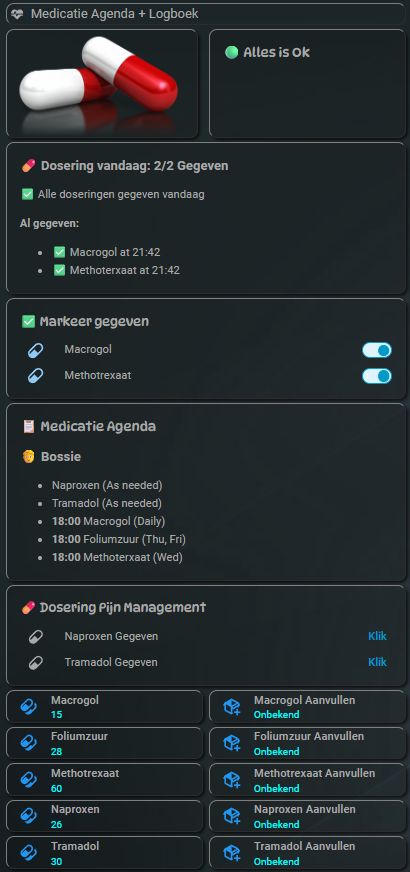
there ya go!..using my own cards a litttle tho...
and removed the name stamp in code in marked given...
the left pill pic shows now red cause it was triggered....
normally it shows the red as black transparant.....
anything worked like a charm!
rock on fr0styh0e!!
That looks fantastic, love seeing it dialed in with your own cards!
And nice, you beat me to the "already given" tweak, dropping the name so it reads "Macrogol at 21:42" instead of leading with the patient. That's exactly what was bugging you (and another user) earlier, so I'll make med-first the default in the bundled card too (keeping the patient name only when there's more than one patient). The red-pill-on-trigger card-mod touch is slick.
Really glad it all came together. Thanks for putting it through its paces and for the sharp feedback, it genuinely shaped the last few releases. Rock on!
Your "Take Now" is the dose's switch (tap = recorded as now). For "Specify Time", there's a new service, medication_reminder.mark_given: target the dose's switch and pass a given_at, and it records the dose as taken at that time instead of now. So at 9:00 you can log that it was actually taken at 8:00:
Try it from Developer Tools → Actions, or wire it to a dashboard button with a datetime input for a one-tap "Specify Time". Correcting the time on a dose you'd already marked given just updates the timestamp (no double-counting, no re-nagging).
Update via HACS to 0.16.0 and it's there. Thanks for the clear Medisafe example, that made it easy to build the right thing!
Thanks! That works fine for switch type doses. What about for "as needed" meds that have a button type instead of a switch?
My use case is a rather common one I suspect: a pain med that can be taken as needed, but not less than 4 hours apart. So it's important to be able to record the time it was actually taken.
Great point, and good timing: the "not less than 4 hours apart" part is actually already on the roadmap as a planned over-dose guard (a minimum interval between doses, warning if you log one too soon).
The piece that's genuinely missing is the one you put your finger on: as-needed meds use the "Log dose" button, which today only decrements the supply count, it doesn't record when you took it. (The mark_given service I just shipped does record a time, but only for scheduled switch-type doses, not PRN buttons.) So the order of operations is: first make PRN doses record a "last taken at" time, then the 4-hour guard can enforce itself off that.
So I'll add PRN taken-time tracking (a "last taken" timestamp you can see, plus a way to log it at a specific time like mark_given), which then unlocks the minimum-interval guard for pain meds. I've updated the roadmap to reflect exactly that.
Thanks, that's a really clear use case, and it sharpened where the gap actually is.
I'm out of my lane here, so feel free to ignore! But I'm thinking that the button type is going to be a limiting factor down the road. For example, I'm not sure you could ever use one to report something like, "how many doses of this have I taken today?" So you may want to consider changing the data type away from a button. Yes, there would be a bit of pain in switching to a more robust data type, but I believe you are still in Alpha, so it's worth considering....
Thanks, and you're not out of your lane at all, this is a good thing to poke at.
You're right that you can't read "how many doses today" off a button, since a button is stateless by design. But the button is only the input (the "log a dose now" action); none of the actual data lives in it. The state is already kept in companion entities that update on each press:
the supply number decrements on every log, and
as of 0.17.0, each PRN med has a <med>_last_taken timestamp sensor.
So moving away from the button wouldn't unlock new data. In Home Assistant a momentary "do it now" action is exactly what a button is for, and the history/state lives in the sensors sitting next to it.
That said, the specific thing you're after, a "doses taken today" count, is a genuinely useful gap, and it's easy to add without changing the button: another sensor that increments on the same dose_logged event and resets at the daily reset time (something like sensor.<patient>_<med>_doses_today). I'll add it to the list. It pairs naturally with the last-taken sensor and the planned over-dose guard (a minimum-interval / max-per-day warning).
Appreciate you thinking a step ahead while it's still alpha. That's exactly when this kind of structural feedback is most valuable!
just an tiny thingy.....
if possible..
is there a way to sort in schedule
the schedules on top......
then underneath it the as needed?
just curious about that...
exxelent work as ussual tho!
yay!
Done! Pushed an update so the schedule overview now lists each patient's timed doses first, with the as-needed ones grouped at the bottom of their block. It's a dashboard-only change, so just re-copy the schedule overview card (from lovelace-card.yaml or the two-column version) and you'll have it.
Big update: flexible schedules, PRN + over-dose guard, supply tracking, and heading into HACS!
It's been 18 days since I first shared this, and the integration has come a long way, a lot of it straight from ideas in this thread. Quick rundown of where it's at.
Installing
It's submitted to the HACS default store and currently sitting in the review queue, so a one-click install is coming soon. In the meantime you can add it today as a custom repository: HACS > three-dot menu > Custom repositories > https://github.com/magikh0e/ha-medication-reminder > type "Integration".
What's new since the first post
Flexible schedules: daily, specific days of the week, every N days, on/off cycles (e.g. 21 on / 7 off), specific days of the month, and as-needed (PRN).
As-needed (PRN) with an over-dose guard: set a minimum interval between doses and a max per day; a sensor warns (never blocks) when another dose right now would be too soon or over the cap. The "no less than 4 hours apart" painkiller case.
Supply & refill tracking: per-medication counts that tick down as doses are given, a low-stock flag, a run-out estimate, and a refill reminder.
Per-medication detail (newest): record strength, brand, the condition it's prescribed for, a full name, and a dosage summary, plus a "current medications" view you can hand to a vet or doctor.
Log the actual time a dose was taken, not just "now".
Reminders, nagging, and a time-sensitive "missed" escalation via blueprints or copy-paste automations, routed to whatever notify target you pick.
An auto-discovering dashboard (no entity IDs to edit), a calendar entity that lays the whole schedule out, and a next-dose sensor.
The README now has screenshots of all of it.
Thank you
A lot of this came straight from this thread:
@IOT7712 for the red/green status-panel idea, and for pushing on as-needed meds and over-medication safety, which became the PRN dose type and the over-dose guard.
A milestone update: when I first shared this, there was a roadmap of "would be nice" features, and almost all of it came straight out of this thread. As of v0.23.0, every one of those is live. Genuinely, thank you, this thread wrote the roadmap.
What started here and is now shipped:
Flexible schedules beyond daily: specific days of the week (@Tadies), every N days, on/off cycles (e.g. 21 on / 7 off), specific days of the month (@ggaltqq), and as-needed / PRN (@IOT7712).
Red/green "all OK / attention needed" status panel, with a flashing option and a per-patient aggregate, the glanceable care-setting view (@IOT7712).
Over-dose guard for as-needed meds: a minimum interval and a daily cap, with a sensor that warns (never blocks) when another dose right now would be too soon. The painkiller-safety case (@IOT7712).
Supply & refill tracking: per-med counts that tick down as doses are given, a low-stock flag, a run-out estimate, and a refill reminder (@Tadies, inspired by your pill counter).
24-hour time format option (@Tadies, and DarkVeter on GitHub).
Record the actual time a dose was taken, not just "now."
Per-medication detail (strength, brand, what it is prescribed for, dosage) plus a "current medications" view to hand a vet or doctor (VGrol on GitHub).
Edit a dose in place instead of remove-and-re-add (weswark on GitHub).
Per-patient / per-group dashboards (blubbel42 on GitHub).
And a few things that grew out of those: a crash-safe "given" state, an un-mark alert so an accidental tap is visible, a grouped Configure menu, and an optional critical-alert mode for the missed-dose notification that overrides Silent / Do Not Disturb on both iPhone and Android.
Install: it's submitted to the HACS default store; in the meantime you can add it as a custom repository (https://github.com/magikh0e/ha-medication-reminder, type Integration). Full notes in the README and CHANGELOG.
The only thing still on the list is optional in-integration notifications (so the YAML companion automations become optional one day), and that's my own itch, not a request from here.
So, thank you all. Keep the ideas coming, I'm still listening.
I realized today...im getting notifications as it should..
That's great!...then ill realized it's getting sended
In 12 hours format....lmao
Text says user(6:00PM) then in small font behind it 18:00
Did i forgot something?
Or is it script that send it...ty@
And ofcourse im glad it's getting
In Hacs now...congratz!!
Wel deserved i would say..
So thank you!
Glad it's working for you, and thank you for the kind words on the HACS submission, much appreciated!
You didn't forget anything, and it's not on your end. The time shown inside the reminder is formatted by the companion reminder automation (the "script" you mentioned), and right now that part is hardcoded to 12-hour, so it prints "6:00 PM" even when you've picked 24-hour in Reminder settings. Your dose entities and dashboard already follow the 24-hour setting (and the small "18:00" is your phone's own notification timestamp), it's just the notification text that doesn't follow it yet.
I'll fix it so the notification time matches your per-patient time-format setting, in the next release. If you want 24h immediately, you can edit the reminder automation's clock line to use %H:%M, but no rush, I'll get it sorted properly.