Midea (formerly Midea AC LAN) integration is now part of Home Assistant Core 🎉

We’re excited to announce that the migration of the Midea (formerly Midea AC LAN) integration to Home Assistant Core is well underway, led by @chemelli and @rokam.

The objective is to bring the Midea M-Smart protocol directly into Core while expanding support for the many different devices and brands that use this protocol.

Migration status

Merged

Available since Home Assistant 2026.8.0:

  • :white_check_mark: Climate

Available since Home Assistant 2026.9.0:

  • :white_check_mark: Binary Sensor

  • :white_check_mark: Button

  • :white_check_mark: Fan

  • :white_check_mark: Humidifier

  • :white_check_mark: Light

  • :white_check_mark: Number

  • :white_check_mark: Select

  • :white_check_mark: Sensor

  • :white_check_mark: Switch

  • :white_check_mark: Time

Available since Home Assistant 2026.9.0:

  • :white_check_mark: Water Heater

Each platform is being migrated individually to ensure feature parity, proper testing, and long-term maintainability within Home Assistant Core.

Some entities have been migrated to a different domain, for example from sensor to binary_sensor or from lock to switch.

More than just Midea

The Midea M-Smart protocol is shared by many manufacturers, so the Core integration is designed to support compatible devices from brands including:

Ariston, Beverly, Bugu, Carrier, Colmo, Comfee, Electrolux, Inventor, LittleSwan, Netsu, Olimpia Splendid, Pro Breeze, Rotenso, Toshiba Lifestyle, Vandelo, Wahin, and others.

So even if your appliance is not branded Midea, there’s a good chance it uses the same protocol.

Help improve device support

The upstream midea-local library relies on information from real devices to add support for new models and expose additional features.

If you own a compatible device, please help us improve support by providing information about your device and, when possible, a Lua file.

You can find the detailed steps in our wiki:

midea-local Wiki — Providing a Lua File

Useful information includes:

  • Brand

  • Model

  • Appliance type

  • Serial number (S/N)

Every contributed device helps improve midea-local, which directly benefits the Midea integration in Home Assistant Core for everyone.

If your device is not fully supported, or you’re seeing missing features, please consider contributing its information. It may help us support not only your device, but many other devices using the same protocol. :raising_hands:

Finally, integration will get the attention it deserves!

Great news! Always good to see more and more integrations moving from custom to core! Well done!!!

Fantastic. This wouldnbe great as Midea is one of the largest producer ww of devices.
Way2go!

Isn’t it less “moving” and more “forking” to core? It seems there’s been a disagreement/rift between maintainer of the HACS integration and those involved in transitioning it to core.

In the end it looks like both will continue being available.

That so great! Every effort of this kind will make home assistant more future proof and well integrated with hardware! Good work!

Midea does have a cheap smart stove gas/electric with temp probe and cam would be nice to bring that over to ha and i might buy it :slight_smile: as of now i use a tapo cam hidden under the over range microwave as a stove cam but wanted an over cam too :slight_smile:
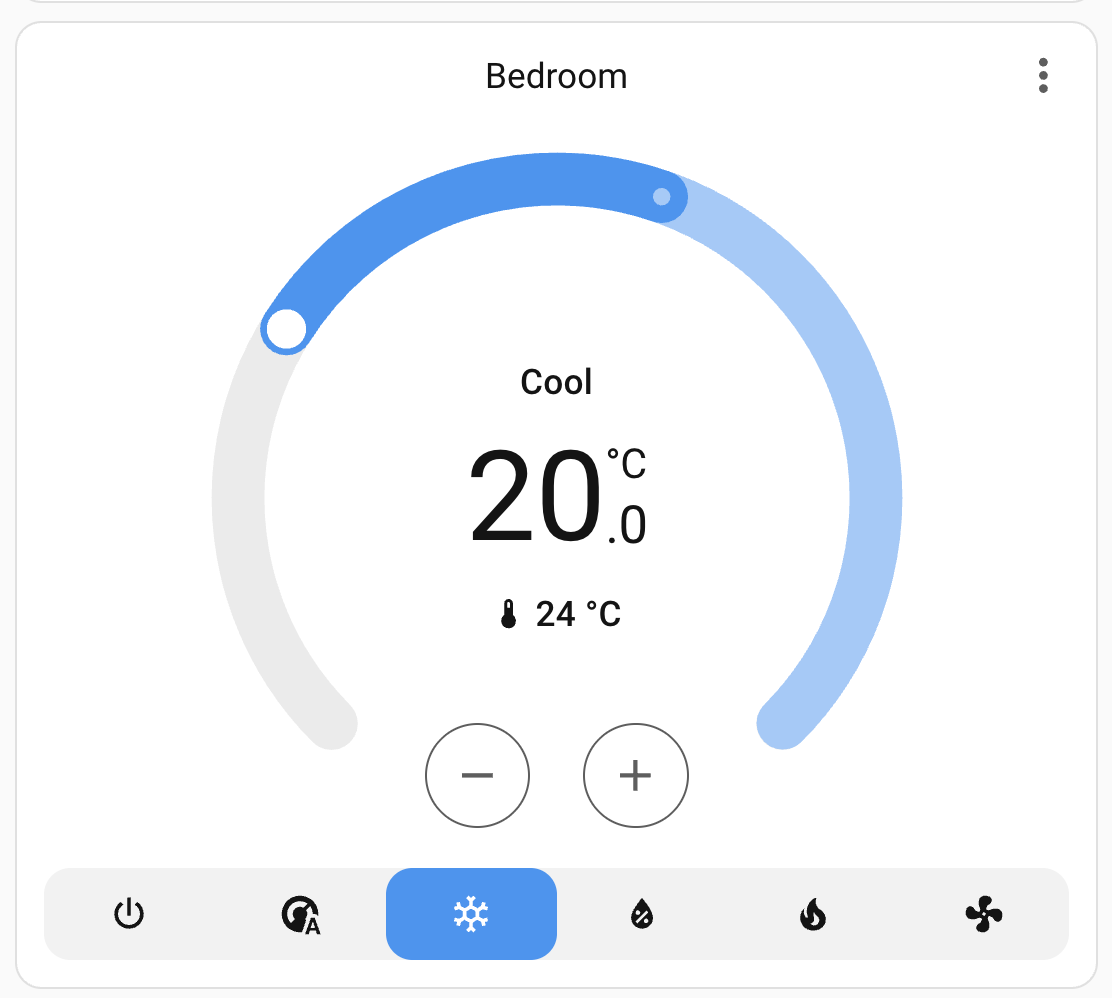
Is the direction to provide identical functionality inside the core or is the plan to change/update the functionality so that it is roughly comparable, but may not match exactly?

I have just tested both versions, when I add the climate device to a dashboard, I see different controls:

Midea_ac_lan:

Integrated Midea:

I am able to click through the integrated version to bring up a panel which provides similar controls: On/Off, Mode etc.

But they don’t show up on the main dashboard.
The AC I am using is a: Midea Duo 14,000 BTU

Hi @dtrott,

I’m quite sure you’re using a different card for the frontend representation.

Regarding your main question: Midea in core will provide all the features of the custom integration, but fully aligned with Home Assistant best practices and its expected entity model.

cannot get this intergration to add my AC which it finds and does not connect with my credentials .I also have tried to retrieve the token and key using msmart-ng and this does not discover any devices on my lan .I also looked thru the logs and there is no token or key found in them

the error it returns:
Could not get a valid token and key from the cloud weather i choose manually enter or use preset cloud credentials

Might be a dumb question, but are dehumidifiers not currently supported by the core integration? I’m able to use the HACS integration to discover and add my Midea Cube I just bought but the core integration can’t seem to discover the device no matter which configuration method I choose (auto, manual, list all).

got it to work had to use smarthome mobile app then I could add to HA

@do_do please open an issue and attach debug log for both working custom and core integration so we can analyze the issue.

Thank you in advance for your help !

Hi, I also have this device (Cube) which works great with HACS but isn’t yet supported.

I’d like to help get it added, I saw some commands on the GitHub repo, but what file/info should I upload and what is safe? Is it ok to send serial number etc for the device? I think I saw that in the output.

@seasideCT, thanks for the info.

What do you mean by “works great with HACS but isn’t yet supported”?

We need the LUA file to support new devices. On the Wiki (link above), you can find the steps to gather them.

In case you need any help, feel free to contact us on Discord.

Sorry I meant using this integration

I’ll have a look at the documentation and submit thanks

Hello Mate, sorry for the dumb question. either i am blind or it is hidden, but i havent found a list with already tested devices. I wanted to check and contribute with my device if still necessary :slight_smile:
i have it since last year and today i got a new router and the integration Midea Air appliances from the Mr. Bogojevic Guy seems broken, so i looked around and saw that this here is getting to HA Core (Congratulations for that :)! ) and stumbled across this thread. now i am wondering, which one should i install? The hot days are over and i can try the new one, in case its not recommended yet.

The AC i have is a Comfee CPPA-09CRN7-QB6 9000btu/h and i only used the old midea app to connect to wifi and ditched it. however, i tried today the msmarthome app and saw that there is a temperature curve for sleep mode, which i always wondered why it was so hot at night when i turned it on, now i know why that was lol.

Now i just report some observations of mine that are partially based on my guess as non programmer.

  1. when activating sleep mode the AC is running 8hours and you can set a temperature curve, a feature i would have loved to know about earlier because it was kinda inconvinient on stock curve lol
  2. presets: i saw there are 3 or so presets and you can choose one of them as favorite apparantly to make it appear in homepage in midea app, now i am wondering if the favorite is being binded to the button. gotta have to find that out.
  3. i always saw in HA an outdoorsensor that was always same temp reporting, probably because it is getting the data from midea app which had weather from what i saw, maybe it could be possible to give it in home assistant a weather entity instead?

i think i missed something but i have to check later, if it turns out that noone reported on that device :slight_smile:

also i saw there is a button to update firmware, which i havent touched yet becaause i have no information wheter thats a good idea because midea patching firmware or something like that, what would you say?

I have a cube dehumidifier and it’s working well in 2026.9.0.

I disabled and deleted the HACS integration before adding the core one.
