MQTT Light with RGB and brightness - how to get the RGB value?

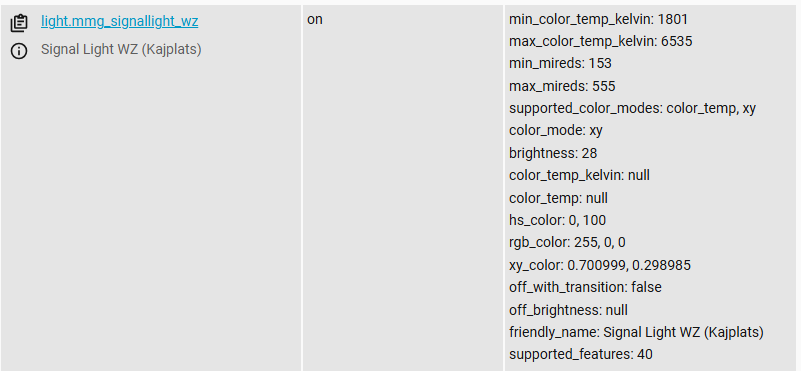
I have a light bulb which is exposed on MQTT like this:

mmg_signallight_wz
state = on
last_updated = 2026-01-13T15:39:52.508881+00:00
last_changed = 2026-01-13T15:39:52.508881+00:00
min_color_temp_kelvin = 1801
max_color_temp_kelvin = 6535
min_mireds = 153
max_mireds = 555
supported_color_modes = ["color_temp", "xy"]
color_mode = "xy"
brightness = 20
color_temp_kelvin = null
color_temp = null
hs_color = [103.689, 80.784]
rgb_color = [105, 255, 49]
xy_color = [0.236988, 0.667994]
off_with_transition = false
off_brightness = null
friendly_name = "Signal Light WZ (Kajplats)"
supported_features = 40
restored = true

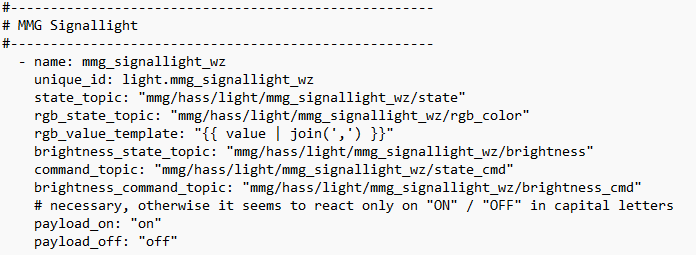
Reading MQTT Light - Home Assistant I’ve configured a MQTT Light like this:

  - name: mmg_signallight_wz
    unique_id: light.mmg_signallight_wz
    state_topic: "mmg/hass/light/mmg_signallight_wz/state"
    rgb_state_topic: "mmg/hass/light/mmg_signallight_wz/rgb_color"
    brightness_state_topic: "mmg/hass/light/mmg_signallight_wz/brightness"
    command_topic: "mmg/hass/light/mmg_signallight_wz/state_cmd"
    brightness_command_topic: "mmg/hass/light/mmg_signallight_wz/brightness_cmd"
    payload_on: "on"
    payload_off: "off"

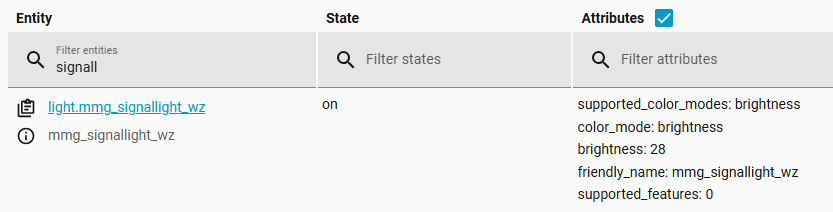
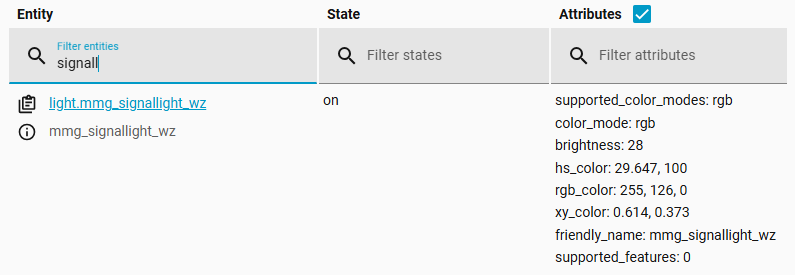
On/Off and brighness work (are shown in light.mmg_signallight_wz), but the color isn’t.

Since the rgb_state_topic is exposed via MQTT as [105, 255, 49] and is expected as 105, 255, 49, I think I have to use rgb_value_template instead of rgb_state_topic to get rid of the brackets.

So I changed the config to:

    #rgb_state_topic: "mmg/hass/light/mmg_signallight_wz/rgb_color"
    rgb_value_template: "105,255,49"

using a fixed value instead of a template (to avoid fiddling aroung with removing the brackets via the template in the first shot) only to see if the rgb_value_template works in principle.
But the color also wasn’t shown in light.mmg_signallight_wz.

It’s also confusing, that the given example in the docu uses rgb_state_topic AND rgb_value_template. But I assume, this is only to give an example for both possibilities and not for real life.

So the question is, how to convert the MQTT rgb_color = [105, 255, 49], into the MQTT light to get the color as well?

tia
Andy
You need both.

  • rgb_state_topic indicates where to get the rgb value

  • rgb_value_template indicates how to process the rgb value, acquired via rgb_state_topic, so that it is in the required format.

The required format is three integers separated by commas such as 123,80,42 but your value has additional square brackets.

Converting [123,80,42] to 123,80,42 will depend on whether Home Assistant understands [123,80,42] to be a list or a string. As a first attempt, you can try this template:

rgb_state_topic: "mmg/hass/light/mmg_signallight_wz/rgb_color"
rgb_value_template: "{{ value | join(',') }}"

Oh great, sounds logical to me, couldn’t get it out of the documentation - anyway.

So I tried (before trying to convert the list in brackets into strings - where I didn’t succeed in the Template Editor yet) to feed a ‘hard coded’ string into rgb_value_template for testing purposes.

But unfortunately neither one of this three variants brought the RGB value to the corresponding rgb_color attribute of the MQTT light entity:

rgb_value_template: "{{ '255,10,10' }}"
rgb_value_template: {{ '255,10,10' }}
rgb_value_template: "255,10,10"

But at least all three variants bring now a color_mode: rgb attribute. This looks like a step forward.

Next question, after this hurdle was taken is, which value argument to use in the template.

The example uses value_json.rgb (even if the example is not for json but for default schema).

I’m struggling a bit with the sparse documentation

What was the result when you tested the template I suggested?

Sorry, didn’t mention, that rgb_value_template: “{{ value | join(‘,’) }}” didn’t work either.

And testing the template

{{ ‘[123,45,50]’ | join(‘,’) }} renders to [,1,2,3,4,5,5,0,]

Therefore I startet to split the task into several steps. First trying to feed in a hardcoded value, then investigating how to build the template in a correct way.

You will need to provide more details than merely “didn’t work” otherwise I cannot help you.

  • Describe your testing procedure.
  • Was the appropriate attribute produced?
  • Did it contain any value?

That’s to be expected because this '[123,45,0]' is a string, not a list.

BTW, are you using single-quotes in your template like this ' or like the way you have it in the example you posted ‘ which is a so-called fancy quote? Fancy quotes do not work in templates.

I don’t recommend that approach. The value received via the topic specified in rgb_color_topic is stored in a variable simply named value. That’s what you should be using for testing.

The template I suggested assumes the received value is a list so that’s why it uses join(',') to convert the list’s values into a comma-delimited string.

If the received value is in JSON format then it will be in a variable named value_json. However, in your first post, there’s no evidence suggesting the rgb value is in JSON format so it’s likely to be in the variable named value.


EDIT

Post the complete MQTT Light configuration that you are testing.

Testcase:

Turning on the light in the remote installation, which publish its states to a MQTT-Broker via MQTT Statestream.

This is the view on the broker:

rgb_color is set (to Red).
brightness is 28, so it’s on.

Another HASS instance subscribes to the MQTT broker with this mqtt light config:

The light entity gets created on this instance and follows the on/off and brightness states, but no RGB attribute is generated for this entity:

Post the configuration you are using for MQTT Statestream.

Post the configuration you are using for MQTT Statestream.

mqtt_statestream:
  base_topic: mmg/hass
  publish_attributes: true
  publish_timestamps: true

rgb_color of the source light entity is published to the MQTT broker, as well as all other attributes:

I now understand your complete configuration and should be able to duplicate it on my two Home Assistant servers. It will allow me to experiment with the light’s configuration. I will do it later today.

1 Like

I have spent a few hours experimenting with MQTT Light and have come to the conclusion that it is subject to some, to put it politely, misbehavior.

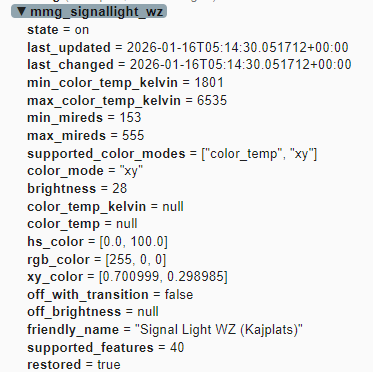
The issue appears to be related to the supported_color_modes option as shown in your screenshot here:

In my testing, I got the same brightness value and once that particular value was set, Home Assistant refused to support any rgb-related options (it posted warnings and errors in Logs so I advise you to check your Logs as well).

If the value is rgb then it will support rgb-related options. However, there is no way to manually set the value of the supported_color_modes option for the default (basic) light schema (it can be done for the json schema).

Home Assistant appears to infer the value based on what it detects in the MQTT Light’s configuration. However, if the light’s configuration contains rgb-related options but Home Assistant has trouble interpreting them, it defaults to setting supported_color_modes to brightness.

Worst of all, some of the error messages I received suggested it was not even trying to use rgb_value_template. For example, the error message contains the value [255, 252, 71] and was not able to process the leading square bracket.

Logger: homeassistant.components.mqtt.client
Source: util/logging.py:167
integration: MQTT (documentation, issues)
First occurred: 7:25:08 PM (1 occurrence)
Last logged: 7:25:08 PM

Exception in _rgb_received when handling msg on
 'mmg/hass/light/floor_lamp/rgb_color': '[255, 252, 71]' 
... etc ...
ValueError: invalid literal for int() with base 10: '[' 

However what I had in rgb_value_template was different from the received value [255, 252, 71] and so it implies it didn’t try using the template. :face_with_diagonal_mouth:

I will try to spend some more time with this tomorrow but, at this point, I can only conclude that its behavior does not appear to closely follow its documentation. In other words, there may be a bug.


NOTE

Here is the configuration I used for testing on my system.


mqtt:
  - light:
      name: test_floor_lamp
      unique_id: test_floor_lamp_rev2
      state_topic: mmg/hass/light/floor_lamp/state
      state_value_template: "{{ value | upper }}"
      command_topic: mmg/hass/light/floor_lamp/state_cmd
      brightness_state_topic: mmg/hass/light/floor_lamp/brightness
      brightness_command_topic: mmg/hass/light/floor_lamp/brightness_cmd
      rgb_state_topic: mmg/hass/light/floor_lamp/rgb_color
      rgb_value_template: "{{ value[0] }},{{ value[1] }},{{ value[2] }}"
1 Like

After more experimentation, I have succeeded in creating an MQTT Light configuration that correctly reports the state, brightness, and RGB values published via MQTT Statestream.

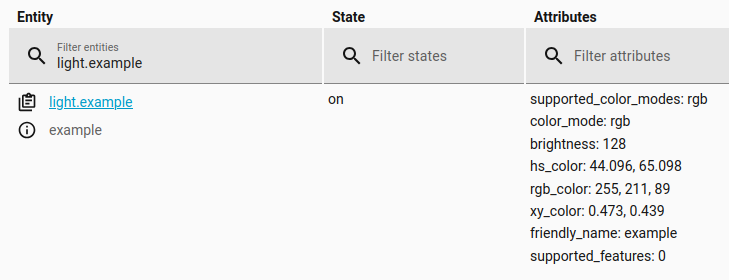
Here is light.floor_lamp which is a Philips Hue light integrated to my main Home Assistant server via the Philips Hue integration.

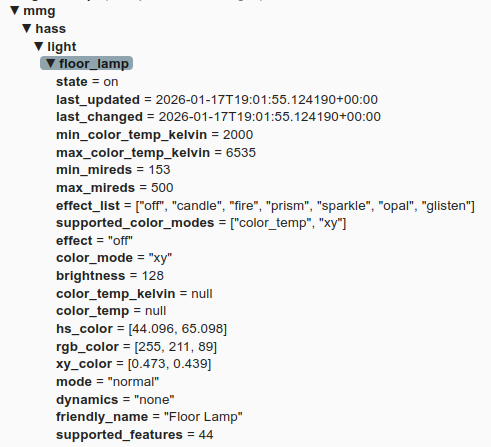
My main server uses MQTT Statestream to publish light.floor_lamp’s information via the following topics and payloads (screenshot from MQTT Explorer).

On my Home Assistant test server, I have the following MQTT Light configuration for light.example.

mqtt:
  - light:
      name: "example"
      unique_id: example_123
      state_topic: mmg/hass/light/floor_lamp/state
      state_value_template: "{{ value | upper }}"
      command_topic: mmg/hass/light/floor_lamp/state_cmd
      brightness_state_topic: mmg/hass/light/floor_lamp/brightness
      brightness_value_template: "{{ 0 if value == 'null' else value }}"
      brightness_command_topic: mmg/hass/light/floor_lamp/brightness_cmd
      rgb_state_topic: mmg/hass/light/floor_lamp/rgb_color
      rgb_value_template: "{{ value[1:-1] if value != 'null' else '0,0,0' }}"
      rgb_command_topic: mmg/hass/light/floor_lamp/rgb_color_cmd

The important thing to know is that the MQTT Light integration handles the payload values as strings. For example, [255, 211, 89] is shown in MQTT Explorer as a list but the MQTT Light integration handles it as a string. The same is true for null which is handled as a literal string and not the null object (i.e. none). Knowing this is vital for creating valid templates to process the values.

Finally, here is the resulting light.example reporting the same state, brightness, and RGB values of light.floor_lamp.


NOTE

You probably already know this but light.example simply reports the state, brightness, and RGB values of light.floor_lamp. It cannot control light.floor_lamp (unless you create an automation to process its command topics).

1 Like

Great!, with your solution (which is quite different to the (sparse) documentation) it works!

The only thing I could contribute in addition is, that the rgb_cmd_topic seems to be mandatory, leaving it out, will not generate the rgb attributes!

Leaving out the brightness_command_topic doesn’t matter, leaving out the command_topic will at least generate an error at reloading the config.

You probably already know this but light.example simply reports the state, brightness, and RGB values of light.floor_lamp . It cannot control light.floor_lamp (unless you create an automation to process its command topics).

Thank’s for the hint - I know this and did it successfully with a non-rgb lamp.

Overall: Thank you very much for your effort, you made it work for me!

br
Andy

1 Like

During my testing, I noticed all the same things you did about the three separate command topics. It’s interesting that the integration is inconsistent about how it handles a missing command topic (error/no error message, ignore/fail, etc).

For the sake of consistency, I included the corresponding command topic for the state/brightness/rgb topics in my example (even though, like you said, the brightness command topic isn’t strictly needed).

FWIW, in the past I had created MQTT Light configurations that only handled state and brightness. There was very little experimentation required to arrive at a functional configuration. In contrast, the addition of rgb configuration, in this recent example, proved to be more challenging. I hope this topic will help others save time with their MQTT Light configurations.

1 Like

I also made lights of only state and brightness - this was feasible with the existing documentation, rgb was a nightmare.

I could raise an issue about these learnings in order to get the documentation improved, but it was your research work, I don’t want to pretend that I was the one who disclosed all these mysteries with hard work.

Let me know…

Feel free to improve the official documentation.

You will need a Github account to submit your modifications as a Pull Request here:

home-assistant.io/source/_integrations/light.mqtt.markdown at current ¡ home-assistant/home-assistant.io ¡ GitHub

There is a Community Guide explaining how to do it:

Editing the Documentation and Creating a Pull Request on Github - Community Guides - Home Assistant Community